BurnZombies
Health Uyari
- License — License: MIT
- Description — Repository has a description
- Active repo — Last push 0 days ago
- Low visibility — Only 7 GitHub stars
Code Basarisiz
- rm -rf — Recursive force deletion command in install.sh
Permissions Gecti
- Permissions — No dangerous permissions requested
Bu listing icin henuz AI raporu yok.
Run your agents forever. A Mac menu-bar app that cleans up after Claude Code, Codex and Cursor: zombie processes, stale worktrees and node_modules, every 15 minutes, backed up first.
https://github.com/user-attachments/assets/d56b8996-09ee-49c4-8125-85eba52c32e0
BurnZombies (BZ) cleans up after your AI coding agents, on its own.
It stops the processes they orphan and deletes the worktrees and rebuildable junk they leave behind, saving each worktree's commits and changes first. On the author's Mac, which had about 1,000 agent worktrees, its first two days freed 685.6 GB and cleared 453 stale worktrees, most of them under rules learned from 19 one-tap answers.
On your Mac, paste this into Terminal:
curl -fsSL https://raw.githubusercontent.com/swordfish444/BurnZombies/main/install.sh | bash
macOS 14+ · no account, API key or sudo · free and open source (MIT) · signed, not yet notarized by Apple · read the script first
Want to look first? Use | bash -s -- --look-only instead of | bash: BZ finds and asks but burns nothing until you choose Start burning.
If Claude Code or Codex is signed in, BZ also runs AI sweeps on your login, about $0.30–$1.20 each at API prices. To skip them, add --observe-only the same way.
How it works
- Install it. One command. A flaming skull joins your menu bar and shows what it found within a minute.
- Run your agents. Claude Code, Codex, Cursor: as many sessions, worktrees, dev servers and builds as you like. Nothing about how you work changes.
- BZ burns the exhaust. From the first minute, and every 15 minutes after, it stops orphaned processes and deletes stale worktrees and rebuildable junk, backing up each worktree first. When it isn't sure, it asks you once, and your answer becomes a rule.
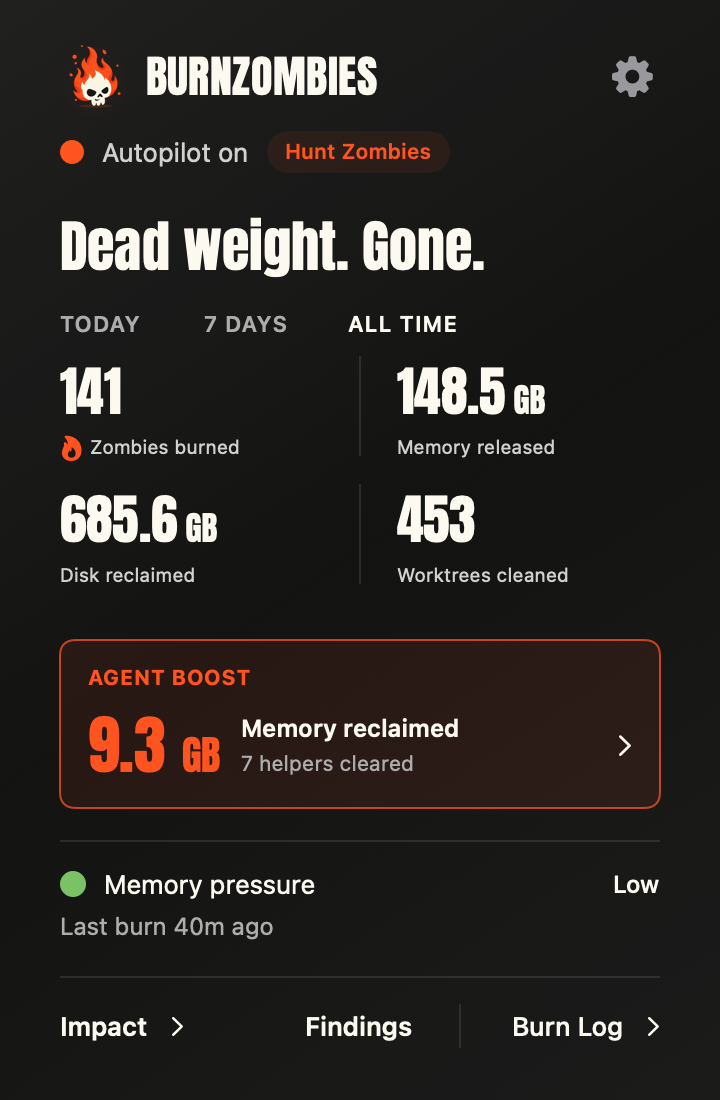
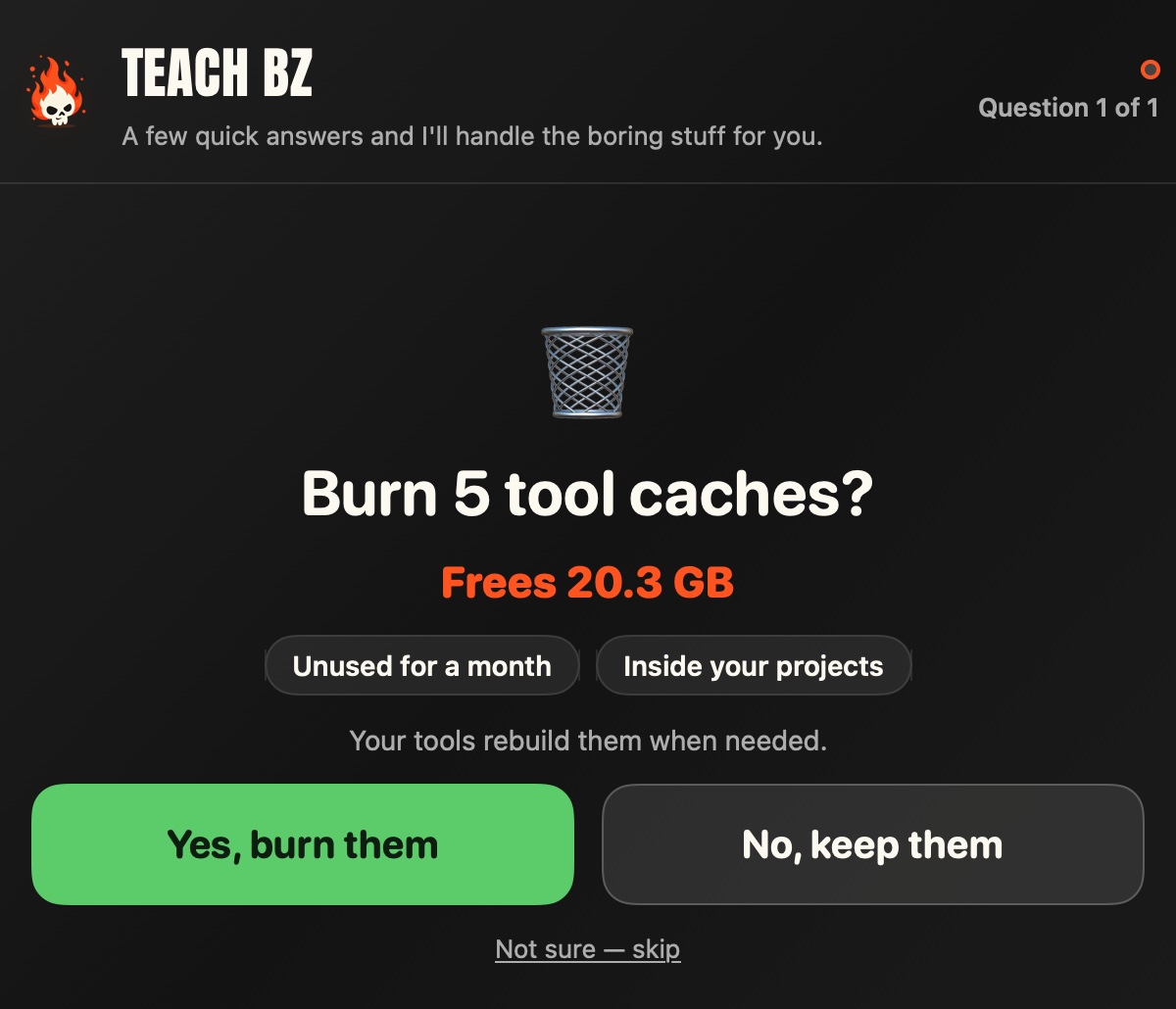
Left: the author's real panel after two days of Autopilot. Right: when BZ isn't sure, it asks. One tap, and it remembers. (Example data.)
What happens next
- Minute one: BZ shows what it found, burns what's clearly safe and asks about the rest. With
--look-onlyit shows and asks but burns nothing until you choose Start burning. - Around minute 10: if Claude Code or Codex is signed in, the first AI sweep judges what the rules don't cover.
- From then on: BZ looks every 15 minutes, quietly. AI sweeps run only when there's something new to judge, at most every 30 minutes.
- After a restart: BZ starts again when you log in, so it keeps going without you. Start at login in Settings turns that off.
What it burns
To BZ, burning means stopping a program or deleting a folder.
- 🧟 Zombie processes: robot browsers that Playwright, Puppeteer or an MCP server left open (often 1–3 GB each), plus Node workers and build watchers left running after their app or chat is gone.
Safety net: a politeSIGTERM, sent only after an exact identity check. - 📁 Stale worktrees nothing is using.
Safety net: first, a Git ref inside the repo saves every commit, uncommitted change and untracked file, plus small ignored files. Browser profiles that test runs leave behind aren't kept. If BZ can't verify that backup, the worktree stays. Branches are kept. Restore in one click from Findings for 30 days; the ref stays in the repo after that. - 🗑️ Rebuildable junk:
node_modules, build output, DerivedData.
Safety net: your tools rebuild it when needed.
Safe by default
- Hands off what's in use: never macOS, your apps, your AI tools, your main project folders, or anything a program or an open chat is using.
- Your agents' worktrees wait for your yes, and No or Keep forever always wins.
- Every worktree is backed up to a Git ref first; restore it in one click or by hand.
- Starter rules (switch each off in Settings → Burns without asking):
- robot browsers nothing can drive anymore, once idle 10+ minutes;
- programs still driving a robot browser, an hour after their chat ended;
- orphaned programs that have barely used the CPU for 6+ hours and have no open port;
- merged worktrees with no local changes untouched for a month;
- junk inside worktrees untouched for two weeks;
- the throwaway profiles and recordings that robot browsers leave in your temp folder.
- Robot browsers are browsers a tool started with automation flags: a control pipe, or a debugging port plus headless mode, a fake keychain or a throwaway profile. The browser you use has none of these, so it is never touched, and neither are logged-in profiles a tool keeps.
- The AI, if on, may burn a low-risk item only when it rates itself at least 85% sure: an orphaned program with no open port, a known junk folder, or a worktree nothing uses. Every burn it asks for passes BZ's own checks.
- Never on its own: worktrees made by Claude Code, Codex or the Conductor app. Other worktrees, such as ones Cursor or your scripts make, follow the two rules above.
- Your yes answers: a question says what it covers, like "Burn 5 tool caches?", and Yes also covers new matches later. Switch any rule off in Settings → Burns without asking. Settings → Never touches lists what BZ leaves alone, and you can add any folder or app.
- Limits: at most 20 worktrees, 20 junk folders and 50 programs per look. BZ knows an idle Claude Code or Codex chat is still open from the session records those tools keep.
The tests check these rules on every code change. How cleanup stays safe →
FAQ
What does the AI cost, and can I turn it off?Without Claude Code or Codex signed in there's no AI at all; with one, AI sweeps are on by default and run on your login: roughly $0.30–$1.20 a sweep at API prices, or plan usage on a subscription. They run only when there's something new to judge, at most every 30 minutes, so a quieter Mac runs fewer. On the author's Mac, working through about 1,000 worktrees in its first days, they came to about $13–23 a day at API prices. There's no spending limit; Settings → Used this week shows what they used. Turn them off with Which AI → Off in Settings; the starter rules and your answers keep cleaning. Model and cost →
What does the AI see?The plain facts BZ gathered about each item, like where it is, its size and what started it, plus any project files it reads in the folders it's judging, such as package.json, READMEs and configs. It's told never to read secrets such as .env files, keys or credentials. Its shell and web tools are switched off: it reads, then asks BZ to burn, and every burn it asks for passes BZ's own checks. All of it goes through your own Claude Code or Codex login, like any other request you make with it.
Yes: install with --look-only (curl … | bash -s -- --look-only). BZ finds, sizes and asks exactly as usual, and Findings lists everything it found, why, and what burning it would do. Nothing burns on its own: not the starter rules, not your yes answers, not the AI. The menu says Look-only · nothing burns and how much it would burn. When you're ready, choose Start burning there, or choose another level in Settings, and BZ starts burning what waited right away. A Burn now you click on one item still burns that item.
Already installed? Choose Look only in Settings. --observe-only is not a dry run: it only turns the AI off, and the rules keep burning.
Worktrees, yes: Restore in Findings for 30 days. The restore point is a Git ref in the repo that holds every commit and local change, small ignored files such as .env included; ignored files over 5 MB, anything inside rebuildable folders and browser profiles left by test runs aren't kept. A copy with more than 512 MB of other unsaved files waits for a question that names them; a Yes deletes those for good. The ref stays local unless you push refs/burnzombies/* yourself, for example with git push --mirror. It stays after 30 days, so you can also restore by hand, without the app:
git for-each-ref refs/burnzombies/retired          # list restore points
git worktree add --detach ../my-copy refs/burnzombies/retired/<id>
git -C ../my-copy reset HEAD^   # only if the top commit is a "BurnZombies safety copy"
Junk folders get rebuilt by your tools. Programs get a graceful stop, which can't be undone.
I run long background jobs on purpose. Are they safe?Click Keep forever on one in Findings, and BZ and the AI leave it alone. On its own, BZ only stops a program whose app or chat is gone and that has no open port.
Does it need Full Disk Access?No. Without it, BZ skips the places macOS protects (Desktop, Documents, Downloads, iCloud Drive and other apps' data) and tells you what it skipped. With it, the same rules cover those folders too. To grant it, click Allow Full Disk Access in the menu. Access setup →
What does the install script do?It downloads the release it pins, checks it against that release's SHA-256 checksums, checks the archive's paths and the app's code signature, and puts BurnZombies.app in ~/Applications. No sudo. Releases are signed with BurnZombies' own certificate but aren't notarized by Apple yet. Prefer a fixed version? Swap main in the URL for a release tag, such as v0.14.0. Read install.sh · Installer options →
One app in ~/Applications, with its burnzombies command inside it, a data folder in ~/Library/Application Support/BurnZombies, and a login item so BZ comes back after a restart (switch off Start at login in Settings to remove it; updates keep your choice). Setup writes only BZ's own settings, not your agents'. The top of Settings shows your version and build. Choose Check for Updates, then Update and Restart when a newer release is available. BZ verifies the download and its release certificate, finishes current cleanup, replaces the app and restarts it; a failed restart restores the previous version. Your settings and signing identity stay the same. Versions before 0.16 need the install line once to get the updater.
There's no telemetry or automatic update polling. Update checks and downloads contact GitHub only when you ask. Other traffic is your AI sweeps through your own Claude Code or Codex login and, on request, a GitHub CLI lookup of a worktree's pull request.
Can Claude Code or Codex install it for me?Yes. Give it this prompt:
How do I uninstall?Install and set up BurnZombies using https://raw.githubusercontent.com/swordfish444/BurnZombies/main/llms.txt. Preserve my existing agent settings and verify setup without running cleanup.
Switch off Start at login and stop BZ, then delete the app and its data folder. Restore points stay in your repos until you delete them. Three steps →
Learn more
User guide · How Autopilot decides · Safety · Install options · MCP server · Feedback
You build. We burn.
Yorumlar (0)
Yorum birakmak icin giris yap.
Yorum birakSonuc bulunamadi