crypto-trader-skill
Health Uyari
- License — License: MIT
- Description — Repository has a description
- Active repo — Last push 0 days ago
- Low visibility — Only 5 GitHub stars
Code Basarisiz
- eval() — Dynamic code execution via eval() in crypto-idealab/lab.py
- network request — Outbound network request in crypto-idealab/lab.py
Permissions Gecti
- Permissions — No dangerous permissions requested
Bu listing icin henuz AI raporu yok.
16 Claude skills for crypto day trading on Binance, Bybit and Hyperliquid perpetuals: today's setups with their real records, a clean card on any coin, every trade planned, sized and checked, and nothing placed without your typed yes. Paper by default. Backtested on 37,401 trades with fake money; no setup showed an edge after costs.
The Crypto Trader skill
17 Claude skills for crypto day trading. We backtested their setups on
37,401 trades, published every trade, and none of the setups showed an edge
after costs. Now test your own ideas the same way.




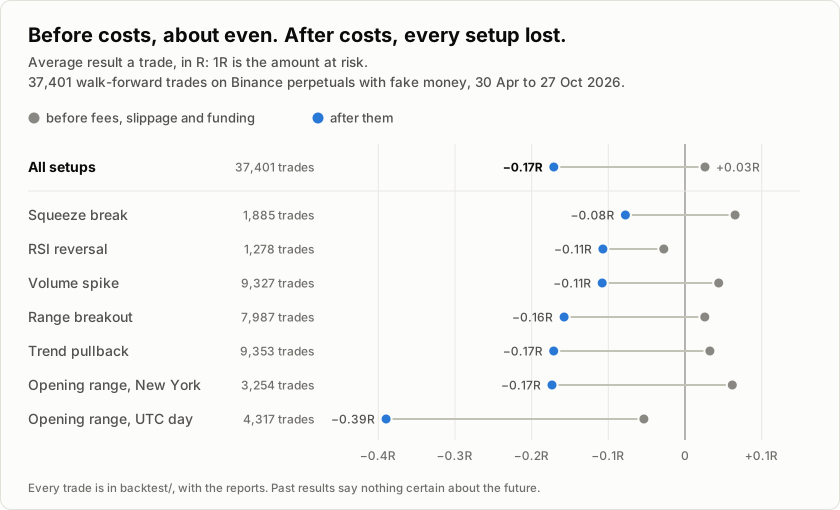
Before fees, slippage and funding, the setups came out about even: +0.03R a
trade, where 1R is the amount at risk. After them, every setup lost: -0.17R
a trade across all of them, and the best of the fourteen setups and sides,
squeeze-break longs, only broke even. Most trading tools show you the wins.
This pack shows each setup's record next to the setup, every time, blocks
trades whose stop is too tight for the coin's costs, and leaves the decision
to you.
Install in Claude Code, two lines:
/plugin marketplace add syedishaq7262-svg/crypto-trader-skill
/plugin install crypto-trader-skill@crypto-trader-skill
Then ask: "what should I trade today?", "tell me about SOL", "would buying
RSI dips in an uptrend have worked?". Paper trading is the default, and no
order goes through until you type yes for that exact order.
What it does
One skill scans every liquid perpetual for seven setups. Another puts
today's setups next to their records: how each rule did over the 37,401
backtested trades and on its own coin lately, after fees, slippage and
funding, and it says on every board that none has shown an edge. Ask about
any coin and you get one clean card: trend, levels, liquidity, funding, open
interest, the latest headline and the next CPI print. The Time Machine
replays a planned trade 10,000 times from the coin's own recent candles,
re-runs the same setup on its last 30 days, and tests it against random
entries before you risk a dollar. The Idea Lab takes an idea of your own,
in plain words, turns it into a rule and tests it the same honest way: on
real past prices, after every cost, against random entries, with a count of
how many ideas you have tried. The rest plan the exit before the entry,
size the position to your max loss, check where liquidation sits, run every
order past your limits, and keep your journal.
The backtest is walk-forward on real Binance prices with fake money: 27,566
trades over 90 days, then 9,835 more over the 90 days before, as a check on
data the first run never saw. The full results are
below, and every trade is inbacktest/.
Nothing in this pack can place an order on its own. Paper trading is the
default, and it is not a testnet: it fills at live prices against the real
order book and plays your stop and target out on real 1-minute candles. A
live order needs "paper": false in your config, the --live flag, your own
exchange keys in environment variables, a passing risk check from the last
15 minutes, and your typed yes for that exact order.
Free, MIT, no signup. No API key for anything except a live order. The tools
are plain Python (standard library only) that read free public data: Binance
USD-M futures, Bybit and Hyperliquid market data, seven crypto newsrooms'
RSS feeds, a US macro calendar, Bybit's listing notices, the Fear & Greed
index and Hyperliquid's public leaderboard.
Trading stocks? This pack is the crypto counterpart of Jake
Schincariol's day-trader-skill,
eleven skills for US stocks.
Install
The two lines at the top install the pack as a Claude Code plugin. Claude
Code namespaces plugin skills, so they show up as/crypto-trader-skill:crypto-scout and so on. Copy the folders instead if
you want plain /crypto-scout:
git clone https://github.com/syedishaq7262-svg/crypto-trader-skill.git
cp -r crypto-trader-skill/crypto-* ~/.claude/skills/
Project-local instead of global: copy the same folders into your repo's.claude/skills/. Always install crypto-setup: every other skill imports
its cryptocore.py. No Claude Code at all? Paste any single SKILL.md at
the top of a chat and it runs as a mode. You lose the Python tools, but the
method works.
The tools need Python 3.8 or newer and an internet connection that reaches
the exchanges. Nothing to pip install. Run /crypto-setup first: it checks
which exchanges answer from where you are. Binance and Bybit refuse some
countries, the US among them; the pack then uses the next exchange that
answers. Cloud sandboxes often allow only a few websites, so run the pack
where Claude can reach the exchanges, such as Claude Code on your own
computer.
The seventeen
| command | job | what it does |
|---|---|---|
/crypto-setup |
Setup and Doctor | Checks which exchanges answer from where you are, how fast, and whether your clock is right for signed orders. Writes your config. |
/crypto-scout |
Scout | Today's live setups within the cost rule, the least bad long-run record first, each with its backtest record and its coin's last 30 days against random entries. Says plainly that none has shown an edge. |
/crypto-scanner |
Chart Scanner | Scans every liquid perpetual for seven setups: opening-range breakouts, range breakouts, squeezes, trend pullbacks, RSI reversals, volume spikes, strength against BTC. |
/crypto-coin |
Coin Report | One clean card for any coin: price, trend, levels, liquidity, funding, open interest, news, the next macro release, live setups. |
/crypto-derivs |
Derivatives Radar | Funding, open interest and positioning; crowded longs and shorts; funding gaps between exchanges; the market regime. |
/crypto-news |
News Monitor | Seven newsrooms, the US macro calendar and exchange listing and delisting notices, sorted for your coins and plans. |
/crypto-whales |
Whale Watch | What the top traders on Hyperliquid's public leaderboard hold, at what leverage, and what changed since you last looked. |
/crypto-entry |
Entry Timer | Watches a setup bar by bar and says the moment it triggers. |
/crypto-exit |
Exit Planner | Sets the stop, the target and the time limit before the entry, with fees, slippage and funding counted in R. |
/crypto-timemachine |
Time Machine | Replays the trade 10,000 times from the coin's own candles, re-runs the setup's own history, and tests it against random entries. |
/crypto-idealab |
Idea Lab | Tests an idea of your own on the past: Claude turns your words into a rule, the lab replays it on real candles after fees, slippage and funding, against random entries at the same hours, and counts how many ideas you have tried. |
/crypto-budget |
Budget Manager | Sizes the position to your max loss per trade, your margin cap and your leverage cap. |
/crypto-liquidation |
Liquidation Guard | Where liquidation sits, how often a move that big came within a day, and the leverage that keeps it far behind your stop. |
/crypto-risk |
Risk Manager | Checks every order against your limits: max loss, daily loss, trades a day, open positions, reward to risk, what fees and slippage take from a stop-out, a cooldown after losses. |
/crypto-broker |
Order Executor | Paper by default, at live prices. Live on Binance or Bybit with your own keys. Never without your typed yes. |
/crypto-alerts |
Alerts | Rings on a price, a move, funding, your stop or target, a position near liquidation, or a macro release. |
/crypto-journal |
Trading Journal | Your record with honest ranges: win rate, break-even, drawdown, costs, and the habits that cost money. |
How to use it
Everything lands in a crypto/ folder in your project, and each skill reads
what the last one wrote:
setup (once)
scout, or scanner -> coin                                     (what is worth a look)
entry -> exit -> timemachine -> budget -> liquidation -> risk -> broker   (one trade)
alerts: stop, target, time limit, liquidation, macro releases (while it is open)
news / derivs / whales                                        (context, any time)
idealab                                                       (test an idea of your own, any time)
journal                                                       (afterwards)
Or just ask: "what should I trade today?", "tell me about SOL", "plan a long
on ETH", "is BTC crowded?", "test my idea: short when funding is high", "how
am I doing?".
An example, from the pack's offline test market: synthetic prices on
Wednesday 21 October 2026, not real data. The tests replay this exact
chain and check every number below.
/crypto-scoutat 15:15 UTC: 41 setups live in the scan, 10
tested. BONK's breakout short is left out because a stop-out would cost
0.50R. A squeeze break on SHRTX comes first, only because squeeze-break
longs have the least bad backtest record within the cost rule, +0.06R a
trade, which can't be told from zero. A VOLX volume spike won all three
of its recent trades, which random entries matched only 0.2% of the time,
but in the backtests a coin's recent record did not predict its next
trade. The board says the UTC-day opening range is old news by now and
the New York open, 1h45m ago, has a fresh one, and it ends by saying
nothing on it has shown an edge./crypto-entryreplays the New York open on ORBX bar by bar: the
30-minute range is 21.002 to 21.255, and at 14:20 a 5-minute bar closes
at 21.404, above the range, on 4.8x volume. Triggered./crypto-exitplans it at 15:15, 55 minutes later, so it enters at
the market: 21.456. The stop goes at the range's midpoint, 21.128, a risk
of 0.328 a coin; the target is 2R, 22.112; out within 24 hours either way.
After fees and slippage the target must come first in 36.4% of trades to
break even. Two warnings: the target is beyond the 7-day range, and a
1-hour swing high at 21.886 sits in the way./crypto-timemachinereplays the next 24 hours 10,000 times from
ORBX's own last 30 days (seed 19, so anyone can repeat it): target first
29.1%, stop first 61.0%. Then it re-runs the same New York opening-range
rule on those 30 days: it fired 11 times and hit its target once, losing
0.89R a trade after costs, worse than random entries at the same hours.
Verdict: no edge./crypto-budgetwith a $1,000 account, a $10 max loss and a 3x
leverage cap: 26 ORBX at 2x isolated, $278.93 of margin. The loss at the
stop is $9.64, fees, slippage and funding included./crypto-liquidation: the estimated liquidation, 11.009, is 48.7%
away, 31.9 times further than the stop./crypto-riskpasses it against every limit, and repeats the
history: the setup lost 0.89R a trade over its last 11 trades here./crypto-brokershows the ticket in plain words with a fingerprint:
buy 26 ORBX, stop 21.128 on the exchange's mark price, target 22.112,
about $9.64 to lose. Nothing happens unless you type yes for that exact
order. Here, everything says no, and that is the point of looking
before you risk a dollar.
Backtest: 27,566 trades on real past prices
We went back 90 days, from 29 July to 27 October 2026, on Binance's 40
busiest perpetuals, and pretended each moment was today. Moving forward one
candle at a time, the scanner saw only the candles that had closed by then,
never a later one. Whenever a setup fired, we opened a trade with fake money
the way the pack plans one: the stop at the setup's own invalidation point,
the take-profit at 2R (twice the risk), out after 24 hours either way, one
trade at a time per coin, setup and side. Then we played each trade on the
5-minute candles that came next, counted the stop whenever one candle
touched both the stop and the target, and charged the fees, the slippage
and the funding each trade would have paid. Six setups, long and short: the
opening range of the UTC day and of the New York open, range breakouts,
squeezes, trend pullbacks, RSI reversals and volume spikes. Strength against
BTC is a ranking with no stop, so it is left out. 27,566 trades in all.
| result | |
|---|---|
| trades | 27,566: target hit first 8,669, stopped out 17,300, closed at the 24-hour limit 1,597 |
| won (above zero after costs) | 35.1% (95% range 34.6% to 35.7%) |
| average a trade, after costs | -0.18R (90% range -0.19R to -0.16R) |
| average a trade, before costs | +0.02R |
| fees, slippage and funding | 0.20R a trade |
| profit factor | 0.77 |
| against random entries (same times of day, same stops and targets) | +0.06R a trade better |
| the Scout's first test as it stood at the time (5,426 trades) | -0.05R a trade, against -0.16R for every signal over the same weeks |
| a $1,000 paper account under the pack's limits ($10 at risk, 2 open, 4 a day), the last 60 days, run 100 times | lost money in 96 of 100 runs; the median run ended at $721 |
What it says:
Taken blindly, the setups lost money. Before costs they came out
about even (+0.02R a trade), and they beat random entries at the same
times by 0.06R a trade, so the rules do pick slightly better moments than
chance. Not by enough to pay the costs.Costs decided it, and tight stops cost the most. Fees and slippage are
a fixed share of the price, so the closer the stop, the bigger they are
against the risk. Before costs every group below was close to zero:stop distance trades before costs after costs under 0.25% 669 +0.06R -0.61R 0.25% to 0.5% 2,760 -0.01R -0.41R 0.5% to 1% 7,469 +0.04R -0.22R 1% to 2% 8,822 +0.02R -0.14R 2% or more 7,846 +0.01R -0.08R Over the 90 days, the 10,209 trades whose stop-out would have cost more
than 0.2R were even before costs (-0.01R) and lost 0.38R a trade after
them.No setup clearly made money. RSI reversal longs (+0.07R over 342
trades) and squeeze-break longs (+0.01R over 694) were the only ones above
zero, and neither result can be told apart from zero. The opening range of
the UTC day was the worst: -0.37R long and -0.50R short.
What the trades taught us
We split the trades in two by time and kept only the lessons that held in
both halves. In this first run two rules did, and both were in the pack
before the backtest:
the cost rule (skip a trade when fees and slippage would take more than
0.2R from a stop-out; the Exit Planner already warned at that line) and the
30-day check (take a setup only when it made money after costs on that coin
over its last 30 days, at least 5 trades; the Scout's first test). Because
they came first, this was a fair test of them, not a rule fitted to these
trades.
| average a trade, after costs | 28 Aug to 27 Sep | 27 Sep to 27 Oct | trades |
|---|---|---|---|
| every signal | -0.21R | -0.11R | 18,462 |
| the cost rule | -0.10R | +0.00R | 12,235 |
| the 30-day check | -0.07R | -0.02R | 5,426 |
| both | +0.00R | +0.02R | 4,314 |
The 30-day check needs 30 days of history, so the table covers the last 60
of the 90 days. In this run the two rules together came out about even:
they cut the losses; they did not make money.
What did not hold, worked out from the same trades: longs did better in one
month and shorts in the other, which is the market's mood, not a rule;
trading only with BTC's trend (longs above a rising 20-day average, shorts
below a falling one) did no better than taking every signal; and picking
setups by how they did across all coins the month before helped in one
half and hurt in the other.
The $1,000 paper account takes whatever fires first each day, so one run
says more about one hour than about the rules: run the original way, 153 of
its 237 trades came in the hour after midnight UTC, when the day's count
starts again. It now runs 100 times, each run starting its day at a random
hour, as a trader's day starts at midnight wherever they live:
| paper account, last 60 days, 100 runs | median end | middle 90% of runs | runs that lost |
|---|---|---|---|
| every signal | $721 | $417 to $933 | 96 |
| the cost rule | $841 | $574 to $1,046 | 82 |
| the 30-day check | $848 | $549 to $1,155 | 79 |
| both | $951 | $689 to $1,183 | 65 |
Then 90 days it had never seen
A lesson read from one stretch of data can be luck, so we ran the same code
on the 90 days before, 30 April to 29 July 2026. Only 14 of today's 40
busiest coins traded through all of it: 9,835 trades, in
the second report.
| average a trade, after costs | 30 May to 29 Jun | 29 Jun to 29 Jul | trades |
|---|---|---|---|
| every signal | -0.10R | -0.24R | 6,548 |
| the cost rule | -0.05R | -0.15R | 4,104 |
| the 30-day check | -0.08R | -0.35R | 2,048 |
| both | -0.06R | -0.30R | 1,493 |
- The setups lost money again: -0.15R a trade after costs, +0.04R
before, and again a little better than random entries (+0.08R). No setup
and side made money after costs. - The cost rule held. It beat taking every signal in both halves, and
over the 90 days the trades it would have refused lost 0.26R a trade,
against 0.08R for the rest. - The 30-day check did not. It did no better than taking every signal
overall and worse in the second half, and with it the two rules together
lost 0.14R a trade. On the same 14 coins it had helped from August to
October, so the coins are not the reason: a setup's last 30 days on a coin
is not a reliable guide to its next trade. The Scout ranked by that
record, so it no longer does: see below.
What the pack does with it:
- The cost rule is now a rule. The Risk Manager blocks an order when
fees and slippage would take more thanmax_cost_r(0.2R) from a
stop-out. The Exit Planner says so and names the stop distance that would
pass, the Scout leaves those setups out and tests the next one in their
place, and the Scanner marks them. - Every setup shows its record. The Scout, the Scanner, the Coin Report
and the Exit Planner show the setup's record next to it, from both runs
pooled (37,401 trades): every trade, and the trades within the cost rule,
which are the ones the pack lets you take. They say "can't be told from
zero" when the range around a result, widened for testing 14
setup-and-side groups at once, spans zero. The numbers ship incrypto-setup/track_record.json; your
own run'strack_record.json, copied into yourcrypto/folder, takes
its place. - The Scout lists; it does not pick. It orders today's setups by their
long-run record within the cost rule, shows each coin's last 30 days as
context, and says on every board that nothing has shown an edge. The Risk
Manager caps the damage, and paper trading is the default.
Caveats: the coins are today's busiest, so coins that faded or were delisted
are missing (the second run kept only 14); past trades were charged today's
fees and slippage; two 90-day stretches are still a short history. The
first run came before each trade's stop-out cost was saved, so its cost-rule
numbers rebuild that cost from each coin's own stop-outs; the second run
saved it exactly. Both runs' trades and reports, the first run's checks
report and the pooled report are in backtest/, and you can run
it yourself on Binance or Bybit, over any window (Hyperliquid keeps too
little 5-minute history):
python3 tools/backtest.py                        # the 40 busiest coins, the last 90 days
python3 tools/backtest.py --end 2026-07-29       # the 90 days before 29 July
python3 tools/backtest.py --coins 20 --days 60 --venue bybit
python3 tools/backtest.py --trades backtest/2026-07-29-binance-90d-trades.csv.gz,backtest/2026-10-27-binance-90d-trades.csv.gz --end "2026-10-27 06:00"
The last one pools both published runs into the track record that ships
with the pack, without downloading anything. With one file and that run's--end, it rebuilds that run's checks.
The tools
All standard-library Python, polite to the exchanges (rate limits, retries,
caching).
python3 crypto-setup/setup.py doctor                    # which exchanges answer from here
python3 crypto-scout/scout.py                           # today's setups within the cost rule, with their records
python3 crypto-scanner/scan.py --session ny             # every setup, the New York open's range
python3 crypto-coin/coin.py SOL                         # one coin, one card
python3 crypto-derivs/derivs.py                         # funding, open interest, crowded trades
python3 crypto-news/news.py --coins BTC,SOL             # headlines, macro calendar, exchange notices
python3 crypto-whales/whales.py coin BTC                # who among the top traders holds BTC
python3 crypto-entry/entry.py watch ORBX --session ny   # bar by bar until it triggers
python3 crypto-exit/exit.py plan ORBX                   # -> crypto/plan.json
python3 crypto-timemachine/timemachine.py run           # 10,000 replays, the history, the edge test
python3 crypto-idealab/lab.py test --when "rsi(14) < 30 and close > ema(200)" --side long
                                                        # your own idea on the past, after costs
python3 crypto-budget/size.py                           # -> crypto/orders.json
python3 crypto-liquidation/liq.py check                 # liquidation against the stop
python3 crypto-risk/check.py                            # PASS / BLOCK per order
python3 crypto-broker/broker.py ticket                  # the ticket, READY or not
python3 crypto-alerts/alerts.py add --from-plan         # stop, target, time limit
python3 crypto-journal/journal.py                       # how it is going, honestly
python3 tools/backtest.py                               # every setup replayed on the last 90 days, walk-forward
The market tools take --venue binance|bybit|hyperliquid, and most take--json and --now "YYYY-MM-DD HH:MM" (UTC) to pin the clock.
Settings
python3 crypto-setup/setup.py init writes crypto/config.json fromconfig.example.json. The ones to set
first:
| setting | default | what |
|---|---|---|
account_usd |
1000 | the money in the trading account |
max_loss_per_trade_usd |
10 | the most one trade may lose at its stop |
max_daily_loss_usd |
30 | losses today plus open risk; past it, no new entries |
max_trades_per_day |
4 | new entries a day |
max_open_positions |
2 | positions and resting orders at once |
min_reward_risk |
1.5 | the smallest target, in multiples of the risk |
max_cost_r |
0.2 | the most fees and slippage may take from a stop-out, in R; past it the Risk Manager blocks the trade (0: off) |
max_leverage |
3 | leverage cap; margin_mode stays isolated |
cooldown_after_losses |
2 | losses in a row before a 12-hour pause |
paper |
true | simulated fills at live prices; false only when you mean it |
display_tz |
UTC | your time zone for printed times: "Australia/Melbourne", "America/New_York" or an offset like "+11:00" |
session |
utc | the opening range to trade: utc, tokyo, london or ny |
Tests
python3 -m unittest discover -s tests -v
The tests run offline in two or three minutes, on a fake exchange that
answers in Binance's, Bybit's and Hyperliquid's real response formats
(checked against real recorded responses in tests/fixtures/real), with a
synthetic market built to contain known setups. They also play the
failures: a country block, rate limits, timeouts, a garbled candle, an order
whose reply never arrives, a stop the exchange refuses.
To check everything against the real exchanges from your own computer:
python3 tools/live_check.py               # every skill, read-only, on the best exchange from here
python3 tools/live_check.py --all-venues  # Binance, Bybit and Hyperliquid each
It runs every skill on live data in a temporary folder, places paper trades
only, never reads your keys, and writes live_check_report.txt.
Fine print
Not financial advice. This is software that reads public data and does
arithmetic. It does not know your situation and it cannot see the future.
Most people who day trade lose money, and leverage makes losses arrive
faster. You can lose money. Decide for yourself, and talk to a licensed
professional if you need advice.
No trade goes through until you say yes. Only /crypto-broker can lead
to an order, and only after /crypto-risk passed that exact order in the
last 15 minutes and you typed yes for it in the chat. A live order also
needs "paper": false in your config and the --live flag. Every order
carries a stop, placed on the exchange the moment the entry fills; if the
stop cannot go on, the position is closed at once.
Paper first. "paper": true is the default. Paper fills walk the live
order book and pay the exchange's standard fees and the real funding, so
paper results are honest about costs.
Keys stay out of the chat. Live trading reads BINANCE_API_KEY andBINANCE_API_SECRET, or BYBIT_API_KEY and BYBIT_API_SECRET, from
environment variables. Never paste a key into a chat. Give the key trading
permission only, never withdrawals, and restrict it to your IP address if
the exchange allows it. Hyperliquid is read-only here: its orders need
wallet signatures this pack does not handle.
Leverage and liquidation. Isolated margin and a 3x cap by default, and
the liquidation must sit at least twice as far away as the stop. The
liquidation prices shown are estimates; the exchange's own is the one that
counts.
The Time Machine is a simulation, not a prediction. It is built from the
coin's own last 30 days of 5-minute candles (17 on Hyperliquid, which keeps
fewer). The future can do things those
30 days never did: a listing, a hack, a delisting, a CPI surprise. Treat its
odds as a reality check, never as a promise.
A stop is a plan, not a guarantee. In a fast market a stop can fill well
past its price. The max loss shown is the loss at the stop price, with fees,
slippage and funding.
The data is free and unofficial. Exchange APIs can lag, change or
rate-limit you; the newsrooms' feeds and the macro calendar are unofficial
too. The tools read closed candles, not every tick, by the exchange's clock
even when your computer's runs ahead. Check anything that matters on the
exchange before you act on it.
Crypto only. Binance and Bybit now list stock, ETF, commodity and forex
contracts next to crypto. The pack leaves them out: they follow their home
market's hours, and everything here assumes a market that never closes.
Where you live matters. Binance and Bybit refuse some countries, and
some countries restrict crypto derivatives for retail traders. A blocked
exchange is the exchange's rule for your location: the pack uses the next
one that answers and never tries to get around a block. Check that you may
trade perpetual futures where you live.
Whale watch reads public data. Hyperliquid's leaderboard and positions
are public. Wallet addresses are pseudonyms, and the pack never tries to
find out who is behind one. A leaderboard only shows the traders who are
still winning, so past profit there proves little.
Taxes. Crypto trades can be taxable events where you live, and frequent
trading makes the records long. The journal keeps them; nothing here is tax
advice.
Files
crypto-setup/        SKILL.md, setup.py, cryptocore.py (shared by every skill), config.example.json, track_record.json
crypto-scout/        SKILL.md, scout.py
crypto-scanner/      SKILL.md, scan.py
crypto-coin/         SKILL.md, coin.py
crypto-derivs/       SKILL.md, derivs.py
crypto-news/         SKILL.md, news.py
crypto-whales/       SKILL.md, whales.py
crypto-entry/        SKILL.md, entry.py
crypto-exit/         SKILL.md, exit.py
crypto-timemachine/  SKILL.md, timemachine.py
crypto-idealab/      SKILL.md, lab.py
crypto-budget/       SKILL.md, size.py
crypto-liquidation/  SKILL.md, liq.py
crypto-risk/         SKILL.md, check.py
crypto-broker/       SKILL.md, broker.py, exchanges.py
crypto-alerts/       SKILL.md, alerts.py
crypto-journal/      SKILL.md, journal.py
tools/               live_check.py: every skill against the real exchanges; backtest.py: the walk-forward backtest; chart.py: the chart at the top, drawn from the trades
docs/                the chart at the top, light and dark, and the card shown when the repo is shared
backtest/            the published backtests: both runs' reports and trades (CSV, gzipped), the checks and pooled reports
tests/               unittest suite, a fake exchange, real recorded responses
MIT. Made for Claude, by Claude, with
syedishaq7262-svg.
Yorumlar (0)
Yorum birakmak icin giris yap.
Yorum birakSonuc bulunamadi