openai-compatible-imagegen
Health Gecti
- License — License: MIT
- Description — Repository has a description
- Active repo — Last push 0 days ago
- Community trust — 31 GitHub stars
Code Uyari
- fs module — File system access in .github/workflows/release-artifacts.yml
Permissions Gecti
- Permissions — No dangerous permissions requested
Bu listing icin henuz AI raporu yok.
Standalone Skill and Codex Plugin for OpenAI-compatible image generation, editing, batch workflows, QA, and focused canvas editing.
OpenAI-Compatible Images
Generate, edit, batch-process, inspect, and deliver images through your OpenAI-compatible image API.


English | 简体中文
OpenAI-Compatible Images ships one image core in two installation shapes. Use the portable Standalone Skill with Agent clients and command-line workflows, or install the Codex Plugin for result cards, focused canvas editing, annotations, immutable artifacts, and version history.
Choose your package
| Package | Best for | Includes |
|---|---|---|
| Standalone Skill | Codex CLI, Claude Code, OpenCode, and other Agent Skills clients | Generation, editing, JSONL batches, transparency, delivery, and QA |
| Codex Plugin | Codex App users who want the complete image workflow | All shared capabilities plus MCP tools, result cards, canvas editing, artifacts, and versions |
Choose one installation shape for each environment. The packages share code and versions but keep separate local configuration and artifact directories. Follow the migration guide when moving an existing configuration to the Codex Plugin.
Codex App workflow
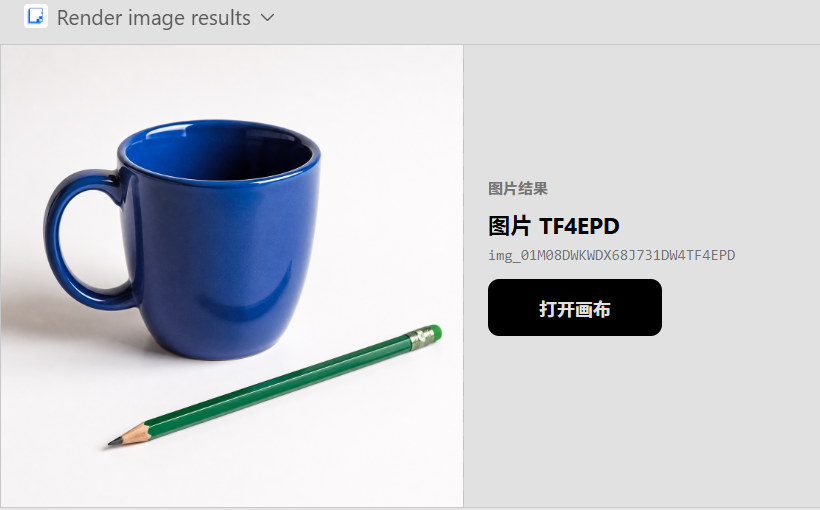
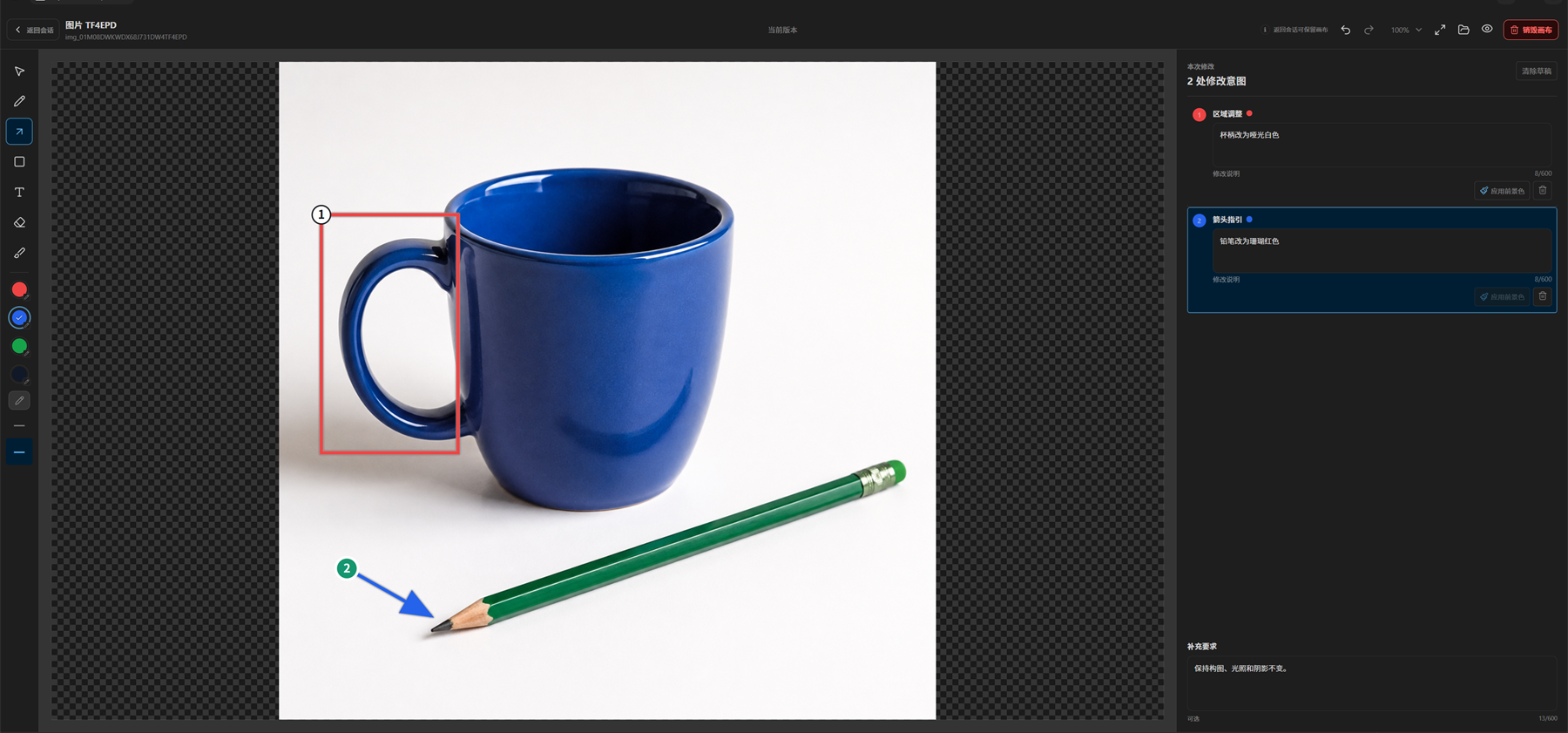
Generate an image in the conversation, then open its focused canvas to mark regions and add instructions for each change.
Conversation result
Focused editing canvas
Install the Codex Plugin
Requirements: a Codex version with Plugin support, Git, Node.js 20+, Python 3.12 or newer, and your own OpenAI-compatible image service. The Plugin ZIP is platform-neutral and supports Windows, macOS, and Linux.
codex plugin marketplace add Syh1906/openai-compatible-imagegen
codex plugin add openai-compatible-imagegen@openai-compatible-imagegen
You can also open Plugins in Codex App, select the openai-compatible-imagegen marketplace, and install OpenAI-Compatible Images. In an interactive Codex CLI session, enter /plugins to use the same browser.
The Git-backed package already contains the MCP server and widget. You do not build the repository or run a local web server.
The Plugin selects python on Windows and python3 on macOS/Linux, then requires Python 3.12 or newer. Set OPENAI_COMPATIBLE_IMAGEGEN_PYTHON to one explicit executable when the default command is not available; an invalid override or failed preflight stops the operation instead of trying another command. The Windows-only Show in folder action is unavailable on macOS/Linux, but generation, editing, artifacts, annotations, and canvas workflows remain supported.
To install a versioned Plugin ZIP from GitHub Releases, follow the local Plugin ZIP installation steps.
Plugin installation and configuration
Install the Standalone Skill
Download openai-compatible-imagegen-skill-<version>.zip from GitHub Releases. Extract it into your client's skills directory so SKILL.md is at the package root, then start a new session.
For the third-party skills CLI, extract the Standalone ZIP first and pass the extracted openai-compatible-imagegen directory as the package source. Install it for the current project by default:
npx --yes skills@latest add /path/to/openai-compatible-imagegen --agent codex --skill openai-compatible-imagegen --copy --yes
Add --global to make the Skill available to the current user across projects:
npx --yes skills@latest add /path/to/openai-compatible-imagegen --global --agent codex --skill openai-compatible-imagegen --copy --yes
Do not pass this repository root to the CLI. Use the Skills CLI only for the first installation of an extracted Standalone archive. For scope, updates, rollback, and removal behavior, follow the Standalone installation guide.
Standalone installation paths and setup
What it does
- Generate images and edit one or more references.
- Run bounded multi-image and heterogeneous batch jobs.
- Preserve every complete API original before delivery transforms.
- Resize, fit, add safe margins, split grids, and build preview boards.
- Prepare transparency through declared chroma, emissive, mask, or verified prompt-alpha routes.
- Run deterministic checks for dimensions, alpha, edge contact, margins, and components.
- Keep credentials local and return only safe error summaries.
- In Codex App, review results in conversation and continue through a focused annotation canvas.
The backend must expose POST /v1/images/generations and POST /v1/images/edits, returning data[].b64_json or data[].url.
Use it
Describe the subject, composition, size, quantity, transparency, checks, and output you need:
Create a 16:9 product launch banner at 2K, then deliver a 1200x675 PNG.
Protect the notebook, recolor the mug, and open the result in the focused canvas for review.
Generate four editorial illustrations and keep an auditable batch manifest.
The Plugin presents results and canvas actions in Codex App. The Standalone Skill runs its bundled CLI and reports output and manifest paths. The Standalone package remains independent: it does not include the Plugin's MCP or platform filesystem adapters.
Documentation
Use the documentation index to find installation, configuration, migration, rollback, troubleshooting, and architecture guides.
Security
Credentials stay in user-controlled files or environment variables. The project does not run a hosted image service or collect prompts and outputs. See SECURITY.md for reporting and trust boundaries.
License
Yorumlar (0)
Yorum birakmak icin giris yap.
Yorum birakSonuc bulunamadi