claude-account-switcher
Health Uyari
- No license — Repository has no license file
- Description — Repository has a description
- Active repo — Last push 0 days ago
- Community trust — 19 GitHub stars
Code Basarisiz
- rm -rf — Recursive force deletion command in build_app.sh
Permissions Gecti
- Permissions — No dangerous permissions requested
This macOS menu bar utility allows users to seamlessly switch between multiple Claude Code accounts without needing to repeatedly log in and out via a web browser. It also provides a live view of API usage and rate limits directly in the menu bar.
Security Assessment
The tool handles highly sensitive data, specifically OAuth access and refresh tokens. It mitigates this risk by storing credentials in the native macOS Keychain rather than leaving them exposed on the disk. It actively executes shell commands, such as invoking the Claude CLI for authentication switching, and modifies user configuration files (`~/.claude.json`). It also makes external network requests to Anthropic's API to fetch live rate limit data. No hardcoded secrets were found. However, the static analysis flagged a recursive force deletion command (`rm -rf`) inside a build script (`build_app.sh`). While common in build and packaging processes, this warrants a quick manual code review to ensure it safely targets only temporary build files. Overall risk is rated as Medium due to the deep system and credential interactions required for its core functionality.
Quality Assessment
The project is highly active, with its most recent code push occurring today. It has garnered 19 GitHub stars, indicating a small but growing community interest and early-stage trust. However, a notable drawback is the complete absence of a license file, meaning the legal terms of use and redistribution are undefined.
Verdict
Use with caution — the active maintenance and secure Keychain integration are positives, but the missing license and the `rm -rf` execution in the build script mean developers should review the source code before relying on it.
Switch between multiple Claude Code accounts instantly from your Mac menu bar. View live API usage & rate limits, bypass browser logins, and keep your flow.
Claude Account Switcher
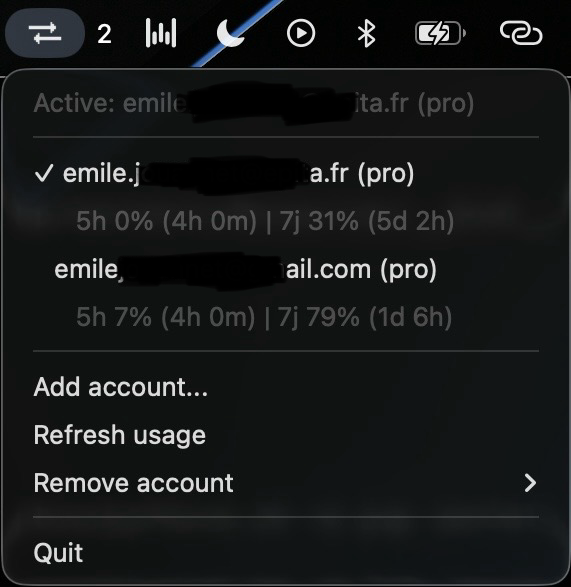
A lightweight macOS menu bar app that lets you switch between multiple Claude Code accounts instantly — and see your usage for each one.
Why?
If you have multiple Claude Code subscriptions (personal, work, etc.), switching between them means running claude auth logout + claude auth login every time — opening a browser, logging in, waiting. When you hit your rate limit on one account and want to continue working on another, this friction kills your flow.
Claude Account Switcher saves your credentials securely in the macOS Keychain and lets you switch accounts with a single click. No logout, no login, no browser. Instant.
Features
- One-click account switching — no logout/login, no browser
- Live usage display — shows 5-hour and 7-day utilization for each account directly in the menu
- Secure credential storage — credentials stored in macOS Keychain, never on disk
- Auto-import — detects your current Claude Code account on first launch
- Full session switching — swaps both OAuth tokens and Claude CLI state (
~/.claude.json), soclaude auth statusalways reflects the active account
How it works
Claude Code stores its authentication in two places:
- macOS Keychain — OAuth tokens (access + refresh) under the service
Claude Code-credentials ~/.claude.json— account metadata (email, org, subscription type) in theoauthAccountfield
When you add an account, the app:
- Backs up the current credentials to a separate Keychain entry (
claude-switcher:{email}) - Saves the
oauthAccountmetadata from~/.claude.jsoninto its config - Runs
claude auth logout+claude auth loginfor the new account - Imports the new account's credentials and metadata
When you switch accounts, the app:
- Saves the current account's Keychain credentials and
oauthAccountstate - Restores the target account's OAuth token into
Claude Code-credentials - Restores the target account's
oauthAccountinto~/.claude.json - All Claude Code sessions immediately use the new account
Usage data (5h/7d rate limits) is fetched via Anthropic's OAuth API using each account's stored token.
Architecture
┌─────────────────────────────────────────────────────────┐
│  macOS Keychain                                         │
│                                                         │
│  "Claude Code-credentials"     ← active account token   │
│  "claude-switcher:user1@…"     ← backup token account 1 │
│  "claude-switcher:user2@…"     ← backup token account 2 │
└─────────────────────────────────────────────────────────┘

┌─────────────────────────────────────────────────────────┐
│  ~/.claude.json                                         │
│                                                         │
│  oauthAccount: { emailAddress, orgId, ... }             │
│  ↑ swapped on each account switch                       │
└─────────────────────────────────────────────────────────┘

┌─────────────────────────────────────────────────────────┐
│  ~/.config/claude-switcher/accounts.json  (mode 0600)   │
│                                                         │
│  Per account: email, subscription_type, org_name,       │
│  keychain_account, oauth_account (cached metadata)      │
└─────────────────────────────────────────────────────────┘
Install
Homebrew (recommended)
brew install --cask Symbioose/tap/claude-switcher
Then launch it from Spotlight or /Applications/Claude Switcher.app.
Download the app
- Go to Releases
- Download Claude-Switcher.zip
- Unzip and drag Claude Switcher.app to
/Applications - Launch it — the icon appears in your menu bar
Note: On first launch, macOS may block the app because it's not signed. Go to System Settings → Privacy & Security and click Open Anyway.
Usage
A menu bar icon appears. From there:
- See your accounts — each account shows email, subscription type, and live usage (5h / 7j)
- Switch accounts — click any account to activate it instantly
- Refresh usage — click "Rafraîchir usage" to update usage data
- Add an account — triggers
claude auth loginto authenticate a new account - Remove an account — removes saved credentials from the Keychain
On first launch, the app automatically imports your currently logged-in Claude Code account.
Verifying a switch
After switching, you can confirm in any terminal:
claude auth status
# Should show the newly activated account's email
Security
- Credentials are stored exclusively in the macOS Keychain — never written to disk files
- Config file (
~/.config/claude-switcher/accounts.json) stores only account metadata (email, org name, subscription type, cachedoauthAccountstate) with0600permissions - Config directory has
0700permissions - Email validation prevents Keychain service name injection
- No
shell=Truein any subprocess call — no command injection possible - OAuth tokens pass through
securityCLI arguments (briefpsvisibility, inherent to macOSsecuritytool)
Requirements
- macOS 12+
- Claude Code installed and accessible via
claudeCLI
Build from source
git clone https://github.com/emilejouannet/claude-account-switcher.git
cd claude-account-switcher
python3 -m venv .venv && source .venv/bin/activate
pip install -e . && pip install py2app pytest
Run directly:
claude-switcher
Build the standalone .app:
bash build_app.sh
# Output: dist/Claude Switcher.app
Run tests:
pytest tests/ -v
License
MIT
Yorumlar (0)
Yorum birakmak icin giris yap.
Yorum birakSonuc bulunamadi