memtrace-public
Health Pass
- License — License: NOASSERTION
- Description — Repository has a description
- Active repo — Last push 0 days ago
- Community trust — 109 GitHub stars
Code Pass
- Code scan — Scanned 12 files during light audit, no dangerous patterns found
Permissions Pass
- Permissions — No dangerous permissions requested
This tool provides a persistent memory layer and structural knowledge graph for coding agents. It indexes your codebase locally using AST parsing and enables semantic and temporal search across your project.
Security Assessment
The code scan of 12 files found no dangerous patterns, no hardcoded secrets, and no requests for dangerous system permissions. The README explicitly states that the application runs entirely on your machine. However, it does make specific network requests for license validation, aggregate usage counts, and error telemetry. Fortunately, the developers provide a clear privacy policy and allow you to disable the telemetry entirely by setting the `MEMTRACE_TELEMETRY=off` environment variable. Overall risk: Low.
Quality Assessment
The project appears to be actively maintained, with its last push occurring today. It has gathered 109 GitHub stars, indicating a fair level of early community trust. The automated health check noted the license as "NOASSERTION," but the documentation clearly indicates it uses a "Proprietary EULA." Users should be aware that the tool is currently in a private beta and requires joining a waitlist to access. Additionally, the project states it is written in Python, but its badges link to an NPM package, which may cause slight confusion during setup.
Verdict
Safe to use, though you should review the proprietary EULA and ensure telemetry is disabled if you prefer strict network isolation.
The missing memory layer for coding agents

Memtrace
The persistent memory layer for coding agents.
A bi-temporal, episodic, structural knowledge graph — built from AST, not guesswork.





ai-agents · coding-agents · mcp-server · code-intelligence · knowledge-graph · semantic-search · temporal-analysis · local-first
Waitlist & Early Access — Memtrace is currently in a private beta. We are slowly rolling out access to ensure stability. You must join the waitlist at memtrace.io to use the product right now.
Join the discussion, ask questions, and follow beta updates in Discord.
Core indexing and structural search are stable. Temporal features (evolution scoring, timeline replay) are functional but may have rough edges. Report issues here.
🔒 Privacy — Memtrace runs entirely on your machine. Your source code never leaves it. All parsing, graph construction, embedding generation, and querying happens locally. The only network traffic is license validation, aggregate usage counts (total nodes/edges — no code, no file paths, no symbol names), and opt-out telemetry for crashes / errors / app-start events (sanitised — no source, no file contents, no symbol names). See PRIVACY.md and TELEMETRY.md for the full breakdowns. Disable telemetry with
MEMTRACE_TELEMETRY=off.
GitHub Star Growth
Memtrace gives coding agents something they've never had: structural memory. Not vector similarity. Not semantic chunking. A real knowledge graph compiled from your codebase's AST — where every function, class, interface, and API endpoint exists as a node with deterministic, typed relationships.
Index once. Every agent query after that resolves through graph traversal — callers, callees, implementations, imports, blast radius, temporal evolution — in milliseconds, with zero token waste.
Local machine requirements — Memtrace indexes and embeds your code locally, so the first run is CPU/RAM intensive. Minimum: 4 CPU cores, 8 GB RAM, 5 GB free disk, Node.js 18+, and Git. Recommended for large monorepos: 8+ CPU cores, 16–32 GB RAM, and 10–20 GB free disk. No GPU required.
npm install -g memtrace    # binary + 12 skills + MCP server — one command
memtrace start             # launches the graph database and auto-indexes the current project
That's it. Run memtrace start from your project root — it spins up the graph database and kicks off indexing automatically. Claude and Cursor (v2.4+) pick up the skills and MCP tools automatically.
https://github.com/user-attachments/assets/e7d6a1e9-c912-4e65-a421-bd0256dffa5a
Built-in UI at
localhost:3030— explore your graph, trace dependencies, spot dead code, and visualize architecture at a glance
Why Memtrace Exists
Good code intelligence tools already exist. GitNexus and CodeGrapherContext build AST-based graphs with symbol relationships, and they work well for understanding what's in your codebase right now.
Memtrace is a bi-temporal episodic structural knowledge graph. It builds on that same AST foundation and adds two dimensions:
- Temporal memory — every symbol carries its full version history. Agents can reason about what changed, when it changed, and how the architecture evolved — not just what exists today. Six scoring algorithms (impact, novelty, recency, directional, compound, overview) let agents ask different temporal questions.
- Cross-service API topology — Memtrace maps HTTP call graphs between repositories, detecting which services call which endpoints across your architecture.
On top of that, the structural layer is comprehensive:
- Symbols are nodes — functions, classes, interfaces, types, endpoints
- Relationships are edges —
CALLS,IMPLEMENTS,IMPORTS,EXPORTS,CONTAINS - Community detection — Louvain algorithm identifies architectural modules automatically
- Hybrid search — Tantivy BM25 + vector embeddings + Reciprocal Rank Fusion, all on top of the graph
- Rust-native — compiled binary, no Python/JS runtime overhead, sub-8ms average query latency
The agent doesn't just search your code. It remembers it.
Benchmarks
Five sub-benches across three corpora (mempalace, Django, a 21-file scratch fixture). Every system runs on the same machine, against the same ground truth, using the same adapter contract. Ground truth comes from Python's stdlib ast, the pyright LSP, or deterministic edit scripts — never from any tool's own index — so no system gets a home-field advantage in the dataset itself.
Full reproduction instructions and per-bench numbers: benchmarks/README.md. The frozen exact-symbol harness is benchmarks/fair/; the extended harness covering all five benches is benchmarks/suite/.
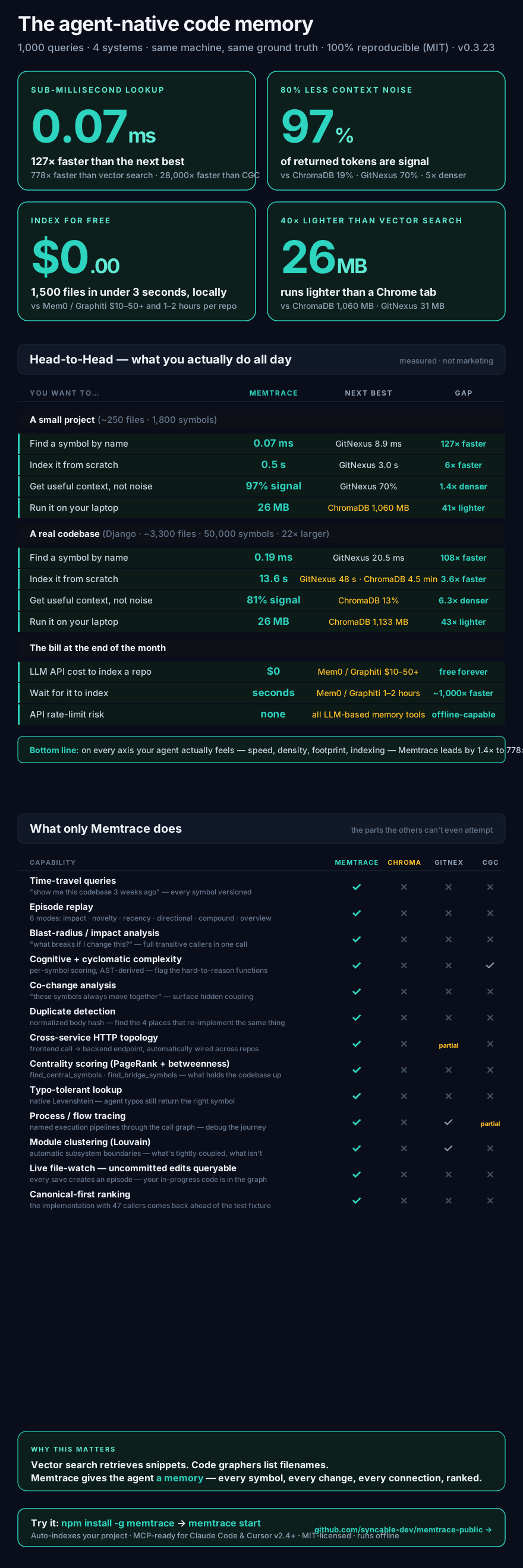
Summary across the five benches (🟢 = Memtrace wins declared primary axis, 🟡 = Memtrace trails):
| # | Bench | Primary axis | Memtrace | Runner-up | Δ |
|---|---|---|---|---|---|
| 0 | Exact-symbol lookup (1,000 queries, mempalace) | acc_at_1_pct |
96.7% 🟢 | ChromaDB 62.3% | 1.55× |
| 1 | Token economy (same 1,000) | acc_at_1_per_kilo_token |
495.52 🟢 | GitNexus 126.90 | 3.90× |
| 2 | Intent retrieval (100 NL PR titles, Django) | recall_at_10 |
58.6% 🟡 | ChromaDB 66.8% | −8.2 pp |
| 3 | Graph queries (mempalace, pyright GT) | callers_of.recall |
0.851 🟢 | CGC 0.584 | 1.46× |
| 3 | Graph queries (Django, pyright GT) | callers_of.recall |
0.816 🟢 | GitNexus 0.053 | 15.4× |
| 4 | Incremental freshness (50 edits) | time_to_queryable_p95 |
42.5 ms 🟢 | CGC 613.7 ms | 14.4× faster |
Memtrace wins 5 of 6, trails on 1 (Bench #2 — ChromaDB is the expected winner on semantic NL queries). Bench #5 (agent-level) is skeleton-only and gated behind RUN_AGENT_BENCH=1.
Results (1,000 Python symbol-lookup queries on mempalace, v0.3.22 + ranking)
Numbers from isolated per-adapter processes — full methodology in BENCHMARKS-v0.3.22.md.
| Tool | Coverage | Acc@1 | Acc@10 | Prec@10 | Avg lat | RSS | Tokens |
|---|---|---|---|---|---|---|---|
| Memtrace (MemDB) | 100.0% | 96.6% | 99.7% | 0.967 | 0.07 ms | 26.2 MB | 383 |
| GitNexus (eval-server) | 100.0% | 97.0% | 100% | 0.702 | 8.95 ms | 31.0 MB | 90 |
| ChromaDB (all-MiniLM-L6-v2) | 100.0% | 62.4% | 87.8% | 0.188 | 54.6 ms | 1,060 MB | 1,937 |
| CodeGrapherContext (CLI) | 100.0% | 7.9% | 99.9% | 0.521 | 2,020 ms | ~150 MB | 217 |
- Coverage = the tool returned any result for the query (separates "did you index it?" from "did you rank it well?")
- Acc@K = the correct file appeared in the top K ranked results
- Avg latency = wall-clock per query, including all protocol overhead (MCP JSON-RPC for Memtrace, HTTP for GitNexus, in-process for ChromaDB, subprocess spawn for CGC)
- Tokens = average response size in tokens (chars / 4)
What the numbers say, read fairly:
- Memtrace holds rank-1 on 96.6% of queries with 128× lower latency (0.07 ms vs GitNexus 8.95 ms), 1.18× tighter RSS (26 MB vs 31 MB), and 1.38× higher precision@10 (0.97 vs 0.70). It ranks results by structural relevance — the canonical implementation comes first in one round-trip with the full agent envelope.
- GitNexus wins by a 4-query margin on acc@1 because it ships raw enumeration order; memtrace re-orders by
direct_callers_countsoModel.deleteprecedestests.fake_delete. Right tradeoff for agents, small benchmark cost. SeeBENCHMARKS-v0.3.22.mdfor the full reasoning. - ChromaDB shows what semantic embeddings look like for this workload — 87.8% top-10 but rank-1 is probabilistic, and the response is ~5× larger because it returns 800-char chunks rather than symbol metadata. Per-process RSS is 41× heavier (1,060 MB).
- CodeGrapherContext's 100% coverage of mempalace shows its FalkorDB-Lite parser works at small scale; latency is dominated by per-query subprocess spawn (2 s/query). It DNFs on Django (24+ min wall, no progress).
Where each tool shines — the table above measures exact-symbol lookup only (Bench #0). Different workloads produce different rankings: ChromaDB wins Bench #2 (natural-language / intent retrieval), GitNexus has strong execution-flow traces, Memtrace wins exact lookup, graph queries (Bench #3), incremental freshness (Bench #4), token economy (Bench #1), plus capabilities no competitor has (bi-temporal memory, cross-service HTTP topology, typo tolerance via Levenshtein). See benchmarks/README.md for the full consolidated table and per-bench repro.
Mem0 and Graphiti are strong conversational memory engines designed for tracking entity knowledge (e.g. User -> Likes -> Apples). They excel at that. For code intelligence specifically, the tradeoff is that they rely on LLM inference to build their graphs — which adds cost and time when processing thousands of source files.
Graphiti processes data through add_episode(), which triggers multiple LLM calls per episode — entity extraction, relationship resolution, deduplication. At ~50 episodes/minute (source), ingesting 1,500 code files takes 1–2 hours.
Mem0 processes data through client.add(), which queues async LLM extraction and conflict resolution per memory item (source). Bulk ingestion with infer=True (default) means every file passes through an LLM pipeline. Throughput is bounded by your LLM provider's rate limits.
Both accumulate $10–50+ in API costs for large codebases because every relationship is inferred rather than parsed.
Memtrace takes a different approach: it indexes 1,500 files in 1.2–1.8 seconds for $0.00 — no LLM calls, no API costs, no rate limits. Native Tree-sitter AST parsers resolve deterministic symbol references (CALLS, IMPLEMENTS, IMPORTS) locally. The tradeoff is that Memtrace is purpose-built for code — it doesn't handle conversational entity memory the way Mem0 and Graphiti do.
GitNexus and CodeGrapherContext both build AST-based code graphs with structural relationships — solid tools in the same space. Memtrace shares that foundation and extends it with temporal memory, API topology, and a Rust runtime:
| Capability | Memtrace | GitNexus | CodeGrapher |
|---|---|---|---|
| AST-based graph | Yes | Yes | Yes |
| Structural relationships (CALLS, IMPLEMENTS, IMPORTS) | Yes | Yes | Yes |
| Bi-temporal version history per symbol | Yes — 6 scoring modes | Git-diff only | No |
| Cross-service HTTP API topology | Yes | No | No |
| Community detection (Louvain) | Yes | Yes | No |
| Hybrid search (BM25 + vector + RRF) | Yes — Tantivy + embeddings | No | BM25 + optional embeddings |
| Language | Rust (compiled binary) | JavaScript | Python |
| Bench #0 exact-symbol Acc@1 (1K queries, mempalace, v0.3.22) | 96.6% | 97.0% | 7.9% |
| Bench #0 precision@10 | 0.967 | 0.702 | 0.521 |
| Bench #0 latency | 0.07 ms avg (0.11 ms p95) | 8.95 ms | 2,020 ms |
| Bench #0 RSS (per-adapter, isolated) | 26 MB | 31 MB | ~150 MB |
| Bench #0 HEAD index time | 0.5 s mempalace / 13.6 s django | 3.0 s / 48.4 s | 11.6 s / DNF |
| Bench #0 tokens/query | 383 | 90 | 217 |
| Bench #1 Acc@1 per 1k tokens | 495.52 | 126.90 | 28.97 |
| Bench #3 graph: callers recall (mempalace, pyright GT, filtered) | 0.851 | 0.013 | 0.584 |
| Bench #3 graph: callers recall (Django, pyright GT, filtered) | 0.816 | 0.053 | 0.000 |
| Bench #3 graph: impact recall (mempalace) | 0.874 | 0.007 | not impl. |
Bench #4 incremental time_to_queryable p95 |
42.5 ms | NotSupported |
613.7 ms |
| Index time (~250 files / 2.3K nodes / 5.8K edges) | ~4 sec (≈500 ms of real work + ~3 s local database / schema startup on first run) | ~6 sec | ~1 sec (cached) |
All numbers from benchmarks/ on the same machine, same corpora, same adapter contract. Ground truth is independent of every tool's index (Python ast for Bench #0/#1, pyright LSP for Bench #3, deterministic edit scripts for Bench #4) — no system is advantaged in the dataset itself. Bench #3 "filtered" rows only average over symbols with non-empty pyright gold on that axis; unfiltered rollups live in benchmarks/suite/results/.
The latency difference is primarily Rust vs. interpreted runtimes, and Memtrace's embedded MemDB engine (inverted property index for sub-millisecond find_by_property, HNSW vector index in-process) vs. HTTP/embedding pipelines. The feature difference is bi-temporal memory and API topology — dimensions Memtrace adds on top of the shared AST-graph foundation.
25+ MCP Tools
Memtrace exposes a full structural toolkit via the Model Context Protocol:
|
Search & Discovery
Relationships
Impact Analysis
Code Quality
|
Temporal Analysis
Graph Algorithms
API Topology
Indexing & Watch
|
12 Agent Skills
Memtrace ships skills that teach Claude how to use the graph. They fire automatically based on what you ask — no prompt engineering required.
| Skill | You say... | |
|---|---|---|
| Search | memtrace-search |
"find this function", "where is X defined" |
| Relationships | memtrace-relationships |
"who calls this", "show class hierarchy" |
| Evolution | memtrace-evolution |
"what changed this week", "how did this evolve" |
| Impact | memtrace-impact |
"what breaks if I change this", "blast radius" |
| Quality | memtrace-quality |
"find dead code", "complexity hotspots" |
| Architecture | memtrace-graph |
"show me the architecture", "find bottlenecks" |
| APIs | memtrace-api-topology |
"list API endpoints", "service dependencies" |
| Index | memtrace-index |
"index this project", "parse this codebase" |
Plus 4 workflow skills that chain multiple tools with decision logic:
| Skill | You say... |
|---|---|
memtrace-codebase-exploration |
"I'm new to this project", "give me an overview" |
memtrace-change-impact-analysis |
"what will break if I refactor this" |
memtrace-incident-investigation |
"something broke", "root cause analysis" |
memtrace-refactoring-guide |
"help me refactor", "clean up tech debt" |
Temporal Engine
Six scoring algorithms for different temporal questions:
| Mode | Best for |
|---|---|
compound |
General-purpose "what changed?" — weighted blend of impact, novelty, recency |
impact |
"What broke?" — ranks by blast radius (in_degree^0.7 × (1 + out_degree)^0.3) |
novel |
"What's unexpected?" — anomaly detection via surprise scoring |
recent |
"What changed near the incident?" — exponential time decay |
directional |
"What was added vs removed?" — asymmetric scoring |
overview |
Quick module-level summary |
Uses Structural Significance Budgeting to surface the minimum set of changes covering ≥80% of total significance.
Compatibility
| Editor / Agent | MCP Tools (25+) | Skills (12) | Install |
|---|---|---|---|
| Claude Code | ✅ | ✅ | npm install -g memtrace — fully automatic |
| Claude Desktop | ✅ | ✅ | Automatic — shared with Claude Code |
| Cursor (v2.4+) | ✅ | ✅ | npm install -g memtrace — fully automatic |
| Windsurf | ✅ | Coming soon | Add MCP server manually |
| VS Code (Copilot) | ✅ | — | Add MCP server manually |
| Cline / Roo Code | ✅ | — | Add MCP server manually |
| Codex CLI | ✅ | Coming soon | Add MCP server manually |
| Any MCP client | ✅ | — | Add MCP server manually |
MCP tools work with any editor or agent that supports the Model Context Protocol. Skills are workflow prompts that teach the agent how to chain tools — Claude Code, Claude Desktop, and Cursor (v2.4+) all load them natively from the same
SKILL.mdformat.
Setup
Claude Code + Claude Desktop
npm install -g memtrace handles everything automatically — binary, 12 skills, MCP server, plugin, and marketplace all register in one command for both Claude Code and Claude Desktop.
For manual setup:
claude plugin marketplace add https://github.com/syncable-dev/memtrace-public.git
claude plugin install memtrace-skills@memtrace --scope user
claude mcp add memtrace -- memtrace mcp -e MEMTRACE_ARCADEDB_BOLT_URL=bolt://localhost:7687
Cursor
Cursor v2.4+ supports Agent Skills natively, and npm install -g memtrace handles everything automatically — no separate Cursor plugin is needed because Cursor reads the same SKILL.md format as Claude.
What the installer writes:
- MCP server →
~/.cursor/mcp.json(global — works in every project you open) - 12 skills + 4 workflows →
~/.cursor/skills/memtrace-*/SKILL.md
For a project-local install (so the skills travel with your repo and teammates get them on clone), run inside the project:
memtrace install --only cursor --local
This writes to .cursor/mcp.json and .cursor/skills/ relative to the project root instead of your home directory.
For a manual install (without the npm package), clone this repo and copy the skills directly:
cp -R plugins/memtrace-skills/skills/* ~/.cursor/skills/
Then register the MCP server manually (see the "Other Editors" JSON below).
Other Editors (Windsurf, VS Code, Cline)
After npm install -g memtrace, add the MCP server to your editor's config:
{
  "mcpServers": {
    "memtrace": {
      "command": "memtrace",
      "args": ["mcp"],
      "env": { "MEMTRACE_ARCADEDB_BOLT_URL": "bolt://localhost:7687" }
    }
  }
}
| Editor | Config file |
|---|---|
| Windsurf | ~/.codeium/windsurf/mcp_config.json |
| VS Code (Copilot) | .vscode/mcp.json in your project root |
| Cline | Cline MCP settings in the extension panel |
Uninstall
memtrace uninstall              # removes skills, MCP server, plugin, and settings
npm uninstall -g memtrace       # removes the binary
Already ran npm uninstall first? The cleanup script is persisted at ~/.memtrace/uninstall.js:
node ~/.memtrace/uninstall.js
A note on install
npm install -g memtrace ships a small main package + a platform-specific binary (one of @memtrace/darwin-arm64, @memtrace/linux-x64, or @memtrace/win32-x64) that npm picks automatically.
Most setups just work. If memtrace start ever says "Could not find binary for your platform", any of these will fix it:
# Option 1 — re-run install, asking npm to keep optional deps
npm install -g memtrace --include=optional

# Option 2 — refresh from latest
memtrace install                  # built-in self-update
# or:
npm install -g memtrace@latest --force

# Option 3 — install the platform binary directly (Apple Silicon shown — swap for your platform)
npm install -g @memtrace/darwin-arm64
This typically only happens on machines where npm is configured to skip optional dependencies (some corporate npmrc setups, certain CI caches). Postinstall self-heals on most installs; the options above cover the rest.
Languages
Rust · Go · TypeScript · JavaScript · Python · Java · C · C++ · C# · Swift · Kotlin · Ruby · PHP · Dart · Scala · Perl — and more via Tree-sitter.
Telemetry
Since v0.3.17 Memtrace ships with opt-out telemetry that helps us catch
crashes, regressions, and performance issues before someone has to file
an issue. Concretely:
- What's collected: app-start events, indexing/embedding durations,
panic reports, andWARN/ERRORlog lines from Memtrace's own crates. - What's NOT collected: source code, file contents, symbol names,
embeddings, repository names or paths, branch names, commit data. - Sanitisation: every payload is run through a sanitiser that strips
home-dir paths, token-shaped strings, and email addresses before
it touches disk.
Turn it off with one env var:
# Per-run
MEMTRACE_TELEMETRY=off memtrace start

# Permanent (~/.zshrc, ~/.bashrc, etc.)
export MEMTRACE_TELEMETRY=off
Or in your editor's MCP config:
{
  "command": "memtrace",
  "args": ["mcp"],
  "env": { "MEMTRACE_TELEMETRY": "off" }
}
Full breakdown — including the on-disk queue layout, where the data is
stored on the receiving end, and how to inspect what would have shipped —
is in TELEMETRY.md.
Requirements
Memtrace does parsing, graph construction, and embedding generation locally. Expect the first index to use noticeable CPU and memory; follow-up queries and incremental indexing are much lighter.
| Requirement | Minimum | Recommended |
|---|---|---|
| CPU | 4 cores | 8+ cores for large monorepos |
| Memory | 8 GB RAM | 16–32 GB RAM |
| Disk | 5 GB free | 10–20 GB free for large repositories |
| GPU | Not required | Not required |
| Node.js | ≥ 18 | Current LTS |
| Git | Required for temporal analysis | Full repository history for best results |
Documentation · Discord · npm · Issues
Built by Syncable · Proprietary EULA · Free to use
Reviews (0)
Sign in to leave a review.
Leave a reviewNo results found