claude-monitor
Health Warn
- License — License: Apache-2.0
- Description — Repository has a description
- Active repo — Last push 0 days ago
- Low visibility — Only 6 GitHub stars
Code Warn
- network request — Outbound network request in web/static/js/api.js
Permissions Pass
- Permissions — No dangerous permissions requested
No AI report is available for this listing yet.
Monitor and visualize all your Claude Code sessions — track token usage, costs, tool calls, and session activity through a real-time web dashboard.
Claude Monitor
A comprehensive monitoring and visualization tool for Claude Code sessions.
Track token usage, costs, tool calls, and session activity through a real-time web dashboard.
Features
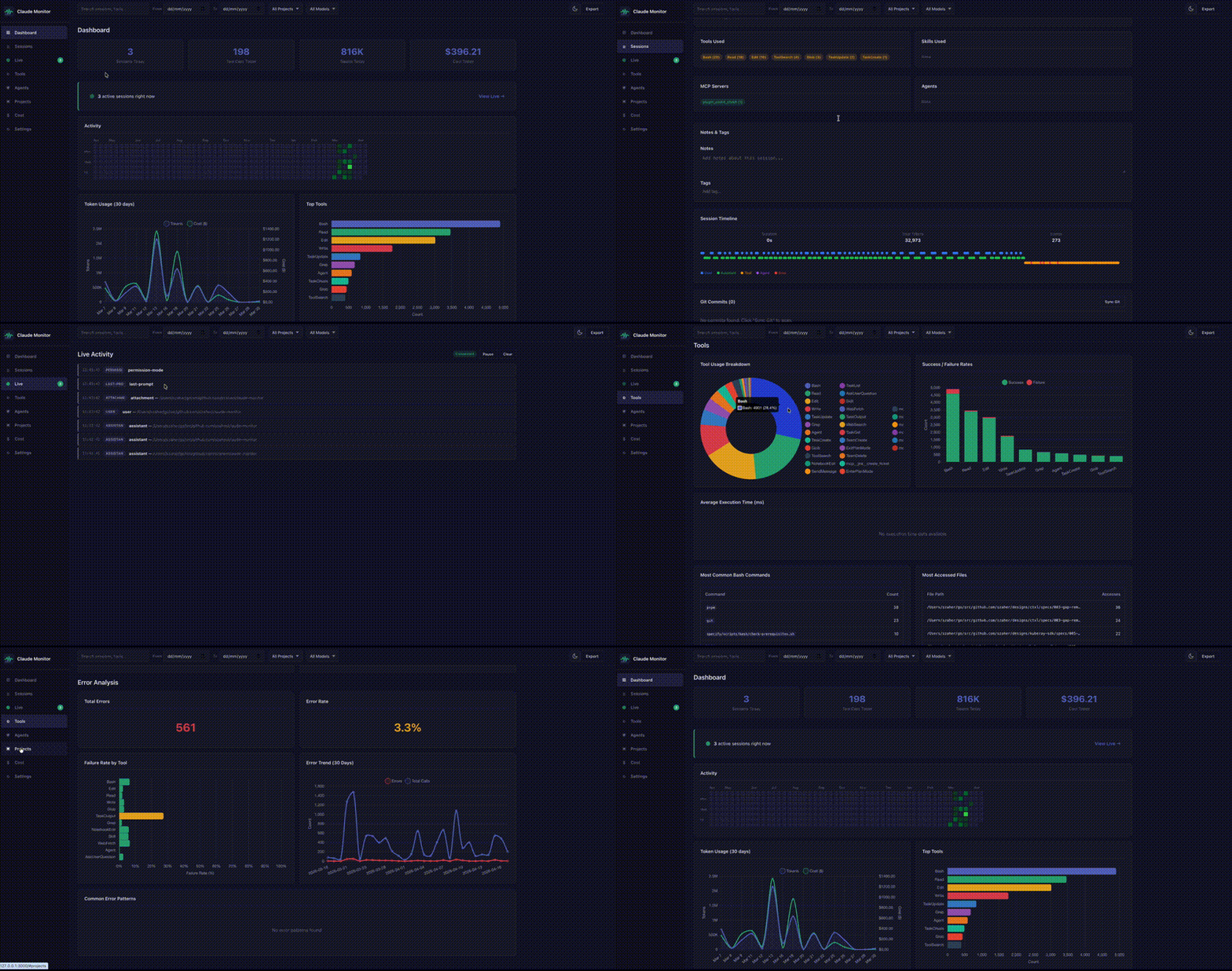
- Real-time monitoring -- WebSocket-powered live view of active Claude Code sessions
- Session tracking -- Automatic capture of session metadata, messages, and tool calls via Claude Code hooks
- Log file watching -- Monitors
~/.claude/projects/for new and modified JSONL log files - Historical import -- Bulk import of existing Claude Code session logs
- Cost estimation -- Per-session cost calculation based on configurable model pricing
- Full-text search -- Search across all message content using SQLite FTS5
- Token analytics -- Input, output, cache read, and cache write token breakdowns
- Tool usage stats -- Track which tools are used most and their success rates
- Project breakdown -- Per-project session and cost summaries
- Export -- Export sessions as JSON, CSV, or HTML
- Web dashboard -- Single-page application with dashboard, sessions, live, tools, projects, cost, and settings pages
Installation
Build from source:
make build
Or install to /usr/local/bin:
make install
Quick Start
# 1. Install hooks and initialize the database
claude-monitor install

# 2. Import existing Claude Code session logs
claude-monitor import

# 3. Start the web UI
claude-monitor serve

# Visit http://localhost:3000
Commands
install
Install Claude Code hooks and initialize the database.
claude-monitor install [--force]
--force-- Overwrite existing hook configuration
uninstall
Remove hooks and optionally delete all data.
claude-monitor uninstall [--delete-data]
--delete-data-- Also remove the database and configuration files
serve
Start the monitoring daemon and web UI.
claude-monitor serve [--port PORT] [--host HOST] [--no-browser]
--port-- HTTP port (default: from config, typically 3000)--host-- HTTP host (default: from config, typically 127.0.0.1)--no-browser-- Do not open the browser on start
import
Import historical Claude Code session logs from JSONL files.
claude-monitor import [--path PATH]
--path-- Path to Claude Code projects directory (default:~/.claude/projects)
export
Export sessions as JSON, CSV, or HTML.
claude-monitor export [--format FORMAT] [--output FILE] [--from DATE] [--to DATE] [--project NAME]
--format-- Output format:json,csv, orhtml(default:json)--output-- Output file path (default: stdout)--from-- Start date filter (RFC3339)--to-- End date filter (RFC3339)--project-- Filter by project name or path
config
Manage configuration.
claude-monitor config [--show] [--reset]
--show-- Display current configuration--reset-- Reset configuration to defaults
status
Show daemon status and database statistics.
claude-monitor status
version
Print version information.
claude-monitor version
Configuration
Configuration is stored in ~/.claude-monitor/config.yaml. Key settings:
server:
  port: 3000
  host: "127.0.0.1"

cost:
  models:
    opus:
      input: 15.0        # $/million tokens
      output: 75.0
      cache_read: 1.5
      cache_write: 18.75
    sonnet:
      input: 3.0
      output: 15.0
      cache_read: 0.3
      cache_write: 3.75
    haiku:
      input: 0.25
      output: 1.25
      cache_read: 0.03
      cache_write: 0.3

storage:
  database_path: "~/.claude-monitor/claude-monitor.db"
  retention_days: 0       # 0 = keep forever

ui:
  theme: "auto"           # auto, light, dark
  default_page: "dashboard"
  sessions_per_page: 50
Architecture
- Hook receiver -- Listens on a Unix socket (
~/.claude-monitor/monitor.sock) for real-time hook events from Claude Code - Log watcher -- Uses fsnotify to detect changes to JSONL log files under
~/.claude/projects/ - Ingestion pipeline -- Batches, deduplicates, and writes events to SQLite with FTS5
- REST API -- JSON endpoints for sessions, messages, tool calls, stats, search, and config
- WebSocket hub -- Broadcasts real-time events to connected dashboard clients
- Web UI -- Embedded static SPA served by the Go binary
API Endpoints
| Endpoint | Method | Description |
|---|---|---|
/api/sessions |
GET | List sessions (supports project, from, to, limit, offset) |
/api/sessions/{id} |
GET | Session detail with messages, tool calls, and subagents |
/api/messages |
GET | List messages (supports session_id, type, limit, offset) |
/api/tool-calls |
GET | List tool calls (supports session_id, tool_name, limit, offset) |
/api/subagents |
GET | List subagents (supports session_id, limit, offset) |
/api/stats |
GET | Dashboard aggregate statistics |
/api/stats/daily |
GET | Daily activity for charts (supports days) |
/api/stats/tools |
GET | Tool usage breakdown |
/api/stats/models |
GET | Model usage breakdown |
/api/stats/projects |
GET | Project activity breakdown |
/api/search |
GET | Full-text search on messages (requires q) |
/api/config |
GET/POST | Get or update configuration |
/ws |
WebSocket | Real-time event stream |
Development
# Run tests
make test

# Build
make build

# Run
make run
License
Apache License 2.0 -- see LICENSE for details.
Reviews (0)
Sign in to leave a review.
Leave a reviewNo results found