camelot
Health Gecti
- License — License: GPL-2.0
- Description — Repository has a description
- Active repo — Last push 0 days ago
- Community trust — 10 GitHub stars
Code Uyari
- process.env — Environment variable access in assets/js/app.js
Permissions Gecti
- Permissions — No dangerous permissions requested
Bu listing icin henuz AI raporu yok.
Kanban board based coding agents orchestrator based on KISS
🏰 Camelot AI
Delegate coding tasks to AI agents. Manage them from a kanban board.






🏰 Camelot AI gives development teams a way to safely scale their engineering output
with AI — without giving up control. Create tasks on a board, let AI agents plan
and implement them, review and approve before anything ships. Like having junior
developers who never sleep, managed through a clean visual interface.
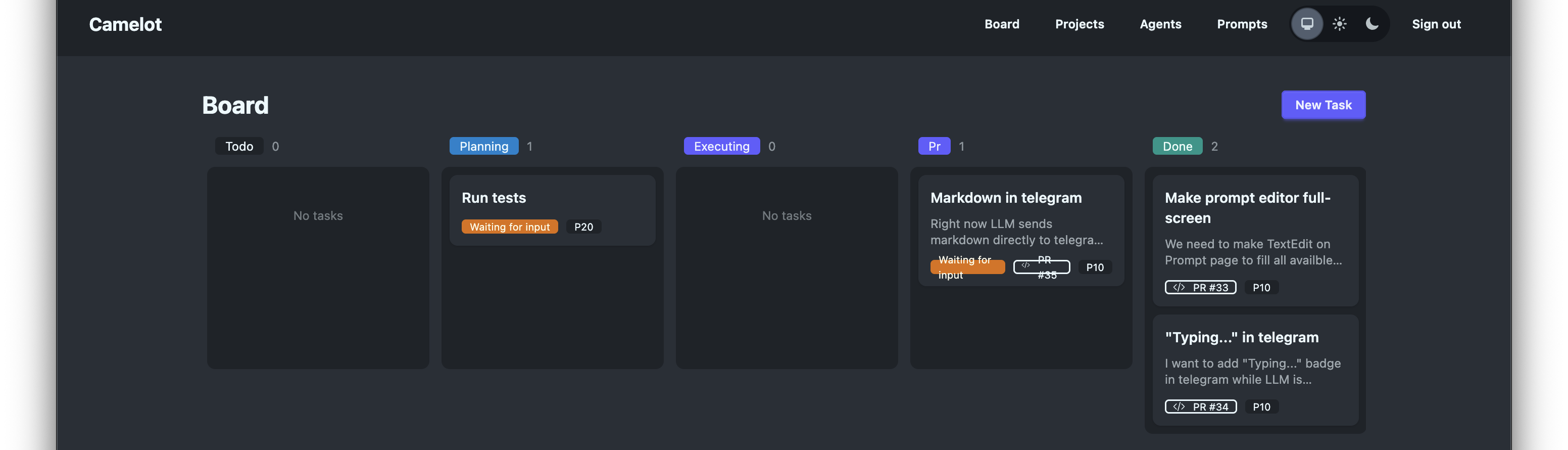
How It Works
- Create tasks on a kanban board — or sync them from GitHub Issues
- AI agents pick up tasks, write a plan, and wait for your approval
- You approve the plan — agents execute it and open a PR
- Watch it happen in real-time with live session streaming
- Review the PR, merge, done — agents handle reviewer comments and CI failures too
Features
- Kanban board — 6-stage workflow: todo, planning, executing, pr, done, cancelled. Set priorities, track state at a glance.
- Multi-agent coordination — Run Claude Code and Codex agents in parallel across projects. Priority-based task dispatch.
- Human-in-the-loop — Agents propose plans before writing code. You approve before anything ships. No surprise commits.
- GitHub-native — Sync issues as tasks, track PRs, monitor CI checks. Tasks auto-complete when PRs merge.
- Customizable prompts — Per-project prompt templates with
{{variable}}interpolation. Tune agent behavior to match your conventions. - Tool permissions — Whitelist which CLI tools agents can use. Full control over agent capabilities.
- Real-time streaming — Watch agent output live via WebSocket. Full session logs for every execution.
- Self-hosted — Your code never leaves your infrastructure. PostgreSQL on your servers. No SaaS dependency.
- Magic link auth — No passwords to manage. Email-based authentication out of the box.
Tech Stack
| Component | Technology |
|---|---|
| Backend | Elixir, Phoenix LiveView 1.1 |
| Data layer | Ash Framework 3.0 |
| Database | PostgreSQL (via Ecto + AshPostgres) |
| Background jobs | Oban |
| Real-time | Phoenix PubSub + WebSocket |
| Frontend | Phoenix LiveView + Tailwind CSS v4 |
| Auth | AshAuthentication (magic link) |
| HTTP client | Req |
Getting Started
Prerequisites
- Elixir >= 1.15 and Erlang/OTP (use asdf or mise for version management)
- PostgreSQL >= 14
- An SSH key is auto-provisioned per user; a GitHub App is optional and
admin-configured for PR/issue polling — seedocs/self-hosting/github-app.md - Claude Code and/or Codex CLI installed
Installation
# Clone the repo
git clone https://github.com/T0ha/camelot.git
cd camelot

# Install dependencies, create DB, run migrations, build assets
mix setup

# Generate a secret key
mix phx.gen.secret
# Set it as SECRET_KEY_BASE in your environment

# Start the server
iex -S mix phx.server
Visit localhost:4000.
First Steps
- Sign in with a magic link sent to your email
- Create a project pointing to a local git repository
- Create a task, pick a CLI Agent (Claude Code or Codex) from the
dropdown, and watch it flow through the board
See Get Started (source:docs/cloud/get-started.md) for a full
walkthrough from first login to your first merged PR.
Configuration
Key environment variables (see config/runtime.exs for full details):
| Variable | Description | Required |
|---|---|---|
DATABASE_URL |
PostgreSQL connection string | Production (optional override in dev/test) |
SECRET_KEY_BASE |
Cookie signing secret (mix phx.gen.secret) |
Production |
PHX_HOST |
Application hostname | Production |
PORT |
HTTP port (default: 4000) | No |
POOL_SIZE |
Database pool size (default: 10) | No |
REGISTRATION_ENABLED |
When false, new sign-ups are blocked; existing users can still sign in (default: true) |
No |
GITHUB_APP_* |
GitHub App integration (GITHUB_APP_ID, _SLUG, _CLIENT_ID, _CLIENT_SECRET, _PRIVATE_KEY_B64, _WEBHOOK_SECRET) — see docs/self-hosting/github-app.md |
No (opt-in per deployment) |
Bootstrapping users
When REGISTRATION_ENABLED=false (cloud beta mode), the sign-in screen rejects unknown emails. Use the mix task to add users — the first invocation creates an admin who can then add more users from /admin/users:
# First admin (bootstrap)
mix camelot.create_user [email protected]

# Subsequent users
mix camelot.create_user [email protected] --role user
Inside a release:
bin/camelot eval 'Mix.Tasks.Camelot.CreateUser.run(["[email protected]"])'
Architecture
Agent CLI ──→ Tasks ──→ Sessions
                 │
Projects ────────┤
                 │
           PromptTemplates
- Projects map to local git repositories with optional GitHub integration
- Agent CLI configs wrap a CLI tool (Claude Code or Codex) — executable, args, parser, runner image — configured once (admin-only) and picked per task
- Tasks pick a fixed Agent CLI at creation and flow through a state machine: draft → todo → planning → executing → pr → done
- Sessions record each execution of a task, driven by a
TaskRunnerprocess, with full output logs - Prompt Templates are customizable per-project with variable interpolation
Key modules: Camelot.Board.Task, Camelot.Agents.Agent,Camelot.Runtime.TaskRunner, Camelot.Projects.Project,Camelot.Prompts.PromptTemplate
Development
mix test              # Run tests
mix format            # Format code
mix credo             # Lint
mix dialyzer          # Type checking
mix precommit         # All checks before committing
See CLAUDE.md and AGENTS.md for AI-assisted development guidelines.
Deployment
🏰 Camelot AI is a standard Phoenix application. See the
Phoenix deployment guides
for general instructions.
Run docker compose up to deploy with the included Dockerfile anddocker-compose.yml.
Roadmap
- Kanban board with full task lifecycle
- Claude Code and Codex agent support
- GitHub issue sync and PR tracking
- Prompt template customization
- Real-time session streaming
- Tool permission controls
- Docker / docker-compose deployment
- Webhook-based GitHub integration
- Additional agent types
- Team / multi-user collaboration
- 🏰 Camelot AI Cloud (hosted version)
Contributing
PRs welcome — see the roadmap above for ideas.
- Branch off
developand open your PR againstdevelop—mainis
release-only and is updated through an automaticdevelop→mainPR - Follow the Elixir Style Guide
- Run
mix precommit,mix credoandmix dialyzerbefore submitting - Open an issue first for large changes
Branching model, CI pipelines and the release flow are documented in
docs/contributing.md.
License
Yorumlar (0)
Yorum birakmak icin giris yap.
Yorum birakSonuc bulunamadi