centian
Health Uyari
- License — License: Apache-2.0
- Description — Repository has a description
- Active repo — Last push 0 days ago
- Low visibility — Only 6 GitHub stars
Code Gecti
- Code scan — Scanned 12 files during light audit, no dangerous patterns found
Permissions Gecti
- Permissions — No dangerous permissions requested
This tool is a proxy server for the Model Context Protocol (MCP) that allows developers to aggregate multiple servers, inspect tool invocations, apply processing hooks, and add structured logging to their AI agent traffic.
Security Assessment
Overall risk: Medium. As a proxy gateway, it inherently intercepts all MCP requests and responses, meaning it handles potentially sensitive data and network traffic. The installation process relies on piping a remote web script directly into bash, which is a common but inherently risky pattern. Additionally, it manages authentication by generating, storing, and hashing API keys. The code itself is written in Go, the light audit found no dangerous hardcoded secrets or malicious patterns, and no dangerous system permissions are required. Furthermore, the documentation thoughtfully includes a security measure that prevents users from accidentally exposing the proxy to the open internet without explicitly enabling authentication.
Quality Assessment
The project is licensed under the permissive Apache-2.0 license and was updated very recently, indicating active development. However, it suffers from extremely low community visibility with only 6 stars on GitHub. Consequently, the codebase has not been widely peer-reviewed or battle-tested by the broader community.
Verdict
Use with caution — the code appears safe and well-intentioned, but its low community adoption means you should carefully review the installation script and configuration before routing sensitive AI agent traffic through it.
MCP Proxy Server, that allows you to customize your MCP setup and tool invocations.
Centian - the MCP Proxy
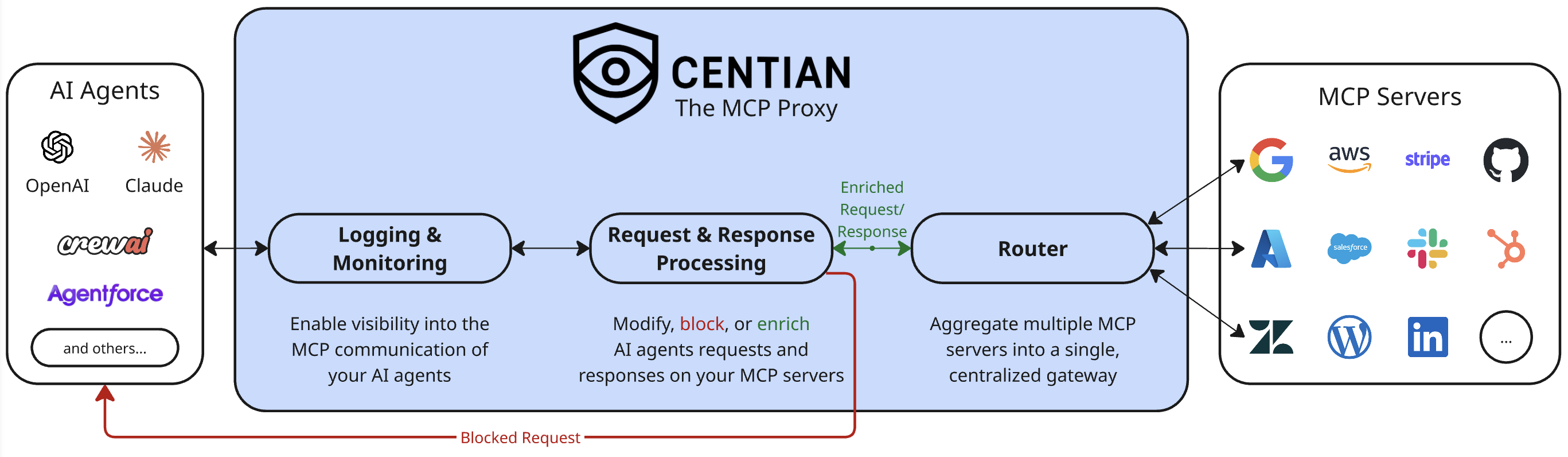
Centian is a lightweight MCP (Model Context Protocol) proxy that adds processing hooks, gateway aggregation, workflow-driven task verification, and structured logging to MCP server traffic.
Highlights
- Programmable tool-call processing – inspect, modify, block, or enrich proxied
tools/callrequests and results with processor scripts. - Unified gateway for multiple servers – expose many downstream MCP servers through one clean endpoint (DRY config).
- Workflow-driven taskverification – expose
centian.task_*tools for onboarding, planning, execution, and approval-gated task flows. - Structured logging & visibility – capture MCP events for debugging, auditing, and analysis.
- Built-in task run explorer – persist task/action timelines and inspect them through the API or embedded UI.
- Fast setup via auto‑discovery – import existing MCP configs from common tools to get started quickly.
Quick Start
Note: if you do not already have an MCP setup locally you can also look into the next section Demo.
- Install
curl -fsSL https://raw.githubusercontent.com/T4cceptor/centian/main/scripts/install.sh | bash
- Initialize quickstart config (npx required)
centian init -q
This does the following:
Creates centian config at
~/.centian/config.jsonAdds the
@modelcontextprotocol/server-sequential-thinkingMCP server to the configYou can add more MCP servers by running
centian server add:centian server add --name "my-local-memory" --command "npx" --args "-y,@modelcontextprotocol/server-memory" centian server add --name "my-deepwiki" --url "https://mcp.deepwiki.com/mcp"Creates an API key to authenticate at the centian proxy
Displays MCP client configurations including API key header
- NOTE: the API key is only shown ONCE, afterwards its hashed, so be sure to copy it here
- Alternatively you can create another API key using
centian auth new-key
- Start the proxy
centian start
Default bind: 127.0.0.1:8080.
Security note
Binding to0.0.0.0is allowed only ifauthis explicitly set in the config (true or false). This is enforced to reduce accidental exposure.
- Point your MCP client to Centian
Copy the provided config json into your MCP client/AI agent settings, and start the agent.
Example:
{
  "mcpServers": {
    "centian-default": {
      "url": "http://127.0.0.1:8080/mcp/default",
      "headers": {
        "X-Centian-Auth": "<your-api-key>"
      }
    }
  }
}
- Done! - you can now log and process proxied MCP tool calls with centian.
- (Optional): to process downstream
tools/callrequests and results, add a processor viacentian processor addor scaffold a CLI processor viacentian processor new.
- (Optional): to process downstream
Demo
For the fastest end-to-end product demo, use the built-in centian demo command.
centian demo
centian demo creates a self-contained demo workspace, starts a local Centian instance, launches a supported coding agent against that instance, and shows the live task UI.
Current v1 support:
claude
Example:
centian demo --agent claude
Optional path override:
centian demo --agent claude --path ./my-centian-demo
By default this creates the demo under:
{cwd}/.centian/demo
The command creates:
workspace/for the agent tasktemplates/with the taskverification workflowlogs/with Centian-generated logs and event storageconfig.json,prompt.md,claude_mcp_config.json, andcentian.pidagent.stdout.logandagent.stderr.logfor the headless agent process output
Behavior:
- starts Centian locally
- prints the live UI URL
- best-effort opens the browser on macOS
- runs the agent headlessly
- keeps Centian running after the agent finishes
To stop the demo server later:
kill $(cat ./.centian/demo/centian.pid)
This is a safe, isolated demo flow intended to showcase Centian taskverification. It is not yet a hardened sandbox boundary and does not currently support Codex or Gemini in the public command.
demo/ walkthroughs
The demo/ folder contains three walkthroughs:
demo/logging_demo/for OpenTelemetry span export on MCP tool calls.demo/modification_demo/for regex-based redaction of sensitive response values.demo/taskverification/for workflow-driven task execution with persisted timelines and approval waits.
Quick local setup:
cd demo
make setup
Then run either make demo-logging-up or make demo-modification-up.
These examples are intended to demonstrate extension patterns and are not production-hardened security/monitoring implementations.
For further details, check out demo/README.md.
The taskverification demo has its own setup and run flow documented in demo/taskverification/README.md.
Taskverification documentation is available in docs/TASKVERIFICATION.md.
Taskverification
Centian can expose a workflow-driven task runtime on top of the normal MCP proxy surface.
When proxy.capabilities.taskVerification.enabled is true, Centian adds centian.task_* tools that guide an agent through:
- template selection and task registration
- onboarding and planning artifacts
- step-by-step execution with checks and invariants
- approval-wait nodes that block downstream tool usage
Taskverification is opt-in. The task runtime, persisted history, and embedded UI are separate capability toggles.
When event storage is enabled, Centian persists lifecycle and MCP action history and exposes:
GET /api/task-runsGET /api/task-runs/{runID}/events
When proxy.capabilities.ui.enabled is true, Centian serves an embedded read-only UI under /ui, including:
/ui/tasks/ui/tasks/:runID
The embedded UI is an observer only. It does not register tasks, advance workflow steps, or mutate run state.
For local builds, make build rebuilds and embeds the full frontend, while make build-go skips the frontend rebuild and uses the fallback embedded UI.
See:
Configuration
Centian uses a single JSON config at ~/.centian/config.json.
Minimal example:
{
  "name": "Centian Server",
  "version": "1.0.0",
  "auth": true,
  "authHeader": "X-Centian-Auth",
  "proxy": {
    "host": "127.0.0.1",
    "port": "8080",
    "timeout": 30,
    "logLevel": "info",
    "logOutput": "file",
    "logFile": "~/.centian/centian.log"
  },
  "gateways": {
    "default": {
      "mcpServers": {
        "my-server": {
          "url": "https://example.com/mcp",
          "headers": {
            "Authorization": "Bearer <token>"
          },
          "enabled": true
        }
      }
    }
  },
  "processors": []
}
Valid Configuration Requirements
At a minimum (for config management commands), a config must include:
version(non-empty string)proxy(object)
For centian start (strict validation), the config must also include:
- At least one gateway in
gateways - Each gateway must have at least one active MCP server
- Gateway names and server names must be URL-safe (
a-z,A-Z,0-9,_,-) - Each server must define exactly one transport:
commandfor stdio, orurlfor HTTP(S)
- If
urlis used, it must be a validhttp://orhttps://URL - Header keys and values must be non-empty
You can validate your current config with:
centian config validate
Environment Variable Interpolation
Centian supports environment variable interpolation in mcpServers.<server>.headers values.
Example:
{
  "gateways": {
    "default": {
      "mcpServers": {
        "github": {
          "url": "https://api.githubcopilot.com/mcp/",
          "headers": {
            "Authorization": "Bearer ${GITHUB_PAT}",
            "X-Api-Key": "$API_KEY",
            "X-Custom": "prefix-${ENV}-suffix"
          }
        }
      }
    }
  }
}
Downstream OAuth
Centian supports downstream OAuth for HTTP MCP servers. When enabled, Centian handles token storage, refresh, and browser-based authorization for the configured downstream.
Currently supported:
- Browser-based Authorization Code flow
- PKCE with
S256only - Refresh-token based reauthorization after the initial login
- Client authentication via
client_secret_postorclient_secret_basic
Minimal example:
{
  "proxy": {
    "host": "127.0.0.1",
    "port": "8080",
    "web": {
      "publicBaseUrl": "http://127.0.0.1:8080"
    }
  },
  "gateways": {
    "default": {
      "mcpServers": {
        "protected-server": {
          "url": "https://example.com/mcp",
          "oauth": {
            "enabled": true,
            "clientId": "${OAUTH_CLIENT_ID}",
            "clientSecret": "${OAUTH_CLIENT_SECRET}",
            "clientAuthMethod": "client_secret_post",
            "resource": "https://example.com/mcp",
            "issuer": "https://issuer.example"
          }
        }
      }
    }
  }
}
Notes:
- Downstream OAuth is supported for HTTP MCP servers only. Stdio servers do not use this flow.
proxy.web.publicBaseUrlis required when any downstream server enables OAuth. It must be the externally reachable base URL for Centian's hosted/oauth/start,/oauth/status, and/oauth/callbackroutes.- You must set
oauth.clientId,oauth.clientSecret, andoauth.resource. - For metadata discovery, provide either
oauth.issueror bothoauth.authorizationEndpointandoauth.tokenEndpoint. - Centian always sends PKCE
S256during downstream browser login. Providers that only supportplainPKCE, or that do not supportS256, are not supported yet. - Supported client auth methods are
client_secret_postandclient_secret_basic. - After a downstream challenge, Centian exposes
centian.auth_statusandcentian.login.<server>so clients can inspect auth state and start or resume login.
Be aware of:
- Tokens are stored locally in Centian's config directory in encrypted form, with a locally managed master key.
- If proxy auth is disabled, Centian uses one shared local identity per endpoint. In that mode, downstream OAuth tokens are also shared per endpoint identity.
- The login flow depends on the browser being able to reach
proxy.web.publicBaseUrl. - If you configure explicit
oauth.authorizationEndpoint/oauth.tokenEndpointvalues instead of issuer discovery, Centian still uses PKCES256; it just cannot pre-verify support from issuer metadata ahead of time. - For OAuth-enabled downstreams, Centian manages the downstream
Authorizationheader itself instead of forwarding the client's auth header to that server. - Not all downstream OAuth patterns are implemented yet. In particular, Dynamic Client Registration (DCR), machine-to-machine
client_credentialsflows, device flows, non-browser grant types, and non-S256PKCE variants are not currently supported. Those are expected roadmap items on the way to v1.0.
Endpoints
- Aggregated gateway endpoint:
http://localhost:8080/mcp/<gateway> - Individual server endpoint:
http://localhost:8080/mcp/<gateway>/<server>
In aggregated mode, tools and prompts are namespaced to avoid collisions.
Resources and resource templates are not namespaced. If multiple downstreams expose
the same resource URI or resource-template URI, Centian hides that entry from the
aggregated surface and logs a warning instead of silently letting one downstream win.
Session Management
Centian manages two different session layers:
- Upstream sessions are the sessions between an MCP client and Centian.
- Downstream sessions are the sessions Centian opens to the configured MCP servers behind a gateway.
These two layers are intentionally managed separately. An upstream session still exists per MCP client session, but the downstream connections attached to it can be reused from a pool.
Current Behavior
- If
authistrue, Centian identifies the caller by the matched API key ID. - If
authisfalse, Centian uses one shared local identity per endpoint. - Downstream session reuse is keyed by
endpoint + identity.
This means:
- Reconnects from the same authenticated client reuse the same downstream MCP session set for that endpoint.
- Unauthenticated local traffic shares one downstream MCP session set per endpoint.
- Different endpoints do not share downstream sessions with each other.
Why This Exists
Some MCP clients reconnect frequently or do not reliably reuse Mcp-Session-Id. If downstream sessions were tied directly to every upstream reconnect, Centian would repeatedly re-initialize downstream MCP servers.
The current pooling model avoids that by keeping upstream session handling separate from downstream session ownership:
- the upstream session keeps references to downstream connections
- the pool owns downstream lifecycle and reuse
This applies to both stateful and stateless upstream MCP traffic. Even if the upstream side is stateless, Centian can still reuse downstream sessions internally when the identity and endpoint match.
Processors
Processors let you enforce policies or transform proxied tools/call traffic. Centian supports two processor runtimes:
cli: Centian runs a local executable and exchanges JSON overstdin/stdoutwebhook: Centian sends the same reducedDataContextJSON to a remote HTTP endpoint via synchronousPOST
You can scaffold a CLI processor with:
centian processor new
You can also register existing processors directly:
centian processor add --path ./processors/audit.py
centian processor add --type webhook --url https://example.com/processors/audit --header "Authorization=Bearer ${TOKEN}"
CLI and webhook processors use the same DataContext contract and can coexist in the same chain.
That contract centers on event, payload, routing, and optional read-only auth context, as documented in docs/processor_development_guide.md.
Processors currently run only around proxied tools/call handling: once before the downstream call and once after the downstream result is returned.
Processor timeout values are configured in seconds per processor and default to 15. The timeout is enforced per invocation, so the same processor may consume that budget once on the request phase and again on the response phase of a single tool call. Required processor timeouts fail the current phase; non-required processor timeouts are logged and skipped.
Logging
Centian has two different logging/observability paths, and they serve different purposes.
Internal Proxy Logging
These logs are for Centian's own internal runtime behavior only: proxy startup, downstream connection state, processor execution failures, and similar implementation details.
Configure them under proxy:
{
  "proxy": {
    "logLevel": "info",
    "logOutput": "file",
    "logFile": "~/.centian/centian.log"
  }
}
logLevel:debug,info,warn,errorlogOutput:file,console,bothlogFile: optional file path when file output is enabled
By default, internal proxy logs are written to ~/.centian/centian.log.
MCP Communication Logging
Logs about actual MCP requests/responses are separate from the internal logger. They are written to ~/.centian/logs/ as MCP event records:
requests.jsonl– MCP requests with timestamps and session IDs
Use this path when you want to inspect or retain MCP traffic.
Processor-Based Observability
If you want to log, export, redact, or otherwise process proxied tool-call details, use processors rather than the internal proxy logger. This is the correct place for tool-call-specific observability, audit enrichment, and custom telemetry.
See:
- demo/README.md for end-to-end examples
demo/src/otel_span_logger.pyfor telemetry exportdemo/src/response_redactor.pyfor response transformation/redaction
Commands (Quick Reference)
centian init– initialize configcentian start– start the proxycentian auth new-key– generate API keycentian server ...– manage MCP serverscentian config ...– manage configcentian logs– view recent logs
Installation (More Options)
Script (recommended)
curl -fsSL https://raw.githubusercontent.com/T4cceptor/centian/main/scripts/install.sh | bash
Homebrew
Coming soon.
From source
git clone https://github.com/T4cceptor/centian.git
cd centian
make build-go      # Go-only build using the embedded fallback UI
make build         # Full build, requires Node 22 and embeds the real UI
Troubleshooting & Known Limitations
Known Limitations
- stdio servers run locally: Stdio MCP servers run on the host under the same user context as Centian. Only configure stdio servers if you trust the clients using Centian, since they can access local resources through those servers. For the future, we are looking into starting stdio-based servers in a virtualized environment.
- OAuth scope is currently limited: Centian supports downstream HTTP OAuth for browser-based Authorization Code + PKCE
S256flows with refresh handling. It does not currently provide a general upstream OAuth layer for authenticating MCP clients to Centian itself, and it does not yet implement DCR,client_credentials, device flow, other non-browser downstream grant types, or non-S256PKCE variants. - Shared credentials reduce auditability: If you set auth headers at the proxy level, all downstream requests share the same identity. Prefer per‑client credentials so downstream servers can audit and rate‑limit correctly, or provide appropriate processors and logging to ensure auditability.
- Unauthenticated mode shares downstream identity: If
authis disabled, Centian uses one shared local identity per endpoint. That simplifies local use, but it also means downstream session state and downstream OAuth tokens are shared within that endpoint. - Future changes: please be aware that the APIs and especially data structures we are using to log events and provide information to processors are still evolving and might change in the future, especially before version 1.0.0. Further, changes in MCP are reflected by the MCP Go SDK and are dependent on it.
Development
make build          # Build to build/centian
make build-go       # Build without rebuilding the frontend
make install        # Install to ~/.local/bin/centian
make test-all       # Run unit + integration tests
make test-coverage  # Runs test coverage report
make lint           # Run linting
make dev            # Clean, fmt, vet, test, build
make build stages the frontend and expects Node 22 plus npm to be installed. Use make build-go when you only need the Go binary and the fallback embedded UI is sufficient.
Contributing
Centian is still evolving, and contributions are useful across the proxy, processor, OAuth, taskverification, and UI surfaces.
Good contribution areas include:
- new processors and policy examples
- taskverification templates and demo scenarios
- docs, onboarding, and configuration clarity
- UI polish around task runs and observability
- bug fixes, tests, and performance work
To contribute:
- read CONTRIBUTING.md
- follow CODE_OF_CONDUCT.md
- report security issues through SECURITY.md
License
Apache-2.0
Yorumlar (0)
Yorum birakmak icin giris yap.
Yorum birakSonuc bulunamadi