zaivern-code
Health Warn
- License — License: Apache-2.0
- Description — Repository has a description
- Active repo — Last push 0 days ago
- Low visibility — Only 5 GitHub stars
Code Pass
- Code scan — Scanned 12 files during light audit, no dangerous patterns found
Permissions Pass
- Permissions — No dangerous permissions requested
No AI report is available for this listing yet.
Zaivern Code — Rust-native AI cockpit editor

Zaivern Code
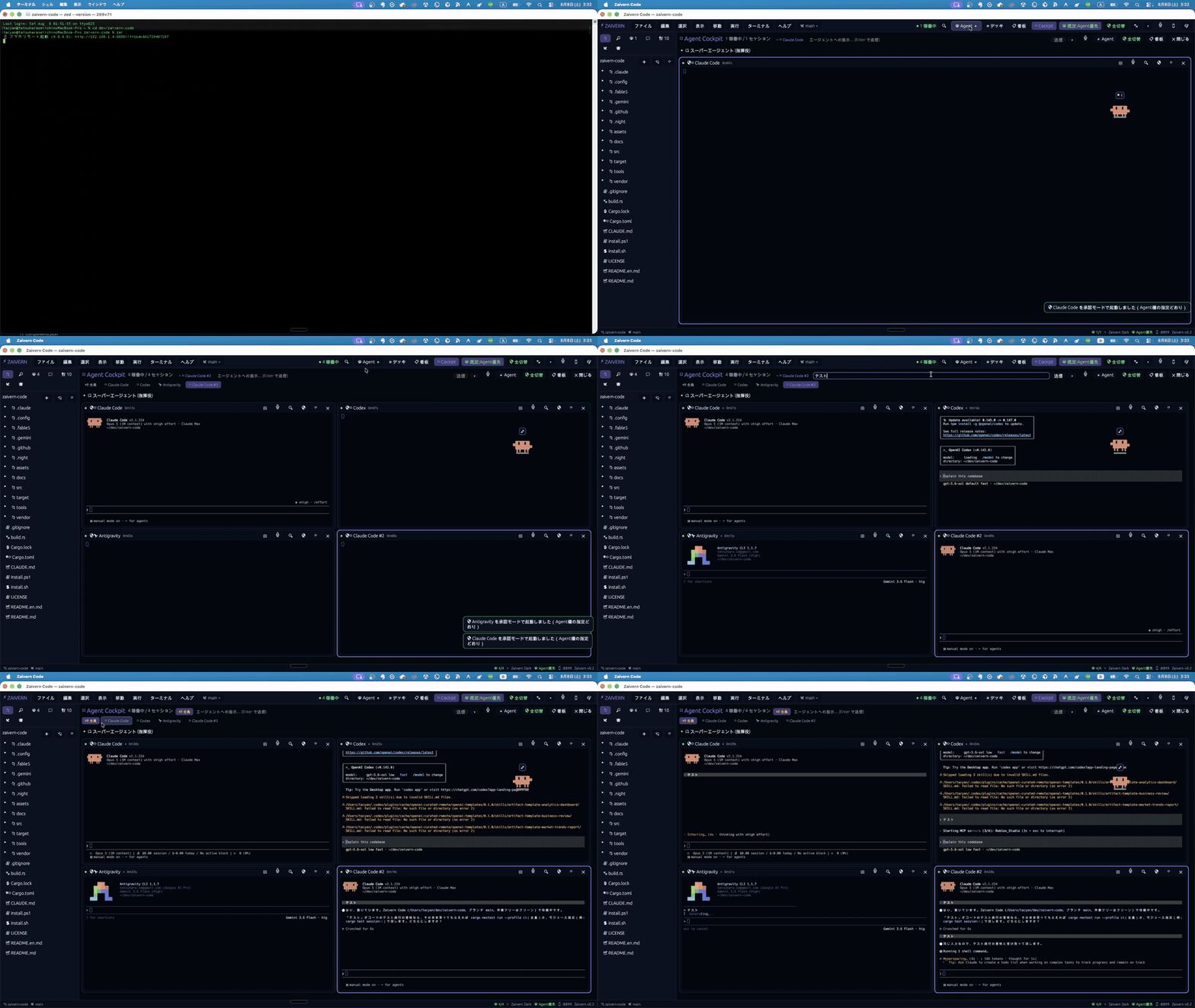
One cockpit for Claude Code, Codex, Gemini CLI, and the other AI coding CLIs you already use.
Launch, watch, and steer them from a single native app on macOS, Windows, and Linux.




Download ·
Quick Start ·
Documentation ·
Website
If Zaivern Code looks useful to you, a ⭐ Star helps its development.
Why Zaivern Code
Starting several AI coding CLIs is easy. Keeping track of them is not. Every agent
lives in its own terminal tab, asks for approval at its own pace, and edits files
without knowing what the others are doing.
| Without a cockpit | With Zaivern Code |
|---|---|
| Cycle through tabs to find who needs you | Every agent on one screen, with live status |
| Paste the same instruction into each tool | Broadcast once to the fleet, or target one agent |
| Miss an approval prompt and lose the run | Notifications and one-click approval |
| Stay at your desk while agents work | Check progress and approve from your phone |
| More parallel agents, more merge conflicts | A shared ledger keeps agents off each other's lines |
Zaivern Code is not an AI model and does not bundle one. It drives the CLIs you have
already installed and signed in to — one is enough to start.
Quick Start
Prerequisites. Install and sign in to at least one supported AI coding CLI.
Zaivern Code ships launch presets for 33 of them, including Claude Code, Codex, and
Gemini CLI. You do not need more than one.
macOS / Linux
curl -fsSL https://raw.githubusercontent.com/tacyan/zaivern-code/main/install.sh | sh
zai .
Windows PowerShell
irm https://raw.githubusercontent.com/tacyan/zaivern-code/main/install.ps1 | iex
zai .
Both installers verify the release archive against the published checksums.txt
before unpacking it, and abort without extracting or running anything if the
SHA-256 does not match — or if the checksums cannot be fetched at all.
Rather not pipe a script into your shell? Download the archive for your platform from
Releases, unpack it, and putzai (or zai.exe) somewhere on your PATH. Then run zai . in a project folder.
See SECURITY.md for how to verify the download by hand, check the
build provenance, or read the SBOM.
Once the window is open:
- Click
+ Agentand pick a CLI you already have installed. - Type a task into the input box and send it.
- Add a second agent once the first one feels comfortable.
Updating
zai update            # check for a newer release, show the command, then upgrade
zai update --check    # only look; changes nothing
zai update --yes      # upgrade without the confirmation prompt
zai update works whether or not the editor is running, and picks the right method for
how you installed it (installer script, or cargo install). Re-running the one-liner
above does the same thing.
zai uninstall removes it (--dry-run lists what would go). Uninstalling touches only
the executable and ~/.zaivern; anything else on your PATH is listed, never deleted.
Key Features
Agent Cockpit
Tile several AI CLIs side by side and see at a glance which one is thinking, editing,
running, or waiting on you. Launch presets for 33 tools are built in, so adding an
agent is a two-click operation rather than a remembered command line.
Broadcast
Send one instruction to every running agent from a single input box, or pick one agent
when you want focused control. Useful when the same correction applies to the whole
fleet.
Status, Approvals, and Notifications
Zaivern Code surfaces permission prompts, stalls, and unexpected exits as notifications
you can act on in one click. Automatic approval is off by default and has to be turned
on deliberately.
Phone Remote
Check progress, send instructions, approve actions, and edit files from your phone.
The simplest setup works over the same Wi-Fi network, and an SSH tunnel covers the
case where you are not on it.
Conflict Coordination
Agents claim the files — or the individual line ranges — they are about to edit in a
shared ledger, and git hooks refuse a write that would collide. The section below
spells out what this covers and what it does not.
Built-in Editor
Read code and review what your agents changed without leaving the app, including
images, PDFs, CSVs, and Markdown. Unsaved buffers survive a crash: the next launch
restores them, and if the file changed on disk in the meantime you are shown the
difference instead of being silently overwritten.
Conflict Coordination
Agents record the files and line ranges they are about to edit in a shared,
per-repository ledger, and git hooks refuse a write that would collide — so a clash
surfaces when it happens instead of at merge time.
What it cannot catch is a semantic conflict: one agent changes a function signature
while another keeps calling the old one, in a different file, with a perfectly clean
merge.
$ zai czero init      # install the ledger, git hooks, and merge driver, then self-diagnose
$ zai czero verify    # create a real conflict in a throwaway repo and check that it stops
Scope, limits, and the measurements behind them are in
docs/conflict-zero.md.
Supported Platforms
| Item | Support |
|---|---|
| OS | macOS arm64/x86_64, Linux x86_64/arm64, Windows x86_64 |
| AI CLIs | 33 launch presets, including Claude Code, Codex, and Gemini CLI |
| Rust | 1.88+ — only when building from source |
| License | Apache-2.0 |
A common setup is Claude Code implementing, Codex testing, and Gemini CLI writing docs,
but nothing in Zaivern Code assumes that split. Any combination works, including a
single agent.
Safety
- Approval-required mode is the default; Auto-YES is opt-in per session.
- Privilege escalation always requires manual approval.
- MCP environment-variable values are never displayed — only whether they are set.
- Child processes are stopped when a session is destroyed or the app exits, so no
orphaned agent keeps running in the background.
Documentation
| Document | What it covers |
|---|---|
| docs/conflict-zero.md | What "conflict-free" claims, what it does not, and the measurements behind it |
| docs/czero-repo-shapes.md | Which guarantees hold for which repository shape |
| docs/plugins.md | Writing plugins, with the format specification |
| docs/README.md | Index of every other document, grouped by the claim it backs |
Release notes for each version are on the
Releases page.
Contributing
Bug reports, feature requests, and pull requests are welcome. Please check
Issues for an existing report before
opening a new one, and open a
Pull Request against main.
git clone https://github.com/tacyan/zaivern-code.git
cd zaivern-code
rustup update stable
cargo run --release -- .
CONTRIBUTING.md covers the rest: how to verify a change, how to run
the Linux and Windows checks locally, and the conventions this repository follows.
License
The agents are already fast. Now it is your turn to command faster.
Reviews (0)
Sign in to leave a review.
Leave a reviewNo results found