PAIDEIA
Health Gecti
- License — License: MIT
- Description — Repository has a description
- Active repo — Last push 0 days ago
- Community trust — 74 GitHub stars
Code Gecti
- Code scan — Scanned 6 files during light audit, no dangerous patterns found
Permissions Gecti
- Permissions — No dangerous permissions requested
Bu listing icin henuz AI raporu yok.
Paideia — a Claude Code plugin that forms exam readiness locally. Stop renting your own learning.
ΠΑΙΔΕΙΑ · Paideia
Your course. Your patterns. Your errors. Your cheatsheet.
A Claude Code plugin that turns your own materials into a permanent, editable, per-course study graph — every artifact shaped by you, not by a generic syllabus.

Capture lectures with Exam Radar — OPTIMETA's Alt plugin — and study them with Paideia. Install it in Alt and run the two together: the whole arc, from sitting in the lecture to studying for the exam, lands in one workflow. Pipe a roadmap straight in with /paideia:alt.






한국어 README · PAIDEIA-codex — OpenAI Codex CLI edition · taewoopark.com — author site
Using OpenAI Codex CLI instead of Claude Code? Same tool, same on-disk layout, same license — ported to Codex on 2026-04-21 amid brief confusion over a reported Claude Code Pro-tier restriction that Anthropic later clarified was only a limited test for some new users. The port stands on its own as a CLI-agnostic alternative either way; pick whichever agentic CLI you already pay for → PAIDEIA-codex.
Security notice. This is the original PAIDEIA repository. PAIDEIA is installed as a Claude Code plugin and never asks you to download a
.zip, run an.exe, or use any installer. Any other repository using the PAIDEIA name is not affiliated with this project unless it is explicitly linked from this README.
Generic study tools teach you the average syllabus. Paideia teaches you your syllabus —
from your professor's notes, your HW emphases, your handwriting, your errors. Every artifact is a markdown file you can edit.
What Paideia means
In ancient Greece, Παιδεία was never the deposit of facts into a passive student. It was the lifelong formation of a complete human being — through structured encounter with primary texts, guided practice under a master, and reflective dialogue that folds feedback into deeper revision.
This plugin implements that cycle for the specific, bounded problem of exam preparation in math, physics, and engineering courses:
  ingest ──▶ analyze ──▶ drill ──▶ grade ──▶ weakmap ──▶ cheatsheet
     ▲                                                        │
     └────────────────── feedback loop ───────────────────────┘
Every stage produces a markdown artifact that lives in your course folder forever. Nothing is ephemeral. Nothing is hidden behind an API. Nothing stops working when the next funding winter hits.
What generic study tools can't do
Most study tools can't personalize to your course, your professor, or your mistakes — because the product they sell is a generic curriculum.
- Coursera, edX, Khan Academy — fixed curriculum; no idea what your professor actually emphasizes.
- Quizlet, Anki, Brainscape — you manually curate every card; nothing derives patterns from your own solution manuals.
- Chegg, Course Hero — generic solution manuals; not organized around your course's recurring idioms.
- Brilliant, Duolingo Max, Khanmigo — generic exercises; no knowledge of what you got wrong on HW2 last month.
- ChatGPT Study Mode, Gemini "Deep Study", NotebookLM — no persistent per-course state. Every new session starts cold, and last week's mistakes don't shape this week's drill unless you re-upload and re-explain.
None of them form understanding around the specific material in front of you. They each give every student the same answer. Paideia does the opposite: every artifact is derived from your folder — lecture notes, textbook chapter, HW, solutions, handwritten attempts — and accumulates permanently in plain markdown you can edit.
| Axis | Paideia | Typical edu-SaaS / LLM chat |
|---|---|---|
Solution patterns (P1..Pk) |
Extracted from your course's own solutions, citing your own files | Generic textbook list, or none |
| Drill priority | Weighted by your professor's HW emphasis (HW density = exam tier) | Fixed curriculum, or your own guesswork |
| Cheatsheet | Built from your errors/log.md — whatever you actually got wrong |
Boilerplate from the syllabus |
| Per-course state across sessions | Permanent markdown + YAML, grows as you work | Conversation resets; paid tier for history |
| Editing an artifact you disagree with | Open the .md in any editor, save |
Read-only UI |
| Carrying last semester's prep into next semester | Fork the course folder, edit deltas | Start over |
| Version history of your own understanding | git log / git diff any artifact |
Not surfaced |
| Where the artifacts live | Your disk, as text | Remote DB, exportable only with paid tier |
The plugin uses Claude Code (which is a paid tool) to do the heavy lifting, but everything it produces lives on your disk as plain markdown. If you later switch to a different model runner, or pause your Claude Code subscription, the course-index, patterns, error log, weakmaps, and cheatsheets are all still yours to open, read, edit, and diff. The scaffold is the plugin; the study graph is yours.
By default, OCR goes through Claude's native vision inside your existing Claude Code session. If you'd rather the handwritten PDFs never leave the machine, ollama pull qwen3-vl:8b is a one-time ~6 GB download that flips every subsequent OCR pass to local Qwen3-VL inference. Either way, everything downstream — patterns, coverage, weakmaps, cheatsheets, the error log — is plain markdown on your disk.
The load-bearing principle: HW density = exam probability
Most "study smart" advice tells you to hunt your blind spots. That is backwards. The professor has already told you where the exam points live — by assigning homework. Sections with heavy HW coverage are 🔥🔥 Exam-primary. Sections with zero HW are ⚪ Low-risk, not "hidden traps". The professor's omission is the strongest possible signal that the topic is off the exam.
Paideia's ranking is explicit about this, and every drill command honors it by default:
| Tier | HW count on section | Treatment | Share of mock-exam points |
|---|---|---|---|
| 🔥🔥 Exam-primary | 3+ | Drill hardest | ≥70% |
| 🔥 Exam-likely | 2 | Drill next | ~25% |
| 🟡 Exam-possible | 1 | Warm-pass review | ≤5% |
| ⚪ Low-risk | 0 | Reference only | 0 |
/paideia:quiz all, /paideia:mock, /paideia:hwmap hot all weight output by this tiering. If you insist on drilling a ⚪ section, the plugin complies once and warns you that exam probability is low — your limited time is worth more than an imagined gotcha.
The formation cycle, stage by stage
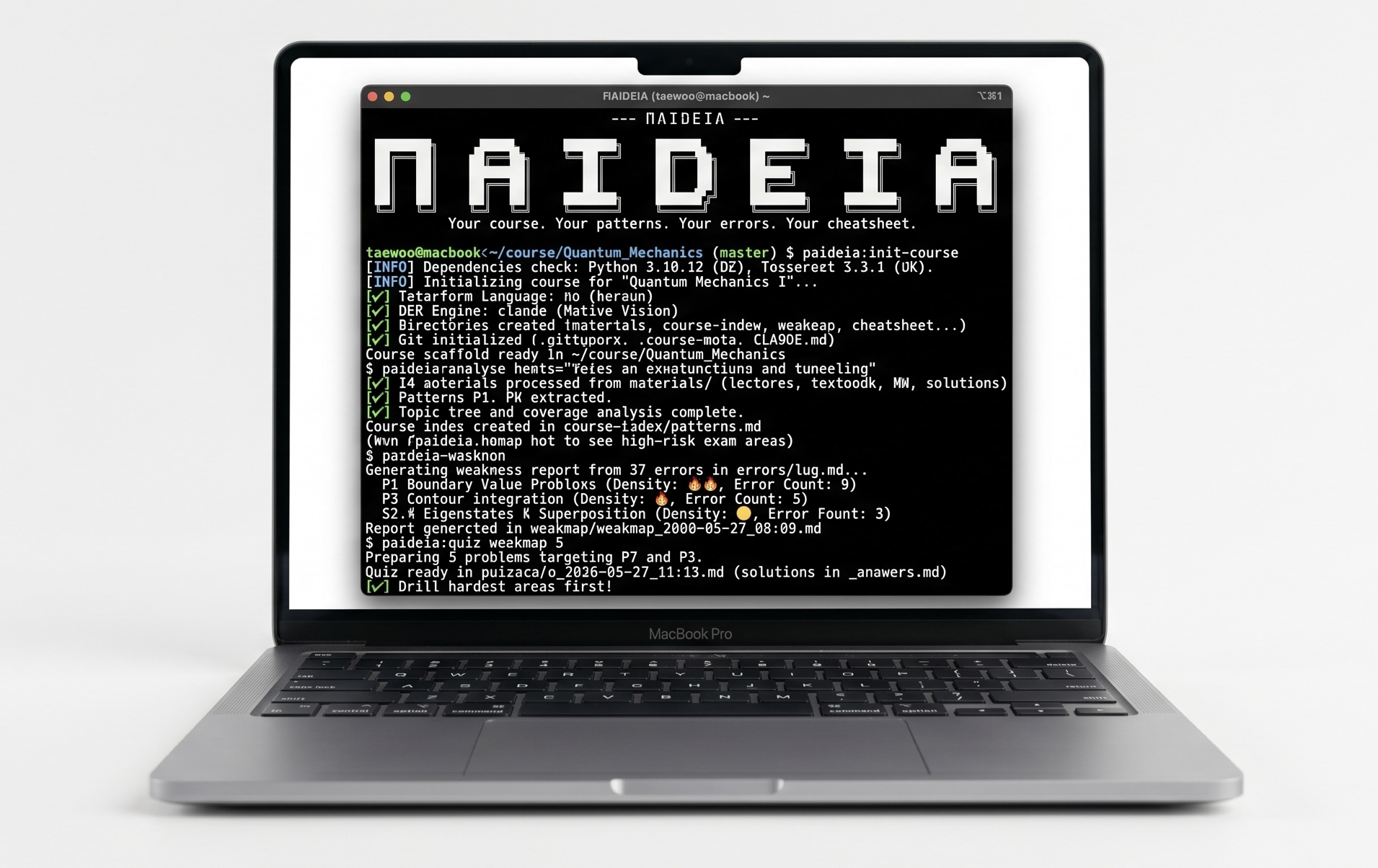
Running PAIDEIA from the Claude Code CLI.
And from the Claude desktop app — the same plugin renders analyze + hwmap artifacts side by side:
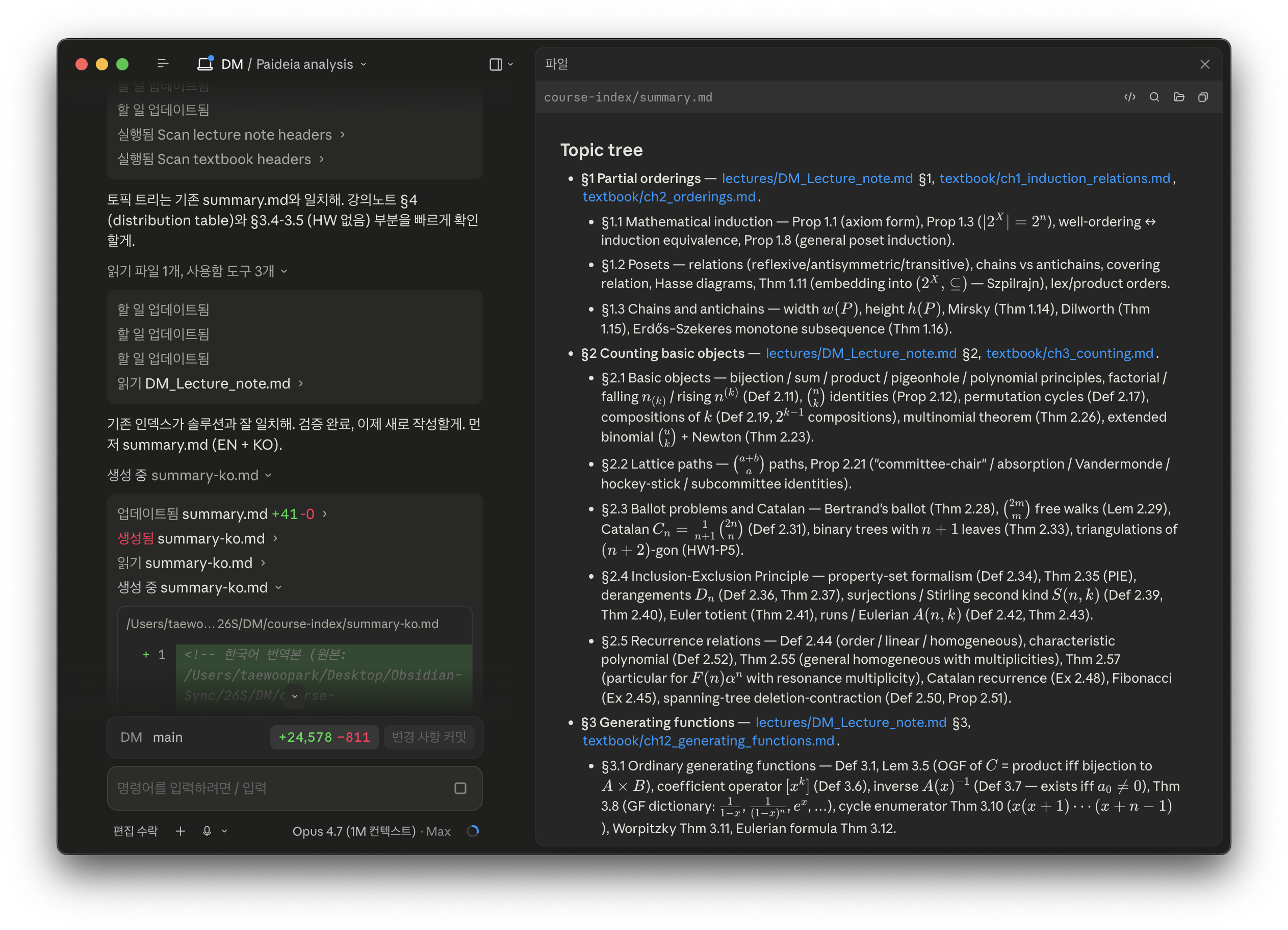
summary.md — topic tree from /paideia:analyze
|
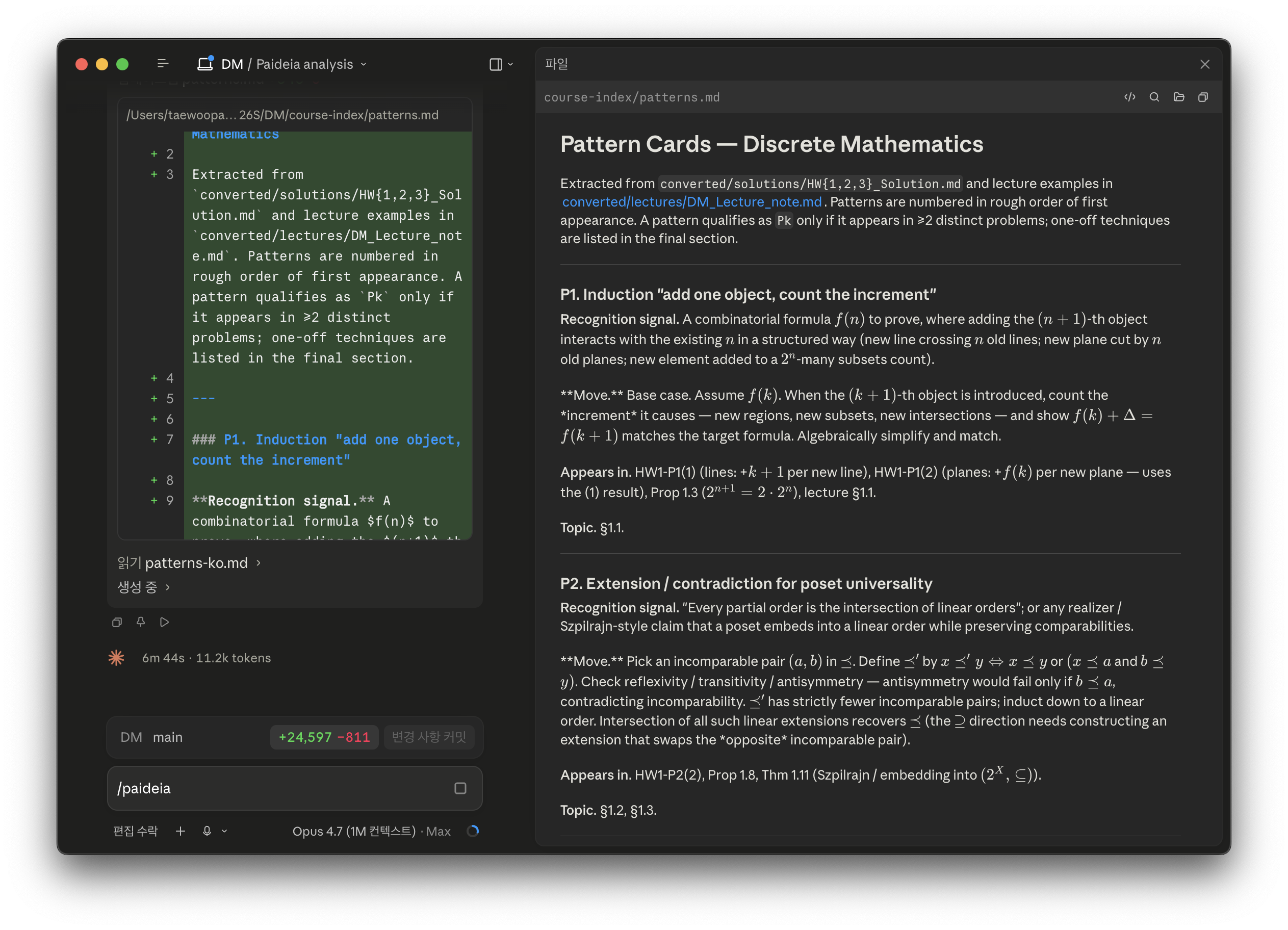
patterns.md — solution-pattern cards from /paideia:analyze
|
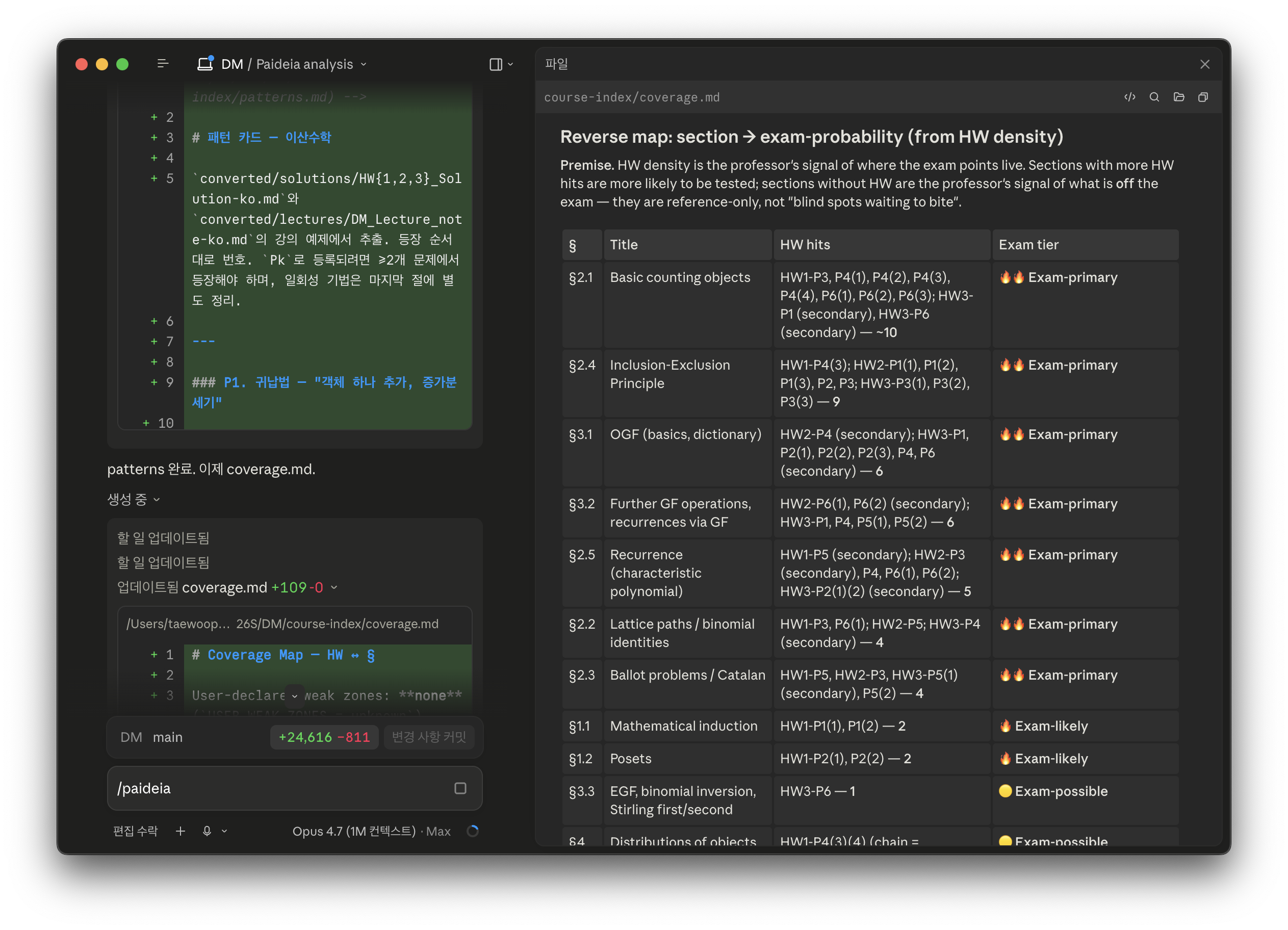
coverage.md — section → exam-probability map from /paideia:analyze
|
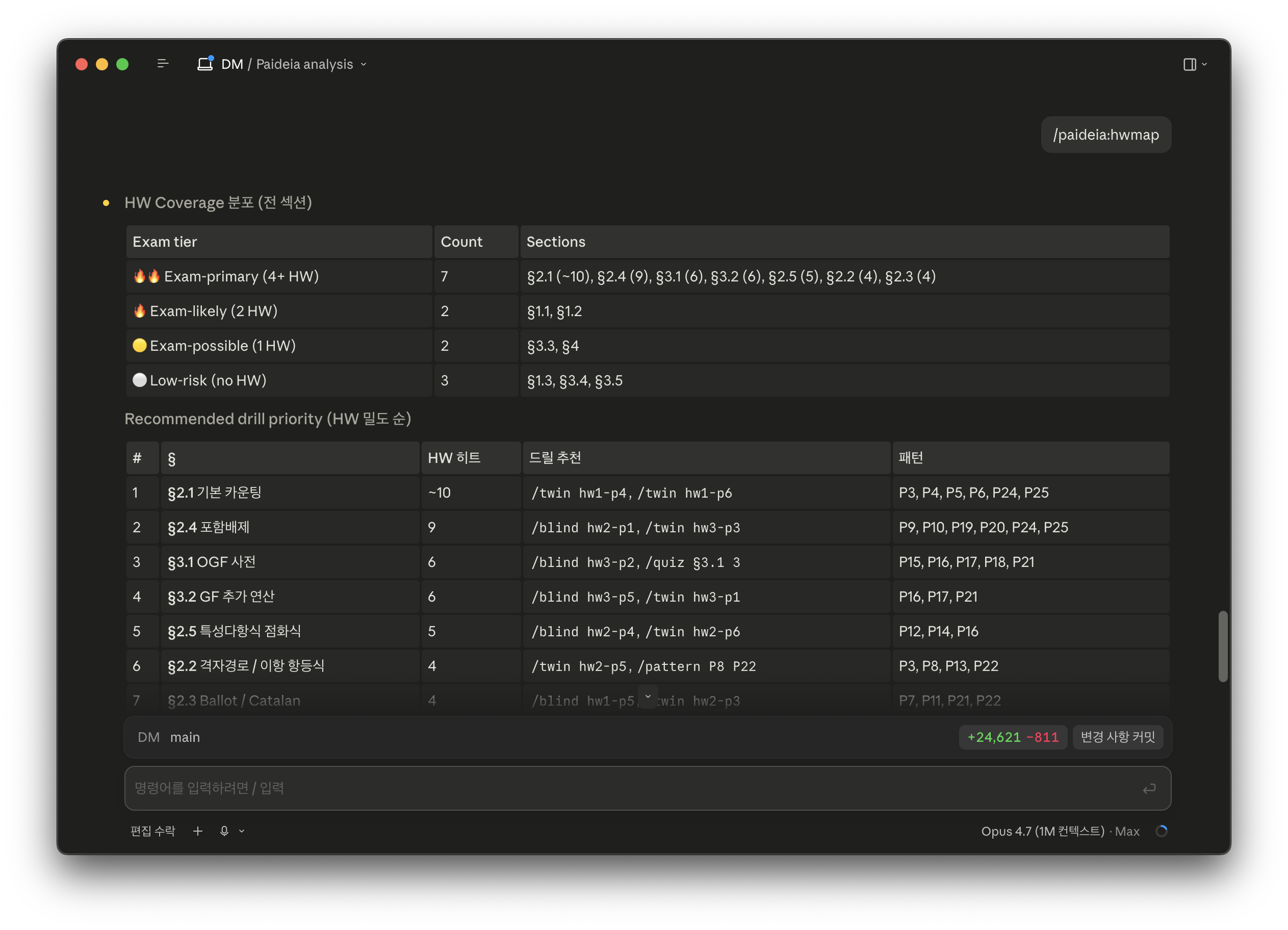
/paideia:hwmap — HW-density drill priority
|
Recommended: run Paideia from the Claude desktop app for the smoothest experience — markdown, LaTeX, and tables render inline as the agent produces them, so analyze and hwmap outputs are readable without leaving the conversation. If you prefer the CLI (the demo above), pair it with Obsidian pointed at your course folder; see A reading tip: use Obsidian below.
| Stage | What it does | Commands | Produces |
|---|---|---|---|
| Encounter | Read the professor's signal | /paideia:ingest |
converted/**/*.md — every lecture, textbook chapter, HW, solution, as clean markdown |
| Structure | Extract the grammar of the course | /paideia:analyze |
course-index/{summary,patterns,coverage}.md — topic tree, recurring solution patterns (P1..Pk), HW-density exam-tier ranking |
| Practice | Active recall weighted by what the professor actually tests | /paideia:quiz, /paideia:twin, /paideia:blind, /paideia:chain, /paideia:mock |
quizzes/, twins/, chain/, mock/ — problems you solve on paper |
| Reflection | Your hand-written work becomes a grade | /paideia:grade |
answers/converted/<name>.md + errors/log.md — OCR via Claude vision (default), Ollama/Qwen3-VL, or Tesseract; then strategy-based grading |
| Diagnosis | Errors compressed into a priority-ranked weakness report | /paideia:weakmap |
weakmap/weakmap_<ts>.md — append-only history |
| Distillation | One page, error-driven, printable | /paideia:cheatsheet, /paideia:derive, /paideia:pattern |
cheatsheet/final.md, derivations/<slug>.md — reference only what you actually need |
Supporting: /paideia:hwmap surfaces HW-density exam-probability, /paideia:init-course bootstraps a fresh course folder.
Install
Prerequisites
Required (both install paths)
- Python 3.9+ (the plugin checks + offers to install its deps)
- A Unix-style shell (
bash/zsh). The bootstrap + grade commands use heredocs,mkdir -p,mktemp, and subshell backgrounding — native Windowscmd/ PowerShell isn't currently supported. - macOS:
brew install poppler tesseract tesseract-lang - Linux (Debian/Ubuntu):
apt-get install poppler-utils tesseract-ocr tesseract-ocr-kor - Windows: use WSL2, then follow the Linux path inside the WSL shell. Git Bash works too if
popplerandtesseractare onPATH.
Optional — only if you want the --ocr=ollama mode (every page image stays on your machine)
ollama+ theqwen3-vl:8bmodel (~6 GB). macOS:brew install ollama. Linux: see the ollama install script. Thenollama pull qwen3-vl:8b.
If you don't install Ollama, Paideia's default OCR engine is Claude's own vision — nothing extra to install, nothing extra to subscribe to beyond Claude Code itself.
Install via the Claude desktop app (recommended)
The desktop app is the smoothest reading surface for Paideia — summary.md, patterns.md, coverage.md, and /paideia:hwmap tables render inline as the agent emits them (see the screenshot grid above), so there's no separate reader to keep open.
Download Claude Desktop from claude.ai/download and sign in. Available for macOS, Windows, and Linux.
Open any new conversation and run each line as its own message:
/plugin marketplace add https://github.com/OPTIMETA/PAIDEIA.git/plugin install paideia@paideia-marketplaceThe 14
/paideia:slash commands are now available in every conversation. Continue to Per-course bootstrap below.
Install via the Claude Code CLI
If you prefer the terminal, install Claude Code first, then run the same two commands inside claude, each as a separate line:
/plugin marketplace add https://github.com/OPTIMETA/PAIDEIA.git
/plugin install paideia@paideia-marketplace
The full
https://...URL is deliberate — theowner/reposhorthand makes the CLI try SSH first, which fails if you don't have a GitHub SSH key registered. HTTPS always works.
After install, 16 slash commands become available under the /paideia: namespace. CLI users should also set up Obsidian as a reading companion — the terminal can't render math.
Per-course bootstrap
Open Claude Code inside the folder you want to use for this course, then run:
/paideia:init-course
This interactively:
- Checks Python / poppler / tesseract deps and offers to install missing ones (ollama is only probed when you pick the
ollamaengine in step 4) - Asks which interface language you want for this course —
en(default) orko. All subsequent paideia prompts, drill instructions, and generated MD narrative in this folder will follow that choice. Structural tokens (file paths, slash command names, pattern IDsP1, P2, …, YAML keys, tier markers) stay in English regardless - Asks for
COURSE_NAME,EXAM_DATE,EXAM_TYPE,USER_WEAK_ZONES - Asks which OCR engine you want as the default:
claude(native vision, no install),ollama(local Qwen3-VL, pulls the 6 GB model in the background), ortesseract(lightest, lowest fidelity) - Creates the directory skeleton (
materials/,converted/,course-index/,quizzes/,mock/,twins/,chain/,derivations/,cheatsheet/,weakmap/,answers/converted/,errors/) - Writes
.course-meta(carriesINTERFACE_LANG+OCR_ENGINE, read by/paideia:grade,session_start.py,vision_ocr.py, and every slash command) and a project-levelCLAUDE.md - Wires both a project-scoped statusline (
scripts/statusline.py) and aSessionStarthook (scripts/session_start.py) in.claude/settings.json. The statusline showspaideia · <COURSE> · D-N · <phase> · P<k> ↑whenever you're inside the course folder; the hook prints a matching two-line reminder at the top of every new conversation so first-turn context is already primed git initso your prep is versioned from the first keystroke
You can always override the OCR engine for a single grade call: /paideia:grade --ocr=claude path/to/answer.pdf.
Existing course folders (migration note)
If you initialized a course before language support existed, .course-meta won't have an INTERFACE_LANG field — the plugin treats that as en and switches all prompts/output to English. To keep Korean output for an existing course, add a single line to .course-meta:
INTERFACE_LANG: ko
That's the whole migration. No re-init needed. Fresh courses go through the language picker in step 2 of /paideia:init-course.
Course folder layout
After /paideia:init-course, your course folder looks like this:
my-course/
├── .course-meta                     # course name, exam date, interface language (en|ko), OCR engine
├── CLAUDE.md                        # project rules Claude Code reads every turn
├── .gitignore                       # hides raw PDF scans + OCR scratch; the study graph itself (errors/log.md, answer keys, solutions) stays committed
├── .claude/
│   └── settings.json                # wires the PAIDEIA statusline + SessionStart hook for this folder only
│
├── materials/                       # YOU DROP RAW FILES HERE (PDF or MD)
│   ├── lectures/                    # professor's notes, slide decks
│   ├── textbook/                    # textbook chapters
│   ├── homework/                    # HW problem sets
│   └── solutions/                   # HW solutions / worked examples
│
├── converted/                       # auto-generated markdown — do not edit
│   ├── lectures/                    # output of /paideia:ingest (vision-transcribed LaTeX)
│   ├── textbook/
│   ├── homework/
│   └── solutions/
│
├── course-index/                    # knowledge base — built by /paideia:analyze
│   ├── summary.md                   # topic tree (§1, §1.1, §2, …)
│   ├── patterns.md                  # recurring solution patterns, labeled P1, P2, …
│   ├── coverage.md                  # HW ↔ § map with 🔥🔥 / 🔥 / 🟡 / ⚪ exam tiers
│   └── radar.md                     # lecture-emphasis signal — imported by /paideia:alt
│
├── answers/                         # YOU DROP HAND-WRITTEN SCAN PDFs HERE
│   └── converted/                   # /paideia:grade writes OCR'd markdown here
│
├── errors/
│   └── log.md                       # append-only YAML error log (seed for /weakmap + /cheatsheet)
│
├── quizzes/                         # /paideia:quiz — each problem has a hidden _answers.md sibling
├── mock/                            # /paideia:mock — full mock exams (hidden _sol.md siblings)
├── twins/                           # /paideia:twin — same pattern, new surface
├── chain/                           # /paideia:chain — multi-pattern integration problems
├── derivations/                     # /paideia:derive — clean reference derivations
├── cheatsheet/                      # /paideia:cheatsheet — error-driven one-pager (+ optional PDF)
└── weakmap/                         # /paideia:weakmap — timestamped, append-only history
Only two directories are yours to edit by hand:
materials/— drop source PDFs (or MDs) into the matching subfolder.answers/— drop hand-written scan PDFs into the root; the OCR'd markdown shows up underanswers/converted/.
Everything else is produced by slash commands and should be treated as regenerable. Delete and rebuild whenever, git log <dir> to see your own progress over time, or point Obsidian at the whole folder as a vault.
A reading tip: use Obsidian
If you run Paideia from the CLI rather than the Claude desktop app, this is the recommended companion. Paideia writes everything as plain markdown with LaTeX math ($...$, $$...$$); you can read it in any editor, but Obsidian is the natural choice:
- Renders
$...$and$$...$$math via MathJax with zero configuration - Backlinks let you click from
quizzes/q_<ts>.mdstraight into the citedconverted/lectures/chN.md §K - The whole course folder is just a vault — point Obsidian at
~/courses/my-course, and everything is a searchable graph - Works entirely offline, free, local. Consistent with Paideia's philosophy: your notes, your disk, your tool
VS Code with a markdown-math extension works too. The terminal — even with a markdown preview — is bad for math; don't fight that.
And the lecture end: Alt
Obsidian is the companion at the reading end. Alt is the companion at the other end — where the lectures come in. Alt records and transcribes your lectures, and OPTIMETA's Exam Radar plugin runs inside it to rank topics by how strongly the professor emphasized them out loud. Send that into Paideia with /paideia:alt, and the loop closes: attend the lecture → capture it → extract the exam signal → study what matters. Lectures live in Alt, deep personal study lives in Paideia, and Exam Radar is the bridge — finally one continuous workflow instead of scattered tools.
Full workflow — an example
Phase 0 — once per course (15 minutes)
cp ~/textbooks/ch*.pdf      ~/courses/my-course/materials/textbook/
cp ~/lecture-notes/wk*.pdf  ~/courses/my-course/materials/lectures/
cp ~/hw/hw*.pdf             ~/courses/my-course/materials/homework/
cp ~/hw/hw*_sol.pdf         ~/courses/my-course/materials/solutions/
In Claude Code:
/paideia:ingest                     # every PDF → vision pipeline (parallel agents, LaTeX-faithful)
/paideia:analyze <weak-zone hints>  # build patterns + coverage + summary
/paideia:hwmap hot                  # surface 🔥🔥 exam-primary zones
Phase 1 — diagnostic (40 minutes)
/paideia:quiz all 20                # broad diagnostic, 20 problems
# solve on paper (40 min), scan to answers/diagnostic.pdf
/paideia:grade                      # local qwen3-vl OCR + strategy grade
Phase 2 — targeted drilling (bulk of your prep time)
/paideia:weakmap                    # priority-ranked weakness report
/paideia:blind hw3-p2               # strategy-only drill on a known problem
/paideia:twin hw3-p2                # variant with same pattern, new surface
/paideia:chain 3                    # multi-pattern integration problem
/paideia:quiz weakmap 5             # 5 problems targeting the latest weakmap
Phase 3 — integration (~90 minutes)
/paideia:mock 90                    # full 90-min mock weighted by HW density
# solve on paper, scan, upload to answers/mock_<ts>.pdf
/paideia:grade                      # grade the mock
Phase 4 — compression (60 minutes, night before exam)
/paideia:cheatsheet --pdf           # error-driven one-pager
/paideia:weakmap                    # review weak zones one more time
Phase 5 — cool-down (10 minutes before exam)
/paideia:weakmap # top 3 only. Do not learn new things.
Commands (16 total)
| Command | Purpose |
|---|---|
/paideia:init-course |
Bootstrap a fresh course folder (dep check, skeleton, metadata prompt, background ollama pull) |
/paideia:doctor [--fix] |
Diagnose the install + workspace (Python, poppler, tesseract, Ollama/Qwen3-VL, course folders, .course-meta, writable paths, statusline wiring); --fix repairs the permission-free issues |
/paideia:ingest [--force] |
Every PDF in materials/** → markdown in converted/** via the vision pipeline (parallel agents, one per PDF, LaTeX-faithful). |
/paideia:analyze [hints] |
Build course-index/{summary,patterns,coverage}.md |
/paideia:hwmap hot|<§> |
Surface 🔥🔥 Exam-primary sections ranked by HW density |
/paideia:pattern <§|Pk|keyword> |
Show pattern cards from course-index |
/paideia:derive <target> |
Clean reference derivation to derivations/<slug>.md |
/paideia:quiz <topic|§|weakmap> [N] |
N practice problems, answers hidden in sibling _answers.md |
/paideia:blind <problem-id> |
Strategy-check drill on a known problem (no re-solve, describe approach) |
/paideia:twin <problem-id> |
Variant of a known problem — same pattern, new surface |
/paideia:chain <N> |
Multi-pattern integration problem combining N patterns |
/paideia:mock <minutes> |
Full mock exam, HW-density weighted |
/paideia:grade [--ocr=<engine>] [path] |
OCR answer PDF via the engine set in .course-meta (Claude vision / Ollama / Tesseract), strategy-grade, append errors/log.md |
/paideia:weakmap [concept] |
Priority-ranked weakness report saved to weakmap/weakmap_<ts>.md |
/paideia:cheatsheet [--pdf] |
Error-driven one-pager |
/paideia:alt [paste] |
Import an OPTIMETA Exam Radar (Alt plugin) export → course-index/radar.md + a lecture-emphasis column on coverage.md + a gold-zone weakmap |
Under the hood
Ingest pipeline: vision for every PDF
/paideia:ingest routes every PDF in materials/** through the same vision pipeline. pdfplumber was tried first as a fast path for prose-heavy material (textbook, HW) and proved unreliable: even pages that look like plain prose silently word-salad as soon as they mix equations, figures, multi-column layouts, or margin notes. Rather than maintain a per-category heuristic with fallbacks we'd have to retune per course, we route everything uniformly.
| Source | Method |
|---|---|
materials/**/*.pdf |
Vision pipeline (parallel agents, LaTeX-faithful) |
materials/**/*.md |
Copy-through with provenance header |
How the pipeline runs: every page is rendered to PNG at dpi=160; every PNG is resized to ≤1800 px on the long edge before any agent starts reading (Claude's many-image requests hard-reject images >2000 px; 16:9 slides at dpi=160 blow past that unless you preempt the resize); then one parallel general-purpose agent is spawned per PDF, each of which reads its own pages sequentially (parallel batches trip the same dimension limit) and transcribes to LaTeX markdown. Output like $$\hat H = -\frac{\hbar^2}{2m}\partial_x^2 + V(x)$$ instead of ℏ ∂ p2 ℏ 2 ∂ 2 p ̂. A real 13-lecture, 208-page quantum mechanics course ran end-to-end with zero [?] markers.
Details in plugins/paideia/skills/pdf/VISION.md.
Hand-writing OCR: three engines, you pick
The user does not type math into chat. They solve on paper, scan to PDF, drop the PDF into answers/, and run /paideia:grade. The plugin converts the scan to markdown via one of three engines, chosen per course (via OCR_ENGINE in .course-meta) and overridable per call (via /paideia:grade --ocr=<engine>):
| Engine | Default? | How it runs | When to pick it |
|---|---|---|---|
claude |
Yes | pdftoppm renders each page → Claude reads each PNG directly → synthesizes markdown in one pass. No extra model, no subprocess, nothing to install. |
The out-of-the-box path. Strong on Korean + LaTeX; no model-load stall. |
ollama |
opt-in | vision_ocr.py --engine=ollama → local Qwen3-VL 8B with automatic tesseract fallback. |
You want the page images to never leave the machine (not even to Anthropic). Requires ollama pull qwen3-vl:8b once (~6 GB). |
tesseract |
opt-in | vision_ocr.py --engine=tesseract → pytesseract (eng if INTERFACE_LANG=en, eng+kor if ko). |
Fastest and lightest; acceptable for typed scans; poor on hand-writing. |
Each engine writes answers/converted/<stem>.md with a <!-- SOURCE: ... --> / <!-- TIER: ... --> header comment so /paideia:grade can caveat low-confidence OCR.
Default choice (claude) is deliberately the path of least friction: anything that already ships with Claude Code is enough. The ollama engine exists for users who want a hard privacy boundary on the page images themselves, and tesseract exists as a reliable floor when nothing else is available.
Strategy-based grading, not line-by-line
OCR noise in hand-written math makes strict algebraic grading useless — a single misread ∫ vs ∑ would cascade. More importantly, pattern recognition is the actual exam bottleneck, not arithmetic. The grader therefore checks three things on each problem:
- Pattern — did the student pick the right Pk from
course-index/patterns.md? - Variables — did they identify the right substitution / basis / index / contour?
- End-form — does their final expression have the right shape (dimensions, asymptotics, structure)?
Errors get logged as YAML to errors/log.md with a typed classification (pattern-missed | wrong-variable | wrong-end-form | algebraic | sign | definition). This log is the seed for /paideia:weakmap and the only input to /paideia:cheatsheet --pdf.
Patterns extracted from your solutions
/paideia:analyze doesn't ship a generic "calculus moves" list. It reads your course's actual solution manual, extracts recurring solution patterns, and labels them P1, P2, ... with worked instances that cite your own converted/solutions/ files. The patterns are your course's idioms, not a textbook's. For a complex analysis course, P3 might be "closed contour + Jordan's lemma + residue at essential singularity." For a linear systems course, P3 might be "partial fractions + inverse Laplace with complex poles." Every discipline has its own moves; only the course itself reveals them.
Append-only history
weakmap/ never overwrites. Every /paideia:weakmap invocation produces weakmap/weakmap_<ISO-timestamp>.md. You can git log weakmap/ and see exactly which weaknesses collapsed first, which ones persisted, which new ones emerged after the diagnostic mock. This is "git diff your own understanding over time" in practice.
Statusline: where you are in the cycle, at a glance
/paideia:init-course writes a project-scoped .claude/settings.json that points Claude Code's statusline slot at scripts/statusline.py. The statusline shows:
paideia · <COURSE_NAME> · D-<days-to-exam> · <phase> · P<top-miss> ↑
<phase>is derived from activity on disk (not a calendar, and not merely file existence), so it advances when you actually use the artifact, not when you seed an empty one:setup—course-index/patterns.mddoesn't exist yet → run/paideia:ingest+/paideia:analyzediag— patterns exist, buterrors/log.mdhas no graded entry yet → run/paideia:quiz all 20, solve on paper, then/paideia:gradedrill— quiz problems exist ANDerrors/log.mdhas at least one graded- problem_id:entry → cycle/paideia:blind·/paideia:twin·/paideia:quiz weakmapmock— a mock-sourced entry has appeared inerrors/log.md(i.e., you've actually graded a mock) → compress with/paideia:cheatsheet --pdfcram—cheatsheet/final.{md,pdf}exists → taper, re-read the weakmap, stop learning new thingscool—D-0overrides everything (exam is today)
<top-miss>is the most frequentpattern:tag from the latestweakmap/weakmap_*.md(falls back toerrors/log.md). The↑is a reminder that this is the pattern to drill next.- Color is a random neon shade, picked deterministically from
sha1(session_id)— it stays stable within one session but rotates across sessions. Pure decoration; no information is color-encoded. - Silent fallback — if the CWD has no
.course-meta, the script outputs nothing, and Claude Code falls back to its default statusline. Safe to leave wired.
On top of the statusline, /paideia:init-course also wires a SessionStart hook (scripts/session_start.py, matcher startup|resume) that prints a matching two-line reminder — course name with D-N, current phase, and the top-miss pattern with a suggested next command — at the top of every new conversation. The hook and the statusline read the same .course-meta + errors/log.md + latest weakmap, so they agree; the hook just echoes the same signal inline in the prompt, where first-turn context tends to land before the eye hits the status bar. Both slots exit silently if the CWD has no .course-meta, so it's safe to leave wired when you cd elsewhere.
Under the hood, the statusline memoizes its output at ~/.cache/paideia/<sha1(cwd|session)>.json and invalidates on the mtime of every file whose contents affect the display (.course-meta, course-index/patterns.md, errors/log.md, cheatsheet/final.{md,pdf}, newest weakmap/mock/quizzes file). Claude Code re-renders the statusline on every prompt; without the cache, a mature course folder with hundreds of weakmap entries would re-scan on every turn.
To disable the statusline for one course, delete or edit that course's .claude/settings.json. To disable globally, edit ~/.claude/settings.json instead. To customize the format or colors, edit plugins/paideia/scripts/statusline.py — everything is in one file.
What ships
PAIDEIA/
├── .claude-plugin/marketplace.json      # marketplace manifest
├── LICENSE                              # MIT
├── README.md                            # this file
├── README.ko.md                         # Korean mirror
└── plugins/paideia/
    ├── .claude-plugin/plugin.json       # plugin manifest (name, version, author)
    ├── README.md                        # quick-reference card
    ├── skills/
    │   ├── pdf/
    │   │   ├── SKILL.md                 # routing decision tree + reference extractors
    │   │   └── VISION.md                # default ingest pipeline — parallel vision agents per PDF
    │   ├── vision-ocr/SKILL.md          # Claude vision (default) + Ollama Qwen3-VL + tesseract
    │   ├── course-builder/SKILL.md      # ingest + analyze pipeline
    │   ├── exam-drill/
    │   │   ├── SKILL.md                 # drill primitives (twin, blind, chain, mock)
    │   │   └── twin-recipe.md           # invariance rules for variant generation
    │   ├── answer-processing/SKILL.md   # strategy-grade hand-written OCR output
    │   └── alt-import/SKILL.md          # import an Exam Radar (Alt) export → radar.md + coverage lecture column
    ├── commands/                        # 16 slash commands
    │   ├── init-course.md  doctor.md    ingest.md    analyze.md
    │   ├── hwmap.md        pattern.md   derive.md    quiz.md
    │   ├── blind.md        twin.md      chain.md     mock.md
    │   ├── grade.md        weakmap.md   cheatsheet.md
    │   └── alt.md
    └── scripts/
        ├── doctor.py                    # /paideia:doctor: install + workspace diagnostic, permission-free --fix
        ├── vision_ocr.py                # opt-in: ollama qwen3-vl driver + tesseract forcing, for --ocr=ollama|tesseract
        ├── statusline.py                # emits `paideia · <COURSE> · D-N · <phase> · P<k> ↑` for Claude Code's statusline slot
        └── session_start.py             # SessionStart hook: two-line "phase / top-miss / next command" at the top of every new session
Design convictions
- The terminal is bad for math. Claude produces markdown files; you read them (ideally in Obsidian).
- Typing solutions is slow and error-prone. You solve on paper, scan, and the plugin OCRs locally.
- OCR noise is inevitable. So grading is strategy-based (pattern / variables / end-form), not line-by-line algebra. This is what the actual exam grader is evaluating anyway.
- Patterns must be extracted from your course's solutions — not from a generic list. Every discipline has its own idioms; only the course itself reveals them.
- Your errors are the most valuable study signal — more than the textbook, more than the lectures. The cheatsheet is generated from
errors/log.md, not from the syllabus. - HW density tells you the exam. Your time is finite; spend it where the points are.
- Everything is yours to edit. Patterns, weakmaps, cheatsheets, the error log — all plain markdown/YAML in your own git history. Disagree with
P3? Rewrite it, and the next drill uses your edit. Fork a course folder from last semester into a new one and edit deltas. The plugin is a scaffold; the study graph is yours.
FAQ
Does this work for non-math courses?
It's built around problem-pattern extraction, so it shines in quantitative disciplines: math, physics, EE, CS-theory, ML-theory, statistics, engineering. For history or literature it would still ingest and produce summaries, but the drill commands assume problems have solution patterns.
Korean and English mixed materials?
Yes. Ingestion and OCR are configured for eng+kor. Patterns and grading responses honor the language mix of your source materials.
How is this different from just asking ChatGPT / Claude / Gemini to help me study?
Per-course persistence. An LLM chat has no memory of the pattern you missed on HW2 two weeks ago, no ranking of which sections your professor actually emphasizes, no notion of "your typical error type." Paideia writes all of that to markdown files on your disk. A /paideia:weakmap today is informed by every /paideia:grade since the course began, because errors/log.md is append-only. A generic chat session, however smart, is a blank slate every time you open it.
Can I edit the patterns / cheatsheet / weakmap if I disagree?
Yes. That's the whole point of keeping them as plain markdown. If P3 feels wrong, open course-index/patterns.md and rewrite it — subsequent drills will use your edit. If the cheatsheet emphasizes the wrong thing, trim it. The plugin is a scaffold; the study graph is yours to shape.
Do I need Ollama / Qwen3-VL to use this?
No. The default OCR engine is Claude's native vision — it uses the Claude Code session you're already in and needs no extra install. Ollama + qwen3-vl:8b is an opt-in path for users who want the page images to stay on their machine entirely (not even visible to Anthropic's servers during a grade call). tesseract is a third option for minimal-install setups or typed scans.
What if my machine can't run qwen3-vl:8b even though I picked Ollama?
The vision_ocr.py driver automatically falls back to tesseract on any Ollama failure (eng if your course's INTERFACE_LANG is en, eng+kor if ko). You can also just set OCR_ENGINE: claude in .course-meta (or pass --ocr=claude) and skip Ollama entirely.
Can I reuse the plugin across multiple courses?
Yes — each course lives in its own folder with its own .course-meta, course-index/, errors/log.md, and weakmap/. Nothing is shared or polluted across courses. Open Claude Code inside whichever course folder you're working on.
Can I trust an LLM to grade my work?
Grading is strategy-based (pattern match, not algebra), the grader cites the pattern from course-index/patterns.md, and every grade writes a YAML entry you can audit in errors/log.md. If a grade is wrong, fix the YAML entry — the next /paideia:weakmap reflects the correction.
Is my data private?
Your PDFs, markdown, errors, and weakmaps all live in your local course folder — nothing is uploaded to any third-party service. The only network traffic the plugin itself generates depends on the OCR engine you pick: with claude (default), page images flow through your existing Claude Code session (i.e., whatever path your normal Claude Code conversation already takes — nothing new); with ollama, nothing leaves the machine after the one-time model download; with tesseract, nothing leaves the machine ever.
Connect


License
MIT. Use freely. Fork and modify for your own courses — the point of the plugin is that the study graph it builds is yours to shape, not a fixed product you have to live with.
Generic curricula teach the average student. Παιδεία — formation, one student at a time.
Yorumlar (0)
Yorum birakmak icin giris yap.
Yorum birakSonuc bulunamadi