superpowers-uml
Health Uyari
- No license — Repository has no license file
- Description — Repository has a description
- Active repo — Last push 0 days ago
- Low visibility — Only 5 GitHub stars
Code Basarisiz
- fs.rmSync — Destructive file system operation in plugins/superpowers-uml/skills/brainstorming/scripts/server.cjs
- process.env — Environment variable access in plugins/superpowers-uml/skills/brainstorming/scripts/server.cjs
- fs module — File system access in plugins/superpowers-uml/skills/brainstorming/scripts/server.cjs
- rm -rf — Recursive force deletion command in plugins/superpowers-uml/skills/brainstorming/scripts/stop-server.sh
- child_process — Shell command execution capability in plugins/superpowers-uml/skills/writing-skills/render-graphs.js
- execSync — Synchronous shell command execution in plugins/superpowers-uml/skills/writing-skills/render-graphs.js
- exec() — Shell command execution in plugins/superpowers-uml/skills/writing-skills/render-graphs.js
- fs module — File system access in plugins/superpowers-uml/skills/writing-skills/render-graphs.js
Permissions Gecti
- Permissions — No dangerous permissions requested
This tool modifies the Superpowers framework to let AI agents design software collaboratively with users through UML modeling. It integrates with Claude Code and Astah Pro to generate and refine UML diagrams before writing implementation code.
Security Assessment
Overall risk: High. The codebase contains multiple significant security red flags. It actively executes shell commands using `child_process`, `execSync`, and `exec()`. There are destructive file system operations present, including `fs.rmSync` in JavaScript and a dangerous `rm -rf` recursive force deletion command in a bash script (`stop-server.sh`). The tool also accesses environment variables and the file system. While no hardcoded secrets or dangerous permission requests were found, the capability to silently execute arbitrary shell commands and forcefully delete files locally presents a major security liability.
Quality Assessment
The repository appears to be actively maintained, with its most recent push occurring today. However, community trust and visibility are currently very low, with only 5 GitHub stars. Furthermore, the project completely lacks a license file, which means it defaults to exclusive copyright. This legally restricts how developers can use, modify, or distribute the code, making it problematic for enterprise or open-source adoption.
Verdict
Use with caution. The active development is promising, but the lack of a license and the presence of dangerous shell execution and file deletion capabilities require a thorough manual code review before implementing.
Superpowers-UML modifies Superpowers to ensure a software development workflow in which AI agents design through UML modeling.
Superpowers-UML: UML-enabled Superpowers
Superpowers-UML modifies Superpowers to ensure a software development workflow in which AI agents design through UML modeling.
Key modifications to Superpowers:
- The AI agent represents the specifications, including the software design[^1], as a UML model.
- The user and the AI agent collaboratively refine the specifications and the design[^1] through UML modeling.
- The AI agent creates an implementation plan based on the user-approved UML model.
- The AI agent revises the UML model so that it matches the implemented code.
- Only Claude Code is supported, as this project relies on Claude Code-specific features such as Hooks and Subagents.
[^1]: In the future, the specification and design artifacts may be separated.
Demo
Request: Create a desktop AI chat app in Java
Agent: Claude Code with Sonnet 4.6
Processing time: 90 minutes
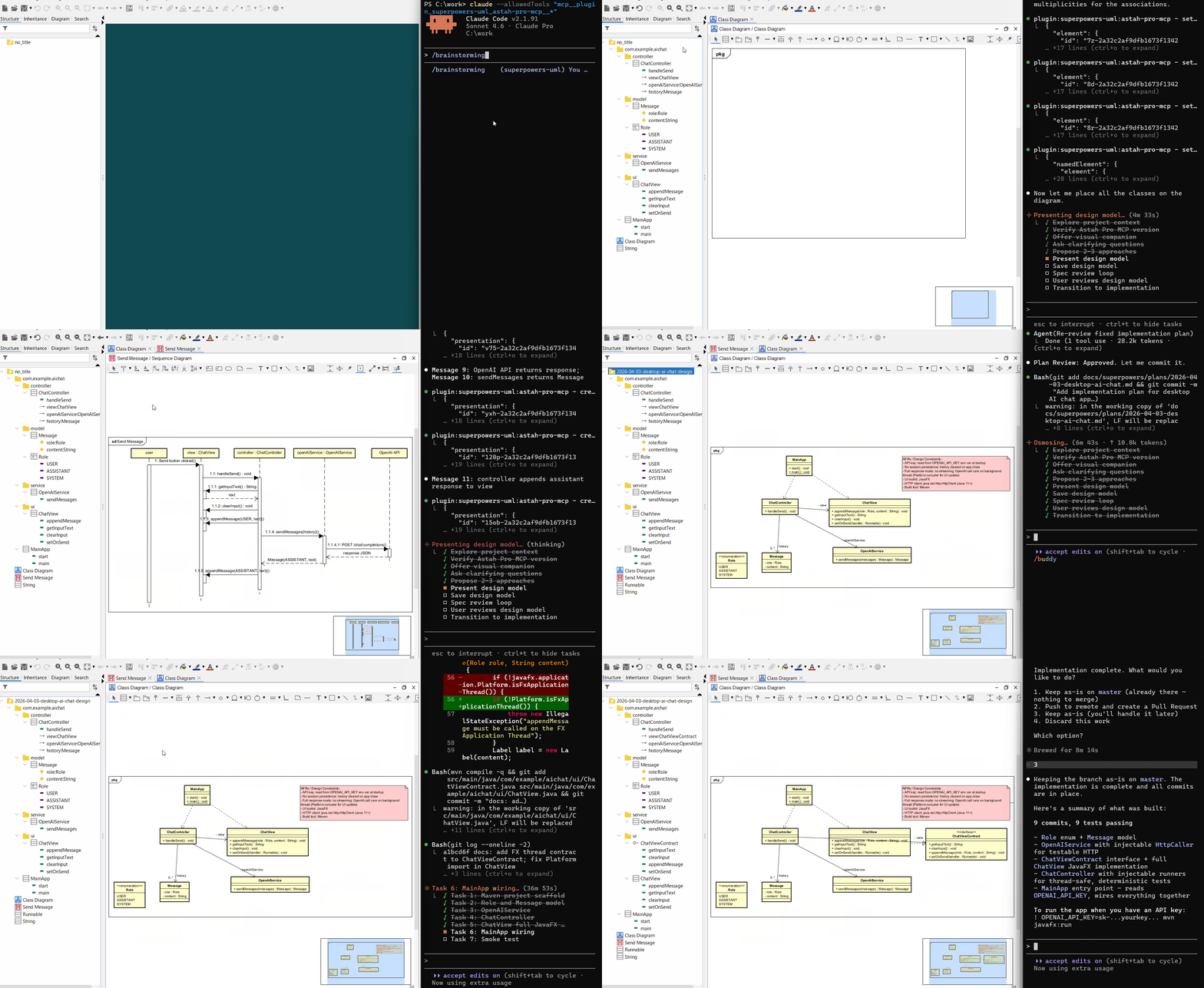
Created UML diagrams and an AI chat application:
 |
 |
 |
Requirements
- Claude Code
- Astah Pro v11.0 or later
- Astah Pro MCP v0.2.0 or later
Info: We have not measured the exact figures, but using Superpowers-UML in Claude Code with Sonnet 4.6 for about 40 minutes reaches the Pro plan's 5-hour token limit. If you want to use Superpowers-UML comfortably, the Max plan may be better. For the AI agent model, we recommend Sonnet or Opus in terms of the quality of the generated UML models and the ability to accurately follow the workflow.
Install
Install Claude Code
Install Astah Pro
Install the Astah Pro MCP plugin in Astah Pro
Install steps: Launch Astah Pro -> drag and drop the Astah Pro MCP JAR file onto the Astah Pro window -> restart Astah Pro.
Set up Claude Code to connect to the Astah Pro MCP server
Run this command for project scope in your project directory:
claude mcp add --transport http --scope project astah-pro-mcp http://127.0.0.1:8888/mcpOr run this command for user scope:
claude mcp add --transport http --scope user astah-pro-mcp http://127.0.0.1:8888/mcpSee here for information on the
--scopeflag.Install the Superpowers-UML plugin in Claude Code via the marketplace
/plugin marketplace add https://github.com/takaakit/superpowers-uml.git/plugin install superpowers-uml@superpowers-uml-dev/reload-plugins
Uninstall
Uninstall the Superpowers-UML plugin in Claude Code
/plugin uninstall superpowers-uml@superpowers-uml-dev/plugin marketplace remove superpowers-uml-devIf you want to remove it completely, manually delete the
~/.claude/plugins/cache/superpowers-umldirectory.
Update
Update the Superpowers-UML plugin in Claude Code
/plugin update superpowers-uml@superpowers-uml-dev
Usage
It is recommended to disable unused MCP tools to avoid reducing the AI agent's tool-calling accuracy.
Launch Astah Pro with the Astah Pro MCP plugin installed
Note: Launch Astah Pro before starting Claude Code, and it should remain open throughout the entire workflow.
Open a terminal and go to your project directory
Launch Claude Code with this command to temporarily allow the use of tools:
claude --allowedTools "mcp__plugin_superpowers-uml_astah-pro-mcp__*"A confirmation dialog will pop up on initial connection. Check it and click 'Connect'.
Start the workflow by running this command in Claude Code
/brainstormingTip 1: In Superpowers-UML, no specific design policy is prescribed; the choice of design approach is left to the AI agent. If you want to specify one, a possible approach may be to have the AI agent refer to a document that describes the design policy (e.g., DDD Reference) before starting the workflow, and then instruct the agent to design in accordance with that policy.
Tip 2: If you want to start in the middle of the workflow, send the prompt "List superpowers-uml commands" to display the available commands, then use the appropriate command.
Additional Info
- AI agents refer to information provided by OMG to understand UML.
- AI agents follow Agile Modeling guidelines when creating a UML model.
License
- The original Superpowers is copyright © Jesse Vincent and licensed under the MIT license.
- All modifications and new content added by this project are released under the CC0 1.0 Universal (Public Domain) license.
Contributing
If you have a proposed improvement, please open an issue. Note that any improvements submitted will be released under the CC0 license.
Links
Yorumlar (0)
Yorum birakmak icin giris yap.
Yorum birakSonuc bulunamadi