tapilot
Health Warn
- License — License: MIT
- Description — Repository has a description
- Active repo — Last push 0 days ago
- Low visibility — Only 6 GitHub stars
Code Pass
- Code scan — Scanned 12 files during light audit, no dangerous patterns found
Permissions Pass
- Permissions — No dangerous permissions requested
No AI report is available for this listing yet.
Control your Android phone with natural language. No computer required. Powered by Midscene, with Skills and a Codex plugin.

Tapilot
Pure-vision Android automation powered by Midscene.
English · 简体中文
Tell Tapilot what to do. Midscene reads the phone's screenshots, locates visible
targets and drives the next action. Tapilot runs the agent on your Android phone,
with a native chat interface and replayable execution reports.
Visual navigation uses screenshots rather than DOM selectors, resource IDs or
UI-tree locators. Android's AccessibilityService supplies screenshots, gestures,
system navigation and text input. Normal use requires no ADB, Shizuku or root.
This is an experimental project; model decisions and device behavior can fail.
Demo
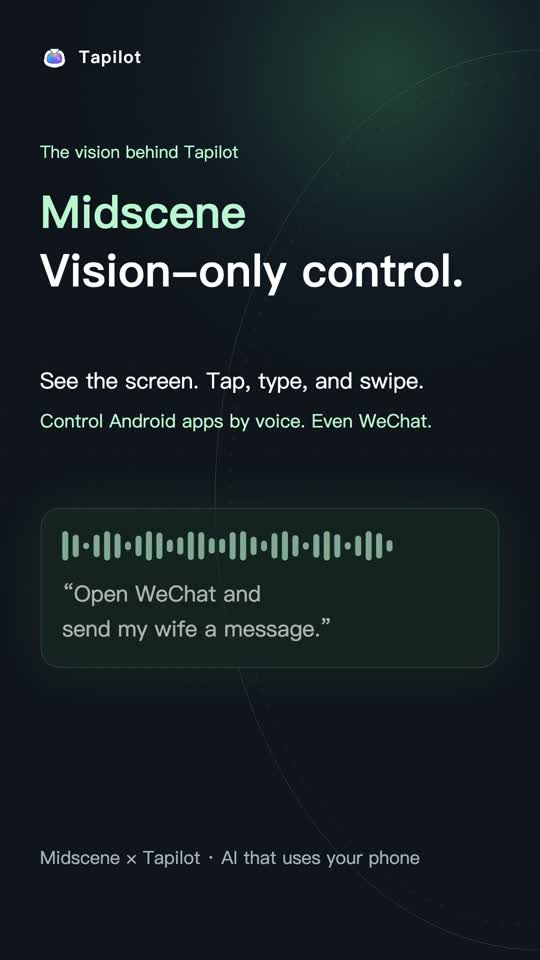
Watch the English demo · Approximately 78 seconds.
How the visual loop works
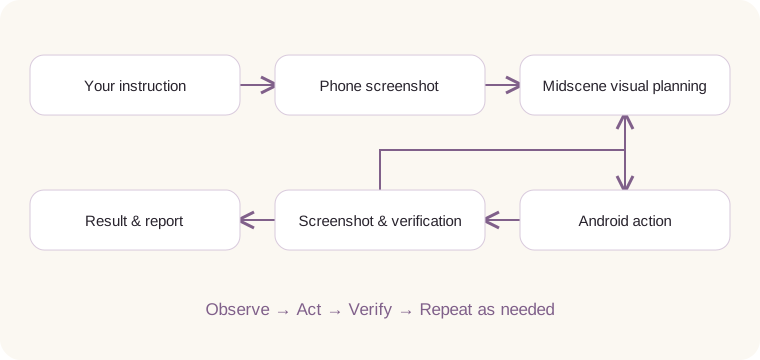
Midscene supplies the visual planning, locating, action execution and reports.
Tapilot supplies the native Android UI, device adapter, model transport, saved
conversations and task lifecycle. The embedded Node.js worker runs on the phone;
model inference uses the configured remote provider. On-device orchestration
does not mean offline inference.
Accessibility is the device execution layer, not the visual locator. Native text
editing can use the focused editable accessibility node, and app launch uses
Android's launcher catalogue. Custom-rendered inputs and protected screens can
therefore remain unsupported even when their pixels are visible.
What you can do
- Operate apps in natural language. Tap, swipe, scroll, type, launch apps and
move between them using Midscene's screenshot-based understanding. - Follow a task across apps. Keep plans and operation results, add a requirement
while running, or explicitly stop and retry. Interrupted tasks do not replay
automatically after an app restart. - Check results on screen. Each phone operation ends with a separate screenshot
check against the current requirements. Missing evidence remains unknown, and
verified progress is retained for later steps. - Inspect what happened. Open the Midscene HTML replay with screenshots,
model plans, actions and errors; export it when needed. - Talk to the phone. Optional Volcengine / Deepgram transcription and speech
playback, with separate provider credentials and an automatic-read setting. - Control it over Wi-Fi. The local Tapilot plugin
connects a paired computer to the phone over pinned TLS. Wireless use requires
an unlocked phone and exclusive control, without ADB or USB.
Try it
Requires an arm64 Android 11+ phone and a supported vision model. There is no
verified public release pipeline yet; build a development APK using the steps below.
- Install the APK, open Tapilot and enable Tapilot device control in Android
Accessibility settings. - In Tapilot settings, configure an HTTPS vision-model API, or choose the existing
ChatGPT (SIWC) connection option where available. Fill credentials on the phone. - Start with a simple visible task, such as opening Calculator and computing 12 × 8. Inspect
the actual screen and execution record before relying on the reply.
The composer offers automatic execution (YOLO), confirmation for critical
operations, or confirmation for every phone operation. New installations default
to YOLO. Choose the confirmation mode appropriate to your task before sending it.
Set up voice input (optional)
In Settings → Voice input, choose a provider. The app includes links to its
console and official setup guide:
- Volcengine: sign in and complete identity verification, enable Streaming
Speech Recognition 2.0 in Doubao Voice, then create a key in
API Key management.
Use a Doubao Voice API Key, not an Ark model key or legacy APP ID.
Official guide. - Deepgram: sign in to the console, select a
project, then open Settings → API Keys → Create a New API Key and grant
transcription access. Copy the secret when created; it is only shown once.
Official guide.
Paste the key into the app and select Check connection to save and verify it.
Build and develop
Use Node.js 24, pnpm 12.4.1, JDK 17, Android SDK Platform 35 and Build Tools 35.0.0.
Set JAVA_HOME and ANDROID_HOME. See CONTRIBUTING for the
complete host prerequisites and signing setup.
pnpm install --frozen-lockfile
npm ci --prefix plugins/tapilot
node plugins/tapilot/scripts/patch-midscene-zod.mjs plugins/tapilot
npm ci --prefix tests/midscene
node plugins/tapilot/scripts/patch-midscene-zod.mjs tests/midscene
pnpm build:android
pnpm check:quick
The local APK is app/build/outputs/apk/beta/app-beta.apk. It uses this machine's
development signing certificate, which cannot update a differently signed app.
Production signing is configured separately. ADB may be used by developers to
install and test; it is not required for Tapilot's runtime automation.
| Directory | Purpose |
|---|---|
app/ |
Native Android UI, credentials, device actions and lifecycle |
node-runtime/ |
Embedded Pi agent, Midscene runner and deployment dependencies |
packages/android-accessibility/ |
Midscene adapter for Android AccessibilityService |
plugins/tapilot/ |
Computer-side Wi-Fi control plugin |
tests/midscene/ |
23 E2E cases and opt-in device fault fixtures |
Run pnpm check for the full local test/build gate and pnpm check:security for
dependency audits. Device-backed E2E is separate; 23 authored cases do not imply
23 verified passes. See the E2E guide and evidence and
contribution guide.
Historical device runs do not establish a pass for the latest source.
Limits and data
- A model can misread a screen, infer an unobserved fact or give an incorrect
completion answer. The E2E ledger distinguishes repaired cases, remaining
failures and untested builds. Verify important outcomes from the actual screen. - Locked or protected screens, OEM background restrictions and inaccessible
custom text inputs can stop execution. Only arm64 devices are bundled today. - Screenshots and task content are sent to your selected model provider. Optional
ASR/TTS sends audio or reply text to the selected speech provider. Account tokens
and API keys stay in Android Keystore-backed storage; this does not make model
requests local or prevent provider-side processing. - Reports contain screenshots, prompts and model output. Review them before
sharing. The phone automatically prunes older reports to keep at most 20 files
and 200 MB, always retaining the newest report even if it exceeds that size.
Export reports you need to keep before running many more operations. Exported
reports and computer-plugin data have their own lifetimes.
Read PRIVACY.md for data handling and deletion, and
SECURITY.md for transport, credential storage and vulnerability reporting.
Built on
Midscene is the foundation of the
visual automation, Android adapter integration, Test Runner and execution reports.
Thanks also to Pi for the conversation/tool
loop, Node.js and Termux
for the Android runtime, Android Jetpack Compose
for the native UI, and the Model Context Protocol
for the computer plugin. See CREDITS.md for more upstream projects,
license identifiers and redistribution work still required before release.
License
MIT. Third-party components retain their own licenses.
See CREDITS.md and redistribution notes.
Reviews (0)
Sign in to leave a review.
Leave a reviewNo results found