core
Health Uyari
- License — License: Apache-2.0
- Description — Repository has a description
- Active repo — Last push 0 days ago
- Low visibility — Only 7 GitHub stars
Code Basarisiz
- rm -rf — Recursive force deletion command in docs/assets/src/render.sh
Permissions Gecti
- Permissions — No dangerous permissions requested
Bu listing icin henuz AI raporu yok.
Open-source 6.8ms local vision + 71Hz physical USB/BLE HID closed-loop control for stock iOS. Bring any $6 ESP32-S3. Native MCP server.

If a human eye can see it and a finger can tap it, your code can drive it.
Open-source 6.8ms local vision + 71Hz physical USB/BLE HID closed-loop control for stock iOS.
Bring any $6 ESP32-S3 board · No jailbreak · No Developer Mode · 100% local · Native MCP Server





Website · Web Flasher · Live Bench · Guides · Architecture · HID Protocol · Rust Host
Why Tapveo Core
Traditional iOS automation tools either run inside the OS debug stack (XCUITest / Developer Mode / Xcode) or rely on turn-based cloud vision loops (1–5s per step). Those approaches are great for white-box CI or exploratory browsing, but leave a gap when you need real-time closed-loop control on a stock, unjailbroken iPhone inside your own LAN.
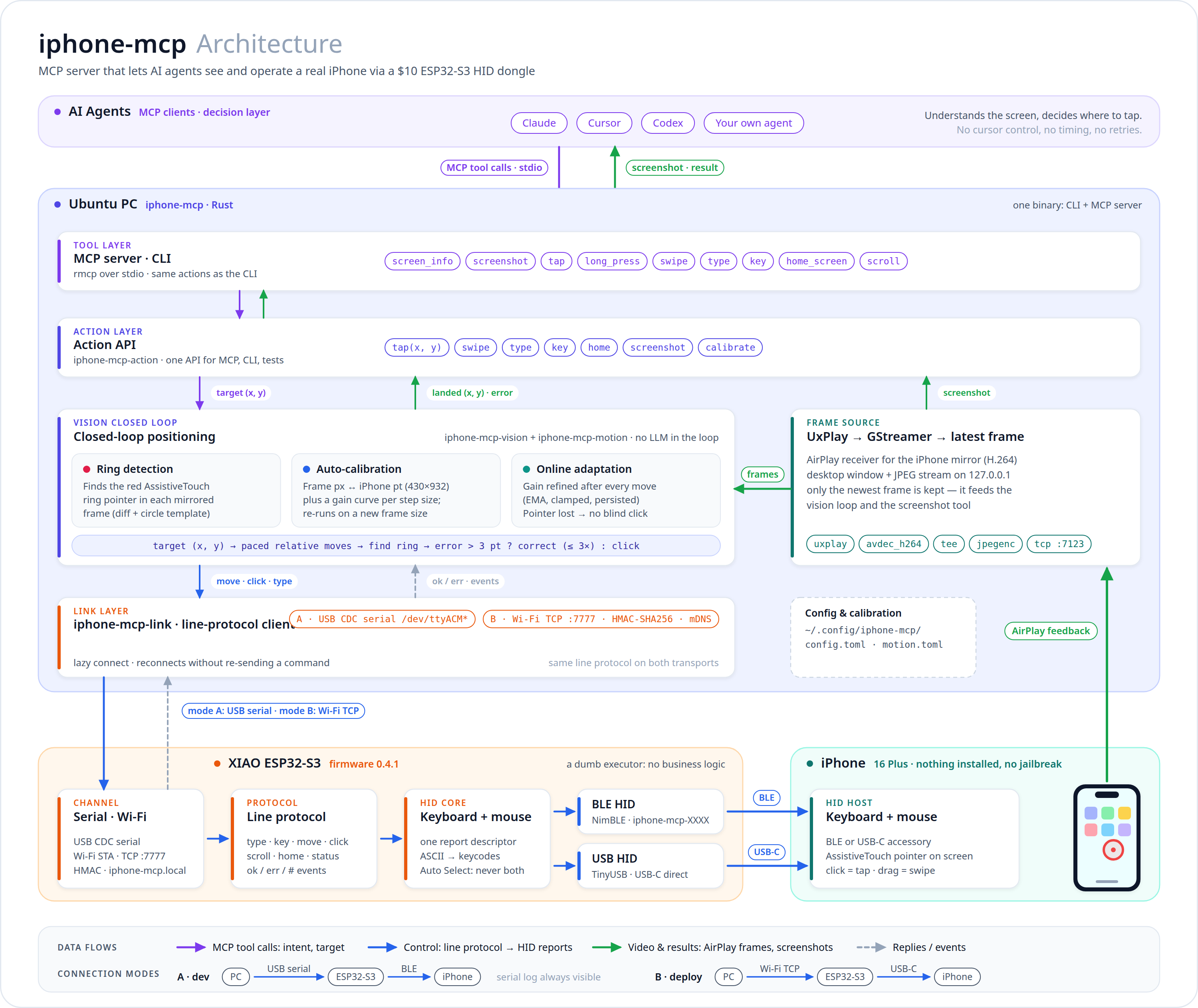
Tapveo Core operates completely outside the mobile OS:
- Eyes: Live AirPlay screen mirroring (
UxPlay-> local TCP stream) + fast local Rust computer vision (iphone-mcp-vision,6.8msframe loop) tracking the AssistiveTouch ring cursor. - Hands: An ESP32-S3 (
Seeed Studio XIAO ESP32-S3or compatible board) enumerating as a standard USB HID or Bluetooth LE HID mouse + keyboard — zero software footprint on the phone. - Brain / Interface: A Rust host CLI & MCP Server (
host/) exposing safe, foreground-verified actions to Claude, Cursor, Codex, or custom local vision loops.
What Can You Build?
- 01 · AI Agent Embodiment (MCP): Connect Claude Desktop, Claude Code, Codex, or Cursor to apps on your own iPhone that never shipped an API — Apple Health, smart-home controllers, personal trackers, or notes.
- 02 · Cross-OS Desktop Control (Linux & Windows): Control stock iPhones at low latency from Linux or Windows workstations — no macOS iPhone Mirroring or Xcode required.
- 03 · Programmable Desk QA & Hardware/IoT Lab: Pair spare iPhones with $6 ESP32-S3 boards to test real iOS permission dialogs, Settings toggles, Bluetooth/NFC peripherals, camera flows, and cross-app CI regressions.
- 04 · Real-Time Closed-Loop Control: Run 60fps continuous perception + 71Hz physical HID trajectories with
0LLM tokens in the inner loop.
One primitive, infinite local workflows:
observe() -> track(6.8ms) -> tap/drag(71Hz) -> verify()— programmable from Rust, Python, or MCP.
Copy-Paste MCP Configuration (Claude Desktop / Cursor / Codex)
After flashing your ESP32-S3 and building the Rust host (cargo build --release), add iphone-mcp to your MCP client configuration:
{
  "mcpServers": {
    "iphone-mcp": {
      "command": "/path/to/core/host/target/release/iphone-mcp",
      "args": ["mcp"],
      "env": {
        "RUST_LOG": "info"
      }
    }
  }
}
Once connected, your agent gets 12 native stdio MCP tools:status, screen_info, screenshot, tap, long_press, swipe, type, key, home_screen, pointer_home, scroll, and move_to.
See the full walkthrough: Give Claude, Codex, or Cursor Physical Hands on a Stock iPhone.
Real-Time Benchmarks & Latency Proof
1. Continuous 60fps Closed-Loop Control (Primary Stress Benchmark)
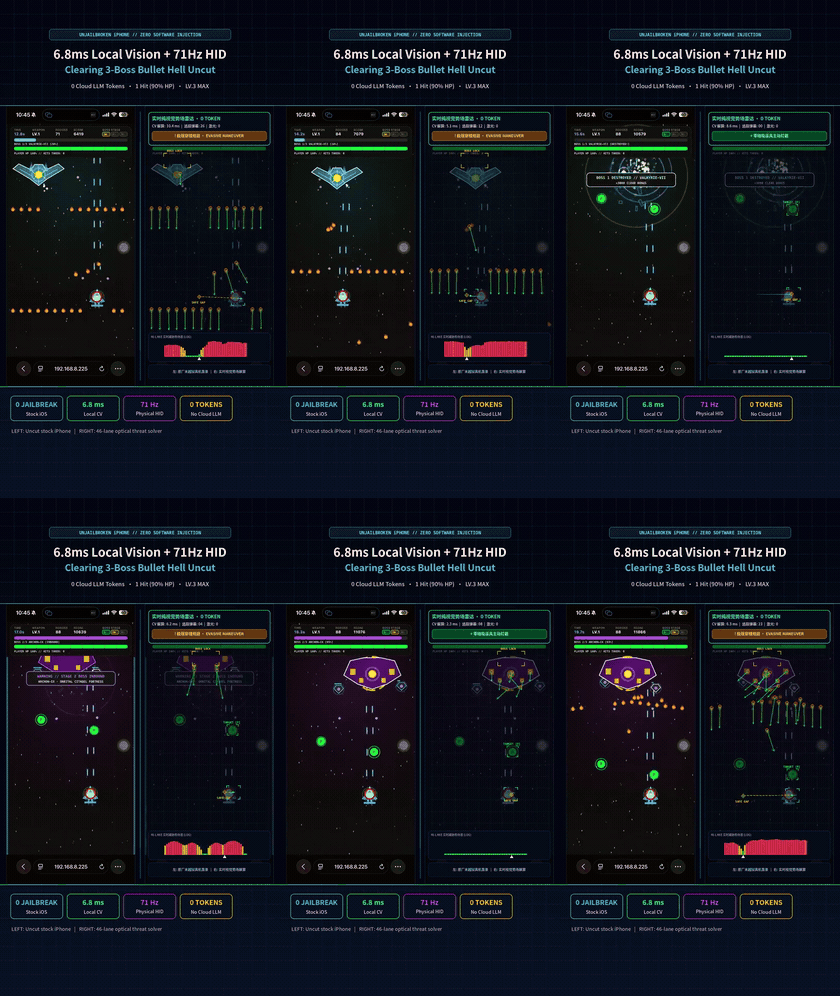
6.8ms local Rust CV · 71Hz wired USB HID · 0 LLM tokens · Uncut stock iPhone 16 Plus
Why use an arcade bullet-hell stress test? Unlike turn-based screenshot loops that stall 1–5s per step, continuous real-time dodge & tracking proves sustained 60fps optical perception paired with high-frequency physical HID actuation inside a tight closed loop.
2. Quantified Reflex & Targeting Benchmark (Reproducible)
| Stack / Baseline | First Reaction | Sustained Targeting | 12-Target Sprint | Precision | LLM Tokens (Loop) |
|---|---|---|---|---|---|
| Cloud VLM Agents | 1,000–5,000ms |
1,000–5,000ms / step |
N/A | Varies | High per turn |
| Human Baseline | ~200ms |
~250–350ms / target |
~3.0–4.5s |
Human | 0 |
| Tapveo Core ($6 ESP32-S3) | 89ms |
192ms / target |
2.31s |
~0.1–1.3pt |
0 |
- 3-Node Closed-Loop Breakdown Video: Watch
$6 Chip Beats Human Reflexes (89ms vs 200ms) on Stock iPhone - Interactive Browser Challenge: Think your fingers are faster? Benchmark yourself in 15s at
tapveo.com/bench
Key Capabilities
- Dual HID Transport (
usb&ble): Plug into the phone directly via USB-C for low-latency wired HID (up to71Hzreal-time keyboard/pointer loops), or pair over BLE while powered from your host. - Wi-Fi TCP + USB Serial Control: Control the ESP32-S3 over USB CDC serial or Wi-Fi TCP (
7777) with HMAC-SHA256 challenge-response authentication and mDNS discovery (iphone-mcp.local). - Closed-Loop Pointer Targeting: Rust optical ring-cursor detector + linearized gain calibration (
iphone-mcp calibrate) eliminates blind-cursor drift. - Fail-Closed Safety Harness:
- Foreground Guard (
--expect-ref/foreground_capture) refuses actions if the foreground screen drifts unexpectedly. - Emergency Hold (
iphone-mcp hold/release) immediately blocks all press, type, and scroll commands. - Declarative Skill Guard (
skills/demo/): page recognition + allow/deny zones before any live input.
- Foreground Guard (
Quickstart
1. Hardware BOM
- Any supported ESP32-S3 board (tested on Seeed Studio XIAO ESP32-S3, ~$6–$10, 8 MB PSRAM, USB-C — no proprietary hardware lock-in)
- Optional short USB-C to USB-C cable (for wired USB HID mode)
2. Flash the Firmware (firmware/)
Option A — Browser One-Click Flasher (20 seconds, no IDE required):
Open tapveo.com/flash in Chrome or Edge, plug in your ESP32-S3 via USB-C, and flash v0.4.1 directly from the browser — with built-in WebSerial ping/ver self-test and local Wi-Fi NVS configuration.
Option B — Build & flash from source (PlatformIO):
Requires PlatformIO Core and pyserial:
cd firmware && pio run -j 4
cd .. && ./scripts/flash_and_check.sh
For Wi-Fi TCP control, configure credentials over USB serial (never commit secrets.h):
python3 host/tools/hidctl.py
# Inside hid>:
# wifi ssid YOUR_24G_SSID
# wifi pass YOUR_WIFI_PASSWORD
# wifi token YOUR_RANDOM_HEX_TOKEN
# wifi on
See docs/wifi-link.md for full details.
3. Build & Verify the Rust Host (host/)
cd host
cargo test
cargo build --release
Lint the reference declarative skill (skills/demo/):
./target/release/iphone-mcp skill lint demo
4. Start Screen Mirroring & MCP Server
# Terminal 1: start live AirPlay mirror receiver (UxPlay -> tcp://127.0.0.1:7123)
./scripts/uxplay-live.sh start

# Terminal 2: start MCP server on stdio
./host/target/release/iphone-mcp --tcp 192.168.1.50:7777 --token-file ~/.config/iphone-mcp/token mcp
Repository Layout
| Path | Description |
|---|---|
firmware/ |
ESP32-S3 dual-route USB/BLE HID + Wi-Fi TCP/HMAC firmware (PlatformIO / Arduino-ESP32) |
host/crates/ |
Rust workspace: link, vision, motion, action, skills, and iphone-mcp CLI/MCP server |
host/tools/ |
Serial/TCP debug console (hidctl.py) and interactive pointer/latency probe (control_probe.html) |
skills/ |
Device profiles (_common/devices.toml) and read-only reference skill (demo/) |
scripts/ |
Firmware flasher, uxplay-live.sh AirPlay pipeline, and Wi-Fi diagnostics |
docs/ |
Architecture, wire protocol, Rust host, and Wi-Fi link documentation |
Intended Use & Non-Goals
Tapveo Core is designed for white-hat real-device QA testing, accessibility research, and personal human-in-the-loop workflows on iOS devices you own or are explicitly authorized to test.
Explicit Non-Goals:
- Bypassing CAPTCHAs, anti-bot challenges, or platform security controls
- Automated bulk account creation, spam, or unauthorized scraping
Disclaimer: Tapveo Core is an independent open-source project and is not affiliated with, endorsed by, or sponsored by Apple Inc. iPhone and iOS are trademarks of Apple Inc.
Learn more at tapveo.com · Contact [email protected] · Licensed under Apache-2.0
Yorumlar (0)
Yorum birakmak icin giris yap.
Yorum birakSonuc bulunamadi