lisa
Health Gecti
- License — License: MIT
- Description — Repository has a description
- Active repo — Last push 0 days ago
- Community trust — 12 GitHub stars
Code Basarisiz
- execSync — Synchronous shell command execution in src/cli/commands/doctor.ts
- exec() — Shell command execution in src/cli/commands/doctor.ts
Permissions Gecti
- Permissions — No dangerous permissions requested
Lisa is an autonomous project management agent that connects your issue tracker to an AI coding assistant. It takes a high-level goal, decomposes it into atomic tasks, implements the code changes in isolated git worktrees, and automatically opens pull requests.
Security Assessment
Overall Risk: High. The tool inherently makes external network requests to communicate with AI models (like Claude, Gemini, or GitHub Copilot) and various issue tracking services. The automated rule-based scan flagged shell command execution (`exec()` and `execSync`) within the `doctor.ts` file. While this is likely used to check local environment setups or test prerequisites, any execution of system-level commands warrants careful review. The tool handles source code and interacts heavily with external APIs, meaning it accesses highly sensitive data (proprietary codebases, API keys for issue trackers, and AI services). Fortunately, no hardcoded secrets or dangerous permissions were detected in the repository.
Quality Assessment
This is a relatively new project with a small but growing community, currently indicated by 12 GitHub stars. However, it is actively maintained, with repository activity as recent as today. It uses the standard and highly permissive MIT license, which is excellent for open-source adoption and integration. The codebase requires Node.js and is distributed via npm, indicating a standard development setup.
Verdict
Use with caution—while it is actively maintained and properly licensed, the autonomous nature of the tool, combined with system-level command execution and extensive API integrations, requires strict local environment oversight.
Autonomous issue resolver
Lisa
Plan issues. Run agents. Get PRs.




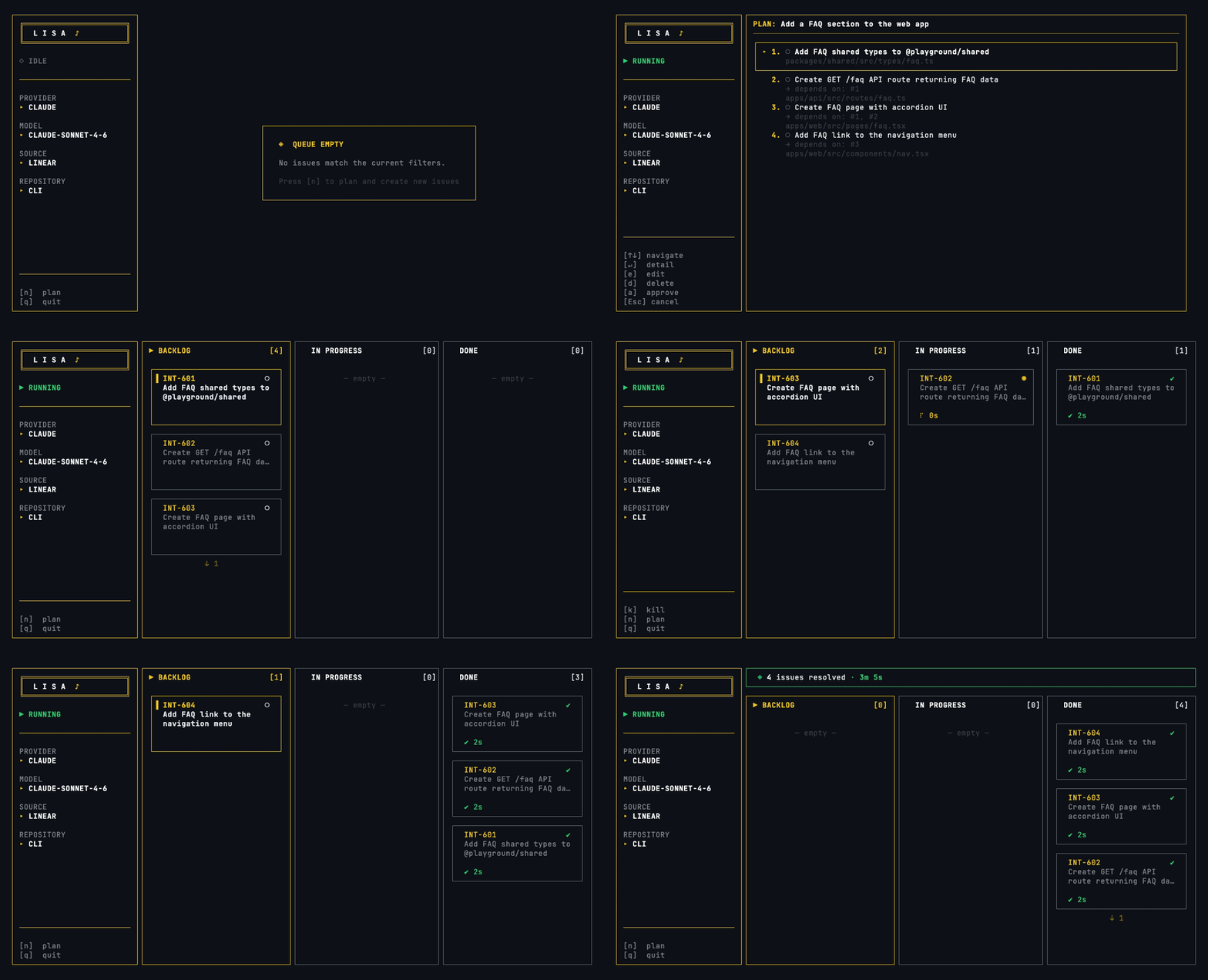
Lisa connects your issue tracker to an AI coding agent and delivers pull requests — autonomously. Describe a goal, Lisa decomposes it into issues, picks them up, implements each one, opens PRs, and updates your board. No babysitting.
Quickstart
npm install -g @tarcisiopgs/lisa
lisa init    # interactive setup wizard
lisa         # start the agent loop
How It Works
Plan → Create issues → Fetch → Implement → Push → Open PR → CI Monitor → Review Monitor → Update board → Next
Lisa starts and shows a Kanban board. If the queue is empty, press n to plan — describe a goal and the AI brainstorms with you (asking clarifying questions), presents its understanding for your confirmation, then decomposes the goal into atomic issues created directly in your tracker. You can review, edit, reorder, delete, or regenerate the plan with feedback before approving. Press r to start processing. Lisa picks the highest-priority labeled issue, moves it to "In Progress", sends a structured prompt to the AI agent, and monitors execution. The agent works in an isolated git worktree, implements the change, runs tests, and commits. Lisa pushes, opens a PR, moves the ticket to "In Review", and picks up the next one.
If something fails — pre-push hooks, quota limits, stuck processes — Lisa handles it: retries with error context, falls back to the next model, or kills and moves on.
Features
- 7 issue trackers — Linear, GitHub Issues, GitLab Issues, Jira, Trello, Plane, Shortcut
- 8 AI agents — Claude Code, Gemini CLI, GitHub Copilot CLI, Cursor Agent, Aider, Goose, OpenCode, Codex
- AI planning — describe a goal, the AI brainstorms with you, decomposes it into issues with dependencies, created in your tracker
- Language-aware — responds in the same language you write your goal in
- Spec compliance — LLM-verified acceptance criteria check before PR creation, with auto-retry
- Concurrent execution — process multiple issues in parallel, each in its own worktree
- Multi-repo — plans across repos, creates one PR per repo in the correct order
- Model fallback — chain models; transient errors (429, quota, timeout) auto-switch to the next
- Real-time TUI — Kanban board with live provider output, plan mode, merge PRs with
m - CI monitoring — polls CI after PR creation, re-invokes the agent to fix failures automatically
- Review monitoring — polls PR reviews after CI, auto-addresses reviewer feedback (GitHub)
- Reaction engine — configurable actions for CI failures, review changes, stuck agents
- Session state tracking — real-time visibility into agent pipeline phase (implementing → validating → CI → review)
- Smart activity detection — reads agent session logs to prevent false stuck kills during analysis phases
- Progress comments — posts real-time status updates on issues as Lisa works through stages
- Context enrichment — greps for issue-related files and surfaces them in the agent prompt
- PR reviewers & assignees — auto-request reviews and assign PRs via config;
selfkeyword resolves to the authenticated user - Self-healing — orphan recovery on startup, push failure retry, stuck process detection
- Guardrails — past failures are injected into future prompts to avoid repeating mistakes
- Lineage context — plan-decomposed issues get sibling task awareness, preventing duplicate work in concurrent mode
- Project context — auto-generates
.lisa/context.mdwith your stack, conventions, and constraints
Providers
| Provider | Key | Provider | Key |
|---|---|---|---|
| Claude Code | claude |
Cursor Agent | cursor |
| Gemini CLI | gemini |
Goose | goose |
| GitHub Copilot CLI | copilot |
Aider | aider |
| OpenCode | opencode |
OpenAI Codex | codex |
Configure models and provider-specific options:
provider: claude
provider_options:
  claude:
    models:
      - claude-sonnet-4-6   # primary
      - claude-opus-4-6     # fallback
    effort: high             # optional: low, medium, high, max
Goose requires a backend selection:
provider: goose
provider_options:
  goose:
    goose_provider: gemini-cli   # gemini-cli, anthropic, openai, google, ollama
    models:
      - gemini-2.5-pro
Commands
lisa                        # start the agent loop (Kanban TUI)
lisa --once                 # process a single issue
lisa --once --dry-run       # preview config without executing
lisa --watch                # poll for new issues after queue empties
lisa -c 3                   # process 3 issues in parallel
lisa --issue INT-42         # process a specific issue
lisa --limit 5              # stop after 5 issues
lisa plan "Add rate limiting" # brainstorm + decompose goal into issues via AI
lisa plan --issue EPIC-123  # decompose existing issue into sub-issues
lisa plan --continue        # resume interrupted plan
lisa plan --no-brainstorm "goal" # skip brainstorming, decompose directly
lisa plan --yes "goal"      # skip confirmations (CI/scripts)
lisa init                   # create .lisa/config.yaml interactively
lisa status                 # show session stats
lisa config --show           # print current config
lisa config --get loop.cooldown  # query a specific value
lisa config --set loop.cooldown=5  # set nested config values
lisa doctor                 # diagnose setup issues (config, provider, env, git)
lisa context refresh        # regenerate project context
lisa feedback --pr URL      # inject PR review feedback into guardrails
lisa sessions               # list active session states (supports --json)
Append --json to any command for machine-readable output. Use --verbose / --quiet to control log verbosity.
Configuration
Config lives in .lisa/config.yaml. Run lisa init to create it interactively.
provider: claude
source: linear
workflow: worktree       # "worktree" (isolated) or "branch" (in-place)

source_config:
  scope: Engineering
  project: Web App
  label: ready              # or array: [ready, urgent]
  remove_label: ready       # label to remove on completion (defaults to label)
  pick_from: Backlog
  in_progress: In Progress
  done: In Review

bell: true                  # terminal bell on issue completion

platform: cli            # "cli" (gh), "token" (GITHUB_TOKEN), "gitlab", "bitbucket"
base_branch: main
# PR creation (at least one)
GITHUB_TOKEN=""           # or use `gh` CLI
GITLAB_TOKEN=""           # for platform: gitlab
BITBUCKET_TOKEN=""        # for platform: bitbucket
BITBUCKET_USERNAME=""

# Issue tracker (set the one you use)
LINEAR_API_KEY=""
TRELLO_API_KEY="" && TRELLO_TOKEN=""
PLANE_API_TOKEN=""
SHORTCUT_API_TOKEN=""
GITLAB_TOKEN=""
GITHUB_TOKEN=""
JIRA_BASE_URL="" && JIRA_EMAIL="" && JIRA_API_TOKEN=""

# Self-hosted instances (optional)
PLANE_BASE_URL=""         # default: https://api.plane.so
GITLAB_BASE_URL=""        # default: https://gitlab.com
PLANE_WORKSPACE=""        # fallback for source_config.scope

# Goose backend (required when provider: goose)
GOOSE_PROVIDER=""         # gemini-cli, anthropic, openai, google, ollama
GOOSE_MODEL=""            # model name for the selected backend

# AI provider API keys (used by Aider / Goose / wizard auto-detection)
ANTHROPIC_API_KEY=""
OPENAI_API_KEY=""
GEMINI_API_KEY=""
GOOGLE_API_KEY=""         # for Goose with goose_provider: google
| Field | Linear | Trello | Plane | Shortcut | GitLab Issues | GitHub Issues | Jira |
|---|---|---|---|---|---|---|---|
scope |
Team name | Board name | Workspace slug | — | Project path | owner/repo |
Project key |
project |
Project name | — | Project ID | — | — | — | — |
pick_from |
Status name | List name | State name | Workflow state | — | — | Status name |
label |
Label | Label | Label | Label | Label | Label | Label |
remove_label |
Label | Label | Label | Label | — | — | — |
in_progress |
Status | Column | State | Workflow state | Label | Label | Status |
done |
Status | Column | State | Workflow state | Closes issue | Closes issue | Status |
repos:
  - name: my-api
    path: ./api
    base_branch: main
    match: "[API]"        # route issues by title prefix
  - name: my-app
    path: ./app
    base_branch: main
Lisa runs a planning phase, then executes steps sequentially — one worktree and one PR per repo.
Advanced optionsloop:
cooldown: 10 # seconds between issues
session_timeout: 0 # max seconds per provider run (0 = disabled)
output_stall_timeout: 120 # seconds without stdout before killing provider (0 = disabled)
overseer:
enabled: true
check_interval: 30 # seconds between git status checks
stuck_threshold: 300 # kill provider after this many seconds without changes
lifecycle:
mode: auto # "auto", "skip" (default), "validate-only"
timeout: 30
proof_of_work:
enabled: true
block_on_failure: true # skip PR when validation fails (default: false)
max_retries: 2 # retry agent on validation failure
commands:
- name: lint
run: pnpm run lint
- name: typecheck
run: pnpm run typecheck
- name: test
run: pnpm run test
validation:
require_acceptance_criteria: true
spec_compliance:
enabled: true
max_retries: 1 # retry agent to fix unmet criteria (default: 1)
block_on_failure: true # skip PR when criteria aren't met (default: false)
ci_monitor:
enabled: true
max_retries: 3 # fix attempts on CI failure
poll_interval: 30 # seconds between CI status checks
poll_timeout: 600 # max seconds to wait for CI
block_on_failure: false # revert issue if CI never passes
# Post-PR review monitoring (GitHub only)
review_monitor:
enabled: true
max_retries: 2 # fix attempts on review changes (default: 2)
poll_interval: 60 # seconds between review checks (default: 60)
poll_timeout: 3600 # max seconds to wait for review (default: 3600)
# Configurable reactions (override defaults)
reactions:
ci_failed:
action: reinvoke # reinvoke | notify | skip
max_retries: 3
escalate_after: 30m
changes_requested:
action: reinvoke
max_retries: 2
escalate_after: 1h
approved:
action: notify
agent_stuck:
action: notify
validation_failed:
action: reinvoke
max_retries: 2
progress_comments:
enabled: true # post real-time status on issues
pr:
reviewers: # auto-request reviews on every PR
- octocat
- hubot
assignees: # auto-assign PRs ("self" = authenticated user)
- self
hooks:
before_run: "./scripts/setup.sh"
after_run: "./scripts/cleanup.sh"
timeout: 60000 # ms, default 60000
Validation Pipeline
After the agent implements an issue, Lisa runs a multi-stage validation pipeline before creating a PR:
Agent implements → Proof of Work (lint/test/typecheck) → Spec Compliance → PR → CI Monitor → Review Monitor
Proof of Work runs configured shell commands (lint, typecheck, test). If any fail, the agent is re-invoked with the error output to fix the issue.
Spec Compliance extracts acceptance criteria from the issue description (- [ ] checklists) and asks the LLM to verify each one against the git diff. The result is a structured JSON with met/not-met verdicts and evidence. If criteria are unmet, the agent is re-invoked to fix them. Results are appended to the PR body as a Markdown table:
| Criterion | Status | Evidence |
|---|---|---|
| Returns 429 on rate limit | Met | Rate limit middleware returns 429 |
| Headers include X-RateLimit | Not Met | No header injection found |
Both stages support max_retries and block_on_failure — when blocking is enabled, the PR is skipped entirely on failure.
Writing Good Issues
Issue quality = PR quality. Lisa validates issues and skips vague ones (labeling them needs-spec).
Include: acceptance criteria (- [ ] checklists), relevant file paths, technical constraints, stack info.
Title: Add rate limiting to /api/users endpoint

Implement rate limiting on `/api/users` to prevent abuse.

Relevant files: src/routes/users.ts, src/middleware/auth.ts

Acceptance criteria:
- [ ] Requests exceeding 100/min per IP return HTTP 429
- [ ] Rate limit headers included in responses
- [ ] Rate limit state stored in Redis (use src/lib/redis.ts)
- [ ] Existing tests still pass
TUI
The real-time Kanban board shows issue progress, streams provider output, and detects PR merges. When the queue is empty, Lisa enters idle mode — plan new issues with n, then start processing with r.
Board view
| Key | Action | Key | Action |
|---|---|---|---|
← → |
Switch columns | k |
Kill current issue |
↑ ↓ |
Navigate cards | s |
Skip current issue |
↵ |
Open detail view | n |
Open plan mode |
p |
Pause / resume | r |
Run (from idle) |
m |
Merge PR (opens detail + triggers merge) | q |
Quit |
Detail view
| Key | Action |
|---|---|
↑ ↓ |
Scroll output log |
o |
Open PR in browser |
m |
Merge PR (warns if CI not passed) |
Esc |
Back to board |
Plan chat
| Key | Action |
|---|---|
↵ |
Send message |
↑ ↓ |
Scroll chat history |
Esc |
Cancel |
Plan review
| Key | Action |
|---|---|
↵ |
View issue detail |
e |
Edit issue in $EDITOR |
d |
Delete issue |
a |
Approve and create issues |
Esc |
Back |
In CLI mode, the plan wizard also offers Regenerate with feedback — describe what to change and the AI regenerates the entire plan incorporating your feedback.
License
Yorumlar (0)
Yorum birakmak icin giris yap.
Yorum birakSonuc bulunamadi