checkyouragent
Health Gecti
- License — License: NOASSERTION
- Description — Repository has a description
- Active repo — Last push 0 days ago
- Community trust — 17 GitHub stars
Code Gecti
- Code scan — Scanned 12 files during light audit, no dangerous patterns found
Permissions Gecti
- Permissions — No dangerous permissions requested
Bu listing icin henuz AI raporu yok.
An analytics tool to explore Claude code usage patterns, errors, and token costs
Check Your Agent
checkyouragent.dev · local, privacy-strict forensics for Claude Code spend.
Claude Code writes a complete record of every session to ~/.claude/projects.
Check Your Agent turns that record into answers: how much each session cost, how
much of that cost was context waste (re-read files, oversized tool results, late
compaction), and which sessions went off the rails. It runs entirely locally —
no accounts, no telemetry, no uploads — and never modifies the original logs.
Tools like ccusage tell you what you spent; Check Your Agent tells you why,
and what to change.
[!NOTE]
This is early-stage software. Cost, risk, discovery, and context-economics
results are estimates derived from local export data and the bundled pricing
tables. Use findings as leads to investigate, not as ground truth.
What It Does Today
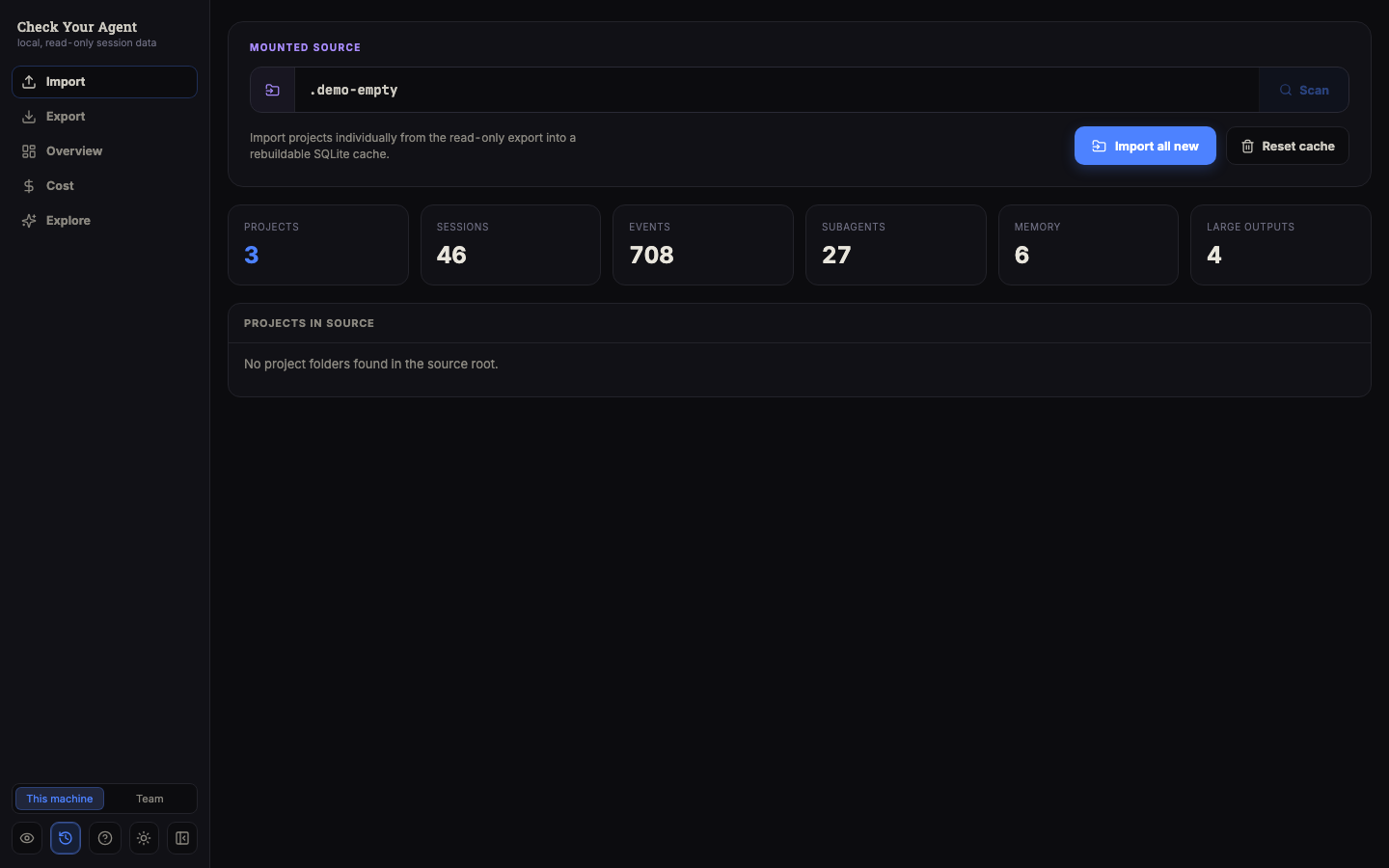
- Import Claude Code project folders from a configured export root into a
rebuildable SQLite index (sessions, events, messages, tool calls/results,
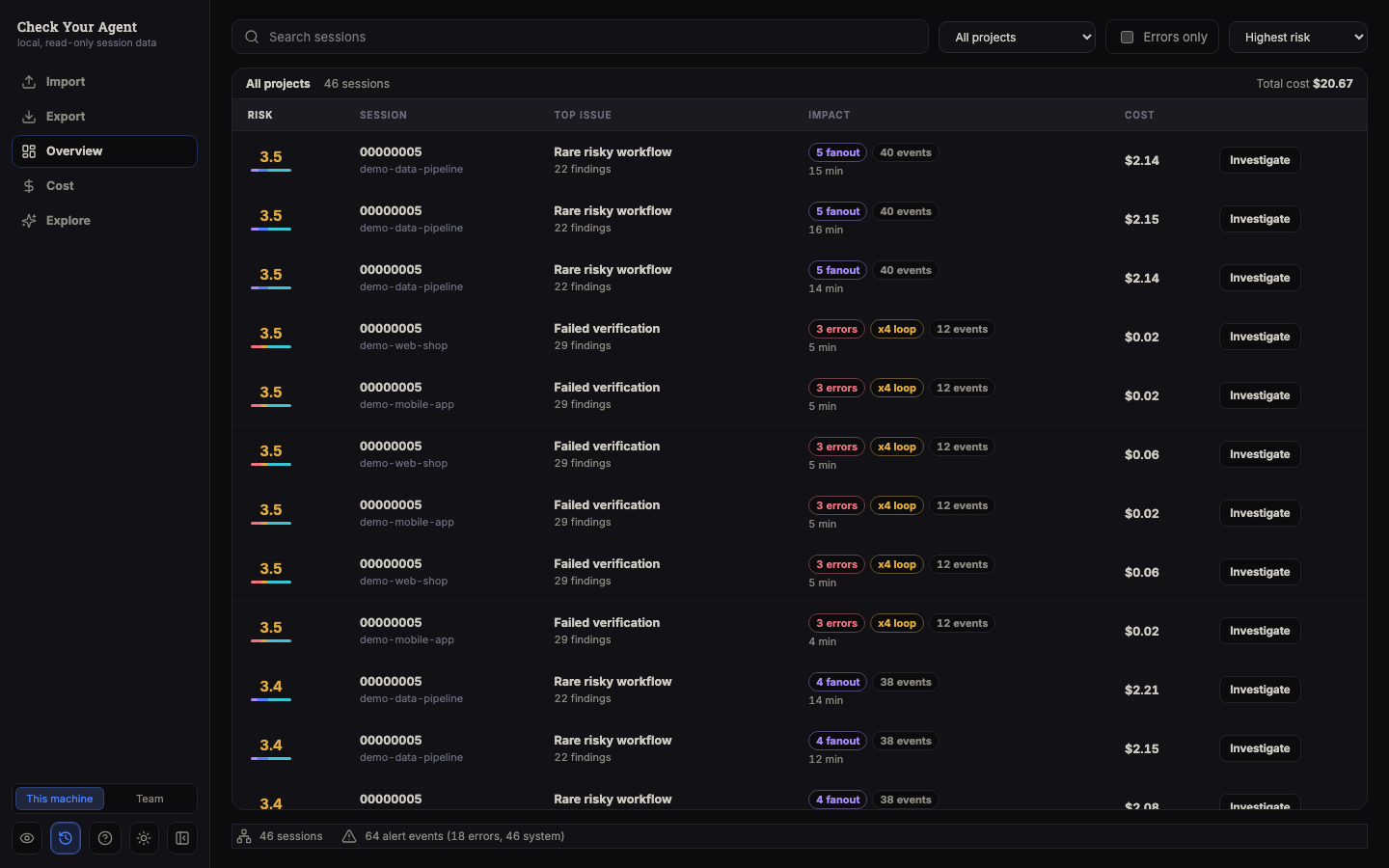
subagents, memory, risk findings, and derived sequence features). - Overview — a triage board that ranks sessions by risk, findings, errors,
loops, subagent fanout, event volume, and estimated cost, with search and
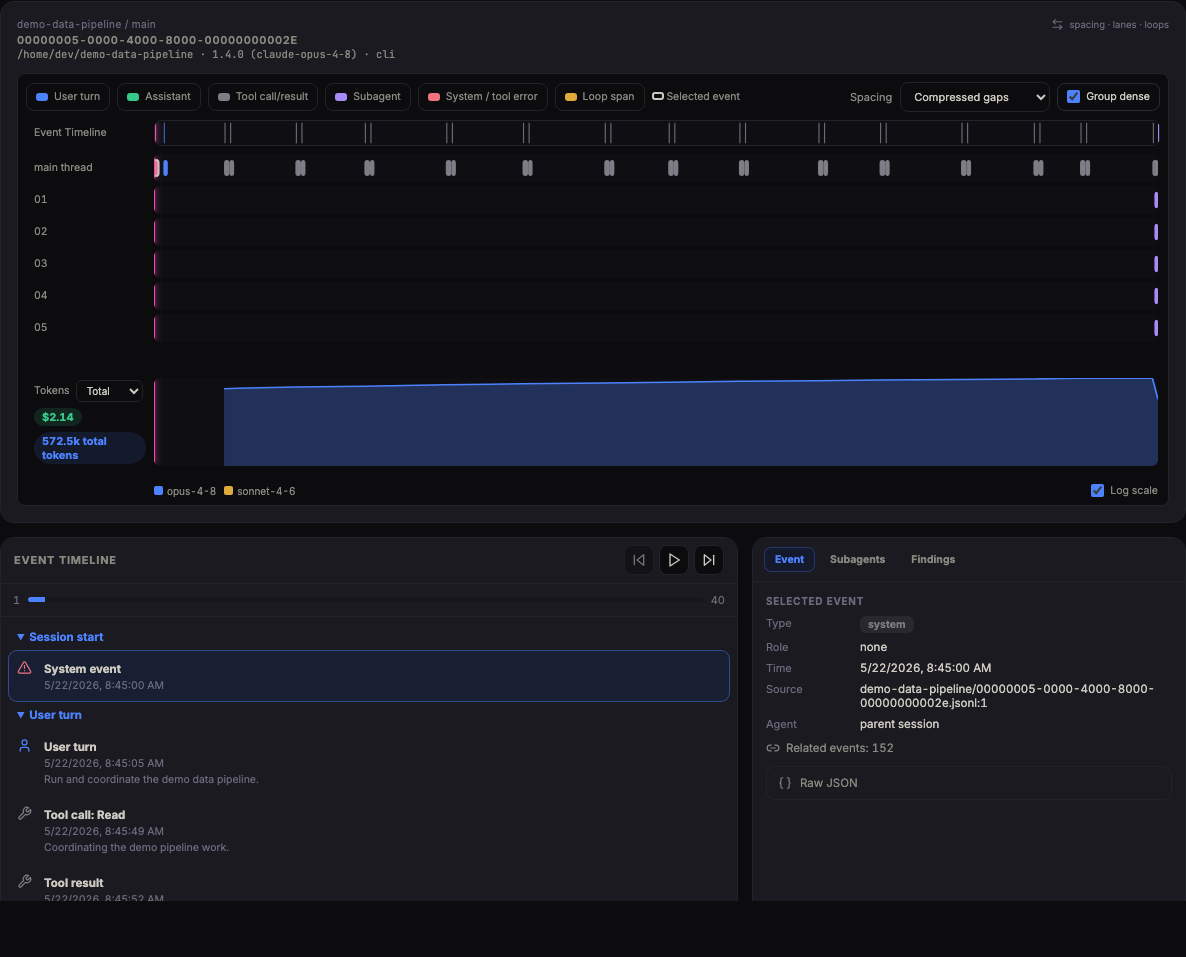
filters. - Session workspace — summary tiles, event timeline, trace lanes, loop
context, subagent heat, in-session search, findings, and a raw event
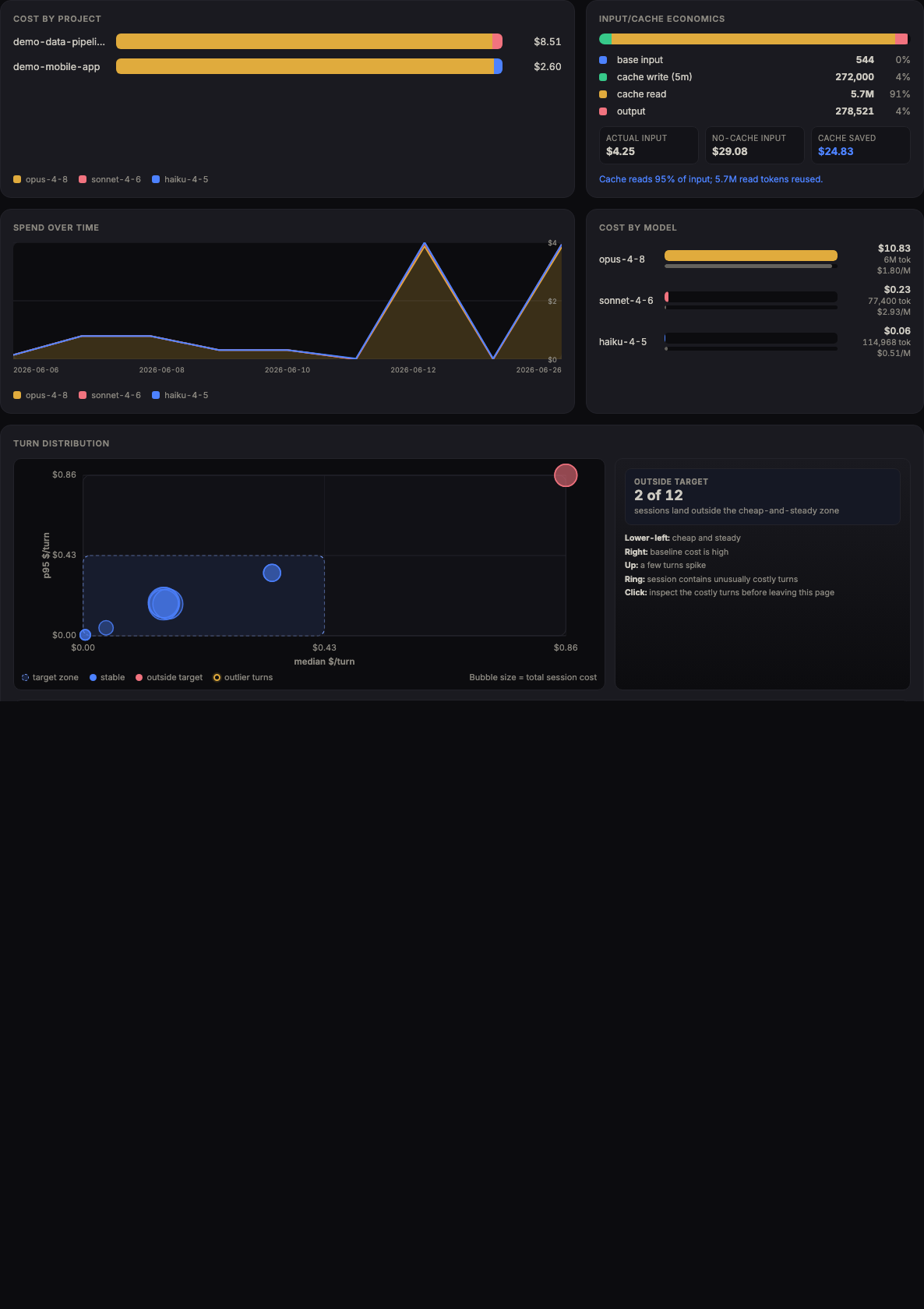
inspector. - Cost — spend by project, model, and token category; spend over time; spike
detection; turn distribution; and session outliers. Optional date-aware
historical pricing. - Explore — subgroup discovery, Context Economics (avoidable vs necessary
spend), a usage mindmap with JSON/PNG export, and a usage-drivers view of
what's behind your token footprint. - Team bundles — export content-free aggregates at structural or team
privacy levels, then import them for team Overview and Cost views. - Privacy mode blurs sensitive UI text for safe screenshots.
Everything runs locally. No accounts, no telemetry, no external calls; the raw
export is mounted read-only and never modified.
Try it with demo data
No Claude Code exports handy? On the Import screen, when the source has no
projects and the cache is empty, click Load demo data. This imports a
bundled, fully synthetic dataset (demo/claude-export/, generated bydemo/generate_demo_data.py) that exercises every screen — triage, cost
analytics, context economics, subgroup discovery, and the usage map. The demo
projects are named demo-*; Reset cache removes them like any other import.
Screenshots

Loading the built-in demo data, scanning the Overview triage board, and opening Context Economics. Full-resolution recording.
These screenshots are static repository assets. They are examples of implemented
screens, not live demos.
| Import | Overview | Session workspace |
|---|---|---|
 |
 |
 |
| Cost analytics | Subgroup discovery | Context economics |
|---|---|---|
 |
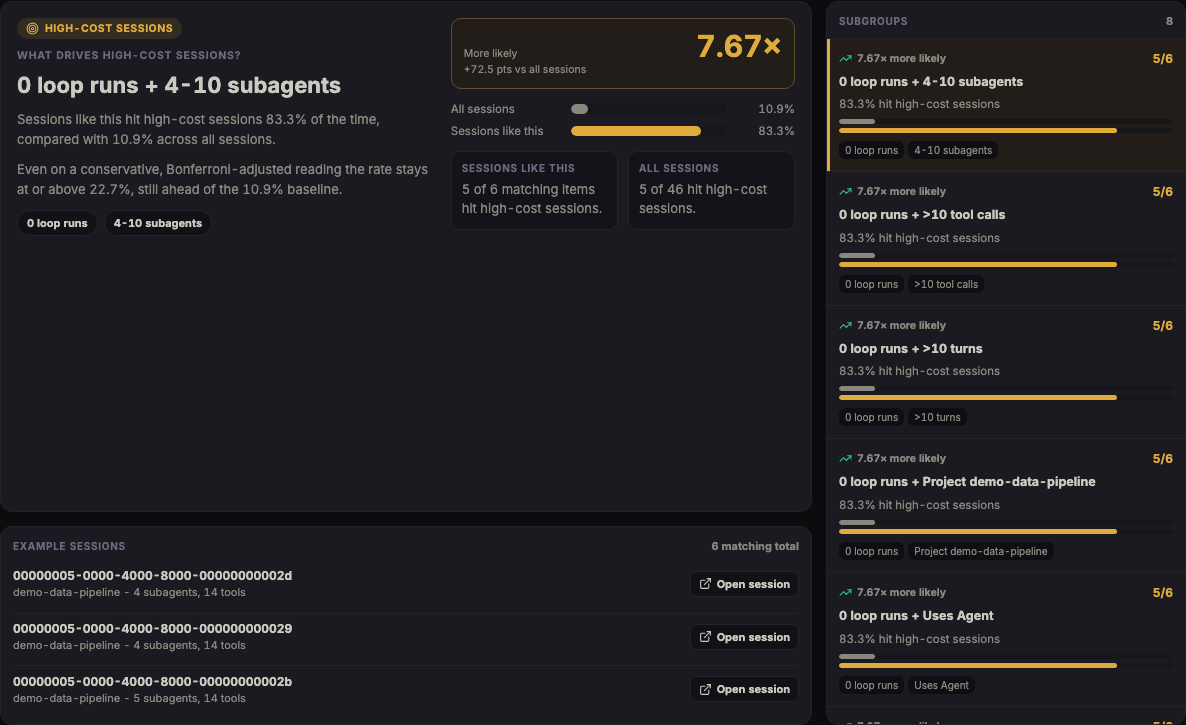 |
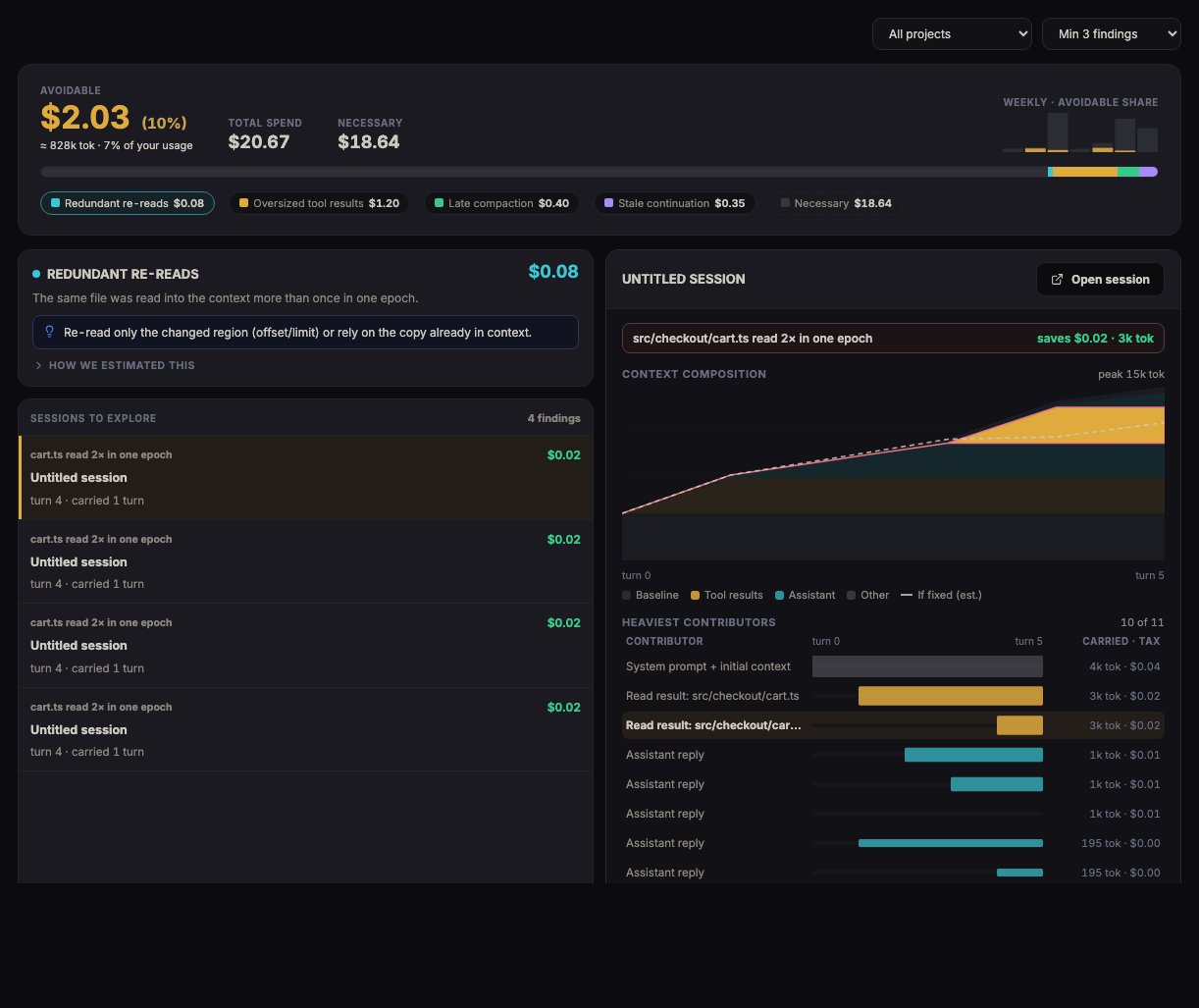 |
| Cost outlier drilldown |
|---|
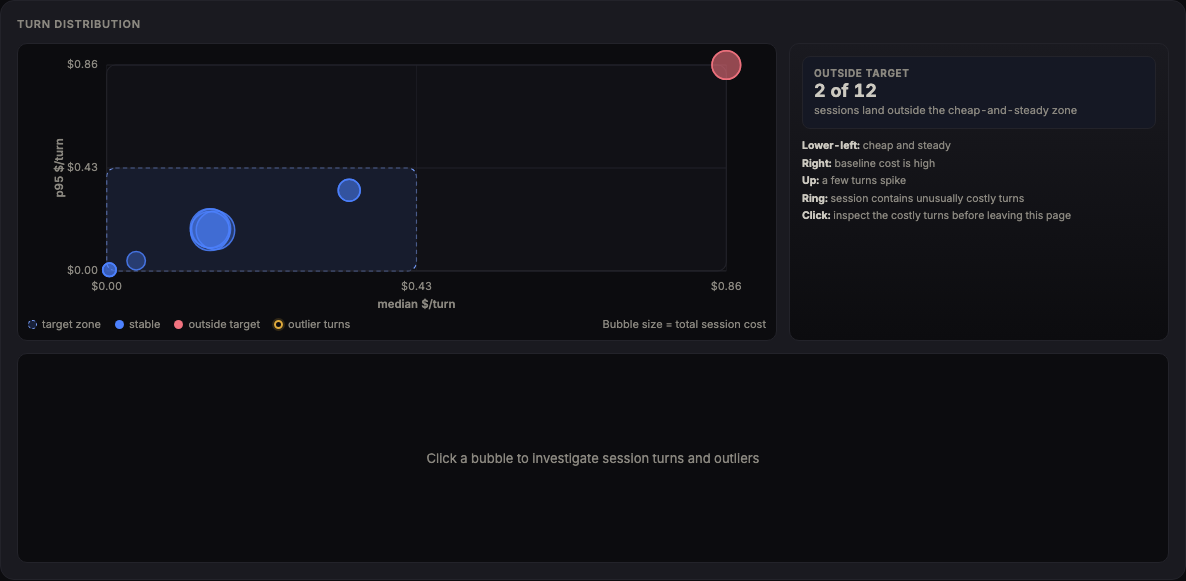 |
How it compares
Check Your Agent is not the only way to look at Claude Code usage. Here is an
honest map and when to reach for each.
| Tool | Best for | Trade-off vs Check Your Agent |
|---|---|---|
| ccusage | Instant daily/monthly/session cost totals from the CLI (npx ccusage) |
Descriptive accounting only — no per-session attribution or waste detection |
| token-dashboard | A local dashboard over the same logs, with rule-based suggestions | Shallower attribution: heuristic rules rather than calibrated context-carry accounting |
| Sniffly | Error-pattern stats across sessions | Unmaintained since 2025; focused on errors, not spend |
| Anthropic native analytics | Team adoption and per-user spend, zero setup | Needs a Team/Enterprise plan; aggregate reporting only, no per-session "why" |
| Check Your Agent | Deep local forensics: which sessions went wrong and how much spend was avoidable, with receipts | Heavier setup than a one-line CLI; Claude Code only (single agent) |
Short version: reach for ccusage when you want a number in ten seconds; reach
for Check Your Agent when you want to know why the number is what it is and
what to change.
What It Does Not Do Yet
- It does not ingest Codex, OpenAI, or other agent histories. Current ingestion
is Claude Code.claude/projectsJSONL only. - It is not a live Claude Code integration. It reads files from the configured
import root when you run an import. - It does not preserve a durable archive of sessions that disappear from the
source export. Re-importing a changed project rebuilds that project in the
SQLite cache from the current files on disk. Reset cachecalls/api/imports/reset, which drops the SQLite cache tables,
including imported team bundle records. Exported team bundle JSON files on
disk are not deleted by that endpoint.- Team aggregate views do not include per-session drilldowns because team
bundles intentionally omit raw session detail. - Sequence mining and anomaly detection are not available yet.
- Backend contribution APIs exist, but no contribution UI is exposed in the
app. - The backend is unauthenticated and intended for loopback-only use.
Input Data
The app expects a directory shaped like Claude Code's project export root:
Data/
  <encoded-project-folder>/
    <session-id>.jsonl
    <session-id>/
      subagents/
        agent-<id>.jsonl
        agent-<id>.meta.json
      tool-results/
        *.txt
    memory/
      *.md
Claude Code usually stores this under ~/.claude/projects. You can copy or
mount that directory as the app's import root. The importer reads JSONL,
subagent metadata, tool-results/*.txt, and memory/*.md. It records malformed
JSONL or metadata as import errors and continues where possible.
Output Data
Local runs write rebuildable state under the data directory:
.ccfr-data/
  ccfr.sqlite3
  settings.json
  contributions/
  team-bundles/
Docker uses a named volume for /app/data and mounts ./TeamBundles at/team-bundles. Team bundle export writes JSON files underCCFR_TEAM_BUNDLE_ROOT/exports.
Run With One Command
With uv (or pipx) installed, run the app without cloning or building anything:
uvx checkyouragent # or: pipx run checkyouragent
This serves the app on http://127.0.0.1:8000, opens your browser, and defaults
the import root to ~/.claude/projects. Useful flags:
checkyouragent serve --import-root /path/to/exports
checkyouragent serve --port 8123 --no-browser
checkyouragent serve --demo        # explore with the bundled synthetic dataset
The shorter cya alias is installed alongside checkyouragent and behaves
identically — e.g. cya serve --demo.
Building from source? Compile and bundle the UI first withpython scripts/build_webui.py; without it the command still serves the API
(and prints how to build the UI).
Run With Docker
Prerequisite: Docker with Compose.
Clone the repo, put or mount Claude Code project folders under Data/, then run:
git clone https://github.com/TarekAwwad/checkyouragent
cd checkyouragent
docker compose up --build
On Windows PowerShell the same commands work unchanged:
git clone https://github.com/TarekAwwad/checkyouragent
cd checkyouragent
docker compose up --build
Open:
Frontend: http://localhost:5173
Backend API docs: http://localhost:8000/docs
docker-compose.yml binds both services to host loopback. It mounts:
./Dataas/importsread-only../TeamBundlesas/team-bundles.pricing.csvandpricing/read-only for cost estimation.- A named
ccfr-datavolume for the backend SQLite cache and settings.
Use docker compose down --remove-orphans when you need to stop and remove old
containers. Do not use docker compose down -v unless you are comfortable
deleting the named backend data volume.
Run Locally
Prerequisites:
- Python 3.11 or newer.
uv.- Node.js 20 or newer.
Backend:
cd backend
uv run --extra dev pytest
uv run uvicorn ccfr.main:app --reload --host 127.0.0.1 --port 8000
On Windows PowerShell:
cd backend
uv run --extra dev pytest
uv run uvicorn ccfr.main:app --reload --host 127.0.0.1 --port 8000
Frontend:
cd frontend
npm ci
npm run dev
On Windows PowerShell:
cd frontend
npm ci
npm run dev
Open the Vite dev server:
http://localhost:5174
The local dev server proxies /api to http://localhost:8000, soVITE_API_BASE should usually be unset during local development. SetVITE_API_BASE only for a built frontend or a backend that is not reachable
through the dev proxy.
Default backend paths resolve from the repository root:
CCFR_IMPORT_ROOT=<repo>/Data
CCFR_DB_PATH=<repo>/.ccfr-data/ccfr.sqlite3
CCFR_TEAM_BUNDLE_ROOT=<repo>/.ccfr-data/team-bundles
CCFR_PRICING_PATH=<repo>/pricing.csv
CCFR_PRICING_DIR=<repo>/pricing
If you want to import from somewhere else, set CCFR_IMPORT_ROOT before
starting the backend. The UI path field can select the configured import root or
a descendant; backend requests outside CCFR_IMPORT_ROOT are rejected.
Main Workflow
- Copy or mount Claude Code project folders into
Data/, or setCCFR_IMPORT_ROOTto the export root. - Start the backend and frontend.
- Open Import and choose Import all new or import a single project.
- Use Overview to sort and filter sessions worth inspecting.
- Open a session to inspect the timeline, trace, subagents, findings, search
results, and raw event details. - Use Cost for spend and token analysis.
- Use Explore for subgroup discovery, context economics, or usage mindmap.
- For team aggregate views, export a team bundle from local scope, switch to
team scope, import one or more bundle JSON files, then open team Overview or
Cost.
Pricing Data
pricing.csv is the baseline price table in US dollars per million tokens. The
optional pricing/ directory can contain full snapshots namedpricing-YYYY-MM-DD.csv. A historical-pricing request overlays every snapshot
whose date is on or before a session's date; later snapshots win for the same
model. If a model has no price row, cost views show partial or unavailable
costs.
License
Check Your Agent is source-available under the
Business Source License 1.1. In short: it is free to use for personal
and internal purposes, including internal use inside a company. Offering it to
third parties as a hosted, managed, or embedded service requires a separate
commercial license. On the Change Date (2030-06-04) the code converts to
Apache-2.0. See LICENSE for the exact terms — the license text
governs.
Project Docs
Yorumlar (0)
Yorum birakmak icin giris yap.
Yorum birakSonuc bulunamadi