autopilot-jobhunt
Health Uyari
- License — License: MIT
- Description — Repository has a description
- Active repo — Last push 0 days ago
- Low visibility — Only 6 GitHub stars
Code Gecti
- Code scan — Scanned 12 files during light audit, no dangerous patterns found
Permissions Gecti
- Permissions — No dangerous permissions requested
Bu listing icin henuz AI raporu yok.
AI job agent: scans 130+ careers pages nightly, scores every role against your resume with an LLM (0–100), alerts you on Telegram, and drafts tailored cover letters + resumes. Free & open source.
autopilot-jobhunt
Your AI job agent. Finds, scores, and drafts applications — while you sleep.
Scans 130+ company careers pages nightly → scores every role against your resume with an LLM → sends you the top matches on Telegram → drafts a tailored resume + cover letter on demand.


📖 Full setup guide with Claude Code MCP integration → SETUP.md
⭐ Star this repo if it helps you land a job
This tool is free, open source, and runs entirely on your machine — no subscription, no credit card. The only "payment" I ask: if it surfaces a role you apply to (or land), drop a star. It takes one click, costs you nothing, and it's the single thing that pushes the project in front of the next person grinding through 130 careers pages by hand. ⭐ Star it here →
How it works
flowchart LR
    A["🌐 130+ Careers Pages"] -->|TinyFish API| B["Job Discovery"]
    B --> C["LLM Batch Scorer\n(0–100 fit score)"]
    C -->|score ≥ min| D["📱 Telegram Alert\nTop N matches"]
    C -->|on demand| E["✉️ Cover Letter\n+ Resume Bullets"]
    C --> F["📊 CSV Export"]
The scoring prompt uses your actual resume — not keywords. The LLM reads your full work history and the job description, then explains in one sentence why you fit or don't. No more guessing.
What a scan result looks like
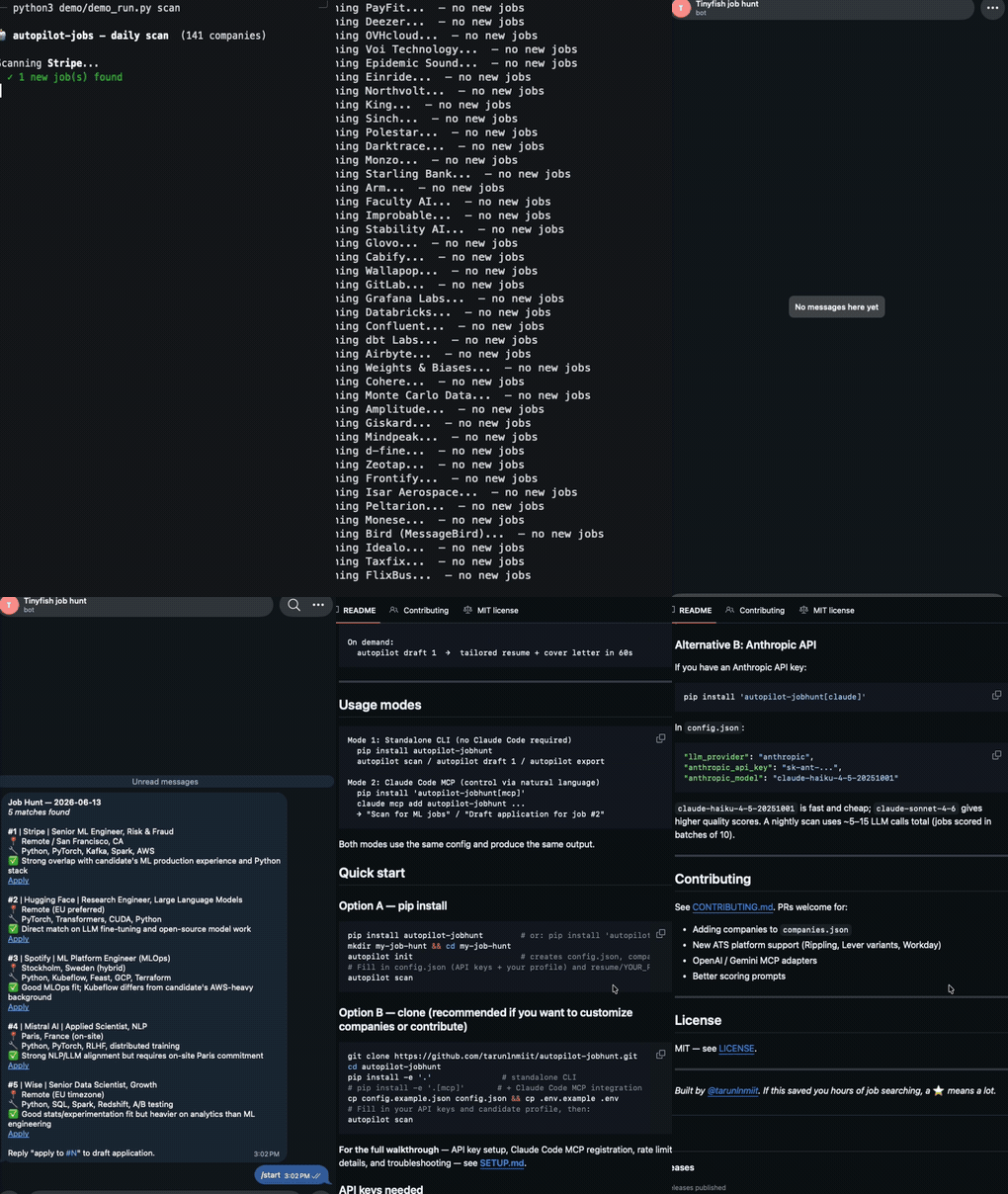
Scanning Mistral AI...
  3 new job URLs. Fetching details...
  Scoring jobs...
  Saved 2 jobs from Mistral AI

Scanning HuggingFace...
  5 new job URLs. Fetching details...
  Scoring jobs...
  Saved 3 jobs from HuggingFace

Scanning Stripe...
  No new jobs found
...
Scan complete.
Top 5 sent to Telegram.
What the Telegram notification looks like
Job Hunt — 06 Jun 2026
5 matches found

#1 | Mistral AI | Applied AI Engineer, ML Infrastructure
📍 Paris/London/Marseille, On-site
🔧 Python, LLMs, RAG, AWS, MLOps, DevOps
✅ Role combines applied AI + ML infrastructure in EU, aligns with MLOps/RAG expertise and relocation goal
Score: 85/100  →  https://jobs.lever.co/mistral/...

#2 | HuggingFace | Staff ML Engineer
📍 Remote (EU)
🔧 Python, PyTorch, Transformers, CUDA, MLOps
✅ Open-source ML role matches deep learning and distributed training background
Score: 80/100  →  https://apply.workable.com/huggingface/...

...

Reply "apply to #N" to draft a tailored application.
What it does
Every night at 2:30 AM:
  ┌─────────────────────────────────────────────────────────┐
  │  Scans careers pages  →  Scores with LLM  →  Notifies  │
  │       (130+ cos)           (0–100 fit)       (Telegram) │
  └─────────────────────────────────────────────────────────┘

On demand:
  autopilot draft 1  →  tailored resume + cover letter in 60s
Usage modes
Mode 1: Standalone CLI (no Claude Code required)
  pip install autopilot-jobhunt
  autopilot scan / autopilot draft 1 / autopilot export

Mode 2: Claude Code MCP (control via natural language)
  pip install 'autopilot-jobhunt[mcp]'
  claude mcp add autopilot-jobhunt ...
  → "Scan for ML jobs" / "Draft application for job #2"
Both modes use the same config and produce the same output.
Quick start
Option A — pip install
pip install autopilot-jobhunt        # or: pip install 'autopilot-jobhunt[mcp]' for Claude Code
mkdir my-job-hunt && cd my-job-hunt
autopilot init                       # creates config.json, companies.json, resume/, .env
# Fill in config.json (API keys + your profile) and resume/YOUR_RESUME.md, then:
autopilot scan
Option B — clone (recommended if you want to customize companies or contribute)
git clone https://github.com/tarunlnmiit/autopilot-jobhunt.git
cd autopilot-jobhunt
pip install -e '.'               # standalone CLI
# pip install -e '.[mcp]'       # + Claude Code MCP integration
cp config.example.json config.json && cp .env.example .env
# Fill in your API keys and candidate profile, then:
autopilot scan
For the full walkthrough — API key setup, Claude Code MCP registration, rate limit details, and troubleshooting — see SETUP.md.
API keys needed
| Service | Cost | Required | Where to get it |
|---|---|---|---|
| TinyFish | Free — no credit card | Always | agent.tinyfish.ai |
| OpenRouter | Free — 4-model fallback chain | Unless using Claude CLI / Anthropic | openrouter.ai |
| Telegram | Free | Optional | @BotFather on Telegram |
Claude Code / MCP integration
Use autopilot-jobhunt as an MCP server inside Claude Code (CLI) or Claude Desktop.
Step 1: Install with MCP support
git clone https://github.com/tarunlnmiit/autopilot-jobhunt.git
cd autopilot-jobhunt
pip install -e '.[mcp]'
Step 2: Register with Claude Code
Option A — one command:
claude mcp add autopilot-jobhunt \
  --env TINYFISH_API_KEY=your_key \
  --env OPENROUTER_API_KEY=your_key \
  --env TELEGRAM_TOKEN=your_token \
  --env TELEGRAM_CHAT_ID=your_chat_id \
  -- python -m job_hunt.mcp_server
Option B — edit ~/.claude.json manually:
{
  "mcpServers": {
    "autopilot-jobhunt": {
      "command": "python",
      "args": ["-m", "job_hunt.mcp_server"],
      "cwd": "/absolute/path/to/autopilot-jobhunt",
      "env": {
        "TINYFISH_API_KEY": "your_key",
        "OPENROUTER_API_KEY": "your_key",
        "TELEGRAM_TOKEN": "your_token",
        "TELEGRAM_CHAT_ID": "your_chat_id"
      }
    }
  }
}
Note:
cwdmust point to the cloned repo — the server readsconfig.jsonandcompanies.jsonfrom there.
Step 3: Use it
In any Claude Code session:
"Scan for ML jobs"
"Draft an application for job #2"
"Export jobs from the last 7 days with score above 70"
Claude Desktop
Same JSON block — add it under mcpServers in Claude Desktop → Settings → Developer.
Customize your target companies
Edit companies.json. Each entry needs:
{
  "name": "Stripe",
  "careers_url": "https://stripe.com/jobs",
  "search_domain": "stripe.com",
  "location": "Remote / San Francisco, CA",
  "region": "Remote"
}
The repo ships with 130+ pre-configured EU, NZ, and remote-friendly tech companies. Add or remove as you like.
How scoring works
The LLM reads your full resume + the full job description and assigns a score 0–100:
| Score | Meaning |
|---|---|
| 80–100 | Near-perfect fit — apply immediately |
| 60–79 | Good fit — worth applying |
| 40–59 | Partial fit — apply if pipeline is thin |
| < 40 | Poor fit — skipped |
Set min_score in config to filter. Default: 60.
Project structure
autopilot-jobhunt/
├── job_hunt/
│   ├── main.py          # CLI entry point
│   ├── scanner.py       # Job discovery + LLM scoring
│   ├── drafter.py       # Resume tailoring + cover letter
│   ├── notifier.py      # Telegram notifications
│   ├── llm_utils.py     # OpenRouter wrapper with fallback
│   ├── tools.py         # Protocol-agnostic tool layer
│   └── mcp_server.py    # MCP server (Claude/AI assistant integration)
├── demo/                # Demo scripts for recording GIF
├── resume/              # Put your resume here (gitignored)
├── state/               # Scan state (gitignored)
├── output/              # Generated applications (gitignored)
├── companies.json       # 130+ target companies
├── config.example.json  # Config template (copy to config.json — gitignored)
└── config.json          # Your config (gitignored — never committed)
LLM options
Default: OpenRouter (free)
Uses a 4-model fallback chain — all free, no credit card needed:
| Model | Role |
|---|---|
meta-llama/llama-3.3-70b-instruct:free |
Primary — best quality |
nvidia/nemotron-3-super-120b-a12b:free |
Fallback 1 — 120B |
google/gemma-4-31b-it:free |
Fallback 2 |
qwen/qwen3-coder:free |
Fallback 3 |
If one model hits its daily free-tier quota, the tool automatically tries the next. Zero LLM cost by default.
Alternative A: Claude Code CLI (no API key needed)
If you have Claude Code installed and authenticated, you can use it as the LLM backend — no separate API key required:
In config.json:
"llm_provider": "claude_cli"
Or via environment variable: LLM_PROVIDER=claude_cli autopilot scan
Optionally set a model: "claude_cli_model": "sonnet" (or "opus", "haiku", empty = Claude's default).
Note: Requires the
claudebinary in your PATH. Verify withclaude --print "hi"first.
The MCP server and cron jobs must run in an environment where yourclaudeauth session is active.Rate-limit note: Each call loads your global Claude Code context (~25–30k tokens). A nightly scan
(5–15 LLM calls) burns significantly against your subscription's 7-day rate limit. Prefer OpenRouter
for nightly automation; use Claude CLI for occasional on-demand drafts.
Alternative B: Anthropic API
If you have an Anthropic API key:
pip install 'autopilot-jobhunt[claude]'
In config.json:
"llm_provider": "anthropic",
"anthropic_api_key": "sk-ant-...",
"anthropic_model": "claude-haiku-4-5-20251001"
claude-haiku-4-5-20251001 is fast and cheap; claude-sonnet-4-6 gives higher quality scores. A nightly scan uses ~5–15 LLM calls total (jobs scored in batches of 10).
Contributing
See CONTRIBUTING.md. PRs welcome for:
- Adding companies to
companies.json - New ATS platform support (Rippling, Lever variants, Workday)
- OpenAI / Gemini MCP adapters
- Better scoring prompts
License
MIT — see LICENSE.
Built by @tarunlnmiit. If this saved you hours of job searching, a ⭐ means a lot.
Yorumlar (0)
Yorum birakmak icin giris yap.
Yorum birakSonuc bulunamadi