SkillsManager
Health Warn
- No license — Repository has no license file
- Description — Repository has a description
- Active repo — Last push 0 days ago
- Community trust — 128 GitHub stars
Code Fail
- rm -rf — Recursive force deletion command in scripts/build-app.sh
- rm -rf — Recursive force deletion command in scripts/notarize-app.sh
Permissions Pass
- Permissions — No dangerous permissions requested
No AI report is available for this listing yet.
A macOS application for discovering, browsing, and installing skills for AI coding assistants. Manage skills for Claude Code and Codex from GitHub repositories or your local filesystem.
Skills Manager



A macOS application for discovering, browsing, installing, and tagging skills for AI coding assistants. Manage skills for Claude Code and Codex from GitHub repositories or your local filesystem.
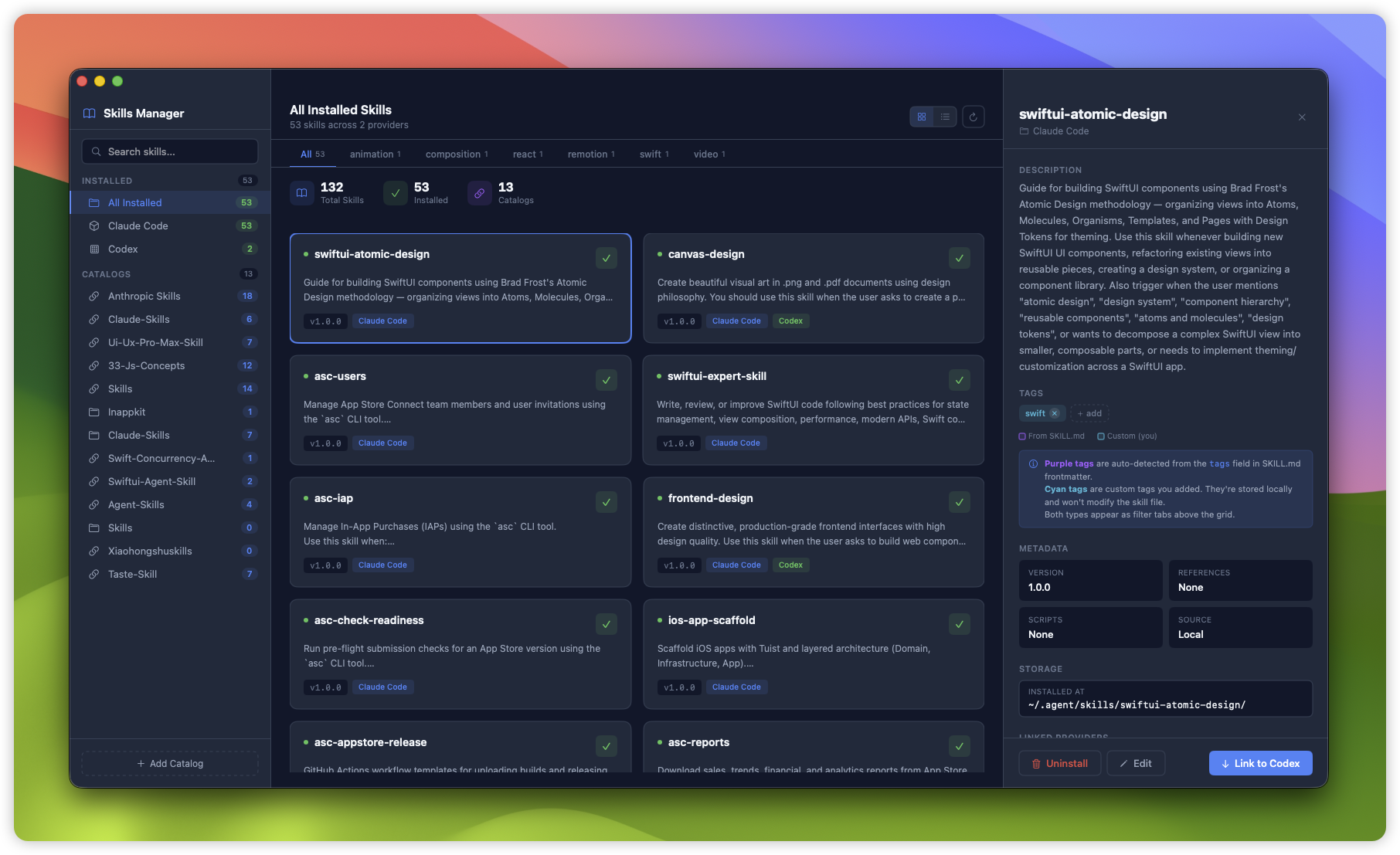
Browse, install, and tag skills for Claude Code and Codex
Features
- Browse Remote Skills - Discover skills from GitHub repositories like anthropics/skills
- Local Directory Support - Add skills from any local directory via
file://URLs - View Installed Skills - Filter by provider (Claude Code, Codex, or all)
- Multi-Repository Support - Add and manage multiple GitHub skill catalogs
- Install to Multiple Providers - Install skills to Claude Code and/or Codex
- Global Custom Tags - Create tags to organize skills across all catalogs
- Tag-Based Filtering - Filter skills by SKILL.md tags or your custom tags
- Markdown Rendering - View skill documentation with full markdown support
- Split-Pane Editor - Edit local skills with live markdown preview
- Uninstall / Unlink - Unlink from a provider or fully uninstall
- Search - Find skills by name, description, or tags
- Grid / List View - Toggle between card grid and compact list views
Providers
| Provider | Skills Path | Description |
|---|---|---|
| Claude Code | ~/.claude/skills |
Anthropic's AI coding assistant |
| Codex | ~/.codex/skills/public |
OpenAI's code generation tool |
Requirements
- macOS 15+
- Swift 6.0+
Installation
Download (Recommended)
Download the latest release from GitHub Releases.
Build from Source
git clone https://github.com/tddworks/SkillsManager.git
cd SkillsManager
swift build -c release
Usage
Launch the app to browse available skills. The three-column layout shows:
- Sidebar - Navigate between installed skills, provider filters, and remote catalogs
- Main Content - Browse skills in grid or list view with tag-based filtering
- Detail Panel - View skill info, manage tags, install/uninstall
Adding Catalogs
- Click "+ Add Catalog" in the sidebar footer
- Choose GitHub Repository or Local Directory
- Enter a URL (e.g.,
https://github.com/anthropics/skills) or browse for a folder - Click "Add Catalog"
Tagging Skills
- Select a skill to open the detail panel
- In the Tags section, click "+ add" to create a new tag
- Tags are global labels - once created, they appear in the filter bar across all views
- Purple tags come from SKILL.md frontmatter; cyan tags are your custom tags
Development
Command Line (Swift Package Manager)
# Build the project
swift build

# Run all tests
swift test

# Run the app
swift run SkillsManager
Xcode (with SwiftUI Previews)
The project uses Tuist to generate Xcode projects with SwiftUI preview support.
# Install Tuist (if not installed)
brew install tuist

# Generate Xcode project
tuist generate

# Open in Xcode
open SkillsManager.xcworkspace

# Run tests via Tuist
tuist test
Architecture
Full documentation: docs/ARCHITECTURE.md
Skills Manager uses a layered architecture with rich domain models and SwiftUI Atomic Design:
SkillLibrary (@Observable, coordinator)
├── localCatalog: SkillsCatalog     ← Installed skills (claude + codex)
├── remoteCatalogs: [SkillsCatalog] ← GitHub repos or local directories
│   └── skills: [Skill]             ← Each catalog OWNS its skills
└── skillTags: SkillTags            ← Global tag management aggregate
| Layer | Location | Purpose |
|---|---|---|
| Domain | Sources/Domain/ |
Rich models (Skill, SkillsCatalog, SkillTags), protocols |
| Infrastructure | Sources/Infrastructure/ |
Repositories, parsers, persistence |
| App | Sources/App/ |
SwiftUI views (Atomic Design), coordinator, design tokens |
Key Design Decisions
- Rich Domain Models - Behavior encapsulated in models (not anemic data)
- Domain Aggregates - SkillTags is an @Observable aggregate managing the tags feature
- Tell-Don't-Ask - Objects manage their own state; callers tell objects what to do
- Protocol-Based DI -
@Mockableprotocols for testability - Chicago School TDD - Test state changes, not interactions
- No ViewModel Layer - Views consume domain models directly
- SwiftUI Atomic Design - Atoms, Molecules, Organisms, Pages
- Design Tokens - DS enum mirrors prototype CSS for consistent dark theme
Project Structure
SkillsManager/
├── Sources/
│   ├── Domain/
│   │   ├── Models/          # Skill, SkillsCatalog, SkillTags, Provider, SkillEditor
│   │   └── Protocols/       # SkillRepository, UserTagRepository, SkillInstaller (@Mockable)
│   ├── Infrastructure/
│   │   ├── Repositories/    # MergedSkillRepository
│   │   ├── Local/           # LocalSkillRepository, LocalDirectorySkillRepository
│   │   ├── Git/             # ClonedRepoSkillRepository
│   │   ├── Parser/          # SkillParser (YAML frontmatter)
│   │   ├── Installer/       # FileSystemSkillInstaller
│   │   └── UserDefaultsUserTagRepository.swift
│   └── App/
│       ├── SkillLibrary.swift   # @Observable coordinator
│       ├── Theme/               # DesignTokens (DS enum)
│       └── Views/
│           ├── ContentView.swift     # 3-column root layout
│           ├── Sidebar/              # SidebarView, SkillCardView, SkillRowView
│           ├── Detail/               # SkillDetailView, SkillEditorView, MarkdownView
│           ├── Atoms/                # TagChip, EditableTagsView, FlowLayout, etc.
│           ├── Molecules/            # CategoryTabsBar, StatsBar, ProviderLinkCard
│           └── Sheets/               # AddCatalogSheet, InstallSheet, UninstallSheet
├── Tests/
│   ├── DomainTests/         # SkillTests, SkillTagsTests, SkillEditorTests
│   ├── AppTests/            # SkillLibraryTests, SkillLibraryUserTagTests
│   └── InfrastructureTests/ # Parser, repository, installer tests
├── Project.swift            # Tuist configuration
└── Package.swift            # SPM configuration
Release & Auto-Updates
The project includes CI/CD workflows and Sparkle integration for automatic updates.
Setup Sparkle Keys
Generate EdDSA keys for signing updates:
# Build first to get Sparkle tools
swift build

# Generate key pair
./scripts/sparkle-setup.sh
Required GitHub Secrets
| Secret | Purpose |
|---|---|
APPLE_CERTIFICATE_P12 |
Base64-encoded Developer ID certificate |
APPLE_CERTIFICATE_PASSWORD |
Certificate password |
APP_STORE_CONNECT_API_KEY_P8 |
Base64-encoded App Store Connect API key |
APP_STORE_CONNECT_KEY_ID |
API key ID |
APP_STORE_CONNECT_ISSUER_ID |
Team issuer ID |
SPARKLE_EDDSA_PRIVATE_KEY |
EdDSA private key for signing updates |
CODECOV_TOKEN |
(Optional) Codecov upload token |
Creating a Release
Releases are triggered by:
- Pushing a version tag:
git tag v1.0.0 && git push --tags - Manual workflow dispatch with version input
The release workflow will:
- Build universal binary (arm64 + x86_64)
- Sign with Developer ID
- Notarize with Apple
- Create DMG and ZIP artifacts
- Publish GitHub Release
- Update Sparkle appcast for auto-updates
License
MIT License - see LICENSE for details.
Reviews (0)
Sign in to leave a review.
Leave a reviewNo results found