orrery
Health Warn
- License — License: MIT
- Description — Repository has a description
- Active repo — Last push 0 days ago
- Low visibility — Only 6 GitHub stars
Code Pass
- Code scan — Scanned 12 files during light audit, no dangerous patterns found
Permissions Pass
- Permissions — No dangerous permissions requested
No AI report is available for this listing yet.
Persistent memory for coding agents. Each agent keeps one memory across sessions, models, tools (pi, OMP, Claude Code) and machines: hierarchical summaries, steady prompt caching, a TUI, and encrypted sync.

Orrery
Persistent memory for coding agents, across sessions, models, tools and machines.


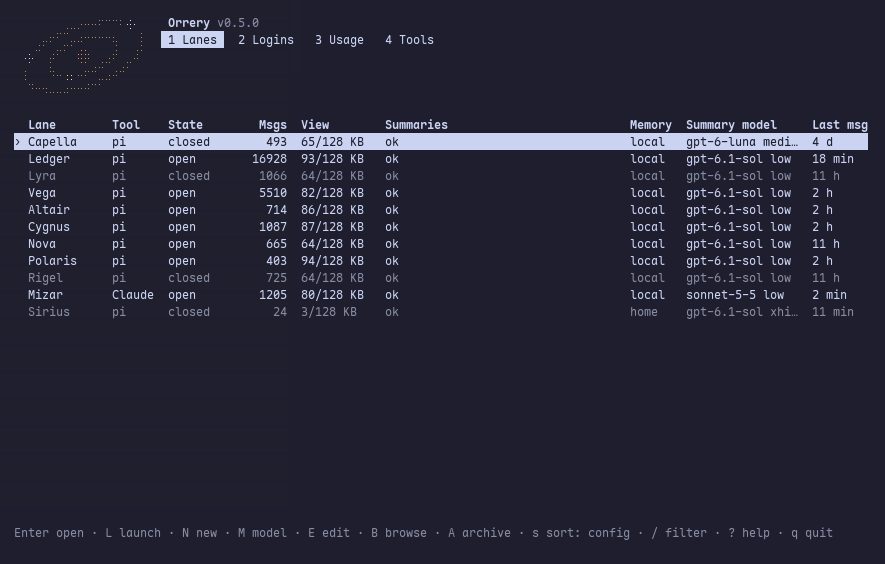
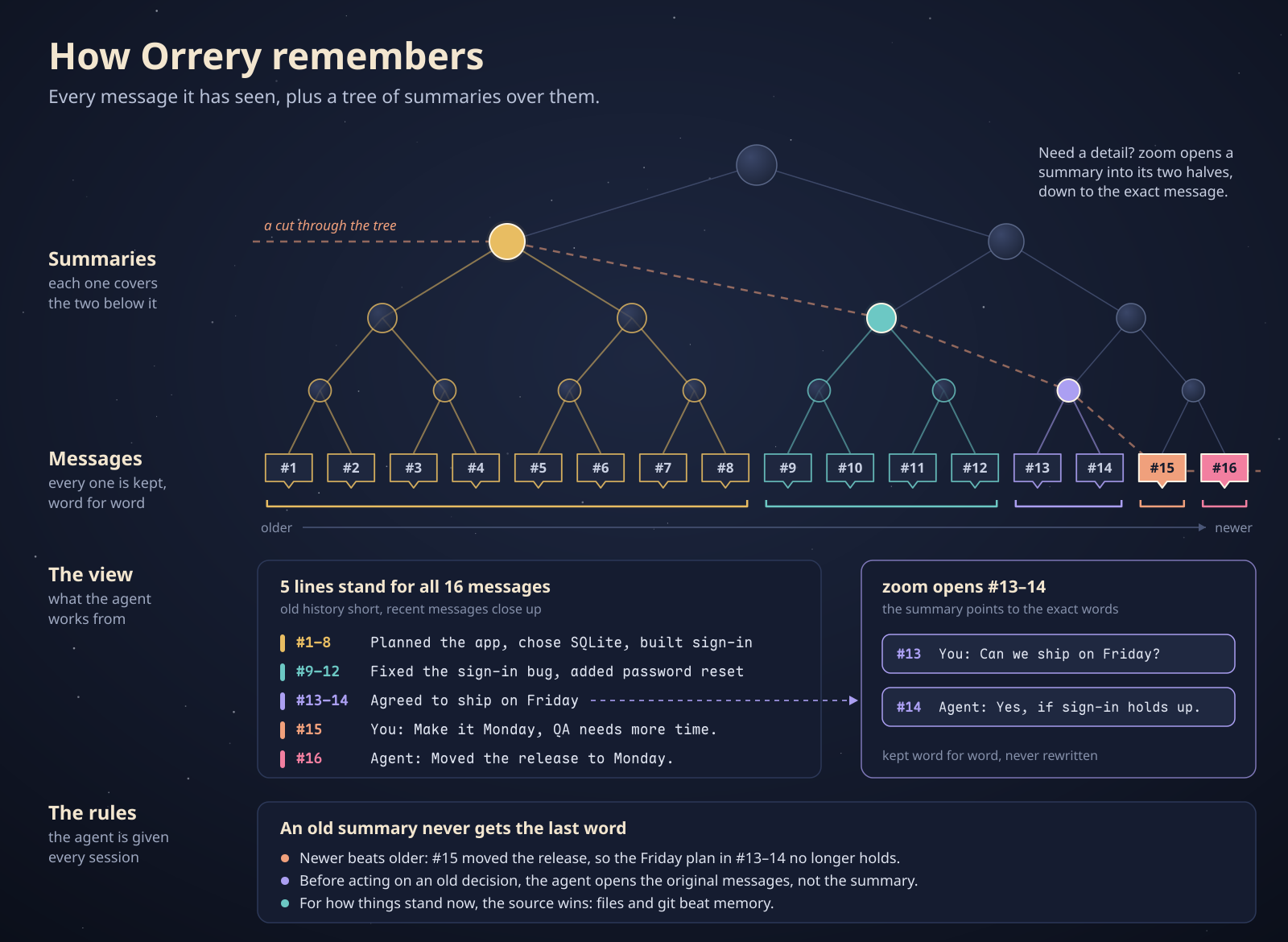
A coding agent forgets everything when its session ends, and a long project outgrows any one conversation. Orrery
gives each of your agents a lasting memory: every message it has seen, plus a tree of summaries over them. The agent
works from a compact view of its whole history and can look up the original messages whenever it needs them.
The memory belongs to the agent, not to a session, a folder or a tool. Start a fresh session, change models, move
from pi to Claude Code, open the agent in another project or carry on from another computer, and it still remembers.
What you can do
- Keep one agent across tools. pi, OMP (oh-my-pi), Claude Code, Codex, OpenCode, Grok Build and the Antigravity CLI
all read and record the same agent's memory. OpenRouter's Ori can launch it too. - Open any agent anywhere.
orrery agent Atlasstarts Atlas's tool in the folder you are in, with its
instructions and memory. The folder's ownAGENTS.mdorCLAUDE.mdstill applies as that project's rules. - Turn existing chats into an agent. Pick one or more of your Claude Code or Codex chats from a list and they
become an agent that remembers those conversations. The chats themselves are only read, never changed. - Give each agent its instructions. Who it is and how it works, sent to the model ahead of its memory.
- Choose how summaries are paid for. Sign in with your ChatGPT account (the one Codex uses) or OpenRouter, use an
OpenAI, Anthropic or OpenRouter API key, or run a local model server. In OpenCode, a paid or own-key model of
OpenCode's can make them too. See Summaries. - Let agents read each other. An agent you allow can look up other agents' memory, read-only. New agents read
nobody until you say so, in the TUI or withorrery agent set. - Compact Claude Code and OpenCode sessions for free. OpenCode's compaction, and Claude Code's with the optional
mod, is answered from the agent's memory: no model call, no additional tokens. - Take an agent to another computer. Keep its memory on your own SSH server or a Cloudflare Worker, encrypted
before it leaves your machine. - Back up and restore.
orrery backupsnapshots every agent (on Linux, a systemd timer can run it nightly), andorrery restoreputs one back. - See what it costs. Tokens per agent and day, with cache hits and cost.
- Install once, update in place. One program, with no Node, npm or Git needed;
orrery updateand rollback.
Screens
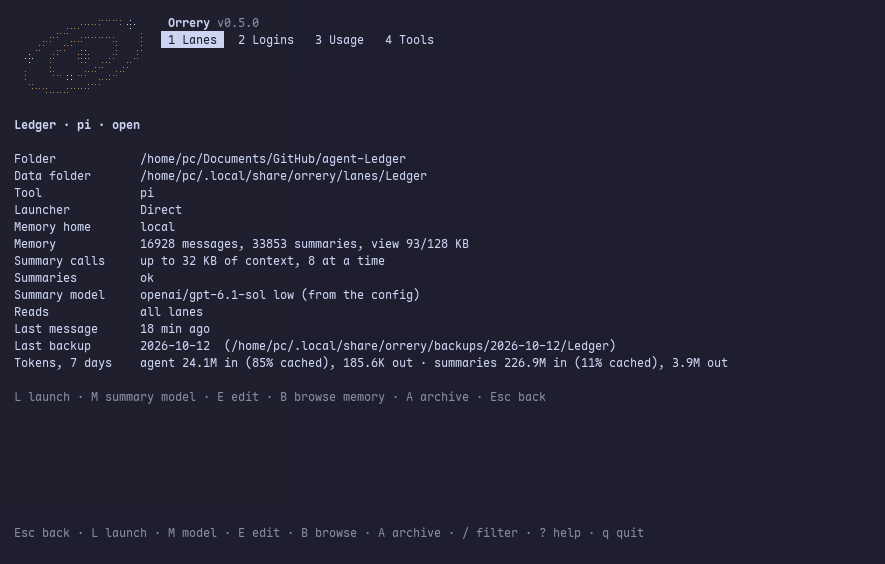
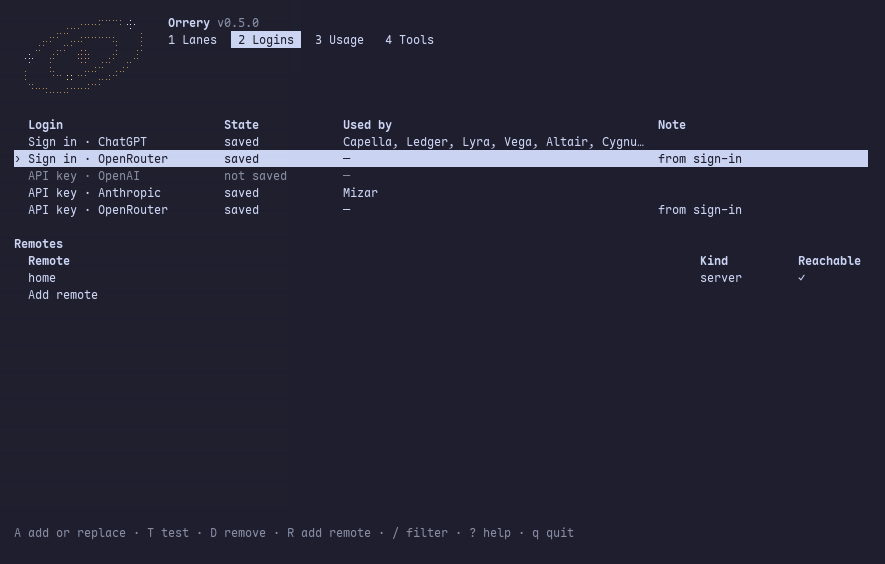
| Agent details | Logins and remotes |
|---|---|
 |
 |
| Usage | Tools |
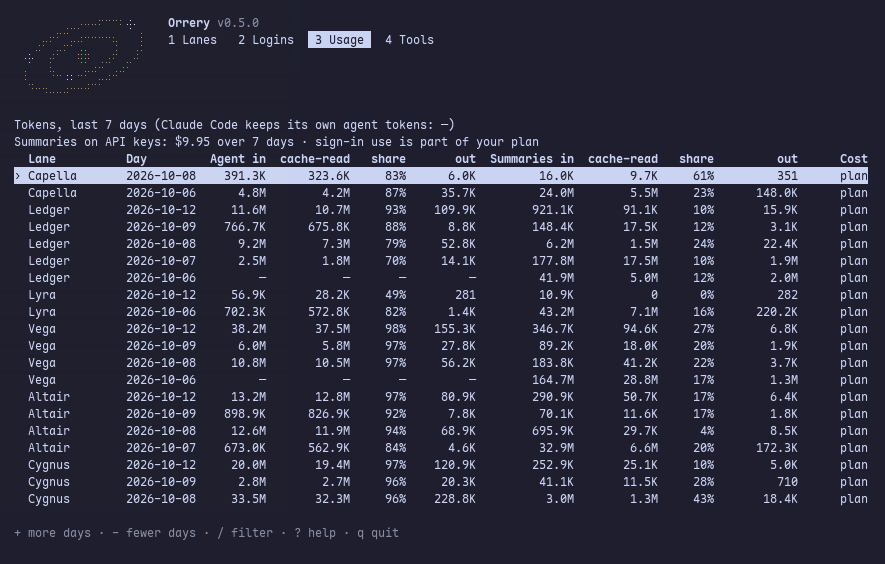 |
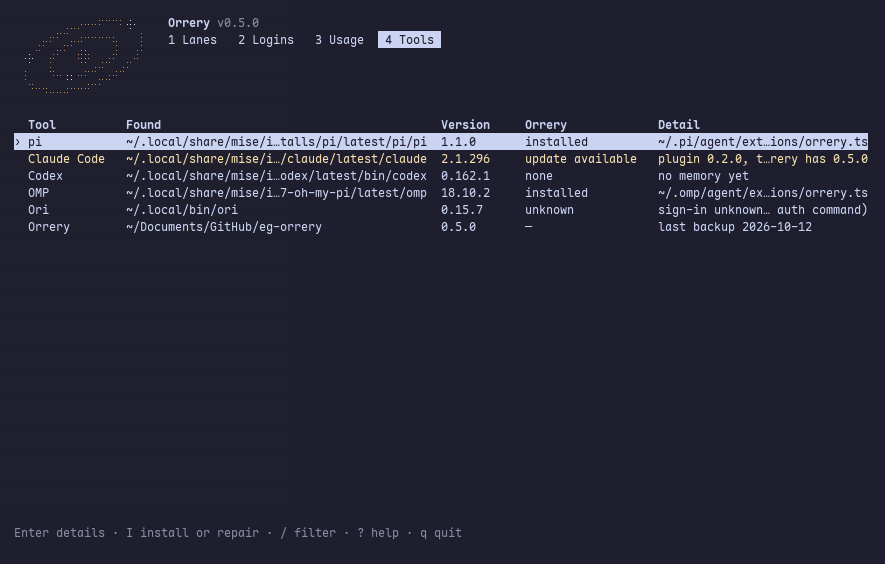 |
Quick start
You need:
- Linux or macOS, x64 or arm64. On Windows, use WSL. Alpine and other musl Linux is not supported yet.
- At least one coding tool: pi, OMP, Claude Code, Codex (0.162.1 or later), OpenCode, Grok Build or the Antigravity
CLI, installed on its own. - A way to make summaries: a ChatGPT or OpenRouter account, an API key, or a local model server (see
Summaries).
1. Install.
curl -fsSL https://github.com/Tech0001/orrery/releases/latest/download/install.sh | sh
The script checks the download, installs Orrery into ~/.orrery, and asks before connecting it to each coding tool
it finds (Codex and OpenCode need nothing: Orrery's side comes with each launch; for Grok it writes Orrery's hook file
and two config entries in ~/.grok; for Antigravity, one entry each in its hooks, MCP and status-line settings under~/.gemini). It puts the orrery command in ~/.local/bin; add that folder to your PATH if
it is not there already.
2. Start Orrery.
orrery
The first run asks where to keep memory, your first agent's name, its folder and tool, and how to make summaries: a
sign-in or an API key. For a local model server instead, add it to ~/.orrery/config.toml first, as
Summaries shows, and add the agent with N.
3. Open your agent. On the Agents page, select it and press Enter. If you started Orrery outside the
agent's folder, it asks whether to open the agent here or there. Its tool starts; quit the tool to come back.
4. Add more. Press N for a new agent. Start it empty, turn an existing Claude Code or Codex chat into it, or
(once you have a remote) fetch one from another computer.
Getting around the TUI
| Page | Keys |
|---|---|
| 1 Agents | Enter open · i details · N new · M summary model · E instructions · C settings · s sort · / filter. On an agent's details: B browse its memory, A archive it |
| 2 Logins | A add or replace a sign-in or key · T test · D remove · R add a remote |
| 3 Usage | + / - more or fewer days |
| 4 Tools | Enter details · I install or repair Orrery's side of pi, OMP, Claude Code, Grok or Antigravity |
? shows help on any page and q quits. Nearly everything the TUI does can also be done from the command line;orrery help lists the commands, and orrery help <command> every option of one.
Agents
An agent is a name, instructions, memory and settings, all kept in ~/.orrery:
~/.orrery/
  config.toml               settings: one [agents.<Name>] section per agent
  agents/<Name>/
    instructions.md         who the agent is
    memory.sqlite           what it remembers
Instructions. Edit them with E in the TUI or orrery agent edit Atlas. They reach the model ahead of the
memory, up to 32 KB. Only you edit them: an agent can suggest a change in chat but cannot make it.
Default folder. An agent can have one (folder = "…", or C in the TUI). Starting its tool there, or in any
folder inside it, picks that agent automatically, as if you had run orrery agent. Choose a folder that belongs to
the agent, not a broad one like your home folder, or every session under it records into that agent. With no default
folder, the agent opens only through Orrery. Claude Code needs one setup step per agent first; Codex, OpenCode, Grok
and Antigravity never pick an agent by its folder, and open agents only through Orrery; see Coding tools.
Importing chats. N, then From an existing chat, lists your Claude Code and Codex chats, newest first,
and marks the ones written to in the last ten minutes as in use. Pick one, or mark several with Space and they are
combined in time order. Orrery reads them, shows a short report, and creates the agent. Its memory builds in the
background, the agents list shows the progress, and the agent opens once the build is done. An import is a
snapshot: anything said in those chats later is not in the agent. From the command line, orrery import can also
gather a whole project's Claude Code and Codex history; see orrery help import.
Reading other agents. An agent reads its own memory and nobody else's until you allow more. Press C on the
Agents page and choose Reads: a checklist of your other agents, with "All agents, including ones added later"
first (Space or Tab ticks a row, Enter saves, Esc goes back). From the command line, orrery agent set Atlas --reads Birch,Cedar replaces the list, --reads all allows every agent (* works too) and --reads none clears it;orrery agent add takes --reads as well. An agent always reads itself, so it is never on its own list. Inconfig.toml it is reads = ["Birch", "Cedar"] (or ["*"]) in the agent's [agents.<Name>] section. An agent
allowed to read others gets the agents and agent_memory tools to look into their memory, read-only, andorrery status, usage and browse run from its shell show them too. An agent's details (i) show both sides:
Reads (whom it reads) and Read by (who reads it). The memory tools take a change when the agent next opens.
pi and OMP add those tools once per run, so a pi or OMP that first opened an agent with no reads gets them only after
a restart.
One session at a time. An agent records from one session. A second session on the same agent runs without its
memory in pi and OMP, and read-only in Claude Code, Codex, OpenCode, Grok and Antigravity.
Archiving. A on a closed agent's page takes it out of the list; its memory stays on disk.
Summaries
Each agent has two models: the one you chat with, chosen in your coding tool, and the one that writes its summaries,
chosen in Orrery. They are independent: change either one and the memory stays the same.
| Summaries from | Set up with | Notes |
|---|---|---|
| Your ChatGPT account (the sign-in Codex uses) | orrery login openai |
Opens your browser; --manual to paste the result over SSH |
| OpenRouter | orrery login openrouter |
Signs in and saves an OpenRouter key |
| An API key: OpenAI, Anthropic or OpenRouter | orrery login --key anthropic |
Typed into a hidden prompt; --from-pi copies a key pi already has |
| A local model server | [[providers]] in config.toml |
Any OpenAI-compatible server, such as llama.cpp |
| A paid or own-key model of OpenCode's | /compactor in OpenCode |
Only while the agent is open in OpenCode; OpenCode's free models are not offered (why) |
The Logins page does the same. Orrery keeps its own logins, separate from your coding tools', in a private file
(mode 0600).
To choose an agent's summary model, press M on the Agents page, or use orrery compactor Atlas to see its
current one, orrery compactor Atlas signin (or key, local) to list choices, and, for example,orrery compactor Atlas key anthropic/<model> to switch. The new model is tested with a real call first; if that
fails, the agent keeps the old one.
A local server looks like this in config.toml:
[[providers]]
id = "llama"
base_url = "http://127.0.0.1:8080/v1"
models = [{ id = "my-model", context_window = 32768, max_tokens = 8192 }]
orrery compactor Atlas local llama/my-model then switches to it. If the server needs a key, api_key_env = "NAME" sends
the one in that environment variable.
Coding tools
| Tool | What Orrery adds | Guide |
|---|---|---|
| pi | An extension: memory, recording, the memory tools and /compactor |
docs/pi.md |
| OMP (oh-my-pi) | The same, through OMP's own extension entry; /orrery and /compactor |
docs/omp.md |
| Claude Code | A plugin with hooks and memory tools, plus an optional mod for the system prompt and compaction | docs/claude-code.md |
| Ori | Launches the agent with an OpenRouter model; Orrery keeps the memory | docs/ori.md |
| Codex | Memory, recording, the memory tools and the guard, on Codex's command line at each orrery agent launch |
docs/codex.md |
| OpenCode | A plugin for each orrery agent launch: memory, recording, the memory tools, the guard, compaction from memory and /compactor |
docs/opencode.md |
| Grok Build | Hooks for recording and the guard, a status row and the memory tools, connected once in Grok's folder; memory and instructions on Grok's command line at each orrery agent launch |
docs/grok.md |
| Antigravity CLI | Hooks that give the model memory and instructions (before its first call and after each compaction), record and guard; a status row and the memory tools; connected once in Antigravity's settings | docs/antigravity.md |
Connect a tool with I on the Tools page, or orrery tools install pi. Each guide lists the versions tested
and the known limits. Claude Code needs no step per agent: with Claude Code 2.1.287 or newer, the Orrery mod brings
an agent's memory into a session started in its folder (claude, claude --resume) and into orrery agent Atlas in
any folder, and records it. orrery claude-setup Atlas is only for the older file setup, described in its guide. Codex needs nothing installed: open its agents withorrery agent Atlas --tool codex (or set the agent's tool to codex), which brings Orrery's hooks, memory tools and
instructions on Codex's command line and writes nothing to ~/.codex. A plain codex is not an agent's session.
Neither does OpenCode: orrery agent Atlas --tool opencode (or the agent's tool set to opencode) startsopencode --standalone with Orrery's plugin for that launch, after checking once per OpenCode version that the plugin
loads, and writes nothing to OpenCode's config. A plain opencode is not an agent's session either. Grok Build is
connected once, by setup or I: Orrery's hook file and two entries (its status row and memory tools) in Grok's
folder. Open its agents with orrery agent Atlas --tool grok, which gives Grok the agent's memory and instructions on
its command line, and asks to connect Orrery to Grok first when it isn't; a plain grok is not an agent's session.
It also asks before launching when Grok's hooks, MCP servers or plugins changed since you approved them
(orrery grok-settings; details). The Antigravity CLI is connected once the
same way: one entry of Orrery's each in its hooks, MCP config and status-line settings. Open its agents with orrery agent Atlas --tool antigravity (pick agy's model with -- --model <id>); Orrery's hooks give the model the agent's
memory and instructions in the conversation, and again after each compaction, and a plain agy is not an agent's
session. Inside a plain session of any coding tool, orrery reads no agent's memory and changes nothing; see Sessions that
are no agent's.
The Claude Code desktop app works too: start a session in the agent's folder, and the app's Claude Code records it
and loads the memory (tested with the Linux app and the file setup). Claude Code on the web runs in the
cloud and can't reach the memory on your machine.
If you are an agent helping someone with Orrery
The TUI is for people; you have the command line. orrery help all lists every command and option.
In an agent's own session (a tool Orrery opened as an agent, ! commands typed in it included), orrery only
reads, and only as that agent: help and --version; status, usage and browse (without --out) for the agent
itself and the agents it may read; and compactor for the agent itself, choosing among the sign-ins, keys and local
servers already saved. Everything else, the TUI included, is refused there with a message: the person runs it in
their own terminal or the TUI (see Safety).
In any other coding tool's session (Claude Code, Codex, OpenCode, Grok, pi, OMP or another coding tool started
outside the person's agents), orrery runs only help, --version, status and usage, and those show no agent.
Everything else is refused there with a message (see Sessions that are no agent's):
ask the person to run the commands below in their own terminal, and to share what you need.
In the person's own terminal, start here:
| To | Run |
|---|---|
| See every agent, whether it is open, and its memory and summary state | orrery status --json |
| See which coding tools are installed and connected | orrery tools --json |
| See which sign-ins and keys are saved (never the keys themselves) | orrery logins --json |
| See token use and cost | orrery usage --json |
| Add an agent, or change its folder, tool or settings | orrery agent add …, orrery agent set … |
| See or switch an agent's summary model | orrery compactor <Name> … |
| Preview importing chats into an agent | orrery import <Name> --dry-run … |
Leave these to the person, in their own terminal:
- Sign-ins and API keys.
orrery loginopens a browser, andorrery login --keyasks for the key in a hidden
prompt. Never ask for a key in chat. - Instructions.
orrery agent editneeds a terminal, and an agent's instructions are its person's to change. - Installing, updating and uninstalling. These ask questions on the terminal and replace the program you are
running on. - Committing an import. Show the person the dry-run report, and run
orrery import <Name> --commit <preview file>
only once they have read it.
Orrery's own files are off-limits to agents: your tools are refused anywhere in ~/.orrery, except that file tools may
read the config and the installed program, and shell commands that name .orrery are refused. Ask the CLI instead.
Shell commands that name Orrery's hook plumbing (codex-hook, claude-hook, grok-hook, agy-hook, or orrery
with holder), or run an orrery command an agent's session may not run (orrery setup, orrery remote and the like), are
refused too, even in a grep or a commit message: leave those to the person, search with your file tools, and write a
commit message that names one to a file (git commit -F). So are shell commands that name Claude Code's or Codex's
session records (~/.claude/projects, ~/.codex/sessions), but one plain read: you may read them, not change them,
with your file tools or with one plain cat, head, tail, wc, ls or sed -n that writes the full path out
(wc -l ~/.claude/projects/<project>/<session>.jsonl). So are shell commands that name OpenCode's config
(opencode.json, a .opencode folder, OpenCode's own folders) or a skills folder (.claude/skills, .agents/skills):
read those with your file tools. Grok's folder (~/.grok) is the same, all but the parts Grok's own features write (its memory, skills, workflows, docs, logs and the like): read it with your file tools (but not Grok's
login or session records, which you can't read at all), and leave changes to Grok's settings and hooks to the person.
Antigravity's conversation records and the settings that load its hooks and servers (~/.gemini/config/hooks.json,mcp_config.json, the CLI's settings.json, a project's .agents/hooks.json) are the same: read them with your file
tools, and leave changes to the person. You can't write OpenCode's config, so ask the person to set up OpenCode for a project; skills you may write with your
file tools, with plain YAML front matter. Your own memory has its own tools: zoom, date and search
(memory_search in OMP; in Codex, Grok and Antigravity, from the orrery MCP server). In a session that is no agent's,
the guard keeps only Orrery's own files, the session records, Grok's folder, Antigravity's files and Orrery's commands
from you; see
Sessions that are no agent's.
Memory that follows you
Push a closed agent to a remote, then pull it on another computer:
orrery agent push Atlas --to home      # on the first computer
orrery agent pull Atlas --from home    # on the second
A remote is a folder on your own SSH server or a Cloudflare Worker (orrery remote add). Memory and instructions are
encrypted before upload with a recovery code that only you keep. One computer writes at a time, and another can take
over. See remote agents.
Backups
orrery backup snapshots every agent's memory and instructions into ~/.orrery/backups/ and keeps 14 days.
To put one back, close the agent first, then run orrery restore Atlas --from 2026-10-01. It keeps the agent's current
instructions if it has any. On Linux, a systemd timer can run
the backup every night and copy it to another machine over SSH; on macOS, run it yourself for now. See
deployment and backups.
Updating and uninstalling
orrery update              # install the latest release
orrery install --rollback  # go back to the previous version
orrery uninstall           # remove the program; memory, config and logins stay
After a rollback, the older version (0.9.5 or later) still reads a config a newer one wrote. An agent set up for a tool
it doesn't know (or with a typo in tool) is listed with that tool, and orrery agent and the TUI refuse to launch it,
saying the tool is unknown. Its memory stays readable: orrery run, orrery claude-setup and a tool started in its
folder still open it, and the guard and every other agent work as usual.
Agents that are open keep their version until they restart. An update says Restart open agent sessions now: sessions left open across the update aren't recorded until they restart.: a Claude Code or Codex session left open may stop
being recorded, or be recorded without the new checks, until it restarts (the Claude
Code and Codex guides say exactly
what happens). The Agents page says when one is waiting, and the pi, OMP, Claude Code, Codex or OpenCode session says
once: "Orrery was updated to 0.6.2; restart this session to use it." Orrery
checks for a new release at most once a day, shared by the TUI and every agent's session (pi, OMP, OpenCode, and the
recorder of Claude Code, Codex and Grok sessions); the TUI header and each session then say once that it is out. A
session never waits on the check: it shows what the last one found, and a newer answer when it comes. The check is
one request to github.com, which sees your IP address; check = false under [updates] in config.toml turns it
off, and the release notice with it (the restart notice needs no request and stays). Notices reach you, never the
model. orrery uninstall --purge also deletes ~/.orrery, after you type delete.
The install script also takes --yes (answer every question yes; with no terminal and no --yes, it skips the
questions, lists them and exits non-zero), ORRERY_VERSION (a specific release) and ORRERY_HOME (somewhere other
than ~/.orrery, as an absolute path; set it in your shell profile too, since every orrery run and coding tool
reads it):curl -fsSL … | ORRERY_VERSION=0.6.0 sh -s -- --yes.
How it works
Each message is appended to the agent's own SQLite file. In the background, a summary model builds a binary tree of
summaries over those messages. The agent receives a 64–128 KB view: recent messages word for word, older ones as
summaries that get coarser with age. Between rebuilds, new lines only extend the view, so providers can serve most
of the prompt from cache. The architecture guide covers the store, the view, scheduling and
the trade-offs.
Safety
Orrery guards credentials: an agent's tool calls that would read key files, your logins or another agent's memory are
refused, and Orrery's own config and program are read-only to agents. Out of the box, agents can neither read nor edit:
- Keys and logins in your home folder:
~/.ssh,~/.gnupg,~/.aws/credentials,~/.kube/config,~/.docker/config.json,~/.config/gh/hosts.yml,~/.netrc,~/.git-credentials,~/.pgpass,~/.npmrc,~/.pypirc,~/.cargo/credentials,~/.gem/credentials,~/.config/gcloud,~/.azure,~/.terraform.d/credentials.tfrc.json, wrangler's login (~/.wrangler,~/.config/.wrangler, and~/Library/Preferences/.wrangleron macOS), Hugging Face's tokens,~/.password-store, the 1Password CLI's~/.config/op, and the logins of pi, OMP, Codex, OpenCode (its database, whereverXDG_DATA_HOMEorOPENCODE_DBputs it), Grok (whereverGROK_HOMEputs it) and Orrery (Claude Code's too, in its sessions). - Secret files in any folder:
.envand.env.<anything>,.dev.varsand.dev.vars.<anything>(Cloudflare
Workers),.secrets,secrets.toml,master.keyand.htpasswd. The shared templates stay open:.env.example,.env.sample,.env.templateand.env.dist, and the same for.dev.vars.
You edit those files yourself. A project's own .npmrc, .pypirc, .azure or .wrangler is not a login and stays
open, and so do npm, cargo, gcloud, az, wrangler, pass and op themselves: only naming the protected files
and folders is refused. An agent's file edits also stay inside the folder it was opened in; allowed_roots = ["/abs/path"] in its [agents.<Name>] section adds more.
You can add your own files and folders. List them under [guard] in ~/.orrery/config.toml (or the fileORRERY_CONFIG names), and every agent is kept from them, in every tool:
[guard]
protect = [
  "~/finance",           # a folder in your home, and everything in it
  "/srv/keys/prod.pem",  # one file, by its full path
  "secrets.yml",         # every file or folder with this name, in any folder
  ".envrc",
]
New configs already have this block, with its examples commented out: uncomment a line or add your own. An older
config gets it once, the first time orrery setup runs (it runs on install and on orrery update); if you delete it,
it does not come back.
An entry that starts with / or ~/ is a path: that file, or that folder and everything in it. An entry with no /
is a name: every file or folder with exactly that name, in any folder. Letter case is ignored, and so is how an accent
is encoded (macOS file systems ignore both). Globs (*.pem), relative paths (keys/prod.pem), backslashes, drive
letters and names starting with ~ are not supported: such an entry is a config error, and so is a protect key
anywhere but under [guard]. The table must be spelled [guard]: a misspelt one ([gaurd]) is not noticed and
protects nothing. Agents cannot change the list, since the config is read-only to them. A refusal says which entry it
came from.
A search of a folder can still read a .env inside it. The same goes for the other secret files named above and
a file a name entry protects: the guard refuses tools that name the file, but a grep of the folder that holds it reads
it too. A path entry and the logins in your home folder do not have this gap: a search of a folder that holds one is
refused.
If config.toml cannot be read, pi and OMP sessions keep the built-in rules, and its [guard] protect when that part
of the file reads cleanly; if it does not (the TOML is broken around it, or an entry is refused), they refuse every
tool call until the config is fixed, as Claude Code does for any config it cannot read (in every Claude Code session,
an agent's or not). A [guard] protect that lists nothing, as a new config has it, counts as no entries even when the
TOML is broken elsewhere.
Agents can't change memory or settings from their shell. Inside an agent's session, the orrery command runs
only:
helpand--version;status,usageandbrowse(without--out), for the agent itself and the agents it may read;compactorfor the agent itself: it shows the summary model and switches among the sign-ins, keys and local
servers already saved, with no new sign-in (so/orrery:compactorkeeps working). An agent may therefore switch
its own summary model to any provider already in your config and logins, but it can add no provider and no login;- the commands the plugins run, for the session's own agent (
orrery claude-modand Grok's status row,orrery grok-status, among them).
Everything else is refused, with a message that says to run it in your own terminal or the TUI: orrery agent (open,
add, set, edit, archive, push, pull and the rest), run, import (the dry run too), compact, backup, restore,login, logins, logout, remote (remote key among them), trust-host, claude-setup, tools, setup,install, update, uninstall, and the TUI. A read of an agent it may not read says how to allow it:Atlas may not read Birch. Allow it in the TUI (C, Reads) or with: orrery agent set Atlas --reads Birch. Inside a
session, orrery uses the config that holds that session's memory: --config, ORRERY_CONFIG and ORRERY_HOME
can't point it at another. A command you type through a tool's own shell passthrough (such as ! in Claude Code or
pi) runs in the agent's session too, and gets the same answer: use another terminal. Orrery knows an agent's session by the process that opened its memory, which
each tool records in the data folder while it is open, and by the markers that process gives its shell; see
agent sessions.
The guard adds a second belt in every tool: shell text that runs orrery with a command agents may not run is refused
before it runs, wherever it stands in the text, so a grep for orrery restore or a commit message that namesorrery setup is refused too (CONTRIBUTING.md lists the workarounds).
A tool an agent starts is no agent's. A claude -p, codex exec, opencode run, pi -p, grok or OMP that an
agent starts from its shell opens no memory, records nothing and says so (Orrery: started inside Atlas's session (pi), so this one opens no memory and records nothing.; Grok 1.0.70 shows it after /clear or a resume, but not at a
fresh launch). Its guard keeps that agent's rules, and both agents' at once when it runs in another agent's folder.
Its prompts come from the agent, not from you, so they never enter memory as your words. orrery run and orrery agent are refused there.
Coding tools outside your agents get the same limits. A Claude Code in another project, a plain codex or grok,
or any other coding tool's session that is no agent's can't read or change Orrery's memory or settings throughorrery, and a tool it starts opens no memory: see Sessions that are no agent's.
Prompts are checked against the tool's own record. Claude Code, Codex and Grok record through hooks, which are
commands any program of yours could run, so Orrery checks what they say. In Claude Code, a hook counts only when
Claude Code itself called it, and a prompt only once Claude Code's transcript shows it as yours (typed, queued, or
given to claude -p); a message another process sent into the session, such as a subagent's report, is kept as[subagent] …, never as your words, and a task notification is dropped. In Codex (0.162.1 or later; an older one's
session isn't recorded, and Orrery says so), a prompt or reply counts only once the session's rollout file has it, in
your own thread and a turn you started: a spawned agent's thread, and a turn another agent or codex queue started,
are never recorded. In Grok, a prompt counts only once the session's own log in Grok's folder shows it as typed, in a
session of your own that the Grok process holds open: a turn Grok starts on its own (a scheduled prompt, a background
task's result) and a subagent's session are never recorded. What is never confirmed is dropped and counted: orrery status shows "N unconfirmed messages not recorded" (unconfirmedMessages in orrery status --json). Agents may read
Claude Code's and Codex's session records with file tools, or with one plain shell read (cat, head, tail, wc,ls or sed -n with the full path written out), but no tool may change them, and other shell text that names those
folders (~/.claude/projects, ~/.codex/sessions) is refused; Claude Code's own memory folder for the project stays
writable. Grok's session records (~/.grok/sessions) an agent's session can't read either. pi, OMP and OpenCode
record inside their own process, so there is no hook to fake. Where Orrery can't make the check (see the
Claude Code, Codex and
Grok guides), the session says why and records nothing.
Agents can't run Orrery's hook plumbing. Shell text that names the hook commands (codex-hook, claude-hook,grok-hook) or Orrery's program with holder is refused, so an agent cannot feed a hook made-up input and put words
in your mouth in its memory. The cost: an agent's grep for those names, or a commit message that mentions one, is
refused too.
Agents can't change Grok's hooks or settings, in any tool. Grok Build loads and runs much of what is in its folder
(~/.grok, or GROK_HOME): its hooks, Orrery's among them, its config, plugins and agents. So no tool writes there,
in every session the guard runs in, one that is no agent's included, but in the parts Grok's own features write (its
memory, skills, workflows, docs, logs, session worktrees and the like). An agent's session may read the rest with file
tools, but not Grok's login or session records, and shell text that names Grok's folder or the parts it keeps is
refused (ls ~/.grok, cat ~/.grok/config.toml). So is every grok command but its read-only ones (grok mcp list, sessions list, --help and the like): the others write them for you (grok mcp disable, grok plugin install, grok update, grok login, --trust) or run sessions outside orrery agent (grok agent, leader,worker), and one that opens a session by its id or the latest one (grok -r, -c, -s) may open one that is live
in another Grok: a second Grok writing a live session's log stops Orrery recording it. The cost: an agent can't change
Grok's settings for you. See Grok.
Agents can't change OpenCode's config or code, in any tool. OpenCode loads plugins, runs commands and takes
permissions from its config, with no prompt, the next time it opens a folder, so a file an agent wrote there from any
tool would run inside OpenCode. No agent may write opencode.json or opencode.jsonc in any folder, a .opencode
folder, OpenCode's own config, cache and state folders (~/.config/opencode, ~/.cache/opencode,~/.local/state/opencode, or where XDG_* and OPENCODE_CONFIG_DIR put them), its database, the fileOPENCODE_CONFIG names, or its system config (/etc/opencode). File tools may read them; shell text that names one
is refused, a cat or a grep too. The cost: an agent can't set up OpenCode for a project (you write those files
yourself), and an agent's shell command that only names one, such as a commit message, is refused.
Skills stay ordinary files. OpenCode also loads the skills in .claude/skills and .agents/skills, and runs a
skill's front matter as code when it opens with ---js. Agents may write skills with their file tools, judged by what
the file will hold: a skill that would open with --- and anything other than YAML or JSON is refused, and so is a
write whose result the guard can't see (a copy or a move into a skills folder, a notebook cell, an MCP tool, OMP's edit;
each tool's guide says which). Shell text that names a skills folder is refused, whatever the command. The cost: an
agent's ls, cat, git add or commit message that names a skills folder is refused (in Codex, which reads files
through its shell, one plain cat, head, tail, sed -n, ls or wc of skill files is allowed; see
Codex), and in Codex an agent can't read OpenCode's config at all. AGENTS.md and.claude/settings.json stay writable.
It is a guard, not a sandbox. It checks file paths and the text of shell commands, so a determined program can get
around it: shell text that spells Orrery's home with a wildcard (ls -d ~/.orr*), a recursive shell command rooted
above it (find ~, grep -r), a name built at run time or a script still reaches Orrery's files, in every session.
The architecture guide lists the known limits, and
Codex's, OpenCode's and
Grok's guides the ones that are their own. The session rules above are a seatbelt
too: an agent that deliberately detaches a process from its session, clears or sidesteps its markers (pointingORRERY_CONFIG at a scratch config, say) and hides Orrery's name from the guard can still run any orrery command,
and a process of yours can still write into a tool's own records. Only an operating-system sandbox closes that; the
limits are listed in full.
Logins are kept in private files (mode 0600), never in the config. Your agents' memory on disk is not encrypted;
copies sent to a remote are. Model providers see whatever context is sent to them, memory included.
Sessions that are no agent's
A coding tool you start outside your agents is a session that is no agent's: Claude Code in another project (the
desktop app's too), a plain codex, opencode, grok, pi or omp, or another coding tool. Its shell runs as you,
so without a check it could read any agent's memory with orrery browse, or plant made-up messages with orrery import. So there orrery reads no agent's memory and changes nothing.
Who counts. Orrery looks above the command for a coding tool's program: claude, codex, opencode, grok
(and Grok's own grok-<os>-<arch>), pi, omp, gemini, qwen, cursor-agent, aider, goose, amp, crush,droid or copilot (also a script of that name run by Node, Bun, Deno, Python, bash or sh). Wherever it finds no
tool above (a chain cut by Codex's sandboxed shell or a detached process, or a variable left over), it looks for a
variable the tool gives its shell: CLAUDECODE
or CLAUDE_CODE_ENTRYPOINT (Claude Code), CODEX_THREAD_ID, CODEX_SESSION_ID or CODEX_SANDBOX (Codex),OPENCODE or OPENCODE_SESSION_ID (OpenCode), and PI_CODING_AGENT (pi). An agent's own session is told first, and keeps the rules in Safety.
What runs there. Only help, --version, status and usage, and those show no agent:
This is a Claude Code session that is no agent's (process 4242), so it shows no agent. Run orrery status in your own terminal or the TUI.
With --json they give no agents and the session's tool: "agents": [] and "session": {"tool": "claude", "noAgent": true}. Everything else, the TUI included, is refused:
orrery browse can't run here: this is a Claude Code session that is no agent's (process 4242), and those can't read or change Orrery's memory or settings. Run it in your own terminal or the TUI.
When a variable found the session, the message says found CLAUDECODE (or the variable it found) in place of the
process, and a refusal then points to Leftover markers. The rule guards your real Orrery data:~/.orrery in your home folder as the system's user database records it (never $HOME), the data folder its config
keeps elsewhere (data_dir), the logins and SSH keys that config names, and what /etc/orrery/config.toml names. A
command that touches only a scratch home is not judged, so test suites that run orrery against scratch homes work from
any session. Your own terminal and the TUI keep full access.
The guard there. Claude Code's plugin runs the guard in every session, pi's and OMP's extension in every folder,
and Orrery's Grok hooks in every Grok session, once Orrery has a config. In a session that is no agent's it keeps
Orrery's own files only:
- Orrery's home and data folder and its logins file: no reads or writes. Its config and installed program: read,
never written. - Where your agents' sessions load code from outside Orrery's home: pi's and OMP's extensions folders
(~/.pi/agent/extensions,~/.omp/agent/extensions, which hold Orrery'sorrery.tsand load every file there),
and Claude Code's plugin copy, its marketplace folder and the records that name them
(~/.claude/plugins/cache/orrery,plugins/marketplaces/orrery,known_marketplaces.json,installed_plugins.json): read by file tools, never written, and not named in shell text. - Every agent's memory view (
.orrery/view.mdin an agent's folder): not read or written. - Claude Code's, Codex's and Grok's session records (
~/.claude/projects,~/.codex/sessions,~/.grok/sessions):
file tools may read them, and so may one plain shell read of Claude Code's or Codex's with the full path written out;
no tool writes them, and other shell text may not name them. - Grok's folder (
~/.grok), but the parts Grok's own features write: read by file tools, never written, and not named
in shell text. - Shell text that runs or names an
orrerycommand other thanhelp,--version,statusandusage, or Orrery's
hook plumbing. - A search whose folder holds Orrery's home (one from your home folder, say), and a content search (grep) whose folder
holds an agent's memory view (a folder above your agents' folders, say): search a narrower folder. - In OMP, a language-server edit (a rename, an applied code action) when the session's folder, or the file it names,
holds or is inside Orrery's files. - A call too large to check (a Claude Code input over 1 MB, say) or that can't be checked in time.
Nothing else: no folder limits, no .env or home-login rules, no [guard] protect. The session works with its own
project's files as it did before. Plain Codex, OpenCode and the other tools that don't load Orrery's plugin get the
command check only, with no guard: their shells and file tools can still read Orrery's files directly, and write them
where their own sandbox allows.
Tools it starts open no memory. A tool that such a session starts (a claude -p or pi -p in an agent's folder,
say) opens no memory, records nothing and, in an agent's folder, says so:
Orrery: started inside a Claude Code session that is no agent's, so this one opens no memory and records nothing.
When a variable found the outer session, the notice names it: … no agent's (found CLAUDECODE; see "Leftover markers" in the README), so …. Its prompts come from that session, so they never enter memory as your words. In an agent's
folder its guard keeps that agent's rules; anywhere else it is a session that is no agent's, with no notice. On Linux
this holds for a tool of the same kind started detached or in the background too (setsid claude -p … from a plain
Claude Code), with no tool above it: a tool started with CLAUDECODE, PI_CODING_AGENT or CODEX_THREAD_ID in its
environment counts as started from that tool's session (the desktop app's own claude aside, and never byCLAUDE_CODE_ENTRYPOINT, which VS Code and the SDK set). Agents still open as before from your own terminal
(orrery agent, or a tool started in an agent's folder), the TUI, Ori and the Claude Code desktop app; orrery agent
and the TUI start the tool without any coding tool's variables.
orrery status names the tool an agent is open in. While an agent is open or working, its line shows the tool it
runs in (Codex, say), not the one it is set up for.
Limits. These rules are a seatbelt, like the guard:
- The guard reads command text. Shell text that spells Orrery's home with a wildcard (
ls -d ~/.orr*), a recursive
shell command rooted above it (find ~,grep -r), a name built at run time or a script can still reach Orrery's
files, in agent sessions too. - An editor's built-in terminal (VS Code, Cursor, Zed and the like) is yours: an editor's own agent that runs commands
in it can't be told from you. A coding tool from the list above, run inside an editor, is still found. - An
orrerycommand that both detaches from its tool (setsid,systemd-run, a new tmux server) and clears the
tool's variables is not found by the command check. In Claude Code, pi and OMP the guard still refuses shell text
that runs a refusedorrerycommand. - A coding tool that such a session starts detached or in the background has no tool above it. On Linux it is found
by the variable it was started with (CLAUDECODE,PI_CODING_AGENTorCODEX_THREAD_ID, or any variable of another
tool); started with those cleared (env -u CLAUDECODE setsid claude -p …), it opens the folder's agent and records
its prompt as yours. On macOS a tool of the same kind started that way is not found even with its variable set, since
a tool's own variables count there only where its process chain is cut. - OMP and the tools without a variable above (Gemini, Qwen Code and the rest) are found by their program only: a
process detached from one of them is not found. - A session that is no agent's can still change your other files that run later in agents' sessions: shell profiles
(~/.bashrc), Claude Code's settings and hooks, systemd units, other programs. The guard keeps only Orrery's own
and the folders above, by their paths: a spelling it can't see (a relative path after acd, a parent folder
replaced whole) gets through. - A scratch home whose files are hard links to your real memory files is not told from a scratch home (symbolic links
are followed). - An Orrery home kept outside
~/.orrery(ORRERY_HOME) is not guarded by this rule. While~/.orreryalso exists,
the agent sessions of that other home count as sessions that are no agent's. - With no entry for your user in the system's user database (some containers), Orrery can't tell which data is
yours, so it judges every command in a coding tool's session, agents' sessions included (it fails closed).
Leftover markers
orrery may refuse in a terminal of your own, saying The session is known only by ORRERY_HOST (or another of the
variables below), or this is a Claude Code session that is no agent's (found CLAUDECODE), and pointing here. The
terminal carries a session's markers, though no such session runs above it. The usual cause is a tmux server first
started from an agent's shell or a coding tool's: tmux keeps the environment it started with as its global
environment, so every pane you open later inherits that session's markers:
- an agent session's:
ORRERY_HOST,ORRERY_AGENTandORRERY_AGENT_TOKEN,CLAUDE_PIDfrom Claude Code,OPENCODE_CONFIG_CONTENTfrom OpenCode, andCODEX_THREAD_IDfrom Codex (that refusal blames Codex's sandbox
instead, but the fix is the same); - any coding tool's:
CLAUDECODEandCLAUDE_CODE_ENTRYPOINTfrom Claude Code,CODEX_THREAD_ID,CODEX_SESSION_ID
andCODEX_SANDBOXfrom Codex,OPENCODEandOPENCODE_SESSION_IDfrom OpenCode, andPI_CODING_AGENTfrom pi.
Most of an agent session's markers count only while that session runs; ORRERY_AGENT naming one of your agents, and
an OPENCODE_CONFIG_CONTENT that carries Orrery's plugin, count for as long as they are set, so one set by hand in your
shell profile does the same. A coding tool's variable counts for as long as it is set: orrery there runs only help,--version, status and usage, and a coding tool you start there in an agent's folder opens no memory, with a
notice that names the variable: any tool when the variable is another tool's (a pi in a pane that carriesCLAUDECODE, say), and on Linux a tool of the same kind too when the variable is CLAUDECODE, PI_CODING_AGENT orCODEX_THREAD_ID (a claude in that pane). The tools orrery agent and the TUI start get none of these variables.
Clear each variable the message names, in tmux and in the pane:
tmux setenv -gu ORRERY_HOST   # tmux's global environment, for the panes you open later
unset ORRERY_HOST             # this pane
The same goes for CLAUDECODE and the rest. Or open a terminal outside that tmux server.
Development
From a checkout (see CONTRIBUTING.md):
npm run check           # TypeScript and the full test suite
npm run test:binary     # the compiled program; needs Bun at .bun-version or newer
npm run test:bun-suite  # the full suite on Bun
npm run demo            # the TUI with five fictional agents: no model calls, nothing of yours touched
The suite has more than 2,000 tests and uses synthetic data only. Tests against real pi, OMP, Ori, Codex and OpenCode
run when those programs are installed; CI runs the suite on Node 22.19 and 24 and on macOS.
CONTRIBUTING.md covers bug reports, pull requests and the real-tool tests; SECURITY.md says how to report a security problem
privately.
Credits
The memory design follows OptChat by Victor Taelin.
Orrery builds on pi and integrates with
oh-my-pi. The Python reference in reference/optchat-py
is used for behavioral parity tests.
License
MIT. See LICENSE.
Reviews (0)
Sign in to leave a review.
Leave a reviewNo results found