token-bar
Health Warn
- License — License: MIT
- Description — Repository has a description
- Active repo — Last push 0 days ago
- Low visibility — Only 6 GitHub stars
Code Fail
- rm -rf — Recursive force deletion command in build.sh
Permissions Pass
- Permissions — No dangerous permissions requested
No AI report is available for this listing yet.
macOS menu-bar app: token usage, cost & rate limits for Claude Code, Codex CLI, Gemini CLI

TokenBar
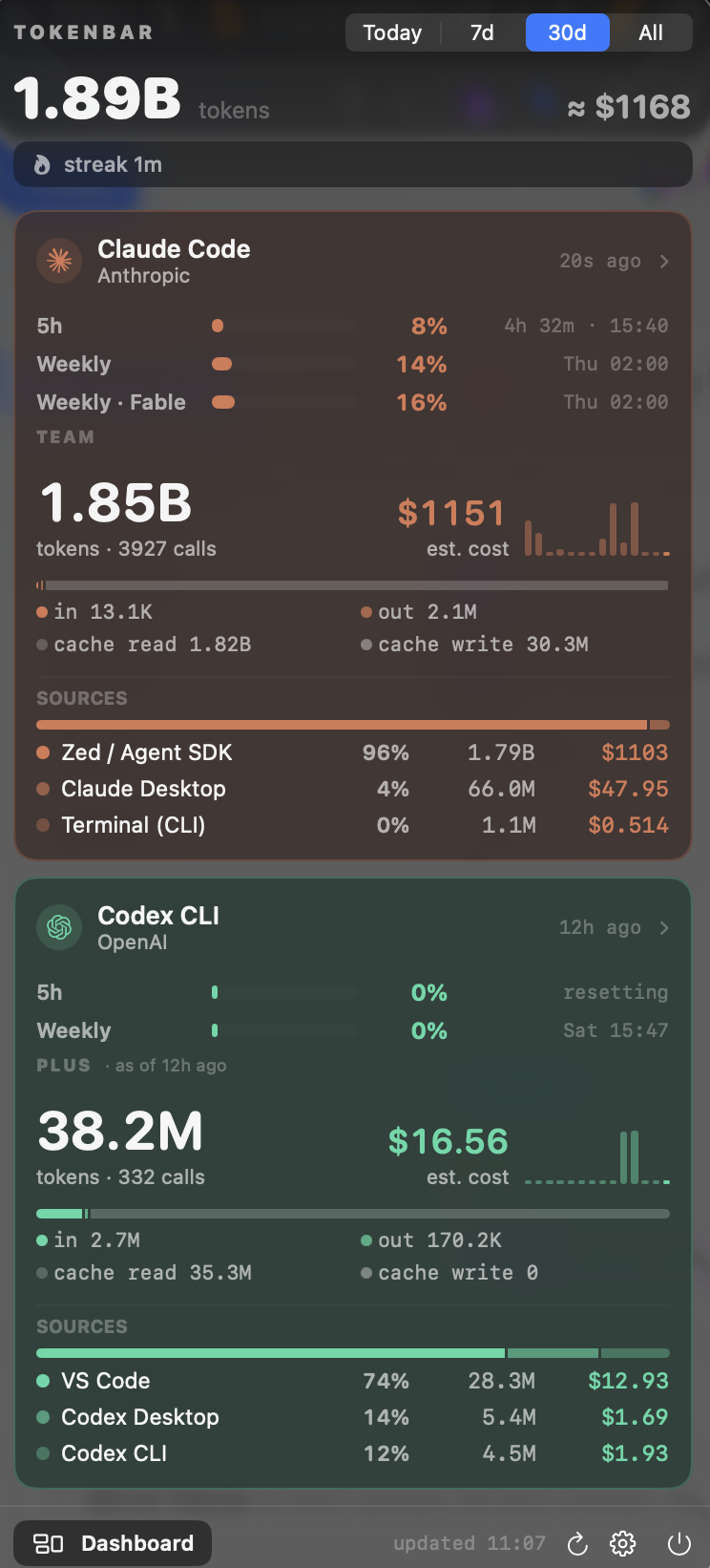
Token usage, estimated cost and rate limits for your AI coding tools — in the macOS menu bar.
Reads local logs only. No API keys, no accounts, no telemetry.


Features
- Usage at a glance — tokens and list-price cost for Today / 7d / 30d / All, split into input, output, cache read and cache write, with a 14-day sparkline per tool.
- Rate limits — Claude 5-hour and weekly windows (incl. per-model weekly), Codex 5-hour and weekly, with reset countdown and clock time.
- Where it came from — usage attributed to source (Terminal, Claude Desktop, Zed, VS Code, …) and to project folder.
- Dashboard window — 30-day stacked chart, top projects / models / sources; click a bar to drill into one day.
- Alerts — limit thresholds (80 % / 95 %), daily and weekly spend budgets, and a break reminder after long continuous use.
- Menu bar, your way — combined total or a single tool (its logo + tokens + worst limit); amber / red when a limit is close.
- Export — events CSV, daily CSV, Markdown report; also headless from the CLI.
- Native — Liquid Glass on macOS 26, light / dark / system, English or Thai, global hotkeys, launch at login.
Install
Download the latest .dmg from Releases and drag
TokenBar.app to Applications. Universal binary (Apple Silicon + Intel), macOS 14 or newer.
The app is not notarized yet (no Apple Developer account), so on first launch macOS may say it is damaged or from an
unidentified developer. Run this once (removes the download quarantine flag and re-signs the app locally), then open it normally:
xattr -cr /Applications/TokenBar.app && codesign --force --deep --sign - /Applications/TokenBar.app
If macOS still blocks it (macOS 15+ removed the right-click → Open bypass), go to
System Settings → Privacy & Security, scroll down and click Open Anyway.
On first launch TokenBar explains what it reads and asks before requesting anything:
- Claude limits (optional) — reads Claude Code's login token from your Keychain to fetch 5h / weekly limits. macOS prompts once; choose Always Allow.
- Notifications (optional) — for limit, budget and break alerts.
Both can be changed later in the ⚙️ menu.
Supported tools
| Tool | Reads | Status |
|---|---|---|
| Claude Code — CLI, Claude Desktop, Zed (ACP), VS Code, Agent SDK | ~/.claude/projects/**/*.jsonl |
verified |
| Codex CLI — CLI, Codex Desktop, VS Code | ~/.codex/sessions/**/*.jsonl |
verified |
| Zed Agent (Zed's native panel) | ~/Library/Application Support/Zed/threads/threads.db (needs brew install zstd) |
verified — no per-message timestamps, usage is dated by thread updated_at |
| Gemini CLI | ~/.gemini/tmp/*/chats/*.json |
from Gemini CLI source, not exercised locally |
| Qwen Code | ~/.qwen/tmp/*/chats/*.json |
Gemini CLI fork, unverified |
| OpenCode | ~/.local/share/opencode/storage/message/*/*.json |
unverified — open an issue with a sample if it misparses |
Tools with no local data are hidden. Cursor, Windsurf, Copilot and the web chats keep no readable local usage and cannot be supported.
Adding a tool means implementing UsageSource (roots, matches, parse) and a Provider case.
Rate limits come from api.anthropic.com/api/oauth/usage (Claude, polled every 5 min; if the token expires, run claude once)
and from the rate_limits payload in Codex session logs (updates while Codex runs).
Dashboard
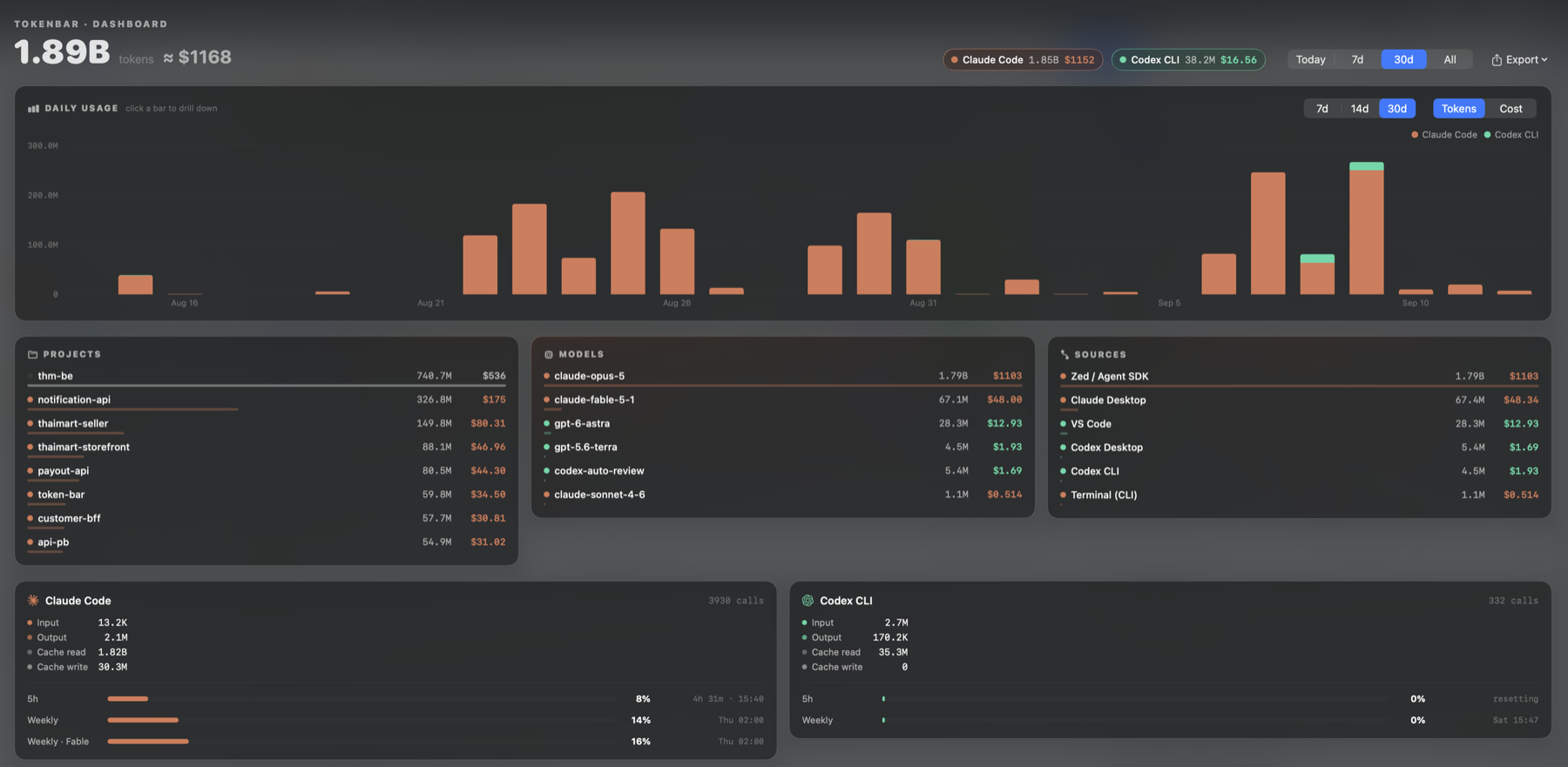
Opens from the popover footer (or a hotkey). 7 / 14 / 30-day stacked daily chart in tokens or cost, top projects
(from the working directory in the logs), models and sources, plus per-tool breakdown with limit gauges.
Click a bar to scope everything to that day; click again or Back to return.
Export (dashboard header) writes events CSV for the last 30 days or the selected day, a daily summary CSV, or a
Markdown report for the selected window. The same outputs are available headless:
/Applications/TokenBar.app/Contents/MacOS/TokenBar --export events 7d  > events.csv
/Applications/TokenBar.app/Contents/MacOS/TokenBar --export daily      > daily.csv
/Applications/TokenBar.app/Contents/MacOS/TokenBar --export report 30d > report.md
Alerts, budgets, hotkeys
All in the ⚙️ menu:
| Setting | Behaviour |
|---|---|
| Limit alert | Notification when any 5h / weekly window crosses 80 % (choose off / 70 / 80 / 90) and again at 95 %, once per reset cycle. Menu-bar icon turns amber / red and shows the worst percentage. |
| Daily / weekly budget | Progress row under the totals; notification at 80 % and 100 %, once per period. Amounts are list-price estimates. |
| Break reminder | Continuous use (calls less than 15 min apart) for 90 min → "take a break" notification, repeating every 45 min. All three values adjustable. |
| Hotkeys | Toggle the popover (default ⌥⇧T) and open the dashboard. Carbon hotkeys, no Accessibility permission. |
| Menu bar shows | Combined total, or one tool with its logo and limit. Toggle the number on / off. |
| Theme / Language | System / light / dark; system / English / ไทย. |
Privacy
- Reads local log files only. Nothing is uploaded; no telemetry, no analytics, no identifiers.
- Network calls: the optional Claude limits request above, and a once-a-day check of the GitHub Releases API for new versions. Both can be disabled.
- Settings are stored in
UserDefaults(dev.techit.tokenbar.app); parsed results are cached in~/Library/Caches/dev.techit.tokenbar.app/.
Cost estimates
Costs are what the same tokens would cost at list price (USD per 1M tokens, per model, with cache read / write rates),
not what you were billed — useful for judging a subscription or comparing tools. The built-in table lives inSources/TokenBar/Pricing.swift; override or add models in ~/.config/tokenbar/pricing.json, matched by model-id prefix:
{ "gpt-5.6": { "input": 1.75, "output": 14, "cacheRead": 0.175, "cacheWrite": 0 } }
Development
Swift Package, SwiftUI MenuBarExtra, no Xcode project. Requires Xcode 16+ (Xcode 26 for the Liquid Glass path).
./build.sh --install     # native build → /Applications/TokenBar.app
./build.sh --dmg         # universal build → dist/TokenBar-<version>.dmg
swift test               # parser fixtures, pricing, streaks, export, versions
Useful flags on the built binary: --dump (aggregated stats), --streak, --notify-test, --icon,--snapshot out.png / --snapshot-dashboard out.png (render views to PNG; env TOKENBAR_SNAPSHOT_LANG=th,TOKENBAR_SNAPSHOT_SCHEME=light, TOKENBAR_SNAPSHOT_DAY=1).
Release: bump CFBundleShortVersionString / CFBundleVersion in Info.plist, commit, thengit tag vX.Y.Z && git push origin vX.Y.Z. GitHub Actions builds the universal dmg and publishes the release.
Icons: app icon from Assets/AppIcon.xcassets (regenerate with scripts/make_appicon.swift, compiled by actool
in build.sh); menu-bar template icon from scripts/make_icon.swift; vendor logos in Sources/TokenBar/Resources/logos/
(Claude, Gemini, OpenAI marks as published by Simple Icons, CC0 — trademarks belong to their owners).
Credits & license
Made by Techit Kakaew. Built with Claude Code.
Released under the MIT License.
Reviews (0)
Sign in to leave a review.
Leave a reviewNo results found