ai-engineer-roadmap
Health Uyari
- License — License: MIT
- Description — Repository has a description
- Active repo — Last push 0 days ago
- Low visibility — Only 5 GitHub stars
Code Gecti
- Code scan — Scanned 12 files during light audit, no dangerous patterns found
Permissions Gecti
- Permissions — No dangerous permissions requested
Bu listing icin henuz AI raporu yok.
Free AI Engineer roadmap: 113 beginner-friendly topics on RAG, LLMs, AI agents, MCP, fine-tuning and production AI. Runnable offline Python, diagrams, interview questions.
AI Engineer Roadmap
Learn RAG, LLMs, AI agents, frameworks, MCP and production AI step by step, with runnable code, diagrams and interview questions.



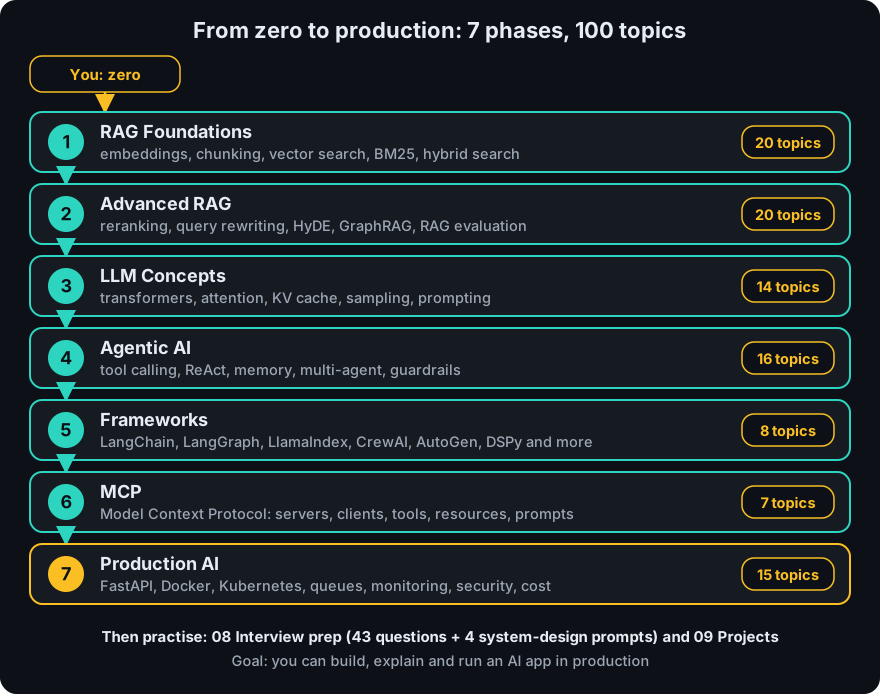
113 topics in 7 phases, each explained in plain English with an everyday analogy, a diagram, Python code, 3 interview questions and links to the original papers or official docs. If you know basic Python, you can start today. The demo scripts run offline with no API key.
Start in 5 minutes
You need Python 3.10 or newer (CI runs 3.12) and git.
git clone https://github.com/techsaurabh-394/ai-engineer-roadmap.git
cd ai-engineer-roadmap
python3 -m venv .venv && source .venv/bin/activate      # Windows: .venv\Scripts\activate
pip install -r requirements.txt
pytest -q                                                # all green = ready
python 01-rag-foundations/code/mini_rag.py "Why use multi-stage builds?"
The last command runs a complete (tiny) RAG pipeline offline. This is its real output:
[1] (docker.txt) Multi-stage builds compile an application in one stage and copy only the final artifact into a small runtime image. This keeps production images small and reduces the attack surface. Docker Compose describes several services in one YAML file and starts them together.
It chunked three sample documents, scored them against your question and printed the best passage with a citation. Set ANTHROPIC_API_KEY (and pip install anthropic) and Claude writes the answer from the retrieved passages instead. Next, open 00-start-here, then topic 1: What is RAG?.
Who is this for?
- Beginners who keep hearing "RAG", "agents" and "MCP" and want to finally understand them
- Developers moving into AI engineering who want a structured path instead of random tutorials
- Job seekers who need to explain these topics in interviews (every topic ends with 3 questions and answers, and there is a separate interview-prep folder)
Pick your path
| You are... | Start here | Then |
|---|---|---|
| Complete beginner | 00 Start here, then What is RAG? and Phase 1 in order | Phases 3, 4, 6 |
| Know Python, new to AI | What is RAG?, then What is an AI Agent? | Phases 2, 5, 6, 7 |
| Building a RAG app now | What is RAG?, then Reranking | Phase 7 |
| Building agents or MCP servers | What is an AI Agent?, then Model Context Protocol | Phases 5, 7 |
| Interview in a week | 08 Interview prep | The "Interview questions" at the end of each topic |
Not sure where to start? Read What is AI engineering? (5 minutes, no code), then pick a day-by-day plan in Learning paths (RAG app, agents and MCP, the full 8 weeks, or interview week). When you finish a phase, test yourself with Practice.
New to the whole thing? Read How to study this repo and keep the glossary open.
See it move
Hard ideas are easier to follow when you can watch them. This animation plays on a loop: a question travels through a RAG pipeline, one step at a time.
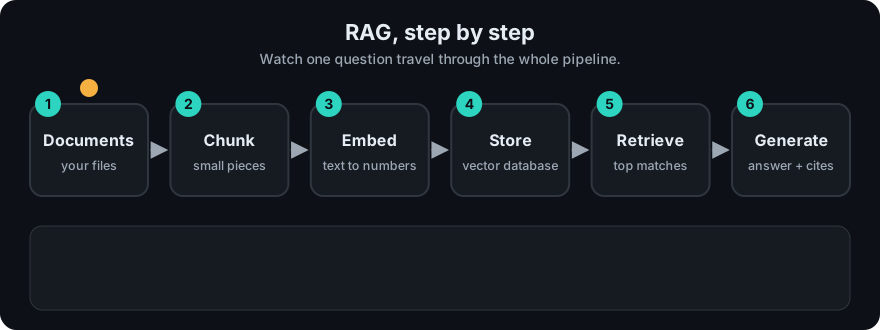
12 animated explainers (RAG, chunking, cosine similarity, attention, ReAct, tool calling, MCP and more) are in the animation gallery and inside the matching topic pages.
The big picture
How the pieces fit together (the number is the phase that teaches it):
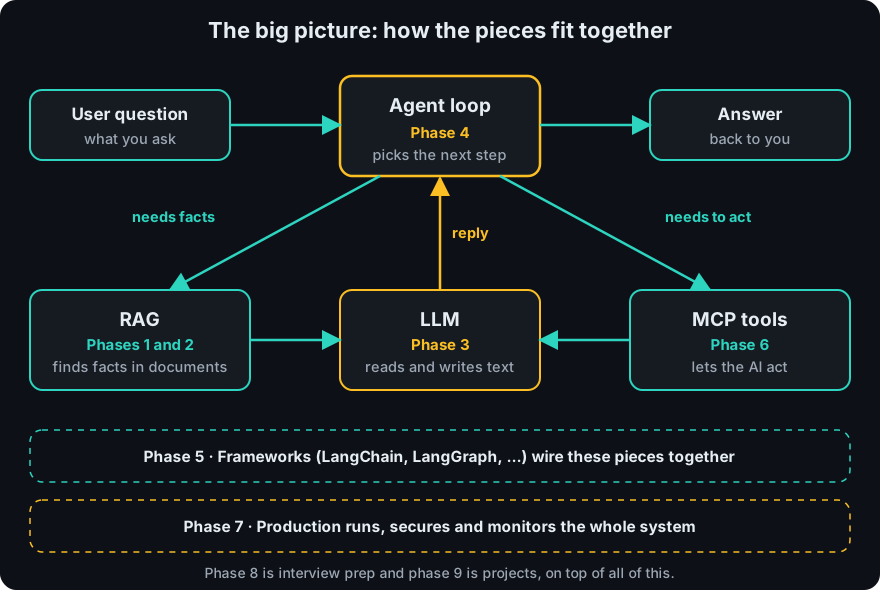
The three core ideas, in more detail:
| RAG Give the model your documents and make it cite them. 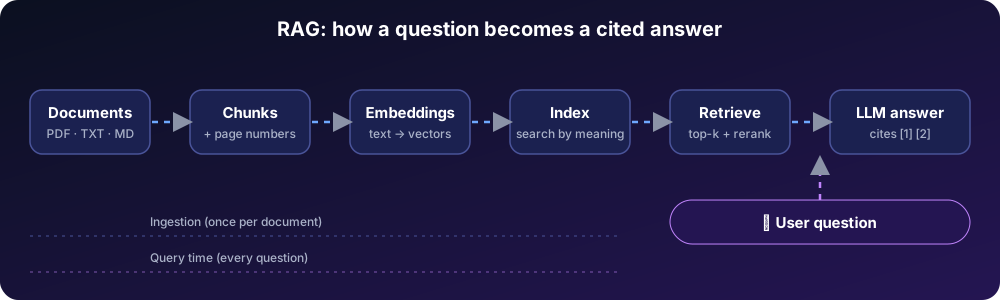 |
Agents Let the model choose tools in a loop, with limits. 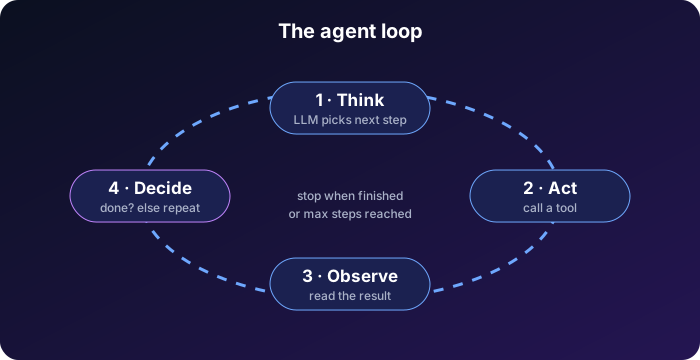 |
MCP One standard way to connect AI apps to tools. 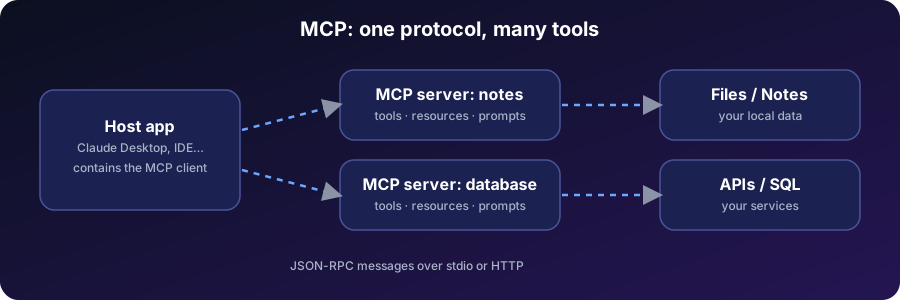 |
More diagrams: RAG end to end · workflow or agent? · interview in a week · production checklist
What you'll need
Every phase works with Python. The scripts in each code/ folder use only the standard library and run offline. The table shows what the extra snippets in the topic pages need if you want to run them too.
| Phase | Demos in code/ |
Extra snippets in topic pages need |
|---|---|---|
| 1 RAG Foundations | Python only, offline | sentence-transformers, chromadb, qdrant-client, faiss, hnswlib, numpy, LangChain packages (each marked with pip install) |
| 2 Advanced RAG | Python only, offline | sentence-transformers |
| 3 LLM Concepts | Python only, offline | torch, transformers, plus openai or anthropic and an API key |
| 4 Agentic AI | Python only, offline (scripted model) | anthropic or openai with an API key, langgraph |
| 5 Frameworks | Python only, offline (from-scratch versions) | langchain, langgraph, llama-index, dspy, OpenAI Agents SDK, and API keys for hosted models |
| 6 MCP | Python toy, offline. TypeScript server: Node.js 18+ (CI uses 22), npm ci, npm run build |
the mcp Python package for the snippets |
| 7 Production AI | Python only, offline: small in-process stand-ins, no Docker, Redis or Kubernetes needed | fastapi, pydantic, redis, celery, mlflow, and Docker or Kubernetes to run the Dockerfile and YAML for real |
An API key is never required. mini_rag.py and agent.py can use Claude when ANTHROPIC_API_KEY is set, and fall back to an offline mode otherwise.
The full checklist
Legend: 🟢 beginner · 🟡 intermediate · 🔴 advanced.
Progress. Fork the repo, tick the boxes as you learn (edit this file on GitHub or locally) and update the Done column. The totals below are the number of topics in each phase.
| Phase | Topics | 🟢 | 🟡 | 🔴 | Done |
|---|---|---|---|---|---|
| 1 RAG Foundations | 20 | 10 | 8 | 2 | 0 / 20 |
| 2 Advanced RAG | 21 | 0 | 10 | 11 | 0 / 21 |
| 3 LLM Concepts | 26 | 7 | 14 | 5 | 0 / 26 |
| 4 Agentic AI | 16 | 5 | 8 | 3 | 0 / 16 |
| 5 Frameworks | 8 | 2 | 4 | 2 | 0 / 8 |
| 6 MCP | 7 | 2 | 4 | 1 | 0 / 7 |
| 7 Production AI | 15 | 2 | 12 | 1 | 0 / 15 |
| Total | 113 | 28 | 60 | 25 | 0 / 113 |
Phase 1 — RAG Foundations
📖 Phase overview · Beginner
- 🟢 What is RAG?
- 🟢 Embeddings
- 🟢 Tokenization
- 🟢 Chunking
- 🟢 Recursive Chunking
- 🟡 Semantic Chunking
- 🟡 Parent Child Chunking
- 🟢 Sliding Window Chunking
- 🟢 Metadata
- 🟡 Vector Databases
- 🟢 Cosine Similarity
- 🟢 Euclidean Distance
- 🟢 Dot Product
- 🔴 HNSW
- 🔴 IVF Index
- 🟡 Hybrid Search
- 🟡 BM25
- 🟡 Sparse Retrieval
- 🟡 Dense Retrieval
- 🟡 Metadata Filtering
Phase 2 — Advanced RAG
📖 Phase overview · Intermediate → Advanced
- 🟡 Reranking
- 🟡 Cross Encoder
- 🟡 Bi Encoder
- 🟡 Context Compression
- 🟡 Query Expansion
- 🟡 Multi Query Retrieval
- 🔴 HyDE
- 🔴 Step Back Prompting
- 🟡 Self Query Retriever
- 🔴 Multi Vector Retriever
- 🟡 Parent Document Retriever
- 🟡 Ensemble Retrieval
- 🔴 Knowledge Graph RAG
- 🔴 GraphRAG
- 🔴 Multi Modal RAG
- 🔴 SQL RAG
- 🔴 API RAG
- 🟡 Incremental Indexing
- 🔴 Streaming Retrieval
- 🔴 RAG Evaluation (RAGAS / DeepEval)
- 🔴 LLM-as-a-Judge
Phase 3 — LLM Concepts
📖 Phase overview · Beginner → Advanced
- 🟢 Transformer Architecture
- 🟡 Self Attention
- 🟡 Multi Head Attention
- 🟡 Positional Encoding
- 🟡 Decoder Only Models
- 🟡 Encoder Decoder Models
- 🔴 KV Cache
- 🟢 Context Window
- 🟢 Temperature
- 🟢 Top-k
- 🟡 Top-p
- 🟡 Beam Search
- 🟡 Hallucination
- 🟢 Prompt Engineering
- 🟡 Fine-Tuning
- 🟢 Calling an LLM API
- 🟡 Structured Outputs
- 🟡 Quantization
- 🔴 LoRA and PEFT
- 🔴 Inference Serving and Batching
- 🟢 How an LLM Works End to End
- 🟡 Q, K and V Explained From Scratch
- 🟡 Inside a Transformer Block
- 🟡 How LLMs Are Trained
- 🔴 Modern Attention Variants
- 🔴 Mixture of Experts and Scaling Laws
Phase 4 — Agentic AI
📖 Phase overview · Intermediate
- 🟢 What is an AI Agent?
- 🟢 Tool Calling
- 🟢 Function Calling
- 🟡 ReAct Pattern
- 🟡 Planning Agents
- 🟡 Reflection
- 🟢 Memory
- 🟢 Short-term Memory
- 🟡 Long-term Memory
- 🟡 Semantic Memory
- 🟡 Episodic Memory
- 🟡 Agent Loops
- 🔴 Multi-Agent Systems
- 🟡 Human in the Loop
- 🔴 Agent Evaluation
- 🔴 Agent Guardrails
Phase 5 — Frameworks
📖 Phase overview · Intermediate
- 🟢 LangChain
- 🟡 LangGraph
- 🟢 LlamaIndex
- 🟡 OpenAI Agents SDK
- 🟡 CrewAI
- 🔴 AutoGen
- 🔴 DSPy
- 🟡 Haystack
Phase 6 — MCP (Model Context Protocol)
📖 Phase overview · Intermediate → Advanced
- 🟢 Model Context Protocol
- 🟢 MCP Server
- 🟡 MCP Client
- 🟡 MCP Tools
- 🟡 MCP Resources
- 🟡 MCP Prompts
- 🔴 Build a Custom MCP Server
Phase 7 — Production AI
📖 Phase overview · Advanced
- 🟢 FastAPI for AI
- 🟢 Docker
- 🟡 Kubernetes
- 🟡 Redis
- 🟡 Celery
- 🟡 RabbitMQ
- 🟡 Monitoring
- 🟡 LangSmith
- 🟡 MLflow
- 🟡 Prompt Versioning
- 🟡 AI Security
- 🟡 Guardrails
- 🟡 Observability
- 🟡 Cost Optimization
- 🔴 Deploy a Production AI Application
Extras
| Folder | What is inside |
|---|---|
| 08-interview-prep | 43 curated questions plus 4 system-design prompts, in 5 files |
| 09-projects | Portfolio project ideas from beginner to advanced |
| docs/what-is-ai-engineering.md | A 5-minute, no-code explanation of the whole field for complete beginners |
| docs/learning-paths.md | Five day-by-day plans with reading times: RAG app, agents and MCP, all 113 topics in 8 weeks, interview week |
| docs/practice.md | 61 practice questions with answers: warm-up, calculations, run-the-demo and design scenarios, plus build challenges |
| docs/animations.md | 12 animated explainers: watch RAG, attention, the agent loop and MCP step by step |
| docs/how-to-study.md | A study routine: pace, and what to do for each topic |
| docs/glossary.md | Plain-English definitions of the key terms |
*/code/ |
Runnable, tested demos for every phase (see "What you'll need") |
Interview questions in total: 339 at the end of the 113 topic pages (3 each), plus the 43 + 4 in 08-interview-prep.
What makes this different
- Plain English first. Every term is defined where it first appears.
- Everything runs. Demo scripts have tests, and CI runs them on every push.
- Basic to hard in one place. From "what is a token" to GraphRAG, Kubernetes and prompt-injection defence.
- Honest trade-offs. Each topic says when not to use the technique.
- Primary sources. Each topic links to the original paper or official docs.
Repository map
ai-engineer-roadmap/
├── 00-start-here/        setup and how to learn
├── 01-rag-foundations/   20 topics + code/
├── 02-advanced-rag/      21 topics + code/
├── 03-llm-concepts/      26 topics + code/
├── 04-agentic-ai/        16 topics + code/
├── 05-frameworks/        8 topics + code/
├── 06-mcp/               7 topics + code/ (incl. a TypeScript MCP server)
├── 07-production-ai/     15 topics + code/
├── 08-interview-prep/    questions and answers
├── 09-projects/          projects to build and share
├── assets/               SVG diagrams
├── docs/                 what is AI engineering, learning paths, practice questions, study guide, glossary
└── .github/workflows/    CI, link check, stale-issue cleanup
Automated checks
Every push and pull request runs the Python tests for all phases, builds the TypeScript MCP example, validates the SVG diagrams and checks that links to local files in Markdown pages are not broken. A separate link-check workflow checks external links; it runs on pull requests that change Markdown and every Monday, and it reports problems without failing the build.
Contributing
Found a mistake or want a topic added? Read CONTRIBUTING.md and open a pull request. Corrections are very welcome. See also the changelog.
Related projects by the author
| Project | What it is |
|---|---|
| rag-docs-chat | PDF chat with cited answers and an evaluation script |
| mcp-notes-server | MCP server with 6 typed tools, resources and a prompt |
| claude-skills | Reusable Claude Skills for SEO/GEO, blogging and MCP |
| mernstackdev.com | Developer blog on React, Node.js and AI engineering |
If this is useful, a star helps others find it.
Saurabh Pathak · AI Engineer & Full-Stack Developer
GitHub ·
LinkedIn ·
Blog ·
[email protected]

Yorumlar (0)
Yorum birakmak icin giris yap.
Yorum birakSonuc bulunamadi