hermes-fry-cards
Health Uyari
- License — License: MIT
- Description — Repository has a description
- Active repo — Last push 0 days ago
- Low visibility — Only 5 GitHub stars
Code Gecti
- Code scan — Scanned 12 files during light audit, no dangerous patterns found
Permissions Gecti
- Permissions — No dangerous permissions requested
Bu listing icin henuz AI raporu yok.
🍟 hermes-fry-cards — 飞书流式卡片插件
🍟 薯条卡片 (hermes-fry-cards)




🍟 Hermes Gateway 飞书流式卡片插件 — CardKit v2.0 实时流式消息

✨ 核心特性
| 能力 | 说明 |
|---|---|
| 🎴 流式卡片 | AI 回复实时打字机效果,按事件顺序动态渲染思考 / 工具 / 回答 |
| 🔧 工具调用合并 | 多个工具调用合并到统一面板,保持卡片紧凑不散乱 |
| 🧠 推理展示 | 显示模型思考/推理内容,支持 <thinking> / Reasoning: / 原生 API 推理块 |
| 🎯 统一面板 | 推理 + 工具合并成底部统一面板,Header 显示模型名、轮次、工具数、耗时 |
| 📊 终态卡片 | 完成后展示完整结果 — token 用量、耗时、上下文窗口 |
| 🖼️ 图片解析 | 自动识别 markdown 图片引用,下载上传后替换为飞书 img_key |
| 🛡️ 消息保护 | 消息被删除/撤回后自动终止更新,避免无效 API 调用 |
| 📤 卡片自动拆分 | 接近飞书 200 元素上限时自动拆分为多张卡片 |
| 🔔 Cron 推送 | 定时任务结果以飞书卡片推送,保留 Markdown 渲染 |
| 🔙 后台任务推送 | /background(/btw)任务完成后以卡片形式推送 |
| 🌐 中英双语 | 卡片文本根据飞书客户端语言自动切换 |
| 🎨 可定制样式 | header/footer、文字大小、宽度模式、字段布局均可配置 |
| 🎯 状态色框 | 顶部 header 根据状态自动着色:流式中蓝色、完成绿色、中断/错误红色 |
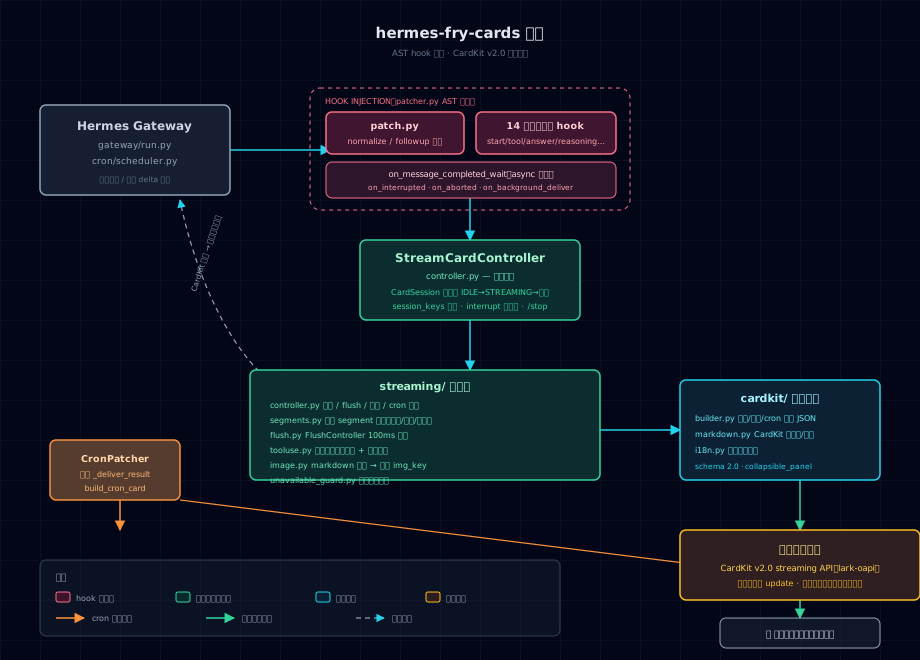
🏗️ 架构总览
🚀 快速安装
AI Agent 一键安装
curl https://raw.githubusercontent.com/techysy/hermes-fry-cards/main/INSTALL.md
手动安装
# GitHub(主仓库)
git clone https://github.com/techysy/hermes-fry-cards.git
# 或国内 Gitee 镜像(更快)
git clone https://gitee.com/techysy/hermes-fry-cards.git

cd hermes-fry-cards
HERMES_PYTHON=~/.hermes/hermes-agent/venv/bin/python3
$HERMES_PYTHON -m pip install -e .
$HERMES_PYTHON -m hermes_fry_cards verify
$HERMES_PYTHON -m hermes_fry_cards install
hermes gateway restart
⚙️ 配置
streaming:
  enabled: true
  header:
    enabled: true
  footer:
    enabled: false
    fields:
      - [status, elapsed, model, context]
display:
  platforms:
    feishu:
      show_tool_use: true        # 展示工具调用面板
      show_reasoning: false      # 展示推理过程
      show_context: true         # 统一面板 header 显示上下文窗口
      context_display_mode: text # text / bar / text_bar
      max_reasoning_panels: 3    # 最多保留的独立推理面板数(超出后合并,防元素溢出)
      unified_panel_min_duration: 5  # 统一面板最小展示耗时(秒)
      truncate_model_name: true  # 截断模型名(nvidia/moonshotai/kimi-k3 → ⇲kimi-k3)
上下文显示格式
开启 show_context 后,统一面板 header 会显示上下文窗口使用量:
context_display_mode |
显示效果 |
|---|---|
text(默认) |
55.6k/1.0m (5%) |
bar |
[███▓▒░░░] 35%(渐变阴影) |
text_bar |
20k/1.0m [███▓▒░░░] 21% |
block/block_text样式在桌面端/移动端显示不一致,已废弃,自动回落到bar/text_bar。
配置项一览
| 配置项 | 说明 | 默认值 |
|---|---|---|
header.enabled |
顶部状态栏 | true |
footer.enabled |
底部元数据栏 | false |
panel_expanded |
完成态面板保持展开 | false |
width_mode |
卡片宽度 (default / compact / fill) |
default |
show_tool_use |
展示工具调用面板 | true |
show_reasoning |
展示推理过程 | false |
show_context |
统一面板 header 显示上下文窗口 | true |
context_display_mode |
上下文显示格式:text / bar / text_bar |
text |
max_reasoning_panels |
最多保留的独立推理面板数(超出后合并,防元素溢出) | 3 |
unified_panel_min_duration |
统一面板最小展示耗时(秒);无工具调用或耗时 ≤ 此值不显示统一面板 | 5 |
truncate_model_name |
截断模型名(nvidia/moonshotai/kimi-k3 → ⇲kimi-k3) |
true |
模型别名配置
独立于 config.yaml,别名写在 ~/.hermes/model_aliases.json:
{
  "longcat": "哈基米",
  "gemini": "哈基米"
}
- 匹配:key 对完整模型名做大小写不敏感子串匹配(
longcat→or/lc/LongCat-2.0命中) - 优先级:别名命中 → 显示别名;未命中 → 回落截断逻辑
- 热更新:每次渲染重读,改完文件即生效,无需重启网关
完整路径:
~/.hermes/model_aliases.json
| 模型别名 |~/.hermes/model_aliases.json子串匹配,命中优先于截断 | 无 |
样式效果示例
统一面板 header 的完整形态(完成态卡片底部折叠面板标题):
| 配置组合 | header 效果 |
|---|---|
truncate_model_name: false, show_context: true 纯文本 |
🍟 nvidia/moonshotai/kimi-k3 · 💭2 · 🔧3 · 152.6k/1.0m (15%) · ⏱️ 45.2s |
默认(truncate_model_name: true) |
🍟 ⇲kimi-k3 · 💭2 · 🔧3 · 152.6k/1.0m (15%) · ⏱️ 45.2s |
context_display_mode: bar |
🍟 ⇲kimi-k3 · 💭2 · 🔧3 · [███▓▒░░░] 15% · ⏱️ 45.2s |
context_display_mode: text_bar |
🍟 ⇲kimi-k3 · 💭2 · 🔧3 · 152.6k/1.0m [███▓▒░░░] 15% · ⏱️ 45.2s |
show_context: false |
🍟 ⇲kimi-k3 · 💭2 · 🔧3 · ⏱️ 45.2s |
header 各部分含义:
🍟模型名 ·💭n推理轮次 ·🔧n工具调用数 · 上下文窗口 ·⏱️耗时。
无工具调用或回复 ≤
unified_panel_min_duration秒时,整个统一面板(含 header)不显示。
🖥️ CLI 命令
HERMES_PYTHON=~/.hermes/hermes-agent/venv/bin/python3
$HERMES_PYTHON -m hermes_fry_cards verify     # 验证兼容性
$HERMES_PYTHON -m hermes_fry_cards install    # 注入 hook
$HERMES_PYTHON -m hermes_fry_cards uninstall  # 移除 hook
$HERMES_PYTHON -m hermes_fry_cards status     # 查看状态
📝 更新 / 卸载
更新
cd hermes-fry-cards && git pull
HERMES_PYTHON=~/.hermes/hermes-agent/venv/bin/python3
$HERMES_PYTHON -m pip install -e .
$HERMES_PYTHON -m hermes_fry_cards uninstall
$HERMES_PYTHON -m hermes_fry_cards install
hermes gateway restart
卸载
HERMES_PYTHON=~/.hermes/hermes-agent/venv/bin/python3
$HERMES_PYTHON -m hermes_fry_cards uninstall
$HERMES_PYTHON -m pip uninstall hermes-fry-cards
🧠 工作原理
用户发送消息
  → 创建卡片会话
  → 流式更新(工具状态、文本增量 — 节流调度)
  → 图片 URL 异步解析替换
  → 终态卡片(token/耗时/上下文)
🛡️ 稳定性保障(v0.1.1)
- session 生命周期统一管理:注册/清理单一入口、幂等可重入;中断接管不误删新会话映射;异常残留的终态会话允许重建,不再需要重启网关恢复
- flush 竞态防护:完成标记与刷新请求交叉时不会误触发多余 CardKit 调用;同一份数据不会被重复刷新
- 失败原因可追溯:卡片失败时记录首次失败原因(
mark_failed(reason=...)),回退网关纯文本是统一决策点
排查问题时可直接按以下标准化日志事件在 ~/.hermes/logs/agent.log 中检索:
| 事件 | 含义 |
|---|---|
session_created |
卡片会话创建 |
card_created |
占位卡片发送成功 |
card_reply_failed |
建卡失败(含飞书错误码),将回退纯文本 |
fallback_to_text |
卡片无法收尾,交还网关默认回复(含原因 reason=...) |
card_complete_failed |
完成重试 3 次耗尽 |
session_disposed / cleanup_idempotent |
会话清理 / 重复清理被幂等吸收 |
📄 文档与报告入口
- 优化方案 — 稳定性与维护性优化方案
- 卡片设置指南 — 全部配置项与常用场景
- 排障指南 — 与 hfc 插件冲突、卡片不显示、hook 未生效等常见问题
- 文档目录 — 项目文档入口
- 测试报告目录 — 报告存放规范与入口
- 核心汉化补丁:
skills/hermes-core-zh-localization/(仓库内附带,安装方式见 SKILL.md)
说明:测试报告建议统一保存在
tests/reports/,并按日期/主题命名,便于后续回归对比和审计。
🔄 热更新 & 网关重启说明
本插件通过 AST 注入 hook 到 Hermes 的 gateway/run.py 和 cron/scheduler.py。部分配置支持热更新(无需重启),但插件代码改动和部分结构类配置需要重启网关才能生效。
✅ 支持热更新(改 config.yaml 后下一条消息即生效)
以下 display 显示 / 样式类配置项,每次渲染都会从磁盘重读,无需重启:
| 配置项 | 说明 |
|---|---|
show_reasoning |
展示推理过程(/reasoning 命令即运行时切换此配置) |
show_tool_use |
展示工具调用面板 |
show_context |
统一面板 header 显示上下文窗口 |
context_display_mode |
上下文显示格式:text / bar / text_bar |
max_reasoning_panels |
最多独立推理面板数(防元素溢出) |
unified_panel_min_duration |
统一面板最小展示耗时(秒) |
truncate_model_name |
截断模型名 |
| 模型别名 | ~/.hermes/model_aliases.json 每次渲染重读,改文件即生效 |
⚠️ 需要重启网关(hermes gateway restart)
以下改动必须重启,运行中的进程不会热加载:
- 插件代码修改(
git pull更新、改源码) streaming.enabled开关streaming.header/footer/body/width_mode等 streaming 结构类配置- 飞书凭据
app_id/app_secret
hermes gateway restart
⚠️ 注意:
hermes gateway restart需要在 gateway 进程之外的独立 shell 中执行。
若从 gateway 进程内部(如通过 AI 对话让 agent 执行)触发,SIGTERM 会传播到子进程,
重启命令本身会被杀掉。请在本地终端手动运行。
✅ 重启不会损坏任何东西,可放心反复执行(可以无限重启)。
重启后的效果验证:hermes_fry_cards status 显示所有 hook installed,飞书渠道连接正常即可。
故障排查
| 现象 | 原因 | 解决方案 |
|---|---|---|
CardKit 300313 报错 |
卡片元素接近飞书 200 上限 | 等待自动拆分 |
| Hook 丢失 | Hermes 升级覆盖了已 patch 的文件 | verify + install + 重启 |
| 流式卡片变纯文本 | CardKit 创建失败 | 日志检索 card_reply_failed / fallback_to_text 看具体原因,检查飞书凭据是否正确 |
status 显示 warning |
CLI 使用了错误的 Python 解释器 | 用 $HERMES_PYTHON 重新执行 |
| 卡片一直 loading 不收尾 | 完成更新失败(如元素 Duplicate ID) | 日志检索 card_complete_failed,确认版本 ≥ v0.1.1(含竞态修复) |
📦 镜像仓库
- GitHub 主仓库:techysy/hermes-fry-cards
- Gitee 国内镜像:techysy/hermes-fry-cards — 国内访问更快,与 GitHub 同步
🔗 相关项目
| 项目 | 说明 | 特性 | Stars |
|---|---|---|---|
| 🍟 hermes-fry-cards | 薯条卡片 — Hermes 飞书流式卡片插件 | 🎯 工具调用合并 · 统一面板 · 状态色框 | ⭐4 |
| 👸🏻 aiduPOP | 爱嘟泡波卡 — Hermes 飞书流式卡片插件 | 🫧 泡波样式 · 透明治愈 · 灵动 UI | ⭐10 |
| 🎭 lark-hls-v2 | 飞书 CardKit v2.0 流式卡片插件 for Hermes Agent | 🎭 二次元画风 · 动态台词 · 场景检测 · Fisher-Yates 洗牌 | ⭐7 |
🔄 与上游 hermes-lark-streaming 的差异
本项目基于 Cheerwhy/hermes-lark-streaming v0.12.0 独立开发。核心流式引擎沿用上游 AST hook 注入架构,在此之上做了三层增强:
✨ 新增功能
| 功能 | 说明 | 上游状态 |
|---|---|---|
| 统一面板 | 推理 + 工具调用合并到底部统一面板;unified_panel_min_duration 控制无工具且耗时短时自动隐藏 |
❌ 推理面板独立散排,多轮对话卡片冗长 |
| 上下文进度条 | show_context 独立开关 + context_display_mode 三种模式(text / 渐变阴影 bar / text_bar),智能单位(<1M 用 k) |
❌ 仅 footer 纯文本百分比,无开关 |
| 推理面板上限 | max_reasoning_panels(默认 3),超出合并进最后一个面板——兼容 deepseek-v4-flash 等不分段思考模型,防 300305 元素溢出 |
❌ 无限制,长思考必溢出 |
| 模型名截断 | truncate_model_name:nvidia/moonshotai/kimi-k3 → ⇲kimi-k3,修复移动端换行 |
❌ 全称显示 |
| 模型别名 | ~/.hermes/model_aliases.json 独立 JSON 配置:{"longcat": "哈基米", "gemini": "哈基米"},key 对模型名做大小写不敏感子串匹配,命中显示别名(如 LongCat → 哈基米),未命中回落截断逻辑;每次渲染重读,改文件即生效 |
❌ 无 |
行为默认值:show_reasoning 默认 true(上游默认 false)。
🔧 关键修复(上游存在的坑)
- 300305 元素超限强制拆卡恢复 — 卡片实际元素总数超飞书硬上限时,自动封印旧卡、未创建 segment 迁移新卡续流,不再永久卡「处理中」
- 远程图片 URL 过滤 — 规避 CardKit 拒绝远程 URL(
200570 invalid image keys),无法上传的引用先 strip 并包代码围栏 - 完成态 Duplicate ID 修复体系 — reasoning
text_el_id全链路复用 + 带索引唯一 ID 兜底;上游完成态用固定reasoning_text会与流式阶段元素冲突,导致卡片卡 loading - seal/complete 失败清理 loading 图标 — 收尾失败不再残留「处理中」状态
🏛️ 内部稳定性重构(v0.1.1)
- session 生命周期统一入口(注册/清理幂等)、interrupt 后不误删新会话映射、终态会话可重建
- FlushController 竞态防护:完成态快照防误重刷、遗留 timer 取消防双刷
mark_failed(reason=...)失败原因可追溯 + 结构化日志事件 +_yield_to_gateway单一回落决策点- 测试规模 15 个文件、新增 9 个稳定性回归测试;配套 CONFIGURATION / TROUBLESHOOTING 文档
📄 归属说明
灵感来自 hermes-lark-streaming(作者 Cheerwhy),原项目使用 MIT 协议。本项目为独立开发版本,已进行架构重写和功能重构。
📄 许可证
Yorumlar (0)
Yorum birakmak icin giris yap.
Yorum birakSonuc bulunamadi