perplexity-mcp
Health Uyari
- License — License: MIT
- Description — Repository has a description
- Active repo — Last push 0 days ago
- Low visibility — Only 7 GitHub stars
Code Gecti
- Code scan — Scanned 12 files during light audit, no dangerous patterns found
Permissions Gecti
- Permissions — No dangerous permissions requested
This MCP server provides an interface to Perplexity AI's Pro search features, including multi-model reasoning and deep research. It allows users to pool multiple Perplexity accounts to share resources and monitor usage via a React admin dashboard and Telegram alerts without paying for the official API.
Security Assessment
The tool operates by using active session cookies rather than official API keys, meaning you must provide your Perplexity account authentication tokens to use it. It makes regular network requests to Perplexity to function and to third-party services (like Telegram) for alert notifications. While the light code scan found no dangerous patterns, hardcoded secrets, or dangerous system permissions, sharing active session tokens inherently carries a Medium risk. There is always a possibility that a third-party tool could misuse session cookies to access or scrape personal account data.
Quality Assessment
The project is very new and currently has low community visibility with only 7 GitHub stars, meaning it has not been broadly tested or vetted by a large audience. However, it is actively maintained (last pushed 0 days ago), includes a clear MIT license, and has a highly detailed, professional README. The codebase appears clean and organized.
Verdict
Use with caution — the code itself is clean and open, but handing over active session cookies to any third-party tool requires a high degree of personal trust and awareness of the potential security implications.
Free Perplexity AI MCP server with multi-account pooling, React admin dashboard, zero-cost health monitoring, and Telegram alerts. No API keys needed.


The only Perplexity MCP server with multi-account pooling, an admin dashboard, and zero-cost monitoring.
No API keys. No per-query fees. Uses your existing Perplexity Pro session.





Features · Quick Start · Admin Panel · Configuration · Architecture
🎯 Why This One?
Most Perplexity MCP servers are single-account wrappers around the paid Sonar API. This one is different:
- 🆓 No API costs — uses session cookies, not the paid API. Same features, zero per-query fees
- 🏊 Multi-account pool — round-robin across N accounts with automatic failover
- 📊 Admin dashboard — React UI to monitor quotas, manage tokens, tail logs in real-time
- ❤️ Zero-cost health checks — monitors all accounts via rate-limit API without consuming queries
- 🛡️ Downgrade protection — detects when Perplexity silently returns a regular result instead of deep research
- 📱 Telegram alerts — get notified when tokens expire or quota runs out
✨ Features
🔍 Smart Search
🤖 9 Models Available
|
🏊 Token Pool Engine
🛡️ Production Hardened
|
🖼️ Screenshots
Token Pool Dashboard
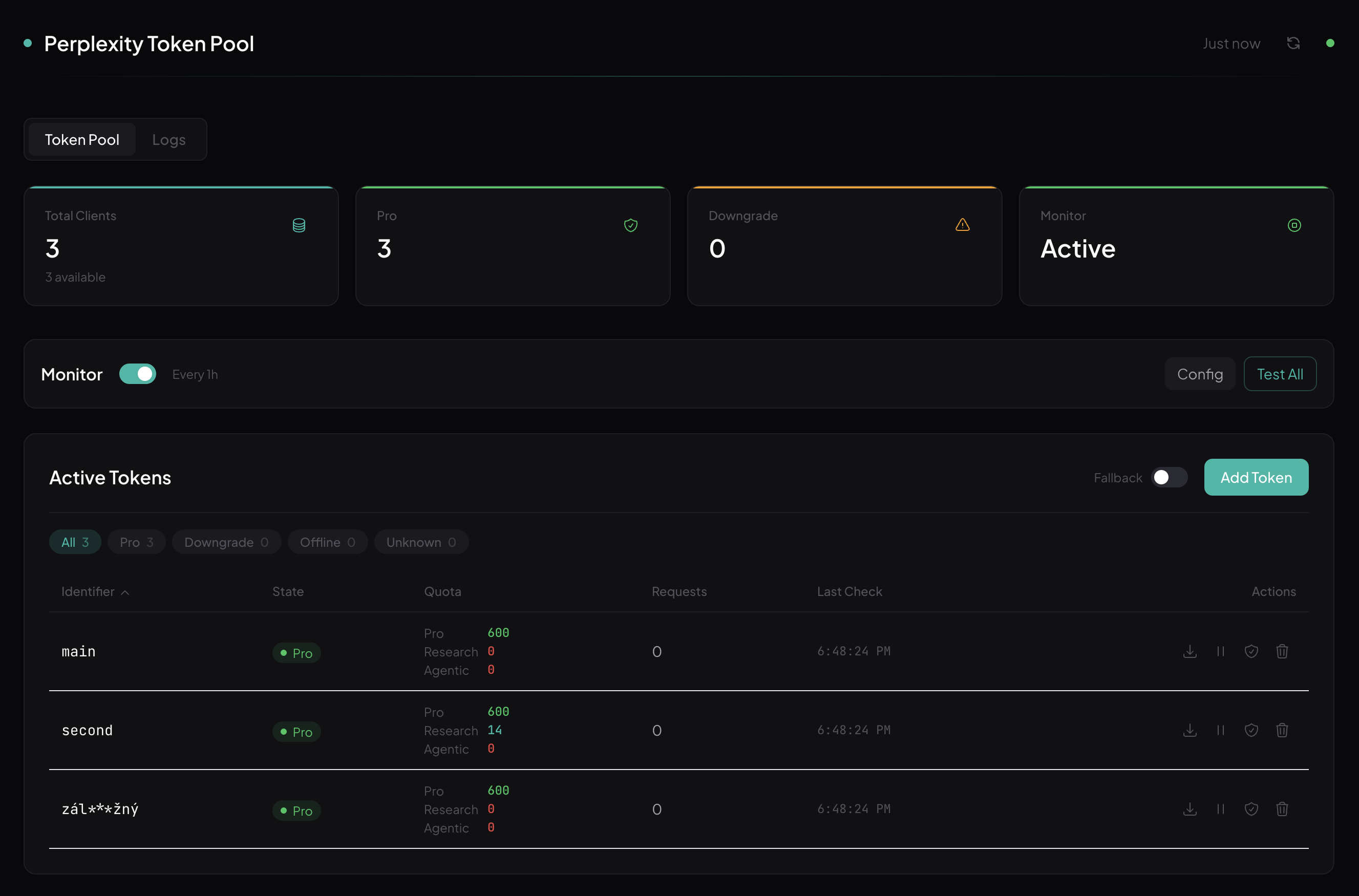
Stats grid, monitor controls, sortable token table with per-account quotas (Pro / Research / Agentic), filter pills, and one-click actions.
Log Viewer
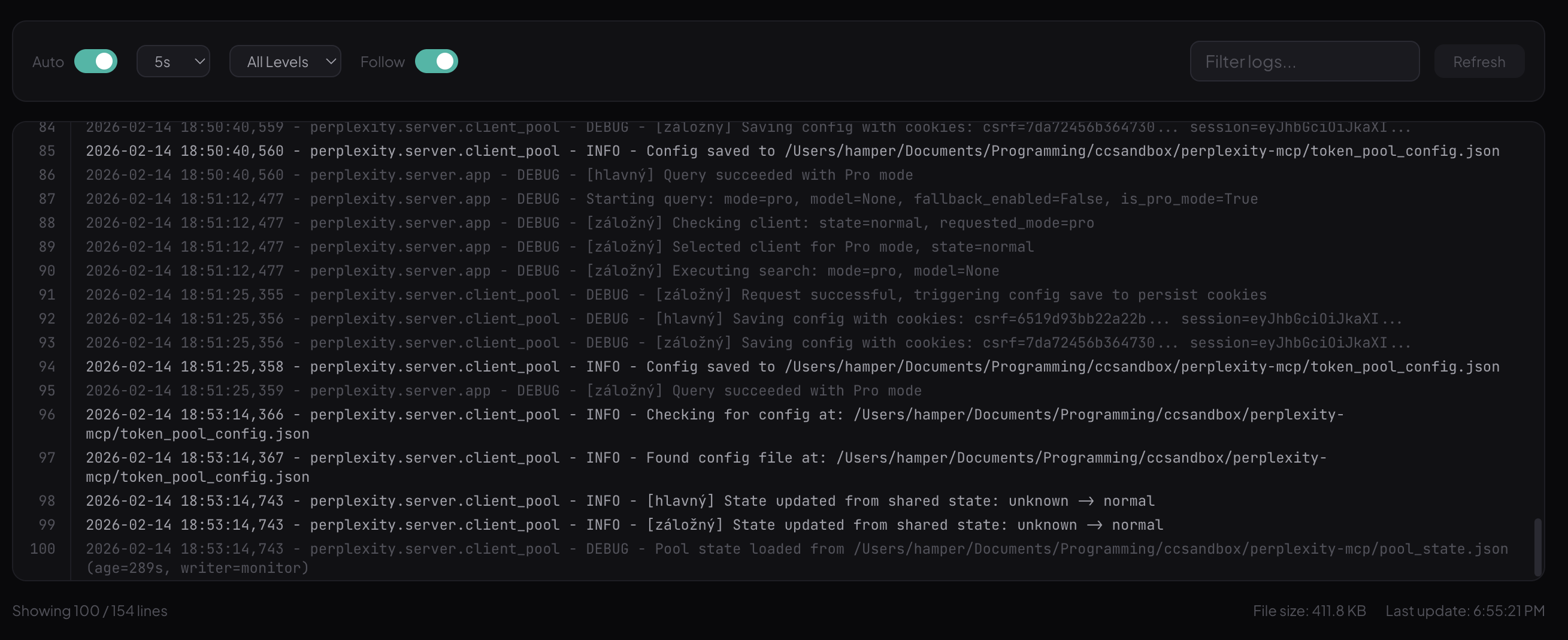
Live log streaming with auto-refresh, level filtering, search highlighting, follow mode, and line numbers.
🚀 Quick Start
1. Clone & Install
git clone https://github.com/teoobarca/perplexity-mcp.git
cd perplexity-mcp
uv sync
2. Add to Your AI Tool
🟣 Claude Codeclaude mcp add perplexity -s user -- uv --directory /path/to/perplexity-mcp run perplexity-mcp
Go to Settings → MCP → Add new server and paste:
{
  "command": "uv",
  "args": ["--directory", "/path/to/perplexity-mcp", "run", "perplexity-mcp"]
}
Add to your MCP config file:
{
  "mcpServers": {
    "perplexity": {
      "command": "uv",
      "args": ["--directory", "/path/to/perplexity-mcp", "run", "perplexity-mcp"]
    }
  }
}
That's it. Works immediately with anonymous sessions. Add your tokens for Pro access — see Authentication.
🛠️ Tools
Two MCP tools with LLM-optimized descriptions so your AI assistant picks the right one automatically:
perplexity_ask
AI-powered answer engine for tech questions, documentation lookups, and how-to guides.
| Parameter | Type | Default | Description |
|---|---|---|---|
query |
string | required | Natural language question with context |
model |
string | null |
Model selection (see models) |
sources |
array | ["web"] |
Sources: web, scholar, social |
language |
string | en-US |
ISO 639 language code |
Mode auto-detection: Models with thinking or reasoning in the name automatically switch to Reasoning mode.
"gpt-5.2"          → Pro Search
"gpt-5.2-thinking"  → Reasoning Mode  ← auto-detected
perplexity_research
Deep research agent for comprehensive analysis. Returns extensive reports with 10-30+ citations.
| Parameter | Type | Default | Description |
|---|---|---|---|
query |
string | required | Detailed research question with full context |
sources |
array | ["web", "scholar"] |
Sources: web, scholar, social |
language |
string | en-US |
ISO 639 language code |
[!TIP]
Deep research takes 2-5 minutes per query. Provide detailed context and constraints for better results. The server has a 15-minute timeout to accommodate this.
🖥️ Admin Panel
A built-in web dashboard for managing your token pool. Start it with:
perplexity-server
Opens automatically at http://localhost:8123/admin/
| Feature | Description |
|---|---|
| 📊 Stats Grid | Total clients, Online/Exhausted counts, Monitor status |
| 📋 Token Table | Sortable columns, filter pills (Online/Exhausted/Offline/Unknown), icon actions |
| 💰 Quota Column | Per-token breakdown — Pro remaining, Research quota, Agentic research |
| ❤️ Health Monitor | Zero-cost checks via rate-limit API, configurable interval |
| 📱 Telegram Alerts | Notifications on token state changes (expired, exhausted, back online) |
| 🔄 Fallback Toggle | Enable/disable automatic Pro → free fallback |
| 📥 Import/Export | Bulk token management via JSON config files |
| 📝 Log Viewer | Live streaming, level filter (Error/Warning/Info/Debug), search, follow mode |
| 🧪 Test Button | Run health check on individual tokens or all at once |
🔐 Authentication
By default, the server uses anonymous Perplexity sessions (rate limited). For Pro access, add your session tokens.
How to Get Tokens
- Sign in at perplexity.ai
- Open DevTools (F12) → Application → Cookies
- Copy these two cookies:
next-auth.csrf-tokennext-auth.session-token
Single Token
Create token_pool_config.json in the project root:
{
  "tokens": [
    {
      "id": "my-account",
      "csrf_token": "your-csrf-token-here",
      "session_token": "your-session-token-here"
    }
  ]
}
Multi-Token Pool
Add multiple accounts for round-robin rotation with automatic failover:
{
  "monitor": {
    "enable": true,
    "interval": 6,
    "tg_bot_token": "optional-telegram-bot-token",
    "tg_chat_id": "optional-chat-id"
  },
  "fallback": {
    "fallback_to_auto": true
  },
  "tokens": [
    { "id": "account-1", "csrf_token": "...", "session_token": "..." },
    { "id": "account-2", "csrf_token": "...", "session_token": "..." },
    { "id": "account-3", "csrf_token": "...", "session_token": "..." }
  ]
}
[!NOTE]
Session tokens last ~30 days. The monitor detects expired tokens and alerts you via Telegram.
⚙️ Configuration
Environment Variables
| Variable | Default | Description |
|---|---|---|
PERPLEXITY_TIMEOUT |
900 |
Request timeout in seconds (15 min for deep research) |
SOCKS_PROXY |
— | SOCKS5 proxy URL (socks5://host:port) |
Token States
Token state is computed automatically from session_valid + rate_limits (never set manually):
| State | Meaning | Badge | Behavior |
|---|---|---|---|
🟢 normal |
Session valid, pro quota available | Online | Used for all requests |
🟡 exhausted |
Session valid, pro quota = 0 | Exhausted | Skipped for Pro, used as auto fallback |
🔴 offline |
Session invalid/expired | Offline | Not used for any requests |
🔵 unknown |
Not yet checked | Unknown | Used normally (quota assumed available) |
Fallback Chain
When a Pro request fails, the server tries progressively:
1. ✅ Next client with Pro quota (round-robin)
2. ✅ Next client with Pro quota ...
3. 🟡 Any available client (auto mode)
4. 🔵 Anonymous session (auto mode)
5. ❌ Error returned to caller
🏗️ Architecture
┌─────────────────────────────────────────────────────────┐
│  Your AI Assistant (Claude Code / Cursor / Windsurf)    │
└──────────────────────┬──────────────────────────────────┘
                       │ MCP (stdio)
                       ▼
┌──────────────────────────────────────────────────────────┐
│  perplexity-mcp                                          │
│  ┌────────────────┐  ┌────────────────────────────────┐  │
│  │  tools.py       │  │  server.py                     │  │
│  │  • ask          │──│  • Pool state sync             │  │
│  │  • research     │  │  • Timeout handling            │  │
│  └────────────────┘  └────────────────────────────────┘  │
└──────────────────────┬───────────────────────────────────┘
                       │
                       ▼
┌──────────────────────────────────────────────────────────┐
│  Backend Engine (perplexity/)                            │
│                                                          │
│  ┌─────────────┐  ┌──────────────┐  ┌────────────────┐  │
│  │  client.py   │  │  client_pool │  │  admin.py      │  │
│  │  • Search    │  │  • Rotation  │  │  • REST API    │  │
│  │  • Upload    │  │  • Backoff   │  │  • Static      │  │
│  │  • Validate  │  │  • Monitor   │  │    files       │  │
│  └──────┬───────┘  │  • Fallback  │  └────────┬───────┘  │
│         │          └──────────────┘           │          │
│         ▼                                     ▼          │
│  ┌─────────────┐                    ┌────────────────┐   │
│  │ Perplexity  │                    │ React Admin UI │   │
│  │ (web API)   │                    │ :8123/admin/   │   │
│  └─────────────┘                    └────────────────┘   │
└──────────────────────────────────────────────────────────┘
| Component | File | Role |
|---|---|---|
| MCP Server | src/server.py |
Stdio transport, pool state sync, timeout handling |
| Tool Definitions | src/tools.py |
2 MCP tools with LLM-optimized descriptions |
| API Client | perplexity/client.py |
Perplexity API via curl_cffi (bypasses Cloudflare) |
| Client Pool | perplexity/server/client_pool.py |
Round-robin, backoff, monitor, state persistence |
| Query Engine | perplexity/server/app.py |
Rotation loop, 3-level fallback, validation |
| Admin API | perplexity/server/admin.py |
REST endpoints + static file serving |
| Admin UI | perplexity/server/web/ |
React + Vite + Tailwind dashboard |
🧪 Development
# Install in development mode
uv pip install -e ".[dev]" --python .venv/bin/python

# Run unit tests (53 tests)
.venv/bin/python -m pytest tests/ -v

# Frontend development
cd perplexity/server/web
npm install
npm run dev      # Dev server with proxy to :8123
npm run build    # Production build
Project Structure
src/                          # MCP stdio server (thin wrapper)
  server.py                   #   Entry point, pool state sync
  tools.py                    #   Tool definitions

perplexity/                   # Backend engine
  client.py                   #   Perplexity API client (curl_cffi)
  config.py                   #   Constants, endpoints, model mappings
  exceptions.py               #   Custom exception hierarchy
  logger.py                   #   Centralized logging
  server/
    app.py                    #   Starlette app, query engine
    client_pool.py            #   ClientPool, rotation, monitor
    admin.py                  #   Admin REST API
    utils.py                  #   Validation helpers
    main.py                   #   HTTP server entry point
    web/                      #   React admin frontend (Vite + Tailwind)

tests/                        # 53 unit tests
⚠️ Limitations
- Unofficial — uses Perplexity's web interface, may break if they change it
- Cookie-based auth — session tokens expire after ~30 days
- Rate limits — anonymous sessions have strict query limits
- Deep research — takes 2-5 minutes per query (this is normal)
📄 License
Yorumlar (0)
Yorum birakmak icin giris yap.
Yorum birakSonuc bulunamadi