QGIS_AI-Agent
Health Uyari
- License — License: GPL-2.0
- Description — Repository has a description
- Active repo — Last push 0 days ago
- Low visibility — Only 5 GitHub stars
Code Gecti
- Code scan — Scanned 12 files during light audit, no dangerous patterns found
Permissions Gecti
- Permissions — No dangerous permissions requested
Bu listing icin henuz AI raporu yok.
AI agent for QGIS: ask in plain English and it finds the data, runs the analysis and builds the map in your open project. One click undoes anything it changed. QGIS plugin by TerraLab, free tier, no card.
AI Agent in QGIS 


Your AI agent for QGIS: hand it the work and it does it in your open project
Ask for anything in plain English and it finds the data, runs the analysis and
builds the map. No code, and one click undoes anything it changed.
What it does
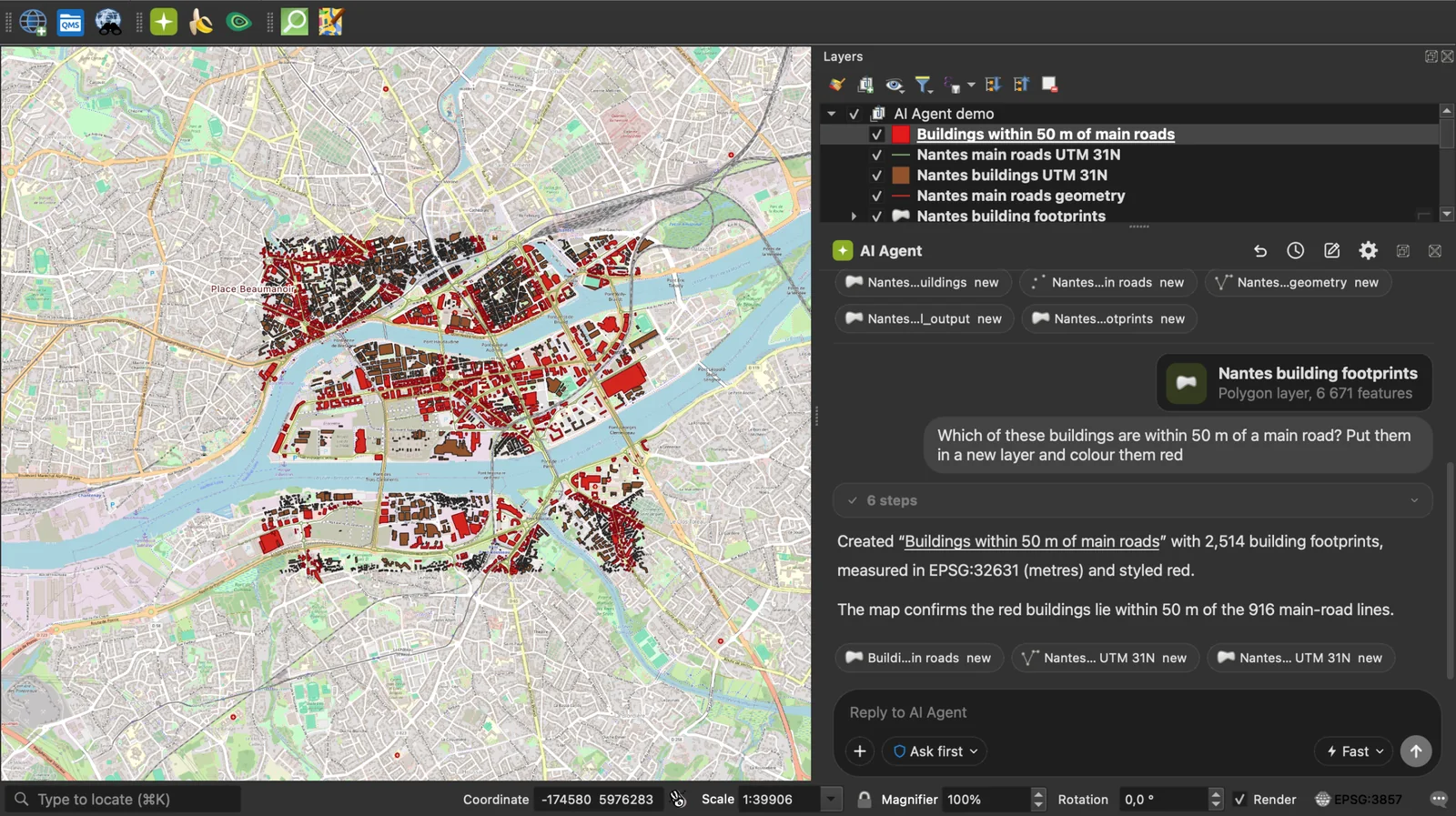
AI Agent by TerraLab is an AI agent for QGIS. You describe the job in plain English and it works on your own layers, in the project you already have open, showing each step as it goes.
- Finds the data: 73 open data connectors (OpenStreetMap, Copernicus, NASA, USGS, IGN, Overture, Planetary Computer and 66 more) and a catalog of 843 ready datasets from 174 countries and from EU-wide and global sources, each with its licence.
- Runs the analysis: 253 tools to load and inspect data, run Processing algorithms and edit geometry.
- Styles and lays out the map: symbology, labels and print layouts.
- You stay in control: you see every step before it runs, changes wait for your approval, and one click undoes anything it changed.
- Fits your habits: one conversation per project. Attach files, layers, selections or the map view to a message.
- Works with AI Edit and AI Segmentation when they are installed.
- Free tier, no card. Plans and limits: https://terra-lab.ai/pricing
- Platforms: QGIS 3.28 to QGIS 4, on Windows, macOS and Linux. 12 languages.
Answers come from an AI model and can be wrong. Review what it changes.
Install
In QGIS, open Plugins > Manage and Install Plugins, search "AI Agent", install. The free tier needs no card.
Links
- Page, tutorial and plans: https://terra-lab.ai/ai-agent
- QGIS plugin repository: https://plugins.qgis.org/plugins/AI_Agent/
- AI Agent for QGIS, the complete guide
- AI Agents in QGIS: what they are and which to use
- ChatGPT for QGIS: what it can and can't do, tested
- QGIS MCP: setup, limits, and one task timed
- Bugs and requests: https://github.com/TerraLabAI/QGIS_AI-Agent/issues
License: GPL-2.0-or-later. Made by TerraLab, terra-lab.ai.
Data & privacy
Every message goes to TerraLab's hosted service at agent.terra-lab.ai, in the
European Union. There is no offline mode and no local model. Answers come from an
AI model, so read what it proposes: nothing that changes your data or writes a
file runs without your approval, at the permission level you chose.
What is sent: your request; a description of the open project (its CRS,
the canvas extent, and per layer the name, type, CRS, feature count, field names
and extent); the attachments you add; and what you wrote in the agent's Settings
fields. Leave those empty and nothing of the kind is sent.
What is not sent: the contents of your raster and vector files, your project
file itself, feature geometries and whole attribute tables. Your activation key
never appears in a tool result: every result, error and traceback passes a
scrubber that also removes database passwords from layer URIs and API keys from
URLs.
Usage counting carries no prompt text, layer name, file path or coordinate, and
switching it off in Account Settings stops it on your machine and on our
server. See our Privacy Policy and
SECURITY.md for the threat model.
What is open and what is not
This repository is the plugin: everything that runs on your computer, under
GPL-2.0-or-later, so what it can do to your machine is auditable in full. The
hosted service is not in this tree: the model's system prompt, the tool
descriptions it reads, and the open data catalogue.
That service is not licensed for reuse, and text and data mining rights on it
are reserved (EU Directive 2019/790, Art. 4). See our
Terms of Use. The TerraLab names and logos
are not covered by the GPL, see TRADEMARKS.md.
Yorumlar (0)
Yorum birakmak icin giris yap.
Yorum birakSonuc bulunamadi