terva
Health Uyari
- License — License: MIT
- Description — Repository has a description
- Active repo — Last push 0 days ago
- Low visibility — Only 5 GitHub stars
Code Gecti
- Code scan — Scanned 12 files during light audit, no dangerous patterns found
Permissions Gecti
- Permissions — No dangerous permissions requested
Bu listing icin henuz AI raporu yok.
An agent harness — a coding agent out of the box, open to anything you can wire a tool to. One hardened Go core, many front ends, pluggable in any language.

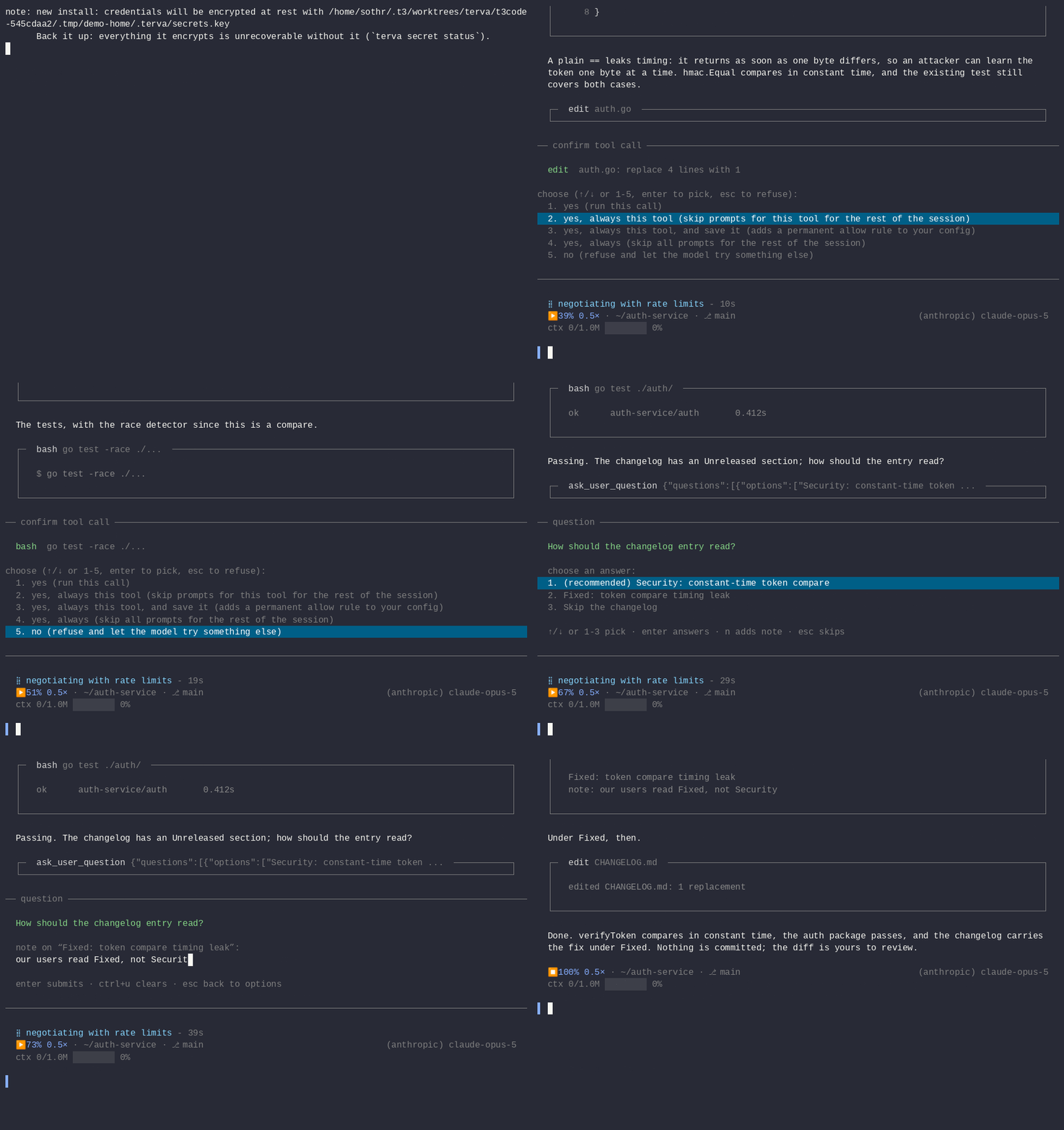
A session transcript replayed through the real terminal at half speed. The same recording plays at terva.sh; just demo-record remakes it.
What is it?
An agent harness in a single static Go binary: a coding agent out of the box,
open to anything you can wire a tool to. It is built in three layers, and the
logo draws them:
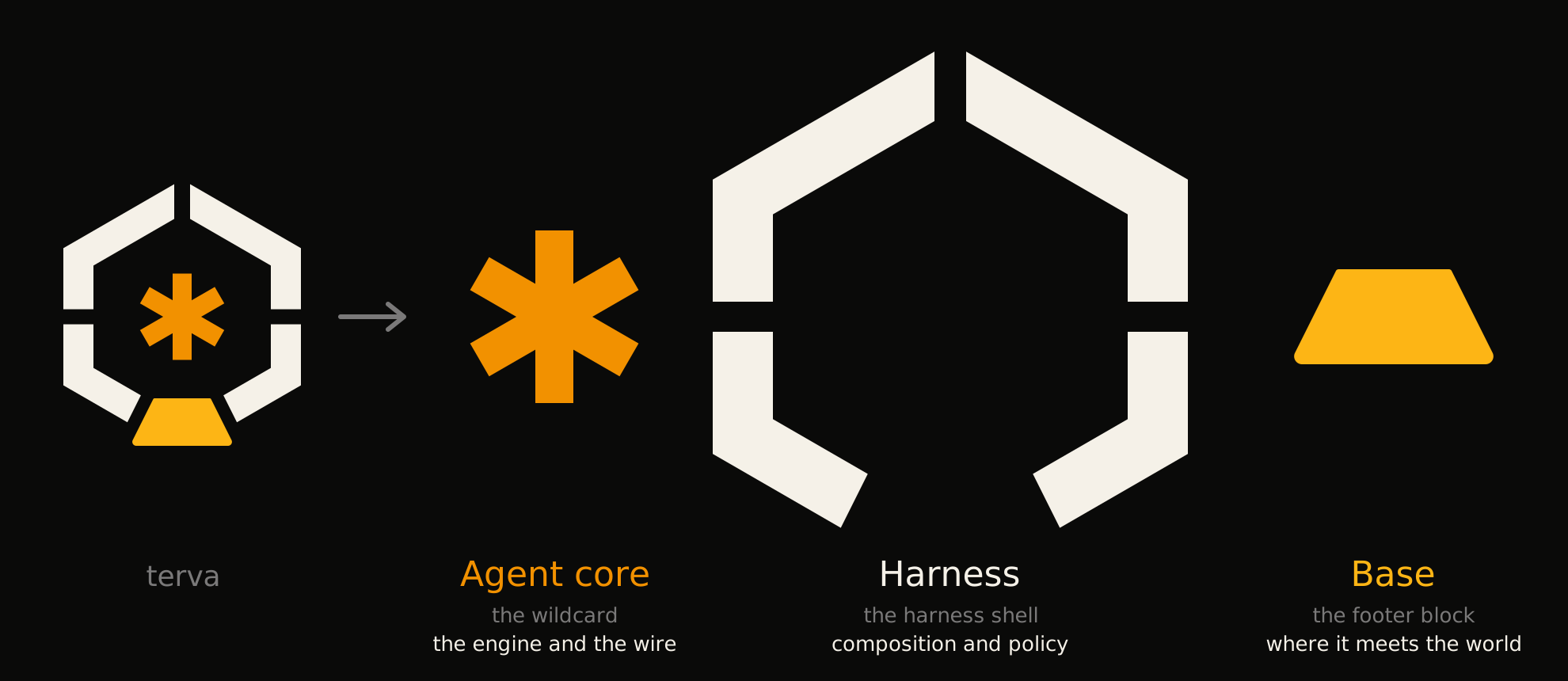
- the agent core, the wildcard: one hardened, test-backed agent loop and
event wire, and one interface to two dozen model providers. It reads no file
and no environment variable. - the harness, the shell: terva's composition and conventions, meaning
configuration, the permission policy, the model registry, sessions,
credentials, and the daemon every front end talks to. - the base, the footer block: the front ends, and the tools, extensions,
MCP servers, skills and connectors that reach the world, in any language.
Take the whole binary, or only the piece you need: the core alone in your own
program, the core and harness through the Go SDK or terva rpc, or terva's
harness around another agent. docs/embedding.md compares
the ways in.
Two first-class front ends ship in the box, both clients of that same harness
over its control plane — same sessions, same permissions, same event stream:
- a terminal UI (
terva) — the default: hand-rolled, fast, with slash
commands, inline images, and message queueing. See docs/tui.md. - a web UI (
terva web) — a browser control panel, not a viewer: drive
sessions, approve tool calls, edit settings, watch the transcript stream.terva desktopopens the same panel in a native window with its own local
server. Closing the window stops that server.
See docs/web.md to serve it and
docs/web-interface.md for what it shows.
Pick either, or both against the same session — the TUI can also drive a
running terva web daemon as a client (terva attach), so the terminal
becomes disposable and the session survives disconnects. The three shapes and
when to use each are laid out in ways to run terva.
Beyond them: an editor integration over ACP, chat connectors, print/json for
scripting, and an embeddable RPC/SDK.
- one static binary.
- built-in providers for Anthropic, OpenAI/Codex/Responses, Kimi, DeepSeek, Google Gemini/Vertex, GitHub Copilot, Bedrock, Azure OpenAI, OpenRouter, Groq, Cerebras, xAI, Together, Hugging Face, Mistral, Moonshot, Z.AI, Xiaomi, MiniMax, Fireworks, Vercel AI Gateway, OpenCode, Cloudflare AI, Ollama, and any OpenAI-compatible local/custom endpoint.
- the built-in tool set: read, write, edit, bash, read-only grep/glob search,
terva_statusfor agent self-introspection, atask_*board the agent plans with, andsession_inspectfor reading its own past transcripts. Extension and MCP tool groups start hidden by default and the model activates the ones it needs viaactivate_tools, so a large integration surface costs no context until it is used ("lazy_tools": falseopts out). - a permission system: approval modes (
plan/ask/auto-edit/workspace/yolo) plus typed permission rules. Interactive sessions default toworkspace(built-in tools and reads run; foreign extension/MCP tools that can have side effects ask) and are sandboxed to the working directory by default. See docs/permissions.md. - pre/post tool-use hooks (veto, rewrite, or observe tool calls with your own scripts; docs/hooks.md) and an MCP client (attach Model Context Protocol servers as tools; docs/mcp.md).
- run modes beyond the two UIs: an editor integration over ACP (Agent Client Protocol — drive terva from Zed and other ACP editors), print, json, and a JSON-RPC server for embedding. Every front end is a thin client of one agent loop and one event stream, spoken over the
ctrlprotocontrol plane (docs/controllers.md). - background subagents: fan work out to parallel swarm agents from within a session.
- RAATI: convene a panel of models to argue a decision to a recorded verdict, instead of trusting one model's first answer. See docs/raati.md.
- Talkoot: run a persistent team of agents in one checkout, native terva members beside Claude Code, with roles, budgets, and an inbox where they ask you. Watch it in the Talkoot app that
terva webserves. The team can also work while you are away: it reaches you over a chat connector, a member looks at a result again later, and a routine that you approved runs on a schedule and never merges. See docs/talkoot.md and docs/always-on.md. - chat connectors: built-in telegram and discord bridges, external
connectors in any language (separate executables speaking a small
versioned JSON protocol), and connectors bundled inside extensions —
one wire for all three, with group admission, interactive approvals
over chat (buttons on Discord), per-chat sessions, speakers, and
threads. See docs/connectors.md. - extensions in any language via subprocess + json-rpc. None installed by default; opt in with
terva ext installorterva --ext. See docs/extensions.md. - user and extension themes via JSON; see docs/themes.md.
- localization: translate the UI into your language, or override terva's wording and even its model-facing prompts in place (works in English too) via per-key
$TERVA_HOME/localesoverlays. See docs/localization.md. - reusable instructions via
SKILL.mdfiles; see docs/skills.md. - optional image generation, two independent opt-in paths: the
generate_imagetool over a registry of hosted or self-hosted backends (OpenAI/LocalAI, AUTOMATIC1111/Forge, ComfyUI), rendered inline and optionally saved into the workspace; and native image output — the model drawing inline in its own reply via the OpenAI Responsesimage_generationtool over your Codex subscription, no extra endpoint. See docs/image-generation.md and docs/native-image-output.md. - chat & play modes: reframe the harness away from coding — a conversation (
--chat) or a roleplay/simulation (--play), fronted by a persona or a SillyTavern character card (--card), with a keyword-triggered lore context engine and a director that can voice a declared cast of actors. See docs/personas.md. - no community atm.
Install
One-liner (macOS, Linux)
curl -fsSL https://terva.sh/install.sh | bash
Detects your OS and architecture, downloads the latest release from GitHub, verifies the SHA-256 against the release's checksums.txt, extracts the binary, and drops it in /usr/local/bin, ~/.local/bin, or ~/bin, whichever is writable first. Pass a version or prefix to pin:
curl -fsSL https://terva.sh/install.sh | bash -s -- v0.137.0 ~/bin
One-liner (Windows, PowerShell)
iwr -useb https://terva.sh/install.ps1 | iex
Drops terva.exe into $HOME\bin and adds it to the user PATH if missing. Open a fresh terminal afterwards.
Container
docker run -it --rm -v terva-data:/data ghcr.io/terva-sh/terva --help
Multi-arch images (linux amd64/arm64) publish with each release,
tagged per version and latest. All state lives on the /data volume
(TERVA_HOME); the agent's workspace is /work. Running connector
bots this way — and under systemd — is covered in
docs/deploy.md.
go install
go install terva.sh/terva/cmd/terva@latest
From source
git clone https://github.com/terva-sh/terva   # public mirror; development happens on the maintainer's Forgejo
cd terva
just build        # produces ./bin/terva
just install      # into $GOBIN (else $GOPATH/bin)
Prebuilt binaries
Every release on the releases page ships archives for Linux, macOS, and Windows on amd64 and arm64 (except windows/arm64), plus a checksums.txt file. Each platform comes in two builds: terva (full — every feature compiled in, including the ACP editor mode and the terva desktop window; what the one-liner installs) and terva-min (lean — chat connectors and desktop left out). Both unpack the same terva command. On Linux the full build needs glibc; on musl (Alpine) use terva-min, which the one-liner picks for you, or install gcompat. Download, verify, chmod +x, and drop on your $PATH. CHANGELOG.md lists what changed in each version.
Authenticate
Run terva and type /login — the TUI opens without credentials and walks
you through a browser-based flow, for an API key or a Claude Pro/Max,
ChatGPT Plus/Pro, Kimi Code, or GitHub Copilot subscription. Credentials
resolve in order: --api-key flag → provider env var (ANTHROPIC_API_KEY,OPENAI_API_KEY, …) → $TERVA_HOME/auth.json. The OAuth flows, token
refresh, and the auth-file format are covered in
docs/providers.md.
Using a subscription login through a third-party tool is a legal gray area
with some providers, and you take full responsibility for how you connect
terva to a provider's service. The terva project itself uses API keys. Read
Provider terms are yours to follow
before you log in with a subscription.
Usage
terva                              # interactive tui
terva "fix the failing test"       # tui, pre-filled prompt
terva -p "list all go files"       # print final text, exit
terva --json "refactor main.go"    # newline-delimited json events, exit
terva --continue                   # resume the most recent session for this cwd
terva --resume                     # pick a session to resume
terva --list-models                # show supported models
terva --chat --persona kaiku       # talk with a companion persona (no tools)
terva --card ./aava.png            # chat as a SillyTavern character card
terva --play --ext ./world         # act in a simulated world extension
terva --help
terva --help lists every flag; the full reference is
docs/cli.md.
Documentation
docs/README.md maps the whole set. Two entry points depending
on what you want:
| docs/design/ | How terva works, and why — the agent loop, context economics and the prefix cache, the permission chokepoint, the control plane, the extension seams, and the lessons behind each. Written for a programmer who does not necessarily write Go |
| docs/practices/ | Practices for agentic harnesses — what we and the field have learned about building this kind of system, generalized for a harness that is not terva, with the evidence behind each claim graded |
The reference guides:
| Doc | What's in it |
|---|---|
| docs/cli.md | Flags, tools (read/write/edit/bash/grep/glob/terva_status/task_*/session_inspect), run modes, the data directory |
| docs/secrets.md | Secrets at rest (terva secret): the age key a new install generates, backing it up, rotation, and the terva web bearer token |
| docs/standard-tools.md | The tool-surface strategy: core vs standard extension vs MCP preset, and the roadmap for new tools |
| docs/permissions.md | Approval modes (plan/ask/auto-edit/workspace/yolo, with workspace the interactive default), permission rules, the jail-by-default sandbox, and the two rules for work that no person began |
| docs/hooks.md | Pre/post tool-use hooks: veto, rewrite, or observe tool calls with your own scripts |
| docs/mcp.md | Attaching MCP servers as tool providers (stdio, namespaced, permission-gated) |
| docs/scripting.md | The in-engine JavaScript sandbox: code_execution and code_execution_mutating, with the host's tools as functions |
| docs/tui.md | The terminal UI: attaching to a daemon, the status bar, copying text out, sessions, inline images, key bindings |
| docs/slash-commands.md | Every TUI slash command, and what each one does |
| docs/recording.md | Recording a TUI session with asciinema: keeping the capture small, the OSC 9;4 busy signal, and secrets |
| docs/web.md | Running the web control panel (terva web): the listener, reverse proxy, auth, deployment, self-restart, building the client |
| docs/web-interface.md | What the web panel shows: the panes, model picker, usage, slash commands, attachments, shared files |
| docs/serve.md | terva serve: one terva per signed-in person on one host, with containment, enrolment, and the operator panel |
| docs/fleet.md | One browser reading many machines: the hub, members that dial in, and the tunnel between them |
| docs/models.md | Picking models, fallback/rescue, custom catalogs, per-provider notes (Kimi, DeepSeek, Gemini, ollama, OpenAI-compatible) |
| docs/providers.md | Login flows, endpoints, models.json reference, capability tags |
| docs/connectors.md | Chat connectors: the telegram and discord bridges, external connectors in any language, group admission, approvals over chat |
| docs/connector-protocol.md | The connector frame reference: every frame in both directions, protocol 1 and 2, and the feature-string vocabulary |
| docs/deploy.md | Running bots as services: systemd units and the container image, for persistent, resuming, capability-scoped connector agents |
| docs/scheduled-jobs.md | Running terva unattended on a timer: watches, reports, and follow-ups |
| docs/extensions.md | Extensions: writing one, the manifest, discovery, configuration, the SDKs, installing and managing |
| docs/extension-protocol.md | The extension frame reference: every frame in both directions, the protocol version each arrived in, the golden corpus |
| docs/controllers.md | The control-plane protocol (ctrlproto): frames, method groups, events, carriers, and the management-plane horizon |
| docs/skills.md | SKILL.md reusable instructions: anatomy, discovery, authoring |
| docs/personas.md | Personas and immersive chat/play: charters, immersive identities, character cards, the cast + actor_spawn, and the mode flags |
| docs/raati.md | RAATI: the deliberation primitive — several models argue a decision to a recorded verdict |
| docs/talkoot.md | Talkoot: a persistent team of agents in one checkout, with roles, budgets, guards, and an inbox for you |
| docs/always-on.md | Always on: the team reaches you over chat, wakes itself, and runs routines that you approved. The five-minute introduction, with a tour |
| docs/workflows.md | Scripted multi-agent orchestration with terva workflow run: a JavaScript program that spawns and sequences sub-agents |
| docs/context-construction.md | What actually goes into the model's context each turn, and in what order |
| docs/debugging-prompts.md | Inspecting the assembled prompt (--dump-prompt), the lore engine, and card/lore/greeting troubleshooting |
| docs/prompt-labels.md | Reference for the source labels and portability classes that --dump-prompt prints |
| docs/themes.md | User and extension themes |
| docs/localization.md | Translating the UI into another language, and overriding terva's wording or model-facing prompts in place (even in English) |
| docs/rpc.md | Embedding terva: the RPC wire schema and the JSON event stream (Go SDK: packages/agent/sdk, examples under examples/) |
| docs/resource-limits.md | Bounding what a session can spend: turns, tokens, cost, and wall-clock |
| docs/profiling.md | Performance-profiling the harness: the terva_pprof dev build, pprof/GODEBUG capture, and reading a TUI CPU profile |
| docs/fork.md | Lineage: how terva relates to zot, and the compatibility promises |
| docs/positioning.md | The canonical statement of what terva is, which downstream copy derives from |
| CHANGELOG.md | What changed in every released version, newest first |
Development
just is the canonical local toolchain (just --list shows every recipe). The
command that matters before you push is the full gate — the same checks CI runs:
just ci        # gofmt + vet, the i18n catalog check, race tests, the
               # terva_acp / terva_web tagged build+test, the terva_pprof and
               # no-connector builds, and the release-overlay sync check
just lint      # gofmt + vet + i18n check (no tests)
just test      # race tests
just build     # ./bin/terva
just install-dev   # non-stripped, pprof-enabled build (see docs/profiling.md)
just ci is the full gate CI enforces — reproduce it before you push. A barego test ./... skips the tagged builds, the i18n check, and the overlay check,
so a green partial run is not a green CI.
Source layout (single Go module), grouped by layer:
cmd/terva/                            main()

# the agent core
packages/core/                        agent loop, events, tools, permission seam, cost, compaction
packages/core/{stall,lazytools,...}   components a host attaches with core.WithComponent
packages/provider/                    the wire: Client interface, streaming clients, baked model rows

# the harness
packages/agent/                       cli wiring, arg parsing, config
packages/agent/build/                 Resolve(): the core, assembled with terva's policies and prompt
packages/agent/modelreg/              terva's model registry
packages/session/                     JSONL sessions, the core's transcript store
packages/auth/                        credential store, api-key probe, oauth, login server
packages/agent/swarm/                 background subagent runtime
packages/agent/card/                  SillyTavern Character Card V2 parser (json + png)
packages/agent/lore/                  keyed-context (lore) engine: selection, budget, recursion
packages/agent/sdk/                   public Go SDK: the core and harness in your own process

# the base
packages/tui/                         terminal raw-mode, input parser, editor, renderer, markdown, view
packages/agent/modes/                 interactive tui, print, json, dialogs
packages/agent/tools/                 read, write, edit, bash, terva_status, sandbox
packages/agent/skills/                skill discovery, frontmatter parser, skill tool
packages/agent/extensions/            extension subprocess manager
packages/agent/extproto/              extension wire-format types
packages/agent/ext/                   public Go SDK for writing extensions (package ext)
Downstream consumers can depend on the layers separately:go get terva.sh/terva/packages/core pulls only the agent core and the wire,
no harness or TUI code. docs/embedding.md says which way in
suits which program, and what each one promises before 1.0.
Lineage
terva began in May 2026 as a hard fork of
patriceckhart/zot and took its own
name once it diverged too far to carry upstream's. It is not a
replacement, successor, or rename — zot lives on as its own project, and the
two have long since gone their separate ways. Existing zot installs keep
working: ZOT_* env vars, legacy data directories, and .zotsession import
all still work, and terva migrate moves you over when you're ready.
docs/fork.md has the full story — what terva grew since the
fork, where the compatibility promises begin and end, and why upstream
tracking was retired.
License
MIT
Yorumlar (0)
Yorum birakmak icin giris yap.
Yorum birakSonuc bulunamadi