fermix
Health Warn
- License — License: MIT
- Description — Repository has a description
- Active repo — Last push 0 days ago
- Low visibility — Only 5 GitHub stars
Code Fail
- rm -rf — Recursive force deletion command in .agents/skills/fermix-e2e-eval/suites/dangerous/sandbox_verify.yaml
Permissions Pass
- Permissions — No dangerous permissions requested
No AI report is available for this listing yet.
Your personal AI, everywhere you are.


Elixir-native multi-agent AI platform that runs as a local daemon and reaches you through the chat channels you already use.


-yellow)
What is Fermix
Fermix is a persistent multi-agent runtime that survives reboots and talks to you through Telegram, WhatsApp, Slack, Discord, Signal, and a local CLI — all terminating in the same agent loop. Everything is one BEAM VM under OTP supervision: there are no HTTP bridges between components, no separate worker pool, no broker. The runtime drives seven providers — OpenAI (API key), openai_codex (Codex OAuth), Anthropic (API key or Claude subscription OAuth), xAI (API key or Grok OAuth), OpenRouter, Mistral (API key), and a keyless local Ollama — selected as a primary with an automatic fallback chain. Sub-agents and scheduled jobs can be pinned to their own (typically smaller, cheaper) model. Fermix also runs scheduled background jobs for digests, watchers, reminders, and checks; each run is isolated, bounded, stored durably, and delivered through the configured channel layer. Fermix ships as a single self-extracting binary per platform, installs an OS service unit on first run, and writes its config, traces, and logs under ~/.fermix.
Quick start
brew install tezra-io/tap/fermix
fermix setup
fermix setup installs and starts the background service, then prints the setup URL and opens http://127.0.0.1:4030/setup in your browser to finish configuration. On a headless host it runs a terminal wizard instead (--cli forces it); --no-service configures without installing the service, and --no-browser prints the URL instead of opening one.
Confirm the daemon is up:
$ fermix status
fermix: running (pid 12345, version 0.2.3, up 4s)
Install
Homebrew (macOS, Linux)
brew install tezra-io/tap/fermix
Build from source
Requires Elixir ≥ 1.19, Erlang/OTP 28, and Zig 0.15.2 — Burrito uses it to package the self-contained binary.
git clone https://github.com/tezra-io/fermix.git
cd fermix
mix deps.get
# Compile + digest the web assets, then package a self-contained binary into
# burrito_out/. Targets: macos_aarch64, macos_x86_64, linux_aarch64,
# linux_x86_64 — omit BURRITO_TARGET to build all four.
MIX_ENV=prod mix assets.deploy
BURRITO_TARGET=macos_aarch64 MIX_ENV=prod mix release fermix --overwrite
sudo install -m 0755 burrito_out/fermix_macos_aarch64 /usr/local/bin/fermix
fermix setup
To run against unreleased code without packaging a binary, use mix fermix.dev instead.
Configure
fermix setup is the single entry point for first-run configuration. By default it installs the service and opens the browser setup at http://127.0.0.1:4030/setup; on a headless host — or with --cli — it runs a terminal wizard. It also accepts non-interactive flags (--openai-api-key, --telegram-bot-token, …) for scripted installs. Once setup is complete, no-arg reruns stay idempotent and only seed missing prompt files; use fermix setup --reconfigure to force the provider/model/effort prompts again. It writes a typed snapshot to:
FERMIX_HOME/config.toml(defaultFERMIX_HOMEis~/.fermix)
It also creates the workspace roots the runtime expects:
$FERMIX_HOME/skills$FERMIX_HOME/journals$FERMIX_HOME/realtime$FERMIX_HOME/traces$FERMIX_HOME/logs$FERMIX_HOME/auth.json(whenopenai_codexis selected;0600)
Regular OpenAI uses OPENAI_API_KEY. Codex uses the separate openai_codex provider and imports OAuth tokens from the Codex CLI into the provider-scoped token store at ~/.fermix/auth.json, refreshed by the supervised TokenManager. Realtime voice V1 uses the regular OpenAI API key even when the text/chat provider is openai_codex.
Runtime precedence is:
- compile-time defaults in
config/config.exs - persisted setup state from
config.toml - environment variable overrides applied in
config/runtime.exs
Scheduled job delivery
Scheduled jobs can deliver their final response to an explicit per-job target, or to a cron-specific default channel target stored in config.toml:
[fermix_core.jobs]
default_delivery_mode = "channel"

[fermix_core.jobs.default_delivery_target]
platform = "telegram"
chat_id = "8217352118"
chat_id is the external channel conversation id, such as a Telegram chat id; it is not a Fermix session id. Delivery settings are resolved into each job when the job is created, so changing the default later does not silently retarget existing jobs. Jobs can also set an optional expires_at ISO8601 timestamp; when it is reached, Fermix marks the job expired through scheduler state.
Environment variables
The credential variables are optional. Running
fermix setup(CLI wizard or web setup) collects your provider API keys and channel tokens and stores the secrets in your OS keychain, so a configured install needs none of the API-key/token variables below. Set them only for headless or container deployments that inject secrets through the environment — the Required column assumes that env-only style of configuration. (TheFERMIX_*runtime/Realtime rows are environment-only operational knobs, unrelated to secret storage.)
| Variable | Required | Description |
|---|---|---|
OPENAI_API_KEY |
Yes when provider is openai |
OpenAI API key |
WHATSAPP_ACCESS_TOKEN |
If WhatsApp is enabled | WhatsApp Cloud API access token |
WHATSAPP_PHONE_NUMBER_ID |
If WhatsApp is enabled | WhatsApp phone number ID |
WHATSAPP_VERIFY_TOKEN |
If WhatsApp is enabled | WhatsApp webhook verification token |
WHATSAPP_APP_SECRET |
If WhatsApp is enabled | WhatsApp webhook HMAC secret |
DISCORD_BOT_TOKEN |
If Discord is enabled | Discord bot token |
DISCORD_BOT_USER_ID |
If Discord is enabled | Discord bot user ID |
SLACK_BOT_TOKEN |
If Slack is enabled | Slack bot token |
SLACK_SIGNING_SECRET |
If Slack is enabled | Slack request signing secret |
SIGNAL_ACCOUNT |
If Signal is enabled | Signal phone/account identifier |
SIGNAL_CLI_PATH |
No | Override the signal-cli executable path |
FERMIX_HOME |
No | Override the persisted config and workspace root |
FERMIX_TRACE_DIR |
No | Override the trace output directory |
FERMIX_LOG_FILE |
No | Override the log file path |
FERMIX_HTTP_BIND |
No | Web endpoint bind address; defaults to 127.0.0.1 (loopback). 0.0.0.0 serves on the network but also exposes the setup/reconfig surface — gate it behind a trusted network |
FERMIX_REALTIME_ENABLED |
No | Enable the local Realtime voice companion mode |
FERMIX_REALTIME_PROVIDER |
No | Realtime provider; only openai is supported |
FERMIX_REALTIME_MODEL |
No | Override the OpenAI Realtime model |
FERMIX_REALTIME_VOICE |
No | Override the Realtime voice |
FERMIX_REALTIME_MAX_SESSION_MINUTES |
No | Per-session voice duration cap |
FERMIX_REALTIME_MAX_COST_CENTS |
No | Per-session estimated/reported cost cap |
FERMIX_REALTIME_MAX_ESTIMATED_COST_CENTS_PER_SESSION |
No | Long-form alias for FERMIX_REALTIME_MAX_COST_CENTS |
FERMIX_REALTIME_TOOL_POLICY |
No | Voice tool scope, read_only or broad |
FERMIX_REALTIME_ALLOW_NETWORK_TOOLS |
No | Allow Realtime tool calls that use network access |
FERMIX_REALTIME_PERSIST_TRANSCRIPTS |
No | Persist final voice transcripts as local memory text |
In dev/test these default to empty strings.
Use
Daemon control
fermix service install writes the OS service unit (launchd .plist on macOS, systemd .service on Linux) and enables it. Subsequent control is uniform across platforms:
fermix service install [--user|--system]   # write and enable the unit
fermix start                               # start the installed service
fermix status                              # ask the daemon over its control socket
fermix ask "say pong"                      # send one local prompt to MainAgent
fermix logs -f                             # tail ~/.fermix/logs/fermix.log
fermix stop
fermix restart
fermix service uninstall
The unit calls fermix run, which boots the OTP supervision tree, binds the Phoenix endpoint, and blocks. Logs rotate at ~/.fermix/logs/fermix.log (10 MB × 10 files by default).
--user scope is per-user and requires no sudo; on Linux it enables loginctl enable-linger so the service survives logout. --system scope binds at boot and requires sudo.
Local voice companion
Realtime voice is an optional local mode. When enabled, fermix run starts a 0600 Unix-domain socket at ~/.fermix/realtime.sock; the native macOS companion connects to that socket and the daemon owns provider auth, prompt composition, tools, memory, and cost caps.
fermix setup --reconfigure --realtime-enabled \
  --realtime-model gpt-realtime-2 \
  --realtime-voice marin \
  --realtime-max-session-minutes 15 \
  --realtime-max-cost-cents 100

fermix voice status
The setup snapshot writes the Realtime block to FERMIX_HOME/config.toml:
[fermix_core.realtime]
enabled = true
provider = "openai"
model = "gpt-realtime-2"
voice = "marin"
max_session_minutes = 15
max_estimated_cost_cents_per_session = 100
persist_transcripts = false
The companion is a native macOS app (SwiftUI, macOS 13+) — there is no iOS version and no prebuilt download yet, so build and install it from source (requires Xcode or its command-line tools). Source and full instructions live at clients/macos/FermixPet. Use the build script (not swift run) — it stages a proper .app bundle so Dock, Quit, and microphone permissions work:
cd clients/macos/FermixPet
./script/build_and_run.sh install
open "$HOME/Applications/FermixPet.app"
For source-only development, skip Burrito and run the full daemon from Mix:
FERMIX_HOME=$HOME/.fermix-dev \
OPENAI_API_KEY=sk-... \
FERMIX_REALTIME_ENABLED=true \
FERMIX_REALTIME_MODEL=gpt-realtime-2 \
mix fermix.dev
mix fermix.dev is the dev mirror of fermix run: one BEAM node hosts the daemon control socket, the Realtime voice socket, the Phoenix endpoint, and the channels app. Pass --no-realtime, --no-channels, or --no-web to skip a layer when iterating on one subsystem in isolation.
Then launch the companion against the same home directory:
cd clients/macos/FermixPet
FERMIX_HOME=$HOME/.fermix-dev ./script/build_and_run.sh
V1 opens a local call explicitly from the companion. While the call is open,
the mic streams continuously and OpenAI server VAD owns turn boundaries; when
no call is open, audio is not streamed. Fermix does not persist raw audio, and
transcript persistence defaults to off. If transcript persistence is enabled,
final spoken user/assistant transcript text is stored locally as voice_turn
memory rows with source_type = "realtime" andsource_id = "local:<device_id>".
Troubleshooting:
fermix voice statusshowsdaemon: offline: start Fermix withfermix startorfermix run.- Realtime is
setup_required: setOPENAI_API_KEYor persist an OpenAI API key through setup. - The companion cannot use the mic: grant microphone access in macOS Privacy & Security settings, or reset the prompt with
tccutil reset Microphone io.tezra.FermixPet. - A shared local app is quarantined: remove Gatekeeper quarantine with
xattr -dr com.apple.quarantine FermixPet.app.
Channels
All channels normalize inbound messages and dispatch them through the same FermixCore.Agents.MainAgent.
- Telegram — long-poll ingress, Bot API replies.
- WhatsApp — Cloud API webhook ingress, text replies. Voice notes are transcribed before reaching the agent.
- Slack — Events API DM and
app_mentioningress, Web API replies. - Discord — Gateway DM and app-mention ingress, REST replies.
- Signal —
signal-clireceive loop, subprocess send path. - CLI — local stdin/stdout smoke path through the same dispatcher and
MainAgent.
HTTP endpoints
| Method | Path | Purpose |
|---|---|---|
GET |
/health/live |
Process liveness only |
GET |
/health/ready |
Structured readiness and runtime health |
GET |
/health |
Backward-compatible alias of /health/ready |
GET |
/setup |
Shared setup/readiness LiveView |
GET |
/webhook/whatsapp |
WhatsApp verification challenge |
POST |
/webhook/whatsapp |
WhatsApp webhook ingress |
POST |
/webhook/slack |
Slack Events API ingress |
Telegram, Discord, and Signal use long-poll or persistent client transports and do not mount HTTP routes.
CLI reference
| Command | Description |
|---|---|
fermix setup [--reconfigure] |
Install + start the service and open the browser setup (or a terminal wizard with --cli) |
fermix run |
Start the daemon in the foreground (used by service units) |
fermix service install [--user|--system] |
Write and enable the OS service unit |
fermix service uninstall [--user|--system] |
Remove the OS service unit |
fermix start [--user|--system] |
Start the installed OS service |
fermix stop [--user|--system] |
Stop the installed OS service |
fermix restart [--user|--system] |
Restart the installed OS service |
fermix status |
Print running daemon status via the control socket (exit 3 if not running) |
fermix voice status [--json] |
Show local Realtime voice companion status |
fermix ask / fermix chat |
Send one local prompt to the running daemon and print the MainAgent reply |
fermix logs [-f] [-n LINES] |
Show or follow the daemon log file |
fermix upgrade [--check] |
Self-update from signed releases (cosign-verified, atomic swap) |
fermix doctor [--full] |
Post-install diagnostics; --full adds network checks |
fermix version |
Print the release version |
fermix help |
Show usage |
fermix upgrade detects package-manager installs (Homebrew, dpkg) and refuses to mutate them — it prints the right brew upgrade / apt upgrade command and exits non-zero. Unmanaged installs follow fetch → cosign verify → snapshot → rename → restart → health-check, with rollback from ~/.fermix/.previous if the post-swap health check fails.
Channel command reference
Plain-text commands work in every channel through the shared dispatcher, and locally through fermix ask / fermix chat.
| Command | Description |
|---|---|
/compact |
Summarize the current conversation window now and keep the summary in history |
/new |
Clear the current conversation history only |
/clear |
Alias for /new |
/help |
List available commands |
/whoami |
Show the stable channel user id used for command authorization |
/background |
Run the current request as a durable background job (/tasks to check, /stop to cancel) |
/tasks |
List in-flight background tasks for this channel |
/stop |
Cancel a running background task |
/ultra |
Run the next turn in exhaustive multi-agent (ultra) mode |
/sandbox |
Inspect and adjust the workspace sandbox (env allow/deny/set, command presets, path grants) |
Outside the local CLI, mutating commands require a per-channel owner. For a
single-user channel, owner_user_id is enough; it also becomes the default
ingress allowlist unless you explicitly set allowed_user_ids orallowed_sender_ids:
[fermix_channels.telegram]
owner_user_id = "123456789"
command_allowlist = ["987654321"]
If owner_user_id is absent, Fermix can derive the command owner from a single
configured ingress allowlist entry. Multiple allowed users still require an
explicit owner_user_id or command_allowlist. Use /whoami from the target
account to discover the id, then persist it with fermix setup --reconfigure or
by editing ~/.fermix/config.toml.
Automatic conversation compaction is controlled by:
[fermix_core.compaction]
enabled = true
threshold = 0.85
After each agent turn, Fermix estimates the conversation tokens for that conversation key. When usage reaches threshold * model_context_window, it summarizes older messages and replaces the stored conversation history with the summary plus recent turns. /new only clears the conversation window; long-term memory, resource revisions, and scheduled jobs are preserved.
Architecture
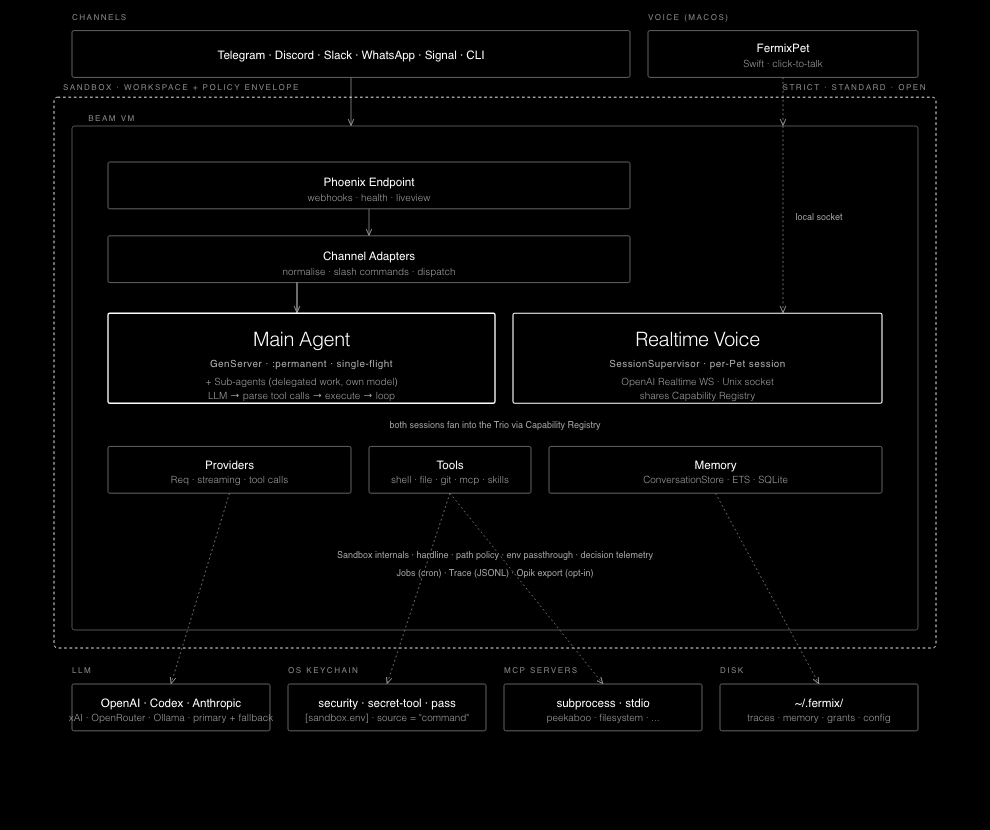
fermix/ (umbrella)
├── apps/fermix_core/       # Agents, providers, tools, memory, setup, CLI, auth, tracing
├── apps/fermix_channels/   # Telegram, WhatsApp, Slack, Discord, Signal, CLI
├── apps/fermix_web/        # Phoenix: setup LiveView, health, webhook ingress
├── apps/fermix_nif/        # Stub for future Rustler NIFs (no NIFs implemented yet)
└── clients/macos/FermixPet # Native local Realtime voice companion
One BEAM VM, all :permanent under OTP. The data flow is straight-line:
channel adapter → FermixChannels.Dispatcher → FermixCore.Agents.MainAgent
  → capability execution → provider → LLM → reply
The agent loop calls the provider, parses tool calls, executes them through the registered FermixCore.Capabilities.Registry, and recurses up to a bounded per-loop iteration cap (default 100 for interactive turns, sub-agents, and scheduled jobs; tunable via [fermix_core.iteration_limits]). Built-in tools are capabilities, and installed skills are registered as capabilities as well.
Built-in tools ship inside Fermix. They are always available when registered; users do not install or remove them. Skills are different: they live under the Fermix skills directories (priv/skills, ~/.fermix/skills, and plugin roots), and each skill carries its own instructions and allowed-tool boundary.
The current built-in capability set is:
| Tool | Description |
|---|---|
shell |
Execute system commands with timeout |
file_read |
Read files with offset/limit |
file_write |
Write files with auto mkdir |
file_edit |
Replace one unique string anchor in a file |
glob_search |
Find files with bounded glob matching |
content_search |
Search file contents without shelling out |
git_read |
Inspect git status, logs, branches, diffs, and objects |
git_write |
Stage, commit, checkout, or pull changes; push is deferred to M10 approval |
web_fetch |
Fetch a public URL and return markdown-light text |
web_search |
Search the public web through the keyless DuckDuckGo HTML backend |
subagents |
Run one or more temporary subagents for delegated work, concurrently up to a cap |
skill_create |
Scaffold a local skill with starter eval cases |
skill_list |
List installed skills available to run via skill_run |
skill_run |
Run an installed skill by name |
skill_view |
Show an installed skill's instructions and metadata |
model_routing_config |
Read or update local model-routing config |
tool_help |
Return full docs for one registered capability |
memory_store |
Store key-value facts |
memory_recall |
Recall stored facts |
memory_sources_list |
List visible memory sources, including scheduled-job sources |
browser |
Drive a browser via the agent-browser CLI (snapshot, navigate, click, fill, screenshot) |
schedule_job |
Create a durable scheduled job and memory source, with optional expiry |
list_jobs |
List scheduled jobs |
update_job |
Update a scheduled job's schedule, prompt, or config |
pause_job |
Pause a scheduled job |
resume_job |
Resume a paused scheduled job |
remove_job |
Remove a scheduled job |
send_attachment |
Send a file attachment back through the active channel |
Observability:
- Structured JSONL traces under
FERMIX_HOME/traces/YYYY-MM-DD/<type>.jsonl - Rotating log file at
FERMIX_HOME/logs/fermix.log - Telemetry events for provider calls, tool execution, channel ingress, and agent lifecycle
/health/readyreports config paths, provider status, per-channel status, memory backend status, and Realtime voice status
Develop
Requirements: Elixir ≥ 1.17, Erlang/OTP ≥ 28, Git, and signal-cli on PATH (or SIGNAL_CLI_PATH configured) if Signal is enabled.
git clone [email protected]:tezra-io/fermix.git
cd fermix
mix setup           # deps.get + install git hooks
mix quality         # format check → compile --warnings-as-errors → credo --strict → dialyzer → test
mix test            # tests only
mix test --only integration
mix quality is the canonical "does everything pass" command. The git pre-commit hook enforces format, compile, credo, and tests.
Running the daemon in dev
mix fermix.dev is the single entry point — it boots core, channels, and web in one BEAM node with the daemon control socket and Realtime voice socket enabled, so fermix ask, fermix status, the macOS companion, and the channel pollers all attach to one process. Use iex -S mix fermix.dev when you want an attached shell.
# Full stack — Phoenix on :4030, daemon socket, Realtime, all enabled channels
FERMIX_HOME=~/.fermix-dev \
OPENAI_API_KEY=sk-... \
FERMIX_REALTIME_ENABLED=true \
mix fermix.dev

# Skip a layer when iterating on one subsystem
mix fermix.dev --no-channels       # no Telegram/WhatsApp/Slack/Discord/Signal
mix fermix.dev --no-realtime       # no voice socket
mix fermix.dev --no-web            # no Phoenix endpoint
The readiness banner prints what actually started:
Fermix dev daemon online
  Daemon socket:    /Users/you/.fermix-dev/daemon.sock
  Phoenix endpoint: http://127.0.0.1:4030
  Realtime socket:  /Users/you/.fermix-dev/realtime.sock
  Channels:         telegram
If a channel or Realtime is not configured, the banner shows the reason instead of crashing — the daemon still comes up so the rest of the stack is testable.
Two Fermix instances polling the same Telegram bot token race on getUpdates, and Telegram returns 409 Conflict ("terminated by other getUpdates request"). The bot token is read only from each FERMIX_HOME's config.toml (set via fermix setup), never from the environment — so give your dev (~/.fermix-dev) and prod (~/.fermix) instances distinct bot tokens. If you store secrets in the OS keychain, also set a distinct [fermix_core] profile (e.g. profile = "dev") in the non-default install so its keychain entries are namespaced (fermix:dev:TELEGRAM_BOT_TOKEN) instead of overwriting the default general entries (fermix:TELEGRAM_BOT_TOKEN). Set the profile before running fermix setup; there is no migration when it changes, so flipping it on a populated install orphans the old keychain entries (re-run fermix setup to re-write them). (The dev mix fermix.dev port-4030 preflight only guards the Phoenix port, not the poller, so it is not a substitute for separate tokens.)
Smoke-testing against the running daemon
With mix fermix.dev running, exercise the agent path locally over the daemon socket:
fermix status                                                  # ping the daemon
fermix ask "say pong"                                          # one-shot prompt
fermix ask --session scenario-web-fetch "validate web_fetch localhost rejection"
echo "summarize current health" | fermix ask --stdin --json    # stdin + JSON output
curl -s http://127.0.0.1:4030/health/ready | jq .              # Phoenix readiness
For the macOS Realtime companion, point it at the same FERMIX_HOME:
cd clients/macos/FermixPet
FERMIX_HOME=~/.fermix-dev ./script/build_and_run.sh
Unit and integration tests
mix test and mix test --only integration do not need a running mix fermix.dev — each test boots its own minimal supervision tree and uses a tmp-dir-scoped Memory database independent of FERMIX_HOME. Run mix quality before pushing; the pre-commit hook enforces the same gates.
Latency benchmarks
The deterministic benchmark harness uses a mock provider and Req.Test channel stubs, so it does not call real LLMs or external channel networks. The default run covers the shared dispatcher → MainAgent → AgentLoop path; adapter, E2E, idempotency, and soak scenarios are available explicitly by name.
FERMIX_HOME=~/.fermix-dev mix fermix.bench --list
FERMIX_HOME=~/.fermix-dev mix fermix.bench --output=bench/current.json
FERMIX_HOME=~/.fermix-dev mix fermix.bench --scenarios=shared_text_minimal --samples=1000 --warmup=20 --output=bench/current.json
FERMIX_HOME=~/.fermix-dev mix fermix.bench --scenarios=telegram_send_short_text,telegram_e2e_text --samples=200 --warmup=10 --output=bench/adapter.json
FERMIX_HOME=~/.fermix-dev mix fermix.bench.soak --output=bench/soak.json
mix fermix.bench.diff bench/baseline.json bench/current.json
Relative benchmark paths are resolved from the umbrella root, so the commands above write to the repo-level bench/ directory even when invoked from a child directory. Use --compare=bench/baseline.json with mix fermix.bench when you want the run to print the p95 delta table after writing bench/current.json.
Resource history CLI
Versioned prompt and memory resources can be inspected from Mix:
mix fermix.resource.list
mix fermix.resource.history user_md --limit 10
mix fermix.resource.show user_md 3
mix fermix.resource.diff user_md 2 3
mix fermix.resource.rollback user_md 2
Use --scope <conversation-key> for checkpoint resources. Checkpoint rollback is not supported; checkpoint revisions are audit/history records only. Rolling back USER.md or MEMORY.md restores the file-backed prompt resource, but future memory rebuilds can overwrite the file if the underlying promoted memories are unchanged.
Documentation
ARCHITECTURE.md— supervision tree, agent loop, providers, channels, and observabilityCHANGELOG.md— release history (Keep a Changelog format, semver)CONTRIBUTING.md— development workflow, quality gates, and PR processSECURITY.md— supported versions and vulnerability reporting
License
Released under the MIT License.
Reviews (0)
Sign in to leave a review.
Leave a reviewNo results found