fluxfiles
Health Uyari
- License — License: MIT
- Description — Repository has a description
- Active repo — Last push 0 days ago
- Low visibility — Only 8 GitHub stars
Code Gecti
- Code scan — Scanned 12 files during light audit, no dangerous patterns found
Permissions Gecti
- Permissions — No dangerous permissions requested
Bu listing icin henuz AI raporu yok.
Self-hosted, MIT file manager for PHP, Laravel and WordPress that you embed in any app. Files stay in your own S3, R2, SFTP or local storage, each user in their own folder via signed tokens. Docker image, React/Vue/CKEditor/TinyMCE adapters, Node/Python SDKs and an MCP server.
FluxFiles
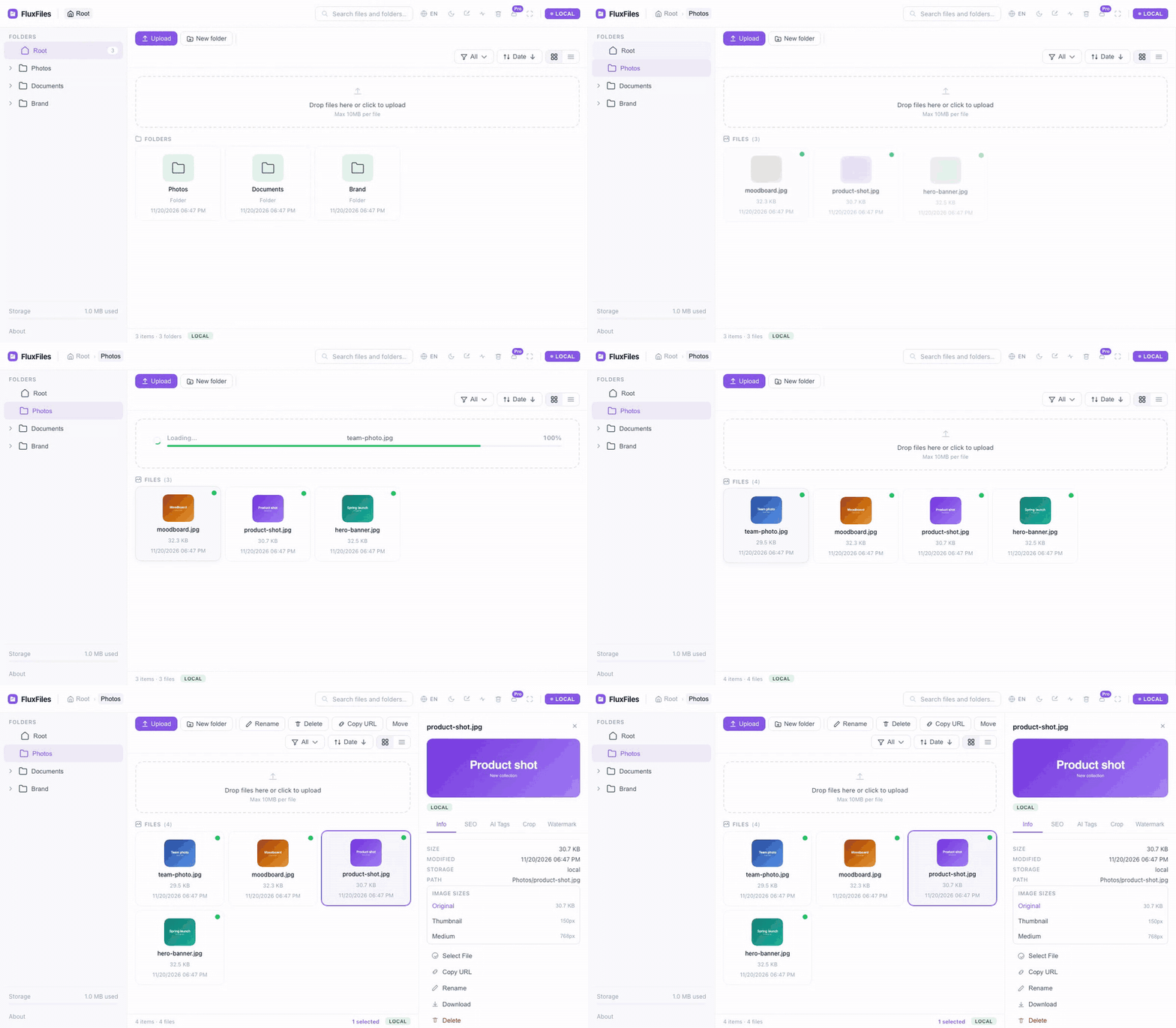




An embeddable file manager for PHP 8.1+. Files stay on your own storage: local disk, AWS S3, Cloudflare R2 or SFTP. Your backend signs a JWT (1 hour by default) that decides what each user can see and do, so FluxFiles keeps no user database of its own.
- Drop it into any app with an iframe and a small JS SDK, or use the adapters for Laravel, WordPress, React, Vue / Nuxt, CKEditor 4/5, TinyMCE and Summernote.
- Scoped per token: disks, folder prefix, permissions, upload size, file types and quota are claims in the token, enforced on every request.
- MIT core: folders, trash, search, WebP/AVIF images, crop, zip, cross-disk copy and more. Paid add-ons are optional and separate.
- No phoning home: the server makes no calls to the vendor. Only the CLI commands
fluxfiles license refreshandfluxfiles update, which you run yourself, contact vendor hosts.
Live demo · Documentation · Website · WordPress plugin · Pro add-ons
Try it in 30 seconds
# One secret (>= 32 bytes), shared by this server and by whatever backend mints your tokens
echo "FLUXFILES_SECRET=$(openssl rand -hex 32)" >> .env
docker run -d --name fluxfiles -p 8080:80 --env-file .env ghcr.io/thai-pc/fluxfiles:latest
TOKEN=$(docker exec fluxfiles php -r 'require "/app/packages/core/embed.php"; echo fluxfiles_token(["user" => "demo", "perms" => ["read","write","delete"], "disks" => ["local"]]);')
echo "http://localhost:8080/public/index.html?token=$TOKEN"
Open the printed URL. The ?token= URL is only for trying it locally; in a real app the SDK hands the token to the iframe, and it never appears in a URL.
The UI never advertises the paid add-ons unless you opt in: with the pro_hints claim set to true ('claims' => ['pro_hints' => true]), an unlicensed, non-framed standalone UI shows locked "Pro" entries; embedded (framed) UIs never show them. See CONFIG.md.
Before you embed it in an app, lock down who may use it. Add your app's exact origin(s) (scheme + host + port, no path, comma-separated) to .env:
# CORS: which sites may call the API
FLUXFILES_ALLOWED_ORIGINS=http://localhost:5173
# CSP: which sites may frame the UI
FLUXFILES_FRAME_ANCESTORS=http://localhost:5173
FLUXFILES_FRAME_ANCESTORS falls back to 'self' plus FLUXFILES_ALLOWED_ORIGINS when unset, but if neither is set, no header is sent and any website can frame the FluxFiles UI. Set them in production. See CONFIG.md.
Your token-minting backend (Node, Python or PHP) must use the same FLUXFILES_SECRET, e.g. node --env-file=.env server.js. A token signed with a different secret is rejected.
No Docker? Install the package, export a secret in the shell, and start the built-in server from that shell:
composer require fluxfiles/fluxfiles
export FLUXFILES_SECRET=$(openssl rand -hex 32)   # keep it: your token backend needs the same value
php vendor/bin/fluxfiles serve &                  # http://127.0.0.1:8080/public/
TOKEN=$(php -r 'require "vendor/fluxfiles/fluxfiles/embed.php"; echo fluxfiles_token(["user" => "demo", "perms" => ["read","write","delete"], "disks" => ["local"]]);')
echo "http://127.0.0.1:8080/public/index.html?token=$TOKEN"
The server reads FLUXFILES_SECRET from the environment, so you don't need a .env inside vendor/. Without it, every API call answers "FLUXFILES_SECRET not configured". More in the install guide.
Embed it in your app
Two pieces: your backend mints a token for the signed-in user, and the page opens the picker with it.
// Backend: who may do what, and where (PHP; Node, Python, Laravel and WordPress do the same)
// Uses the same FLUXFILES_SECRET as the FluxFiles server.
require 'vendor/fluxfiles/fluxfiles/embed.php';

$token = fluxfiles_token([
    'user'   => (string) $user->id,
    'perms'  => ['read', 'write'],
    'disks'  => ['s3'],
    'prefix' => "users/{$user->id}/",   // this user sees only their own folder
]);
<!-- Page: load the SDK from your FluxFiles server and open the picker -->
<script src="https://files.example.com/fluxfiles.min.js"></script>
<script>
  FluxFiles.open({
    endpoint: 'https://files.example.com',
    token: '<?= $token ?>',
    onSelect: (file) => { document.querySelector('#cover').src = file.permanent_url || file.url; },
  });
</script>
// React: npm i @fluxfiles/react
// onSelect gets FluxFile | FluxFile[] (an array when `multiple` is set)
<FluxFiles endpoint="https://files.example.com" token={token} disk="s3"
           onSelect={(file) => { if (!Array.isArray(file)) setCover(file.permanent_url || file.url || ''); }}
           style={{ height: 600 }} />
<!-- Vue 3 / Nuxt 3: npm i @fluxfiles/vue -->
<FluxFiles endpoint="https://files.example.com" :token="token" disk="s3" @select="onSelect" />
{{-- Laravel: composer require fluxfiles/laravel --}}
<x-fluxfiles disk="s3" mode="browser" height="600px" />
The Laravel component renders "not available" until you register a claims resolver that says which folder and rights each user gets, e.g. FluxFiles::resolveClaimsUsing(fn ($user) => ['prefix' => 'users/' . $user->id]) in AppServiceProvider::boot(). See per-user token policy.
- WordPress: install the plugin ZIP from the releases page, then use Media → FluxFiles, the
[fluxfiles]shortcode or the block. Seepackages/wordpress. - TinyMCE (4–8), CKEditor 4, CKEditor 5, Summernote: a toolbar button and the editor's own image-dialog "browse" button. See Framework adapters.
All SDK options, events, commands and token refresh are covered in the embedding guide. Moving off Responsive FileManager, RichFilemanager or KCFinder? The migration guide maps their settings to token claims.
Why FluxFiles
| You want… | FluxFiles |
|---|---|
| A different folder and rights per user, without a user table in the file manager | Every request carries a signed token with the user's disks, folder, permissions, quota and file types. Change what a user may do by issuing a different token. |
| Files on S3, R2 or an SFTP server, not on the web server | Local, S3, R2, any S3-compatible store and SFTP, with cross-disk copy and move. A tenant can even bring their own bucket (BYOB), with its credentials encrypted inside the token. |
| One picker across your stack | The same UI and token in the JS SDK, React, Vue, Laravel, WordPress and four rich-text editors. |
| A maintained replacement for an old picker | Responsive FileManager is archived on GitHub and RichFilemanager has had no commits since 2019. FluxFiles runs on PHP 8.1–8.5, with CI on every release. |
| An uploader and a manager | Unlike an upload widget (Uppy, FilePond), it also browses, renames, moves, trashes, searches and previews what is already stored. |
Features
| Included in the MIT core | |
|---|---|
| Files | Upload (chunked, resumable tus, presigned), download, move, copy, rename, bulk select, trash with restore, zip and extract, import from URL, search by name and metadata (title, alt, caption, tags), duplicate finder |
| Images and media | WebP variants and on-demand WebP/AVIF at any size with srcset, crop, watermark editor, optimize at rest, EXIF/GPS stripping, image/video/audio/PDF preview |
| Access | JWT claims for disks, folder prefix, permissions, owner-only, quota, file count and file types; role presets; rate limits; HMAC-chained audit log |
| Storage | Local, AWS S3, Cloudflare R2, S3-compatible, SFTP, BYOB; bookkeeping in JSON files next to your files, or in your own MySQL/PostgreSQL/SQLite |
| Admin tools | Code/config editor, SFTP chmod, and bring-your-own terminal, PDF tools, office suite and e-signature in a modal |
| UI | 16 languages with RTL, dark mode, mobile layout, usage dashboard |
Pro add-ons, sold separately: share links, upload portals and document requests, versioning, webhooks, AI vision, OCR, virus scan, DLP, legal hold and retention, audit export, SSO, C2PA and backup. See pricing. The full feature table, with when to use each feature, is in the guide.
Framework adapters
| Adapter | Install | What it does |
|---|---|---|
Laravel  |
composer require fluxfiles/laravel |
<x-fluxfiles> Blade component, FluxFiles::token(), config, route proxy |
| WordPress | plugin ZIP | Media page, shortcode, block, Classic-editor button, settings for S3/R2/SFTP and AI tagging |
React  |
npm i @fluxfiles/react |
<FluxFiles>, <FluxFilesModal>, useFluxFiles() (TypeScript) |
Vue 3 / Nuxt 3  |
npm i @fluxfiles/vue |
Components, composable, Nuxt plugin |
TinyMCE  |
npm i @fluxfiles/tinymce |
Toolbar button and image-dialog picker, TinyMCE 4–8 |
CKEditor 4  / CKEditor 5  |
npm i @fluxfiles/ckeditor4 / @fluxfiles/ckeditor5 |
Toolbar button and the editor's image "browse" |
Summernote  |
npm i @fluxfiles/summernote |
Toolbar button that inserts the picked file |
JS SDK  |
npm i fluxfiles or /fluxfiles.js from your server |
The iframe + postMessage bridge the others build on |
Node  / Python  |
npm i @fluxfiles/node / pip install fluxfiles-token |
Mint tokens from a non-PHP backend, byte-compatible with the PHP helper |
MCP server  |
npx -y @fluxfiles/mcp |
Let an AI agent list, search and read files through a scoped token |
Security in brief
- Tokens: HS256 only, short-lived by default (1 hour), refused if they carry no
exp; the main token travels overpostMessageandAuthorization: Bearer, never in a URL. Core does not capexp, so keep TTLs short: a token can't be revoked before it expires except by rotatingFLUXFILES_SECRET, which invalidates every token. - Scope: every path is normalised and confined to the token's prefix; disks, permissions and file types are checked on every request.
- Uploads: dangerous extensions (including double extensions such as
shell.php.jpg) are refused, an extension can't be changed after upload, and zip extract is guarded against path slip and zip bombs. - Network: CORS and
Originallow-lists; BYOB endpoints and URL imports are SSRF-checked and pinned to the resolved IP. - Accountability: an HMAC-chained audit log of every write, and rate limits per user and action.
The full list, token handling and a production checklist are in the security section. To report a vulnerability, see SECURITY.md.
Documentation
| Read this | For |
|---|---|
| Guide | Install, configure, embed, storage disks, tokens, multi-tenant setups, API, troubleshooting |
| Deployment | nginx and Apache configs, permissions, upload limits, when to switch to the DB backend |
| Configuration reference | Every token claim and environment variable |
| API | Every route |
| Migrating | Coming from Responsive FileManager, RichFilemanager, KCFinder, Roxy Fileman, Tiny File Manager or File Browser |
| All documents | Guides, references, design and security records |
| llms.txt | For AI assistants (Claude, ChatGPT, Cursor, Copilot): install paths, packages, token example and security rules in one file, with links to the raw docs |
Contributing
Bug reports and pull requests are welcome; start with CONTRIBUTING.md. The repository is a monorepo: core in packages/core, each adapter in its own package with its own tests. To run the core suite on a fresh clone:
composer install -d packages/core
echo "FLUXFILES_SECRET=$(openssl rand -hex 32)" > packages/core/.env   # gitignored; the tests sign tokens with it
for f in packages/core/tests/unit/*.php packages/core/tests/integration/*.php; do php "$f"; done
More test suites (end-to-end, browser, adapters) are listed in the guide.
License
MIT. Created and maintained by thai-pc. The MIT licence only asks that you keep its copyright and permission notice in copies of the code. A credit line in your project is appreciated but not required, for example:
Based on FluxFiles by thai-pc — https://github.com/thai-pc/fluxfiles
Yorumlar (0)
Yorum birakmak icin giris yap.
Yorum birakSonuc bulunamadi