dicom-viewer-mcp-app
Health Warn
- License — License: MIT
- Description — Repository has a description
- Active repo — Last push 0 days ago
- Low visibility — Only 5 GitHub stars
Code Warn
- process.env — Environment variable access in main.ts
- process.env — Environment variable access in vite.config.ts
Permissions Pass
- Permissions — No dangerous permissions requested
No AI report is available for this listing yet.
MCP app/server that renders local DICOM series into server-side PNG slices with window/level handling, then embeds an interactive viewer with slice navigation, zoom, pan, and metadata inside LLM chat clients.
DICOM Viewer MCP App
A prototype MCP (Model Context Protocol) App that displays DICOM medical images directly within LLM chat interfaces, including Claude Desktop. Built using the MCP Apps SDK.
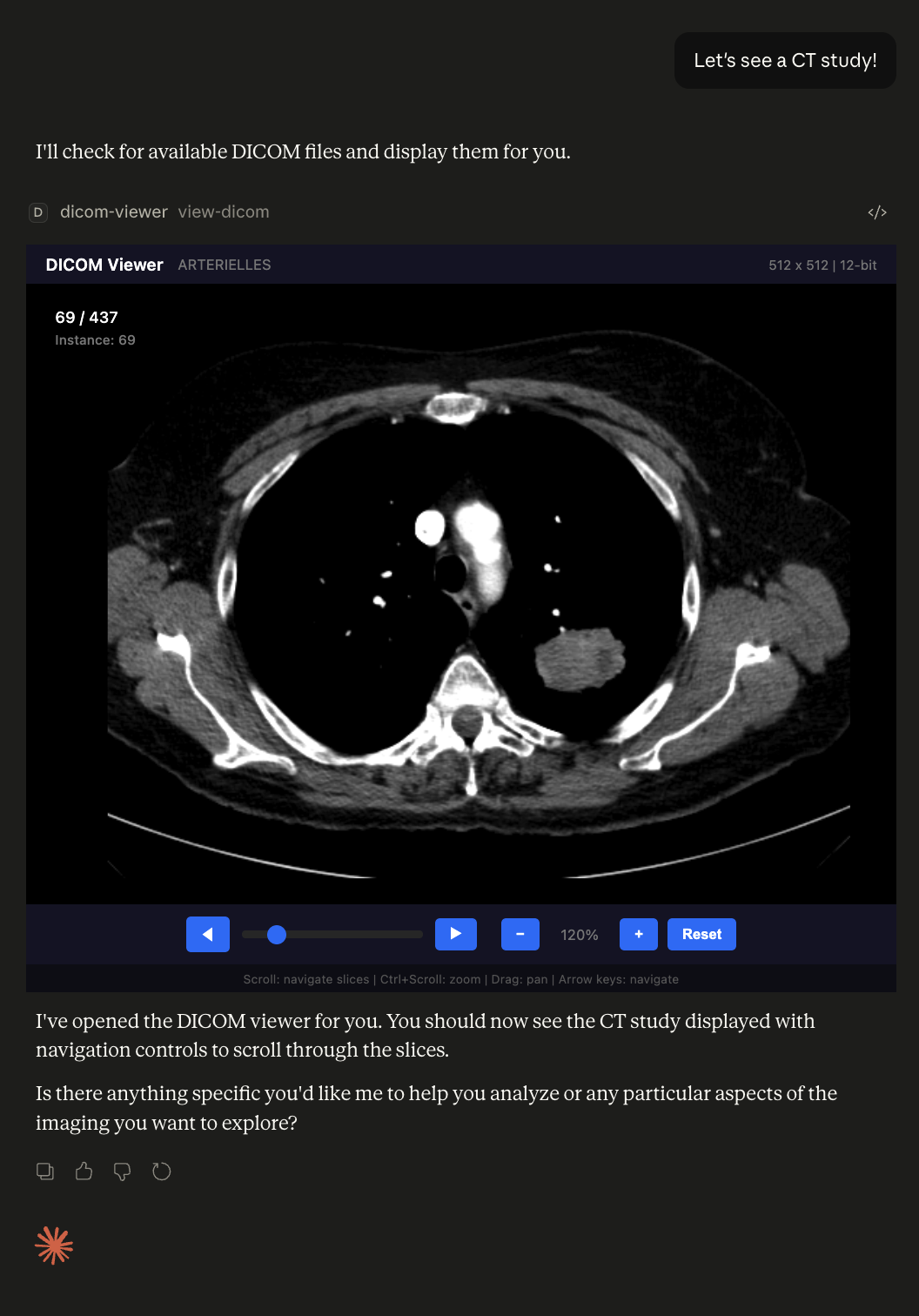
Features
- View DICOM medical images directly within Claude Desktop
- Series navigation - browse through multiple slices with slider, buttons, or scroll wheel
- Keyboard shortcuts - arrow keys for navigation, Home/End for first/last slice
- Pan and zoom controls for image inspection
- Displays image metadata (dimensions, bit depth, instance number)
- Server-side rendering using
dicom-parserandsharp - Handles DICOM window/level and rescale slope/intercept
- Automatic sorting by Instance Number or Slice Location
How It Works
- The MCP server scans the
./dicom/folder for all.dcmfiles - Parses each DICOM file using
dicom-parser - Converts pixel data to PNG using
sharpwith proper windowing - Sorts slices by Instance Number or Slice Location
- Embeds all images in the HTML resource sent to Claude Desktop
- The client displays images with interactive navigation controls
This approach avoids CSP (Content Security Policy) restrictions in Claude Desktop by doing all DICOM processing server-side.
Prerequisites
- Node.js 18+
- Claude Desktop with MCP support
Installation
# Clone the repository
git clone https://github.com/ThalesMMS/dicom-viewer-mcp-app.git
cd dicom-viewer-mcp-app

# Install dependencies
npm install

# Build the project
npm run build
Usage
1. Add your DICOM files
Place your DICOM files (.dcm) in the ./dicom/ folder:
./dicom/
├── IM-0001-0001.dcm
├── IM-0001-0002.dcm
├── IM-0001-0003.dcm
└── ...
2. Configure Claude Desktop
Add the server to your Claude Desktop configuration:
macOS: ~/Library/Application Support/Claude/claude_desktop_config.json
{
  "mcpServers": {
    "dicom-viewer": {
      "command": "node",
      "args": [
        "/absolute/path/to/dicom-viewer-mcp-app/dist/index.js",
        "--stdio"
      ]
    }
  }
}
3. Restart Claude Desktop
After updating the configuration, fully quit and restart Claude Desktop.
4. View DICOM images
Ask Claude to "show me a DICOM study" or "use the view-dicom tool".
Controls
| Action | Control |
|---|---|
| Navigate slices | Scroll wheel, slider, or ◀/▶ buttons |
| Navigate slices (keyboard) | Arrow keys (←/→ or ↑/↓) |
| First/Last slice | Home / End keys |
| Zoom | Ctrl + Scroll wheel, or +/− buttons |
| Pan | Click and drag |
| Reset view | Reset button |
Development
# Build and run in development mode
npm start

# Or run with hot reload
npm run dev
Project Structure
dicom-viewer-mcp-app/
├── dicom/                  # Place DICOM files here (a single series)
│   └── .gitkeep
├── src/
│   ├── mcp-app.tsx        # React client component
│   ├── mcp-app.module.css # Styles
│   └── global.css
├── server.ts              # MCP server with DICOM processing
├── main.ts                # Entry point (stdio/HTTP transport)
├── mcp-app.html           # HTML template
├── package.json
└── README.md
Technical Details
DICOM Processing
The server handles:
- 8-bit and 16-bit pixel data (signed and unsigned)
- MONOCHROME1 and MONOCHROME2 photometric interpretations
- Rescale slope and intercept transformations
- Window center and window width adjustments
- Automatic slice sorting by Instance Number or Slice Location
Supported DICOM Transfer Syntaxes
Currently supports uncompressed DICOM files (Explicit/Implicit VR Little Endian). Compressed transfer syntaxes (JPEG, JPEG 2000, etc.) are not yet supported.
Limitations
- Uncompressed DICOM only (no JPEG/JPEG2000 compression)
- All slices are loaded at once (may be slow for very large series)
- Single series at a time
Citation
If you use this software, please cite it using the metadata in CITATION.cff:
Thales Matheus Mendonça Santos. DICOM Viewer MCP App. Version 1.0.0. 2026-06-08. https://github.com/ThalesMMS/dicom-viewer-mcp-app
Author
Thales Matheus Mendonça Santos - GitHub
License
MIT
Reviews (0)
Sign in to leave a review.
Leave a reviewNo results found