g2-claude-remote
Health Uyari
- License — License: MIT
- Description — Repository has a description
- Active repo — Last push 0 days ago
- Low visibility — Only 5 GitHub stars
Code Basarisiz
- exec() — Shell command execution in src/events/format.ts
Permissions Gecti
- Permissions — No dangerous permissions requested
Bu listing icin henuz AI raporu yok.
Control Claude Remote Control Sessions from the Even Realities G2 glasses: HUD app, companion panel, and uvx-runnable bridge server
Claude Remote
Steer live Claude Code
remote-control sessions from Even Realities G2
glasses: the event stream on the HUD, the touchpad to approve and reply, the mic
to dictate. A companion phone panel mirrors it all with a fuller control surface.

Quick start
Install the app on your glasses from the
Even Hub,
or sideload a packedclaude-remote-<version>.ehpk.Run the bridge on the machine where you're logged in to Claude Code (needs
uv) or an analagous python manager:uvx --from "git+https://github.com/ThatCrispyToast/g2-claude-remote#subdirectory=server" claude-remote-bridgeIt prints the URLs your phone can reach it at and a bearer token: a word
passphrase likecoral-anvil-mango-scoop-visor, generated on first run and
saved to~/.config/claude-remote/bridge-token.Connect - enter one of those URLs and the token in the panel's Settings
card. Add a Deepgram key there for voice
dictation; leave it blank and voice disables itself.
Can't connect? Open the bridge's port (default 8790) in the host firewall.
[!CAUTION]
Keep the bridge on a private network i.e. LAN or Tailscale. The token is the only guard, and it can read and steer every remote-control session of the logged-in account. Flags and env vars:server/README.md.
What it does
- Live sessions on the HUD - each opens on its newest output and auto-follows
while running. Scroll up to page through history, down to re-attach to the tail.
Runs of tool calls collapse into one compact line (◆ Read factory.py, Edit scene.yaml) so what Claude is actually saying stays readable. - Answer blocking prompts - permission requests and questions arrive as native
screens (right away if you're watching,! needs youin the footer if not).
Tap to answer, double-tap to set aside. Answer one elsewhere and it retires itself. - Steer hands-free - interrupt, switch model / permission mode / reasoning
effort, fire slash commands (/context,/usage,/compact, …), send canned
replies, or dictate by voice. - Active sessions only - archived and dead ones never reach the glasses, and
every control action re-checks before it acts.


How it works
G2 glasses (576×288 HUD · touchpad · mic)
        │ BLE
        ▼
Even phone app - runs this app (glasses UI + companion panel)
        │ HTTP + SSE · bearer token · LAN / Tailscale
        ▼
claude-remote-bridge (server/) - wraps claude-rc-api
        │ your Claude Code OAuth login (~/.claude)
        ▼
Anthropic Remote Control API
The app (src/, packed into an .ehpk) runs inside the Even phone app and draws
on the glasses through the firmware's native widgets. The bridge
(server/) is a small JSON+SSE server overclaude-rc-api. It runs on
any machine logged in to Claude Code, borrows that login (surviving token
rotation), and adds the active-only filter, bearer-token auth, and the routes for
answering blocking prompts.
Controls
| Screen | Scroll ↑ / ↓ | Tap | Double-tap |
|---|---|---|---|
| Sessions list | move selection | open session | exit dialog |
| Session view | native scroll - up into history, down to live | open Compose menu | back to list |
| Compose menu | move selection | fire action / enter submenu | back to session |
| Commands submenu | move selection | fire slash command | back to Compose |
| Model / Mode / Effort submenu | move selection | apply | back to Compose |
| Voice dictation | scroll transcript | done - review before sending | cancel |
| Confirm send | scroll the message | send | cancel |
| Permission prompt | move between Allow / Deny | pick | set aside |
| Question | move between options | pick (Dismiss cancels) |
set aside |
The Compose menu leads with Dictate, then the quick-sends (Proceed, Run tests,Explain - configurable), Interrupt, Commands, Model, Mode, Effort, andArchive. Slash commands run locally at no token cost; heavy ones (/compact,/clear) go through the confirm screen first. A set-aside prompt reopens from the
Compose menu's ! Answer question / ! Review permission row, or by reopening the
session. No blocking screen can trap you.
The companion panel
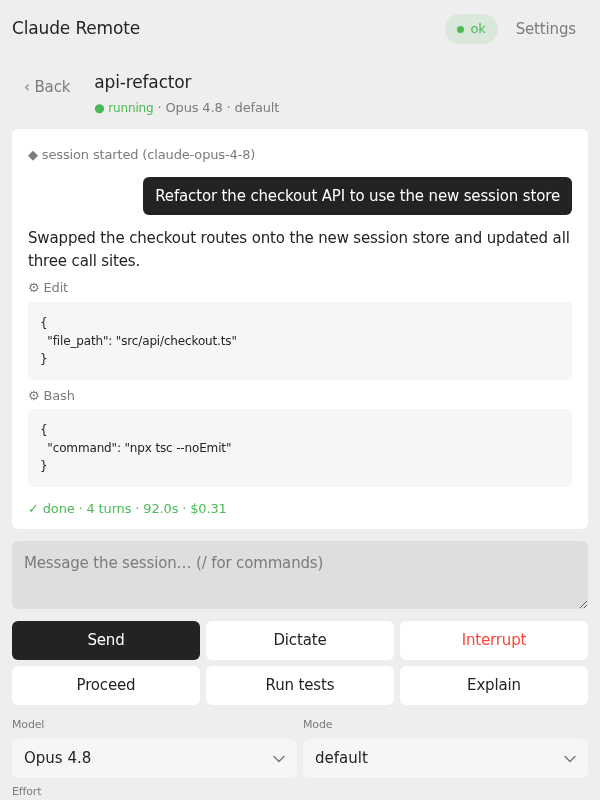
The same bundle's DOM is a full control surface in the phone's WebView: the
un-clipped event log with tool inputs and usage/cost, free-text sends with /
slash-command autocomplete, every steering control, and the Settings card. It
still works as a plain-browser web app with no glasses connected.
App updates can also carry a release notice — a slim dismissible card above
the session list for anything important (say, "update your bridge"). Notices are
baked into the build (nothing is fetched), and each one shows until dismissed,
then never again on that device. On the glasses the same notice appears once as
a scrollable screen right after connect — tap acknowledges it, double-tap defers
it to the next launch — and acknowledging on either surface retires it on both.
Configuration
Two layers on the app side; the higher wins.
- Runtime settings - the panel's Settings card (bridge URL, token, Deepgram
key), stored on the device across app restarts. This is how a packed.ehpkis
configured. - Dev-server defaults -
VITE_*vars in.env.local, read bynpm run dev
only (.env.examplelists them all). Packs never include them:npm run packbuilds with env resolution disabled, so no key or host can leak
into an artifact.
The bridge takes CLI flags and RC_BRIDGE_* env vars, and reads .env.local too
(VITE_BRIDGE_TOKEN doubles as its token), so one file configures both sides in
development.
Development
Node 18+ for the app; Python 3.10+ with uv for the
bridge.
git clone https://github.com/ThatCrispyToast/g2-claude-remote && cd g2-claude-remote
npm install
cp .env.example .env.local     # set VITE_BRIDGE_URL / VITE_BRIDGE_TOKEN

npm run bridge                 # bridge → 0.0.0.0:8790
npm run dev                    # app dev server → http://0.0.0.0:5175

# sideload onto the glasses (phone on the same Wi-Fi / Tailscale network)
npx @evenrealities/evenhub-cli qr --url http://<host>:5175 --external
Point VITE_BRIDGE_URL at an address the phone can reach - a Tailscale MagicDNS
name or a LAN IP. To hack on claude-rc-api at the same time, clone it next to
this repo and use npm run bridge:uv.
Packaging: npm run pack builds and packs claude-remote-<version>.ehpk.
Every pack is distributable (no env is resolved), and it refuses to run ifpackage.json and app.json disagree on the version - bump both together.
Bridge as a service: the bridge holds no state, so any service manager works.
Install it once and point a systemd unit (or equivalent) at claude-remote-bridge:
uv tool install "git+https://github.com/ThatCrispyToast/g2-claude-remote#subdirectory=server"
License
MIT. Unofficial - not affiliated with Anthropic or Even Realities. The
Remote Control API surface is reverse-engineered and can change without notice.
Yorumlar (0)
Yorum birakmak icin giris yap.
Yorum birakSonuc bulunamadi