BeardGit
Health Pass
- License — License: NOASSERTION
- Description — Repository has a description
- Active repo — Last push 0 days ago
- Community trust — 10 GitHub stars
Code Warn
- fs module — File system access in .github/workflows/release.yml
Permissions Pass
- Permissions — No dangerous permissions requested
This is a native desktop application designed to be an all-in-one interface for managing software repositories. It provides a unified window to handle code commits, pull requests, CI/CD pipelines, built-in terminals, in-app editing, and AI agent integration.
Security Assessment
Risk Rating: Medium. The application inherently handles highly sensitive data because it requires local filesystem access and manages source code repositories. It also directly executes shell commands via its integrated terminal features and makes network requests to interact with external Git hosting platforms. No hardcoded secrets were identified, and the automated rule scan confirmed no dangerous OS-level permissions are requested. A minor warning was flagged regarding filesystem access during its automated release workflows, though this is common for software build pipelines.
Quality Assessment
The project is actively maintained, with repository activity logged as recently as today. It features a comprehensive description and a polished manual indicating a serious development effort. Community trust is currently very low but growing, represented by only 10 GitHub stars. The licensing situation presents a minor concern; the automated scan returned an unasserted license status, while the project's manual indicates it operates under the CC BY-NC-SA 4.0 license. This Creative Commons license explicitly restricts commercial use, meaning this tool is not suitable for professional commercial environments.
Verdict
Use with caution — the application offers a polished, actively maintained experience with no immediate security red flags, but it carries a strict non-commercial license and inherently handles critical developer credentials.
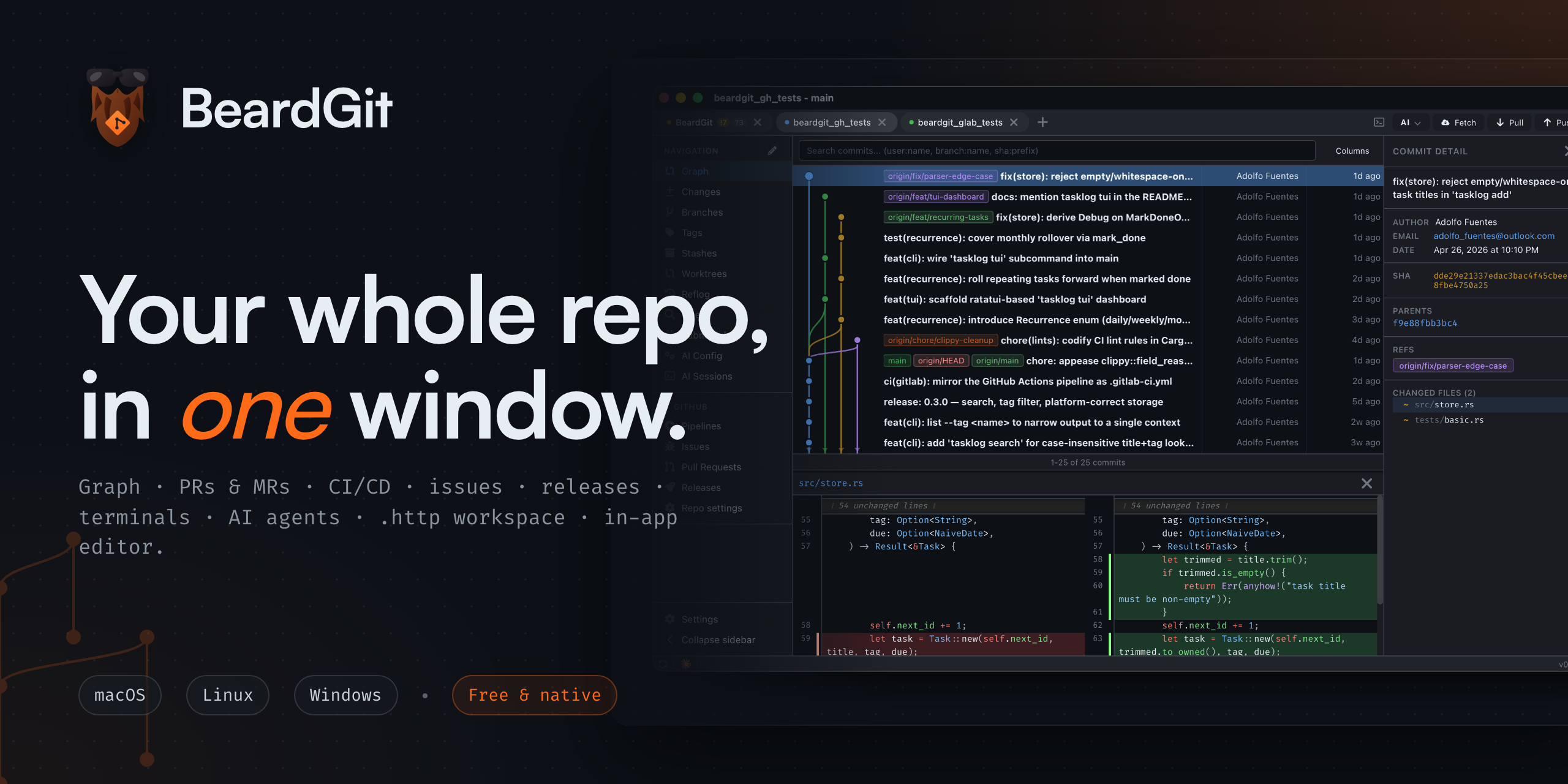
Your whole repo in one window — graph, PRs/MRs, issues, CI/CD, releases, terminals, AI agents, an in-repo HTTP workspace, and an in-app editor. Native desktop. macOS · Linux · Windows.
English · Español
BeardGit
Your whole repo, in one window.
Stop juggling six tabs to ship a commit. Graph, PRs and MRs, issues, CI/CD pipelines, releases, terminals, AI agents, an in-repo .http workspace, and an in-app code editor — in a single native desktop app.
No Electron. No telemetry. macOS · Linux · Windows.




Download for macOS, Linux, or Windows ↓ · Visit the website · Is it for me?
If BeardGit saves you a tab, drop a ⭐ — it’s how the project gets seen.
§ 01 — Manifesto
You ship code from one keyboard, not seventeen tabs. BeardGit is built on a simple premise: everything you touch to release a change should live in one app. Your commit graph. Your branches. Your staging. Your pull requests and merge requests on GitHub and GitLab. Your CI pipelines and deploy jobs. Your issues, labels, and releases. Your terminals. Your AI agents. Your API requests, committed alongside the code that calls them. Your repo files, edited in place. Close the browser tabs. Close the other clients. BeardGit is the one window you keep open.
§ 02 — What you get
A canvas graph that scales
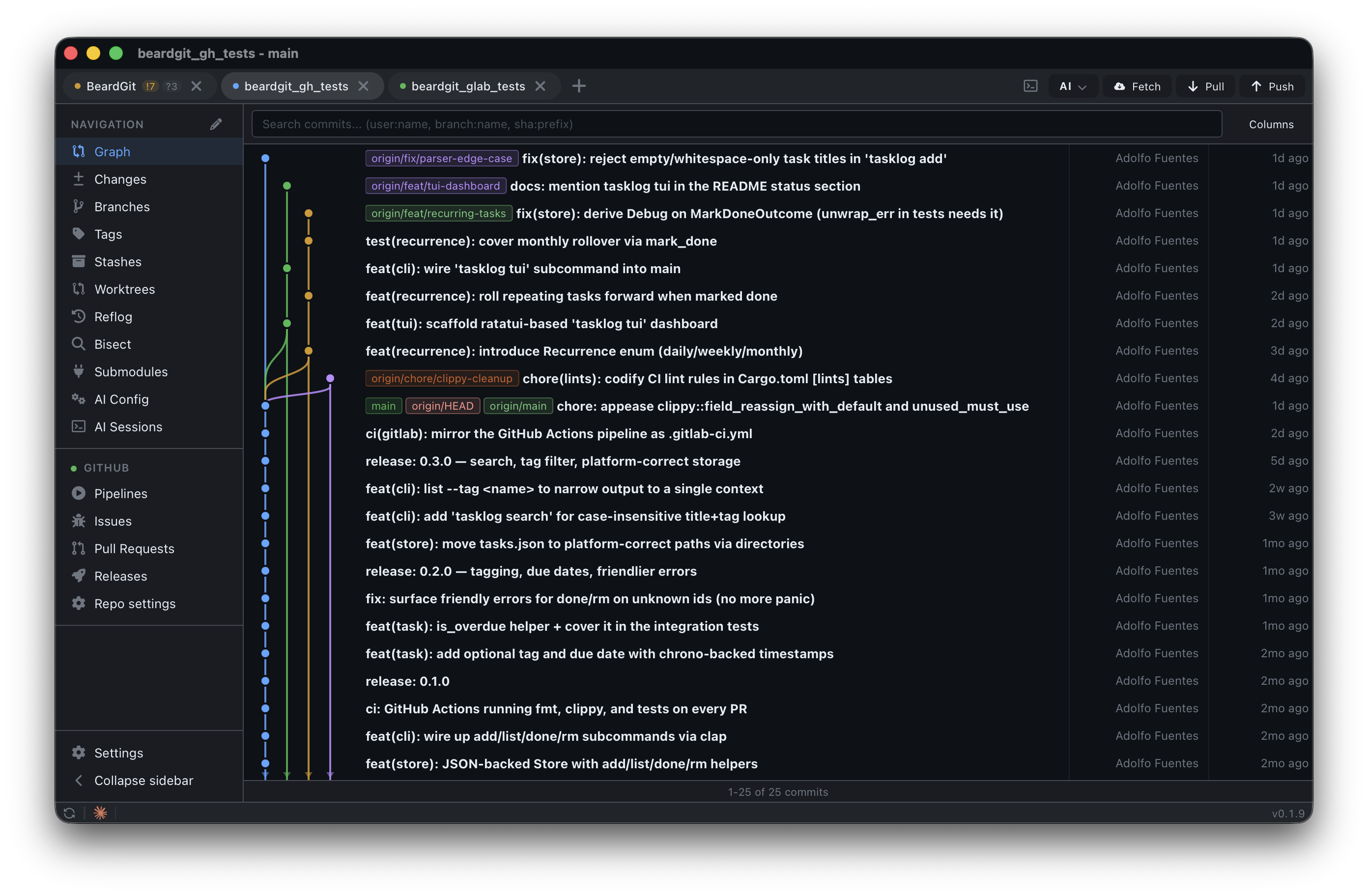
100K+ commits render smoothly via a viewport-sliced renderer. Branch lanes, merge curves, sync-state lines, author highlighting — all on HTML canvas, not DOM. ⌘F filters by author, message, or ref; the graph re-lays out only for the matches. Three-way merge editor, interactive rebase, revert, amend, reset, cherry-pick, blame, reflog with recovery actions, and a visual git bisect with auto-mode that runs your test command at every step.
Pick a folder that isn't a repo yet and BeardGit offers to set it up in one shot: git init, drop a .gitignore, commit as Initial commit, create a matching repo on GitHub or GitLab, wire the remote, and push — every step independently optional, partial progress preserved on failure.
Forge-native for GitHub and GitLab
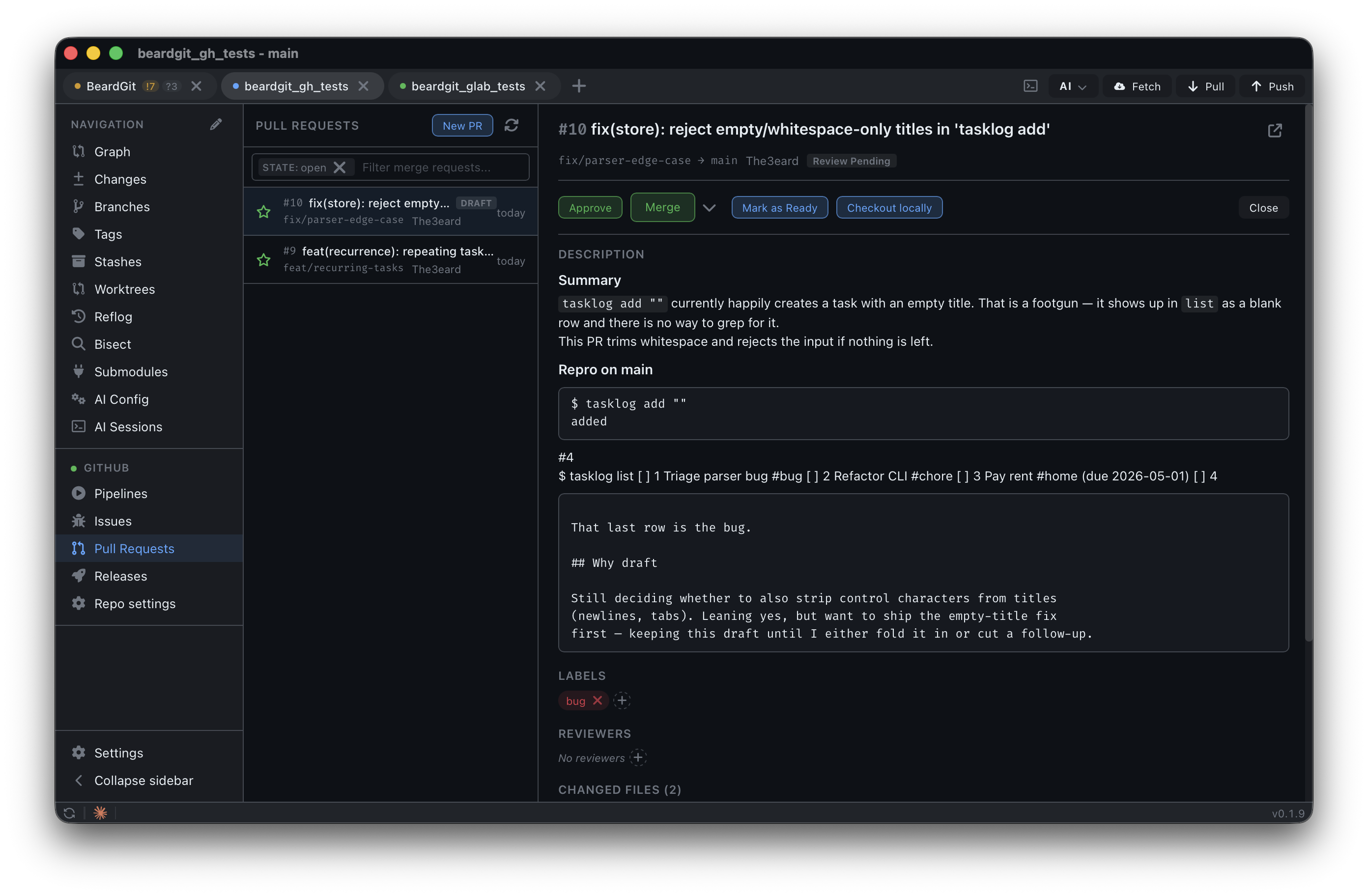
Create, edit, merge, approve, and comment on PRs and MRs with per-file diff and inline review threads. Manage issues, labels, milestones, assignees. Trigger, retry, retry-failed-only, cancel pipelines. Publish releases and stream asset uploads. Edit repo settings — description, homepage, topics, visibility, default branch, branch protection, labels — without leaving the app.
A clean ForgeProvider abstraction wraps gh and glab. Self-hosted GitHub Enterprise and on-prem GitLab work out of the box; auth is checked per-host so a VPN-only forge doesn't shadow a working one. Multi-instance friendly: a personal gitlab.com and a corporate self-hosted GitLab can coexist.
Both CLIs ship bundled in every installer. No PATH dance, no setup.
AI that runs in a worktree, not in your face
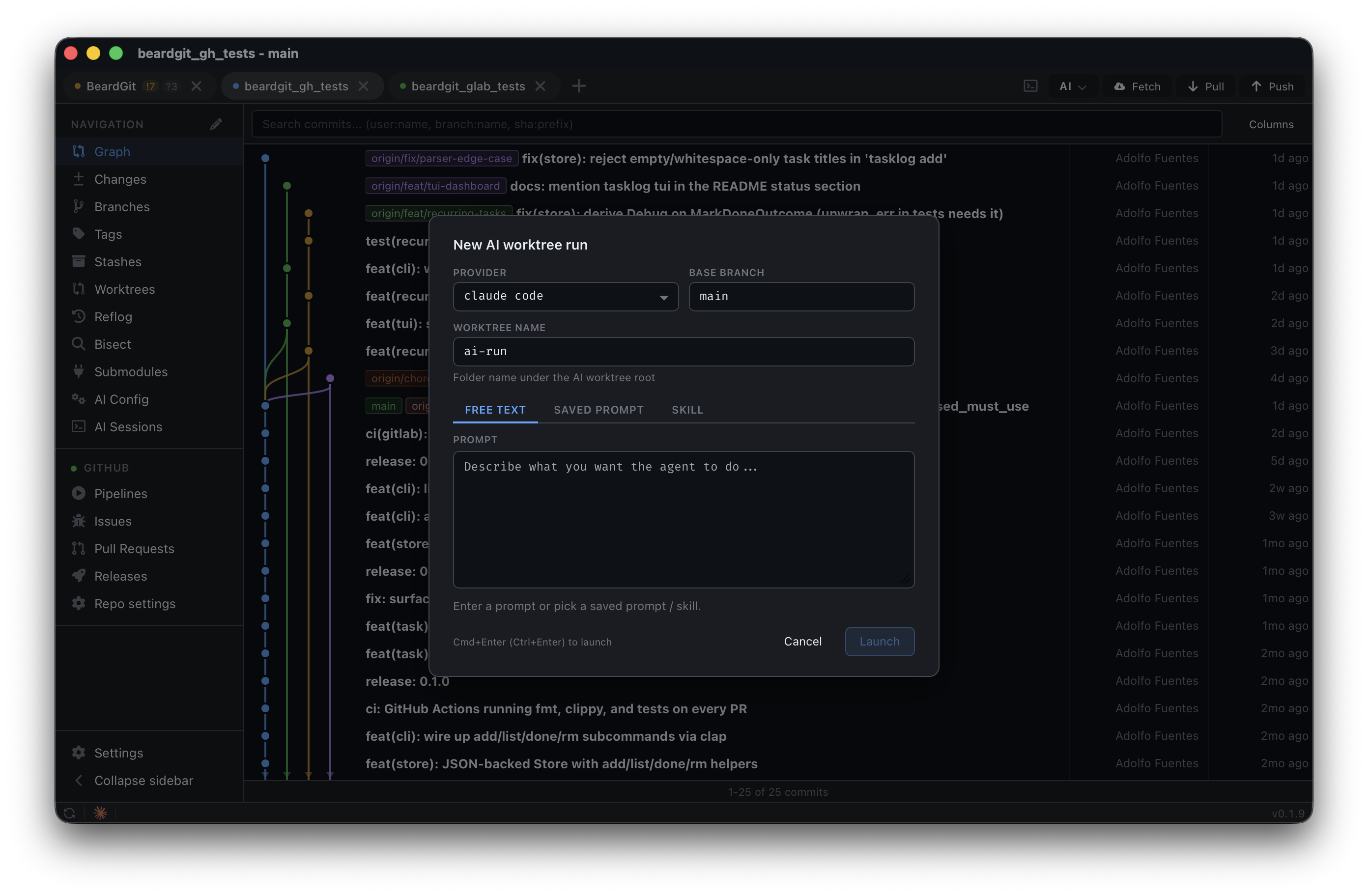
Claude Code, Codex, OpenCode — your local install, driven by BeardGit. Each background run lands on its own ai/<provider>/<slug> branch in an isolated worktree under .beardgit/ai-worktrees/, queued at a concurrency cap you set. Review, merge, or discard. The transcript stays in-app and survives tab switches; your main checkout stays untouched.
From any tab the active provider can also draft a commit message, review your staged changes, or review a PR — gated on "there's actually something to talk about" so you never get an empty reply.
An .http workspace, in your repo
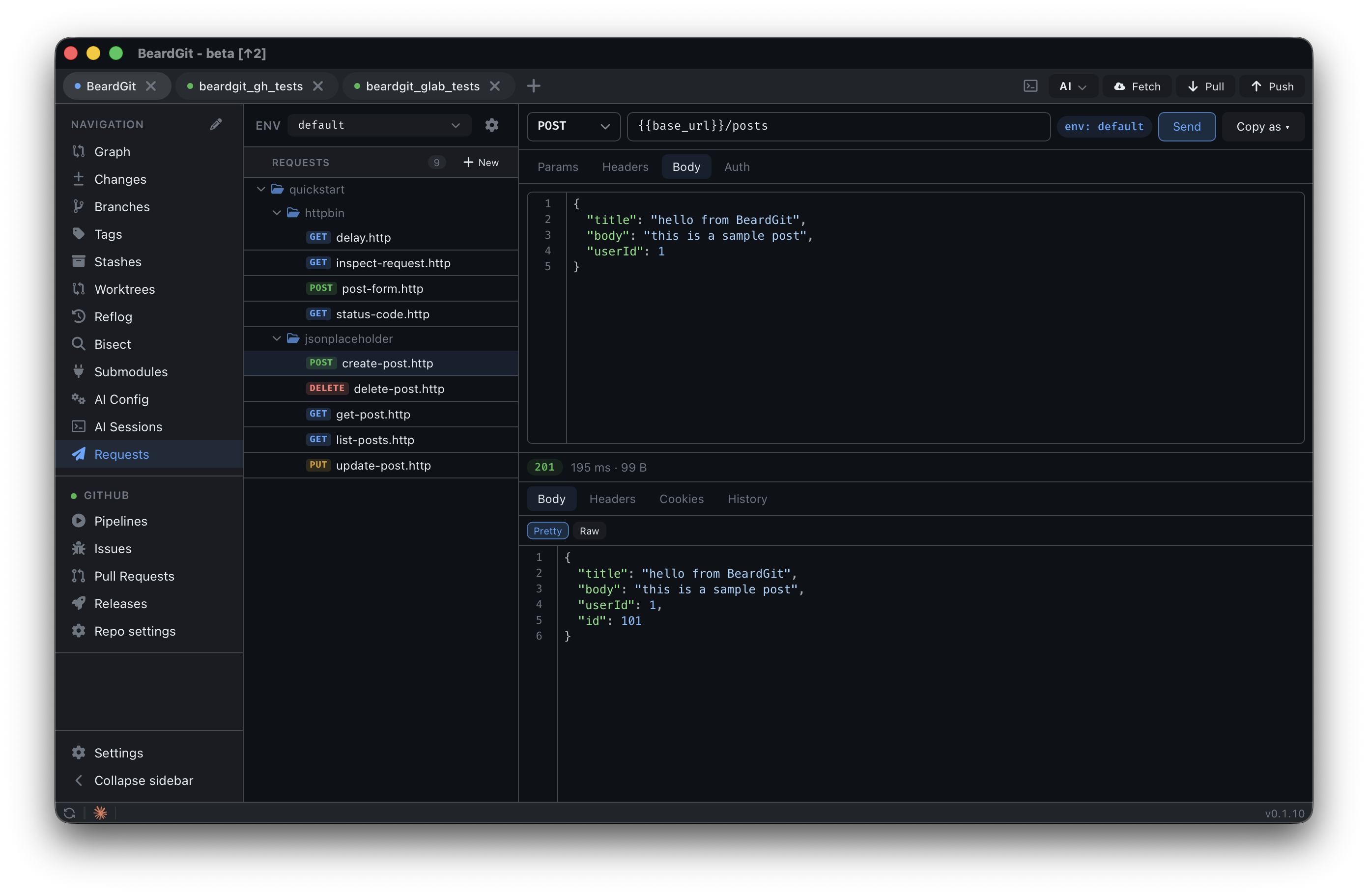
Your API requests live next to the code that calls them. Plain .http files under .beardgit/requests/, committed with the rest of the project, so git pull shares them with the team. Environments split into commit-safe _env/<name>.json; secrets stay encrypted in BeardGit's local credential store, never in git.
When a forge provider is active, seven forge_* auto-variables (forge_token, forge_host, forge_api_base, forge_owner, forge_repo, forge_branch, forge_commit_sha) are available with zero setup, so hitting the API of the repo you're staring at is one click. JSON syntax highlighting, {{var}} autocomplete, diff between any two responses from history, and Copy-as cURL / fetch / HTTPie / wget. Cancel actually cancels the in-flight request.
An in-app code editor
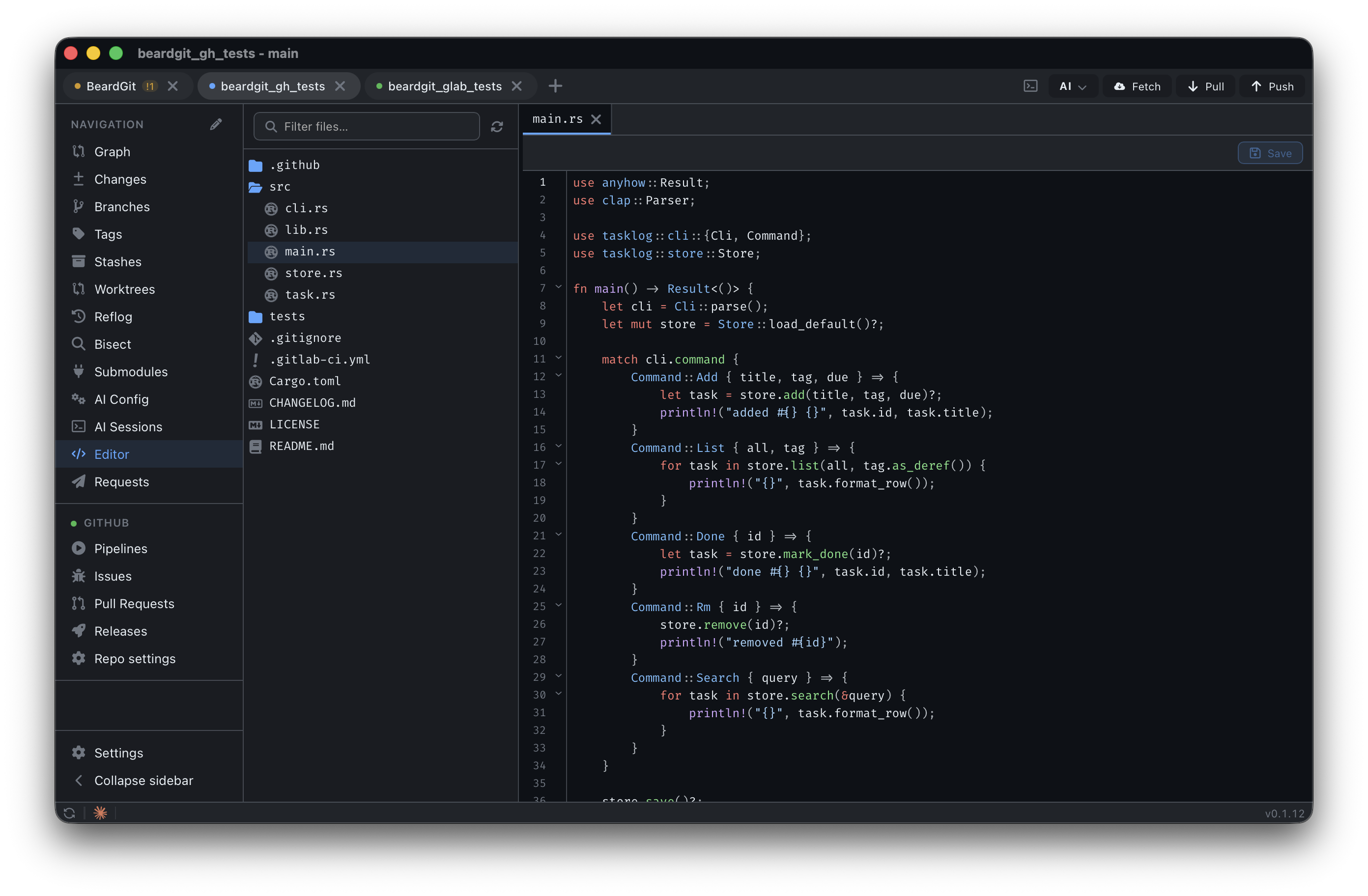
Edit repo files without leaving BeardGit. CodeMirror 6 with per-language snippets (Rust, TS / JS, Python, Go), keyword completion, JSON lint with rules for package.json and tsconfig.json, inline color pickers in CSS, indent guides, and a gitignore-aware file tree. Save writes to disk; ⇧ Save also stages it for the next commit. Right-click any file row in Changes, Branches, or Reflog and pick Open in editor to jump straight in.
And the rest
- Multi-repo tabs. Heavy state (repo, layout, watcher) loads only for the active tab. A dozen open repos cost the same as one.
⌘1…⌘9jumps between them. - Real terminals. xterm.js + WebGL fed by a native Rust PTY. OSC 7 auto-links a terminal to the matching project tab. Foreground process polling detects when
claude/codex/opencodestart and updates the tab on the fly. - Themes and i18n. Light, dark, and custom JSON themes — every accent flows from CSS tokens, including the graph. English and Spanish ship via Paraglide; adding a locale is a JSON file.
- A sidebar that's yours. Reorder navigation items, hide what you don't use, reset to the default. Layout persists app-wide.
- Auto-update. Tauri updater on the stable channel with diagnostics for endpoint and last-check timestamp — so you can tell a 404 apart from a DNS hiccup without leaving the app.
- Local-only logs.
tracingwith daily rotation and 7-day auto-purge to a per-platform path. The log path is included in the in-app error dialog; sharing a file is your call, never the app's.
Who BeardGit is for
Five minutes from download to first commit. No accounts, no logins, no "BeardGit Cloud."
You'll like it if you:
- Use both GitHub and GitLab and want them to feel the same.
- Test APIs against the repo you're staring at and hate context-switching to Postman.
- Run Claude Code / Codex / OpenCode and want them isolated in worktrees, not loose in your tree.
- Care that your git client doesn't ship a 200 MB Chromium runtime to render a sidebar.
- Want a polished GUI with Linux as a first-class platform, not an afterthought.
You probably won't if you:
- Live entirely on
gitCLI andlazygit— BeardGit is GUI-first. - Need SVN, Mercurial, Perforce, or self-hosted Bitbucket — not supported.
- Want a paid product with phone support and an enterprise SSO portal — that's not this.
BeardGit is free and source-available. The CC BY-NC-SA license blocks reselling BeardGit itself — using it commercially in your team is fine.
Install in 30 seconds
Pre-built installers are published on every tagged release:
| Platform | Architecture | Format |
|---|---|---|
| macOS | Apple Silicon | .dmg |
| Linux | x64 | .AppImage |
| Windows | x64 | .exe |
First launch — unsigned builds (one-time setup)→ Download the latest release, pick your installer, and run it.
ghandglabare bundled — no extra setup needed.
BeardGit is currently distributed without Apple or Microsoft code-signing certificates, so both operating systems will flag the app the first time you open it. The app is safe; the warnings exist because the binaries are not notarized/signed. You only need to do this once per install.
macOS — "BeardGit is damaged" / "developer cannot be verified"
xattr -dr com.apple.quarantine /Applications/BeardGit.app
Or right-click BeardGit.app → Open → click Open in the confirmation, or use System Settings → Privacy & Security → Open Anyway.
Windows — "Windows protected your PC" (SmartScreen)
Click More info → Run anyway. The warning won't reappear on the same machine.
Building from source
Prerequisites
- Git 2.x+ — required at runtime for write operations.
- Rust stable — install via rustup.
- Node.js 22+ — install from nodejs.org.
macOS
xcode-select --install
Linux (Debian / Ubuntu)
sudo apt update
sudo apt install libwebkit2gtk-4.1-dev build-essential curl wget file \
  libxdo-dev libssl-dev libayatana-appindicator3-dev librsvg2-dev
Linux (Arch)
sudo pacman -S --needed webkit2gtk-4.1 base-devel curl wget file \
  openssl appmenu-gtk-module libappindicator-gtk3 librsvg xdotool
Linux (Fedora)
sudo dnf install webkit2gtk4.1-devel openssl-devel curl wget file \
  libappindicator-gtk3-devel librsvg2-devel libxdo-devel
sudo dnf group install "c-development"
Windows
- Install Microsoft C++ Build Tools and select Desktop development with C++.
- Install the WebView2 Runtime.
Build and run
git clone [email protected]:The3eard/BeardGit.git
cd BeardGit
npm install
npm run tauri dev
First build compiles every Rust crate and takes roughly 3–5 minutes. Subsequent runs are fast. Release bundle:
npm run tauri build
| Layer | Stack |
|---|---|
| Shell | Tauri 2 with the auto-updater plugin |
| Core | Rust — 18 crates, libgit2, SQLite, tracing, tokio, reqwest, portable-pty |
| Frontend | Svelte 5, TypeScript, Canvas 2D, CodeMirror 6, xterm.js + WebGL, Vite, Paraglide 2 |
| Integrations | gh and glab (bundled), Claude Code, Codex, OpenCode |
| CI | GitHub Actions — cargo fmt, cargo clippy --workspace -D warnings, cargo test --workspace, svelte-check, vitest, stylelint, eslint |
Three layers with strict boundaries. Only app-core depends on Tauri — every other crate is a reusable library.
| Crate | Role |
|---|---|
git-engine |
Hybrid git — git2 for reads, system git for writes |
graph-builder |
Pure DAG construction and lane assignment |
forge-provider |
ForgeProvider trait + shared forge types (contract-only) |
cli-provider |
GitHubCli / GitLabCli impls of ForgeProvider via gh / glab |
provider |
CiProvider trait + CI types + shared HTTP helpers |
gitlab-api / github-api |
REST implementations of CiProvider |
ai-provider |
AiProvider trait + shared AI types |
claude-code / codex / opencode |
AiProvider implementations |
auth |
AES-256-GCM encrypted credential store with machine-bound key |
storage |
SQLite via rusqlite, JSON config, TOML theme loader, logging |
task-runner |
Async task manager with streaming output and cancellation |
terminal |
PTY session manager via portable-pty with OSC 7 integration |
watcher |
Debounced filesystem + AI config + sessions watchers |
mutation-events |
Lightweight event bus for cross-feature notifications |
requests-runner / requests-store |
.http parser, executor, and SQLite-backed history |
app-core |
200+ Tauri command handlers, AppState, event bridge |
Branch strategy
| Branch | Purpose |
|---|---|
main |
Mirrors the latest stable release. Auto-update endpoint points here. |
beta |
Integration branch. Feature/fix branches merge here with --no-ff, then main is fast-forwarded on release. |
Day-to-day work happens on short-lived branches off beta (feat/<thing>, fix/<thing>, …). Don't batch features on a long-lived branch.
Contributing
Pull requests welcome. See CONTRIBUTING.md. All contributors must sign a short CLA before their changes can be merged.
If you find a bug, open an issue. If you're unsure whether something's a bug, a limitation, or an opportunity for a plugin, open it anyway — over-triage beats under-triage.
Security
See SECURITY.md for our disclosure policy.
License
CC BY-NC-SA 4.0. Free for non-commercial use with attribution and share-alike. Commercial use of the app by individuals or teams is fine — the NC clause is defensive (it blocks reselling BeardGit itself).
Made with cargo, coffee, and stubbornness by Adolfo Fuentes.
If BeardGit saves you a tab, drop a ⭐ on the repo — it's how the project gets seen.
Reviews (0)
Sign in to leave a review.
Leave a reviewNo results found