ManimFlow
Health Uyari
- License — License: MIT
- Description — Repository has a description
- Active repo — Last push 0 days ago
- Low visibility — Only 5 GitHub stars
Code Uyari
- network request — Outbound network request in package-lock.json
- process.env — Environment variable access in pi_baml/baml_client/async_client.ts
- process.env — Environment variable access in pi_baml/baml_client/async_request.ts
Permissions Gecti
- Permissions — No dangerous permissions requested
Bu listing icin henuz AI raporu yok.
Generate and publish Manim animations from natural-language prompts with autonomous AI coding agents.
ManimFlow
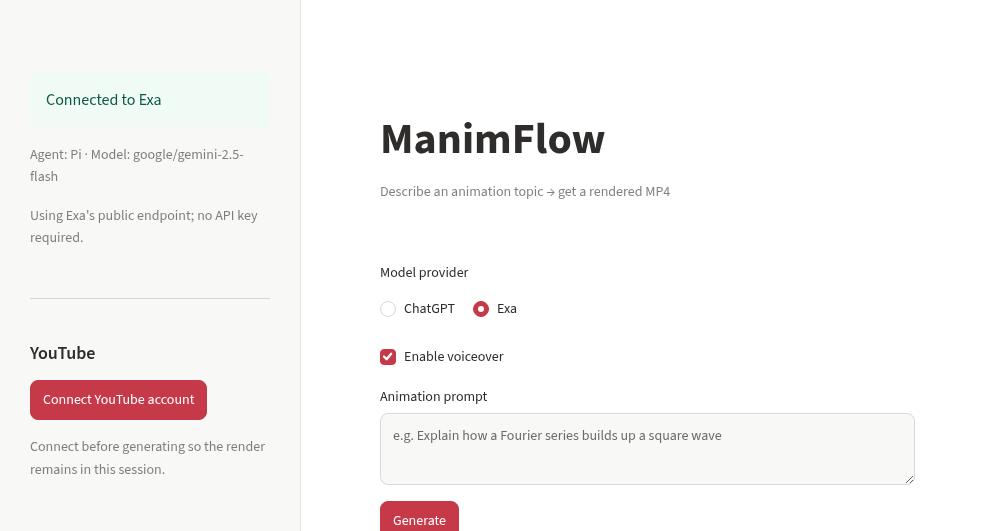
ManimFlow turns a natural-language animation request into a rendered Manim video. The Streamlit app plans scenes, gives Pi an isolated project workspace, streams the agent's progress, renders the animation, and keeps repairing failures until it produces an MP4.
What it does
- Accepts a short topic or a detailed animation brief.
- Uses the selected model to create a complete scene plan.
- Starts Pi as an autonomous coding agent in a temporary workspace.
- Generates modular Manim source files and shows them in a live, read-only Monaco browser.
- Runs Manim, observes errors, edits the project, and retries until a valid MP4 is available.
- Displays the video for playback and download.
- Adds an AI voiceover (narration script written from the scene plan, spoken with the AbbieSpeak voice and muxed into the MP4).
- Suggests editable YouTube metadata and can upload the result after browser-based YouTube authorization.
Long and detailed prompts receive longer scene plans. Mathematical and scientific animations use the installed LaTeX toolchain through MathTex and Tex.
Layout review
Once a valid video exists, layout_review.py runs layout_audit.py, a headless geometry audit adapted from gqy20/manim-agent. It dry-runs scene.py and flags overlapping objects, crowding, and objects outside the safe frame after each play() call. Labels inside their own box and full-frame backgrounds are skipped. Findings go back to Pi as a review round, up to two. Pi should fix them, but may ignore a finding it judges deliberate by recording IGNORED: <finding> | <reason> in review_notes.md. The audit is advisory: if it cannot run, or a revision breaks rendering, the last valid video is kept.
Voiceover
voiceover.py writes a narration script from the scene plan, synthesizes it with theabbie/AbbieSpeak (hf download of speak.py, run through uv run), and muxes it into the MP4 with FFmpeg, holding the last frame if the narration runs longer than the video. speak.py and its model weights download on first use and are cached; the GitHub Actions workflow prefetches them in a build step. If voiceover fails, the silent video is returned. Set HF_TOKEN for faster downloads, and pass --no-voiceover to manimflow_pi.py to skip it.
Model providers
The Streamlit interface offers two providers. The Copilot, Gemini, and Anthropic implementations remain in the code but are hidden:
| Provider | Authentication | Default model |
|---|---|---|
| ChatGPT | Sign in with ChatGPT: open the sign-in link, then paste the 127.0.0.1 address your browser fails to load |
First model available to your plan |
| Exa | Public Exa endpoint through the exa-enhanced Pi provider (BAML schema alignment, full tool calling) |
google/gemini-2.5-flash |
The ChatGPT session (access and refresh tokens) is kept in the active Streamlit session and saved in this browser's localStorage, so a reload or a later visit signs you back in without pasting a URL. Signing out clears it. ManimFlow does not write it to project files or repository configuration. The sign-in flow follows Webiome, with the code exchange done by the Streamlit server, so no extra Worker is needed.
Main features
- Autonomous Pi coding and repair loop
- Live, filtered tool and render progress
- VS Code-style read-only Monaco file explorer
- Per-render isolated workspaces
- Full local Manim documentation checkout for providers using the documentation gate
- LaTeX, common TeX packages, recommended fonts, and
dvisvgm - MP4 playback and download
- Browser-persistent encrypted YouTube authorization
- LLM-suggested YouTube title, description, and tags
- Resumable YouTube uploads with editable privacy settings
- Serialized render queue for safe concurrent Streamlit sessions
- Isolated Node 22 and pinned Pi
1.4.0and BAML runtime installation when required
How it works
Animation prompt
      |
      v
Scene planner
      |
      v
plan.md and AGENTS.md
      |
      v
Pi coding agent
      |
      +--> reads local Manim documentation when required
      +--> writes Python modules
      +--> runs Manim
      +--> diagnoses and repairs failures
      |
      v
animation.mp4
      |
      +--> browser playback and download
      +--> optional YouTube upload
The app parses Pi's JSON event stream into useful progress messages. Large command and documentation results are shortened only in the frontend log. Files and tool results passed to Pi remain complete.
Run locally
Requirements
- Python 3.11 or newer
- Node.js 22 or newer
- The system packages listed in
packages.txt
Install the application dependencies:
python -m venv .venv
source .venv/bin/activate
pip install -r requirements.txt
npm ci
Copy the example secrets file and add the providers you intend to use:
cp .streamlit/secrets.toml.example .streamlit/secrets.toml
Start Streamlit:
streamlit run streamlit_app.py
Deploy on Streamlit Community Cloud
- Fork this repository.
- Create a Streamlit app with
streamlit_app.pyas the entry point. - Add the required values under App settings, then Secrets.
- Deploy the app. Streamlit installs Python dependencies from
requirements.txtand system packages frompackages.txt.
Example secrets:
COPILOT_TOKEN = "optional-copilot-token"
GEMINI_API_KEY = "optional-gemini-key"

YOUTUBE_CLIENT_ID = "your-client-id.apps.googleusercontent.com"
YOUTUBE_CLIENT_SECRET = "your-client-secret"
YOUTUBE_REDIRECT_URI = "https://your-app.streamlit.app/"
YOUTUBE_TOKEN_ENCRYPTION_KEY = "a-long-random-secret"
COPILOT_TOKEN is optional because the app can use GitHub device login. GEMINI_API_KEY is required only when Google Gemini is selected. The four YouTube values are required only for YouTube uploads.
For YouTube OAuth, enable YouTube Data API v3, create a Google OAuth Web application, and register the exact deployed Streamlit URL as its redirect URI. The app encrypts OAuth credentials before storing them in that browser's local storage.
Repository layout
| Path | Purpose |
|---|---|
streamlit_app.py |
Main Streamlit product and render orchestration |
pi_extensions/exa_enhanced.ts |
Exa provider that turns Pi's tool schemas into a BAML action union, so Exa models make real read, write, edit, and bash tool calls |
pi_baml/ |
Generated BAML client used by the Exa provider |
exa_runtime.py |
Installs the Exa provider and BAML client into a Pi agent directory |
code_browser_component/ |
Read-only Monaco code browser |
browser_storage_component/ |
Browser-local encrypted credential storage bridge |
requirements.txt |
Python dependencies |
packages.txt |
Streamlit system packages, Manim libraries, FFmpeg, and TeX |
package.json |
Pinned Pi coding-agent dependency and Node requirement |
Miscellaneous
The repository contains earlier interfaces that are no longer the primary product:
GitHub Actions renderer
.github/workflows/render.yml renders an issue after the repository owner applies the manim label. It runs the same six-attempt autonomous Pi pipeline with GitHub Copilot and gpt-4o, then publishes the resulting MP4 as a workflow artifact.
Colab notebook
ManimFlow.ipynb provides an interactive Exa-only Colab workflow. It installs the pinned Pi runtime and uses the same hardened Exa provider extension and autonomous render loop as the Streamlit app.
Colab CLI
The manimflow script launches the Exa and Pi pipeline in a temporary Colab session, streams useful progress, and downloads the rendered MP4. It requires colab-cli and an authenticated Colab session.
pip install colab-cli
colab login
./manimflow "doppler effect visualization"
YouTube upload notebook
youtube_script.ipynb is the original standalone YouTube upload experiment. Its functionality is now integrated into the Streamlit app.
Yorumlar (0)
Yorum birakmak icin giris yap.
Yorum birakSonuc bulunamadi