ClaudeWatch
Health Uyari
- No license — Repository has no license file
- Description — Repository has a description
- Active repo — Last push 0 days ago
- Community trust — 79 GitHub stars
Code Basarisiz
- process.env — Environment variable access in .claude/skills/verify-claudewatch/office-smoke.mjs
- rm -rf — Recursive force deletion command in package.json
- child_process — Shell command execution capability in scripts/afterSign.js
- spawnSync — Synchronous process spawning in scripts/afterSign.js
- process.env — Environment variable access in scripts/afterSign.js
- fs module — File system access in scripts/afterSign.js
- child_process — Shell command execution capability in scripts/build-mac.js
- fs.rmSync — Destructive file system operation in scripts/build-mac.js
- process.env — Environment variable access in scripts/build-mac.js
- fs module — File system access in scripts/build-mac.js
- rm -rf — Recursive force deletion command in scripts/build-widget.sh
- child_process — Shell command execution capability in scripts/generate-changelog.js
- fs module — File system access in scripts/generate-changelog.js
- rm -rf — Recursive force deletion command in scripts/generate-icons.sh
Permissions Gecti
- Permissions — No dangerous permissions requested
Bu listing icin henuz AI raporu yok.
Real-time monitor for Claude Code CLI sessions. Desktop app with a menu bar tray, built with Electron, React and TypeScript.
ClaudeWatch — Complete Documentation
Real-time monitoring for Claude Code CLI instances. Desktop app built with Electron + React + TypeScript.
Table of Contents
- Overview
- Prerequisites
- Quick Start
- Development Setup
- Architecture
- Main Process
- Renderer (UI)
- IPC Communication
- Platform Detection
- Configuration & Settings
- Tray & Popover
- Notifications
- Testing
- Building for Production
- Project Structure
- Design System
- Troubleshooting
- Roadmap
Overview
ClaudeWatch is a cross-platform desktop application that detects and monitors running Claude Code CLI instances on your system. It provides:
- Real-time process detection via platform-specific system commands (
ps/lsofon macOS,tasklist/wmicon Windows) - Live dashboard with CPU, memory, elapsed time, and status per instance
- Menu bar tray icon with hover popover for quick glances
- Session history tracking completed Claude sessions
- Configurable notifications for idle and exited instances
- Dark-themed UI built with Tailwind CSS and Lucide icons
Screenshots
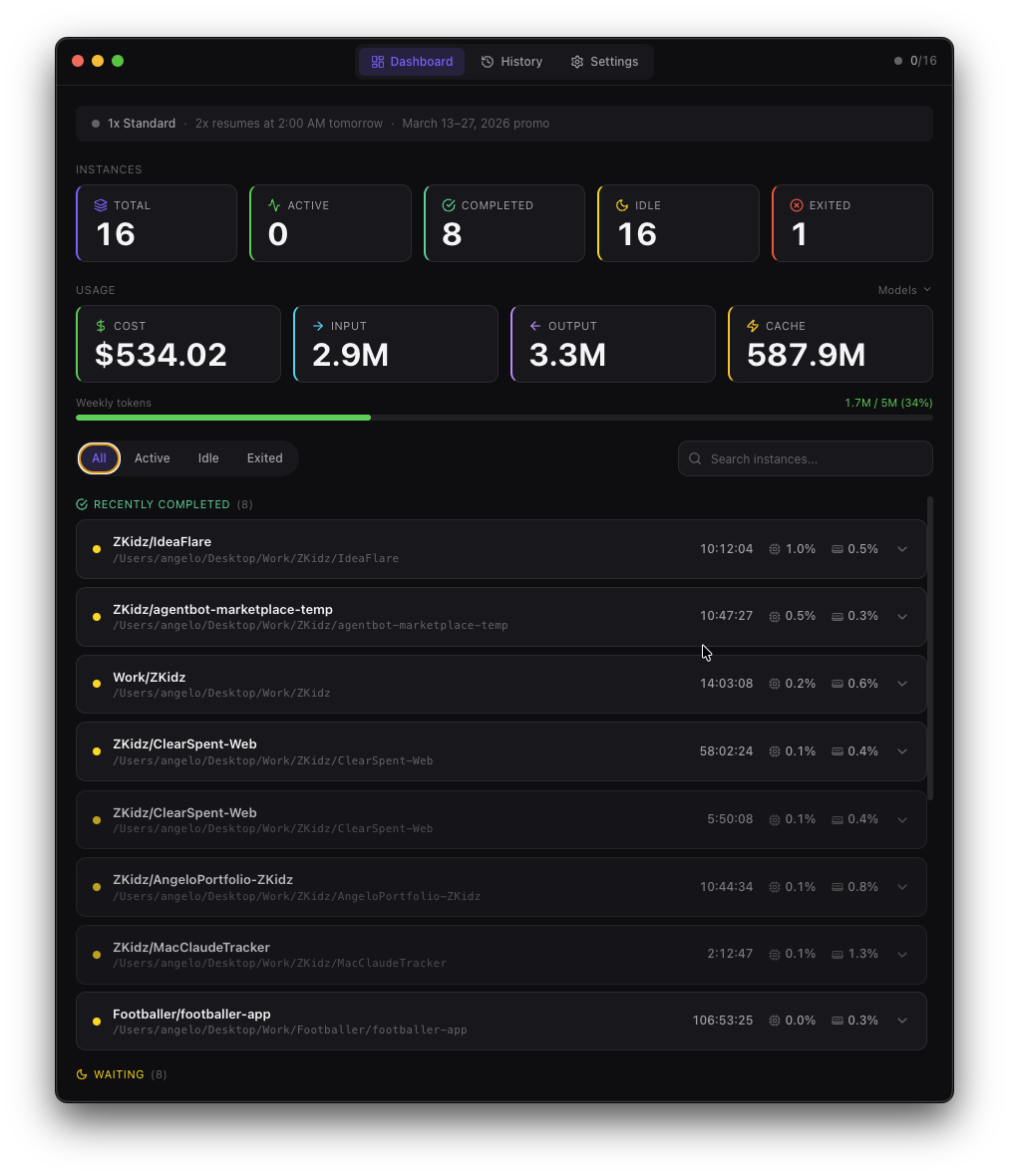
Dashboard — Live stats, usage metrics, and instance list with filters:
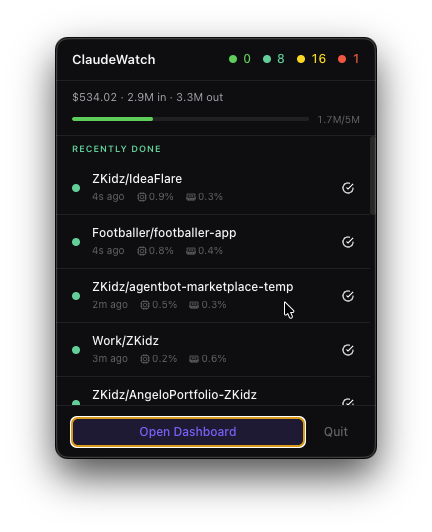
Tray Popover — Compact menu bar view with recent sessions:
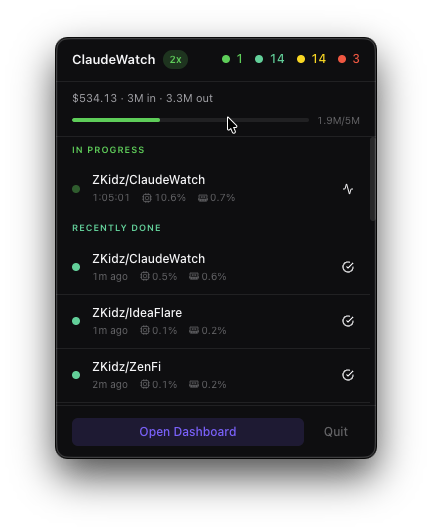
2x Indicator — Tray popover showing Claude promo status:
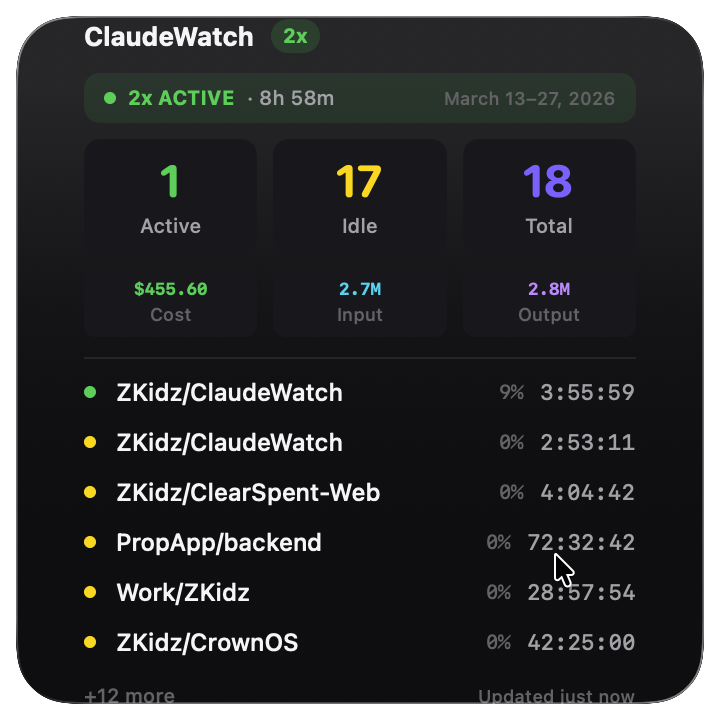
macOS Widget — Large widget showing live session stats, usage costs, and instance list:
How It Works
┌──────────────────────────────────────────────────────────────┐
│ System (macOS / Windows / Linux)                             │
│  └── Claude CLI processes (claude --resume, claude -m, etc.) │
└────────────────────┬─────────────────────────────────────────┘
                     │ ps / lsof / tasklist
                     ▼
┌──────────────────────────────────────────────────────────────┐
│ Main Process (Electron)                                      │
│  ├── ProcessMonitor  → polls system every N seconds          │
│  ├── SessionTracker  → detects new/changed/exited instances  │
│  ├── SettingsStore   → persists user preferences             │
│  ├── NotificationManager → native macOS/Windows alerts       │
│  └── TrayManager     → menu bar icon + popover window        │
└────────────────────┬─────────────────────────────────────────┘
                     │ IPC (contextBridge)
                     ▼
┌──────────────────────────────────────────────────────────────┐
│ Renderer (React 19)                                          │
│  ├── Dashboard      → stats cards, filters, instance list    │
│  ├── Header         → nav pills + live status indicator      │
│  ├── PopoverView    → compact tray popover UI                │
│  ├── SessionHistory → past session log                       │
│  └── Settings       → polling, notifications, appearance     │
└──────────────────────────────────────────────────────────────┘
Prerequisites
| Tool | Version | Purpose |
|---|---|---|
| Node.js | >= 18.0 | Runtime |
| pnpm (recommended) or npm | >= 8.0 | Package manager |
| Git | Any | Version control |
| Xcode Command Line Tools (macOS) | Latest | Native compilation |
| Visual Studio Build Tools (Windows) | 2019+ | Native compilation |
Verify Prerequisites
node --version    # v18.0.0 or higher
pnpm --version    # 8.0.0 or higher (or use npm)
git --version     # any version
On macOS, install Xcode CLI tools if not present:
xcode-select --install
Quick Start
# 1. Clone the repository
git clone <repo-url> ClaudeWatch
cd ClaudeWatch

# 2. Install dependencies
pnpm install

# 3. Run in development mode
pnpm dev

# 4. The app opens automatically — look for the tray icon (● 0) in your menu bar
The app starts hidden in the system tray. Click the tray icon to open the popover, or right-click for the context menu and select "Open Dashboard."
Development Setup
Install Dependencies
pnpm install
This also runs electron-builder install-app-deps as a postinstall hook to compile native Node modules for Electron's version of Node.
Development Server
pnpm dev
This starts electron-vite dev which:
- Builds the main process and preload scripts
- Starts a Vite dev server for the renderer (with HMR)
- Launches the Electron app connected to the dev server
Hot Module Replacement (HMR): Changes to renderer files (React components, styles, hooks) reload instantly. Changes to main process files trigger a full restart.
Available Scripts
| Script | Command | Description |
|---|---|---|
pnpm dev |
electron-vite dev |
Development mode with HMR |
pnpm build |
electron-vite build |
Build all processes for production |
pnpm preview |
electron-vite preview |
Preview production build locally |
pnpm test |
vitest run |
Run all tests once |
pnpm test:watch |
vitest |
Run tests in watch mode |
pnpm typecheck |
tsc --noEmit |
TypeScript type checking |
pnpm lint |
eslint . --ext .ts,.tsx |
Lint all TypeScript files |
pnpm format |
prettier --write "src/**/*" |
Format all source files |
pnpm build:mac |
Build + electron-builder --mac | Create macOS DMG |
pnpm build:win |
Build + electron-builder --win | Create Windows installer |
pnpm build:linux |
Build + electron-builder --linux | Create Linux AppImage |
npm run release:patch |
npm version patch && git push --follow-tags |
Bump patch version and trigger CI release |
npm run release:minor |
npm version minor && git push --follow-tags |
Bump minor version and trigger CI release |
npm run release:major |
npm version major && git push --follow-tags |
Bump major version and trigger CI release |
Verify Everything Works
# Run all checks in sequence
pnpm typecheck && pnpm test && pnpm lint
Architecture
Three-Process Model
Electron apps run three separate processes, each with its own entry point:
electron.vite.config.ts
├── main      → src/main/index.ts         (Node.js — full system access)
├── preload   → src/preload/index.ts      (Bridge — limited, secure)
└── renderer  → src/renderer/main.tsx     (Browser — React UI)
| Process | Runtime | Access | Entry Point |
|---|---|---|---|
| Main | Node.js | Full system (filesystem, processes, notifications) | src/main/index.ts |
| Preload | Node.js (sandboxed) | Bridge between main & renderer | src/preload/index.ts |
| Renderer | Chromium | Browser APIs + exposed IPC methods | src/renderer/main.tsx |
Key Design Decisions
Context Isolation — The renderer cannot access Node.js APIs directly. All system operations go through the preload bridge (
window.api).Event-Driven Updates — The
SessionTrackeremits lifecycle events (update,instance-appeared,instance-exited). Multiple consumers (dashboard, popover, tray, notifications) subscribe independently.Platform Abstraction — Process detection is abstracted behind the
PlatformDetectorinterface. macOS usesps+lsof, Windows usestasklist+wmic.Multi-Window — Both the main dashboard and the tray popover are separate
BrowserWindowinstances loading the same renderer bundle (differentiated by URL hash#popover).
Main Process
ProcessMonitor (src/main/process-monitor.ts)
Detects Claude CLI processes running on the system.
Poll cycle:
- Calls platform-specific detector (
DarwinDetectororWin32Detector) - Gets raw process info (PID, CPU, memory, command line, TTY)
- Resolves working directory via
lsof(macOS) orwmic(Windows) - Parses CLI flags (
--resume,--model,--mcp-config, etc.) - Extracts session ID from
--resumeflag - Determines status: active (CPU > threshold) or idle (CPU <= threshold)
- Returns enriched
ClaudeInstance[]
Configuration:
cpuIdleThreshold(default: 3.0%) — CPU below this = idle
SessionTracker (src/main/session-tracker.ts)
Tracks instance lifecycles across polling cycles.
State management:
- Maintains a
Map<pid, ClaudeInstance>of currently known instances - Compares each poll result against previous state
- Detects: new appearances, status changes, and exits
Events emitted:
| Event | Payload | When |
|---|---|---|
instance-appeared |
ClaudeInstance |
New PID detected |
instance-status-changed |
{ instance, previousStatus } |
active ↔ idle |
instance-exited |
SessionHistoryEntry |
PID no longer found |
update |
{ instances: [], stats: {} } |
Every poll cycle |
SettingsStore (src/main/store.ts)
Persistent settings and session history using electron-store.
Storage location:
- macOS:
~/Library/Application Support/claudewatch/config.json - Windows:
%APPDATA%/claudewatch/config.json - Linux:
~/.config/claudewatch/config.json
NotificationManager (src/main/notifications.ts)
Sends native OS notifications for instance events.
Notifications:
- Instance went idle — when CPU drops below threshold
- Instance exited — when a Claude session ends
Respects user settings: onIdle, onExited, sound, doNotDisturb.
Renderer (UI)
Component Hierarchy
App.tsx
├── [#popover] PopoverView
│   ├── Stats header (active/idle/exited counts)
│   ├── Instance rows (sorted, compact)
│   └── Actions (Open Dashboard, Quit)
│
└── [default] Main App
    ├── Header (nav pills + live indicator)
    └── <main>
        ├── Dashboard
        │   ├── Stat cards (4-column grid)
        │   ├── Filter bar + search
        │   └── InstanceList
        │       └── InstanceCard (expandable)
        │           ├── StatusBadge
        │           ├── Metrics (time, CPU, MEM)
        │           └── [expanded] Details + Open in Terminal
        ├── SessionHistory
        │   └── History entries with time-ago
        └── Settings
            ├── Monitoring (polling, threshold)
            ├── Notifications (toggles)
            ├── Appearance (theme)
            ├── System (launch at login)
            └── Updates (check, download, install)
Hooks
useInstances() — Manages all instance state:
- Fetches initial data on mount
- Subscribes to real-time IPC updates
- Provides filter (all/active/idle/exited) and search
- Returns sorted, filtered instances via
useMemo
useSettings() — Manages app settings:
- Loads settings on mount
- Sends updates to main process for validation and persistence
useUpdater() — Manages auto-update state:
- Subscribes to
updater:statusIPC events on mount - Tracks status, update info, download progress, and errors
- Exposes
checkForUpdates,downloadUpdate,installUpdateactions
Key UI Patterns
Real-time elapsed counter:
Each InstanceCard runs its own setInterval that increments the elapsed time every second while the instance is active or idle. This avoids re-rendering the entire list.
Popover routing:App.tsx checks window.location.hash === '#popover' at module load time. The tray popover window loads the same renderer bundle but with #popover appended to the URL.
macOS drag region:
The entire body is set as a drag region (-webkit-app-region: drag) so the frameless window is draggable. Interactive elements (buttons, inputs) opt out with -webkit-app-region: no-drag.
IPC Communication
Renderer → Main (invoke/handle)
| Channel | Direction | Input | Output |
|---|---|---|---|
instances:get |
Request | — | { instances, stats } |
settings:get |
Request | — | AppSettings |
settings:set |
Request | Partial<AppSettings> |
AppSettings |
history:get |
Request | — | SessionHistoryEntry[] |
history:clear |
Request | — | { success: boolean } |
app:open-dashboard |
Action | — | { success: boolean } |
app:quit |
Action | — | void |
terminal:open |
Action | projectPath, terminalType? |
{ success: boolean } |
updater:check |
Action | — | void |
updater:download |
Action | — | void |
updater:install |
Action | — | void |
Main → Renderer (send/on)
| Channel | Direction | Payload |
|---|---|---|
instances:update |
Push | { instances, stats } |
updater:status |
Push | { status: UpdateStatus, data?: UpdateInfo | UpdateProgress | string } |
Preload Bridge
The preload script (src/preload/index.ts) exposes window.api via contextBridge:
window.api = {
  getInstances()                    // → ipcRenderer.invoke('instances:get')
  getSettings()                     // → ipcRenderer.invoke('settings:get')
  setSettings(settings)             // → ipcRenderer.invoke('settings:set', settings)
  getHistory()                      // → ipcRenderer.invoke('history:get')
  clearHistory()                    // → ipcRenderer.invoke('history:clear')
  openDashboard()                   // → ipcRenderer.invoke('app:open-dashboard')
  quit()                            // → ipcRenderer.invoke('app:quit')
  openTerminal(path, terminalType?) // → ipcRenderer.invoke('terminal:open', path, terminalType)
  onInstancesUpdate(callback)       // → ipcRenderer.on('instances:update', ...)
  checkForUpdates()                 // → ipcRenderer.invoke('updater:check')
  downloadUpdate()                  // → ipcRenderer.invoke('updater:download')
  installUpdate()                   // → ipcRenderer.invoke('updater:install')
  onUpdaterStatus(callback)         // → ipcRenderer.on('updater:status', ...)
}
Platform Detection
macOS (src/main/platform/darwin.ts)
Process discovery:
ps -eo pid,stat,%cpu,%mem,etime,tty,command
Filters output for lines matching the Claude CLI pattern (excludes Claude.app GUI and Electron helpers).
Working directory:
lsof -a -p <pid> -d cwd -Fn
Extracts the current working directory from lsof output.
Claude CLI identification:
- Must match
/claude\s/regex (bareclaudecommand or full path ending inclaude) - Excludes:
Claude.app,Electron Helper,nodeprocesses
Windows (src/main/platform/win32.ts)
Process discovery:
tasklist /FI "IMAGENAME eq claude.exe" /FO CSV /NH
Then for each PID:
wmic process where ProcessId=<pid> get CommandLine,ExecutablePath
Working directory:
Extracted from the executable path via wmic.
Adding a New Platform
- Create
src/main/platform/<platform>.ts - Implement the
PlatformDetectorinterface:interface PlatformDetector { getClaudeProcesses(): Promise<RawProcessInfo[]> getWorkingDirectory(pid: number): Promise<string> } - Register in
getPlatformDetector()inprocess-monitor.ts
Configuration & Settings
Default Settings
{
  pollingIntervalMs: 3000,       // How often to scan for processes
  cpuIdleThreshold: 3.0,         // CPU % below which = idle
  launchAtLogin: false,          // Start with macOS/Windows
  notifications: {
    onIdle: true,                // Notify when instance goes idle
    onExited: true,              // Notify when instance exits
    onError: true,               // Notify on errors
    sound: true,                 // Play notification sound
    doNotDisturb: false          // Suppress all notifications
  },
  theme: 'dark',                 // 'dark' | 'light' | 'system'
  maxHistoryEntries: 100         // Max stored history items
}
Validation Ranges
| Setting | Min | Max | Default |
|---|---|---|---|
pollingIntervalMs |
500 | 60000 | 3000 |
cpuIdleThreshold |
0.1 | 100 | 3.0 |
maxHistoryEntries |
1 | 10000 | 100 |
Validation happens server-side in ipc-handlers.ts before persisting.
Tray & Popover
Tray Icon
The app lives primarily in the system tray (menu bar on macOS, system tray on Windows/Linux).
Tray title: ● <active_count> — shows how many Claude instances are currently active.
Interactions:
| Action | Result |
|---|---|
| Hover | Opens popover window |
| Left click | Toggles popover |
| Right click | Shows context menu |
Popover Window
A small (320x420) frameless window anchored below the tray icon:
- Transparent with macOS vibrancy (
popovermaterial) - Auto-hides on blur (click outside)
- Shows compact instance list with live metrics
- "Open Dashboard" and "Quit" buttons
Context Menu (right-click)
ClaudeWatch — 5 instances
─────────────────────────────
🟢 MyProject — 00:05:32
🟢 OtherProject — 00:12:01
🟡 IdleProject — 01:23:45
🔴 FinishedProject — 00:30:00
─────────────────────────────
Open Dashboard
Check for Updates
─────────────────────────────
Quit
Notifications
Types
| Event | Title | Body | Setting |
|---|---|---|---|
| Instance idle | "Claude went idle" | Project name | notifications.onIdle |
| Instance exited | "Claude session ended" | Project name + duration | notifications.onExited |
Controls
- Sound — toggle notification sound on/off
- Do Not Disturb — suppresses all notifications while enabled
- Individual toggles for each notification type
Auto-Updates
ClaudeWatch supports automatic updates via GitHub Releases using electron-updater.
How It Works
- On startup (after 10s delay), the app checks GitHub Releases for a newer version
- Checks repeat every 4 hours automatically
- Users can also trigger a check manually from Settings or the tray context menu
- When an update is found, the user chooses whether to download it
- After download completes, the user can install and restart with one click
Architecture
AutoUpdaterManager (src/main/auto-updater.ts)
├── Wraps electron-updater's autoUpdater
├── Sends status events to all renderer windows via 'updater:status' IPC
├── Dev mode: all operations are no-ops (electron-updater requires packaged app)
└── Configurable auto-check interval (default: 4 hours)

useUpdater hook (src/renderer/hooks/useUpdater.ts)
├── Subscribes to 'updater:status' events
├── Manages state: status, updateInfo, progress, error
└── Exposes actions: checkForUpdates, downloadUpdate, installUpdate
Update States
| Status | Description | UI |
|---|---|---|
idle |
No check performed yet | "Check" button |
checking |
Querying GitHub Releases | Spinner |
available |
New version found | "Download" button + version badge |
not-available |
Already on latest | "Check" button |
downloading |
Downloading update | Progress bar with percentage |
downloaded |
Ready to install | "Install & Restart" button |
error |
Check or download failed | Error message + "Check" button |
Settings UI
The Updates section appears at the bottom of the Settings panel with:
- Current update status text
- Version badge when an update is available
- Progress bar during download
- Action buttons for each state
Tray Integration
Right-clicking the tray icon shows a "Check for Updates" option above the Quit separator.
Configuration
Auto-update is configured in electron-builder.yml:
publish:
  provider: github
  owner: theangeloumali
  repo: ClaudeWatch
This tells electron-updater where to check for releases. The latest-mac.yml / latest.yml files generated during the build are uploaded alongside the installers.
Development Notes
- Auto-update is completely disabled in dev mode (
is.devguard) sinceelectron-updaterrequires a packaged app withapp-update.yml autoDownloadis set tofalse— users must explicitly choose to downloadautoInstallOnAppQuitistrue— if an update is downloaded but not installed, it installs on next quit
Testing
Test Framework
- Runner: Vitest 3.x
- DOM environment: jsdom (renderer tests)
- Node environment: Node (main process tests)
- Assertion libraries:
@testing-library/react,@testing-library/jest-dom - Coverage: V8 provider
Running Tests
# Run all tests once
pnpm test

# Run tests in watch mode
pnpm test:watch

# Run with coverage
npx vitest run --coverage

# Run specific test file
npx vitest run src/main/ipc-handlers.test.ts
Test Structure
src/
├── main/
│   ├── auto-updater.test.ts       # Auto-update manager tests (18 tests)
│   ├── ipc-handlers.test.ts       # IPC handler tests (12 tests)
│   ├── process-monitor.test.ts    # Process detection tests (15 tests)
│   ├── session-tracker.test.ts    # Lifecycle tracking tests (17 tests)
│   ├── store.test.ts              # Settings persistence tests (11 tests)
│   ├── notifications.test.ts      # Notification tests (14 tests)
│   ├── widget-stats-writer.test.ts # Widget stats tests (10 tests)
│   └── bugfix-issues.test.ts      # Regression tests (21 tests)
└── renderer/
    └── __tests__/
        ├── setup.ts               # Test setup (mocks window.api)
        ├── components.test.tsx     # Component render tests (8 tests)
        ├── useInstances.test.ts    # Hook tests (8 tests)
        ├── useSettings.test.ts    # Hook tests (4 tests)
        └── useUpdater.test.ts     # Auto-update hook tests (14 tests)
Total: 152 tests across 12 test files.
Writing New Tests
Main process tests use the Node environment:
import { describe, it, expect, vi } from 'vitest'
import { validateSettings } from './ipc-handlers'

describe('validateSettings', () => {
  it('clamps pollingIntervalMs to valid range', () => {
    expect(validateSettings({ pollingIntervalMs: 100 })).toEqual({
      pollingIntervalMs: 500
    })
  })
})
Renderer tests use jsdom with React Testing Library:
import { render, screen } from '@testing-library/react'
import { Dashboard } from '../components/Dashboard'

it('renders stat cards', () => {
  render(<Dashboard />)
  expect(screen.getByText('Total')).toBeInTheDocument()
})
Building for Production
Step 1: Build the Application
pnpm build
This runs electron-vite build which compiles:
- Main process →
out/main/index.js - Preload script →
out/preload/index.js - Renderer →
out/renderer/index.html+ assets
Step 2: Create Platform Installer
macOS (DMG)
pnpm build:mac
Output: dist/claudewatch-1.0.0-universal.dmg
- Universal binary (Intel + Apple Silicon)
- DMG with drag-to-Applications layout
- Requires macOS entitlements (
build/entitlements.mac.plist)
Note: For distribution outside the Mac App Store, you need an Apple Developer certificate for code signing. Unsigned builds will show a Gatekeeper warning.
Windows (NSIS Installer)
pnpm build:win
Output: dist/claudewatch-1.0.0-setup.exe
- NSIS installer with custom install directory option
- x64 architecture
Linux (AppImage)
pnpm build:linux
Output: dist/claudewatch-1.0.0-x86_64.AppImage
- Self-contained AppImage (no system dependencies)
- Category: Utility
Build Configuration
Build settings are in electron-builder.yml:
appId: com.zkidz.claudewatch
productName: ClaudeWatch
directories:
  buildResources: build # Icons, entitlements, etc.
  output: dist # Built installers go here
Build Output Structure
dist/
├── claudewatch-1.0.0-universal.dmg   # macOS
├── claudewatch-1.0.0-setup.exe       # Windows
├── claudewatch-1.0.0-x86_64.AppImage # Linux
├── mac-universal/                       # Unpacked macOS app
│   └── ClaudeWatch.app/
└── builder-effective-config.yaml        # Resolved build config
Build Resources
Place build resources in the build/ directory:
build/
├── icon.icns              # macOS app icon (512x512)
├── icon.ico               # Windows app icon
├── icon.png               # Linux app icon (256x256+)
├── entitlements.mac.plist # macOS sandbox entitlements
└── background.png         # DMG background (optional)
Pre-Build Checklist
# 1. Verify types
pnpm typecheck

# 2. Run all tests
pnpm test

# 3. Lint
pnpm lint

# 4. Build
pnpm build

# 5. Preview locally (test production build without packaging)
pnpm preview

# 6. Package for your platform
pnpm build:mac   # or build:win or build:linux
Releasing
Creating a Release
ClaudeWatch uses GitHub Actions to automatically build and publish releases when a version tag is pushed.
Quick Release
# Bump version, create git tag, push — triggers CI build + GitHub Release
npm run release:patch   # 1.0.0 → 1.0.1
npm run release:minor   # 1.0.0 → 1.1.0
npm run release:major   # 1.0.0 → 2.0.0
This runs npm version <type> which:
- Updates
versioninpackage.json - Creates a git commit with message
v1.0.1 - Creates a git tag
v1.0.1 - Pushes the commit and tag to the remote
CI/CD Pipeline (.github/workflows/release.yml)
When a v* tag is pushed, two jobs run in parallel:
| Job | Runner | Output |
|---|---|---|
build-mac |
macos-latest |
Universal DMG + latest-mac.yml |
build-win |
windows-latest |
NSIS installer + latest.yml |
Both jobs publish artifacts directly to the GitHub Release using --publish always.
Authentication: Uses the automatic GITHUB_TOKEN — no additional secrets needed.
Widget build: The macOS job runs npm run build:widget (requires Xcode/Swift) with continue-on-error: true so the release still succeeds if the widget build fails.
Manual Release
If you need to build and publish manually:
# 1. Bump version
npm version patch

# 2. Build
npm run build

# 3. Package and publish to GitHub Releases
GH_TOKEN=<your-token> npx electron-builder --mac --publish always
GH_TOKEN=<your-token> npx electron-builder --win --publish always
Code Signing
Currently, builds are unsigned. This means:
- macOS: Gatekeeper shows a warning on first launch ("unidentified developer"). Users bypass via right-click → Open.
- Windows: SmartScreen may warn on first run.
Auto-update still works without code signing. To add signing later, set these GitHub Actions secrets:
CSC_LINK— Base64-encoded.p12certificateCSC_KEY_PASSWORD— Certificate password
How Users Get Updates
- User runs an older version of ClaudeWatch
- App checks GitHub Releases (automatically every 4h, or manually via Settings/tray)
- If a newer version exists, the app shows "Update available v1.0.1"
- User clicks "Download" → progress bar shows download progress
- User clicks "Install & Restart" → app quits, installs, and relaunches
Project Structure
ClaudeWatch/
├── build/                          # Build resources (icons, entitlements)
├── dist/                           # Built installers (git-ignored)
├── out/                            # Compiled output (git-ignored)
├── plans/                          # Feature plans and roadmaps
├── docs/                           # Documentation
│
├── src/
│   ├── main/                       # Electron main process
│   │   ├── index.ts                # App entry point, lifecycle
│   │   ├── process-monitor.ts      # Claude process detection
│   │   ├── session-tracker.ts      # Instance lifecycle tracking
│   │   ├── store.ts                # Persistent settings (electron-store)
│   │   ├── tray.ts                 # Tray icon + popover window
│   │   ├── notifications.ts        # Native OS notifications
│   │   ├── auto-updater.ts         # Auto-update manager (electron-updater)
│   │   ├── ipc-handlers.ts         # IPC request handlers
│   │   ├── terminal-resolver.ts    # Detect parent terminal from process tree
│   │   ├── terminal-opener.ts      # Open project in detected terminal
│   │   ├── widget-stats-writer.ts  # Write stats.json for macOS widget
│   │   ├── widget-sync.ts          # Coordinate widget data updates
│   │   ├── format-utils.ts         # Duration formatting
│   │   └── platform/
│   │       ├── darwin.ts           # macOS process detection (ps/lsof)
│   │       ├── win32.ts            # Windows process detection (tasklist/wmic)
│   │       └── exec.ts             # execFile promise wrapper
│   │
│   ├── preload/                    # Context bridge
│   │   ├── index.ts                # Exposes window.api
│   │   └── index.d.ts             # Type declarations
│   │
│   └── renderer/                   # React UI
│       ├── main.tsx                # React entry point
│       ├── App.tsx                 # Root component + popover routing
│       ├── index.html              # HTML shell
│       ├── env.d.ts                # Global type augmentation
│       ├── components/
│       │   ├── Header.tsx          # Navigation + live indicator
│       │   ├── Dashboard.tsx       # Stats + filters + instance list
│       │   ├── InstanceList.tsx    # Instance card container
│       │   ├── InstanceCard.tsx    # Expandable instance row
│       │   ├── StatusBadge.tsx     # Colored status dot + label
│       │   ├── PopoverView.tsx     # Compact tray popover UI
│       │   ├── SessionHistory.tsx  # Past sessions view
│       │   ├── Settings.tsx        # Preferences view
│       │   └── ProjectTag.tsx      # Project name display
│       ├── hooks/
│       │   ├── useInstances.ts     # Instance state + filtering
│       │   ├── useSettings.ts      # Settings state management
│       │   └── useUpdater.ts       # Auto-update state + actions
│       ├── lib/
│       │   ├── types.ts            # Shared TypeScript types
│       │   └── utils.ts            # Formatting utilities
│       ├── styles/
│       │   └── globals.css         # Tailwind base + component utilities
│       └── __tests__/
│           ├── setup.ts            # Test environment setup
│           ├── components.test.tsx  # Component tests
│           ├── useInstances.test.ts # Hook tests
│           ├── useSettings.test.ts  # Hook tests
│           └── useUpdater.test.ts   # Auto-update hook tests
│
├── .github/
│   └── workflows/
│       └── release.yml             # CI/CD: build + publish on tag push
├── electron.vite.config.ts         # Vite config (main/preload/renderer)
├── electron-builder.yml            # Build/packaging config
├── tailwind.config.ts              # Tailwind theme + design tokens
├── postcss.config.js               # PostCSS (tailwindcss + autoprefixer)
├── tsconfig.json                   # Base TypeScript config
├── tsconfig.node.json              # Main process TS config
├── tsconfig.web.json               # Renderer TS config
├── vitest.config.ts                # Test configuration
├── package.json                    # Dependencies and scripts
└── .prettierrc                     # Code formatting rules
Design System
Color Palette
| Token | Value | Usage |
|---|---|---|
surface |
rgb(14, 14, 16) |
App background |
surface-raised |
rgb(24, 24, 28) |
Cards, inputs, elevated surfaces |
surface-hover |
rgb(32, 32, 38) |
Hover states |
accent |
#7C5CFC |
Primary purple accent |
accent-hover |
#6B4FE0 |
Accent hover state |
status-active |
#30D158 |
Active instances (green) |
status-idle |
#FFD60A |
Idle instances (yellow) |
status-exited |
#FF453A |
Exited instances (red) |
status-finished |
#64D2FF |
Finished instances (cyan) |
text-primary |
#F5F5F7 |
Main text |
text-secondary |
#A1A1A6 |
Secondary text |
text-tertiary |
#636366 |
Subtle text, icons |
border |
rgba(255,255,255,0.08) |
Default borders |
border-hover |
rgba(255,255,255,0.15) |
Hover borders |
Typography Scale
| Token | Size | Weight | Usage |
|---|---|---|---|
text-stat |
2rem | 700 | Large stat numbers |
text-heading |
0.8125rem | 600 | Section headings, labels |
text-body |
0.8125rem | 400 | Body text |
text-caption |
0.6875rem | 400 | Small labels, captions |
text-mono-sm |
0.75rem | 500 | Monospace metrics |
Font Stack
- Sans: -apple-system, BlinkMacSystemFont, SF Pro Text, system-ui
- Mono: SF Mono, Menlo, Monaco, Consolas
Component Utilities (CSS)
| Class | Description |
|---|---|
.card |
Base card: rounded-10px, border, surface-raised bg |
.card-interactive |
Card + hover effects (border-hover, surface-hover) |
.stat-card |
Stat display: card + flex-col + padding |
.filter-btn |
Inactive filter pill |
.filter-btn-active |
Active filter pill (accent bg) |
.no-drag |
Opt out of macOS window drag region |
Animations
| Name | Duration | Effect |
|---|---|---|
fade-in |
200ms ease-out | translateY(4px) → 0, opacity 0 → 1 |
pulse-dot |
2s ease-in-out infinite | Opacity oscillates 1 → 0.4 → 1 |
List items get staggered animation delays (30ms per item, up to 10 items).
Troubleshooting
Tailwind styles not rendering
Cause: The css.postcss.plugins block in electron.vite.config.ts overrides postcss.config.js.
Fix: Ensure electron.vite.config.ts does NOT have a css block in the renderer config. Vite should discover postcss.config.js automatically.
Instance cards not clickable / not expanding
Cause: macOS Electron drag region (-webkit-app-region: drag) on body intercepts clicks on child elements inside buttons.
Fix: Add the no-drag class to interactive container elements (e.g., .card-interactive).
"Open in Terminal" opens the wrong app
ClaudeWatch detects the terminal each session runs in and tries to open the correct app. If the detected terminal has no dedicated opener (e.g., Alacritty, Hyper), it falls back to Terminal.app. Supported dedicated openers: Warp, iTerm2, Terminal.app, Kitty, WezTerm, Ghostty, VS Code, Cursor.
No instances detected
- Verify Claude CLI is actually running:
ps aux | grep claude - Check that the Claude process matches the detection pattern (must be
claudecommand, notClaude.app) - Try lowering the polling interval in Settings (e.g., 1 second)
- Check Console.app for any permission errors with
psorlsof
Notifications not appearing
- Check System Preferences → Notifications → ClaudeWatch is enabled
- Verify
Do Not Disturbis not enabled in app settings - Verify individual notification toggles are on in Settings
Build fails on macOS
# Install Xcode CLI tools
xcode-select --install

# Clear node_modules and reinstall
rm -rf node_modules out dist
pnpm install
Build fails on Windows
Ensure Visual Studio Build Tools 2019+ are installed with the "Desktop development with C++" workload.
Roadmap
Completed
- Process detection (macOS + Windows)
- Live dashboard with stats, filters, search
- Dark-themed UI with Tailwind design system
- System tray with context menu
- Menu bar popover (hover/click)
- Session history tracking
- Configurable notifications
- Settings persistence
- Multi-terminal detection and opening (Warp, iTerm2, Terminal.app, Kitty, WezTerm, Ghostty, VS Code, Cursor)
- Session type detection (CLI, VS Code, subagent)
- Auto-updater integration (electron-updater + GitHub Releases CI/CD)
- macOS Widgets (WidgetKit) — Small/Medium/Large widgets with live stats, usage costs, and instance list
Planned
- Linux process detection (
/procfilesystem) - Export session history (CSV/JSON)
- Custom alert rules (e.g., "notify if idle for > 5 minutes")
Dependencies
Runtime
| Package | Version | Purpose |
|---|---|---|
@electron-toolkit/preload |
^3.0 | Preload utilities |
@electron-toolkit/utils |
^3.0 | Electron helpers (is.dev, etc.) |
electron-store |
^10.0 | Persistent JSON storage |
electron-updater |
^6.0 | Auto-update support |
lucide-react |
^0.400 | Icon library |
Development
| Package | Version | Purpose |
|---|---|---|
electron |
^34.0 | Desktop framework |
electron-builder |
^25.0 | Native packaging |
electron-vite |
^3.0 | Vite integration for Electron |
react / react-dom |
^19.0 | UI framework |
typescript |
^5.7 | Type safety |
tailwindcss |
^3.4 | Utility-first CSS |
vitest |
^3.0 | Test runner |
@testing-library/react |
^16.3 | Component testing |
@vitejs/plugin-react |
^4.0 | React Fast Refresh |
eslint |
^9.0 | Linting |
prettier |
^3.0 | Code formatting |
Last updated: 2026-03-19
Yorumlar (0)
Yorum birakmak icin giris yap.
Yorum birakSonuc bulunamadi