tern-projects
Health Gecti
- License — License: MIT
- Description — Repository has a description
- Active repo — Last push 0 days ago
- Community trust — 15 GitHub stars
Code Gecti
- Code scan — Scanned 4 files during light audit, no dangerous patterns found
Permissions Gecti
- Permissions — No dangerous permissions requested
Bu listing icin henuz AI raporu yok.
Tern plugin: Curated multi-folder projects, pinned chats, and unified search across OMP, Claude Code, Codex, Pi, OpenCode, and Cursor.
tern-projects
A curated project sidebar and unified agent history search for Tern.
Bring order to your AI coding sessions across OMP, Claude Code, Codex, Pi, OpenCode, and Cursor.
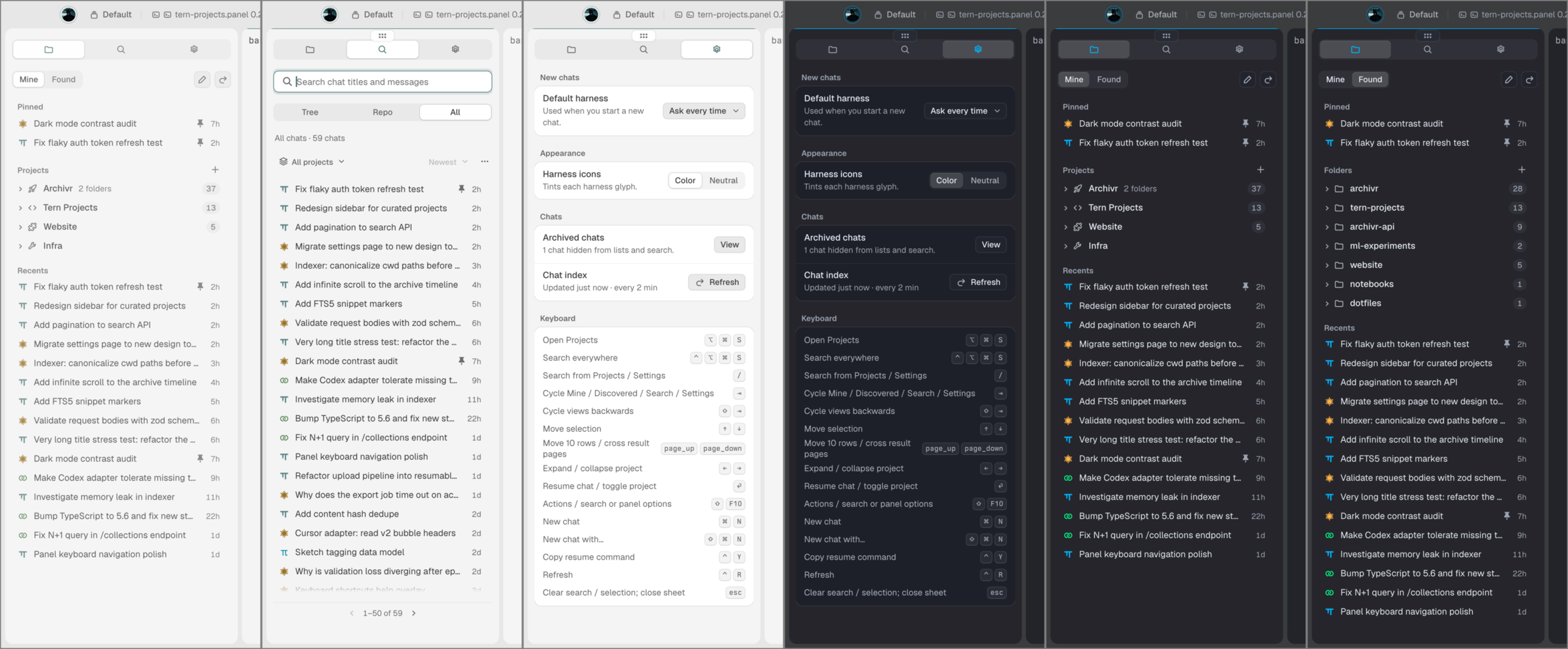
Quickstart
Run this inside Tern:
tern plugin install github.com/thegeneralist01/tern-projects
Toggle the sidebar:
- macOS:
⌘ ⌥ S - Windows / Linux:
Ctrl + Alt + S
(Or open Projects from the Tern command palette).
That's it. Tern fetches the plugin, and the background engine builds automatically on first load. No manual compile steps, no extra configuration.
To update later:
tern plugin install github.com/thegeneralist01/tern-projects --force
What it does
If you use multiple AI coding agents, your sessions are scattered across hidden SQLite databases and JSONL files. tern-projects unifies them into a fast, native sidebar:
- 📁 Curated "My Projects" & Multi-Folder Workspaces — Real projects rarely live in a single directory. Group an app, its backend API, shared libraries, and documentation into one named project with a custom icon.
- 🎯 Primary Launch Directories — Pick one folder as Primary (where fresh agent sessions spawn), while additional directories are automatically supplied via
--add-dirto harnesses that support multi-folder workspaces (OMP, Claude Code, Codex). - 🔍 Instant Full-Text Search — FTS5-powered search across all your past sessions. Filter by Worktree, Repository, or All history with live keyword highlighting.
- 🚀 Fresh Chat Launching — Press
⌘N(Ctrl+N) to launch a new chat in your preferred CLI (omp,claude,codex,pi,opencode, orcursor). - 📌 Global Pins & Recents — Keep critical threads pinned to the top of your sidebar. Recents keeps your 15 most recent chats one click away.
- 🗄️ Local Archiving & Safe Deletion — Archive threads to hide them without losing data, or permanently delete sessions via verified native CLI calls.
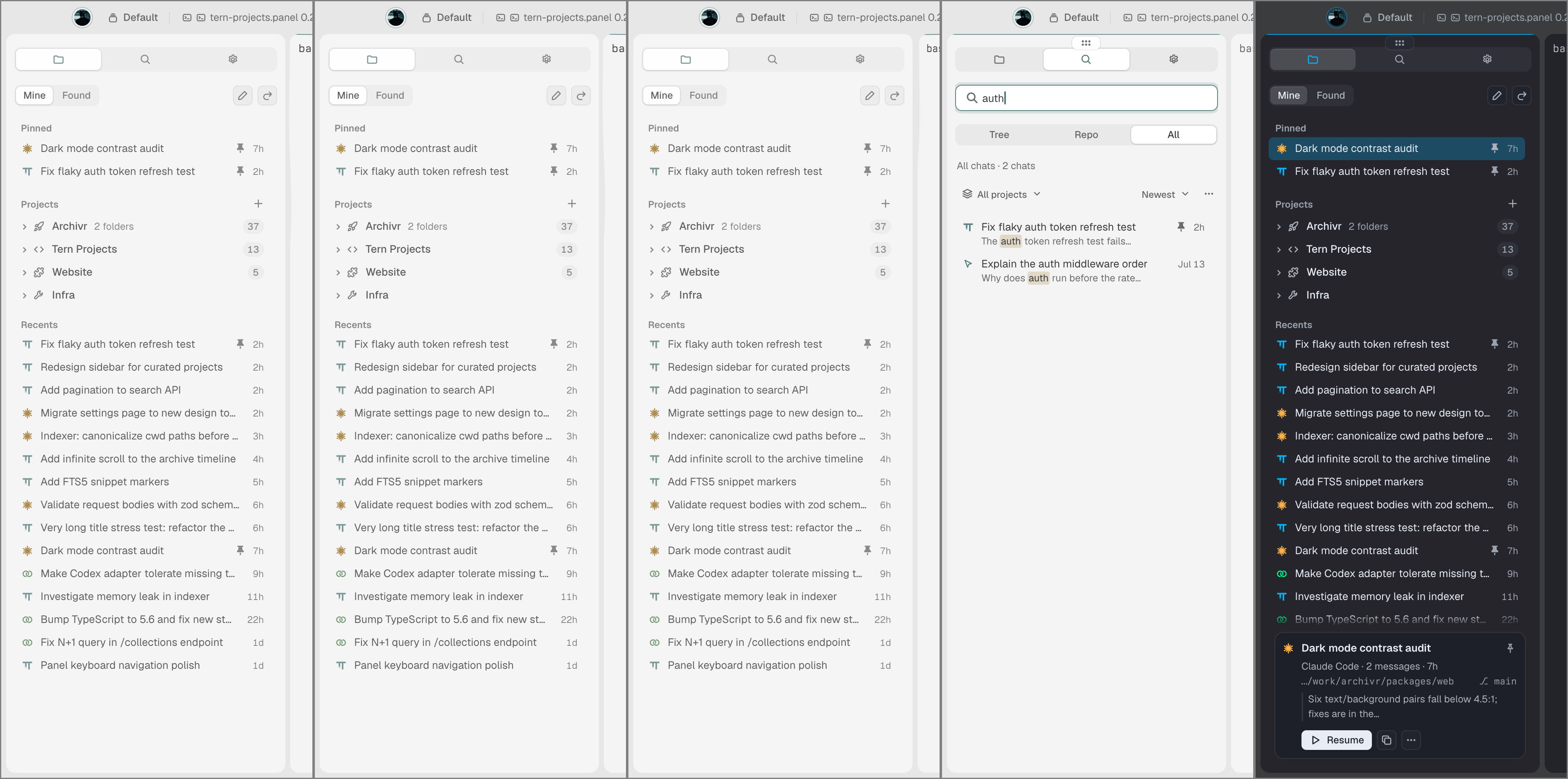
Keyboard-First Controls
Optimized for speed and one-handed navigation:
| Action | macOS | Windows / Linux |
|---|---|---|
| Toggle Projects sidebar | ⌘ ⌥ S |
Ctrl + Alt + S |
| Search everywhere | ⌃ ⌥ ⌘ S |
Ctrl + Alt + Shift + S |
| Cycle views (Projects ➔ Found ➔ Search ➔ Settings) | Tab / Shift + Tab |
Tab / Shift + Tab |
| Quick Search from Projects or Settings | / |
/ |
| New chat (in current project/folder) | ⌘ N |
Ctrl + N |
| New chat with… (choose harness) | ⇧ ⌘ N |
Shift + Ctrl + N |
| Resume chat | Enter |
Enter |
| Fold / unfold project | ← / → |
← / → |
| Context menu / Actions | Shift + F10 |
Shift + F10 |
| Copy resume command | ⌃ Y |
Ctrl + Y |
| Dismiss / Clear search / Close modal | Esc |
Esc |
Inside any text field, standard terminal editing shortcuts just work (⌘A/Ctrl+A select all, ⌘⌫/Ctrl+U delete line prefix, ⌥⌫/Ctrl+⌫ delete word).
Supported Coding Harnesses
| Agent | Fresh Launch Command | Native Resume | Multi-Folder Support | Deletion Support |
|---|---|---|---|---|
| OMP | omp --cwd <primary> [--add-dir <extra>...] |
omp --resume <path> |
✅ Multiple --add-dir |
Transcript + artifact unlinking |
| Claude Code | claude [--add-dir <extra>...] |
claude --resume <id> |
✅ Multiple --add-dir |
Exact session history filtering |
| Codex | codex --cd <primary> [--add-dir <extra>...] |
codex resume <id> |
✅ Multiple --add-dir |
codex delete <uuid> --force |
| Pi | pi |
pi --session <path> |
Single root | Exact file unlinking |
| OpenCode | opencode <primary> |
opencode --session <id> |
Single root | opencode session delete <id> |
| Cursor | cursor-agent / native CLI |
Resumes in directory | Directory | Clean database record pruning |
How It Works
- Non-destructive: Your original git worktrees, folders, and transcripts are never touched or rearranged.
- Fast SQLite FTS: Full-text indexing runs in a separate local SQLite database (
index.sqlite), refreshing in the background every two minutes. - Durable Library: Your custom projects, icons, pins, and preferences are stored in an independent
library.sqliteso reindexing the cache never wipes your setup.
Contributing
Contributions are welcome! Whether you are fixing a bug, improving Luau block performance, or adding support for a new AI coding assistant, see CONTRIBUTING.md for architecture notes and step-by-step instructions.
Changelog
See CHANGELOG.md for release notes.
License
MIT © 2026 thegeneralist01
Yorumlar (0)
Yorum birakmak icin giris yap.
Yorum birakSonuc bulunamadi