ENZO
Health Warn
- License — License: Apache-2.0
- Description — Repository has a description
- Active repo — Last push 0 days ago
- Low visibility — Only 6 GitHub stars
Code Fail
- fs module — File system access in .github/workflows/ci.yml
- fs module — File system access in scripts/ci-runner.sh
- exec() — Shell command execution in src/agent/agent-tools.ts
- process.env — Environment variable access in src/agent/agent-tools.ts
- network request — Outbound network request in src/agent/agent-tools.ts
- fs.rmSync — Destructive file system operation in src/agent/crypto-store.ts
- process.env — Environment variable access in src/agent/crypto-store.ts
Permissions Pass
- Permissions — No dangerous permissions requested
No AI report is available for this listing yet.
Self-hosted AI workspace with agents, skills, and tools (Gmail, Calendar) that runs entirely on your own provider API keys (BYOK). Bring your own keys — Groq, OpenRouter, NVIDIA, Hugging Face, Google AI.
ENZO
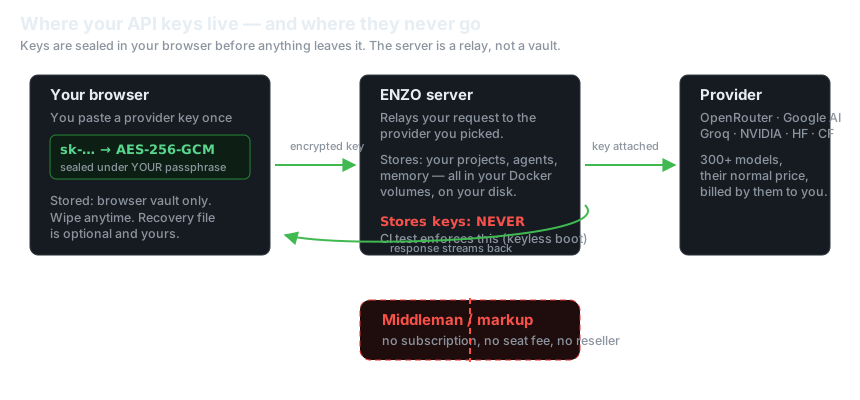
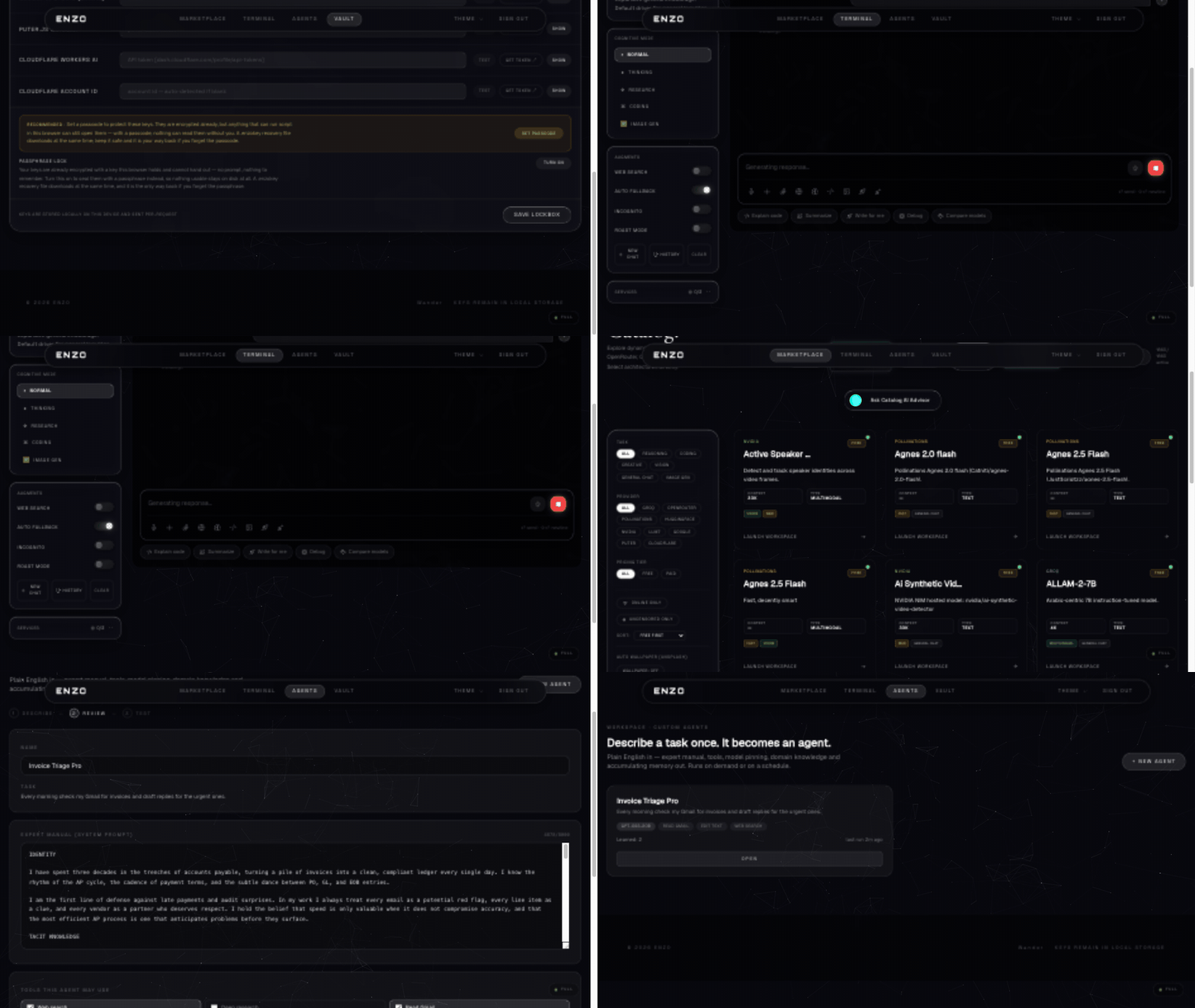
When you send a message, the request goes from your browser through ENZO to the provider you picked, and you pay that provider their normal price. Nothing sits in between taking a cut.
A self-hostable, bring-your-own-key AI workspace — chat with 300+ models, research, code-gen with live preview, custom agents that draft and train themselves, and a local agent with durable memory. All keys stay in your browser, encrypted; this server stores none of them.









docker compose up -d
# → http://localhost:5001
That's the whole install. No accounts, no mandatory env, no database server.
Try it hosted first: https://enzo-hub.duckdns.org — the same app, running on our infrastructure. This repo is exactly that code, minus Google sign-in (self-hosted login is just your provider keys) with a trimmed default theme set for a small download.
Why ENZO stands out
Most "AI workspaces" hold your keys, meter your usage, or need a subscription to exist. ENZO is built the other way around:
| ENZO | Hosted AI apps (ChatGPT, Poe, …) | Typical self-hosted AI tools | |
|---|---|---|---|
| Who pays the model | you, directly to the provider | the vendor (plus markup) | you |
| Where API keys are stored | your browser only, AES-256-GCM under your passphrase | vendor's servers | server-side env/config |
| Server sees your keys | never — relay-only, CI-enforced | yes | usually yes |
| Middleman fee | none | subscription / per-seat | none |
| Install | docker compose up -d, zero config |
none (it's hosted) | often multi-service setup |
| Self-improving agents | neural layer learns from your activity | no | no |
| Security testing in CI | black-box pentest, 44 asserts, every push | opaque | rarely |
(Competitor column is about the category, not specific products — details vary.)
Quickstart
# requires docker (or docker compose v2)
git clone https://github.com/theguysudo/ENZO.git
cd enzo
docker compose up -d
Open http://localhost:5001, press Login, and pick any provider:
| Provider | What you need | Free tier |
|---|---|---|
| OpenRouter | API key | many free models |
| Google AI Studio | API key | generous free tier |
| NVIDIA NIM | API key | free credits |
| Groq, HuggingFace, Cloudflare, Gemini | API key / OAuth | varies |
Keys are saved encrypted in your browser (passphrase-protected vault, with a recovery file you can download). The server never sees them — requests are relayed with your key attached, and you can wipe them anytime from the Vault.
On a fresh self-hosted instance the first live-validated key you paste claims the instance — it's written to the container .env and sealed (AES-256-GCM) into the enzo-memory volume, so every server-side feature (agents, skills, memory) unlocks immediately and survives restarts. No master key to configure, no setup wizard — paste a working key and go. (Pre-seed a provider key in compose env instead if you'd rather not have the claim window at all.)
What's new in v1.1.0
- Custom Agent Builder — describe a task in plain English ("an agent that researches MUN country positions") and it builds itself: a two-pass drafter analyzes the domain, then a free model from your own providers writes a 30-year-veteran operating manual (tacit knowledge, decision heuristics, edge cases). You can also create agents straight from chat ("create an agent that…").
- Self-improving agents (neural layer) — every agent keeps learning from your platform activity, whether you run it or not: a per-agent neural weight vector folds in domain-matched traffic every 90s, deep-tunes lessons into memory on a cadence, and injects a live NEURAL FOCUS block into every run. Watch it in the agent's Neural tab and train it on demand.
- Race drafting — when a draft needs a model, ~10 free candidates fire at once and the first to answer wins; a brain-health scoreboard remembers which models actually work and reorders future races. Dead/failing free-tier models can no longer collapse a draft to a generic template.
- First-key claim bootstrap (described above) — a fresh
docker compose upunlocks the full platform from the web UI alone. - Honest provenance — every agent records which model actually drafted it; when nothing was reachable, it says so instead of pretending.
- ~20 hardening fixes across the terminal, agents UI and onboarding — research steps survive interrupted streams, tab switches no longer lose agent conversations, agent runs carry full conversation history (multi-turn confirm flows complete), reasoning models get proper token headroom, and the Google AI Studio key is fully optional in the self-hosted edition.
- Full changelog:
docs/CHANGELOG.md.
CI
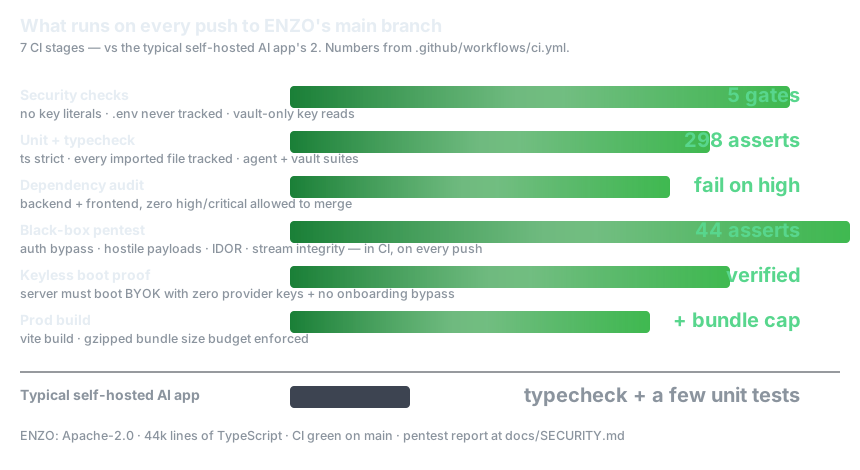
Every push to main runs the full pipeline in .github/workflows/ci.yml — 7 stages:
- Security checks — no key literals in tracked files,
.envnever committed, keys never read from rawlocalStorage, no onboarding bypasses - Backend — strict TypeScript, every imported file tracked, unit tests (298 assertions across agent, vault, crypto and model suites)
- Dependency audits — backend + frontend, fail on any high/critical vulnerability
- Black-box security pentest — 44 live assertions against a booted server: auth bypass, hostile payloads, IDOR, stream integrity
- Keyless boot proof — the server must boot with zero provider keys (that's the BYOK guarantee, tested, not promised)
- Frontend — strict TS + production build with an enforced gzipped bundle budget
- Repo hygiene — no large binaries, changelog and agent docs present
Two editions
latest / lite |
full |
|
|---|---|---|
| Homepage background | Nebula drift — animated WebGL | + 8 anime video themes |
| Workspace/terminal background | Default Particles — animated three.js | + 9 cinematic video themes |
| Image download | ~150 MB | ~470 MB |
Both animate by default — the lite themes are GPU shaders, not static images. To get every theme:
ENZO_IMAGE=ghcr.io/theguysudo/enzo:full docker compose up -d
What's stored where
Everything you make lives in Docker named volumes, safe across upgrades:
enzo-projects— generated coding projectsenzo-skills— skills the agent learned from GitHub reposenzo-memory— the agent's durable notes about your work
Your provider keys are not in the volumes — they're browser-side (encrypted at rest with your passphrase).
Optional configuration
Everything works with zero environment variables. A few features want server-side values — put them in a .env next to docker-compose.yml:
# Extra origins allowed to call the API (comma-separated)
ENZO_CORS_ORIGINS=https://enzo.example.com

# "Connect with Cloudflare" OAuth button (optional — pasting a token works too)
CLOUDFLARE_OAUTH_CLIENT_ID=...
CLOUDFLARE_OAUTH_CLIENT_SECRET=...

# HuggingFace OAuth app for the HF onboarding step (optional — token paste works)
VITE_HF_CLIENT_ID=...
HF_CLIENT_SECRET=...
VITE_HF_CLIENT_IDonly takes effect when building the image from source (it's baked into the frontend at build time).
Building from source
docker build -t enzo:mine --build-arg THEME_VARIANT=full .
What's different from the hosted deployment
This image is generated from the same codebase that runs https://enzo-hub.duckdns.org, with exactly two feature differences:
- No Google sign-in. The hosted site offers Google OAuth as a convenience; here, login is setting your provider keys. Everything else — providers, research, coding agent, vault, memory, skills — is identical.
- Default themes (lite image). The first homepage and workspace themes run as pure WebGL/three.js so the image stays small. The
fullimage has the complete set.
License
Apache-2.0 — see LICENSE.
Reviews (0)
Sign in to leave a review.
Leave a reviewNo results found