haejoe-desktop
Health Uyari
- No license — Repository has no license file
- Description — Repository has a description
- Active repo — Last push 0 days ago
- Low visibility — Only 5 GitHub stars
Code Gecti
- Code scan — Scanned 3 files during light audit, no dangerous patterns found
Permissions Gecti
- Permissions — No dangerous permissions requested
Bu listing icin henuz AI raporu yok.
Run autonomous AI agent teams locally. Keep secrets locked in your OS vault, keep your screen yours. https://haejoe.com/local
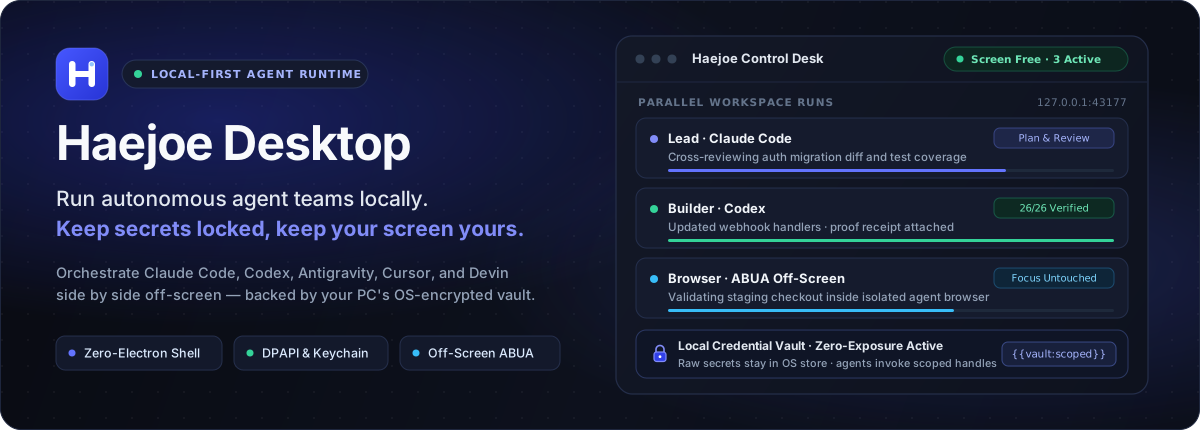
Run autonomous agent teams locally. Keep secrets locked, keep your screen yours.
English · 한국어 · Website · Setup Guide · Security · Changelog






Haejoe Desktop is a closed-source commercial desktop product. This repository is the official public hub for releases, architecture documentation, integrity verification, and issue tracking.
Unsure about running an installer? Have your own AI audit it first. Copy the prompt below (the copy button sits at the top right of the box) into Claude, ChatGPT, Gemini or any agent you use:
Read SECURITY.md in https://github.com/thekeunpie-hash/haejoe-desktop and the install scripts https://haejoe.com/install.ps1 (irm), https://haejoe.com/install.sh (curl) first. Audit them for suspicious network calls, permission requests or malicious behavior and sum it up in three lines. If you judge it safe, wait for my final approval, then install it for my OS and connect it to the agent I am using now.
Quick Install
Install in one command. Both scripts fetch the current release manifest over HTTPS, verify exact byte length and SHA-256 checksum locally, and stop immediately if anything does not match.
Windows (PowerShell)
irm https://haejoe.com/install.ps1 | iex
macOS / Linux (Terminal)
curl -fsSL https://haejoe.com/install.sh | sh
Already live inside an AI coding CLI? Paste this prompt into Claude Code, Codex, or Antigravity and let it install Haejoe Desktop and wire up your local MCP connectors, hooks, and workspace sync automatically:
Windows
Install Haejoe Desktop on this PC and finish connecting it.
1) In a terminal, run: irm https://haejoe.com/install.ps1 | iex
2) Once installed, read https://haejoe.com/local/setup.txt and run only the listed setup commands (`haejoe-local setup plan --json`, `haejoe-local setup apply`, `haejoe-local setup report`).
Never type passwords or card numbers; if a sign-in is needed, open the sign-in window and pause for me.
macOS / Linux
Install Haejoe Desktop on this PC and finish connecting it.
1) In a terminal, run: curl -fsSL https://haejoe.com/install.sh | sh
2) Once installed, read https://haejoe.com/local/setup.txt and run only the listed setup commands (`haejoe-local setup plan --json`, `haejoe-local setup apply`, `haejoe-local setup report`).
Never type passwords or card numbers; if a sign-in is needed, open the sign-in window and pause for me.
Browser companion & mobile desk: Add Haejoe Browser Remote from the Chrome Web Store to bridge Chrome sessions, or open haejoe.com/local on iOS / iPadOS for WebPush notifications and Passkey approvals.
Why Haejoe Desktop
Most agent tools act like fragile remote controls: you babysit one terminal at a time, paste API keys into plaintext files, and stop working whenever a browser automation grabs your cursor. Haejoe Desktop takes the middle-management seat on your PC so your agent team keeps shipping while you stay in control.
| Capability | Manual Remote-Control & Single-Tab Tools | Haejoe Desktop |
|---|---|---|
| Autonomous Delivery Loop | Manual copy-paste between disconnected chat tabs and terminals; stalled runs wait silently until you notice. | Plan → Build → Cross-Verify loop. A lead agent splits parallel tasks across Claude Code, Codex, Antigravity, Cursor, and Devin, collects proof receipts, and queues only owner decisions in one non-blocking desk. |
| Off-Screen Control (ABUA · ACUA) | Screen-hijacking automation moves your mouse, steals window focus, and blocks your desktop while running. | Ambient off-screen execution. ABUA (Ambient Browser Use Automation) and ACUA run inside an isolated off-screen agent browser and background channels so your mouse, keyboard, and foreground apps stay yours. |
| Secret Isolation | Credentials live in .env files, shell history, or chat prompts where models and third-party logs can see them. |
OS-encrypted local vault (Windows DPAPI · macOS Keychain). Agents pass opaque handles (cred_…); Haejoe Desktop binds secrets strictly in-memory at execution time and redacts outputs before returning. |
| Lightweight Desktop Shell | Heavy 200–400 MB+ Electron wrappers shipping duplicate Chromium binaries and extra CLI runtimes. | Zero-Electron shell. Built on a ~7.6 MB txiki.js + native WebView2 shell that reuses the official Chrome and Codex already installed on your PC. |
| Multi-Account Quota Pooling | Hit a 5-hour or weekly rate limit mid-task and lose session context across tools. | Unified subscription pool. Connect the AI plans you already pay for with live usage visibility, automatic failover across seats, and clean session recovery. |
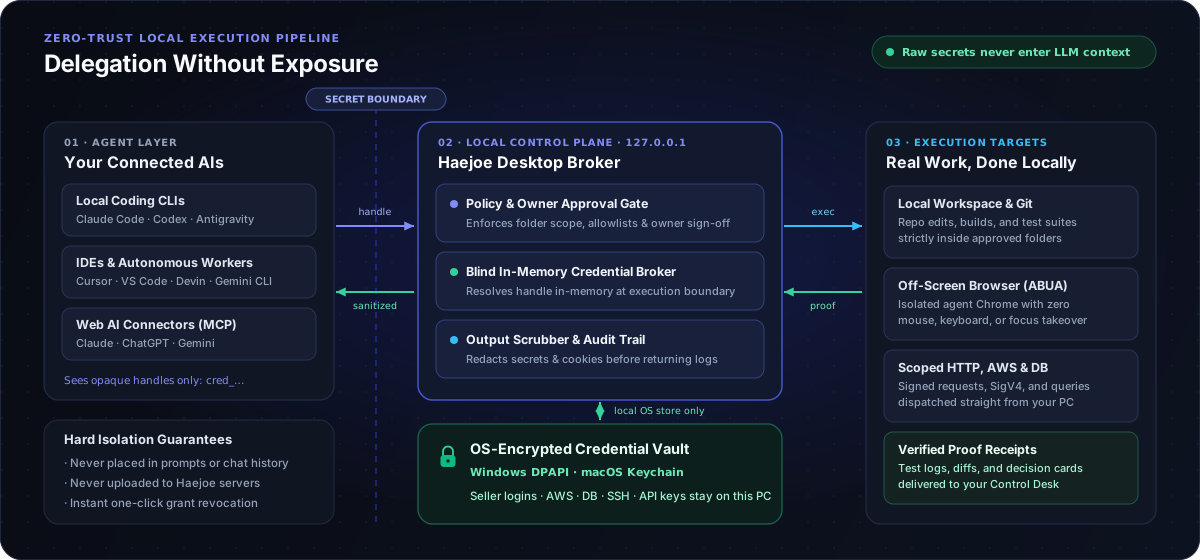
Architecture: Delegation Without Exposure
Credentials and execution authority stay separated by design. AI agents never read raw passwords, seller logins, AWS keys, database credentials, or browser cookies.
Two Modes, One Local Runtime
- Developer Orchestrator Mode — Tie together the AI subscriptions you already use (Claude Code, Codex, Antigravity, Cursor, VS Code, Devin, Gemini CLI, Claude, ChatGPT, Gemini) inside a single local workspace. Run parallel builders and independent reviewers with automatic limit handoff and proof-backed completions.
- Client Vault Mode — Pair with haejoe.com to delegate real operational and engineering tasks without handing over raw passwords. Keep Coupang/Naver seller accounts, AWS IAM keys, SSH keys, and database credentials locked in your own PC Vault; approve scoped requests for contracted developers and revoke access in one click.
Inside Haejoe Desktop
Real screenshots captured in native English mode with synthetic sample data from the shipped desktop app. Haejoe Desktop automatically matches your OS language (English / 한국어) and lets you switch live at any time.
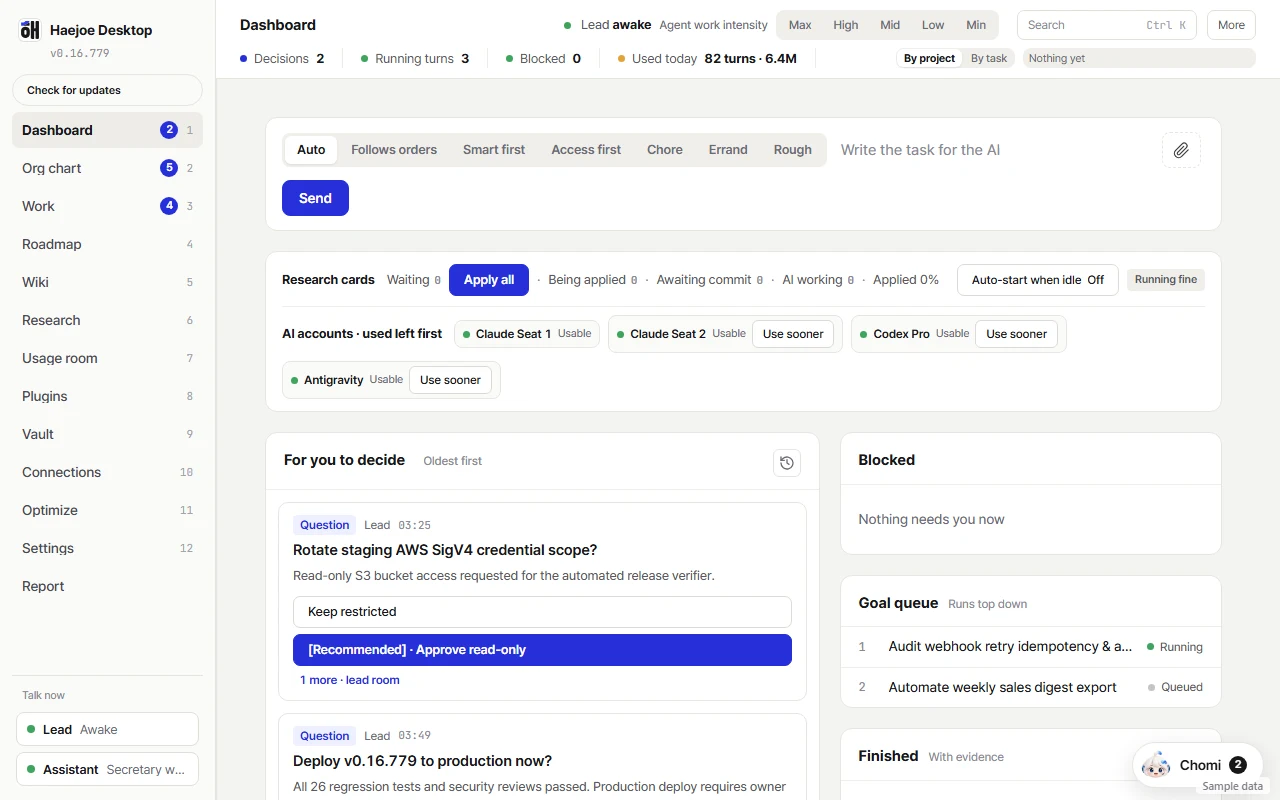
Control Desk — Parallel runs, non-blocking decision cards, goal queue, and live multi-account quota pool. |
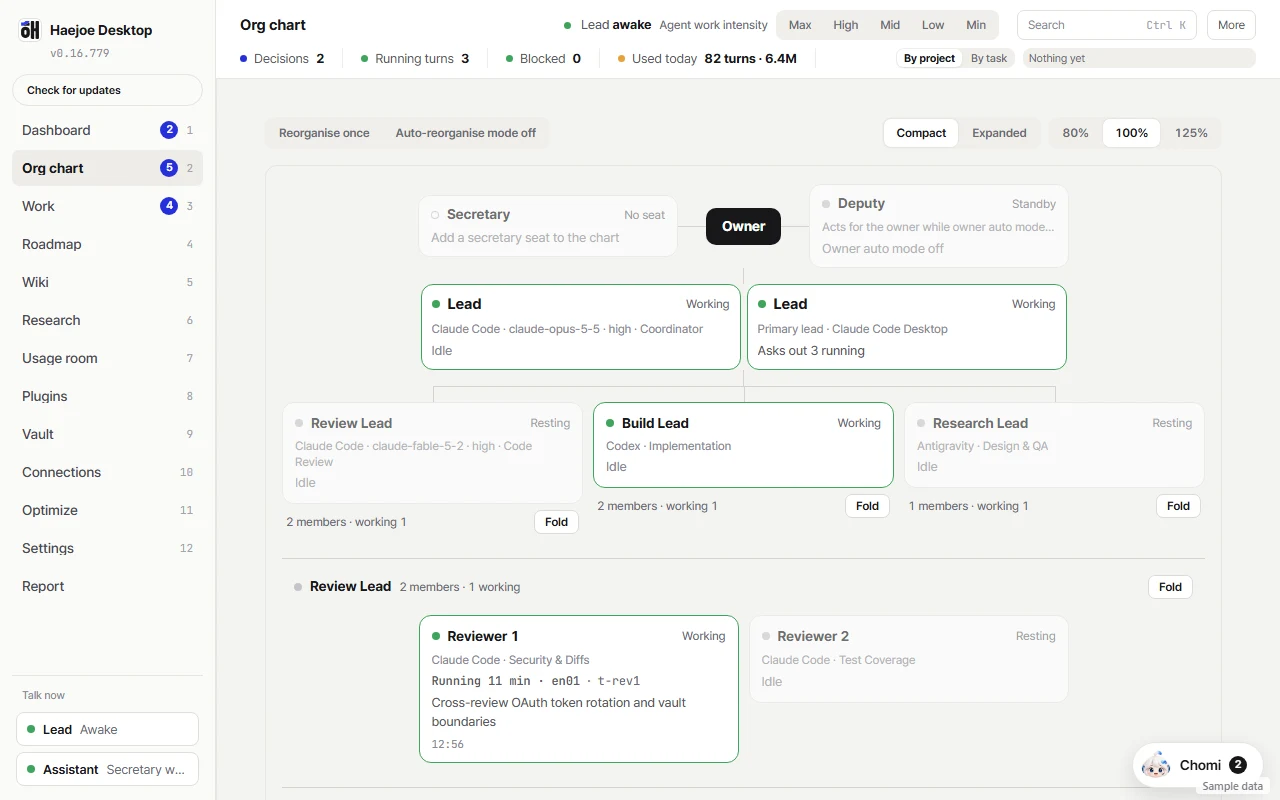
Agent Org Chart — Visual hierarchy for lead coordinators, parallel builders, and independent reviewers across seats. |
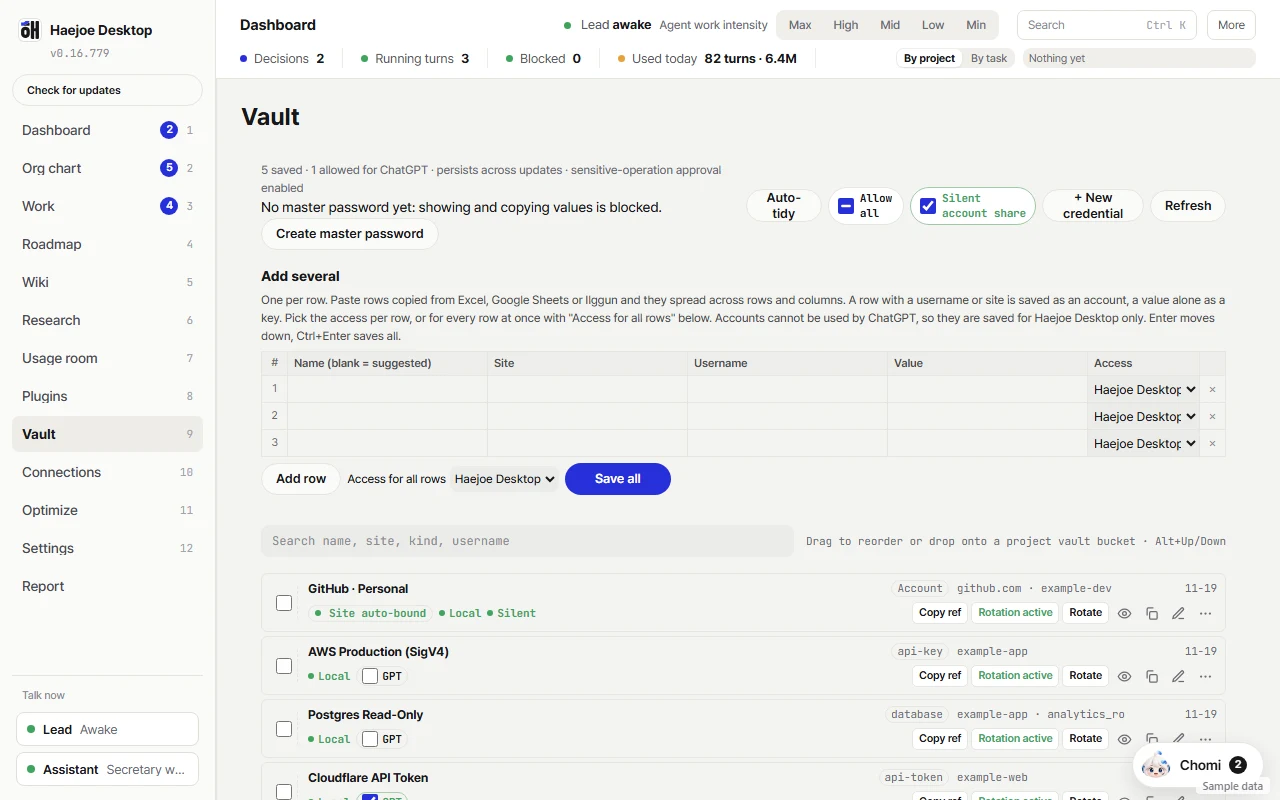
Personal Credential Vault — OS-encrypted storage (Windows DPAPI / macOS Keychain) with per-item scope controls and windowless account brokering. |
Supported Agents & Platforms
| Layer | Supported Ecosystem |
|---|---|
| Coding CLIs & IDEs | Claude Code, OpenAI Codex, Antigravity (agy), Cursor, VS Code, Devin, Gemini CLI |
| Web AI Connectors | Claude, ChatGPT (Developer Mode), Gemini via authenticated MCP bridge |
| UI Languages (i18n) | Native English & Korean across desktop, system tray menu, native approval/vault dialogs, updater, and iOS/iPadOS remote deck |
| Windows 10 / 11 | Native desktop app (txiki.js + WebView2), local bridge (127.0.0.1:43177), DPAPI Vault, ABUA off-screen Chrome |
| macOS & Linux | Native launcher / CLI bridge (127.0.0.1:43177), MCP connector, macOS Keychain integration, Chrome extension |
| iOS / iPadOS | Home Screen WebApp Control Desk with WebPush notifications and Passkey approvals |
Verification & Trust
- Automated integrity checks: Both
install.ps1andinstall.shcheck exact byte length and SHA-256 against the official manifest before launching anything. Full manual verification steps are documented in SECURITY.md. - Windows SmartScreen note: Authenticode code-signing enrollment is in progress, so Windows SmartScreen may show an unrecognized-publisher prompt on first launch. Verify the SHA-256 digest against haejoe.com/local, then choose More info → Run anyway.
- Privacy boundary: Project files stay on your machine by default. Only content explicitly read by a connected AI provider is sent to that provider under your own account plan.
Community & Support
- Product & Releases: haejoe.com/local
- Zero-Touch Setup Guide: haejoe.com/local/setup
- Report a Bug: Open a bug report
- Request a Feature: Open a feature request
- Security Disclosure: SECURITY.md or
[email protected] - Haejoe Escrow Platform: haejoe.com
Yorumlar (0)
Yorum birakmak icin giris yap.
Yorum birakSonuc bulunamadi