telegram-parser
Health Uyari
- No license — Repository has no license file
- No description — Repository has no description
- Active repo — Last push 0 days ago
- Community trust — 100 GitHub stars
Code Basarisiz
- rm -rf — Recursive force deletion command in .github/workflows/traffic-history.yml
Permissions Gecti
- Permissions — No dangerous permissions requested
Bu listing icin henuz AI raporu yok.
TG
TG is a local-first Telegram comments exporter and analytics dashboard. It exports channel posts, discussion comments, reactions, links, optional media files, and can update existing datasets incrementally.
Current version: 2.3.1.
Features
- Export Telegram channel posts and comments with Telethon.
- Use one or more channels in
CHANNEL, separated by commas. - Save exports as
JSON,CSV,Parquet, orPostgreSQL. - True incremental export: scan new posts and revisit older exported posts to refresh comments, reactions, and counters.
- Optional media download into
data/content/<dataset_name>/. - Optional anonymization of
user_id,username,first_name, andlast_name. - Web UI on port
9595with dashboard, post view, comment tree, filters, user profiles, export launch screen, Scheduler mode, and Watch mode. - Open local JSON exports from
data/rawdirectly in the dashboard, sorted by date or channel. - LLM analyzer for exported JSON files with Russian, English, and Chinese prompt files.
- Period comparison for comments, users, and reactions with
tg compare. - MCP server for local automation through AI clients.
- Docker Compose setup for local use.
Screenshots
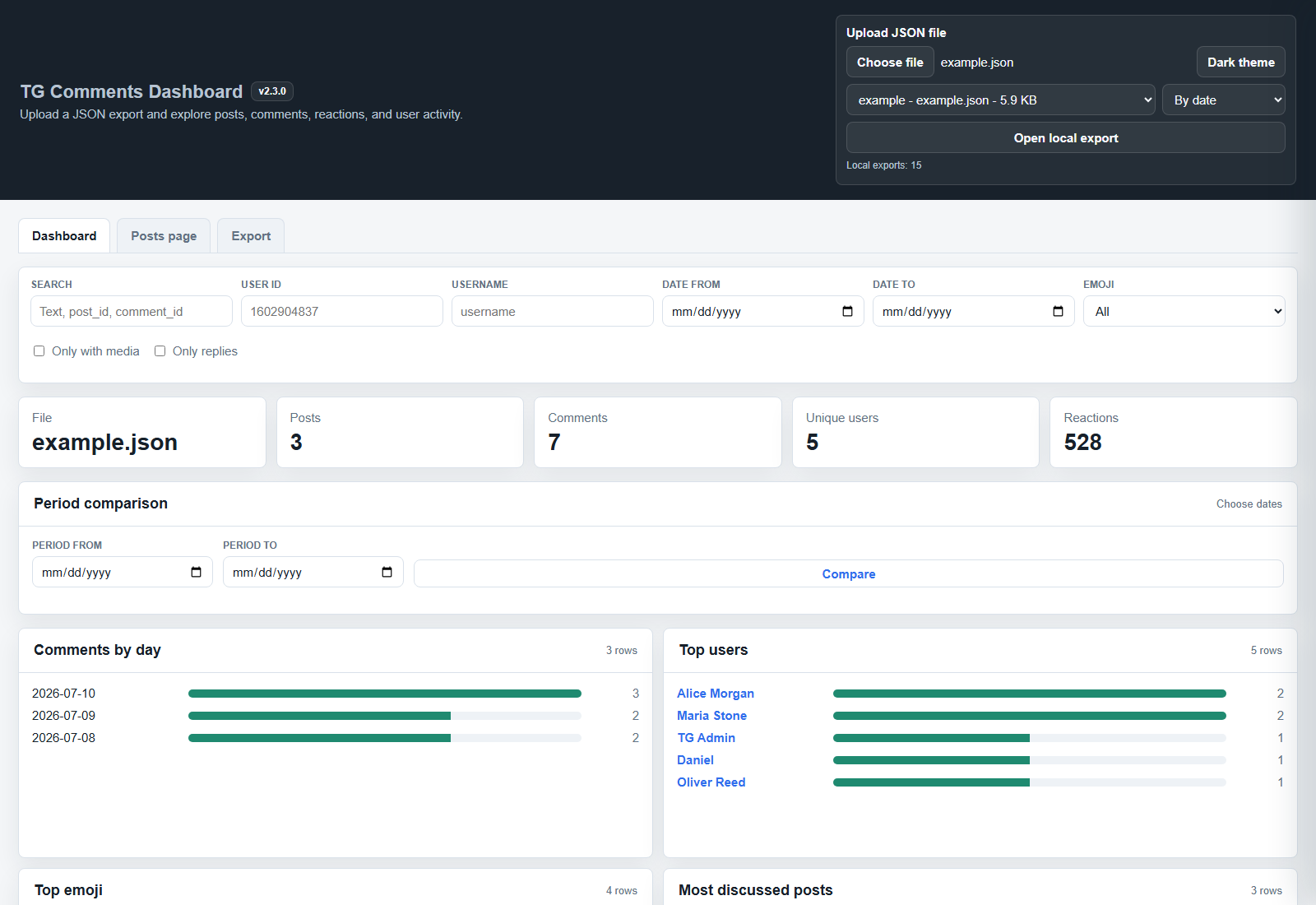
Dashboard
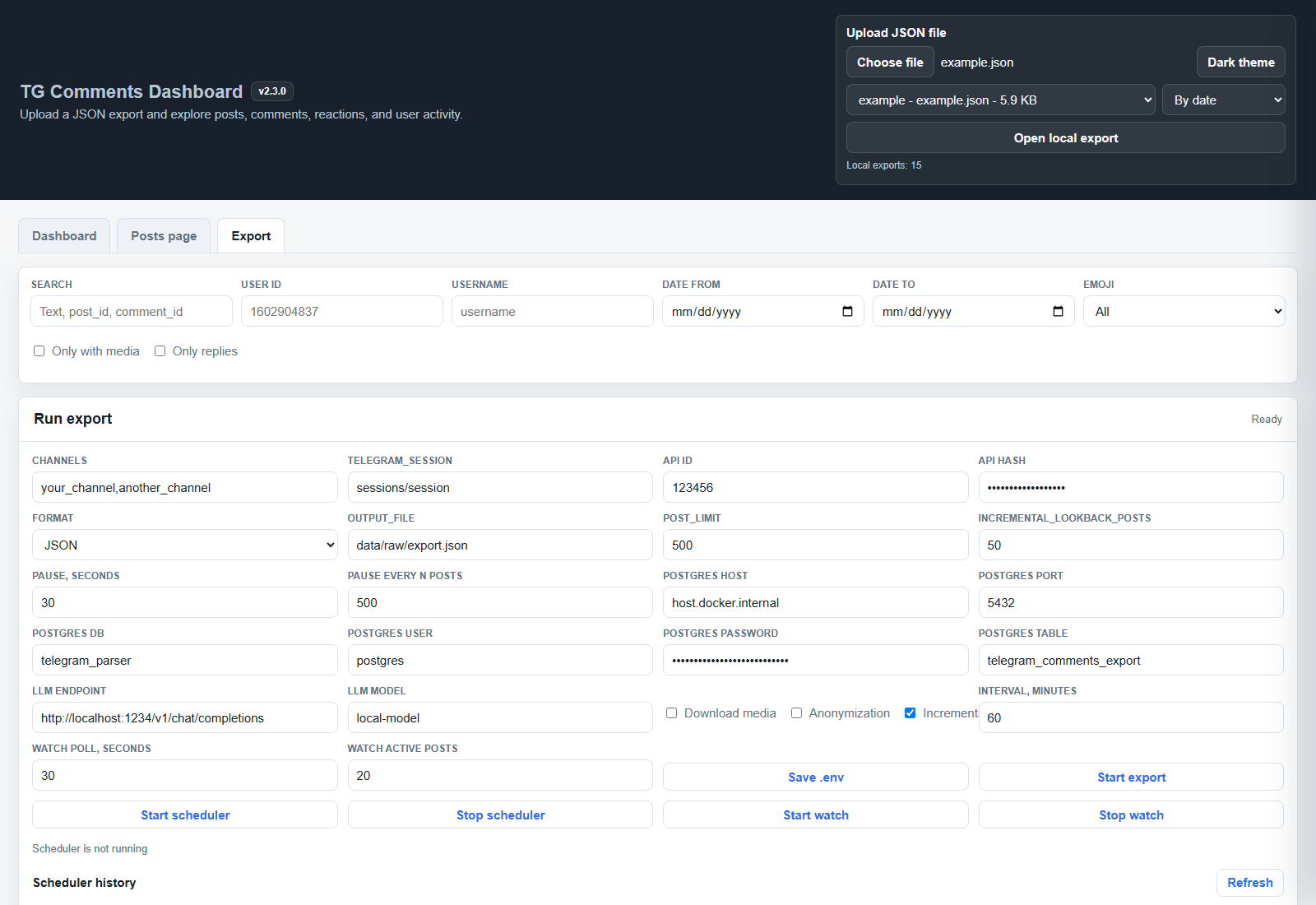
Export Screen
Demo JSON
Use examples/example.json to test the dashboard without connecting to Telegram.
Project Structure
.
├── main.py                    # Unified CLI: export, analyze, dashboard, config-check, mcp
├── export_comments.py         # Compatibility entrypoint for exporters.telegram_exporter
├── web/
│   ├── comments_dashboard.html # Web dashboard markup
│   ├── css/                    # Dashboard styles
│   └── js/                     # Dashboard scripts
├── web_server.py              # Compatibility entrypoint for api.web_server
├── api/                       # Local web server and dashboard API
├── telegram/                  # Telegram message serialization helpers
├── exporters/                 # Telegram export orchestration and output formats
├── storage/                   # JSON file loading and atomic writes
├── analytics/                 # Export summaries and dataset analytics helpers
├── llm/                       # LLM analysis implementation
├── mcp_server.py              # MCP server for local exports and analysis
├── llm_analyzer.py            # Compatibility entrypoint for llm.analyzer
├── config.py                  # .env/config loader
├── docker-compose.yml         # Docker Compose services
├── anonymizer                 # Aliases for anonymized users
├── prompts/                   # LLM prompt files
├── data/
│   ├── raw/                   # Exported datasets
│   ├── content/               # Downloaded media
│   ├── analysis/              # LLM analysis output
│   └── state/                 # Incremental export state
└── examples/
    ├── example.json
    └── demo_export.json
Requirements
- Docker Desktop, recommended.
- Telegram API credentials:
API_IDandAPI_HASH. - A Telegram account session for Telethon.
- Optional: PostgreSQL if you use
postgresqlexport. - Optional: local or remote LLM endpoint if you use
analyze.
Get Telegram API credentials at https://my.telegram.org/apps.
Configuration
Docker creates .env from .env.example on the first start, so new users can begin with one command:
docker compose up --build
Then open http://localhost:9595 and fill in Telegram settings in the Export tab.
If you prefer to edit the file before starting, create .env manually:
Copy-Item .env.example .env
Edit .env:
API_ID=123456
API_HASH=your_api_hash_here
CHANNEL=your_channel,another_channel
TELEGRAM_SESSION=sessions/session
OUTPUT_FILE=data/raw/export.json
POST_LIMIT=500
INCREMENTAL_LOOKBACK_POSTS=50
POSTS_PAUSE_SECONDS=30
POSTS_PAUSE_AFTER_POSTS=500

POSTGRES_HOST=host.docker.internal
POSTGRES_PORT=5432
POSTGRES_DB=telegram_parser
POSTGRES_USER=postgres
POSTGRES_PASSWORD=your_postgres_password_here
POSTGRES_TABLE=telegram_comments_export

LLM_ENDPOINT=http://localhost:1234/v1/chat/completions
LLM_MODEL=local-model
Important fields:
API_ID,API_HASH: Telegram API app credentials.CHANNEL: one or more channel usernames or links separated by commas, for exampledurov,telegram.TELEGRAM_SESSION: Telethon session file path, usually insidesessions/.POST_LIMIT: how many new/latest posts to scan per export run.INCREMENTAL_LOOKBACK_POSTS: in incremental mode, how many already exported older posts to revisit at or below the savedlast_post_id.POSTS_PAUSE_SECONDS: pause duration in seconds.POSTS_PAUSE_AFTER_POSTS: pause after every N processed posts.OUTPUT_FILE: base output directory is taken from this path, usuallydata/raw/export.json.LLM_ENDPOINT,LLM_MODEL: used byanalyze.
Configuration is validated per command: export requires Telegram settings, analyze requires LLM settings, and PostgreSQL settings are loaded only for postgresql export.
Docker Usage
Start the web UI with one command:
docker compose up --build
Open:
http://localhost:9595
Run CLI commands:
docker compose run --rm cli --help
docker compose run --rm cli config-check
CLI Commands
The project uses one CLI entrypoint:
tg <command> [options]
In Docker:
docker compose run --rm cli <command> [options]
Export JSON
docker compose run --rm cli export json
Output example:
data/raw/<channel>_20260710_120000.json
Incremental Export
docker compose run --rm cli export json --incremental
Incremental mode writes and updates:
data/raw/<channel>_dataset.json
data/state/<channel>_state.json
It scans posts newer than the saved last_post_id plus INCREMENTAL_LOOKBACK_POSTS already exported posts at or below that last_post_id. This refreshes counters, reactions, and comments on older posts that changed after a previous run. It merges posts by post_id, merges comments by comment_id, and keeps already downloaded media files.
Watch Mode
docker compose run --rm cli watch --poll-interval 30 --refresh-active-posts 20
Watch mode is a long-running process that keeps the Telethon session open, watches selected channels for new posts, tracks discussion activity for recent posts, and updates changed posts in data/raw/<channel>_dataset.json. The poll interval refreshes recent posts for counters, reactions, nested replies, and missed events.
Export With Media
docker compose run --rm cli export json --incremental --download-media
Media is saved to:
data/content/<channel>_dataset/
Other Export Formats
docker compose run --rm cli export csv
docker compose run --rm cli export parquet
docker compose run --rm cli export postgresql
PostgreSQL settings are read from .env.
Anonymized Export
docker compose run --rm cli export json --incremental --anonymize
Aliases are loaded from anonymizer. Use --anonymizer-file <path> to pass a custom file.
Analyze Exported JSON With LLM
docker compose run --rm cli analyze durov_dataset.json --limit 10
Use a built-in prompt language:
docker compose run --rm cli analyze durov_dataset.json --limit 10 --language en
docker compose run --rm cli analyze durov_dataset.json --limit 10 --language zh
Built-in prompt files:
prompts/llm_ru.jsonprompts/llm_en.jsonprompts/llm_zh.json
Pass a custom prompt file:
docker compose run --rm cli analyze durov_dataset.json --prompt-file prompts/llm_en.json
Compare Periods
Compare comments, unique users, and comment reactions for a selected period against the immediately previous period of the same length:
docker compose run --rm cli compare --from 2026-07-01 --to 2026-08-01 --file durov_dataset.json
--to is exclusive. If --file is omitted, the newest JSON export from data/raw is used.
Prompt files are JSON objects with system and user_template fields. user_template must include {data}.
Analysis files are saved to:
data/analysis/analysis_<source_file>.json
MCP Server
Run a Model Context Protocol server over stdio:
docker compose run --rm -i cli mcp
Local Python:
python main.py mcp
The MCP server exposes tools for local automation:
get_config_safe: read non-secret config values with secrets masked.list_exports,get_export_summary,get_post,search_comments: inspect JSON exports indata/raw.list_analysis_files,read_analysis,run_analysis: work with LLM analysis files.start_export,get_export_process_status: start and monitor a Telegram export.start_exportrequiresconfirm=true.
Run Dashboard
docker compose up
The dashboard can:
- upload a JSON file;
- open a local JSON export from
data/raw; - show file name, posts, comments, unique users, reactions;
- draw charts by day, top users, top emoji, discussed posts;
- open a post and show comments as a tree;
- filter by user, date range, emoji, media, and replies;
- open user details;
- edit
.envsettings from the Export tab; - start exports from the browser and show progress.
- enable Scheduler mode to update selected channels automatically every N minutes.
- enable Watch mode to keep watching channels and update changed JSON dataset posts continuously.
- show the app version from
version.pythrough/api/version.
Dashboard API endpoints:
GET /api/version: return the current app version.GET /api/exports?sort=date|channel: list JSON exports fromdata/raw.GET /api/export/<file>/summary: return counts and metadata for one JSON export.GET /api/export/<file>/compare?from=YYYY-MM-DD&to=YYYY-MM-DD: compare comments, users, and reactions between periods.GET /api/scheduler/status: return current scheduler state.GET /api/scheduler/history?limit=50: list persisted scheduled run records.GET /api/scheduler/history/<run_id>: return one scheduled run detail card.POST /api/scheduler/start: start scheduled exports withchannel,interval_minutes, format, and export flags.POST /api/scheduler/stop: stop scheduled exports.GET /api/watch/status: return current Watch mode state.POST /api/watch/start: start Watch mode withchannel,poll_interval,refresh_active_posts, and export flags.POST /api/watch/stop: stop Watch mode.
Scheduler mode starts the first export immediately, then repeats every configured interval. If an export is still running when the next interval arrives, that run is skipped.
Scheduler history is stored as JSON files in data/scheduler/. Each scheduled run has its own record with status QUEUED, RUNNING, SUCCESS, PARTIAL, FAILED, SKIPPED, or CANCELLED, plus channel results, structured error information, and recent log lines.
Watch mode is separate from Scheduler mode. It stays running and updates changed posts as channel or discussion activity arrives, with a periodic refresh for counters and missed comment updates.
Local Python Usage
If you do not use Docker, install dependencies:
pip install -r requirements.txt
Run commands:
python main.py --help
python main.py config-check
python main.py export json --incremental
python main.py watch --poll-interval 30 --refresh-active-posts 20
python main.py compare --from 2026-07-01 --to 2026-08-01 --file durov_dataset.json
python main.py dashboard
python main.py mcp
Data Format
The main JSON format is a list of posts:
[
  {
    "post_id": 101,
    "post_date": "2026-07-10 10:00:00+00:00",
    "post_text": "Post text",
    "post_views": 1200,
    "post_forwards": 10,
    "post_link": "https://t.me/channel/101",
    "post_media": null,
    "post_reactions": [{"emoji": "fire", "count": 12}],
    "comments": [
      {
        "comment_id": 501,
        "comment_date": "2026-07-10 10:05:00+00:00",
        "comment_text": "Comment text",
        "comment_link": "https://t.me/channel/501",
        "comment_media": null,
        "reply_to_msg_id": null,
        "comment_reactions": [],
        "user": {
          "user_id": 1001,
          "username": "alice",
          "first_name": "Alice",
          "last_name": null,
          "bot": false,
          "premium": false
        }
      }
    ]
  }
]
When an exporter step fails but partial data can still be saved, posts may include optional post_media_error or export_errors fields, and comments may include comment_media_error.
See examples/example.json for a complete demo file.
Notes About Telegram Limits
Telegram does not publish one fixed universal limit for every Telethon workflow. The exporter includes pauses and handles FloodWaitError by saving already collected data before waiting.
Recommended practice:
- keep
POST_LIMITreasonable; - use incremental export instead of full re-export;
- keep pauses enabled;
- avoid frequent repeated exports of the same large channel;
- do not run many sessions in parallel from the same account.
Troubleshooting
Docker Is Not Running
Start Docker Desktop and run again:
docker compose up --build
Missing API_ID Or API_HASH
Check .env:
docker compose run --rm cli config-check
First Telethon Login
On first run Telethon may ask for phone/login code. The session file is configured with TELEGRAM_SESSION and is usually stored in:
sessions/
The folder is mounted into Docker, so the session can be reused between runs.
Parquet Export Fails
Make sure Docker image was rebuilt after dependencies changed:
docker compose build --no-cache
PostgreSQL Export Fails
Check:
POSTGRES_HOSTPOSTGRES_PORTPOSTGRES_DBPOSTGRES_USERPOSTGRES_PASSWORD- network access from Docker to PostgreSQL
Git Ignore Policy
Runtime data is intentionally ignored:
.envsessions/data/raw/*data/content/*data/analysis/*data/state/*
Keep secrets, sessions, exported private data, and downloaded media out of Git.
Yorumlar (0)
Yorum birakmak icin giris yap.
Yorum birakSonuc bulunamadi