somora_agent
Health Warn
- License — License: MIT
- Description — Repository has a description
- Active repo — Last push 0 days ago
- Low visibility — Only 8 GitHub stars
Code Fail
- process.env — Environment variable access in bin/somora.mjs
- network request — Outbound network request in src/cli/resolvers/clawhub.ts
- process.env — Environment variable access in src/cli/skill.ts
- network request — Outbound network request in src/cli/skill.ts
- spawnSync — Synchronous process spawning in src/cli/somora.ts
- process.env — Environment variable access in src/cli/somora.ts
- network request — Outbound network request in src/cli/tui/app.tsx
Permissions Pass
- Permissions — No dangerous permissions requested
No AI report is available for this listing yet.
Local-first gateway for personal AI agents with persistent memory across multiple LLM providers
somora 🐨
A local-first runtime for personal AI agents — multiple personas with
persistent memory, a shared long-term wiki, and the ability to switch
between Claude, ChatGPT, and any OpenAI-compatible LLM mid-conversation.



What is somora?
A small server you run on your machine that hosts one or more AI agents,
each with its own personality, memory, and configuration. You chat with them
via terminal, browser, or installable mobile PWA; they remember things across
sessions; they can use the same tool surface (memory, files, web, exec, tmux,
attachments) regardless of which LLM you point them at.
What makes it different:
- Local-first. All data — config, memory, sessions, the wiki, attachments
— lives in~/.somora/on your machine. Nothing leaves your laptop unless
you point an engine at a cloud provider. - Multi-agent. Configure as many personas as you want — each with a
distinct character, separate memory inbox, and own model preferences.
All agents share one long-term wiki of consolidated knowledge. - Multi-engine. One conversation can flip between Claude (via your
Claude subscription), ChatGPT (via your ChatGPT subscription), or any
local model exposing an OpenAI-compatible endpoint (Ollama, LM Studio,
vLLM, oMLX, OpenRouter). Conversation history carries over. - Memory that compounds. Three-phase background consolidation: agents
notice new facts during conversation, accumulate them privately, then
promote stable knowledge to a shared Obsidian-vault wiki. The wiki is
cleaned up periodically by a separate worker. - Tools, not magic. Every capability — recall, file edits, shell
commands, web fetches, sub-agent spawning, multimodal attachments — is a
typed tool the agent can call. The same registry feeds all three engines
via either an in-process loop or per-turn MCP child processes. - Projects (optional). Bind a chat session to a real-world thing —
a renovation, a research thread, a piece of code — via a curated
manifest of pointers (Obsidian notes, local source dirs, GDrive URLs,
remote-machine paths). When you/projekt heimkino, the manifest
lands in the agent's prompt so it knows the canonical list of files
that belong to this conversation. Opt-in, off by default — flipprojects.enabled: trueinconfig.yamlto use.
See docs/projects.md. - Sentinel (proactive triggers). Install time-based triggers
(at/every/daily/weekly/cron) that wake an agent on
a schedule. The agent does work into its own chat session — daily
mail digests, scheduled GitHub-check routines, reminders that
surface as agent messages, not toasts. Visible and manageable in the
web-UI Sentinel tab. See docs/sentinel.md.
Architecture at a glance
   you / your terminal / browser
         │
   CLI / TUI / Web / Mobile
         │
   HTTP + SSE / WebSocket
         │
         ▼
  somora-server
   │
   ├─ Engine adapters
   │    ├─ claude-cli         (Claude subscription)
   │    ├─ codex-cli          (ChatGPT subscription)
   │    └─ openai-compatible  (any /v1/chat/completions)
   │
   ├─ Memory layer (per-agent)
   │    ~/.somora/agents/<name>/memory/*.md
   │    indexed: SQLite + sqlite-vec + FTS5 (hybrid retrieval)
   │
   ├─ Wiki layer (shared, optional)
   │    <obsidian-vault>/<wiki-subfolder>/
   │    personen/ projekte/ wissen/ orte/ …
   │    index.md auto-regenerated, monthly logs
   │
   ├─ Attachments (content-addressed)
   │    ~/.somora/attachments/<sha256>.<ext>
   │
   ├─ Tool registry
   │    memory_*, dream_*, file_*, exec, tmux, web_*,
   │    spawn_subagent, somora_docs_*, skill, resource_*,
   │    sentinel, time_now, analyze_file
   │
   ├─ Sentinel (proactive triggers)
   │    ~/.somora/sentinel/triggers.json
   │    time-based fires → agent-turn dispatch with evidence
   │
   └─ Three-phase dream system
        REM   (per-agent, session → memory inbox)
        Deep  (platform, memory inbox → shared wiki)
        Lucid (platform, wiki cleanup)
Requirements
Hard:
- Node ≥20 — uses native
node:sqliteplusbetter-sqlite3. - tmux — required by the
tmuxtool (long-lived terminal sessions for
agents) and by the web tmux app. Install via your package manager. - At least one LLM backend. Pick what you have:
- Claude Code binary (Claude subscription) — for
claude-cliengine. - Codex CLI binary (ChatGPT subscription) — for
codex-cliengine. - Any OpenAI-compatible HTTP server — Ollama, LM Studio, vLLM, oMLX, OpenRouter, etc.
- Claude Code binary (Claude subscription) — for
Optional:
- Obsidian vault — for the wiki + read-only vault recall. Without it
somora still works (memory inbox + per-agent storage), you just lose the
shared long-term layer. - Tailscale — strongly recommended for the web client. HTTPS via
tailscale certlifts the browser's 6-connection limit (HTTP/2 multiplex)
and unlocks secure-context-only browser APIs (microphone, screen-share,
clipboard, push). Without it the web client is single-window-only. - ripgrep (
rg) — required forfile_search. Install via your
package manager.
See docs/setup.md for the full install walkthrough,
including step-by-step prereq setup.
Quickstart
somora is currently installed from source — there is no npm
registry release yet. Thenpm pack+ tarball install below is the
supported install path; updates come viasomora update.
# 1. Install prereqs (see docs/setup.md for details per OS)
sudo apt install tmux ripgrep         # Debian/Ubuntu
# brew install tmux ripgrep           # macOS

# 2. Install at least one LLM backend (pick one or more):
npm install -g @anthropic-ai/claude-code  &&  claude login
npm install -g @openai/codex              &&  codex login
# (for local models: install Ollama / LM Studio / oMLX separately)

# 3. Install somora from source
#    `npm pack` triggers the prepack hook → builds web/dist, then emits
#    a tarball. Installing from the tarball is the reliable path; bare
#    `npm install -g .` falls into npm's link semantics on some setups
#    and would leave a broken install.
git clone https://github.com/thenaxon/somora_agent.git somora
cd somora
npm install -g "$(npm pack | tail -1)"

# 4. First-run setup + start
somora init                    # creates ~/.somora/ and registers the systemd unit
somora server start            # starts the unit (auto-starts on login)
somora tui                     # default agent is created on first run
First run creates ~/.somora/config.yaml and a default agent. For
the web client + provider configuration + Tailscale HTTPS setup, see
docs/setup.md — full step-by-step.
Want to hack on somora itself? See the contributor section in docs/setup.md.
Status
Active development. Open to early testers. Core surface (memory + wiki +
dream-system + web + tmux + mobile) is feature-complete and used daily:
| Capability | claude-cli | codex-cli | openai-compatible |
|---|---|---|---|
| Chat (streaming) | ✓ | ✓ | ✓ |
| Memory auto-injection | ✓ | ✓ | ✓ |
| Memory tools (read + write) | ✓ via MCP | ✓ via MCP | ✓ in-process |
| Wiki layer (shared) | ✓ | ✓ | ✓ |
| Three-phase dreams | ✓ | ✓ | ✓ |
| Tool surface (40+ tools) | ✓ via MCP | ✓ via MCP | ✓ in-process |
| Skills (markdown how-tos) | ✓ | ✓ | ✓ |
| Multimodal attachments (image, PDF) | ✓ native | ✓ image native, PDF rasterized | ✓ image; PDF native or rasterized per provider |
| Sub-agent spawning | ✓ | ✓ | ✓ |
| SSH-resource exec | ✓ | ✓ | ✓ |
Clients
Four first-party clients, all hitting the same local server:
| Client | How to launch | Use |
|---|---|---|
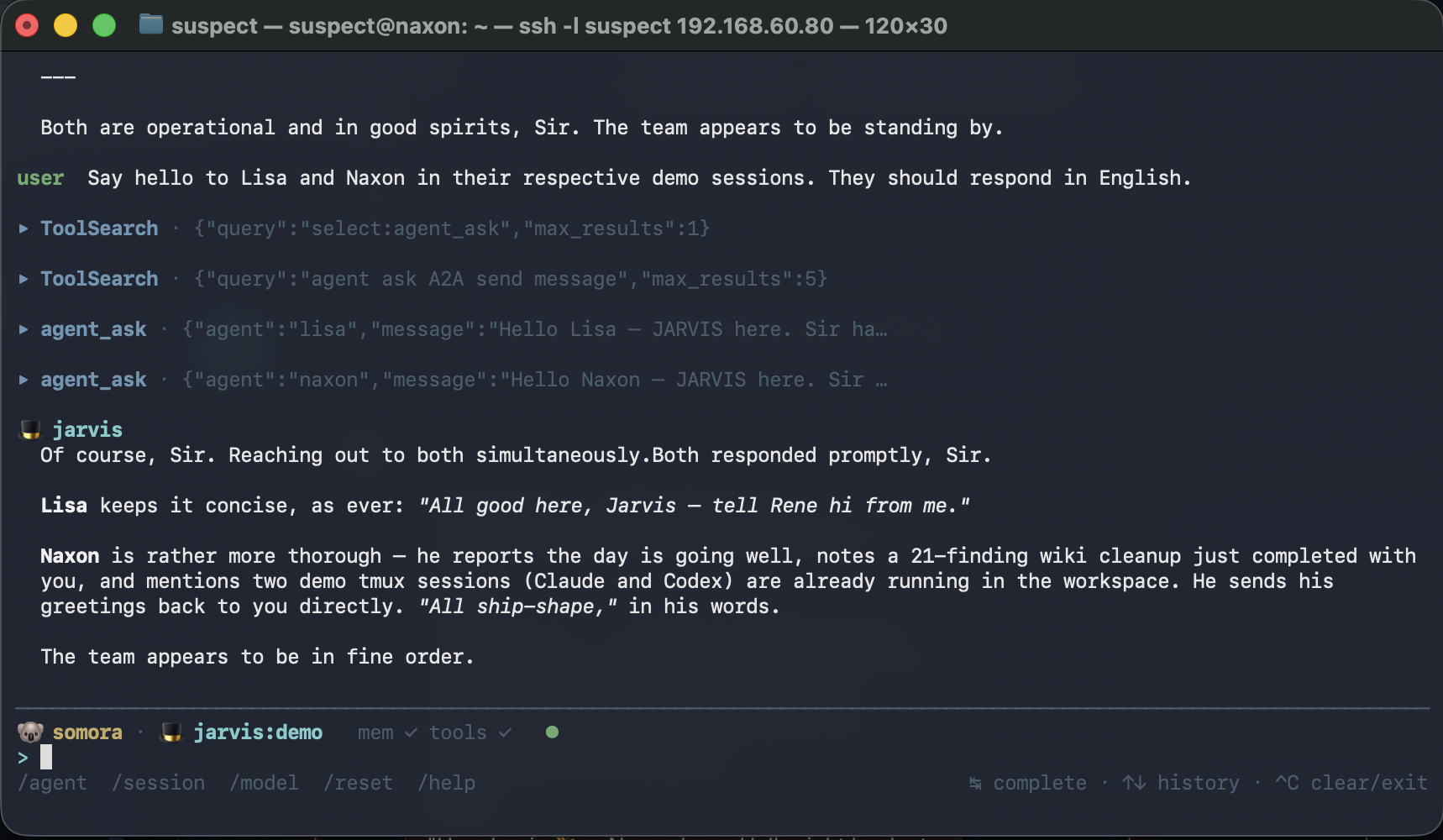
| TUI | somora tui |
Terminal multi-agent chat with full keyboard control. |
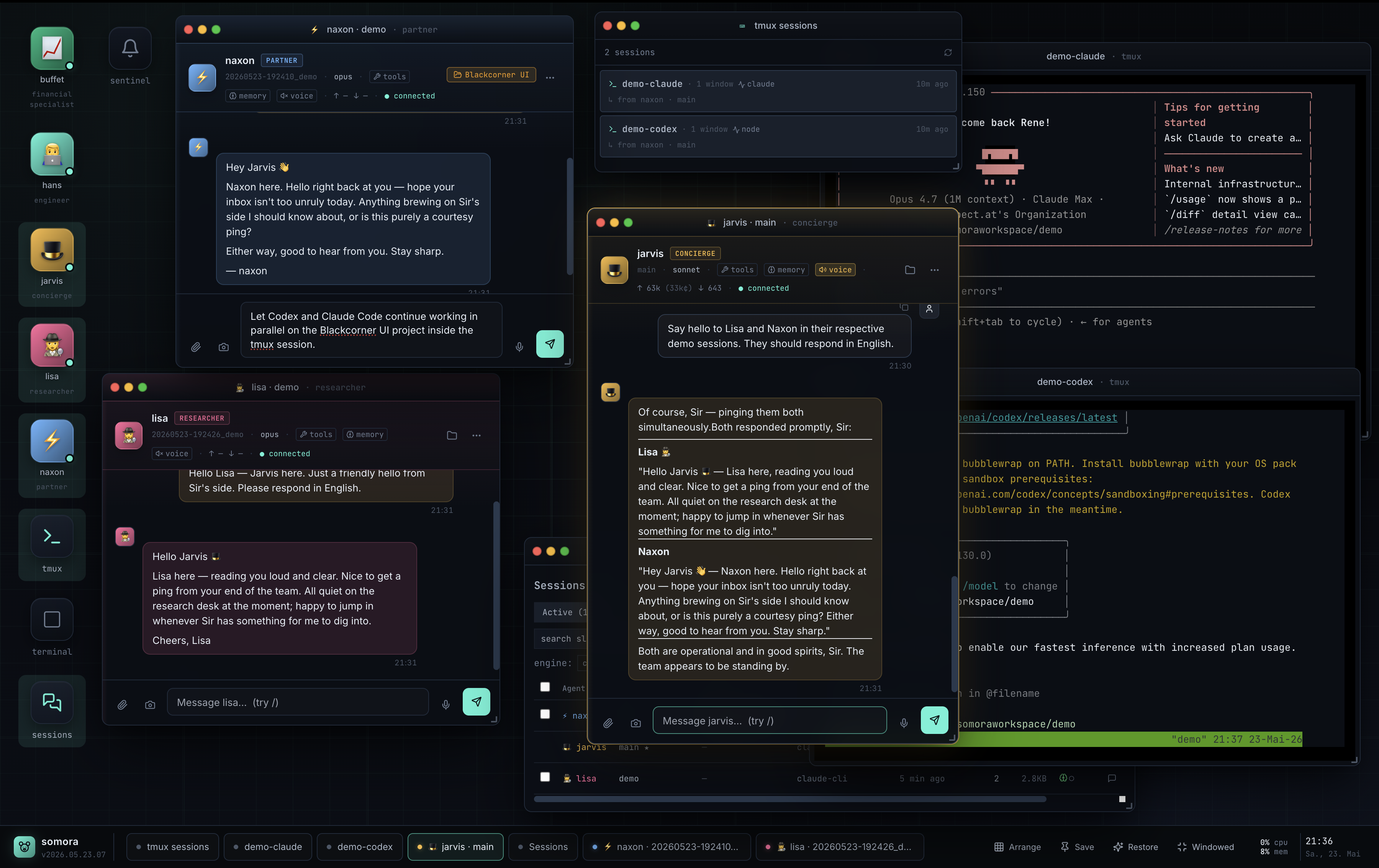
| Web | https://<host>.<tailnet>.ts.net:18737/web/ |
Browser desktop with multi-window chat per agent, drag&drop attachments, screenshot capture, tmux app, plain-shell terminal, a Sessions browser for cross-agent housekeeping (archive, REM-coverage view, click-to-chat), per-bubble copy + pin-to-floating-note for working memory, optional voice in (STT) + spoken replies (TTS) per-session toggle. HTTPS required for >6 connections (HTTP/2 multiplex) and for mic/screenshare/clipboard browser APIs — easiest path is tailscale cert <fqdn>. LAN-trust, no auth. See docs/web.md. |
| Mobile (PWA) | https://<host>.<tailnet>.ts.net:18737/mobile/ then "Add to Home Screen" |
Installable phone app for chatting with all your agents from anywhere on the tailnet. Minimal-scope: avatar-row to switch active agent, single chat surface for the agent's main session, voice input via STT (tap-to-record) + optional spoken replies via TTS (per-agent toggle), photo/PDF attachments via the native picker, typing indicator while the agent thinks. No tmux / no file viewer / no multi-window — that's /web/'s job. See docs/mobile.md. |
| A2A | agent_ask tool |
One agent asks another from inside a turn. |
TUI — somora tui
Web — browser desktop
Mobile — installable PWA on your phone
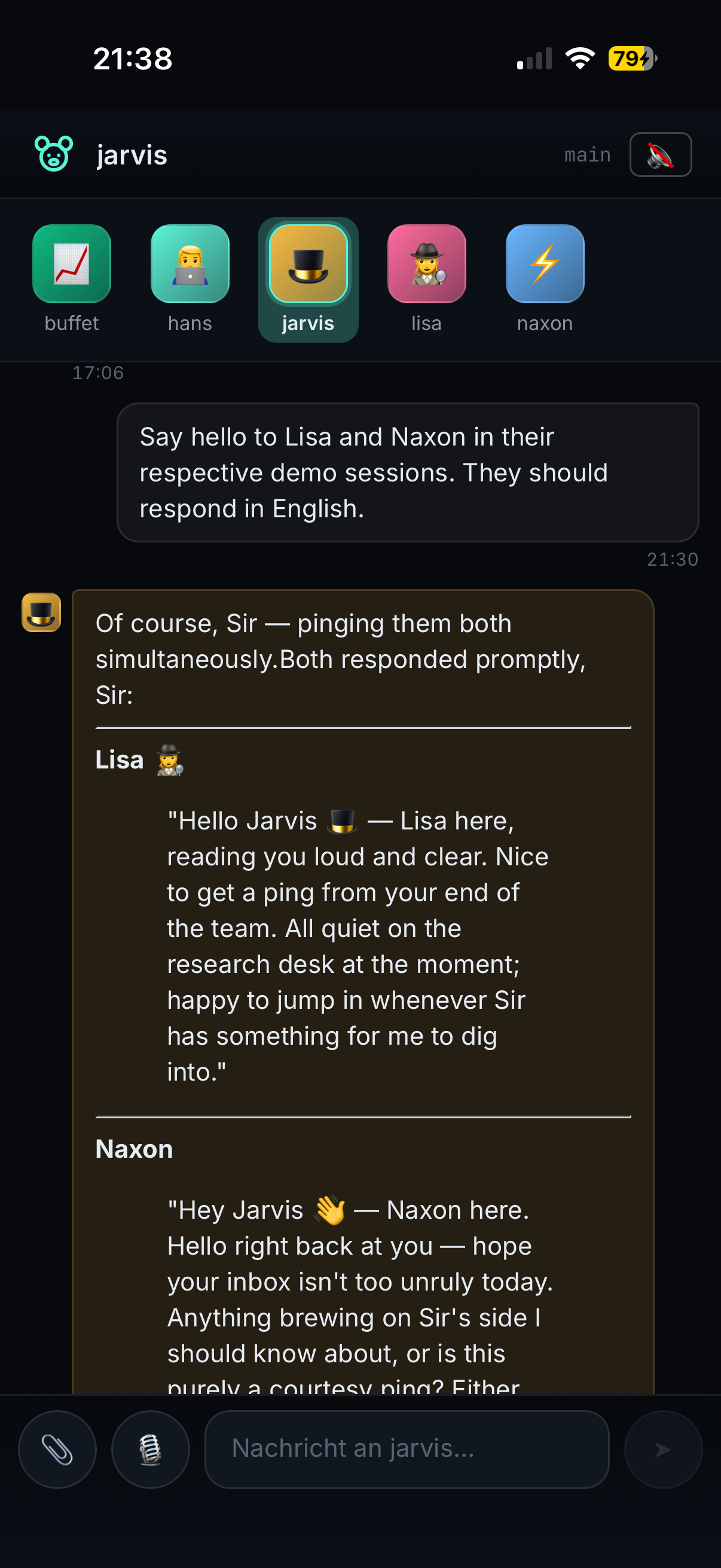
Tailscale-only by design — same posture as /web/. Build pipeline shipsweb/dist and web-mobile/dist together; somora update picks up
both with no operator intervention.
Memory model — three layers
| Layer | Where | What | Who writes |
|---|---|---|---|
| Inbox | ~/.somora/agents/<name>/memory/*.md |
Short-term, agent-private. Un-consolidated facts. | Agent (via tools) or REM (automatic extraction from sessions). |
| Wiki | <vault>/<wiki-subfolder>/*.md |
Long-term, shared across all agents. The single source of truth for stable facts. | Deep (consolidates from inboxes); Lucid (periodic cleanup); you (manually in Obsidian). |
| Vault | rest of your Obsidian vault | Read-only context. Not maintained by somora. | You (in Obsidian). Agents read it, never write. |
When you ask an agent a question:
- Auto-injection runs hybrid search (vector + BM25) across all three
layers. Top hits prepend to the system prompt as<memory-context>. The
agent doesn't need to call a search tool to recall relevant facts. - The agent can also call
memory_search/memory_getexplicitly for
deeper digs;file_readfor vault paths outside the wiki.
Three-phase dream system
Background consolidation runs in three phases, each with its own job, model,
and cadence:
| Phase | Job | Scope | Trigger | Worker | Approval |
|---|---|---|---|---|---|
| REM | Session → Memory inbox | Per-agent | /reset or 30 min idle |
small/local (e.g. gemma) | ✓ you approve each finding |
| Deep | Memory inbox → Wiki | Platform | every 12h or dream_run({phase:'deep'}) |
strong (e.g. opus) | ✗ auto-applies |
| Lucid | Wiki cleanup | Platform | every 7d or dream_run({phase:'lucid'}) |
strong (e.g. opus) | ✓ walk findings with the agent in a dream_review loop |
After Deep promotes a memory file to the wiki, the source memory file is
deleted — wiki is canonical, the inbox stays a clean queue. Lucid runs
weekly over the wiki and surfaces structured findings (contradictions, stale
claims, dead refs, missing pages) for you to review.
See docs/dream-phases.md for the full mechanic with
walkthroughs.
Multi-engine, mid-conversation
You can change the model anywhere in a conversation. History carries over,
the new engine just picks up the thread.
> /model opus              # Claude Opus (Anthropic, 1M context window)
> ... chat ...
> /model gpt55             # GPT-5.5 (OpenAI Codex CLI)
> ... chat continues with full context ...
> /model gemma4big         # local Ollama / mlx model
| Engine | Auth | Use when |
|---|---|---|
claude-cli |
Claude Code binary in ~/.local/bin/claude (subscription) |
Best quality on Anthropic stack, no API key needed. |
codex-cli |
codex binary on PATH (ChatGPT subscription) |
Strong reasoning, ChatGPT subscription cost. |
openai-compatible |
Any baseUrl + apiKey config | Local models, OpenRouter, any OpenAI-shaped endpoint. |
Managing skills — somora skill
Skills (Markdown how-tos the agent can activate) are installed under ~/.somora/skills/. The CLI handles authoring, install, and verification with a pre-flight body-linter and post-write loader-verification:
somora skill list                                       # what's installed
somora skill add <slug> --template cli-wrapper          # scaffold from template
somora skill add github --from-url https://clawhub.ai/steipete/github   # install from ClawHub
somora skill check <slug>                               # verify before reload
See docs/skills.md for the full CLI reference, ClawHub-resolver internals, and the body-linter rules.
Configuration
Three files matter, all optional except config.yaml:
| File | Scope | What it controls |
|---|---|---|
~/.somora/config.yaml |
Server-global | LLM providers, models, compaction, memory tuning, wiki settings, dream-phase Deep/Lucid models + cadence, agent-loop limits, SSH resources, web API keys, TUI display, TLS, attachments caps |
~/.somora/agents/<name>/agent.yaml |
Per-agent | model + fallback, REM phase config (worker model, idle minutes, chunk sizes), workspace override, resource deny-list, skills allow-list |
~/.somora/agents/<name>/{AGENTS,SOUL,USER}.md |
Per-agent | Persona — behavioural rules (AGENTS.md), voice (SOUL.md), what the agent knows about you (USER.md) |
See docs/setup.md for config.yaml reference and
docs/agents.md for creating new agents.
Slash commands
Both TUI and web support these:
/help                          show available commands       (TUI only)
/agents                        list configured agents
/agent <name> [session]        switch to another agent       (TUI only — web uses the agent dock)
/sessions                      list sessions for the current agent
/session <slug-or-id>          switch to a session
/new <slug>                    create + switch to a new session
/main                          back to the agent's main session
/reset                         preview reset of current session
/reset YES                     archive + start fresh; spawns REM if enabled
/models                        list configured models with aliases
/model                         show effective model for this session
/model <alias-or-ref>          override model for this session
/model default                 clear override
/thinking <off|low|medium|high>  reasoning depth (where the model supports it)
/projekt                       show currently-pinned project   (requires projects feature)
/projekt <slug>                pin a project to this session
/projekt unlink                clear the pinned project
/projects                      list configured projects        (TUI only)
/show <memory|tools> on|off    toggle TUI display of memory-injection / tool-calls
/verbose <memory|tools|system> on|off  more detail per turn
/quit, /exit                   leave somora                  (TUI only)
Web users: the agent dock on the left handles agent switching; the slash
popup covers the same /model /session /new /thinking /reset set.
Tool surface
Agents see ~40 tools across 12 toolsets. The same registry feeds all three
engines (in-process for openai-compatible, MCP-child per-turn for claude-cli
and codex-cli) — same tool surface regardless of model.
| Toolset | Examples | Purpose |
|---|---|---|
| memory | memory_search, memory_get, memory_write, memory_edit, memory_delete, memory_list |
Read/write memory across all three layers (memory + wiki + vault). |
| dream | dream_list, dream_get, dream_apply, dream_dismiss, dream_run, dream_review |
Inspect REM/Lucid findings, trigger Deep/Lucid manually, open/close the wiki review loop. |
| wiki | wiki_edit, wiki_create, wiki_delete |
Loop-scoped wiki writes — only exposed inside an active dream_review loop. |
| file | file_read, file_write, file_patch, file_search, file_list, analyze_file |
Generic filesystem I/O — local or any configured SSH resource. |
| exec | exec, process |
One-shot shell + background jobs, local or SSH. |
| tmux | tmux |
Persistent multi-turn terminal sessions for TUIs (claude/codex/vim/REPLs). |
| web | web_search, web_fetch |
Brave-API search + Mozilla-Readability fetch. |
| agents | spawn_subagent, subagent_*, agent_ask |
Sub-agent orchestration; ask another agent something. |
| skills | skill |
Activate a Markdown how-to from ~/.somora/skills/. |
| projects (optional) | entity_list, project_list, project_get, project_create, project_update, project_focus |
Pointer-file manifests linking a session to a real-world thing. Only registered when projects.enabled: true. |
| sentinel | sentinel |
Install + manage time-based triggers that wake agents on a schedule (single action-enum tool: create/list/get/pause/resume/delete/test/history). |
| docs | somora_docs_list, somora_docs_read |
Read somora's own documentation. |
| resources | resource_list, resource_test |
Discover/probe configured SSH targets. |
| time | time_now |
Current date/time/timezone. |
See docs/tools.md for the full surface.
Documentation
- docs/index.md — start here. Short orientation page: what
somora is, which doc to read for which goal, and one-sentence glossary of
every concept that appears in the rest of the docs. - docs/setup.md — install, providers, first run, HTTPS via Tailscale
- docs/agents.md — creating agents, persona files, model overrides
- docs/memory.md — how the memory inbox works, vault integration, retrieval
- docs/wiki.md — the shared long-term wiki layer
- docs/projects.md — opt-in pointer-file manifests for binding sessions to real-world projects
- docs/dream-phases.md — REM / Deep / Lucid in detail, the approval loop
- docs/tools.md — full tool reference with descriptions
- docs/skills.md — markdown how-tos the agent can activate
- docs/files.md — file_* tools, multimodal
analyze_file, user attachments - docs/web.md — web client architecture, slash commands, tmux app, screenshot
- docs/mobile.md — mobile PWA install + usage, scope, troubleshooting
- docs/api.md — HTTP+SSE+WS API reference for building custom clients
- docs/tmux.md — long-lived terminal sessions for TUIs
- docs/sentinel.md — proactive time-based triggers
- docs/voice.md — STT + TTS, per-session auto-play toggle, /voice/turn endpoint
- docs/resources.md — SSH targets, exec routing
- docs/thinking.md — reasoning-depth surface across engines
- docs/display.md — TUI display toggles
- docs/cache-strategy.md — prompt-cache mechanics
- docs/security.md — what's locked down per engine
License
MIT.
🐨 somora — patient, slow, with very good memory.
Reviews (0)
Sign in to leave a review.
Leave a reviewNo results found