claude-statusline
Health Uyari
- License — License: MIT
- Description — Repository has a description
- Active repo — Last push 32 days ago
- Low visibility — Only 5 GitHub stars
Code Gecti
- Code scan — Scanned 2 files during light audit, no dangerous patterns found
Permissions Gecti
- Permissions — No dangerous permissions requested
Bu listing icin henuz AI raporu yok.
🚀 A fast and configurable Claude Code status line


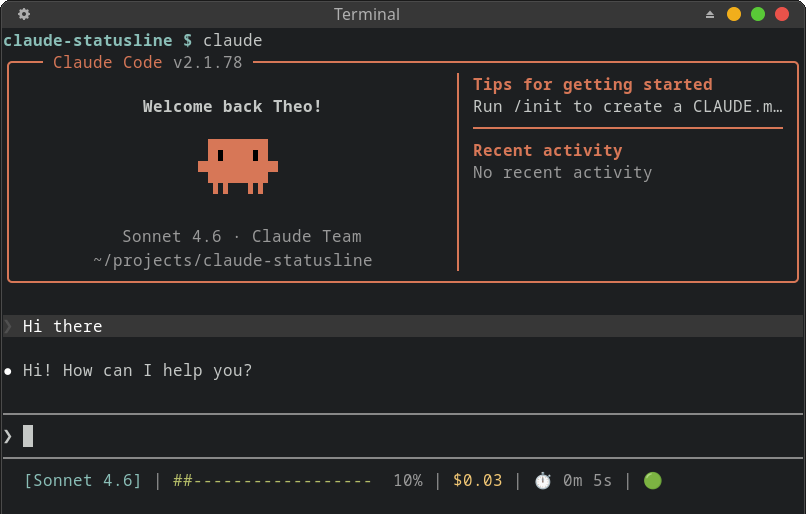
claude-statusline adds a status line to your Claude Code sessions to track context window usage, costs, Claude API status, and your session duration. It is fully customizable with multi-segment modules via a TOML config file — colors, layout, thresholds, Nerd Font icons, and more.
Features
📦 Modules — each independently configurable:
- Model — active Claude model name (e.g.
[Opus 4.6]) - Context bar — visual progress bar of context window usage (
###------) - Context tokens — numeric token counts with SI formatting (e.g.
42k/200k tokens) - Context percentage — context usage as a percentage (e.g.
5%) - Cost — session cost in USD (
$1.23) - Duration — total API duration (
4m 5s) - Status — live Claude API health from
status.claude.comwith 10-minute file-based cache (🟢/🟡/🔴)
⚙️ Configuration (TOML):
- Per-module:
disabled,style,symbol,format({value}/{symbol}placeholders),min_term_width,max_term_width - Threshold-based styling on cost and context bar (warn/critical with different colors)
- Custom line layout templates — modules are
$tokensplaced freely in line strings - Context bar customization: width, fill/empty characters
🎨 Simple styling:
- Named colors (
red,cyan,bright_green…), 24-bit hex (fg:#c792ea,bg:#1a1a2e) - Modifiers:
bold,dim,italic,underline— freely composable
📏 Responsive layout:
- Auto-wrapping: segments overflow to new lines when exceeding terminal width
- Per-module
min_term_widthandmax_term_widthto hide based on terminals width - Terminal width detection via
/dev/tty(works with piped stdin)
🚀 Performance:
- Designed with speed in mind, and compiled as a static Golang binary.
- Extremely fast rendering < 0.019 ms
- See performance benchmarks
⚡ Install
🚀 Method 1: curl installer (recommended)
OS=linux; ARCH=amd64
curl --create-dirs -sSLo ~/.local/bin/claude-statusline "https://github.com/TheoBrigitte/claude-statusline/releases/latest/download/claude-statusline.$OS-$ARCH"
chmod +x ~/.local/bin/claude-statusline
Also supports linux, darwin (macOS), and windows on amd64 and arm64, see Makefile.
This downloads the binary to ~/.local/bin/claude-statusline.
📦 Method 2: go install
Requires the Golang toolchain.
go install github.com/TheoBrigitte/claude-statusline@latest
After installing the binary, configure it into Claude Code in ~/.claude/settings.json:
{
  "statusLine": { "type": "command", "command": "claude-statusline" }
}
Works out of the box with sensible defaults — no config file needed. The default
output looks like:

⚙️ Configuration
To customize, create ~/.config/claude-statusline.toml:
[model]
style = "bold cyan"
symbol = " " # Nerd Font robot icon
[cost]
warn_threshold = 2.0
warn_style = "yellow"
critical_threshold = 5.0
critical_style = "bold red"
[context_bar]
width = 20
fill_char = "█"
empty_char = "░"
warn_threshold = 40.0
warn_style = "yellow"
critical_threshold = 80.0
critical_style = "bold red"
Config file discovery order:
--config <path>flag~/.config/claude-statusline.toml- Built-in defaults
Global Settings
# Separator between segments (also the line-wrap breakpoint)
separator = " | "

# Terminal padding reserved on the right
padding = 5

# Layout — each entry is one line, segments separated by `|` auto-wrap
# Available tokens: $model $context_bar $context_tokens $context_pct $cost $duration $status
lines = ["$model | $context_bar $context_tokens $context_pct | $cost | $duration | $status"]
Modules
Every module supports these fields:
| Field | Type | Description |
|---|---|---|
disabled |
bool | Hide this module entirely |
style |
string | ANSI style (see Styles) |
symbol |
string | Prefix prepended to the value (supports Nerd Font glyphs) |
format |
string | Format string with {value} and {symbol} placeholders |
min_term_width |
int | Only show when terminal is at least this wide |
max_term_width |
int | Only show when terminal is at most this wide |
[model] — Model Name
Displays the active Claude model name.
| Field | Default | Description |
|---|---|---|
style |
"cyan" |
ANSI style |
format |
"[{value}]" |
Wraps name in brackets by default |
min_term_width |
80 |
Hidden on narrow terminals |
[model]
style = "bold fg:#7aa2f7"
symbol = " " # nf-md-robot
format = "{symbol}{value}" # drop the brackets
[context_bar] — Context Window Progress Bar
Visual bar showing context window usage. Supports threshold-based color changes.
| Field | Default | Description |
|---|---|---|
style |
"green" |
Base color |
width |
0 (auto) |
Fixed char width, or 0 for auto (termWidth/3, min 40) |
fill_char |
"#" |
Character for the filled portion |
empty_char |
"-" |
Character for the empty portion |
warn_threshold |
40.0 |
% at which style switches to warn_style |
warn_style |
"yellow" |
Style at warning level |
critical_threshold |
90.0 |
% at which style switches to critical_style |
critical_style |
"red" |
Style at critical level |
[context_bar]
width = 20
fill_char = "█"
empty_char = "░"
symbol = " "               # nf-oct-cpu
style = "fg:#7dcfff"
warn_threshold = 40.0
warn_style = "fg:#e0af68"
critical_threshold = 70.0
critical_style = "bold fg:#f7768e"
[context_tokens] — Token Count
Displays current/total token usage like (27k/1M tokens).
| Field | Default | Description |
|---|---|---|
format |
"({value})" |
Wrapped in parentheses by default |
[context_tokens]
style = "dim"
format = "[{value}]"   # use brackets instead of parens
[context_pct] — Context Percentage
Displays context usage percentage like 27%.
| Field | Default | Description |
|---|---|---|
format |
"{value}%" |
Appends % by default |
[context_pct]
style = "bold"
[cost] — Session Cost
Displays total session cost in USD. Supports threshold-based color changes.
| Field | Default | Description |
|---|---|---|
style |
"yellow" |
Base color |
warn_threshold |
0 |
USD at which style switches (0 = off) |
warn_style |
— | Style at warning level |
critical_threshold |
0 |
USD at which style switches (0 = off) |
critical_style |
— | Style at critical level |
[cost]
symbol = "💰 "
style = "green"
warn_threshold = 2.0
warn_style = "yellow"
critical_threshold = 5.0
critical_style = "bold red"
[duration] — Session Duration
Displays total session wall-clock time.
| Field | Default | Description |
|---|---|---|
symbol |
"⏱️ " |
Timer emoji |
[duration]
symbol = " "    # nf-fa-clock_o
style = "dim"
[status] — API Health
Displays Claude API operational status as an emoji indicator (🟢, 🟡 degraded, 🔴 error).
[status]
disabled = true   # hide if you don't care about API status
Styles
Style strings follow Starship-compatible syntax. Combine any of the following
separated by spaces:
Modifiers: bold, italic, underline, dimmed
Named foreground colors: black, red, green, yellow, blue, purple,cyan, white — and their bright_* variants (bright_red, bright_cyan, etc.)
Hex foreground: fg:#RRGGBB, fg:#RGB, or bare #RRGGBB / #RGB
Named/hex background: bg:red, bg:#1a1a2e
Examples:
"bold"
"red"
"bold green"
"fg:#c792ea"
"bold fg:#ff5370 bg:#1a1a2e"
"bright_cyan"
"dim italic"
Nerd Fonts
If you have a Nerd Font installed in your terminal,
you can use glyph icons as symbol values:
[model]
symbol = " " # nf-md-robot
[context_bar]
symbol = " " # nf-oct-cpu
[cost]
symbol = " " # nf-fa-dollar
[duration]
symbol = " " # nf-fa-clock
Browse icons at nerdfonts.com/cheat-sheet.
📚 Examples
1. Minimal
One clean row. Model, cost, and a compact context bar.
lines = ["$model | $cost | $context_bar $context_pct"]

[model]
min_term_width = 0

[cost]
warn_threshold = 2.0
warn_style = "yellow"
critical_threshold = 5.0
critical_style = "bold red"

[context_bar]
width = 15

[context_tokens]
disabled = true
2. Two-Row Dashboard
Session info on top, context details below.
lines = [
  "$model | $cost | $duration | $status",
  "$context_bar $context_tokens $context_pct",
]

[model]
style = "bold cyan"
min_term_width = 0

[cost]
style = "green"
warn_threshold = 2.0
warn_style = "yellow"
critical_threshold = 5.0
critical_style = "bold red"

[context_bar]
width = 30
fill_char = "█"
empty_char = "░"
3. Cost monitoring
Focused on spending awareness. No context bar clutter.
lines = ["$model | $cost | $duration | $status"]

[model]
style = "bold"
format = "{value}"
min_term_width = 0

[cost]
symbol = "💰 "
style = "green"
warn_threshold = 1.0
warn_style = "bold yellow"
critical_threshold = 3.0
critical_style = "bold red"

[context_bar]
disabled = true

[context_tokens]
disabled = true

[context_pct]
disabled = true
4. Tokyo Night
Hex colors from the Tokyo Night palette with Nerd Font icons.
lines = [
"$model | $cost | $duration | $status",
"$context_bar $context_tokens $context_pct",
]
[model]
symbol = " "
style = "bold fg:#7aa2f7"
format = "{symbol}{value}"
min_term_width = 0
[cost]
symbol = " "
style = "fg:#a9b1d6"
warn_threshold = 2.0
warn_style = "fg:#e0af68"
critical_threshold = 5.0
critical_style = "bold fg:#f7768e"
[duration]
symbol = " "
style = "fg:#565f89"
[context_bar]
symbol = " "
width = 20
fill_char = "█"
empty_char = "░"
style = "fg:#7dcfff"
warn_threshold = 40.0
warn_style = "fg:#e0af68"
critical_threshold = 70.0
critical_style = "bold fg:#f7768e"
[context_tokens]
style = "fg:#565f89"
[context_pct]
style = "fg:#565f89"
5. Compact Percentage Only
Absolute minimum — just the percentage and cost.
separator = "  "
lines = ["$context_pct  $cost  $status"]

[model]
disabled = true

[context_bar]
disabled = true

[context_tokens]
disabled = true

[duration]
disabled = true
📏 Responsive Layout
The status line adapts to your terminal width automatically:
- Auto-wrapping — segments within a line wrap to the next line when they
exceed the terminal width, using theseparatoras the breakpoint. min_term_widthandmax_term_widthper module — each module can set
terminal width boundaries (in columns) required for it to appear. For example,[model]defaults tomin_term_width = 80, so it hides on narrow terminals.- Auto-sizing context bar — when
[context_bar].widthis0(the
default), the bar width scales to one-third of the terminal width (minimum
40 characters).
This means the same config works well across different terminal sizes — from a
narrow split pane to a full-width monitor.
🚀 Performance
claude-statusline runs on every prompt render, so it's built to be fast.
The full pipeline — config loading + JSON decoding + rendering + writing —
completes in ~19 µs (0.019 ms) with only 78 allocs. Rendering alone (pre-parsed
config and input) takes ~5 µs.
goos: linux  goarch: amd64  cpu: i7-1165G7 @ 2.80GHz

Full pipeline (config load + JSON decode + render + write):
  BenchmarkRunWith                 60592   18741 ns/op    5827 B/op   78 allocs/op

Render pipeline (pre-parsed input):
  BenchmarkEndToEnd               263430    4953 ns/op    2064 B/op   43 allocs/op

Internals:
  BenchmarkRenderModules          549267    2306 ns/op    1144 B/op   25 allocs/op
  BenchmarkRenderSegment         2375802     503 ns/op     383 B/op    4 allocs/op
  BenchmarkDisplayLen            2244877     539 ns/op       0 B/op    0 allocs/op
  BenchmarkApplyFormat          12019099      92 ns/op      32 B/op    2 allocs/op

Packages:
  BenchmarkLines (layout)        5271928     226 ns/op     416 B/op    6 allocs/op
  BenchmarkParse (style)         2162178     520 ns/op     245 B/op   10 allocs/op
  BenchmarkSprint (style)       37222816      35 ns/op      64 B/op    1 allocs/op
  BenchmarkWidth (terminal)      7353873     154 ns/op       0 B/op    0 allocs/op
  BenchmarkCost (format)         6420810     182 ns/op       5 B/op    1 allocs/op
  BenchmarkDuration (format)    38799873      31 ns/op       5 B/op    1 allocs/op
  BenchmarkSI (format)          53038720      22 ns/op       3 B/op    1 allocs/op
Run benchmarks yourself:
make bench
🛠️ Building
make build          # Build for current OS/arch
make build-all      # Build for all supported platforms
make test           # Run test suite
make lint-all       # Run all linters
make install        # Build and install to ~/.local/bin
🙏 Credits
- Claude Code for the session JSON API and status line integration
- Starship for the style syntax and rendering inspiration
- Nerd Fonts for the extensive icon library
- CShip for the inspiration on configuration format
📄 License
MIT
Yorumlar (0)
Yorum birakmak icin giris yap.
Yorum birakSonuc bulunamadi