BuildersGate
Health Uyari
- License — License: MIT
- Description — Repository has a description
- Active repo — Last push 0 days ago
- Low visibility — Only 8 GitHub stars
Code Basarisiz
- exec() — Shell command execution in bgate_adapters/_blender_runner.py
- exec() — Shell command execution in bgate_adapters/_blender_sprites.py
Permissions Gecti
- Permissions — No dangerous permissions requested
Bu listing icin henuz AI raporu yok.
Agentic game development for building games with AI Agents. Run one session per seat: art, gameplay, narrative, QA, audio, tech all in 1 spot
Builders Gate



Builders Gate is an MCP server for building games with Claude Code.
It gives Claude 78 tools scoped to one game project: a design database, a work
queue, reference-pinned art generation, Godot and Blender adapters, and playtest
capture. State lives in one SQLite file in the project.
You run several Claude Code sessions at once, each assigned a role: art,
gameplay, narrative, QA, audio, tech. They read and write the same database, so
they do not contradict each other, and they cannot edit the same files at the
same time. A local dashboard shows what each one is doing and is where you
dispatch work and approve output.
Your own Claude session uses the same tools and the same database. Asking it what
is left before the vertical slice reads the queue and the scope tiers, not the
chat history.
bgate init creates a project with a runnable Godot game in it. bgate adopt
points it at a game you already have.
There are limits enforced in code: work outside the current scope tier is
refused, generation stops at a spend ceiling, files locked by one seat cannot be
written by another, and no agent can approve its own art.
Local-first. No daemon, no cloud, no build step in the frontend.
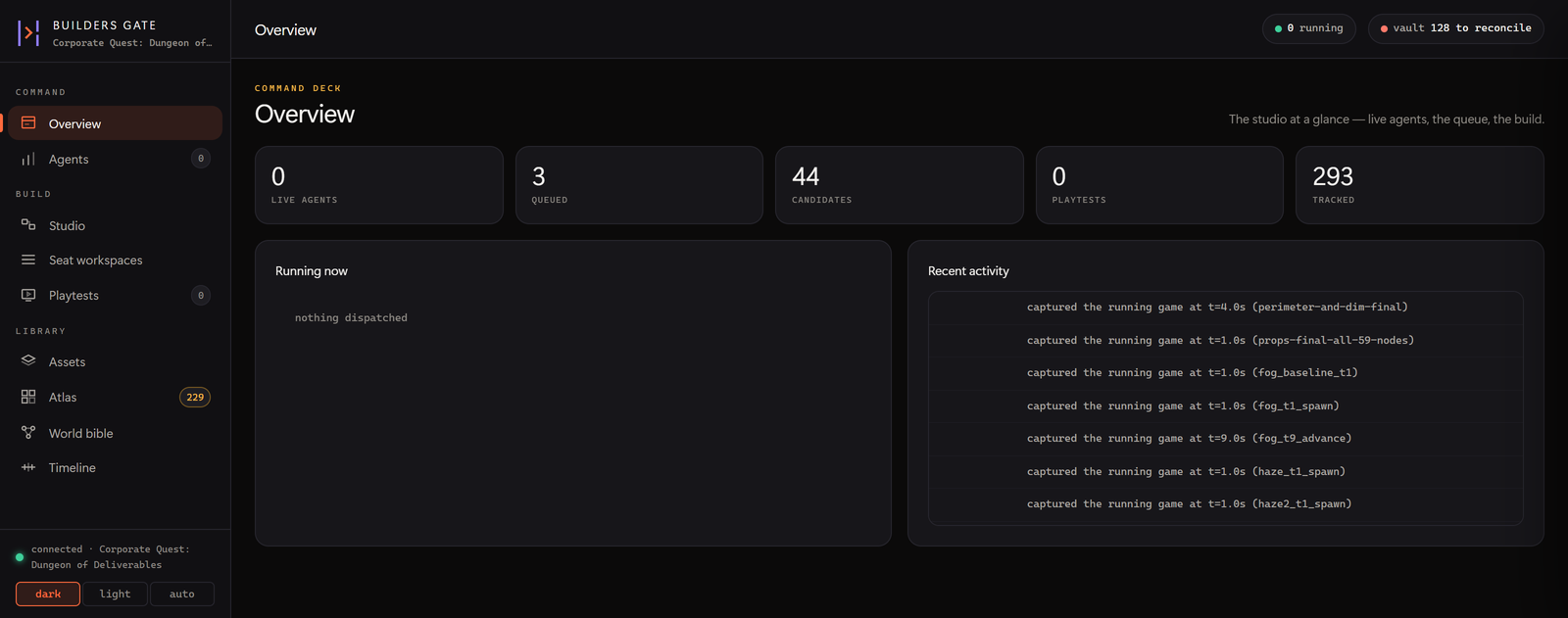
The dashboard, running against a real project. More screenshots →
Who it is for: people running Claude Code who are building a game and want
more than one session working on it. It is more machinery than a small project
needs.
Setting this up with Claude? Point it at
CLAUDE.mdin this repo. It is written for an
assistant doing the install on your behalf, including the two
mistakes that waste the most time.New to this? Start at
docs/start-here.md. It
assumes nothing and defines the vocabulary once. Unfamiliar term?docs/glossary.md.
Project status
Honest version, 2026-07-27, first public release. This is a solo project that has
built real games on one machine, and it shows in both directions.
Works, and is exercised by the test suite and by daily use. The MCP server
and its tools. Seats, lanes, asset locks and the PreToolUse hook. The Godot
adapter: headless run and check, import with in-engine inspection, screenshots,
scaffolds. Both image providers. The dashboard. Playtest capture through to a
joined brief. bgate publish. bgate doctor.
Works, but only proven by hand. The Blender adapter and the glTF round trip.
They are exercised by daily use and by tests that drive a real Blender, but those
tests are slow-marked or skip when Blender is absent, so a normal test run says
nothing about them. Nothing here generates 3D geometry, so treat 3D as the
less-travelled path.
Half-built, and named as such. The audio seat's workspace is a deliberate v1
of sound library, playback and cue sheet, and the UI says so in a banner. The
dashboard's error surfacing is uneven; a failed mutation still sometimes renders
as nothing happening. Godot
version detection reports "unknown" on some builds.
A proposal, not a product. bgate_engine/ is a design note
with JSON schemas and no runtime code. Nothing in the repository imports it.
Its central claim, a second authoritative simulation in Python, was withdrawn
after the experiment recorded in its own DESIGN.md §16.5 came back negative
against two other titles. It ships because the schemas are packaged data and the
reasoning is worth reading, not because it is a direction.
Provenance to weigh. Most of this was proven against a small number of games
on one Windows machine. It has been through a harsh self-audit and the top-10
blockers have since been worked,
and its status header says which.
Requirements
- Python 3.11+
- An MCP client. Claude Code is what it is
developed against - Godot 4.x. Add the Web export templates if you want
bgate publish - Optional: Blender 4.2+ for the 3D leg,
ffmpegandffprobefor playtest capture,faster-whisperandsounddevicefor
transcription - Optional: an
OPENAI_API_KEYorKREA_API_KEYfor generated art
Windows is the supported platform. Linux is best-effort: parts of the product
shell out to Windows tooling, and the suite has not been kept green there. macOS
is untested.
Full detail, including the API key table and the platform notes:docs/setup.md.
Install and quickstart
git clone https://github.com/Thepizzapie/BuildersGate
cd BuildersGate
pip install -e .                          # or: pip install -e ".[dev,stt,record]"

bgate doctor                              # python/key/ffmpeg/blender/godot/whisper
bgate init emberfall --kind 2d            # a project AND a runnable game
cd emberfall
                                          # optional: drop a .env here with your
                                          # image key, see .env.example
bgate serve                               # dashboard on http://127.0.0.1:7788
bgate doctor exits 1 if anything on its list is unavailable. That is right
for a CI step and alarming for a human: you only need Python and Godot for the
core loop. Read the rows, not the exit code.
bgate init creates a NEW directory named after the project, not whatever
directory you were standing in. It writes .bgate/game.db, unpacks the Godot
template, and prints the absolute path. bgate serve with no project shows a
first-run screen that does the same thing from the browser.
To let agents drive it:
claude mcp add builders-gate --scope user -- <abs-python> -m bgate_mcp.server
bgate hook-install <game-project>         # lane/lock teeth
Use the ABSOLUTE python path. The claude CLI's health check resolves a barepython differently than your shell and reports "failed to connect" against a
server that runs fine.
Other entry points, covered in docs/setup.md:
| Command | What it does |
|---|---|
bgate app |
The dashboard in a native window instead of a browser tab |
bgate adopt |
Point it at a Godot project you already have. Additive only, never rewrites a byte you wrote |
bgate projects |
List every known project |
bgate use <name> |
Switch the active project without exporting BGATE_ROOT |
bgate publish |
Turn every game on the machine into a static arcade site |
bgate hook-status |
Prove the enforcement hook is actually live |
Desktop app
bgate serve runs a local web server and you open it in a browser. bgate app
runs the same server and puts it in a native window instead — on Windows that
is the Edge WebView2 runtime, which ships with Windows 11, so there is no
browser bundled and nothing extra to install:
pip install -e ".[desktop]"
bgate app
It binds to a loopback port the OS picks, so it will not collide with abgate serve you already have open, and it shuts the server down when you
close the window.
The standalone Windows build, and why it warns
There is a BuildersGate-windows.zip on the
releases page for people
who do not want Python at all. Unzip it and run BuildersGate.exe — double-click
for the window, or BuildersGate.exe serve for the browser dashboard.
Windows will complain, and here is exactly why. The binary is not code
signed, and Windows has two separate defences against that:
- Defender flagged the first build as
Trojan:Win32/Sabsik.TE.A!ml. The!mlsuffix means a machine-learning guess, not a signature match. That build
used PyInstaller's--onefile, which unpacks a compressed archive into%TEMP%and executes code from it — behaviourally a dropper, whatever it
actually does. It ships as a plain folder now, which removes that trigger. - Smart App Control, default-on for clean Windows 11 installs, refuses to
launch unsigned binaries outright: "we can't confirm who published
BuildersGate.exe." No amount of repackaging fixes this one. It needs an
Authenticode certificate, which is
being worked on.
Every release publishes a .sha256 next to the zip so you can check that what
you downloaded is what CI built. Both are produced by the workflow in.github/workflows/release-exe.yml from a
tagged commit, and you can read the build log.
If you have Python, pip install avoids all of this — bgate app is an
ordinary Python process rather than an unsigned executable, and gives you the
same native window. It is the recommended route.
To build the standalone yourself:
pip install -e ".[desktop]" pyinstaller
python packaging/build_exe.py
That writes dist/BuildersGate/, boots it to check it serves its own assets,
and only then zips it. The check is not ceremony: this app finds static/ andtemplates/ by walking up from __file__, so a bundle that lays them out
wrongly still starts, still renders the shell, and 404s every stylesheet. A
green PyInstaller run does not mean a working binary.
The working loop
Step 1 is bgate init. Everything after it is an MCP tool call, so any Claude
session with the server registered can drive it. The intended shape: you or an
orchestrator fan out one agent per seat, each adopting its role via BGATE_SEAT.
1  bgate init <name>       .bgate/game.db + a runnable game, path printed
2  godot_scaffold          (or, into an existing project: the same runnable slice)
3  DIRECTOR seat           bible_add: pillars, the core loop, scope tiers, the CUT LINE
4  NARRATIVE seat          lore_add / lore_fact; canon_check on every narrative write
5  ART seat                ref_pin approved references first, then blender_sprites /
                           image_sprites / image_generate; asset_lock before touching
                           any binary, asset_release after
6  GAMEPLAY seat           writes code in its lanes; godot_check_project + godot_run
                           after every change; godot_screenshot to SEE the game
7  QA seat                 headless test scripts via godot_run; asset_verify for drift
8  playtest_check/start    play it yourself, talk out loud; feedback lands classified
                           and joined to telemetry; YOU promote what becomes work
Four rules make multi-agent work safe. Check seat_can_write before writing
outside your obvious lane. Lock binaries before editing. Leave a seat_post_note
when your work changes another seat's world. Call scope_check(rank) before
building anything new.
seat_brief(role) returns everything a seat needs to start: mission, lanes,
bible, canon, pinned reference anchors, promoted feedback, and who holds which
locks.
Every tool takes an optional project_dir. It resolves the project from that,
then BGATE_ROOT, then by walking up from the cwd for a .bgate/ dir. Pass it
explicitly whenever more than one project could be in play.
Docs
docs/README.md indexes everything with a line each.
Start here
| Page | What it is |
|---|---|
| start-here.md | The front door. Assumes nothing |
| glossary.md | Every term this project uses narrowly |
Reference
| Page | What it is |
|---|---|
| setup.md | Requirements, API keys, adopt, project switching, MCP registration, platform support |
| reference.md | Every surface in detail: dashboard, seats, locks, Blender to Godot, templates, publishing, playtest, layout |
| design-notes.md | The cut line, budgets, human-only approval, canon, and the technology choices |
| gotchas.md | GPU cold starts, stdio deadlocks, whisper segmentation, telemetry clocks |
Findings
| Page | What it is |
|---|
Working on Builders Gate itself
pip install -e ".[dev]"
python -m pytest -m "not slow" -q
-m "not slow" deselects the tests that drive real Blender, real whisper, and
the in-suite wheel build. Drop it only if you have both installed and want to
wait.
There is a wheel smoke test in the suite, and the failure it exists to catch is invisible under pip install -e .: a wheel
that shipped no JavaScript and no templates/ produced a dashboard of 404s and a
scaffolder that raised FileNotFoundError, and nothing had ever verified
otherwise. Linux is continue-on-error.
Contributing, security, licence
Feedback is worth more here than patches, especially "it did not run on my
machine" and "this gate can be walked around". See
CONTRIBUTING.md for what to include in a report, and
CHANGELOG.md for the release state.
This tool executes arbitrary GDScript, shells out, and spawns agent sessions with
edit permissions. SECURITY.md states plainly what the localhost
guards do protect against (a browser page reaching your dashboard, including via
DNS rebinding) and what they do not (a hostile local user, a network deployment,
untrusted input to the adapters). Report vulnerabilities privately through GitHub
Security Advisories, not a public issue.
MIT. See LICENSE.
Yorumlar (0)
Yorum birakmak icin giris yap.
Yorum birakSonuc bulunamadi