ontosphere
Health Gecti
- License — License: NOASSERTION
- Description — Repository has a description
- Active repo — Last push 0 days ago
- Community trust — 26 GitHub stars
Code Basarisiz
- process.env — Environment variable access in e2e/demo-advert-intro.spec.ts
- process.env — Environment variable access in e2e/demo-foaf-social-network.spec.ts
- process.env — Environment variable access in e2e/demo-pizza-tutorial-chat.spec.ts
- process.env — Environment variable access in e2e/demo-pizza-tutorial.spec.ts
- process.env — Environment variable access in e2e/demo-reasoning-demo.spec.ts
- new Function() — Dynamic code execution via Function constructor in e2e/demo-runner.ts
Permissions Gecti
- Permissions — No dangerous permissions requested
This is a browser-based MCP server and RDF knowledge graph editor. It runs entirely client-side, allowing users to load, author, and visualize ontology data directly in the browser without requiring a dedicated backend.
Security Assessment
Overall risk: Low. The tool operates primarily as a client-side web application. It does not execute system shell commands, request dangerous OS-level permissions, or contain hardcoded secrets. Network requests are strictly tied to its core functionality, such as fetching remote RDF files or querying external SPARQL endpoints.
There are a few minor code hygiene warnings. The project accesses environment variables inside E2E (end-to-end) testing scripts, which is standard for automated browser testing and poses no threat to end users. However, there is a dynamic code execution warning via the `new Function()` constructor located in the demo runner file. While this is typically used in testing or demo environments to parse configurations dynamically, developers should be aware it exists. If the tool is strictly used in a sandboxed browser environment as intended, the dynamic execution poses minimal risk.
Quality Assessment
The project is healthy and actively maintained, with its last code push occurring very recently. It features clear documentation, includes a DOI, and claims an Apache 2.0 license, though the automated scanner flagged the exact license file as unasserted—likely a minor repository metadata configuration issue. Community trust is currently growing, demonstrated by a modest but positive 26 GitHub stars.
Verdict
Safe to use, though users should verify the license metadata in the repository before adopting it for large-scale enterprise projects.
Browser-based RDF/ontology knowledge graph editor — load RDF from files, URLs or SPARQL endpoints; author nodes and edges on the canvas; run OWL-RL reasoning; apply multi-algorithm layout and clustering. AI-native via MCP tool surface and relay bridge. Fully client-side, no backend required.
Ontosphere — Browser-based RDF Knowledge Graph Editor


| I want to… | Start here |
|---|---|
| Try the live demo | Open Ontosphere ↗ |
| Connect an AI agent | AI / MCP Integration |
| Run it locally | Quick start (development) |
| Load my own data | Startup / URL parameters |
| Contribute code | Contributing |
Table of Contents
- Overview
- Key capabilities
- Quick start (development)
- Startup / URL parameters
- Reasoning
- Reasoning demo
- CORS and proxies
- Using the UI
- Developer utilities
- Troubleshooting
- AI / MCP Integration
- Recording demo videos
- Contributing
- License & authors
Overview
Ontosphere is a browser-based RDF/ontology knowledge graph editor. It loads RDF from local files, remote URLs, or SPARQL/Fuseki endpoints; lets users author nodes and edges directly on the canvas; runs OWL-RL reasoning with visual differentiation of inferred triples; and applies multi-algorithm layout (Dagre, ELK) and automatic clustering for large graphs. Additional features include namespace management with live URI renaming, a drag-and-drop workflow template catalog, and a Model Context Protocol (MCP) server for AI-agent integration. All computation runs entirely client-side in the browser against an in-memory RDF store backed by Web Workers — no backend required.
Key capabilities
- Load RDF/Turtle/JSON-LD/RDF-XML/N-Triples from local files or remote URLs (including SPARQL endpoints and Fuseki datasets).
- Startup URL support: auto-load an RDF file via URL query parameter (see "Startup / URL usage" below).
- Reactodia canvas: pan, zoom, minimap, fit-view, with entity group (cluster) support and smooth animations.
- Authoring mode (always on): add nodes via search, draw edges by dragging the halo "Establish Link" handle, edit node annotation properties and link predicates directly on the canvas. Undo/Redo support. Entity auto-complete uses scored domain/range tiers derived from loaded ontologies.
- Search: type in the search box to find entities by label or IRI; press Enter to cycle through matches on the canvas.
- TBox / ABox views: toggle between ontology-level classes/properties (TBox) and data-level individuals (ABox).
- Layout engine: multiple algorithms — Dagre (horizontal/vertical), ELK (layered, force, stress, radial), and Reactodia-default — all running in Web Workers so the UI stays responsive. Spacing is adjustable via a slider; re-layout triggers automatically when spacing changes.
- Clustering: automatic grouping of large graphs on load. Three algorithms available — Label Propagation (default), Louvain, and K-Means. Threshold is configurable (default 100 nodes). Expand/collapse individual clusters or all at once from the toolbar.
- OWL-RL reasoning: run inference in the browser and see inferred triples rendered as amber dashed edges; inferred types/annotations appear in amber italic. A reasoning report lists all inferred triples grouped by rule. Clear inferred triples any time without affecting asserted data.
- Namespace management: edit namespace URIs directly in the legend panel (rename propagates across all stored triples). Colour-coded namespace badges on nodes and edges.
- Export the current graph as Turtle, RDF/XML, or JSON-LD.
- Workflow catalog: drag reusable workflow template cards from the sidebar onto the canvas to instantiate connected subgraphs.
- MCP support: exposes a Model Context Protocol server (via the browser's
navigator.modelContextAPI) for AI-agent integration. Tools:loadRdf,loadOntology,queryGraph,exportGraph,exportImage,addNode,removeNode,expandNode,expandAll,getNodes,addLink,removeLink,getLinks,runLayout,clusterNodes,layoutNodes,focusNode,fitCanvas,runReasoning,clearInferred,getNeighbors,findPath,getNodeDetails,updateNode,getGraphState,addNamespace,updateNamespace,removeNamespace,listNamespaces,loadShacl,validateGraph,getCapabilities,help. MCP manifest at/.well-known/mcp.json.
Quick start (development)
- Install dependencies:
npm install - Start the Vite dev server:
npm run dev - Open in your browser:
http://localhost:8080/
Startup / URL parameters
Ontosphere supports several URL query parameters that control what is loaded on startup.
RDF data URL
| Parameter | Aliases | Description |
|---|---|---|
rdfUrl |
url, vg_url |
HTTP(S) URL of an RDF resource to load on startup. |
Supported sources:
Plain RDF files — Turtle (.ttl), N-Triples (.nt), N3, RDF/XML, JSON-LD. Format is detected from
Content-Typeand file extension.?rdfUrl=https://example.org/mydata.ttlSPARQL endpoints — URLs whose path ends with
/sparqlor/queryare recognised automatically. Ontosphere issues aCONSTRUCT { ?s ?p ?o } WHERE { { ?s ?p ?o } UNION { GRAPH ?g { ?s ?p ?o } } }query.?rdfUrl=https://example.org/fuseki/$/sparqlFuseki dataset root — Returns the full dataset; named-graph quads are flattened into the data graph.
?rdfUrl=https://docker-dev.iwm.fraunhofer.de/dataset/<uuid>/fuseki/$/
Authentication (API key)
| Parameter | Default | Description |
|---|---|---|
apiKey |
— | Value sent as an authentication header with the RDF fetch. |
apiKeyHeader |
Authorization |
Name of the HTTP header. |
?rdfUrl=https://private-endpoint.example.org/data.ttl
&apiKey=Bearer+my-token
&apiKeyHeader=Authorization
The API key is sent only with the RDF fetch request. CORS: the server must allow the Ontosphere origin with credentials (wildcard * origins are incompatible with authenticated requests).
Ontology pre-loading
| Parameter | Alias | Description |
|---|---|---|
ontology |
ontologies |
Comma-separated list of ontologies to load on startup, in addition to any configured autoload and owl:imports discovery. Each value is either a well-known short name (see table below) or an arbitrary HTTPS/HTTP URI. |
?ontology=bfo,dcat
?ontology=bfo2020,https://example.org/myontology.ttl
Well-known short names:
| Short name | Ontology |
|---|---|
rdf |
RDF Concepts Vocabulary |
rdfs |
RDF Schema |
owl |
OWL |
skos |
SKOS |
prov |
PROV-O – The PROV Ontology |
p-plan |
P-Plan Ontology |
bfo |
BFO 2.0 – Basic Formal Ontology 2.0 |
bfo2020 |
BFO 2020 – Basic Formal Ontology 2020 |
dcat |
DCAT – Data Catalog Vocabulary |
foaf |
FOAF |
dcterms |
Dublin Core Terms |
qudt |
QUDT |
iof-core |
IOF Core |
Import discovery
| Parameter | Default | Description |
|---|---|---|
loadImports |
true |
Set to false to disable automatic loading of owl:imports referenced in the loaded RDF. Overrides the per-session app setting without persisting it. |
?rdfUrl=https://example.org/data.ttl&loadImports=false
Full example (CKAN private dataset via Fuseki SPARQL)
http://docker-dev.iwm.fraunhofer.de:8080/
  ?rdfUrl=https://docker-dev.iwm.fraunhofer.de/dataset/<uuid>/fuseki/$/sparql
  &apiKey=<ckan-api-jwt-token>
Startup loading order
All startup mechanisms are additive and run in this order:
- Configured additional ontologies (app settings → persistedAutoload)
- RDF data graph (
rdfUrl/url/vg_url) - Ontologies from
?ontology=URL parameter owl:importsdiscovery (runs after each load unless?loadImports=false)
Other startup mechanisms
window.__VG_STARTUP_TTL— inline Turtle string loaded before any URL parameter.window.__VG_STARTUP_URL— programmatic URL override (takes precedence overrdfUrl).VITE_STARTUP_URLenvironment variable — build-time default startup URL.
Reasoning
Ontosphere runs OWL-RL inference entirely in the browser using the N3.js BGP-only Reasoner. Inferred triples appear as amber dashed edges; inferred types and annotations appear in amber italic. A reasoning report lists all inferred triples grouped by rule. Reasoning is idempotent — running it again produces no additional triples. Use Clear inferred to remove all inferred triples without affecting asserted data.
Supported OWL constructs:
| Construct | Rule(s) | Notes |
|---|---|---|
rdfs:subClassOf (transitivity) |
cax-sco, scm-sco |
Full transitive closure |
owl:equivalentClass |
cax-eqc1/2, scm-eqc1/2 |
Bidirectional; derives rdfs:subClassOf |
owl:someValuesFrom restrictions |
cls-svf1/2, scm-svf1/2 |
Used in description-logic classification (e.g. pizza patterns) |
owl:allValuesFrom restrictions |
cls-avf |
Filler type propagation |
owl:hasValue restrictions |
cls-hv1/2 |
Fixed-value property constraints |
owl:inverseOf |
prp-inv1/2 |
Both directions |
owl:SymmetricProperty |
prp-symp |
|
owl:TransitiveProperty |
prp-trp |
|
rdfs:subPropertyOf |
prp-spo1 |
|
rdfs:domain / rdfs:range |
prp-domain, prp-range |
|
owl:disjointWith violations |
cax-dw |
Raises consistency violation |
Not supported — requires full EYE reasoner:
| Construct | Reason |
|---|---|
owl:intersectionOf membership |
Requires list:in / e:findall built-ins |
owl:unionOf membership |
Requires list:in built-in |
owl:oneOf enumeration |
Requires list:in built-in |
owl:AllDisjointClasses / owl:AllDisjointProperties |
Requires list:in + log:notEqualTo |
owl:propertyChainAxiom |
Requires e:propertyChainExtension built-in |
owl:FunctionalProperty / owl:InverseFunctionalProperty |
Generates owl:sameAs — explosive inference; excluded |
owl:maxCardinality / cardinality restrictions |
Generates owl:sameAs — explosive inference; excluded |
owl:sameAs equality closure (eq-* rules) |
Fires on every triple — O(n²) cost; excluded |
N3.js is a BGP-only reasoner: any rule using EYE/SWAP built-ins (e:findall, list:in, log:notEqualTo) is silently ignored. The rule files in public/reasoning-rules/ contain comments marking all such rules [REQUIRES EYE]. Full OWL-RL support (intersectionOf, unionOf, cardinality) requires migrating to eyereasoner (SWI-Prolog compiled to WASM) — tracked in docs/plans/2026-04-28-006-feat-migrate-eyereasoner-plan.md.
Performance: Reasoning completes in under 2 seconds for typical ontologies (hundreds to a few thousand triples). There is currently no way to abort a running reasoning job; a page reload is required if reasoning hangs.
Reasoning demo
The reasoning demo showcases OWL-RL inference on a small employee ontology:
Open demo ↗
The demo (public/reasoning-demo.ttl) defines a Person → Employee → Manager → Executive hierarchy with ABox assertions that drive five inference patterns:
- rdfs:subPropertyOf —
ex:hasFriendsub-property ofex:knows:alice hasFriend bob→alice knows bob. - owl:inverseOf —
ex:isManagedByinverse ofex:manages:alice manages carol→carol isManagedBy alice. - owl:SymmetricProperty —
ex:isColleagueOfis symmetric:bob isColleagueOf carol→ reverse direction. - owl:TransitiveProperty —
ex:hasSupervisoris transitive:bob→alice,alice→dave→bob→dave. - rdfs:domain —
ex:davehas no type; because he is subject ofex:manages(domainex:Manager), the reasoner infersdave rdf:type ex:Manager.
CORS and proxies
Ontosphere fetches remote RDF directly from the browser. If the remote host does not allow cross-origin requests, the fetch will be blocked.
Workarounds:
- Use CORS-enabled hosting for the RDF file.
- Configure a local dev proxy in your Vite config to forward the request.
Using the UI
Expand annotated UI reference (human operators)The annotated diagram below identifies the numbered UI elements described in this section.
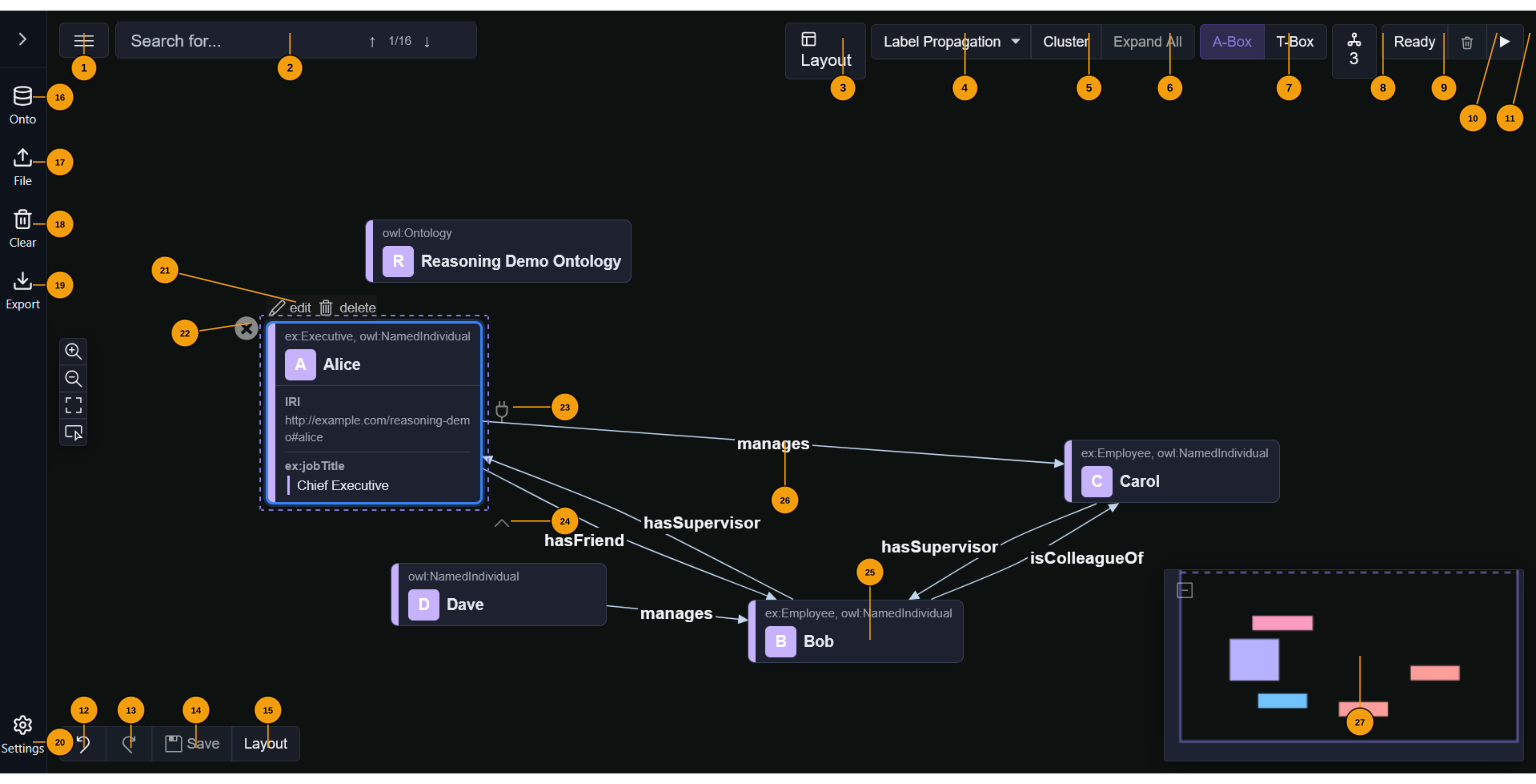
Top bar — left group
1 ☰ View menu — dropdown: Export canvas as PNG, Export as SVG, Print, Show/Hide Legend (toggles the namespace colour key panel).
2 Search — type to find entities by label or IRI. ↑↓ arrows or Enter cycle through matches on the canvas. The badge shows current match / total count.
Top bar — right group (action toolbar)
3 Layout — opens the layout popover: choose algorithm (Dagre horizontal/vertical, ELK layered/force/stress/radial, Reactodia-default), adjust spacing via a slider, toggle auto-layout (re-runs after every graph update).
4 Clustering algorithm selector — choose between None, Label Propagation, Louvain, or K-Means. The large-graph threshold (default 100 nodes, configurable in Settings) controls when auto-clustering runs on load.
5 Cluster — cluster visible nodes with the selected algorithm. Disabled when already clustered or algorithm is None.
6 Expand All — expand all collapsed cluster groups at once.
7 A-Box / T-Box — switch between instance-level individuals (A-Box, highlighted when active) and ontology-level classes/properties (T-Box).
8 Ontologies — shows the count of loaded ontologies. Click to open a popover listing each ontology with options to add/remove from autoload.
9 Reasoning status — shows the current OWL-RL state: Ready / ✓ Valid / ⚠ Warnings / Errors / spinner while running. Click to open the reasoning report (inferred triples grouped by rule).
10 Clear inferred (🗑) — removes all inferred triples without touching asserted data.
11 Run reasoning (▶) — triggers the OWL-RL reasoner. Inferred triples appear as amber dashed edges. Idempotent.
Authoring toolbar (bottom left)
12 Undo — undo last authoring change.
13 Redo — redo last undone change.
14 Save — commit all pending authoring edits to the RDF store in a single batch.
15 Re-layout — re-apply the current layout algorithm in-place.
Left sidebar
16 Onto — open the ontology loader. Enter any HTTP(S) URL or pick from pre-configured sources in Settings.
17 File — open a file picker for local RDF files. Supported: Turtle (.ttl), JSON-LD (.jsonld), RDF/XML (.rdf/.owl), N-Triples (.nt).
18 Clear — remove all loaded graphs and reset the canvas.
19 Export — export as Turtle, JSON-LD, or RDF/XML (dropdown). Generated entirely in the browser.
20 Settings — open the settings panel for default layout, clustering algorithm, large-graph threshold, ontology autoload URLs, workflow catalog, and other preferences.
Sidebar content (expanded)
When the sidebar is expanded (click the › toggle), the file operation buttons are shown in a compact grid. A Workflows accordion appears below when the workflow catalog is enabled in Settings. Drag a template card onto the canvas to instantiate it as a connected subgraph.
Node authoring halo (visible on selected node)
21 Edit / Delete — buttons that appear above a selected node. Edit opens the property editor (IRI, annotation properties, custom fields). Delete permanently removes the entity from the RDF store.
22 Remove (✕) — removes the node from the canvas view without deleting it from the RDF store.
23 Establish Link (plug icon, right side) — drag to another node to create a new edge. A dialog confirms the predicate with scored autocomplete from loaded ontologies.
24 Expand neighbours (∧, bottom) — load and show all RDF neighbours of the node on the canvas.
Canvas elements
25 Individual node — represents an RDF subject. The header shows the local name, a coloured namespace badge, and the OWL class. Properties (IRI, annotations, custom fields) are shown in an editable table on selection.
26 Edge / predicate — labelled arrow between two nodes. Amber dashed edges are inferred triples. Double-click to open the link property editor (scored autocomplete from ontologies).
27 Minimap — overview panel at bottom-right. Click to jump to a region, drag to pan.
Canvas interactions
- Add a node: type in 2 Search and press Enter to search the ontology; select a match to place it on the canvas.
- Authoring mode is always active: hover a node to reveal the halo (21–24).
- Drag the 23 Establish Link handle to another node to create a new edge.
- Double-click an edge (26) to open the link property editor.
- Scroll to zoom; drag the background to pan.
- Namespace legend panel: enable via 1 View menu → Show Legend. Click a namespace entry's pencil icon to rename its URI; renames propagate across all stored triples.
- Use the fit-view button in the canvas controls (left side, zoom icon group) to reset the viewport.
Developer utilities (window globals)
The following debug flags can be set in the browser console to enable diagnostic output. All are gated — they only activate when window.__VG_DEBUG__ is truthy (or config.debugAll is enabled in Settings):
window.__VG_DEBUG__— master debug gate. Set totrueto enable all[VG_*]diagnostic console output.window.__VG_LOG_RDF_WRITES— log RDF triple writes to the console.window.__VG_DEBUG_STACKS__— capture stack traces in debug messages.window.__VG_DEBUG_SUMMARY__— read-only object populated by the startup debug harness with fallback and timing data.
All flags are also persisted from config.debugAll (toggleable in Settings → Debug). Setting config.debugAll = true via Settings is the recommended way to enable diagnostics without console access.
Troubleshooting
- rdfUrl doesn't load on open:
- Confirm the URL is percent-encoded in the address bar.
- Open DevTools → Network and check the fetch request and response headers.
- Look for CORS errors (
Access-Control-Allow-Origin). - Check the console for RDF parser errors or application diagnostics.
- 403 when using certain query parameter names:
- Some servers intercept reserved query names. Use
?rdfUrl=...to avoid conflicts.
- Some servers intercept reserved query names. Use
- Graph is very large / slow:
- Increase the large-graph threshold in Settings or reduce the number of loaded triples.
- Clustering activates automatically above the threshold; use Expand All sparingly on huge graphs.
AI / MCP Integration
Ontosphere exposes a full Model Context Protocol tool surface so AI agents can build and reason over knowledge graphs through natural-language chat.
How it works
The app has two coupled layers:
- N3 RDF store — source of truth.
addNode/addLinkwrite triples here. - Reactodia canvas — visual mirror. Nodes are not created automatically from triples; you must call
addNodeto place a subject on canvas. After adding triples, canvas links refresh automatically. Nodes start collapsed — callexpandNodeorexpandAllto reveal annotation property cards.
OWL-RL reasoning writes inferred triples back to the store and refreshes the canvas.
Setup (Playwright / headless)
navigator.modelContext does not exist in headless Chromium. Inject the polyfill before the page loads using page.addInitScript:
await page.addInitScript(() => {
  const tools = {};
  Object.defineProperty(navigator, 'modelContext', {
    value: { registerTool: async (n, _d, _s, h) => { tools[n] = h; } },
    configurable: true,
  });
  window.__mcpTools = tools;
});

// After page load:
await page.evaluate(async () => {
  const mod = await import('/src/mcp/ontosphereMcpServer.ts');
  await mod.registerMcpTools();
});

// Call a tool:
await page.evaluate(async ([name, params]) => window.__mcpTools[name](params),
  ['addNode', { iri: 'ex:alice', typeIri: 'foaf:Person', label: 'Alice' }]);
In a browser with native navigator.modelContext, tools register automatically on app load.
Example output
An AI agent built this from scratch in one session — full demo with tool calls →

Recommended workflow
loadOntology (TBox)
  → addNode ×N  (ABox individuals, rdf:type set)
  → addLink ×N  (object-property triples, edges appear on canvas)
  → runLayout   (dagre-lr recommended)
  → expandAll   (reveal annotation property cards)
  → runReasoning (infer subClass / domain / range entailments)
  → fitCanvas + exportImage   (SVG snapshot, token-efficient)
  → exportGraph(turtle)       (final deliverable)
URL parameters
| Parameter | Effect |
|---|---|
?url=<encoded-url> |
Load RDF from URL on startup |
?ontology=foaf |
Pre-load FOAF ontology |
?loadImports=false |
Skip owl:imports auto-loading |
Demo
| Demo | Final state |
|---|---|
| FOAF social network Build a social network, extend FOAF with employment classes, run reasoning |
|
| OWL-RL reasoning Build TBox + ABox, infer types via domain/range and transitivity |
 |
| Scene ontology Load an external ontology, author individuals, export Turtle |
 |
| Manchester Pizza Tutorial Full OWL pizza ontology — classes, disjointness, properties, OWL-RL reasoning |
 |
Regenerate:
npm run demo:all
# or individually:
node scripts/run-demo.mjs docs/mcp-demo/seeds/foaf-social-network.md
node scripts/run-demo.mjs docs/mcp-demo/seeds/reasoning-demo.md
node scripts/run-demo.mjs docs/mcp-demo/seeds/scene-ontology.md
node scripts/run-demo.mjs docs/mcp-demo/seeds/pizza-tutorial.md
Full tool declarations with input schemas: public/.well-known/mcp.json
Using Ontosphere with any AI
The demo scripts work against the live deployment — no local server needed. Any AI that can drive a browser (Claude Code, headless Playwright, computer-use agents) can use Ontosphere directly via its MCP tools.
Claude Code / Playwright (full automation)
Point the demo scripts at the deployed app:
node scripts/mcp-demo-reasoning.mjs --url https://thhanke.github.io/ontosphere
node scripts/mcp-demo-foaf.mjs       --url https://thhanke.github.io/ontosphere
The script opens a headless browser, navigates to the URL, registers the MCP tools, then drives the full workflow — building TBox + ABox, running reasoning, taking snapshots, exporting Turtle — exactly as shown in the demo documents.
ChatGPT, Gemini, Claude.ai — AI Relay Bridge
The AI Relay Bridge connects any AI chat tab to Ontosphere with no server, extension, or copy-paste. A bookmarklet watches the AI's output for backtick-wrapped JSON-RPC 2.0 tool calls, executes them in Ontosphere via a BroadcastChannel popup, and injects JSON-RPC responses back into the chat input automatically.
➡️ Full setup guide: docs/relay-bridge.md
Setup (one time):
- Open Ontosphere, expand the AI Relay sidebar panel
- Drag the Ontosphere Relay button to your browser bookmark bar
- Go to your AI chat tab and click the bookmark — a small relay popup opens
Starter prompt (paste into your AI chat after clicking the bookmarklet):
You are connected to Ontosphere via a relay. A script in this tab intercepts your tool calls, runs them in Ontosphere, and injects results back as a user message.

Output format — one JSON-RPC 2.0 call per line, backtick-wrapped:
`{"jsonrpc":"2.0","id":<N>,"method":"tools/call","params":{"name":"<toolName>","arguments":{...}}}`

Call help first to get full instructions and the tool list:
`{"jsonrpc":"2.0","id":0,"method":"tools/call","params":{"name":"help","arguments":{}}}`
The relay handles execution and result feedback automatically — no manual copy-paste needed.
Recording demo videos
See docs/demo-scripts/HOWTO.md for the full guide.
Two styles of demo video are supported:
Seed-driven — write a seed markdown file in docs/mcp-demo/seeds/ with JSON-RPC
tool calls embedded in backtick blocks. The runner parses the seed and executes each
turn directly against window.__mcpTools. Existing seeds: foaf-social-network,reasoning-demo, scene-ontology, pizza-tutorial.
Chat-style (side-by-side) — open demo-stage.html (mock chat left, app right),
inject messages programmatically via addChatMessage(), and call tools on the app
iframe via callToolOnStage(). No relay popup needed. Example: pizza-tutorial-chat.
Demo videos
| Video | Description |
|---|---|
| advert-intro.mp4 | Relay bookmarklet — mock chat + Ontosphere side by side |
| foaf-social-network.mp4 | AI builds a FOAF social graph with OWL-RL reasoning |
| reasoning-demo.mp4 | AI builds an OWL ontology and runs OWL-RL reasoning |
| scene-ontology.mp4 | AI builds a film scene ontology on BFO/RO upper ontology |
| pizza-tutorial.mp4 | Manchester Pizza Ontology — class hierarchy, disjointness, OWL-RL reasoning |
| pizza-tutorial-chat.mp4 | OWL pizza tutorial as AI tutor lesson, side-by-side chat |
To re-record all videos:
npm run demo:video # starts dev server, records, encodes, kills server
Contributing / Development notes
- Canvas & top bar: src/components/Canvas/
- Cluster algorithms: src/components/Canvas/core/clusterAlgorithms/
- Layout functions: src/components/Canvas/layout/
- Search widget: src/components/Canvas/search/
- RDF worker and protocol: src/workers/
- MCP server and tools: src/mcp/
- Tests: src/tests/ — run with
npm test.
License & authors
Check the repository root for licence and contributor information.
Yorumlar (0)
Yorum birakmak icin giris yap.
Yorum birakSonuc bulunamadi