notch-agent-hud
Health Pass
- License — License: MIT
- Description — Repository has a description
- Active repo — Last push 0 days ago
- Community trust — 10 GitHub stars
Code Fail
- rm -rf — Recursive force deletion command in scripts/make-app.sh
- rm -rf — Recursive force deletion command in scripts/release.sh
Permissions Pass
- Permissions — No dangerous permissions requested
No AI report is available for this listing yet.
Notch HUD for Claude Code and Codex: sessions that need you, working agents, per-subscription usage with pace and alerts, and a scheduled 5-hour window warm-up, at the top of your Mac's screen

NotchHUD
Your coding agents, at the top of the screen.
A tiny macOS HUD around the notch that shows which Claude Code and Codex sessions are working,
which need you, and how much of each subscription's quota is left, with the pace you are burning it at,
alerts before you hit a limit, and a scheduler that starts your 5-hour window before you sit down.


What it does
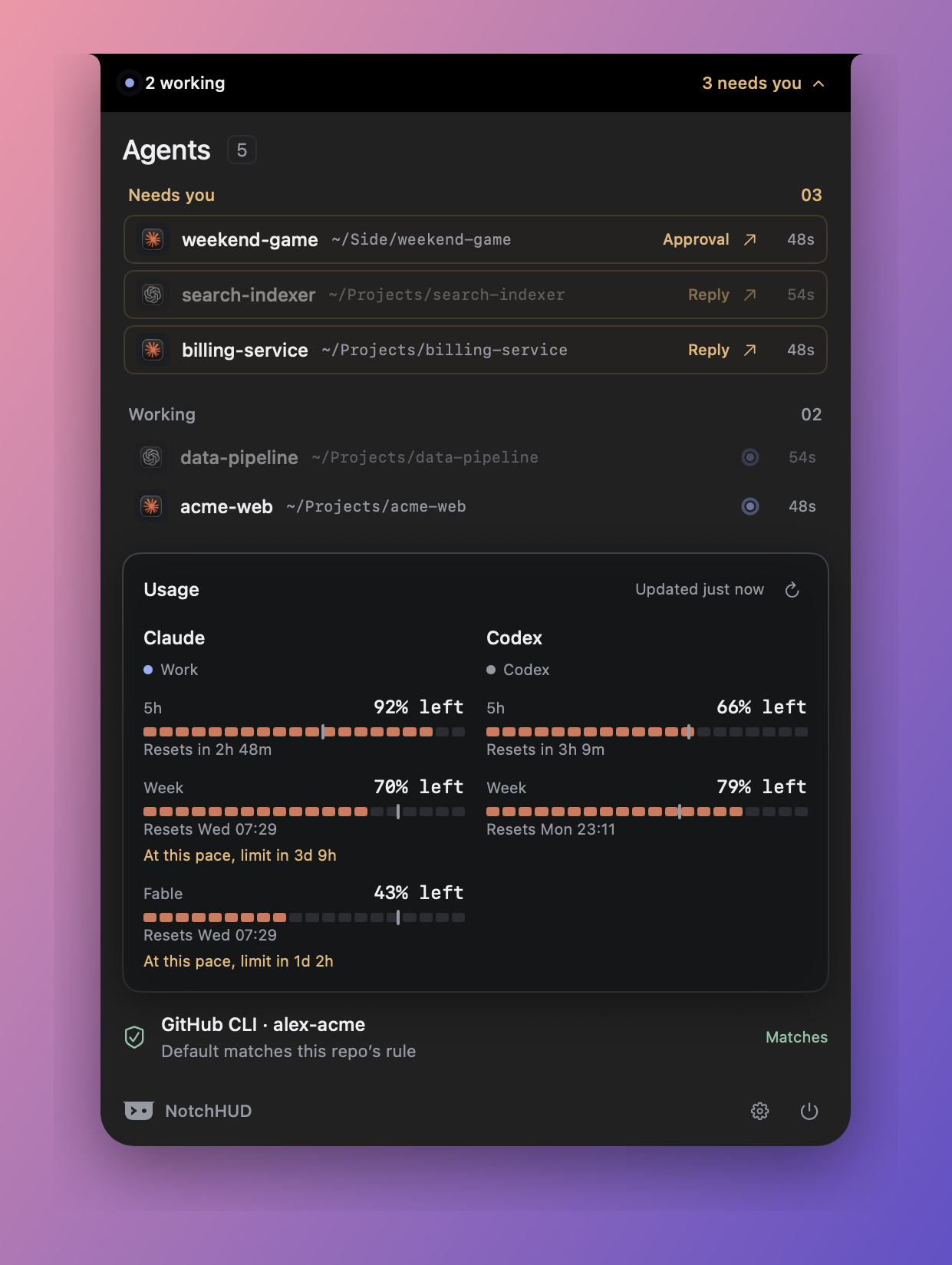
- A pill around the notch (or a small capsule under the menu bar on other displays) shows
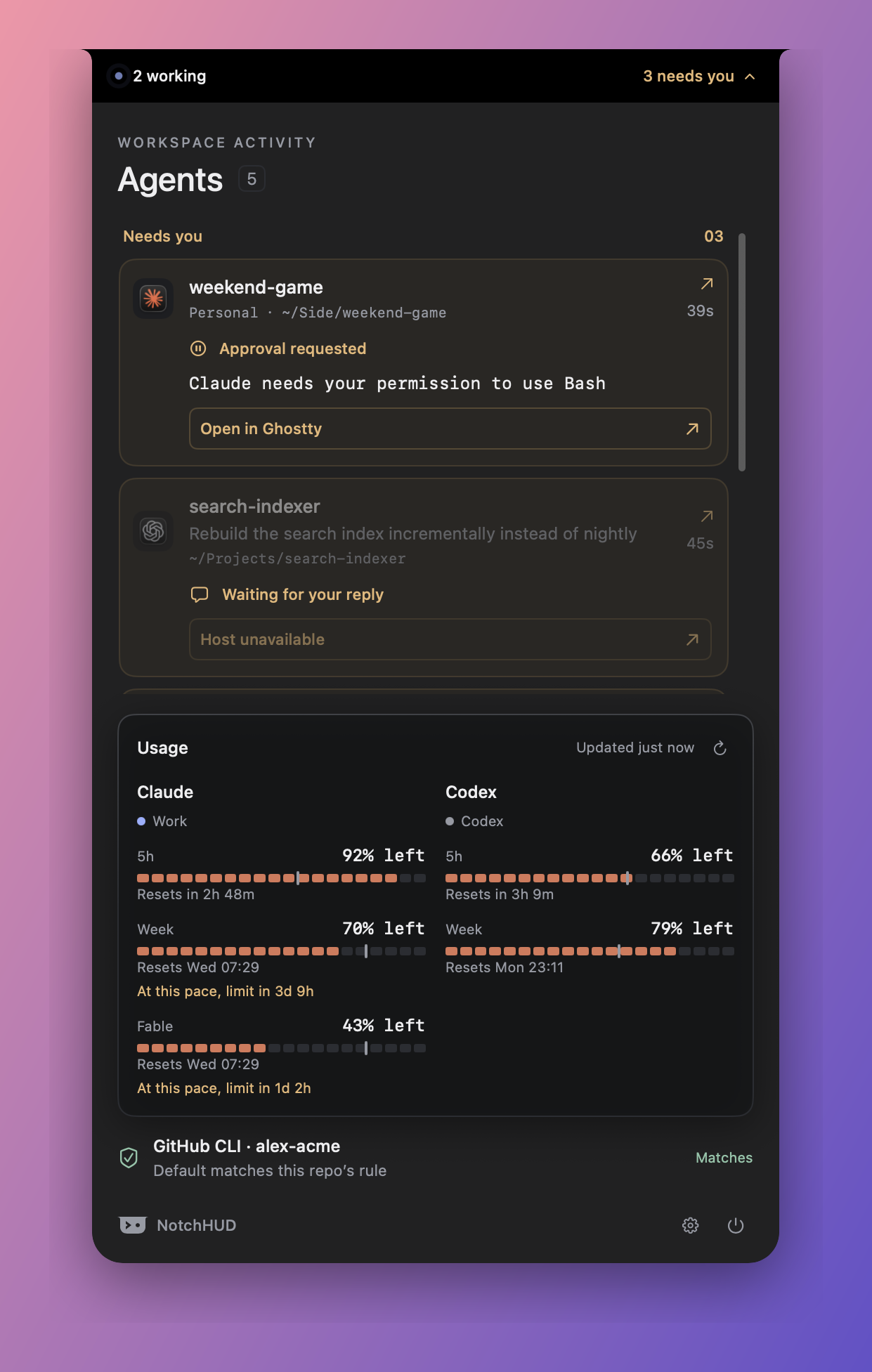
2 working · 1 needs youat a glance. The working dot pulses while agents are busy. - Click to expand. Sessions that need you come first, as cards with the full request text and an Open in Ghostty button. Working and completed sessions follow. Click any row to jump to the exact terminal tab.
- Usage per subscription. 5-hour and weekly windows for every Claude account you own and for Codex, with reset times, as bars or rings, read as used or remaining. The active Claude login uses the same endpoint as
/usageinside Claude Code, so the numbers are exact; a per-model weekly cap (Fable, say) gets a meter of its own. Codex windows are placed by their length, so a weekly-only plan shows a weekly meter and nothing pretending to be a 5-hour one. A pace tick on every meter shows how far the window has run; when quota is going faster than time, one line says when the limit lands. - Alerts and a warm-up. Notification Center tells you when a window nears its limit, hits it, or resets. An optional schedule says hi to Claude early in the morning so the first 5-hour window is already running when you sit down.
- GitHub account guard. Reads the active
ghaccount and warns when it does not match the one your rules expect for the repository you are working in, with a one-click Switch. - Multiple accounts, your labels. Two work accounts, two personal ones, whatever you have. You name them; the app never guesses what a label means.
- Three densities, light and dark, a usage-only mode for when you just want a quota meter, and a setup flow that takes about a minute.
- Updates itself. When a newer release is on GitHub, an Update to x.y.z button appears in the panel footer. It downloads the notarized disk image, verifies the published checksum and Gatekeeper's verdict, replaces the app, and relaunches.

Install
- Download the latest
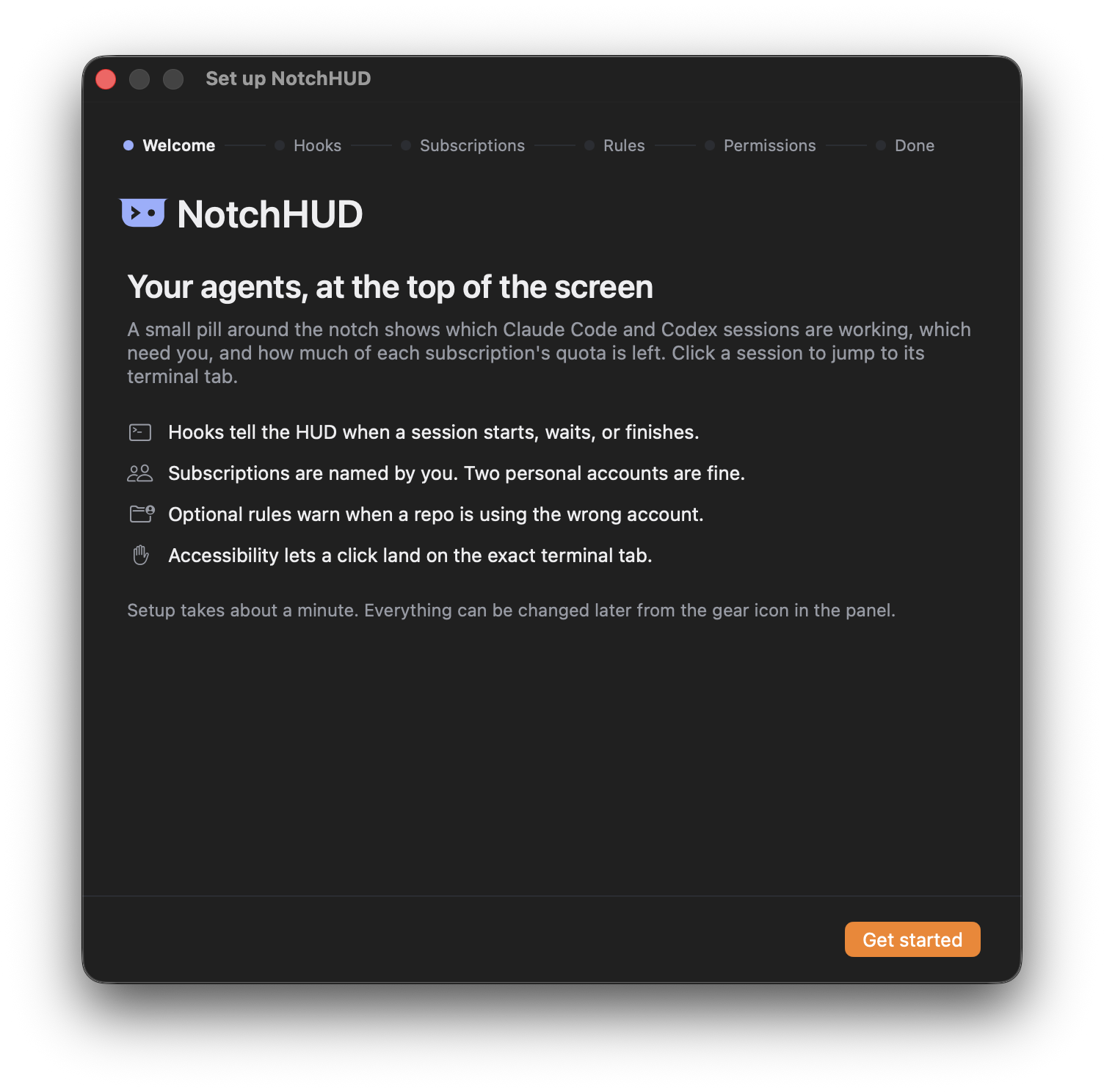
NotchHUD-x.y.z.dmgfrom Releases, open it, and drag NotchHUD to Applications. - Launch it. The pill appears at the top of the screen and the setup window opens.
- Follow setup: it installs the Claude Code hooks, names your subscriptions from the login it detects, lets you add repository rules (optional), and asks for the Accessibility permission that terminal-tab focus needs.
To start it at login: System Settings → General → Login Items → add NotchHUD.
Releases are signed with a Developer ID and notarized, so macOS opens them without warnings.
How it works
- Claude Code sessions report through hooks. Setup adds a small relay script to five hooks in
~/.claude/settings.json(SessionStart, UserPromptSubmit, Notification, Stop, SessionEnd) and keeps a timestamped backup of the file. The relay tags each event with the hosting app, theclaudeprocess id, and the active login, then POSTs it tohttp://127.0.0.1:48618/event. Nothing leaves your Mac. Cloud sessions cannot reach localhost and will not appear. - Codex sessions are detected by watching
~/.codex/sessions/*.jsonl: fresh writes mean Working, quiet means Needs input, half an hour of silence means Recent. The rollout header supplies the working directory and the first prompt as a title. Codex's own usage report inside the rollout is the fallback for the usage strip. - Usage for the active Claude login comes from Anthropic's OAuth usage endpoint, using the token Claude Code already stores in the Keychain. The token is read in-process, sent only to
api.anthropic.com, and never written anywhere. Codex usage comes the same way from the endpoint the Codex app uses, with the token in~/.codex/auth.json, sent only tochatgpt.com. Other Claude accounts keep their last exact figures until those windows expire, then fall back to estimates summed from transcripts, where a rate-limit event teaches the ceiling. - Self-healing. Hook events can be lost when the HUD restarts, so states are re-checked every 15 seconds against the transcript's modification time and the process list. Sessions persist across restarts and recents are kept for 7 days.
- Terminal focus. Clicking a row activates the hosting app. For Ghostty it uses the native AppleScript API to select the terminal by working directory. Orca sessions use the terminal handle they were started with. Other terminals get app-level activation.
Settings
Open Settings from the gear icon in the panel footer or with open notchhud://settings. Edits apply live and save to ~/.notchhud/config.json, which is also watched, so a hand edit in a text editor applies without a relaunch.
- General — density (Minimal, the default, one line per session so long lists fit; Compact; or Cozy, with full cards), open on hover (off by default: the pill is click-to-open and stays open until clicked again), appearance (System, Light, Dark), and the accent that colors the working indicator.
- Usage — show quota as Used (
34%, a meter that fills) or Remaining (66% left, a meter that drains); the meter as Bars or Rings (the week nested inside the 5-hour window, tightest number in the middle); and Quota on the pill, which puts the subscription closest to a limit where "All clear" would be. - Alerts — one notification when a window crosses the threshold (50/70/80/90%), one when it hits the limit, and one when a window that ran hot resets. macOS asks once to allow them; Send a test checks the permission.
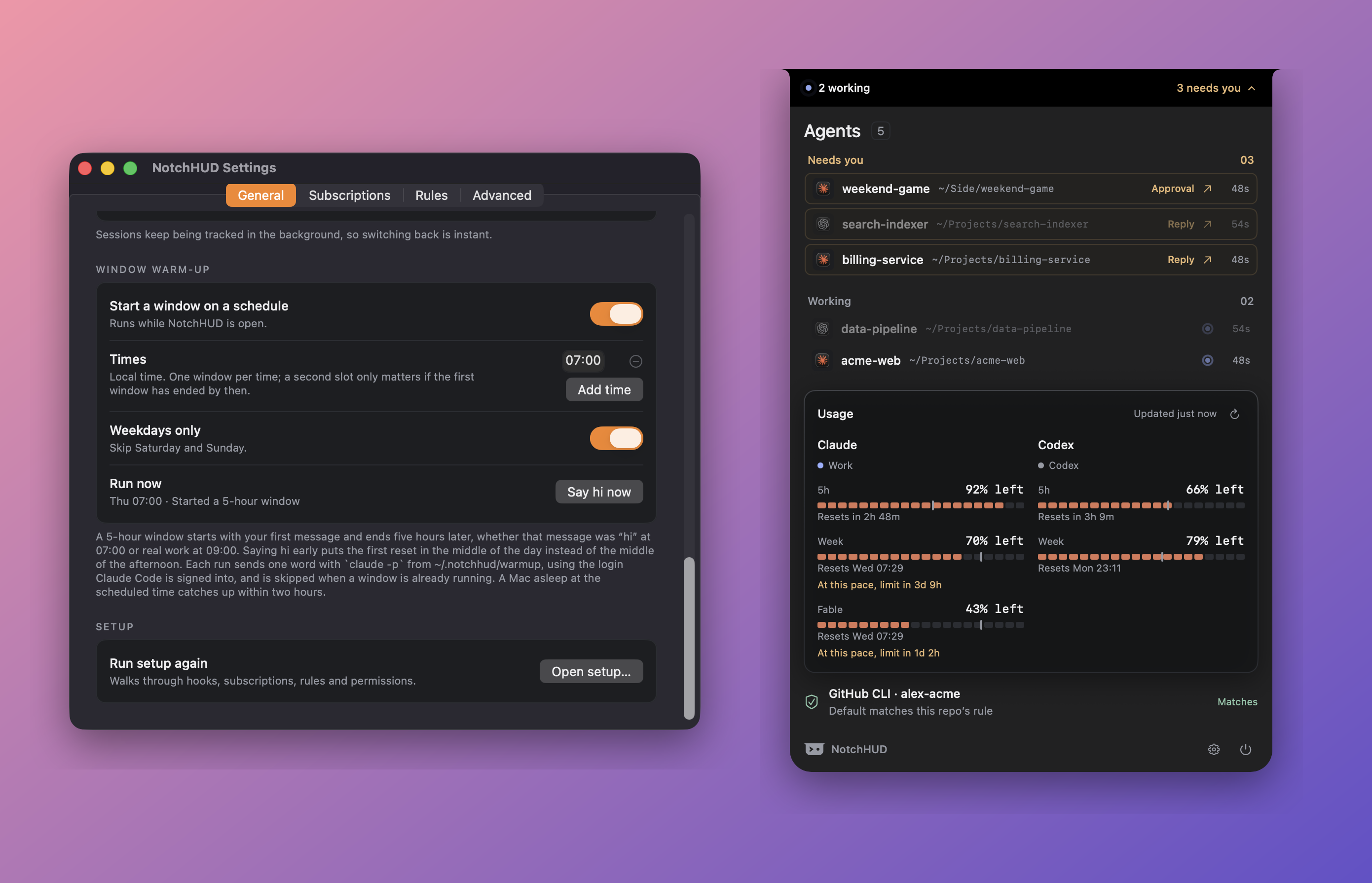
- Window warm-up — a 5-hour window starts with your first message and ends five hours later, whether that was "hi" at 07:00 or real work at 09:00. Set one or more times (weekdays only by default) and NotchHUD runs
claude -p hifrom~/.notchhud/warmupat that moment, using the login Claude Code is signed into. It is skipped when a window is already running, a Mac asleep at the time catches up within two hours, and the last outcome shows in Settings. Each run costs one short message. - Updates — automatic checks at launch and every six hours (one anonymous request to GitHub; switch it off here), a Check now button, and Install when a newer release exists.
- Usage-only mode — the pill shows each subscription's tightest window as a colored dot and percentage, and the panel shows just the usage grid and the GitHub guard. Sessions that need you still break through unless you silence that too.
- Usage — show quota as Used (
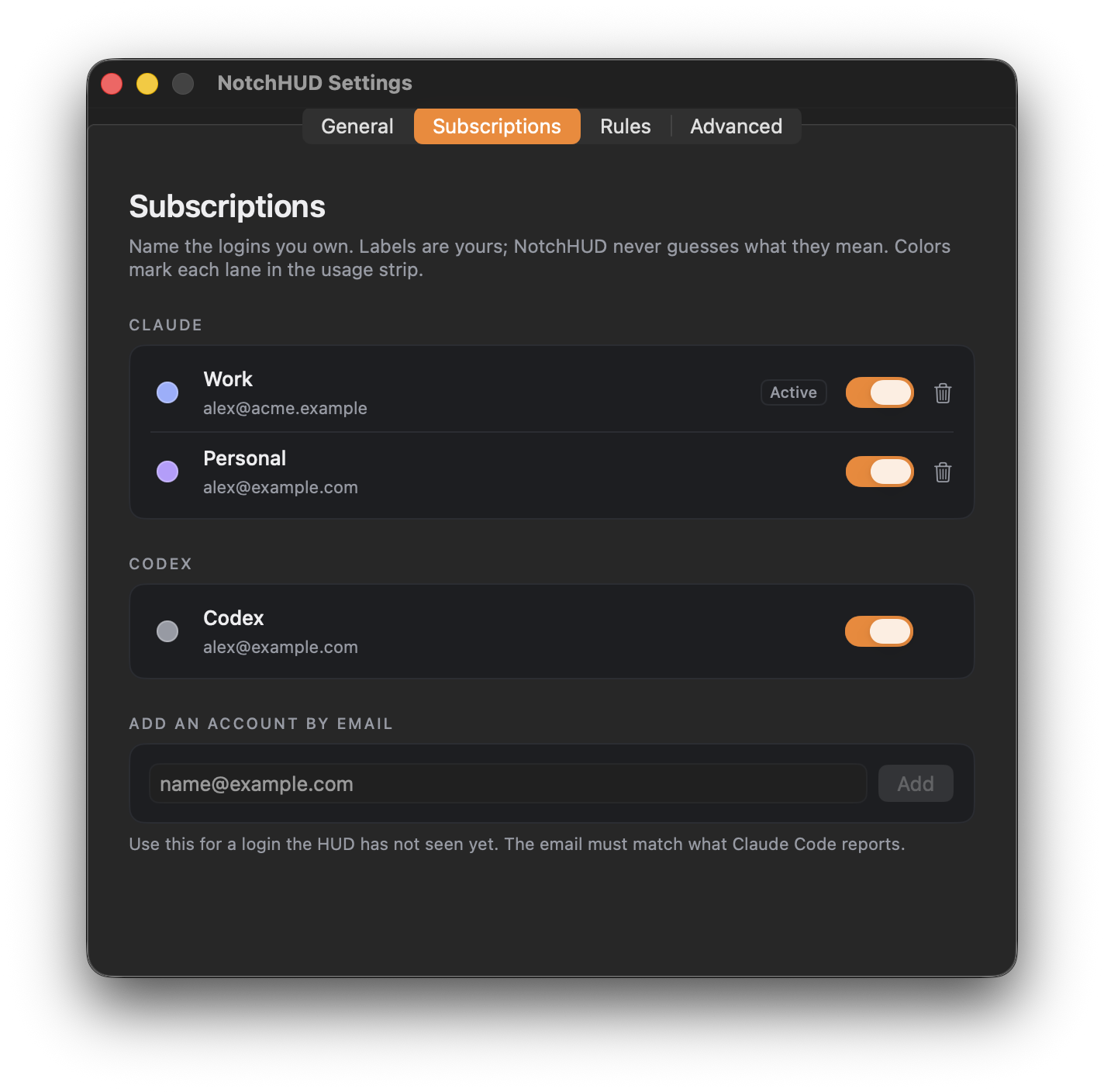
- Subscriptions — the logins you own. Rename each in your own words, pick a lane color, hide a lane without deleting it, remove accounts you no longer use. Logins the HUD has seen but you have not named appear under Seen on this Mac with a one-click Name it. Codex is listed once it is detected.
- Rules — folder and GitHub-owner rules, each with an expected subscription and an expected
ghaccount. Owner rules beat folder rules, and among folders the longest match wins. Folders come from a picker or from suggestions based on where your sessions actually run. - Advanced — hook status with a one-click installer, Accessibility status, a switch for exact usage from Anthropic's API (reads the token Claude Code keeps in the Keychain; off means estimates only and no Keychain access), the default terminal, the Codex app bundle id, and the relay port.
Config file
~/.notchhud/config.json is created on first run. Every field is optional.
{
  "version": 2,
  "port": 48618,
  "terminalApp": "Terminal",
  "codexApp": "com.openai.codex",
  "subscriptions": [
    { "id": "5D2A…", "provider": "claude", "email": "[email protected]", "label": "Work", "accent": "blue", "visible": true },
    { "id": "9F10…", "provider": "claude", "email": "[email protected]", "label": "Home", "accent": "violet", "visible": true },
    { "id": "codex", "provider": "codex", "email": null, "label": "Codex", "accent": "graphite", "visible": true }
  ],
  "rules": [
    { "id": "…", "kind": "pathPrefix", "value": "~/Work", "ghAccount": "me-work", "subscriptionID": "5D2A…" },
    { "id": "…", "kind": "owner", "value": "company", "ghAccount": "me-work", "subscriptionID": "5D2A…" }
  ],
  "preferences": {
    "density": "minimal", "appearance": "system", "accent": "blue",
    "usageOnly": false, "attentionBreaksThrough": true, "onboardingCompleted": true,
    "useUsageAPI": true, "openOnHover": false,
    "usageValue": "used", "usageMeter": "bars", "pillShowsUsage": false,
    "usageAlerts": true, "alertThreshold": 80, "checkForUpdates": true
  },
  "warmup": { "enabled": false, "times": ["07:00"], "weekdaysOnly": true, "graceMinutes": 120 }
}
accentis one ofblue violet teal green amber rose graphite. Amber and red are reserved for state (attention, limits) and never used as a lane color's meaning.- A login not listed under
subscriptionsshows up as an unlabeled lane named after the email's local part. usageValueisusedorremaining;usageMeterisbarsorrings;alertThresholdis a percent from 1 to 99. Warm-uptimesareHH:mmin local time andgraceMinutes(5 to 720) is how late a missed slot may still run.- Files written next to it:
sessions.json(tracked sessions),usage-ceilings.json(learned limits),usage-alerts.json(which alerts have fired),notifications.log(permission answers and post results, for when a notification does not show),warmup-runs.json(warm-up outcomes),notify.sh(the hook relay),focus.log(terminal-focus diagnostics), andwarmup/, the scratch directory the warm-up runs in. GET http://127.0.0.1:48618/statereturns the current sessions, usage, subscriptions and guard as JSON. It is bound to localhost only, but note that it includes your account emails and session paths in clear text for any local process that asks.
Older v1 files (claudeAccounts, pathAccounts, ownerAccounts) are migrated automatically on first launch and kept as config.v1.backup.json.
URL scheme
| URL | Effect |
|---|---|
notchhud://settings |
Open Settings (/general, /subscriptions, /rules, /advanced pick a tab) |
notchhud://setup |
Run the setup flow again |
notchhud://panel/open · /close |
Pin the panel open or collapse it, for scripts and screenshots |
notchhud://warmup/run |
Say hi to Claude now, as the warm-up schedule would |
notchhud://alerts/test |
Post one test notification |
notchhud://update/check · /install |
Ask GitHub for the latest release now; install a release the app already knows is newer |
Privacy
Everything stays on your Mac. NotchHUD makes two kinds of network call. One is for exact usage: to api.anthropic.com for the active Claude login, using the token Claude Code already holds, and to chatgpt.com for Codex, using the token in ~/.codex/auth.json; neither token is persisted or logged, the responses are never cached to disk, and the whole thing can be switched off in Advanced. The other is an anonymous request to api.github.com for the latest release, at launch and every six hours, carrying nothing about you; switch it off under General → Updates. Installing an update downloads the disk image from GitHub Releases. The warm-up, when you turn it on, runs the claude command line the same way you would, and that sends one short message to your Claude account. The HUD reads ~/.claude transcripts and ~/.codex rollouts to detect sessions and estimate usage, runs git to read a repository's origin, and reads the gh CLI's hosts.yml to know which account is active. No analytics.
Build from source
Requires Xcode 26 or newer (the panel uses the macOS 26 glass effects behind an availability check, so the SDK must be present). The app itself runs on macOS 14 or newer.
git clone https://github.com/thilinaa/notch-agent-hud.git
cd notch-agent-hud
swift test                 # 43 tests
./scripts/make-app.sh      # → build/NotchHUD.app
open build/NotchHUD.app
./scripts/install-hooks.sh # optional: install the Claude Code hooks from the terminal
Set NOTCHHUD_HOME=/some/dir when launching to point the whole app at another home directory (config, sessions, Claude and Codex files, gh config); handy for testing and for screenshots that must not show your real data.
make-app.sh signs with a Developer ID certificate if you have one, otherwise with an Apple Development certificate, otherwise ad-hoc. Ad-hoc builds lose the Accessibility grant on every rebuild, which is why a real certificate is preferred for day-to-day development.
Cutting a release
Tag a commit vX.Y.Z and push the tag. The release workflow builds with the hardened runtime, signs with Developer ID, notarizes, staples, wraps a DMG, and attaches it to a GitHub Release. It needs five repository secrets, listed at the top of that file. The same steps run locally with ./scripts/release.sh vX.Y.Z when the certificate and a notarytool keychain profile are present.
Contributing
Issues and pull requests are welcome. Keep the graphite surfaces and reserve color for state; the design language is described in the comments at the top of Sources/NotchHUD/HUDView.swift. Run swift test before opening a PR. New behavior that touches config parsing, migration, hooks, or rules should come with a test in Tests/NotchHUDTests.
License
Reviews (0)
Sign in to leave a review.
Leave a reviewNo results found