threadlines
Health Uyari
- License — License: MIT
- Description — Repository has a description
- Active repo — Last push 0 days ago
- Low visibility — Only 5 GitHub stars
Code Gecti
- Code scan — Scanned 12 files during light audit, no dangerous patterns found
Permissions Gecti
- Permissions — No dangerous permissions requested
Bu listing icin henuz AI raporu yok.
An open-source desktop workspace for Codex and Claude Code with a live browser, project files, and real source control.
Threadlines


Website · Download · What's new in v0.3 · Latest release
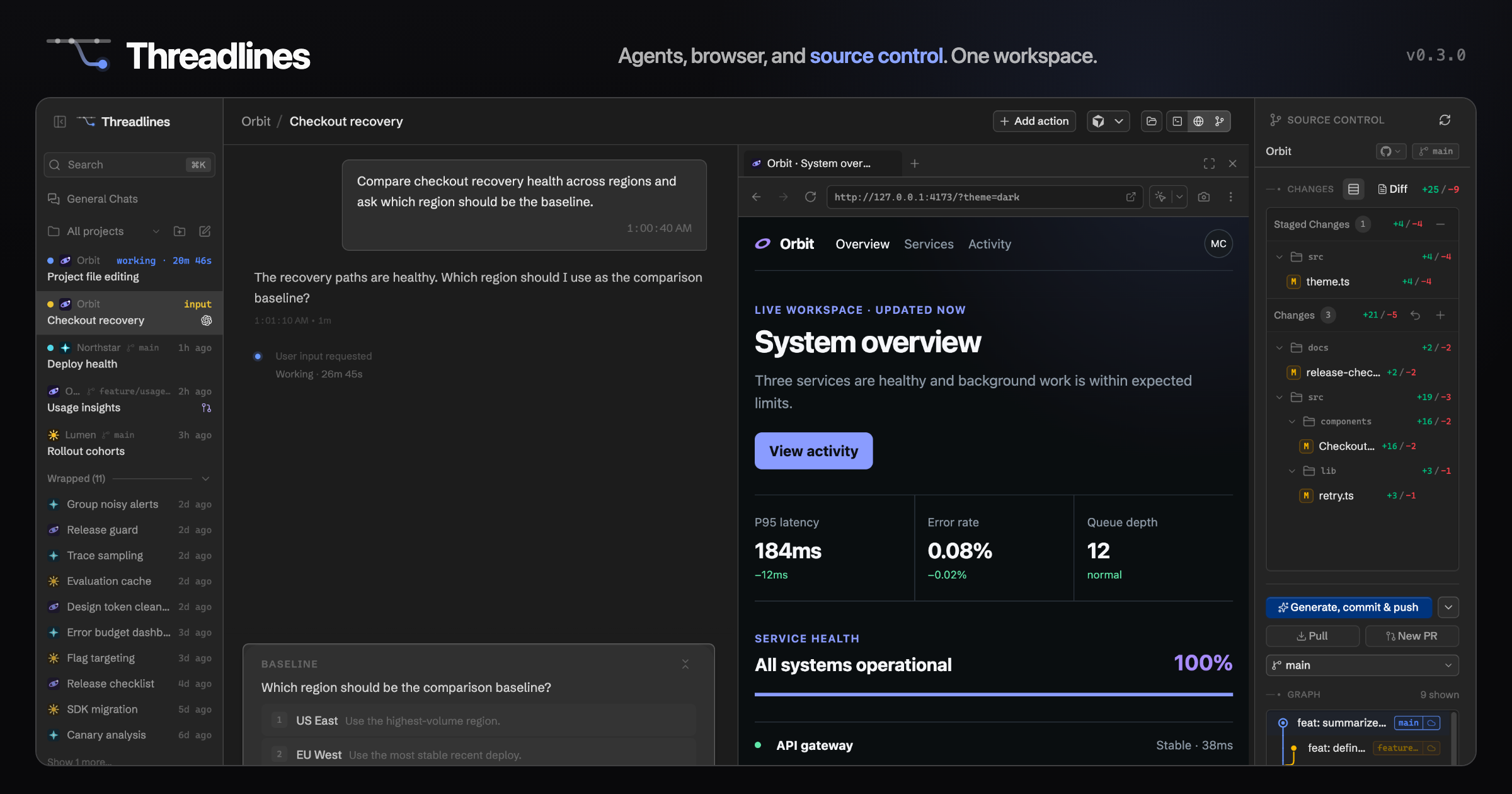
Threadlines is an open-source desktop workspace for Codex and Claude Code. Keep
the agent conversation, a live browser, project files, terminal, and source
control open together so you can see, steer, and recover agent work without
reconstructing context across tools.
Why Threadlines
- A browser beside every thread. Review visual changes and send the exact
page state back to the agent without leaving the workspace. - Source control you can act on. Inspect per-file changes and the commit
graph, then commit, push, and open a pull request from the same app. - Exact context instead of repeated prompts. Attach selected reply, code,
or terminal lines directly to the next message. - Nothing runs invisibly. Track tasks, subagents, and background processes,
including their live state and stop controls. - Durable, provider-flexible sessions. Resume work after restarts and switch
between Codex and Claude Code without losing the thread or working tree. - Set up in minutes. A first-run checklist installs the agent CLIs with one
click and signs you in without leaving the app. - Your phone is a client. Pair it with a QR code and check on running
threads from anywhere, against the desktop app or a self-hosted server. - One usage picture across machines. Token and cost dashboards read the
agents' own transcripts on every computer you run, merged into one view.
Installation
[!NOTE]
Threadlines drives locally installed coding agents:
Codex CLI and
Claude Code. If they are missing,
the first-run setup installs them with one click and signs you in without
leaving the app. Installing them yourself beforehand works too.
Desktop app
Install the latest stable desktop app from the
download page or
GitHub Releases.
Signed Windows and macOS builds and a Linux x64 AppImage are published through
the desktop release workflow. Linux builds are unsigned; integrity for
auto-updates is verified through the updater manifest hashes.
Then open a local project and start a thread with the provider you already use.
Self-host with Docker
Run Threadlines on a VPS or home server and connect from any browser or your
phone:
docker run -d --name threadlines --restart unless-stopped \
  -p 3773:3773 \
  -v threadlines-home:/home/threadlines \
  -v /path/to/your/repos:/workspace \
  ghcr.io/threadlines/threadlines:latest
See docker/README.md for the full guide, including phone
pairing and safe remote access.
Server CLI
The npm package supports advanced CLI/server and remote-bootstrap usage:
npx @threadlines/server@latest --help
[!IMPORTANT]
The server requires Node.js 22.22.2+, 24.15+, or 26+. Odd-numbered Node
releases are not supported.
Local development
vp install --frozen-lockfile
vp run dev
On Windows, clone the repository outside OneDrive-synced folders
(Desktop/Documents by default) — syncing node_modules, .git, and build
output noticeably slows installs, builds, and file watching.
Local desktop artifact
vp install --frozen-lockfile
vp run dist:desktop:artifact -- --platform win --target nsis --arch x64 --build-version 0.3.0
The artifact is written to release/.
Supported providers
Codex and Claude Code are the actively maintained providers today. Drivers for
other agents exist in the codebase, and support for more providers is open for
the future as the product grows.
Origins
Threadlines began as a fork of T3 Code
and has since grown its own product direction, branding, release pipeline,
provider orchestration, and source-control workflow. Upstream remains a source
of inspiration, and improvements flow back when they fit.
The upstream Git history and MIT attribution are kept intact.
See docs/fork-separation.md for the origins and
compatibility policy.
Configuration
New configuration should use THREADLINES_* environment variables:
- new local configuration should use
THREADLINES_*environment variables; - new installs default to a separate
~/.threadlinesdata directory; - the
threadlinesCLI is the supported command.
Usage analytics are enabled by default in official builds and can be disabled
from Settings. See docs/telemetry.md for what Threadlines
collects and what it deliberately does not collect.
Releases
Threadlines keeps the upstream Git history but uses its own app versions starting
at 0.0.1.
See docs/release.md for the desktop release workflow,
platform status, signing requirements, and auto-update behavior.
Development Notes
This is still early WIP. Expect sharp edges.
Do not commit .env files, tokens, private keys, local app data, customer data,
or screenshots containing secrets. See
SECURITY_GUARDRAILS.md before publishing code or
release artifacts.
Before local development, prepare the environment and install dependencies:
# Optional: only needed if you use mise for dev tool management.
mise install
vp install
Read CONTRIBUTING.md before opening an issue or PR.
Support development
Threadlines is free and open source. Optional sponsorships help cover ongoing
development and operating costs such as domains, code signing, CI, and hosted
Phone Link infrastructure. See SUPPORT.md for the no-perks
sponsorship policy and support channels.
Yorumlar (0)
Yorum birakmak icin giris yap.
Yorum birakSonuc bulunamadi