agent-durbar
Health Uyari
- License — License: MIT
- Description — Repository has a description
- Active repo — Last push 0 days ago
- Low visibility — Only 5 GitHub stars
Code Basarisiz
- child_process — Shell command execution capability in .github/scripts/ci-changes.js
- process.env — Environment variable access in .github/scripts/ci-changes.js
- fs module — File system access in .github/scripts/ci-changes.js
- rm -rf — Recursive force deletion command in .github/scripts/ci-changes.sh
Permissions Gecti
- Permissions — No dangerous permissions requested
Bu listing icin henuz AI raporu yok.
Office-style desktop app to see, chat with and coordinate your digital agents across GitHub Copilot, Claude Code and OpenAI Codex, on Linux, macOS and Windows. Open source, MIT. Independent project, not affiliated with GitHub, Microsoft, Anthropic or OpenAI.
Agent Durbar
A calm command center for your AI agents

When you run many agent sessions across several windows, you end up watching your digital agents instead of working. Agent Durbar puts them in one office and shows you only the ones that need you. It is for anyone who works with agents, not only developers: a room is any folder an agent works in.
Download the latest for macOS, Windows or Linux (unsigned, see Install) · Website
Works with: GitHub Copilot, Claude Code and OpenAI Codex (agent apps). Not yet: signed builds (your OS warns the first time), auto-update, and Windows tried by hand only once; the spending limit is soft (known limits).
Status: first stable release, latest
v0.1.18, unsigned. What changed: CHANGELOG.
What it does
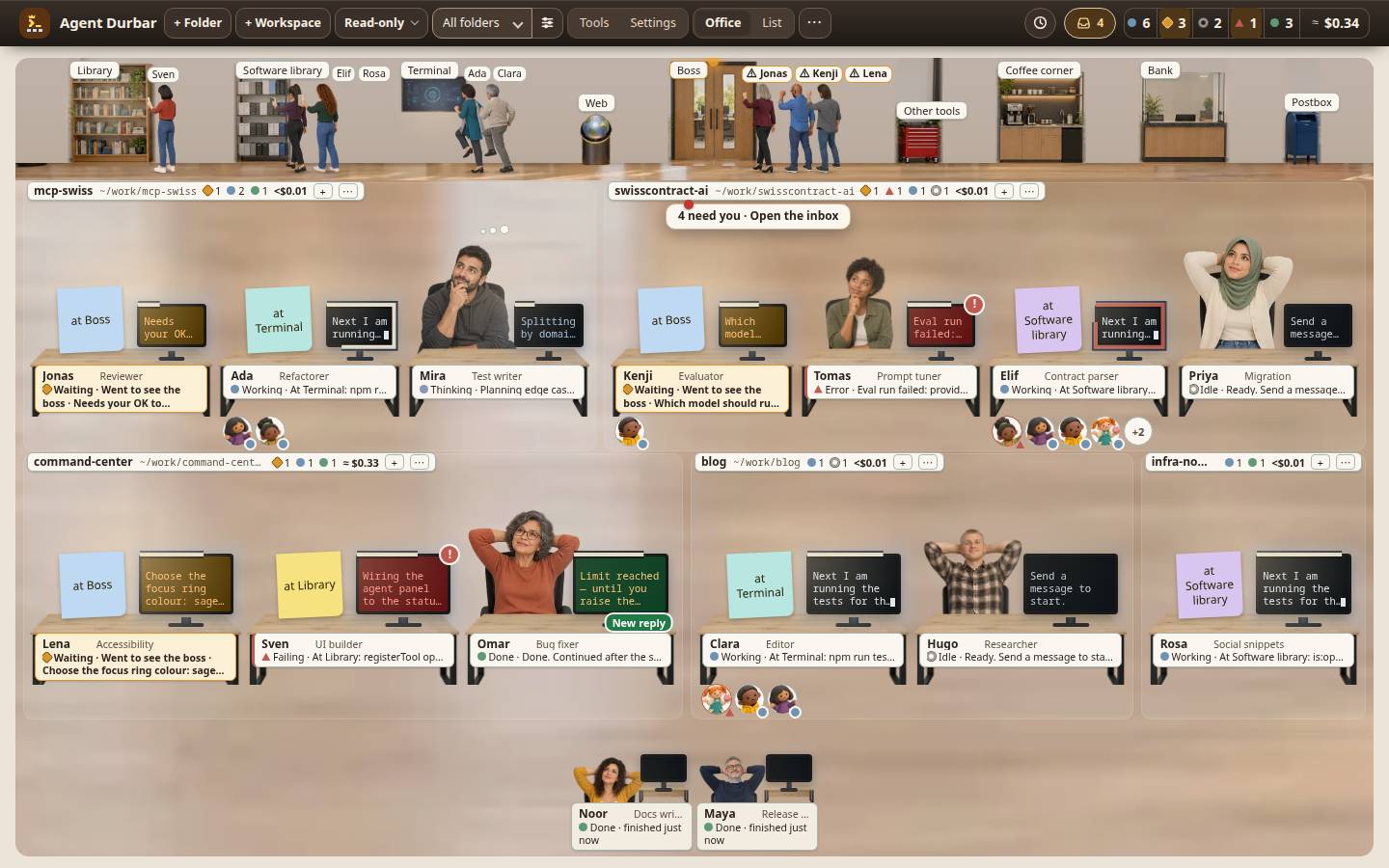
- An office, not a log: every agent is a person at a desk in its folder's room; you see who is working, waiting for you or in trouble.
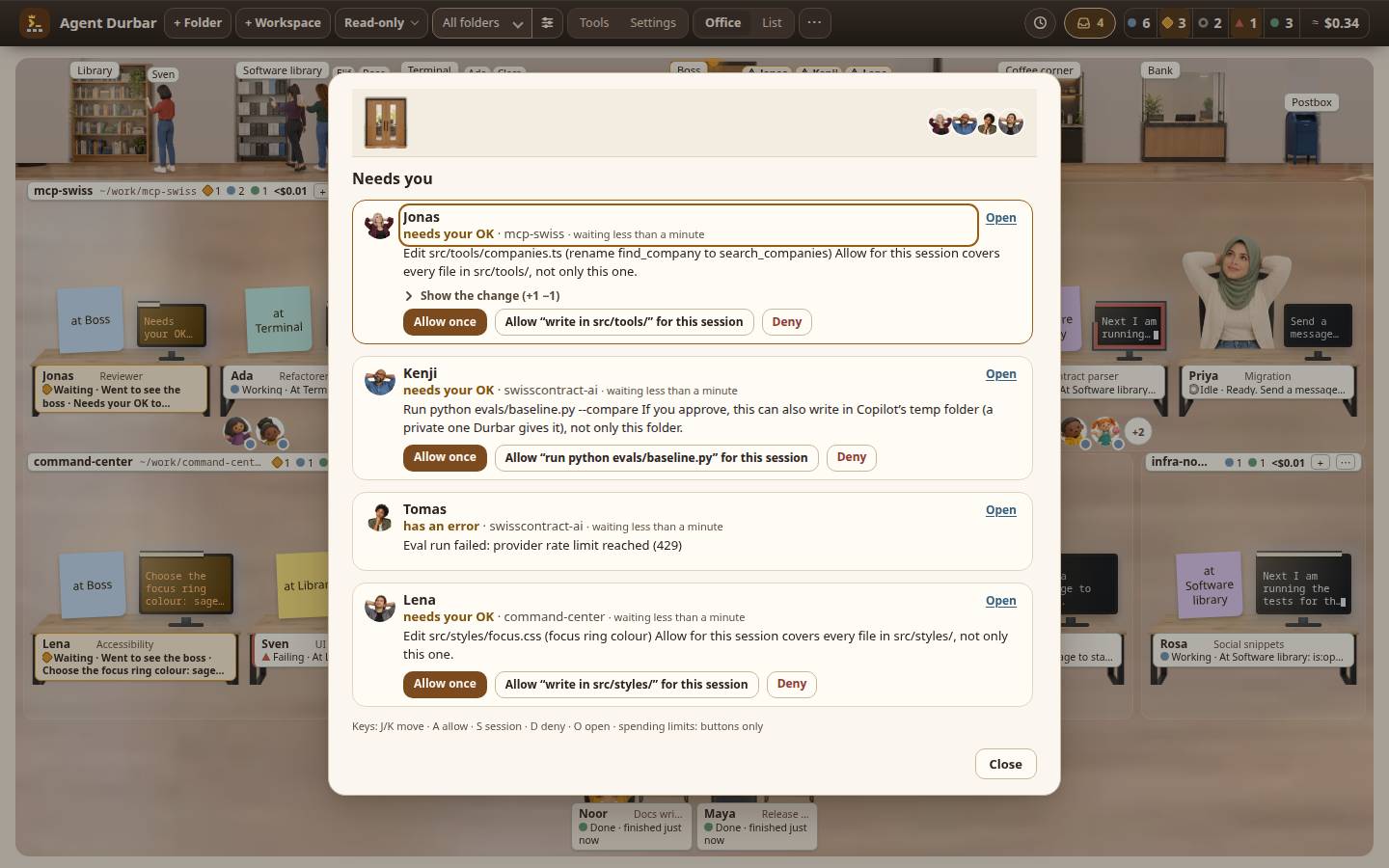
- Needs you: one inbox of every agent waiting for an answer or a permission, oldest first.
- Search conversations: a box in the top bar (Ctrl+Shift+F) finds what you said in any open or earlier session and opens the chat at that message.
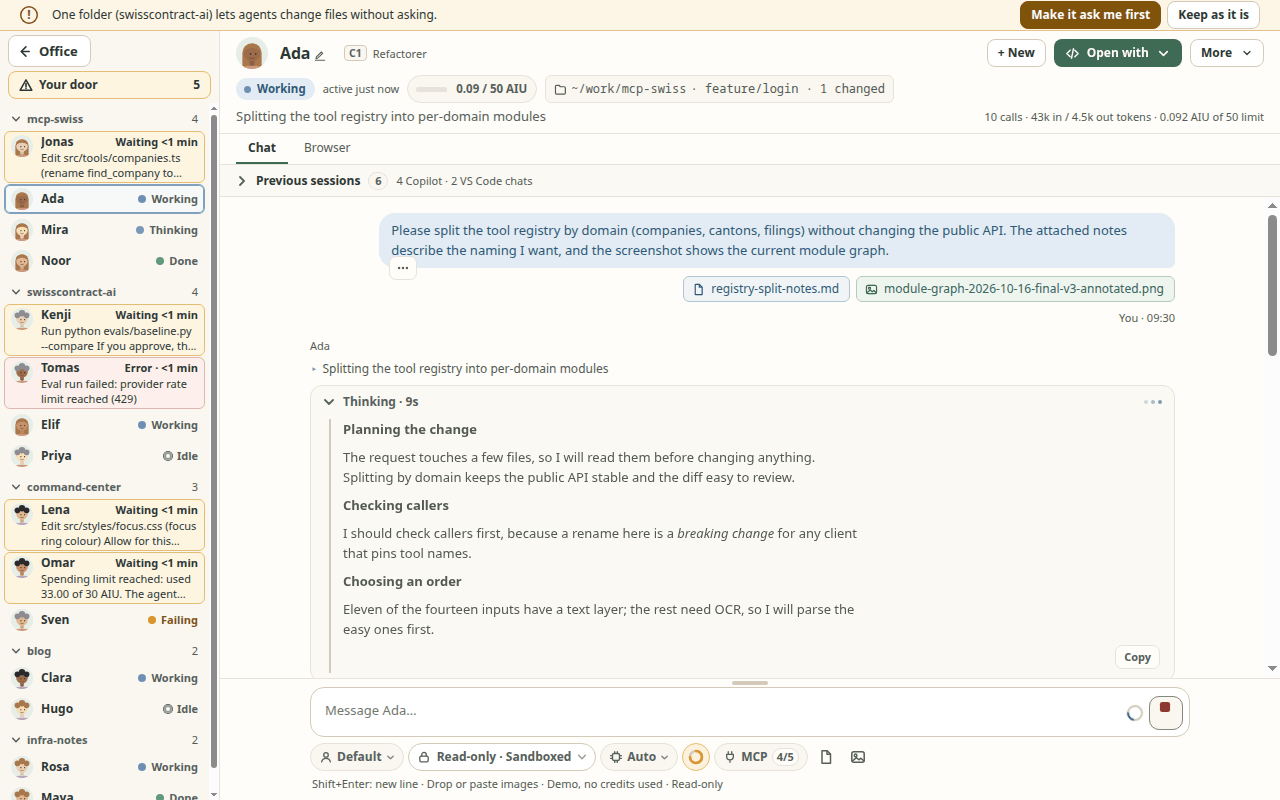
- Full-screen chat with tool calls, diffs, questions and files, and the other agents always in view.
- Three agent apps side by side: Copilot, Claude Code and Codex, with the same permission modes and spending controls.
- Sessions that last: resume after a restart, scheduled prompts, undo file changes, notes.
- MCP servers shared across your agent apps, with health, sign-in and what each costs in context.
- Three looks: the Real office (shown here), the flat Clean Office (the default) and Retro Pixel.
Every feature, with its limits: docs/features.md.
Install
Download the build for your system from the Releases page (macOS .dmg, Windows .exe, Linux .AppImage) and check it against SHA256SUMS.txt. There is no auto-update. You also need at least one agent app (Copilot, Claude Code or Codex); Settings > Agent apps can install it for you.
The builds are not code-signed (certificates cost money), so your OS warns you the first time. Only open files from this repository's Releases page.
- macOS: right-click the app and choose Open, or allow it in System Settings > Privacy & Security.
- Windows: on "Windows protected your PC", click More info, then Run anyway.
- Linux: run
chmod +x Agent-Durbar-*.AppImage && ./Agent-Durbar-*.AppImage(it needs FUSE 2, see the details).
Every file, the Windows and Mac notes, verifying a download and the requirements: docs/install.md.
Safety model
Everything runs locally as you; Durbar has no accounts, servers or telemetry and never sees your tokens; agents start Read-only. Every agent has one of three permission modes, named the same for every agent app:
- Read-only (the default): reads inside the session's folders only; everything else is denied.
- Ask first: writes, shell commands, URLs and tools wait for Allow once, Allow for this session or Deny.
- Allow all: no prompts. Use it only in folders you trust; it asks once to confirm.
Search conversations runs on your computer only: Durbar reads the sessions' text through the agent apps' own files and sessions, masks every excerpt before you see it, stores nothing (no index; the earlier Codex session titles are kept in memory until you clear the box) and sends nothing. Tool output, hidden earlier sessions and the content of earlier Copilot and Codex sessions (their titles only) are not searched; when saved MCP values are locked in the vault, the results say excerpts may show them.
An approval card marks lookalike letters in a host, program or tool name (a Cyrillic letter in a Latin word, a fullwidth form) and names an address's host as the network reads it; it warns and never blocks, with small closed lists rather than the full confusables table (docs/safety.md).
Usage bills against your plans; a per-session spending limit is a soft limit. Details and spending caps: docs/safety.md. Report a problem: SECURITY.md.
Quick start
- Install an agent app and sign in to it, then start Agent Durbar.
- + Folder (Ctrl+O) adds a folder as a room; pick the agent app and keep Read-only until you trust the folder.
- Click an agent to chat. Press I for everyone waiting for you, Ctrl+K for the command palette, ? for all shortcuts.
No agent app yet? From a clone: npm ci && DURBAR_SIM=15 npm start starts the app with 15 agents, no sessions and no AI credits.
Contributing
Try it and tell us what confuses you or breaks, as an issue. To build it:
npm ci
npm run typecheck && npm run build && npm test
npm start
How we work (spec-driven, with GitHub Spec Kit): CONTRIBUTING.md, docs/development.md.
More documentation
Features · Agent apps · Install · Safety and costs · Themes · Known limits · Development · Credits · CHANGELOG
Build cost so far
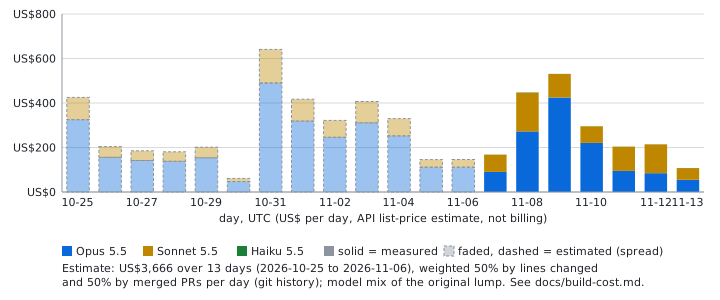
About US$5,634 at API list prices to build this app with AI agents, as of 2026-11-13 (release v0.1.18): an API list-price estimate, not billing of work on 3 machines: one since 2026-10-25, one from 2026-11-07 and one from 2026-11-09, mostly spread over earlier days rather than measured. The rest is not counted yet; the split, the spread of the earlier days and the method: docs/build-cost.md.
License and credits
MIT, Copyright (c) 2026 Three Feathers contributors. Agent Durbar is by Three Feathers; key contributors: vikramgorla, fjcabello and rubenlupi (GitHub handles are used as the names). The art and who made it: docs/credits.md.
Agent Durbar is an independent community project, not affiliated with, endorsed by or sponsored by GitHub, Microsoft, Anthropic or OpenAI. "GitHub Copilot", "Visual Studio Code", "Claude" and "Codex" are trademarks of their owners; Durbar only drives the tools you installed yourself, on your own machine.
Yorumlar (0)
Yorum birakmak icin giris yap.
Yorum birakSonuc bulunamadi