build-world
Health Gecti
- License — License: Apache-2.0
- Description — Repository has a description
- Active repo — Last push 0 days ago
- Community trust — 59 GitHub stars
Code Gecti
- Code scan — Scanned 12 files during light audit, no dangerous patterns found
Permissions Gecti
- Permissions — No dangerous permissions requested
Bu listing icin henuz AI raporu yok.
Build beautiful games with high-quality 3D assets using Thrixel and Claude Code.
Build World
Build interactive 3D worlds with high-quality assets from Thrixel and your AI agent of choice.
Claude Code (or your preferred agent) handles the logic, interactions, and scene setup. Thrixel generates, organizes, and manages the 3D assets. Save your coding agent tokens and time by using Thrixel to generate 3D assets faster and at higher quality than Claude Code.
Build World currently supports Unity and Three.js. This page covers Claude Code, but the workflow works with other coding agents as well.
Build World was previously called Goal to Game. The name changed because the skill goes beyond games: it can build interactive experiences, simulations, educational experiences, virtual tourism and historical recreations, AR/VR experiences, and more.
Thrixel inside the Gauntlet Loop
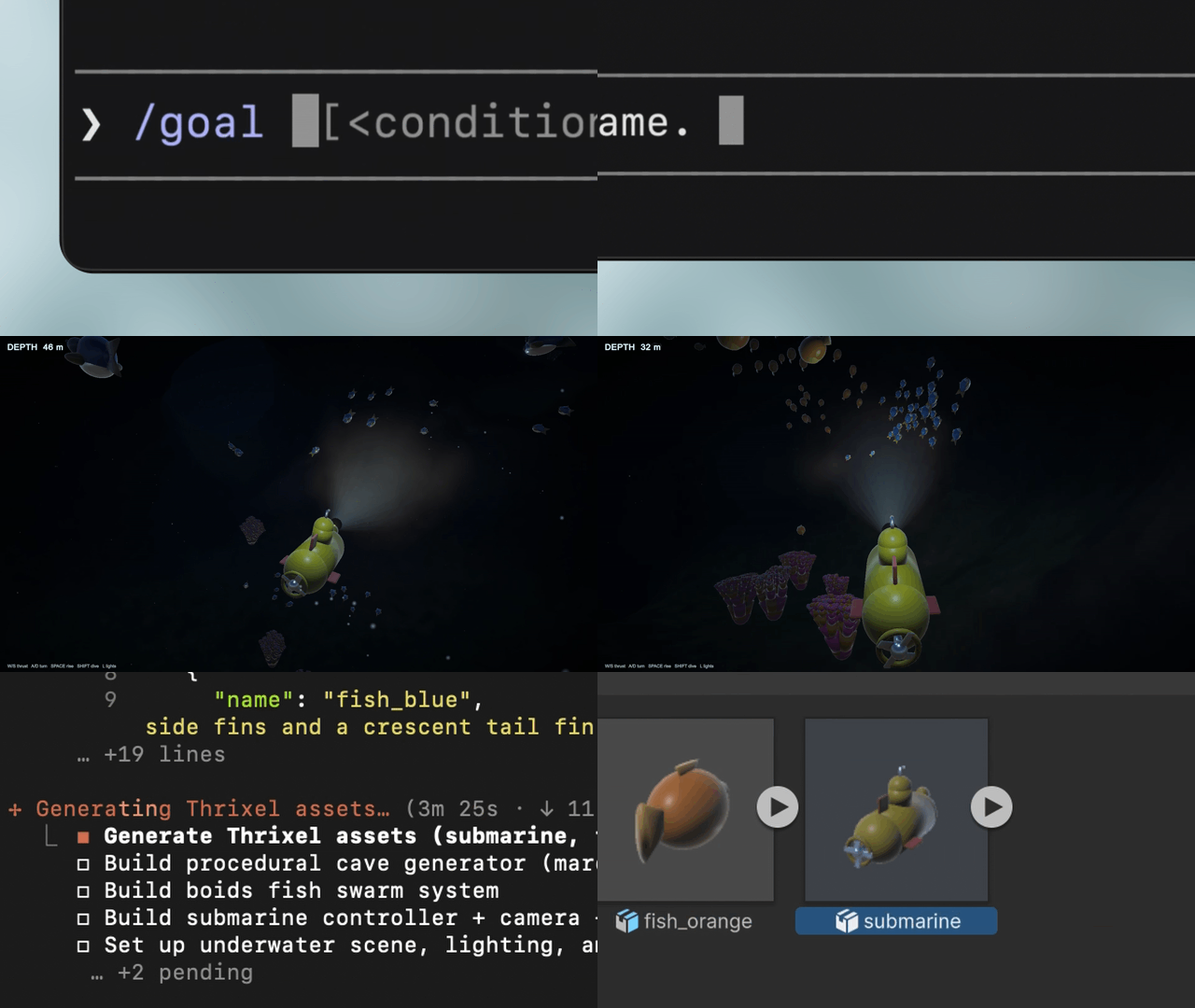
Build World uses a Gauntlet-style iterative workflow for creating interactive 3D worlds. The agent calls Thrixel to generate and refine 3D assets inside the loop. The agent continuously builds, evaluates, and improves the world itself, including its gameplay, interactions, and assets. With Build World, you can vibe out a game or other interactive 3D experience from a single prompt, then keep refining it with follow-up prompts.
Quick start
Steps 1 and 2 are once per machine. After that, a new game is just step 3.
Using Codex or
Gemini CLI instead? Each one
installs Thrixel its own way - the
installation page has the steps for both.
1. Install Claude Code and uv
claude --version
uv --version
Both print a version? Skip to step 2.
Not installed? Install commands heremacOS, Linux, WSL
curl -fsSL https://claude.ai/install.sh | bash    # the agent that writes your game
curl -LsSf https://astral.sh/uv/install.sh | sh   # runs the Thrixel connector
Windows PowerShell
irm https://claude.ai/install.ps1 | iex
irm https://astral.sh/uv/install.ps1 | iex
⚠️ NOW OPEN A NEW TERMINAL, then re-run the check above. Skipping this is the number one cause
of command not found.
2. Connect Thrixel with Claude Code Plugins
Same on every platform:
# 1. Sign up and log in. Opens a page with a code, click Approve. The only manual step here.
uvx thrixel-mcp@latest login

# 2. One plugin carries both the skill and the Thrixel connector, for every project.
claude plugin marketplace add thrixel/goal-to-game
claude plugin install thrixel@thrixel
Confirm both pieces landed:
claude plugin list     # thrixel@thrixel -> enabled
claude mcp list        # plugin:thrixel:thrixel -> Connected
Both lines look right? You are done. Go to step 3.
Turn on updates (once). Updates are off by default. In Claude Code:
- Type
/plugin - Marketplaces > thrixel
- Enable auto-update
(Or update manually anytime: /plugin update thrixel@thrixel. Skipped this? No problem, the
agent tells you when a newer version is out.)
The plugin includes both pieces, so your old install is now a duplicate. Remove it once.
macOS, Linux, WSLclaude mcp remove thrixel
rm -rf ~/.claude/skills/goal-to-game ~/.claude/skills/thrixel
claude mcp remove thrixel
Remove-Item -Recurse -Force "$HOME\.claude\skills\goal-to-game","$HOME\.claude\skills\thrixel"
3. Ask for a game
# Run this wherever you keep projects. Claude makes the project folder itself.
claude --permission-mode auto
Into Claude Code (not the terminal), start the line with /thrixel:goal-to-game, then
describe the game and name the engine (three.js or Unity):
/thrixel:goal-to-game build a submarine exploration game in three.js set in a bright, vibrant tropical sea with coral and fish
[!TIP]
Type/thrand Claude completes/thrixel:goal-to-gamefor you, so you never type it in
full. If the completion does not appear, the skill is not installed - go back to step 2.
We recommend setting /model to Opus 5 or a more capable model, with effort set to high or above.
Claude checks your Thrixel account and starts building. Keep talking to it in plain English to
change things.
Replaces steps 2 and 3 above. Same start command either way: /thrixel:goal-to-game.
2. Connect Thrixel
macOS, Linux, WSL# 1. Sign up and log in. Opens a page with a code, click Approve. The only manual step here.
uvx thrixel-mcp@latest login
# 2. Install the Thrixel connector. --scope user covers EVERY project, not just this folder.
claude mcp add --scope user thrixel -- uvx thrixel-mcp@latest
# 3. Install the skill. Clone, not download, so it can update itself later.
git clone https://github.com/thrixel/goal-to-game ~/.claude/skills/thrixel
Same three commands. Only the path differs: ~ is not reliably expanded when PowerShell passes it
to git, and a skill that lands anywhere else is invisible to Claude.
uvx thrixel-mcp@latest login

claude mcp add --scope user thrixel -- uvx thrixel-mcp@latest

git clone https://github.com/thrixel/goal-to-game "$HOME\.claude\skills\thrixel"
Confirm both landed:
claude mcp list        # thrixel -> Connected
ls ~/.claude/skills/   # thrixel listed
If either is missing, Claude will build the game without Thrixel and never mention it.
3. Ask for a game
Identical to step 3 above, same command and all:
/thrixel:goal-to-game build a submarine exploration game in three.js set in a bright, vibrant tropical sea with coral and fish
"command not found" - open a new terminal. Fixes it almost every time. If a fresh terminal
still fails, run export PATH="$HOME/.local/bin:$PATH" (PowerShell:$env:Path = "$HOME\.local\bin;$env:Path").
Claude has no Thrixel tools - check claude mcp list for thrixel. If missing, re-run theclaude mcp add line, then restart Claude.
Claude says you need to sign in - re-run uvx thrixel-mcp@latest login and click Approve. No
restart needed, just tell Claude to continue.
"Out of cubes" - cubes are Thrixel's generation credits. Claude shows you what is built, marks
missing assets as labelled blocks, and asks how you want to continue.
Working with Thrixel API
Every asset generated through the Thrixel API is saved to your Thrixel workspace.
Manage and Edit: Visit Thrixel Web App to view, manage, and edit your assets. If you make changes in the web app, ask your coding agent to pull the updated versions back into your game.
Engine Agnostic: Because your assets are managed in Thrixel rather than tied to one codebase, you can also reuse them across projects and engines. For example, you can prototype in Three.js and later ask your agent to rebuild the game in Unity using the same asset library.
Parallel Processing: Thrixel can manage and process jobs in parallel. Your coding agent can farm out parallel jobs to Thrixel while building out the logic of the game. Each plan has a different concurrency limit.
Usage and credits
You can test this workflow using the free Thrixel Cubes included with your Starter account. However, building a full-scale game generally requires a wider variety of assets and rapid iteration that usually exceeds Starter limits. Upgrading to a Paid Plan unlocks higher parallel job processing capacity and higher generation limits, allowing you to bring your most ambitious ideas to life. You can keep track of your remaining Cubes anytime in Account Settings.
About Thrixel
Learn more about Thrixel at thrixel.com.
Yorumlar (0)
Yorum birakmak icin giris yap.
Yorum birakSonuc bulunamadi