herdr-agent-resume
Health Gecti
- License — License: MIT
- Description — Repository has a description
- Active repo — Last push 0 days ago
- Community trust — 11 GitHub stars
Code Basarisiz
- exec() — Shell command execution in mods/agent-resume/main.js
Permissions Gecti
- Permissions — No dangerous permissions requested
Bu listing icin henuz AI raporu yok.
Herdr mod: bring Claude Code and Codex sessions back after a reboot (Ctrl+Shift+R)
herdr-agent-resume


Bring coding-agent sessions back after a reboot, in the Herdr desktop app.
When the machine restarts (or you log out, or herdr-core restarts), Herdr brings every tab and split back, but each terminal comes back as a bare shell in its last folder: the agent that was running there is gone. The Herdr TUI used to resume agents on restore. The app doesn't, by design (herdr-core#13).
This mod brings that back. Press Ctrl+Shift+R after a restart, and each terminal that lost its agent gets the command to resume it, typed into its shell:
| Was running | Typed into the restored shell |
|---|---|
| Claude Code | cd '<folder>' && claude --resume <session> [flags] |
| Codex | cd '<folder>' && codex resume <session> [flags] |
| Grok | cd '<folder>' && grok --resume <session> [flags] |
Antigravity CLI (agy) |
cd '<folder>' && agy --conversation <session> [flags] |
| Pi | cd '<folder>' && pi --session <session> [flags] |
| Kiro CLI V3 | cd '<folder>' && python3 <mod>/agent_resume.py launch-kiro <session> (starts kiro-cli chat --v3 --resume-id <session> [flags]) |
The agents open idle on their old conversation, with the flags they were started with (--model, --dangerously-skip-permissions, -s workspace-write, ...); nothing runs until you type. A toast says what came back, and which ones didn't, with the agent's own error when one exits right away.
Or skip the key press: install with --auto and each restored terminal starts its agent again by itself, as soon as its shell is up (fish, bash, zsh). See Automatic resume.
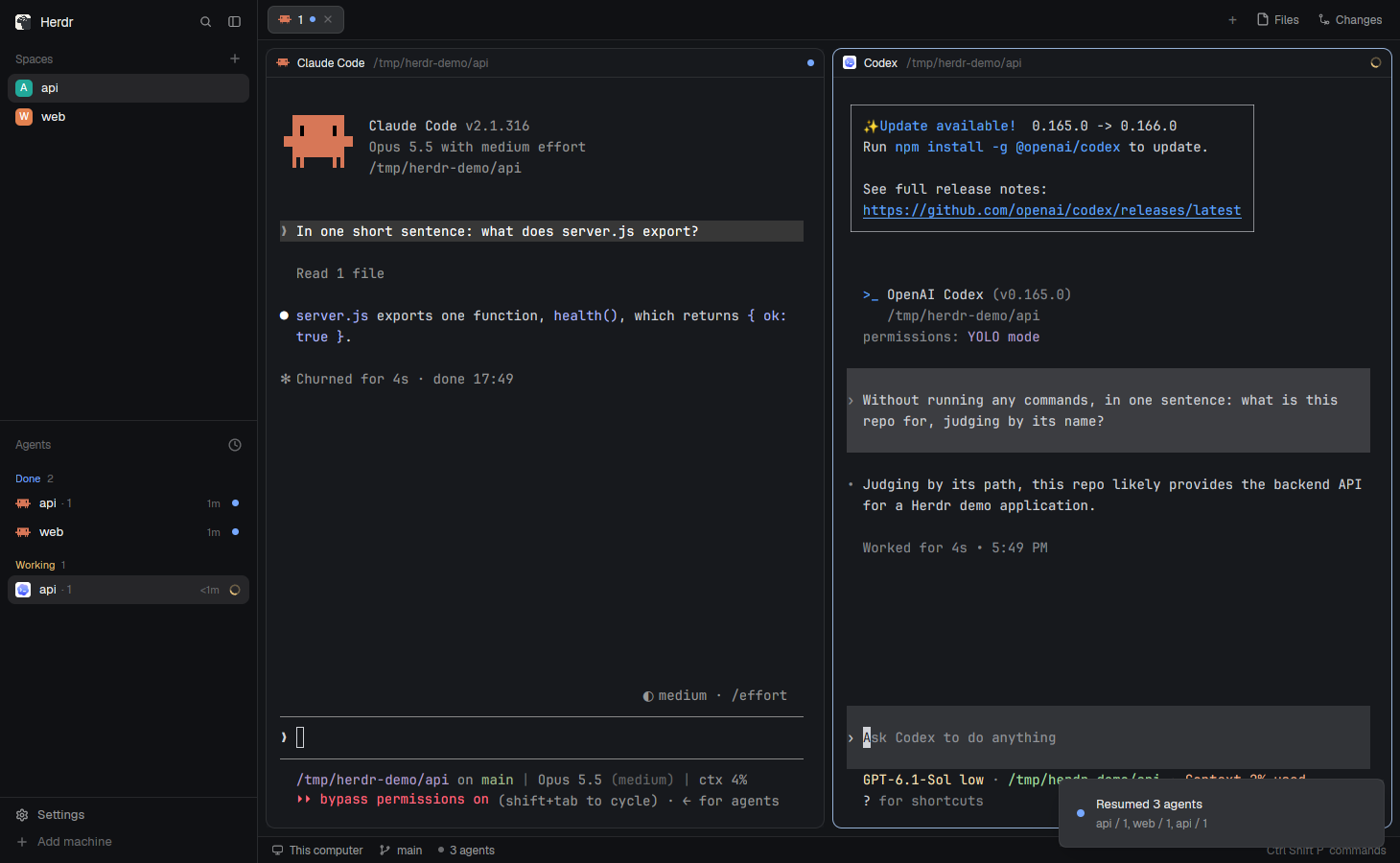
Right after the key press, while the commands are typed into the restored shells:
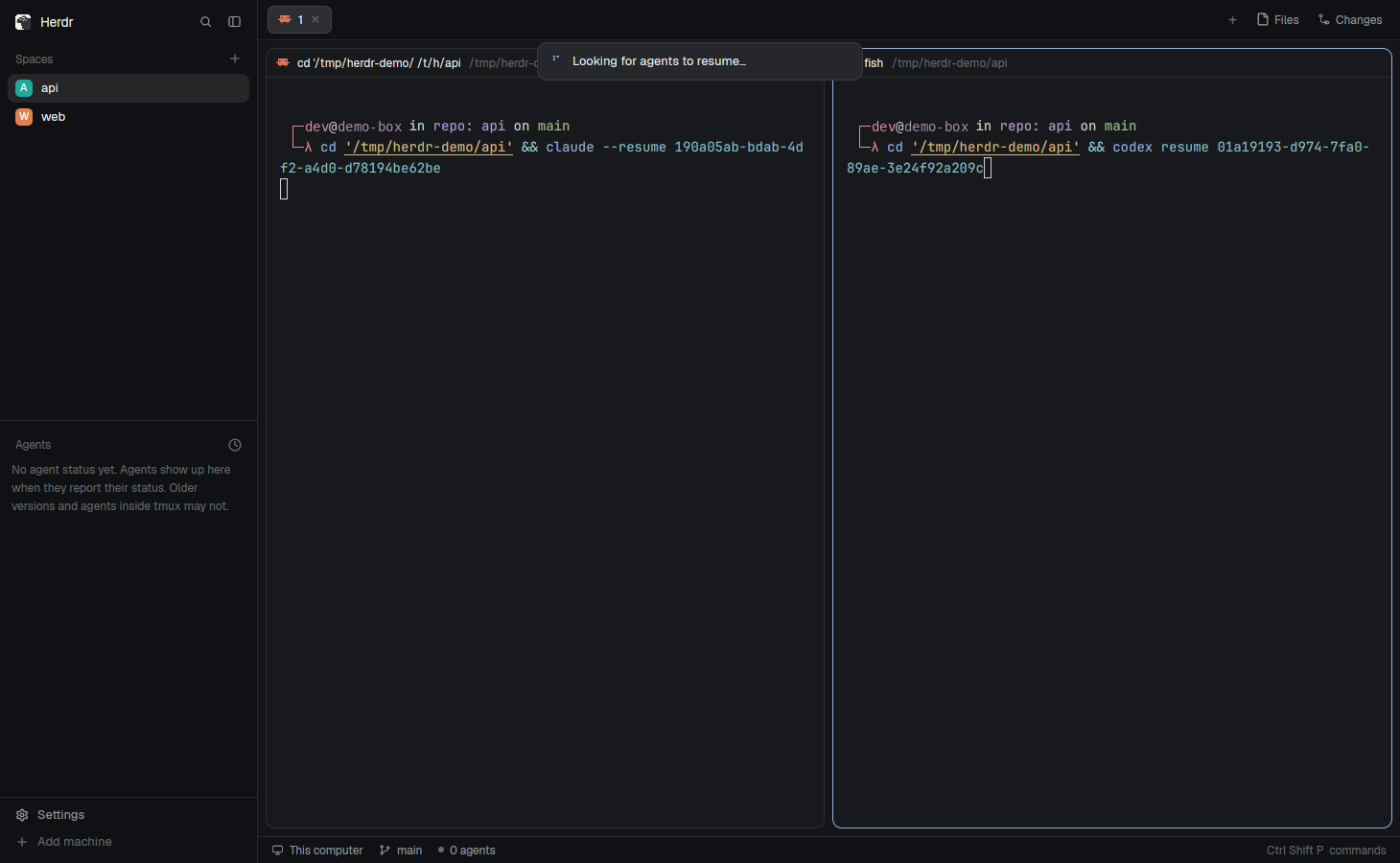
(Real screenshots of a demo Herdr window, taken with herdr-app shot. The shell prompt's user name and the Claude plan were masked.)
Install
Requires Herdr desktop 0.1.16 or newer. Running herdr-app check validates
the popup without starting a resume pass.
git clone https://github.com/thuanlm215/herdr-agent-resume
python3 herdr-agent-resume/scripts/install.py
The installer:
- copies
mods/agent-resume/to~/.config/herdr-app/mods/(afterherdr-app check); - binds Ctrl+Shift+R to
mod.open:agent-resumeinkeys.json, refusing a key already in use; - appends one session hook after the hooks already there, backing each file up to
~/.config/herdr-app/backups/agent-resume/first. It writes one only for an agent that is already set up on this machine:- Claude Code:
SessionStartin~/.claude/settings.json - Codex:
SessionStartin~/.codex/hooks.json - Grok:
SessionStartin~/.grok/hooks/agent-resume.json - Antigravity CLI:
SessionStartandPreInvocationunder the nameagent-resumein~/.gemini/config/hooks.json - Kiro CLI V3: global
SessionStartandUserPromptSubmithooks in~/.kiro/hooks/agent-resume.json. These work with the built-in agent and custom profiles. Install, update and uninstall leave agent profiles andchat.defaultAgentuntouched. - Pi:
~/.pi/agent/extensions/herdr-agent-resume.js(Pi has no shell hook; the extension reports the session)
- Claude Code:
- notes the Claude Code sessions already running in Herdr, so they're covered right away.
Then:
- Codex asks you to review the new hook the next time it starts ("Hooks need review"): trust it, or Codex sessions won't be noted.
- Grok runs your hooks after you trust the folder. Until then, Grok sessions aren't noted.
- Codex sessions already running are noted the next time they start or resume. The same is true for Grok, Antigravity, Pi and Kiro: the hook notes them the next time that session starts.
Update with --update, remove everything with --uninstall. --dry-run shows what would change.
Automatic resume
python3 herdr-agent-resume/scripts/install.py --auto # or --update --auto
--auto adds a few marked lines to your shell's startup, for each shell set up on this machine:
- fish: a file of its own,
~/.config/fish/conf.d/agent-resume.fish; - bash: a block at the end of
~/.bashrc; - zsh: a block at the end of
~/.zshrc(or$ZDOTDIR/.zshrc).
Each file is backed up first. At its first prompt, an interactive shell in a Herdr terminal runs agent_resume.py here. When that terminal lost its agent, it starts the agent again, in the session's folder, with its flags (claude --resume <id> ..., codex resume <id> ..., grok --resume <id> ..., agy --conversation <id> ..., pi --session <id> ..., or kiro-cli chat --v3 --resume-id <id> ...), as the terminal's foreground job. It types nothing, so nothing lands in your shell history. If the agent exits right away with an error (say, the session is gone), a yellow line says so under the agent's message; Ctrl+Shift+R tries again. Every other shell (a new tab, a nested shell, a terminal that didn't lose anything) carries on as usual, after one quick hc get.
Set AGENT_RESUME_AUTO=0 to pause it for a while. --no-auto (with --update) takes the lines out again; --uninstall does too. Ctrl+Shift+R keeps working for terminals that weren't at a shell, and stays quiet about the ones their shell already brought back.
No layout change is needed. Linux and macOS, Python 3.8+ (standard library only).
How it works
Three small pieces, all in mods/agent-resume/agent_resume.py:
- A session hook (
hook claude|codex|grok|agy|pi|kiro). Every time an agent starts a session in a Herdr terminal, it writes the session on that terminal as anagent-resumelabel in herdr-core: agent, session id, folder, transcript, launch flags, the agent's process and the terminal's shell process, and the boot. Labels live with the terminal and survive a reboot. Claude Code runs it on start,/resume,/clearand compact. The others run it on their own session-start event (see Watch out). - A watcher (
watch, started by the hook, one per agent process). It sleeps until the agent exits. If the terminal's shell is still the same process afterwards, you quit the agent yourself, so it removes the label: a session you quit stays quit. If the shell went with it (reboot, logout, core restart, pane closed), the label stays. - The resume pass (
resume, what Ctrl+Shift+R runs; with--auto, each restored shell runsherefor itself instead). A terminal needs its agent back when its label is from another boot, or its shell is a different process than the one the agent ran under. Then, if it sits at an idle shell, the pass types the resume command into it (hc send), 150 ms apart. It waits up to 12 s for restored shells that haven't started yet, and 5 s after typing, it checks each agent is up: a terminal back at its shell with no session noted failed, and the toast quotes the last line the agent printed.
It skips, and says why:
- a terminal running something else;
- a terminal with incomplete or invalid saved session data (the other terminals still resume);
- a session already open in another terminal (or resumed once already in this pass);
- a folder that's gone, or one whose name can't be typed safely (a quote, a backslash, a control character);
- a session with no saved conversation (an agent you never typed into).
It also never notes:
- subagents and Codex sub-threads;
- an agent started by another agent (a
claude -pfrom a tool); - an agent running inside tmux, ssh or anything else between it and the Herdr terminal.
python3 ~/.config/herdr-app/mods/agent-resume/agent_resume.py status shows what a pass would do, without typing anything. What the hook, watcher and passes did is logged to ~/.config/herdr-app/data/agent-resume/log.jsonl.
Watch out
- Why
cdfirst:claude --resume <id>finds a session only from its project folder, and Codex works where it starts. The restored shell opens in the terminal's last folder, which can differ from the session's (the agent moved into a worktree, or the terminal started elsewhere). - You press the key, unless you install with
--auto. Herdr's shipped layouts run no mod in the background, so the mod can't do anything by itself after a restart. Press Ctrl+Shift+R once Herdr is open, or let the shell start the agent itself with--auto. - With Ctrl+Shift+R, the resume command is typed into your shell, so it lands in your shell history.
--autodoesn't type anything. - A folder Claude Code hasn't been told to trust stops at its trust prompt. Folders you worked in are trusted already.
claude --resumemay continue under a new session id. The hook follows it, since every start is noted.- Which flags come back. Only flags that set up how the agent runs and that its resume command accepts. Claude Code keeps
--model,--permission-mode,--dangerously-skip-permissions,--add-dirand a few more. Codex keeps-m,-c,-s,-a,--searchand a few more, but not--full-auto(codex resumedoesn't take it). Grok keeps--model,--permission-mode,--always-approve,--add-dirand a few more, but not-c/--continueor--worktree. Antigravity keeps--model,--effort,--mode,--dangerously-skip-permissions,--add-dirand a few more. Pi keeps--model,--thinking,--provider,--session-dir,--toolsand a few more. Kiro V3 keeps--mode,--model,--effort,--agent,--trust-all-toolsand--trust-tools. Never a prompt, a session picker (--resume,--continue,--session,--conversation,--resume-id),-p/--print, or--worktree. The full list isKEEP_FLAGSinagent_resume.py. With Ctrl+Shift+R, a flag whose value has a quote or a backslash is left out, since it can't be typed safely;--autokeeps it. Flags are read from/proc, so on macOS they don't come back yet. - Supported agents: Claude Code, Codex, Grok, Antigravity CLI (
agy), Pi and Kiro CLI. Shells: fish, bash, zsh, sh, dash, ksh (--auto: fish, bash, zsh). - Codex notes a session at its first message, not when it opens.
- Grok notes a session on
SessionStart, including one reopened with--resume. A subagent's own session is not noted. Your hooks don't run until the folder is trusted. - Antigravity notes a new conversation on
SessionStart(before the first model call) and notes again onPreInvocation, so a resumed conversation is picked up on its next turn. A resumedagyyou quit before that turn is still lost, and the next pass brings it back. - Pi has no shell hooks. The extension notes a resumed session at startup, and a new session once its file exists (after the first message). Opening Pi and quitting before you type leaves nothing to resume.
- Kiro support requires the V3 engine: start it with
kiro-cli chat --v3. GlobalSessionStartandUserPromptSubmithooks note conversations after the first prompt without a custom agent. V3 defers these hooks even when reopening saved history, so both resume paths supervise the Kiro job, refresh its label and forget it on exit without requiring another prompt. A quick startup error keeps the old label for retry. Resume always includes--v3, and uses~/.kiro/sessions/<workspace-hash>/<session>/session.jsonto check that the session exists (a new session may not have a message log yet). V2 sessions and legacy V2 labels are ignored; switching engines and migrating conversations are outside this mod. The hook prints nothing because Kiro adds stdout to context. - Like the Herdr TUI's resume, this relies on how each agent CLI resumes today. If a CLI changes its flags or its hook input, it can break.
The full spec (what you see, how it behaves, how it's built) is in RECIPE.md.
Development
How to report a problem, try a change safely and open a pull request: CONTRIBUTING.md. On macOS? A "Tried it on my machine" issue helps even when everything works.
python3 -m unittest discover -s tests -p 'test_*.py'   # plan, process tree, hook guards, installer
node --test tests/*.test.mjs                           # the toast text
herdr-app check mods/agent-resume
agent_resume.py keeps the decisions in pure functions (plan, decide_here, lost, at_shell, command, placement) so they can be tested without herdr-core. main.js is the popup: it runs one pass with exec and posts the toast built by summary.js.
Checked in a running Herdr app: with two Claude Code sessions and a Codex session open, hc server stop then hc server start, then Ctrl+Shift+R: all three came back on their conversations and the hooks noted them again.
--auto was checked the same way: fish and bash terminals with stand-in agents, a core stop and start, and each restored shell started its agent on its own session and folder; Ctrl+Shift+R afterwards found nothing to do, and quitting a resumed agent forgot its session. The zsh lines haven't run in a real zsh yet. Launch flags and failure reports were checked the same way: stand-ins started with --model opus --dangerously-skip-permissions --append-system-prompt "be brief" "fix it" and -m gpt-5 -s workspace-write --full-auto came back with every flag but the prompt and --full-auto, both through Ctrl+Shift+R and --auto; a session whose agent says "No conversation found" was reported in the pass's result and, with --auto, by the yellow line. Under fish, the resumed agent runs as its own foreground job (Herdr shows it, Ctrl+C hands the shell back).
Kiro CLI 2.27.0 with the V3 engine was checked against an isolated herdr-core 0.1.16: a real conversation on the built-in Default agent, core stop/start, automatic resume with refreshed process IDs before another prompt, /quit, and another restart that stayed at a shell. The manual resume pass was also checked with the same saved V3 session and quit without another prompt. These checks used bash on Linux; the new Kiro job supervisor has not been exercised on macOS.
Also validated end to end against an isolated herdr-core session (HC_SESSION=…, its own app home): stand-in claude/codex programs that run the hook like the real ones, a core stop and start, then a pass. Covered: a resumed Claude and Codex session, a quit Codex session not coming back, a busy terminal skipped then resumed, a nested agent not noted. The real Claude Code 2.1.316 hook was checked the same way (noted on start, forgotten on /exit). Herdr app 0.1.10, herdr-core 0.1.15, Linux.
Credits
The resume commands follow the Herdr TUI's table (src/agent_resume.rs). The popup follows herdr-reopen-tab.
License
MIT
Yorumlar (0)
Yorum birakmak icin giris yap.
Yorum birakSonuc bulunamadi