agent-andon
Health Uyari
- License — License: AGPL-3.0
- Description — Repository has a description
- Active repo — Last push 0 days ago
- Low visibility — Only 9 GitHub stars
Code Uyari
- fs module — File system access in package.json
Permissions Gecti
- Permissions — No dangerous permissions requested
Bu listing icin henuz AI raporu yok.
🚦 Status board & notifications for Claude Code and Codex — glance at an iPad (or get a desktop alert) when an AI coding agent needs you, finishes, or gets stuck. Self-hosted, zero dependencies.
🚦 Agent Andon — a status board & notifier for Claude Code and Codex
Glance at any screen — iPad, phone, or browser — or get a desktop alert — the moment your AI coding agent is working, needs you, done, or stuck.
English · 中文 · 日本語 · 한국어 · Español · Deutsch · Français


⚡ Fastest start — three commands and you're watching your agents from your phone, anywhere. The relay only ever handles ciphertext it can't read, so your code stays yours:
npm i -g agent-andon
andon hosted setup https://relay.agentandon.com
andon install claude
(then restart your agent · just kicking the tires? npx agent-andon serve --demo)
Stand an old iPad on your desk — or open the board on your phone or any browser. Submit a task to
Claude Code or OpenAI Codex, then go do something else — one glance tells you whether the agent
is working, needs you, done, or stuck. No babysitting the terminal, no forgetting to come back.
It's a lightweight, self-hosted way to monitor several AI coding agents at once and get notified
the instant one needs your approval, finishes its turn, or gets blocked — on the board (any device),
a desktop banner, or your menu bar. No app, no account, zero dependencies.
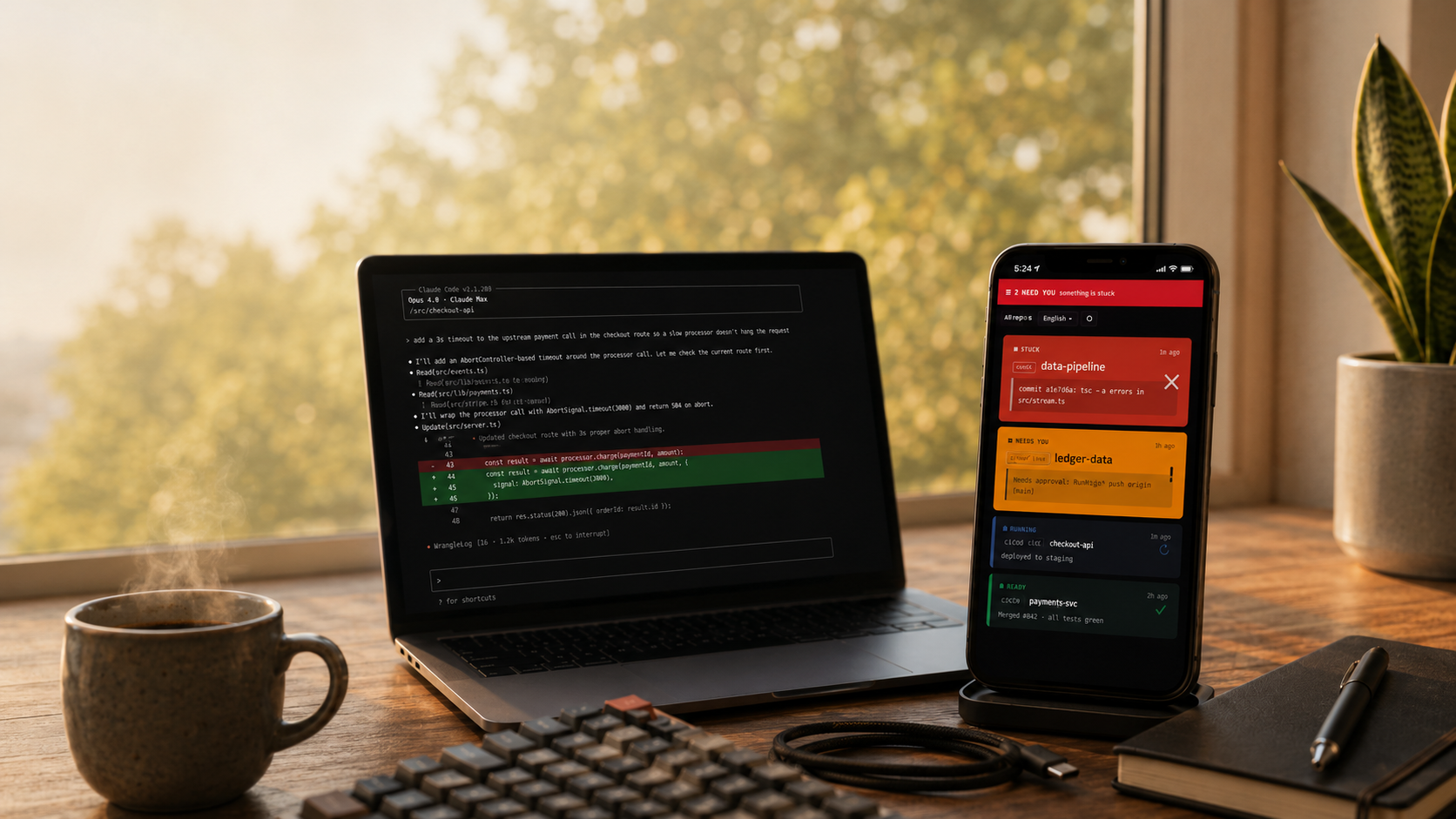
All your AI coding agents on one board — whatever needs you floats to the top. Claude Code and Codex on the left, their live status on your phone.
Andon (行灯) is the lean-manufacturing signal board: a light that tells the
whole floor, at a glance, whether a line is running or needs a human. Same idea,
for your agents.
- Zero runtime dependencies — pure Node.js standard library.
- One command to wire up —
andon install claudeedits your hooks for you (with a backup). - Multi-agent native — one full-width row per session; whatever needs you floats to the top.
- Speaks your language — English · 中文 · 日本語 · 한국어 · Español · Deutsch · Français, auto-detected.
- Any screen — iPad, phone, or browser; no app, no account, no hardware.
Get notified when Claude Code or Codex needs you, finishes, or gets stuck
Agent Andon installs the native lifecycle hooks for Claude Code and OpenAI Codex and turns each turn into a glanceable signal — on the board (any screen), a desktop banner, or phone push — so you stop watching the terminal waiting for a prompt.
Watch several Claude Code / Codex agents at once
Run many sessions in parallel and see one row per agent; whatever needs you floats to the top. Run a whole fleet and only look when one actually needs you.
Self-hosted and private by default
Pure Node standard library, zero runtime dependencies, no account, no telemetry — it runs on your machine. An optional content-blind relay (it stores only ciphertext it can't decrypt) adds board-from-anywhere and phone push without exposing your code.
Docs
New here? Install → Quickstart → Which setup do you need?. Then, for depth:
| Guide | What's in it |
|---|---|
| Commands & event mapping | full CLI · Claude/Codex event→state · background-task counts · naming tiles |
| Notifications | desktop alerts · menu bar · tuning approvals |
| Running it | start / check / stop the board, Tailscale Serve, the relay |
| Configuration & security | env vars · token auth · network model |
| Hosted board · Deploying a relay | the "board from anywhere" relay — use it, or run one |
| Troubleshooting & FAQ · Developing | when something's off · contributing |
How it works
Claude Code / Codex ──(native hook)──▶ andon server (your computer) ◀──(SSE push)── iPad / phone / browser
- Detect — each tool's native hook mechanism reports state changes. No change to your workflow.
- Relay — a tiny HTTP server on your computer receives the events.
- Display — the board holds an open SSE stream, so a state change shows in well under a second
(it falls back to 1 s polling). A signal bar across the top is the "tower light," readable across the room.
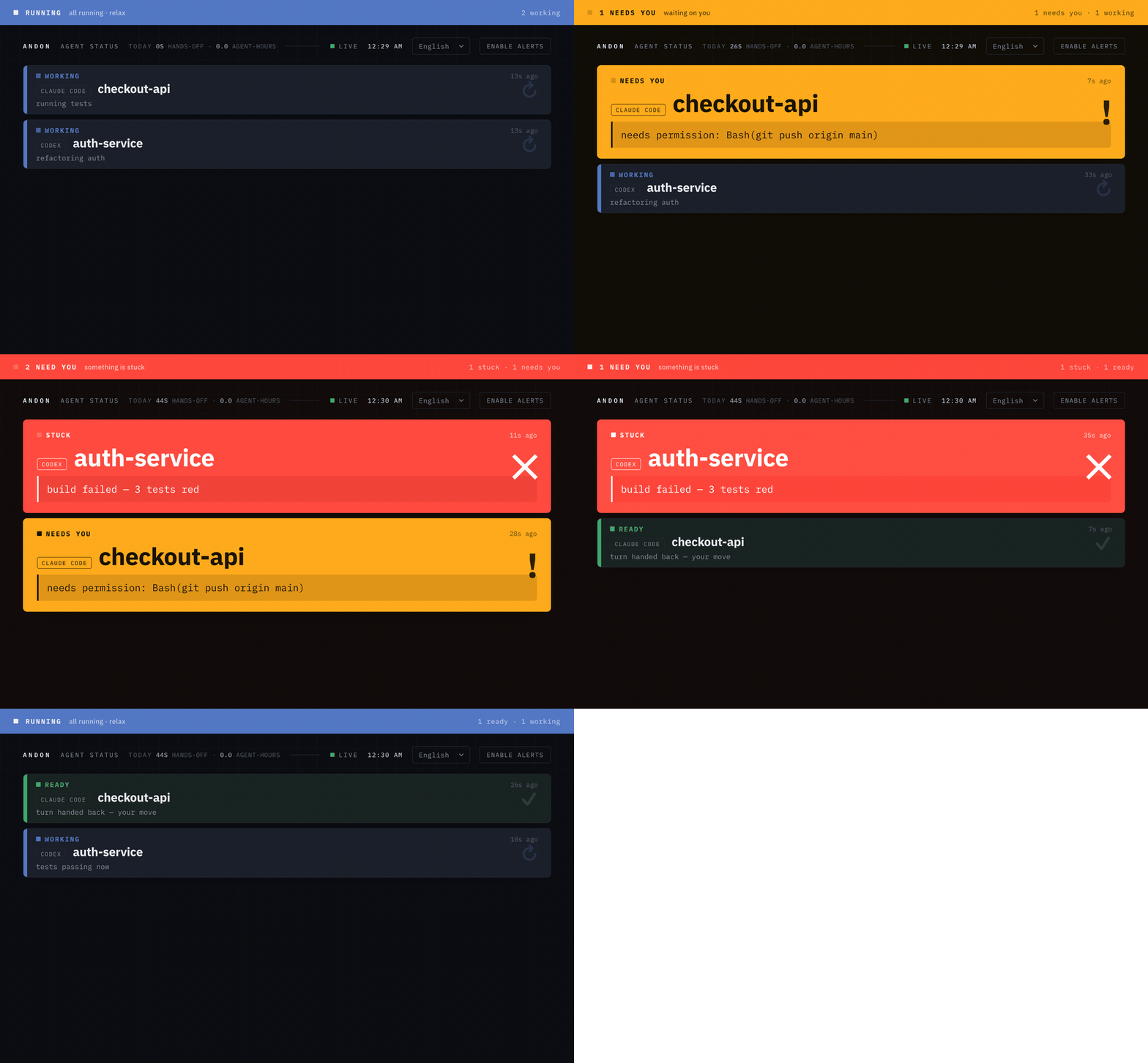
State priority (the top bar and the row order take the most urgent one):stuck (red) > needs-you (amber) > done (green) > working (blue) > idle.
The board: one full-width row per process; stuck / needs-you grow large, show their full message,
and float to the top (auto-scrolled into view), while working / ready / idle stay compact. Calm by default —
only the single most-urgent row pulses. One language per screen, auto-detected (override with the header
dropdown or ?lang=).
Install
npm install -g agent-andon # or: npx agent-andon serve --demo
From source:
git clone https://github.com/tianshanghong/agent-andon && cd agent-andon
npm install && npm run build
node dist/cli.js serve --demo
Requires Node.js ≥ 18.
Quickstart (60 seconds)
1. Verify the board with fake data:
andon serve --demo
It prints a http://<your-ip>:8787 URL. Open it on any phone, tablet, or browser — you should see two
rows cycling colors. Once it looks right, Ctrl-C and run for real:
andon serve
2. Open the board (iPad, phone, or any browser, same Wi-Fi as the computer):
- Open the printed URL. It's
http://, nothttps://. - Tap "Enable sound" once to unlock the chime (browsers mute audio until you tap; this is the board's
in-browser sound, separate from the default-on desktop alerts). Remembered across reloads. - On a phone/tablet: Add to Home Screen for a full-screen, address-bar-free board. (On a wall iPad,
also set Auto-Lock → Never; the page requests a Wake Lock too.)
3. Wire up your agents:
andon install claude        # edits ~/.claude/settings.json (keeps a .andon-backup)
andon install codex         # edits ~/.codex/hooks.json    (keeps a .andon-backup)
andon doctor                # confirm everything's connected; reprints the board URL
Restart your Claude Code session and it lights up the board automatically. That's it.
Want the board (and phone push) from anywhere, not just this Wi-Fi? → Which setup do you need?
Which setup do you need?
🔧 Rather self-host?
Run the whole board locally with andon serve (free, desktop alerts, no relay), or host your own relay with andon relay (andon verify <url> checks any relay). → full self-host guide
andon serve already gives you the board + desktop alerts on the computer running it — free, zero
setup, on macOS / Linux / Windows. The part that takes more is push to your phone: a buzz when an
agent needs you, phone locked, you away from the desk. Phone push needs a relay reachable over HTTPS
- "Add to Home Screen" on the phone (required on iPhone/iPad). The easy way is our managed relay —
nothing to run, no Tailscale, no HTTPS to set up.
flowchart TD
    A(["Watch your AI agents"]) --> B{"Just on this computer?"}
    B -->|Yes| S["<b>andon serve</b><br/>board + desktop alerts — done"]
    B -->|Phone too| C{"Phone PUSH, or just glance?"}
    C -->|Glance| L["<b>andon serve</b> + open http://your-ip:8787<br/>same Wi-Fi, board only — http can't push"]
    C -->|Push anywhere| M{"Which relay?"}
    M -->|Managed| G["☁️ <b>Our managed relay</b> — easiest, no server<br/>andon hosted setup relay.agentandon.com"]
    M -->|Tailscale| T["<b>tailscale serve</b> + andon serve<br/>self-host, just you"]
    M -->|Own relay| R["<b>Deploy a relay</b> (Docker)<br/>self-host: team / your infra"]
| You want… | Do this |
|---|---|
| Board + desktop alerts on your computer | andon serve — the default (macOS / Linux / Windows), alerts on |
| Glance at the board on a phone/tablet on the same Wi-Fi | andon serve, open http://<your-ip>:8787 — board only; http can't push |
| 📱 Phone push — the easy way (no server, no Tailscale) | ☁️ our managed relay: andon hosted setup https://relay.agentandon.com + Add to Home Screen — launching, ⭐ watch |
| Phone push, self-hosted — just you | tailscale serve + andon serve + Add to Home Screen |
| Phone push, your own relay (team / your infra) | deploy a relay (Docker) + Add to Home Screen |
Rule of thumb: andon serve gives desktop alerts for free, everywhere. Want them on your phone?
— easiest is our managed relay (nothing to run); or self-host with Tailscale (just you) or your
own relay (a team).
Commands
andon serve                 # run the board (desktop alerts on by default)
andon install claude        # wire Claude Code hooks (also: install codex)
andon doctor                # health check + the board URL
andon post <state> <agent>  # push a status by hand
andon uninstall claude      # cleanly remove what Andon added
Full reference — every flag, the Claude/Codex event → state mapping, background-task counting, and
naming tiles — is in docs/commands.md.
Notifications
Desktop alerts are on by default — a banner (and sound for needs-you / stuck) on the computer running
the server, degrading gracefully across macOS / Linux / Windows; there's also a menu-bar summary. Tune it
with --say / --no-notify, or pre-approve safe operations so amber fires less. See
docs/notifications.md.
Running it (start / stop)
andon serve                                  # foreground — Ctrl-C to stop
nohup andon serve > /tmp/andon.log 2>&1 &    # background (macOS / Linux)
pkill -f "cli.js serve"                      # stop a background one
Full start / check / stop for the board, Tailscale Serve, and the relay: docs/running.md.
Hosted ("board from anywhere")
Andon is local-first and free to self-host forever — that stays the default. The optional, opt-in
relay gives you the board + phone push from anywhere — use our managed relay (zero setup) or run your
own (same open-source code):
andon hosted setup https://relay.agentandon.com   # opt in — a key is generated that never leaves your machine
andon relay                                        # …or run the content-blind relay yourself
andon verify <relay-url>                           # check a relay serves the exact open-source code
Your status content (its title, message, and agent name) is end-to-end encrypted on your machine
before it leaves; the relay only ever routes and stores that ciphertext, which it cannot decrypt (it
never receives your key) — so it can't read your prompts, code, titles, or messages. It sees only coarse
metadata: that you're active, roughly when, the high-level state, and your IP. "Verifiable, not just trusted": the served code is open-source +
reproducible and andon verify confirms a relay serves exactly it. Full guides:
using the hosted board · deploying a relay.
Don't want to run anything? Our managed relay at
relay.agentandon.comis the zero-setup path —
it's launching soon; ⭐ star / watch to catch the go-live.
Security
By default the server binds 0.0.0.0 with no auth — fine on trusted home Wi-Fi, not on a
public/untrusted network. Set ANDON_TOKEN for a shared network, and don't port-forward it (use the HTTPS
paths above). The board only exposes high-level status — never code or logs. Details + env vars:
docs/configuration.md.
License
AGPL-3.0-or-later — © 2026 wwang.
Run, self-host, audit, fork, and modify Andon freely. If you run a modified version as a network
service, AGPL §13 asks you to offer its source to your users; running it unmodified (a wall board talking
to your own agents) carries no such obligation. The maintainer also offers Andon under separate
commercial terms for a hosted service — see CONTRIBUTING for how that stays possible.
The name "Andon" / "Agent Andon" and the logo are reserved marks of the author — the license covers
the code, not the name (see TRADEMARK). Forks must use a different name.
Yorumlar (0)
Yorum birakmak icin giris yap.
Yorum birakSonuc bulunamadi