ticket-terminal
Health Uyari
- License — License: Apache-2.0
- Description — Repository has a description
- Active repo — Last push 0 days ago
- Low visibility — Only 5 GitHub stars
Code Uyari
- network request — Outbound network request in public/api.js
Permissions Gecti
- Permissions — No dangerous permissions requested
Bu listing icin henuz AI raporu yok.
A Jira synced local ticket board where every ticket opens a real embedded Claude or Codex terminal, with a shared markdown memory and per-ticket cost tracking.

Ticket Terminal
Your ticket board, wired directly into the coding agents doing the work.
Ticket Terminal is a local ticket board where every ticket has a real embedded terminal: an
actual claude or codex session, scoped to that ticket, that can pick up the work, run real
commands, and leave a permanent transcript behind. Underneath the board sits a shared memory
that you and your agents both read and write.
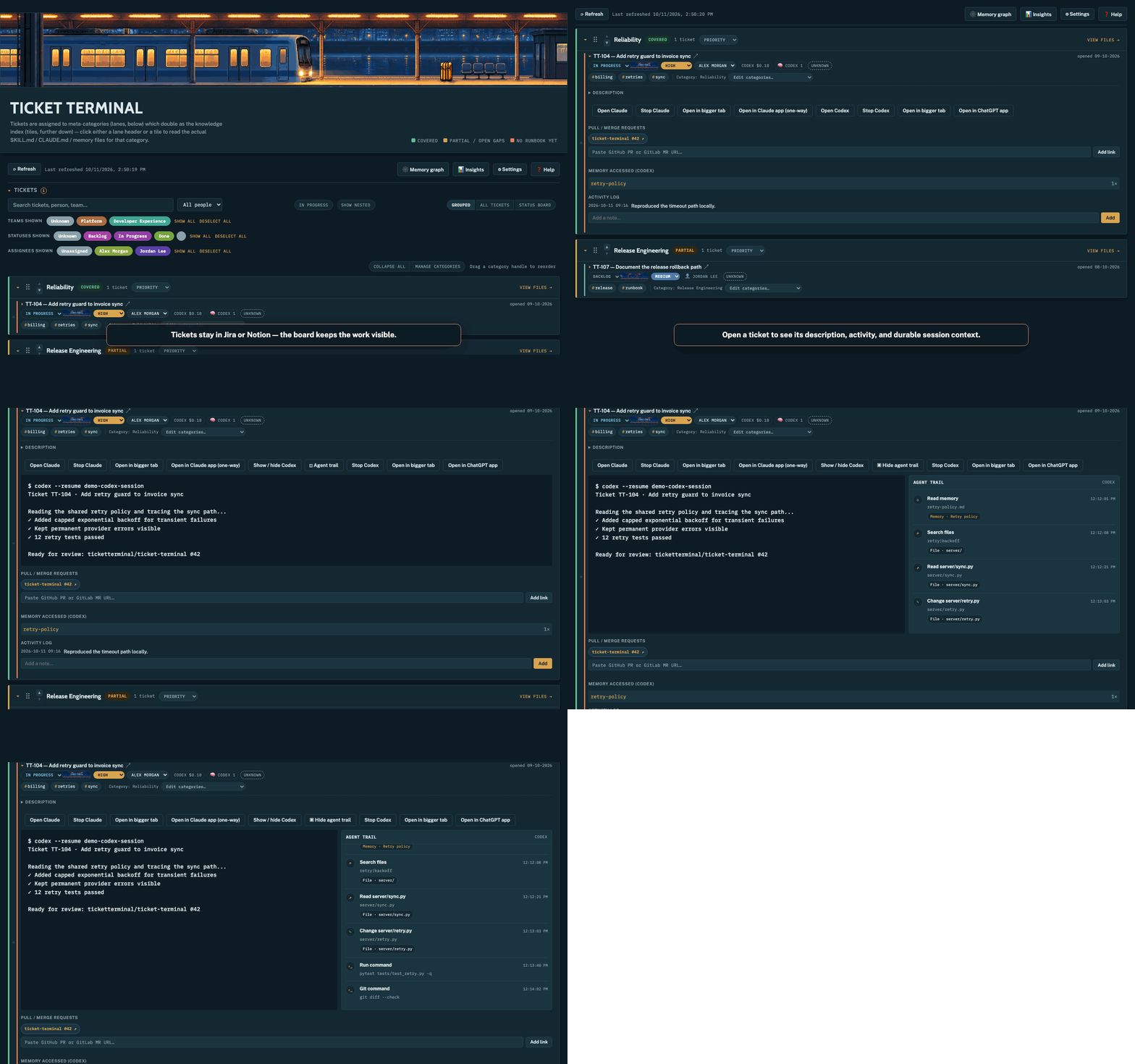
Current app mechanics with safe sample data: open a ticket, launch its agent session, and inspect the agent trail.
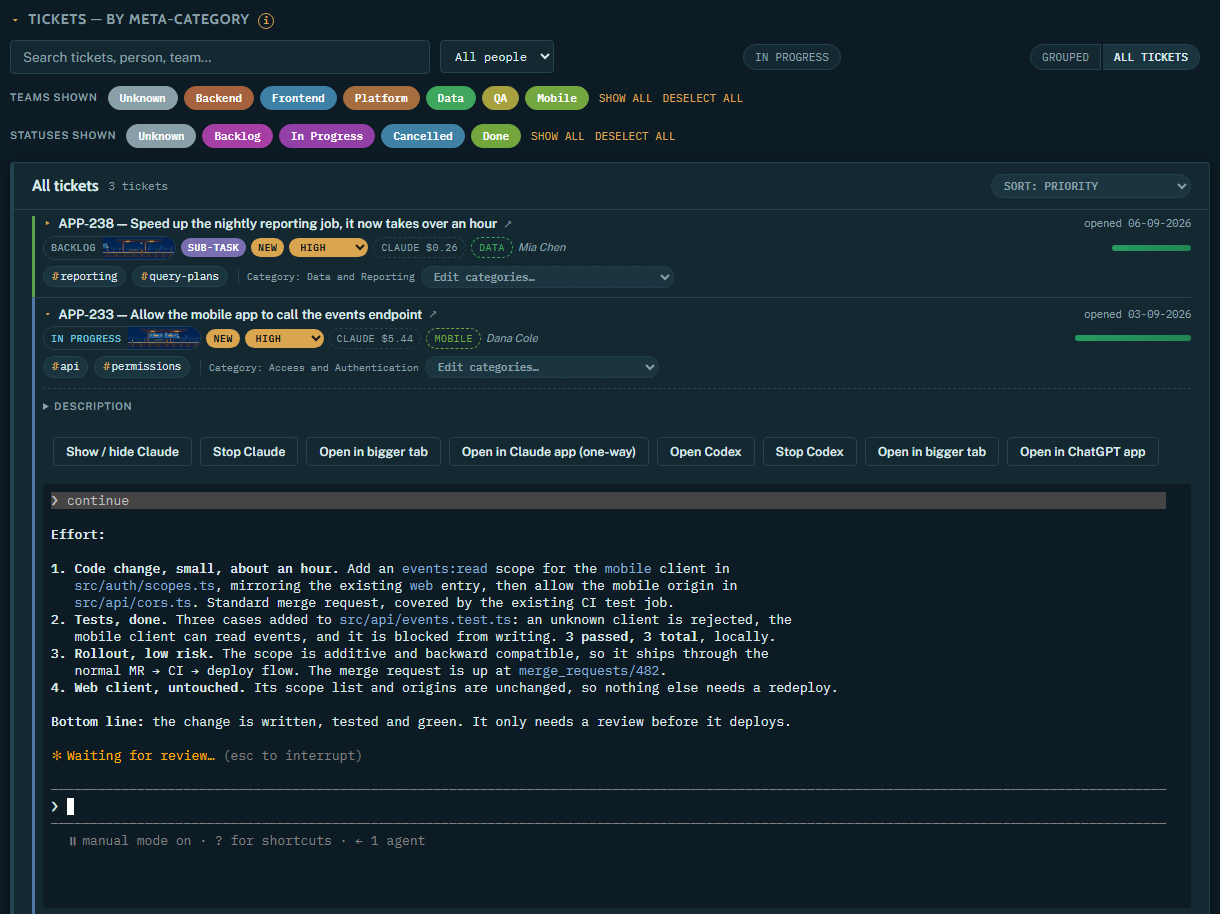
Sample tickets and an illustrative session. Each ticket opens its own Claude or Codex terminal, with the cost badge coming from codeburn.
- Embedded terminals: Claude and Codex sessions per ticket, resumable, with a permanent transcript.
- Shared memory: a folder of markdown notes (with optional Mermaid diagrams) that any agent can read and write. See Memory.
- Cost per ticket: a
$badge on every ticket that has run an agent, via codeburn. - Jira and Notion sync: tickets stay where your team already keeps them.
- Role-aware categories: lanes that double as an index into your runbooks and memory, with starter presets for ten engineering roles.
- Local-first: runs on your machine with your own credentials. No hosted service.
Memory
Agents forget everything between sessions, and a team's knowledge usually lives in someone's head, a
wiki nobody reads, or a chat transcript nobody else can see. Ticket Terminal makes the knowledge
base a plain folder of markdown that humans and agents share:
flowchart LR
  A["Claude / Codex sessions<br/>(one per ticket)"] <-->|read and write files| M[("Memory folder<br/>*.md notes")]
  Y["You, in the app"] <-->|edit notes| M
  M --> G["Graph view"]
  M --> L["Category lanes"]
  M --> U["Usage stats per ticket"]
What a memory is. One .md file per note, with optional frontmatter (name, description,type), [[other-note]] links that become edges in the graph, and an optional ```mermaid
block that renders as a diagram. There is no database and no proprietary format, so it diffs in git
and renders on GitHub or in Obsidian. The full spec is MEMORY_FORMAT.md.
Where it lives. By default it is Claude Code's own per-project memory folder for your default
working directory (~/.claude/projects/<cwd>/memory/), so Claude sessions started there already
read and write it through Claude Code's built-in memory. To use a different folder, set it in
Settings → Memory source or with WMP_MEMORY_DIR. Codex, or any other agent with filesystem
access, can use the same folder; point it there from its own instructions file (for exampleAGENTS.md).
What the app does with it:
- Graph view (
#/memory): notes as nodes, links as edges, filterable by type. Click a note to
read or edit it; edits are written straight back to the file. The app edits existing notes;
agents (or you, on disk) create them. - Diagrams: draft a Mermaid diagram for a single note, or one overview diagram for a whole
category, using your signed-inclaudeCLI. The diagram is stored in the note itself. - Category lanes: each lane lists the notes it relies on, shown with its runbooks and skills.
- Usage tracking: each ticket shows which notes its session actually read (exact
Readcalls
for Claude, path mentions for Codex). The Insights page flags notes that are both large and
heavily read, since those cost input tokens on every session that touches them.
Quick start
The recommended path is Python and uv; it uses the Claude/Codex CLI already installed and signed
in on your machine. Docker is available as a packaging alternative. Either way you end up with the
same app at http://127.0.0.1:4173 — there is no frontend build step.
Recommended: Python + uv
Requirements: Python 3.12, uv, and theclaude and/orcodex CLI, signed in. Optional: Node.js 22.13+ for
cost badges, and a Jira or Notion account for ticket sync.
git clone https://github.com/ticketterminal/ticket-terminal.git
cd ticket-terminal
uv venv && uv pip install --require-hashes -r requirements.txt
source .venv/bin/activate
python server/main.py
Then open http://127.0.0.1:4173, connect Jira or Notion in Settings, expand a real ticket,
and choose Open Claude or Open Codex. If you try the public preview, please file a short
install report—successful
runs are useful too. Do not include credentials or private ticket content.
To show cost badges, install codeburn once:
npm install -g codeburn
Alternative: Docker
Use this if you would rather not manage a Python venv (and Node, for cost badges) on your own
machine. The image bundles Python, Node, and both the claude and codex CLIs; what it does
not bundle is your agent sign-in or your real filesystem — those reach the container through
bind mounts, so a session started here still runs real commands against your real repos, with your
real credentials. This is a packaging convenience, not a sandbox.
cp .env.example .env   # or: touch .env, if you are not using Jira/Notion sync
UID=$(id -u) GID=$(id -g) docker compose up -d --build
docker-compose.yml mounts your whole $HOME into the container at the same
path it has on your host, so ticket workDirs resolve correctly and ~/.claude/~/.codex
(wherever claude/codex already keep you signed in) just work — sign in on your host as normal,
not inside the container. ./data is a separate mount for the app's own state (see
Your data); .env carries Jira/Notion credentials in, same as the Python install.
If a tool inside the container complains about an unknown user (cosmetic, from running as your
host UID with no matching container /etc/passwd entry), it is safe to ignore — file ownership on
the bind mounts is still correct.
Host-native agents. Since the container already bind-mounts your whole $HOME (above), running
claude/codex inside it buys you packaging convenience, not isolation — but it does mean the CLI
version baked into the image, and its own npm/update machinery, can drift from (or outright
conflict with) whatever you have installed natively, and some container profiles block things an
agent CLI expects (e.g. codex's own sandbox needs a Linux user namespace, which isn't always
available unprivileged in Docker). If you'd rather claude/codex ran as genuine host processes —
your real installed versions, your real credentials, no container in the way — while still keeping
the one-command server install:
python3 server/host_bridge.py # run on your host, outside Docker — stdlib only, nothing to install
Then set WMP_HOST_BRIDGE_PORT in .env (default 4174, matching the bridge's own default — set
it explicitly on both sides if you change it) and restart the container. From then on, opening a
terminal spawns claude/codex on your host instead of in the container: the server sends the host
helper a command to run over a local TCP connection to host.docker.internal (Docker's standard
container→host address, already wired up on Docker Desktop; native Linux Docker needs theextra_hosts line already in docker-compose.yml for this to resolve), which
opens a real PTY there and relays its bytes back — the container never runs the agent process itself.
This is strictly additive to the trust boundary the $HOME bind mount already implies, just made
explicit as one local port instead of implicit in a mount; bound to 127.0.0.1 on your host, so it's
never reachable from your network, same as the server itself. Leave WMP_HOST_BRIDGE_PORT unset to
keep running claude/codex inside the container as before. Codex needs installing natively on your
host for this (today it only ships inside the image) — see
learn.chatgpt.com/docs/codex/cli.
Security: the server binds to 127.0.0.1 only — in Docker, that happens inside the
container's own network namespace, so the real boundary moves to the host-side publish instead.docker-compose.yml already scopes this correctly
(127.0.0.1:4173:4173); if you ever run the image by hand, never drop the 127.0.0.1: prefix from-p, or it is reachable from your whole network. Either way: it can spawn a real shell, which is
the point of the embedded terminal, so it must never be reachable from the network. There is no
login layer; localhost is the security boundary.
Why a local app and not a hosted page? A sandboxed web page cannot spawn a local process: noterraform, aws or git against a ticket, and no transcript of the session that did it.
Terminals
Expand a ticket and choose Open Claude or Open Codex. Each provider has its own terminal,
resumable conversation, stop control and cost badge. Collapsing a terminal keeps its process
alive; Stop ends it, and reopening reconnects to or resumes the stored session. Opening the
details panel does not start an agent.
- A ticket's terminal runs in its own
workDir, or inWMP_DEFAULT_WORKDIR(default: your home
directory). - If
claudeorcodexis not on the server'sPATH, setWMP_CLAUDE_BINorWMP_CODEX_BINto an
absolute path. Codex honorsCODEX_HOME. - Codex assigns its own session id. The app tags the opening prompt with a unique marker and looks
it up in Codex's local session index, so it never resumes some other session in a shared directory. - Transcripts are saved per ticket under
data/workspaces/<slug>/sessions/.
Cost badges
Every ticket that has run an agent shows a $ badge (hover for call count and model). The app runscodeburn sessions --period lifetime --format json --provider all and matches results to tickets
by session id, refreshing every 15 seconds while terminals are open. Figures are token-based
estimates, not subscription invoices, and unavailable usage is left blank rather than shown as
zero. Without codeburn on PATH the badge is simply absent.
Categories and knowledge base
Tickets are grouped into category lanes. Each lane can link out to its team's runbooks, skills
and memory notes. New boards ask for a work role and preview one of ten engineering
starter sets (or a custom role); Manage categories lets you add, rename, delete and reorder
lanes. IDs stay fixed when you rename, so ticket assignments and links keep working.
To define lanes by hand, copy the shape from data/categories.example.json into your workspace'scategories.json: an array of {id, name, status, color, note, memories, skills, docs}. status iscovered, partial or gap, and each id in docs needs a matching entry in docs.json (shape:data/docs.example.json, with kind one of skill, claude or memory).
AI category review looks at ticket titles, current categories and your saved role, using the
signed-in claude CLI (haiku, tools disabled). It suggests adds, renames, merges and
reassignments, each with a reason and a preview of the affected tickets. Nothing applies without
your approval, and descriptions, notes, credentials and knowledge files are never sent. Run it on
demand, or set it to daily or weekly.
Every category edit, accepted suggestion and restore saves the previous state, so you can roll back
from Category history. Ticket notes, status and sessions are unaffected by a restore.
The grouped view supports drag-and-drop lane ordering, Collapse all / Expand all, and sorting
by status, priority or open date. Order and collapsed state are saved per browser.
Jira sync
Copy .env.example to .env and fill in JIRA_BASE_URL, JIRA_EMAIL, JIRA_PROJECT_KEY and an
API token. The server then refreshes
title, status, priority and content tags for every ticket on the board every 10 minutes, and
whenever you click Refresh. New tickets created after the newest tracked one are imported with
a suggested category that stays marked for human review. Your categories, team, notes, sessions and
MR links are never overwritten. Without a .env, Jira sync is simply unavailable.
Content tags (one to three per ticket, like kubernetes or certificate rotation) are generated
from the title and description by the signed-in claude CLI. Unchanged tickets are not re-sent,
and if generation fails the Jira fields still refresh and the next sync retries.
Edit JIRA_PRIORITY_ORDER and JIRA_PRIORITY_COLOR in public/board.js if your project does not
use Jira's stock Highest to Lowest priorities.
Notion sync
Notion works as a second ticket source, next to Jira or instead of it. One Notion database is the
project and each page is a ticket. Editing status or priority on the board pushes back to the
tracker.
- At notion.so/my-integrations, create an Internal
integration and copy its secret (ntn_…). - In Notion, open your tickets database, then
···→ Connections, and add the integration. - In the board, go to Settings → Notion connection, paste the secret and click Connect with
token. It is validated before it is stored. - Pick the database, confirm the detected status and priority columns, Save, then Sync now.
NOTION_TOKEN and NOTION_DATABASE_ID in .env do the same for scripted setups; the Settings
page takes precedence.
How pages map to tickets. The title column is the summary. A unique_id property (for examplePROJ-42) becomes the ticket key; otherwise it is NOTION-<8 chars of the page id>. The status
and optional priority columns are auto-detected and overridable, and the page's top-level blocks
become the description. The first sync imports the whole database.
Sprints. The board looks for a relation to a small database of named, dated rows and derives
each sprint's state (active, future or closed) from its dates. On the gap days between sprints it
uses your workspace's active sprint marker, a status value it infers and that you can confirm
under Settings.
OAuth with a public integration is available under Settings → Advanced: OAuth, for handing the
board to people in other workspaces. It needs a Public integration and the redirect URIhttp://localhost:4173/api/notion/oauth/callback.
The Notion API version is pinned to 2022-06-28.
Workspaces
One install can hold several named workspaces, for example a work board and a side project. They are
switched between and never merged. Each has its own tracker connection, tickets, categories,
transcripts and memory folder. With only one workspace you will not see any workspace UI.
Create one from Settings → New workspace…. Slugs are lowercase letters, digits and hyphens;default is reserved. Routes carry the workspace (#/w/<slug>/…), and a bare #/… means the
default workspace. The background sync covers the default workspace only. Others sync when you
switch to them, if they have not synced in the last 10 minutes.
Your data
Everything the app stores is in data/, which is live state and not source. It is gitignored apart
from the *.example.json files, so back it up yourself.
data/
  workspaces.json            # registry of workspaces
  categories.example.json    # shipped examples, shared by every workspace
  docs.example.json
  workspaces/<slug>/         # one board's state
    db.json  settings.json  categories.json  docs.json  category-management.json  sessions/
.env is global. It is the fallback for any workspace, and values saved on a workspace's Settings
page win over it.
Architecture
server/main.py: FastAPI app. Servespublic/, a REST API, andWS /ws/terminal/{key}, a real
PTY runningclaudeorcodex, bridged to the browser.server/db.py: the datastore, a single JSON file per workspace. No ORM or SQLite; a few hundred
documents do not justify one.server/memory_analysis.py,diagram_gen.py: memory graph, usage stats and diagram drafting.server/jira_sync.py,notion_sync.py: tracker adapters. Both are no-ops until configured.server/cost_analysis.py: per-ticket cost viacodeburn.server/content.py,category_management.py: categories, docs and category history.server/workspaces.py: workspace registry and per-request workspace selection.server/agent_launch.py: finding/launching claude or codex in a PTY — pure stdlib, no FastAPI, so
it's shared bymain.py's local spawn path andhost_bridge.pybelow.server/host_bridge.py,host_bridge_client.py,host_bridge_protocol.py: the optional
host-native-agents path (see "Docker" above) — a standalone script you run on your host, the
container-side client that talks to it, and their shared Unix-socket wire format.public/: plain vanilla JS frontend with no bundler.
Development
.venv/bin/python -m unittest discover -s tests   # backend
npm --prefix tests/ui ci && npm --prefix tests/ui test   # UI
The backend suite runs against an isolated local server with mocked LLM responses; it never touches
your live categories or sends ticket data to a model.
Contributing
Issues and PRs are welcome. Open an issue first for anything that will take real time, so it is not
duplicated or built against a direction that is about to change; otherwise just send the PR.
Contributions use the Developer Certificate of Origin: sign off
your commits with git commit -s. There is no CLA and no copyright assignment. See
CONTRIBUTING.md.
License
Apache 2.0. See LICENSE. Contributions are accepted under the same license.

Built by Seurat Labs
Yorumlar (0)
Yorum birakmak icin giris yap.
Yorum birakSonuc bulunamadi