google-ai-mode-mcp
Health Uyari
- License — License: MIT
- Description — Repository has a description
- Active repo — Last push 0 days ago
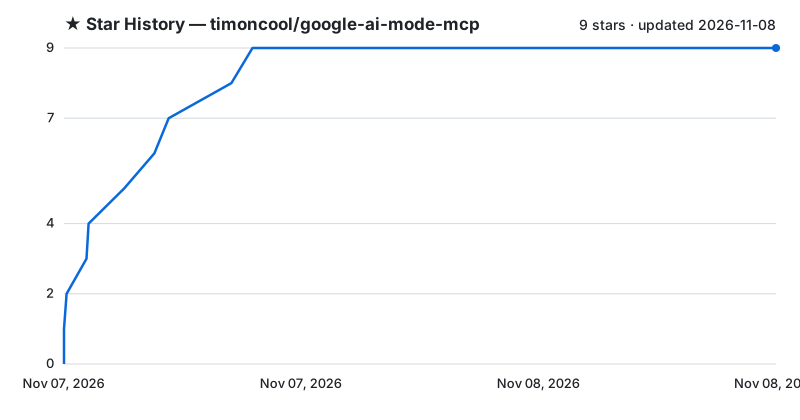
- Low visibility — Only 9 GitHub stars
Code Gecti
- Code scan — Scanned 12 files during light audit, no dangerous patterns found
Permissions Gecti
- Permissions — No dangerous permissions requested
Bu listing icin henuz AI raporu yok.
Google AI Mode for Claude and any MCP client: cited AI answers from your own browser in ~3 s, no tabs, no API keys

Google AI Mode MCP
Google AI Mode for Claude and any MCP client — cited AI answers from your own browser, in about three seconds, with no tabs, no API keys and no quotas of its own.




Google AI Mode reads dozens of pages and writes one answer with sources. This MCP server hands that answer to your agent: Claude asks a question, a small browser extension asks Google in your own Chrome, signed in as you, and the answer comes back as clean Markdown with citations. One call replaces reading five to ten pages, at a fraction of the tokens.
Features
- Fast — about 3 s per answer on average in our tests (6.2 s → 3.2 s against the extension this grew from): the answer is taken the moment Google marks it finished, and the extension gets each query instantly over a long-poll.
- Invisible — in Chrome every search runs in a hidden offscreen frame: no tab, no window, nothing flashes on screen.
- Follow-ups — keep asking in the same Google conversation; it is reopened from its link even after the frame is gone, for 30 minutes.
- Parallel —
search_manysends up to 10 questions at once, about as fast as one. - Local results —
gl="us"(or any country) for prices, availability and local news. - Any UI language — works with Google in English, Russian or any other language.
- Clean answers — no interface leftovers in the text, non-Latin text stays as text (no
\uXXXXtoken bloat). - Clear errors — a CAPTCHA, a sleeping extension or a used-up quota come back with a hint for the agent.
- Your account, your machine — no API keys, no paid proxy, nothing leaves your computer except the search itself.
Install
You need uv and Chrome (Firefox works too, with background tabs instead of hidden frames).
1. MCP server — one command:
claude mcp add google-ai-mode -- uvx --from git+https://github.com/timoncool/google-ai-mode-mcp#subdirectory=server google-ai-mode-mcp
Claude Desktop, Cursor and other clients — the same command in their config:
{
  "mcpServers": {
    "google-ai-mode": {
      "command": "uvx",
      "args": ["--from", "git+https://github.com/timoncool/google-ai-mode-mcp#subdirectory=server", "google-ai-mode-mcp"]
    }
  }
}
2. Browser extension. It is not in any store: you load it into the browser yourself, once.
Chrome, Brave, Vivaldi, Opera and other Chromium browsers:
Copy the extension out of the package:
uvx --from git+https://github.com/timoncool/google-ai-mode-mcp#subdirectory=server google-ai-mode-mcp --extensionIt prints the folder it copied to:
OS Folder Windows %LOCALAPPDATA%\google-ai-mode-mcp\extensionmacOS ~/Library/Application Support/google-ai-mode-mcp/extensionLinux ~/.local/share/google-ai-mode-mcp/extensionOpen the extensions page (
chrome://extensions,brave://extensions, …), turn on Developer mode in the top right corner, click Load unpacked and pick that folder.Keep the folder where it is: the browser loads the extension from it, and deleting or moving it removes the extension.
Be signed in to Google in this browser; searches run in your account. AI Mode must be available for it:
https://www.google.com/search?udm=50&q=testshould open an AI Mode answer.Check the connection: with the MCP server running, the extension's popup says Server & extension connected, and the
healthtool reportsextension_connected: true.
To update, run the command from step 1 again and press the reload arrow on the extension's card. Without uv: clone the repository (or Code → Download ZIP) and load its extension/ folder.
Firefox 128+ (searches run in background tabs instead of hidden frames). The Firefox build is in the repository, not in the package:
git clone https://github.com/timoncool/google-ai-mode-mcpor Code → Download ZIP and unpack it.- Open
about:debugging, click This Firefox → Load Temporary Add-on and pickfirefox-extension/manifest.json. - Firefox removes temporary add-ons when it restarts, so repeat step 2 after each restart. To keep it installed, use Firefox Developer Edition or Nightly:
- set
xpinstall.signatures.requiredtofalseinabout:config; - zip the contents of
firefox-extension/; - install the zip from
about:addons→ gear menu → Install Add-on From File.
- set
3. Skill (recommended) — copy skills/google-ai-mode to ~/.claude/skills/ so Claude knows when to search and how to ask. Measured on the same 25 questions (before/after):
| Without the skill | With the skill | |
|---|---|---|
| Official or primary source cited | 13/24 | 22/24 |
| Answers without any source | 2 | 0 |
| Closing "Would you like…" offers | 23 | 0 |
| Median answer length | 1,085 chars | 532 chars |
| Median time | 3.0 s | 3.2 s |
Tools
| Tool | What it does |
|---|---|
search(query, mode, gl, hl) |
One question → answer, citations, thread_id. mode="fast" for quick facts, gl for a country |
search_many(queries) |
Up to 10 independent questions in parallel, results in the same order |
follow_up(query, thread_id) |
Next question in the same conversation |
generate_image(prompt, save_path) |
Image from Google's generator in AI Mode |
health() |
Server and extension status, with a hint if something is off |
Ask in the language you want the answer in: the answer follows the language of the question (hl only switches Google's interface).
Benchmark
25 questions with fixed answers, three search tools, one blind AI judge (Claude Opus 5.5) that saw only random ids:
| Google AI Mode MCP | Claude Code WebSearch | Exa | |
|---|---|---|---|
| Best answer (of 25) | 10 | 5 | 10 |
| Mean rank (1 = best) | 1.76 | 2.36 | 1.88 |
| Fully correct | 23/25 | 19/25 | 23/25 |
| Median time | 3.1 s | 5.1 s | 0.95 s |
| Text handed to the assistant, 25 answers | 31k chars | 21k chars | 433k chars |
AI Mode gives the best answers overall at a fraction of Exa's text; Exa is fastest and has the best sources, WebSearch is right least often. Asked the way the skill teaches, AI Mode cites an official or primary source in 22 of 24 answers instead of 13, with half the text (before/after). Full report, every raw output and verdict, and a procedure to benchmark any search tool: benchmarks/.
How it works
Claude ──MCP──▶ google-ai-mode-mcp ──HTTP──▶ local relay :15551 ◀──long-poll── browser extension
                                                                                  │
                                         hidden offscreen frame: google.com/search?udm=50
- The MCP server starts a small local relay. The extension holds an open request to it and receives each query the moment it arrives.
- In Chrome the query opens in an iframe of an offscreen document. Google forbids framing its pages, so a session rule lifts the framing headers only for requests that belong to no tab; your normal browsing is untouched.
- The answer is read when Google renders its rating buttons under it, hidden interface text is dropped, and the conversation link is kept for follow-ups.
Settings (extension options): where searches run — hidden frames (default) or background tabs. Environment: GOOGLE_AI_SCRAPER_URL (relay address), GOOGLE_AI_SCRAPER_CLOSE_AFTER_SEARCH=0 to keep tabs open between follow-ups in tab mode.
Limits. This uses Google Search like a person does, through your browser; Google may show a CAPTCHA — open Google once, solve it, and retry. Hidden frames need Chrome (or any Chromium); Firefox uses background tabs.
Inspired by balakumardev/google-ai-scraper.
Other Projects by @timoncool
| Project | Description |
|---|---|
| telegram-api-mcp | Full Telegram Bot API as an MCP server |
| civitai-mcp-ultimate | Civitai API as an MCP server — models, images, prompts |
| trail-spec | TRAIL — cross-MCP content tracking protocol |
| ACE-Step Studio | AI music studio — songs, vocals, covers, videos |
| VideoSOS | AI video production in the browser |
| Bulka | Live-coding music platform |
Authors
- Nerual Dreming — Telegram | neuro-cartel.com | ArtGeneration.me
Support the Author
I build open-source software and do AI research. Most of what I create is free and available to everyone. Your donations help me keep creating without worrying about where the next meal comes from =)
All donation methods | dalink.to/nerual_dreming | boosty.to/neuro_art
- BTC:
1E7dHL22RpyhJGVpcvKdbyZgksSYkYeEBC - ETH (ERC20):
0xb5db65adf478983186d4897ba92fe2c25c594a0c - USDT (TRC20):
TQST9Lp2TjK6FiVkn4fwfGUee7NmkxEE7C
Star History
License
MIT
Yorumlar (0)
Yorum birakmak icin giris yap.
Yorum birakSonuc bulunamadi