cc-pipeline
Health Uyari
- License — License: MIT
- Description — Repository has a description
- Active repo — Last push 0 days ago
- Low visibility — Only 6 GitHub stars
Code Uyari
- process.env — Environment variable access in dist/agents/claude-interactive.js
- process.env — Environment variable access in dist/agents/claude-piped.js
- process.env — Environment variable access in dist/agents/claudecode.js
Permissions Gecti
- Permissions — No dangerous permissions requested
Bu listing icin henuz AI raporu yok.
Claude Code Pipeline - a Claude Agent SDK driven harness for greenfield development
:rotating_light: May 2026 DEPRICATED: My continuation of this work is here https://github.com/timothyjoh/cycle :rotating_light:
Autonomous Claude Code pipeline engine. Install into any repo, write a BRIEF.md describing your project, and let Claude build it phase by phase.
Read the intro blog post (a week outdated) https://curiousagents.substack.com/
What Is This?
cc-pipeline orchestrates autonomous development workflows using Claude Code. You provide a project vision in plain language, and the pipeline:
- Breaks down the vision into phases
- Plans and implements each phase
- Runs tests, reviews code, and commits automatically
- Iterates until the project is complete
Think of it as a CI/CD system for AI-driven development—but instead of deploying code, it writes it.
Prerequisites
- Node.js >=18
- Claude CLI (
claude) installed and configured (get it here) - git — For the commit step (you probably already have this)
Installation
Initialize the pipeline in your project:
cd your-project
npx cc-pipeline@latest init
This scaffolds the .pipeline/ directory, prompt templates, CLAUDE.md, and a BRIEF.md.example into your project.
Quick Start
1. Initialize the pipeline
cd your-project
npx cc-pipeline@latest init
2. Write your project brief
Copy the example and edit it:
cp BRIEF.md.example BRIEF.md
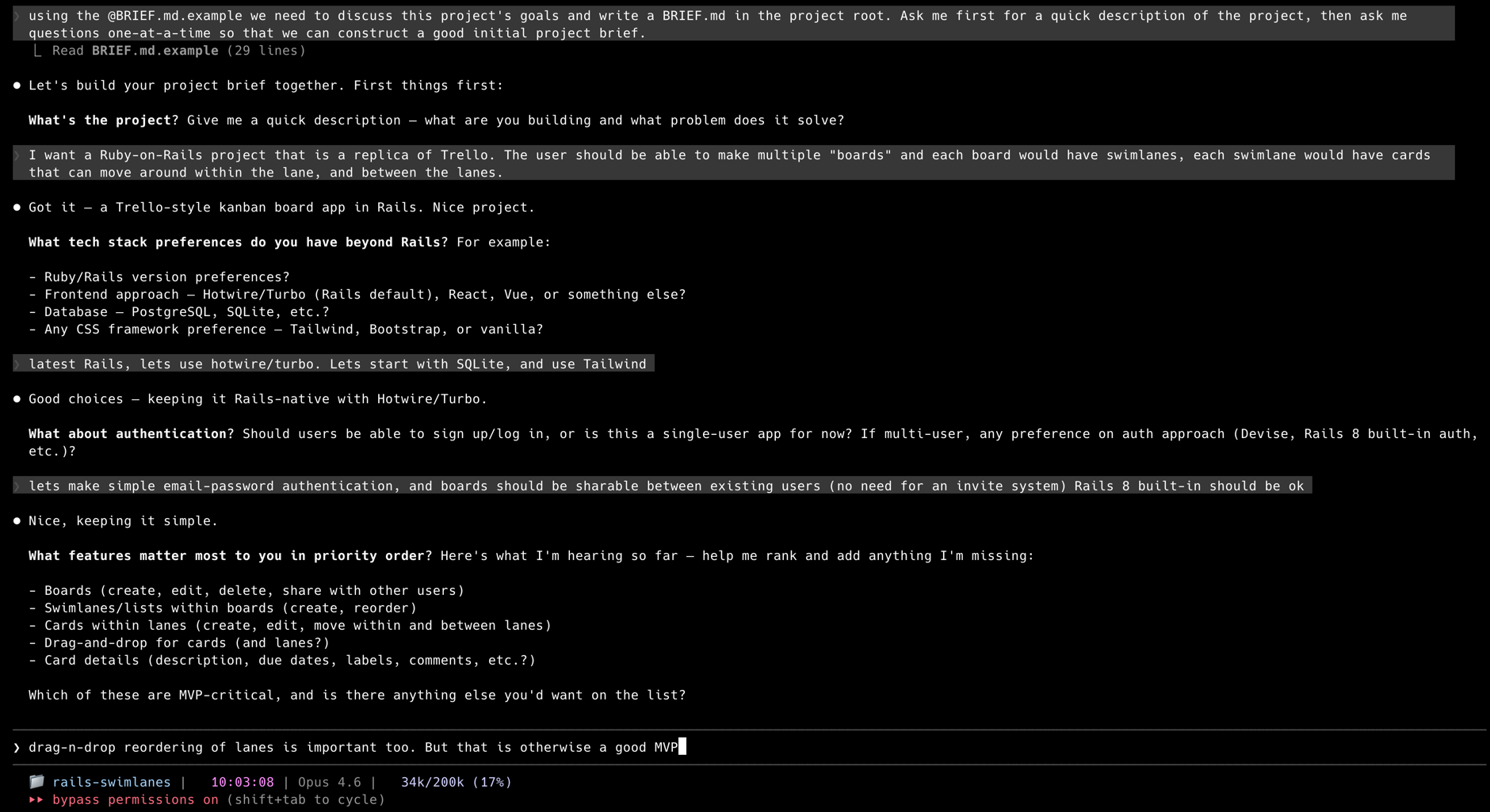
Or let Claude Code help you write it — fire up claude in your project and ask:
Using the @BRIEF.md.example as a template, let's discuss this project's goals
and write a BRIEF.md. Ask me for a quick description first, then ask questions
one-at-a-time to build a good brief.
3. Run the pipeline
npx cc-pipeline run
The TUI launches automatically in a terminal, showing live step progress, agent activity, and per-step timers. That's it — the pipeline will spec, build, review, fix, and commit each phase automatically.
Commands
| Command | Description |
|---|---|
npx cc-pipeline@latest init |
Scaffold .pipeline/, CLAUDE.md, and BRIEF.md.example |
npx cc-pipeline@latest update |
Refresh prompts and docs (preserves your workflow.yaml) |
npx cc-pipeline run [options] |
Run the pipeline |
npx cc-pipeline status |
Show current phase, step, and recent events |
npx cc-pipeline reset |
Clear event log, phase outputs, and STATUS.md |
Tip: Use
@latestwithinitandupdateto get the newest templates. Forrun,status, andreset, the cached version is fine.
Run Options
--phases <n>— Limit to N phases (useful for testing)--model <name>— Override model for all steps (e.g.,opus,sonnet,haiku)--ui— Force TUI on (default: auto-detects TTY)--no-ui— Plain log output, no TUI (useful for CI/pipes)
Examples
npx cc-pipeline run                  # Run until complete (TUI auto-enabled)
npx cc-pipeline run --phases 3       # Run just 3 phases
npx cc-pipeline run --model opus     # Use opus for all steps
npx cc-pipeline run --no-ui          # Plain output, no TUI
npx cc-pipeline reset                # Start over from scratch
The pipeline resumes from interruptions automatically. Press Ctrl-C to pause, then npx cc-pipeline run again to continue.
How It Works
Phases
The pipeline works in phases, each representing a unit of progress (e.g., "user authentication", "payment integration"). Each phase follows the same workflow of steps.
Epics
The pipeline organizes work into Epics — vertical slices of user-testable value stored in docs/epics/. Each Epic represents a real capability a user can open, see, and evaluate (e.g., "User can sign up and log in", not "Set up the database").
The groom step manages Epics automatically: bootstrapping them from your BRIEF.md on phase 1, transitioning to the next Epic when one is complete, and skipping when work is already in progress.
Steps
Each phase runs through these steps (defined in .pipeline/workflow.yaml):
- groom — Bootstrap Epics from
BRIEF.md(phase 1), transition to next Epic, or skip if current Epic is in-progress - spec — Break the current Epic into a phase spec
- research — Analyze the current codebase state
- plan — Create an actionable implementation plan
- build — Implement the plan
- review — Staff engineer-level code review
- fix — Address review findings (skipped if none)
- reflect — Look back at what happened this phase; update the Epic's remaining work
- next — Write a short
NEXT.mdsteering pointer (which Epic, in-progress or complete) - status — Update
STATUS.mdwith build summary, test coverage, and what's next - commit — Git commit and push
Agents
| Agent | How It Runs | Used For |
|---|---|---|
claudecode |
Claude Agent SDK (in-process) | All AI steps by default |
codex |
OpenAI Codex CLI (codex exec --yolo) |
Alternative for build/fix |
bash |
Direct shell command | Scripts, git operations |
State & Resume
Pipeline state lives in .pipeline/pipeline.jsonl — an append-only event log. The current phase and step are derived from the log, so you can interrupt and resume seamlessly.
Project Completion
When all Epics are finished, the groom step writes PROJECT COMPLETE in GROOM.md. The pipeline stops automatically.
Continuing Development Beyond the Initial Brief
Epics are the primary way to extend a project after the initial build. Your BRIEF.md is immutable — it's the original vision — but you can keep adding Epics to docs/epics/ indefinitely.
To add a new Epic, create a file like docs/epics/epic-4-short-name.md (increment the number) with just a Goal and Acceptance Criteria:
# Epic 4: [Short descriptive name]

## Goal
What the user can do when this Epic is complete. Must be something
a user can open, see, and evaluate — not an infrastructure task.

## Acceptance Criteria
- [ ] Observable thing a user can do or see
- [ ] Another testable outcome
The groom step will handle research and planning detail — you only need to express intent. Once the file exists, run npx cc-pipeline run and it picks up from there.
Good Epics are vertical slices of user-testable value:
- ✅ "User can filter and search results"
- ✅ "Admin can export data as CSV"
- ❌ "Refactor the API layer" (infrastructure, not user-visible)
You can also ask Claude Code to help write the next Epic based on what's already been built:
Look at docs/epics/ and STATUS.md, then help me write the next Epic.
Configuration
Pipeline behavior is controlled by .pipeline/workflow.yaml. See .pipeline/CLAUDE.md for full configuration docs — how to edit steps, change agents/models, customize prompts, and add new steps.
Quick Examples
Override model per step:
steps:
  - name: build
    agent: claudecode
    model: claude-opus-4-5
    prompt: prompts/build.md
Use Codex for build/fix:
  - name: build
    agent: codex
    model: o4-mini
    prompt: prompts/build.md
Add conditional execution:
  - name: fix
    agent: claudecode
    prompt: prompts/fix.md
    skip_unless: "MUST-FIX.md"    # Only runs if review produced MUST-FIX.md
Set a phase limit (default is 100):
max_phases: 50
Customize prompts: Edit the markdown files in .pipeline/prompts/ to change how each step behaves.
Example BRIEF.md
# Project Brief

## Overview
A command-line task manager with persistent storage.

## Tech Stack
- Node.js + SQLite
- No external dependencies

## Features (Priority Order)
1. **Add/list/complete tasks** — Core CRUD operations
2. **Due dates & filtering** — Filter by status, due date
3. **Tags & search** — Organize and find tasks

## Constraints
- Must work offline
- Single-file database

## Testing
- Node test runner for unit tests
- Cover core CRUD operations

## Definition of Done
~3 phases for MVP, complete when all features work with tests passing
Project Structure
After initialization and a few phases:
your-project/
├── .pipeline/
│   ├── CLAUDE.md            # Pipeline config docs (for Claude Code)
│   ├── workflow.yaml        # Step definitions, agents, models
│   ├── pipeline.jsonl       # Event log (auto-created on first run)
│   └── prompts/             # Prompt templates (customizable)
│       ├── groom.md
│       ├── spec.md
│       ├── research.md
│       ├── plan.md
│       ├── build.md
│       ├── review.md
│       ├── fix.md
│       ├── reflect.md
│       ├── next.md
│       └── status.md
├── docs/
│   ├── epics/               # Epic definitions (managed by groom step)
│   │   ├── epic-1-auth.md
│   │   └── epic-2-dashboard.md
│   └── phases/
│       ├── phase-1/         # Phase artifacts
│       │   ├── GROOM.md
│       │   ├── SPEC.md
│       │   ├── RESEARCH.md
│       │   ├── PLAN.md
│       │   ├── REVIEW.md
│       │   ├── REFLECTIONS.md
│       │   └── NEXT.md
│       └── phase-2/
│           └── ...
├── BRIEF.md                 # Your project vision
├── CLAUDE.md                # Project conventions (for Claude Code)
├── AGENTS.md                # Dev docs (created by Phase 1)
├── STATUS.md                # Running build summary (auto-updated)
└── [your code here]
Troubleshooting
Pipeline won't start:
- Ensure
claudeCLI is installed:claude --version - Run
npx cc-pipeline@latest initif.pipeline/doesn't exist
Step times out or hangs:
- Check Anthropic's status page — API issues cause slow startups
- The pipeline resumes automatically: press Ctrl-C and run
npx cc-pipeline runagain - For codex steps, an inactivity timeout (5 min of no output) will automatically retry up to 3 times
Want to start over:
npx cc-pipeline reset
npx cc-pipeline run
Want the latest prompts without losing your workflow.yaml:
npx cc-pipeline@latest update
Development
git clone https://github.com/timothyjoh/cc-pipeline.git
cd cc-pipeline
npm install
npm test
npm link    # For local development
License
MIT License — see LICENSE for details.
Contributing
Contributions welcome! Please open an issue or PR on GitHub.
Built with Claude Code by Anthropic.
Yorumlar (0)
Yorum birakmak icin giris yap.
Yorum birakSonuc bulunamadi