killi
Health Pass
- License — License: MIT
- Description — Repository has a description
- Active repo — Last push 0 days ago
- Community trust — 15 GitHub stars
Code Fail
- exec() — Shell command execution in .opencode/plugins/entire.ts
- spawnSync — Synchronous process spawning in .opencode/plugins/entire.ts
- process.env — Environment variable access in .pi/extensions/entire/index.ts
Permissions Pass
- Permissions — No dangerous permissions requested
No AI report is available for this listing yet.
Fast, tiny AI coding agent for the terminal, written in Rust. One small native binary for Apple Silicon Macs. Works with OpenAI, Anthropic and compatible LLMs; MCP, subagents, plan mode, prompt-cache-friendly.

killi




killi is a fast, tiny AI coding agent for your terminal, written in Rust (one small native
binary, no runtime). Like Claude Code, Codex CLI, opencode or Kimi Code, it reads your code, runs
commands and edits files, but it works with any OpenAI-compatible, Anthropic-compatible or
OpenAI Responses LLM, and it supports MCP servers, subagents, plan mode, skills, hooks andAGENTS.md. It is built around one idea: send the model as little as possible, and send it
the same way every time, so the provider's prompt cache keeps hitting. It is the sibling of the
Kil terminal and the
Kiled editor.
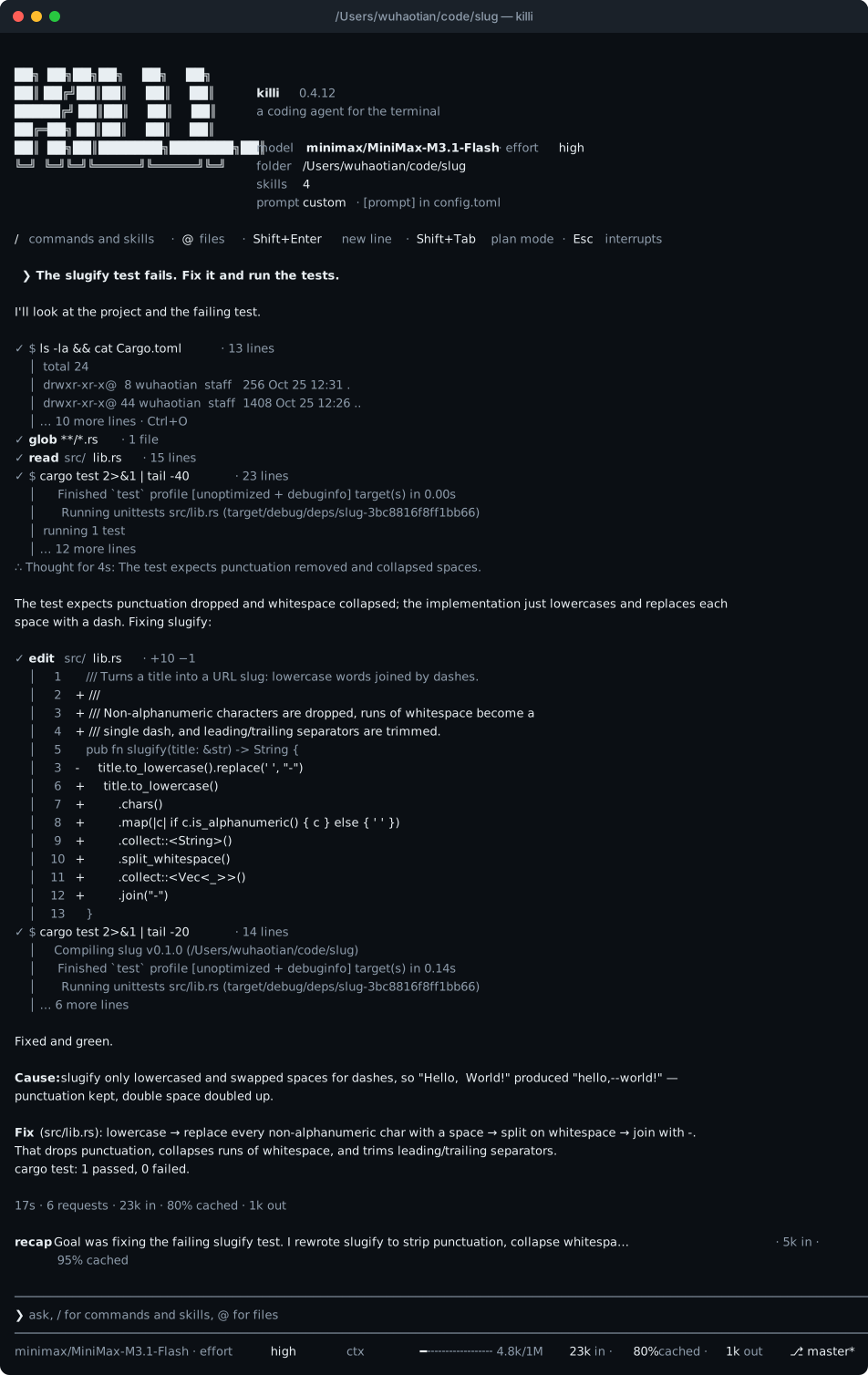
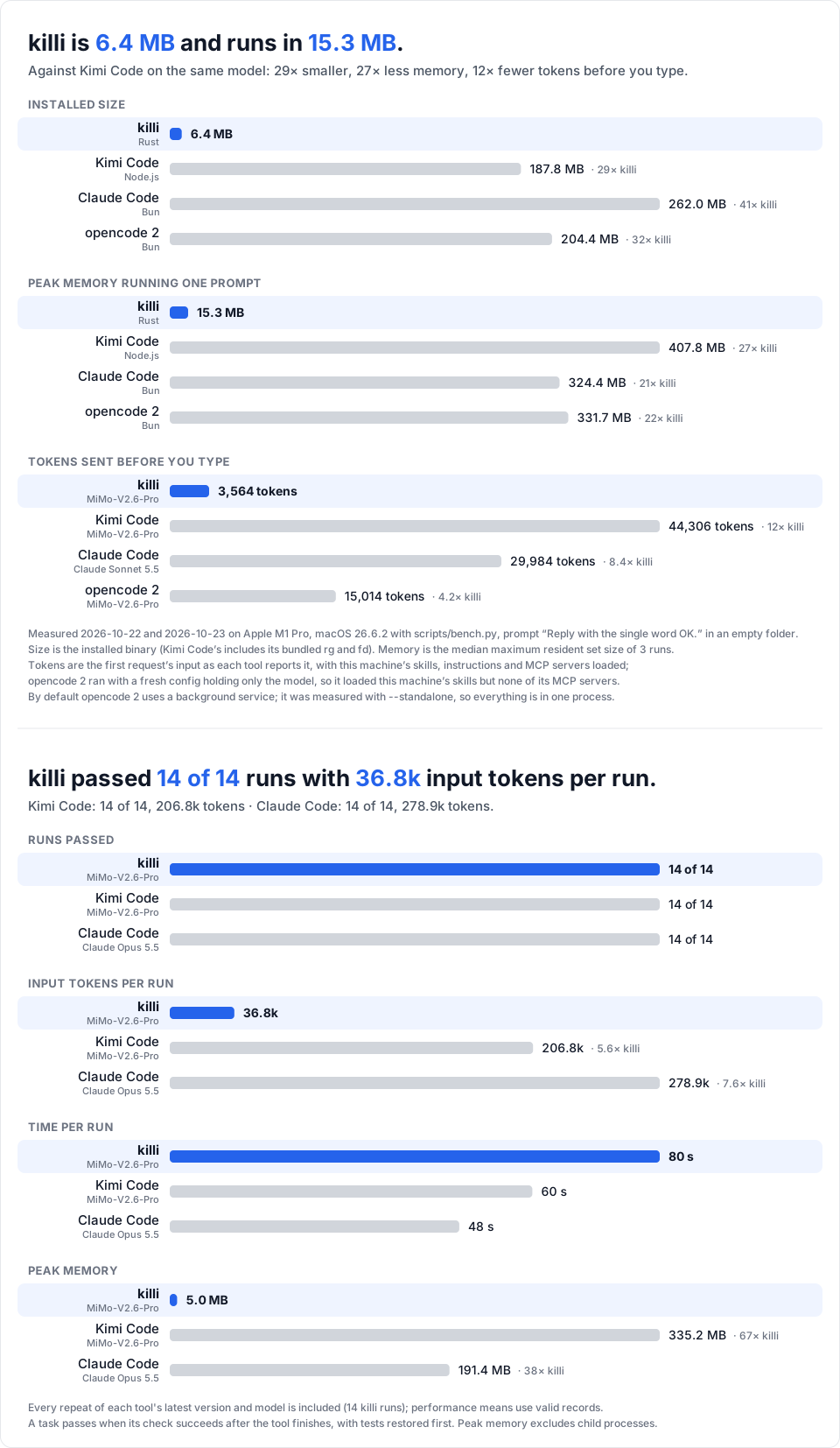
How these were measured: Size and memory · Capability tests.
Status: early. Apple silicon Macs only. Used daily by its author; expect rough edges.
Features
- Small and quick. One 6 MB binary with no runtime to install. It starts in under 20 ms and
uses about 15 MB of memory running a prompt, where Kimi Code uses 408 MB, Claude Code 324 MB
and opencode 2 332 MB. - Few tokens. The system prompt and every tool together come to about 2,600 tokens, plus
yourAGENTS.mdfiles and about 4 tokens per installed skill. In the
capability tests killi passed every task Kimi Code passed, on the same
model, with 5.6× fewer input tokens. - Cache-friendly by design. The system prompt and the tool list are fixed for the whole
session, and history is only appended to, never rewritten. Even plan mode, subagents and
resumed sessions reuse the same cached prefix; 70–90% of input tokens come from the cache. - An interactive mode that stays out of the way. The conversation prints into your
terminal's own scrollback; only a small area at the bottom redraws: what's running, your task
list, the prompt and a status line. Type/for a menu of commands and skills that narrows as
you type. Type while the agent works and your message reaches it at its next step. Esc
interrupts, and nothing it started keeps running. - Plan mode (Shift+Tab): the agent researches and writes a plan; edits are blocked and
bash runs only read-only commands until you approve it. - Tools that forgive small mistakes.
edittakes several changes in one call and still
matches when only trailing spaces, smart quotes or dashes differ. Long output keeps its useful
end and saves the rest to a file. Slightly broken tool-call JSON is repaired, not dropped. - Subagents run in parallel on the same model and cached prompt. Swarms run one subagent
per item of a prompt template, up to 128, several at a time, shown as one live panel (how many,
which are working on what, how long each has run); swarm mode, on by default and set with[agent] swarmor/swarm, tells the agent to split its work that way. Background tasks keep servers and slow builds running. Undo puts
your files back as they were before a turn, including what commands changed. - Sessions that know about each other. Run several killi at once and each knows where the
others work and what they are doing. The agent is told when another session works in its
repository, to leave that session's changes alone, and how to ask it about its work or leave
it a message. Nothing is added to the system prompt or the tool list. - Your setup, carried over. Kimi Code's config layout (
killi import-kimicopies it),
skills from~/.agents/skills, MCP servers frommcp.json, Claude Code-style hooks, andAGENTS.md(orCLAUDE.md) files, including ones in subfolders. - Every session on disk, exactly as sent, so
killi -ccontinues where you left off with
the cache still warm. - Updates itself.
killi updateinstalls the latest release after checking its checksum.
Size and memory
The top half of the chart above. Measured with scripts/bench.py; the versions and models are indocs/bench.json. killi, Kimi Code and opencode 2 ran the same model,
MiMo-V2.6-Pro; Claude Code ran its default, Claude Sonnet 5.5. killi, Kimi Code and Claude Code
loaded this machine's skills, global instructions and MCP servers; opencode 2 ran with a fresh
config holding only the model, so it loaded the skills but no MCP servers, and with --standalone
so that it is one process. killi and opencode 2 (2.1.3) were measured on 2026-10-23, Kimi Code and
Claude Code the day before, on the same machine.
Capability tests
The bottom half of the chart above. Fourteen Rust and TypeScript tasks in evals/tasks: fixing bugs (one hidden in
a 1,400-line file), implementing features from a spec, clearing compiler and clippy errors,
a multi-file refactor, a concurrency bug, JSON escaping with no dependencies allowed, a fix
that must leave a shared file untouched, and a question answered from the code rather than a
misleading README. Each starts from a fresh git repo; it passes when its check (the tests,
clippy, or an exact answer) succeeds after the tool finishes, with the tests restored first.
Every task was checked to fail as given and pass with its reference solution.scripts/eval.py runs them; docs/eval.md has every result.
killi's row is 0.2.16; Kimi Code's and Claude Code's were measured earlier (2.2.0 and 2.1.306), and each
tool ran every task once, so a single task's token count can swing by a third or more. killi's times
were taken on a busy machine and aren't comparable with the other two; tokens and memory are not
affected by load.
Install
curl -fsSL https://github.com/timwuhaotian/killi/raw/main/install.sh | sh
This puts killi in ~/.local/bin after checking its SHA-256 againstreleases/latest.toml. Later, killi update does the same in place.
Build from source
cargo install --path crates/killi
Rust 1.94 or later.
Using killi
Models
killi reads ~/.killi/config.toml. Run without a config, killi offers to make one
from another coding agent it finds on the machine — Kimi Code, pi, omp or opencode — carrying over
their providers, models, API keys, default model, thinking level and MCP servers into killi's
layout; providers those tools only reach through an account login are skipped. Otherwise it
writes a starting config to edit — and then keeps going. When the model it would start on has
no key — $OPENAI_API_KEY isn't set, say — it offers to paste the key (stored under[providers.*] in the config, read with echo off) or to start on another configured model,
so a first run ends on a session instead of an error. On the first interactive launch a short
guide also offers to add another start command beside the binary (such as dw -> killi);
press Enter to keep starting it as killi. To write the config yourself: if you use Kimi
Code, copy its providers, models and MCP servers:
killi import-kimi
Otherwise killi init writes a starting config to edit. It looks like this:
default_model = "mimo/mimo-v2.6-pro"

# [thinking]
# enabled = false            # turns reasoning off everywhere; each model reasons at its
#                            # default_effort (what /effort last picked) otherwise

[providers.mimo]
type = "openai"              # OpenAI chat completions
base_url = "https://api.example.com/v1"
api_key_env = "MIMO_API_KEY" # or api_key = "..."

[providers.minimax]
type = "anthropic"           # Anthropic Messages
base_url = "https://api.example.com/anthropic"
api_key_env = "MINIMAX_API_KEY"

[models."mimo/mimo-v2.6-pro"]
provider = "mimo"
model = "mimo-v2.6-pro"
max_context_size = 1000000
max_output_size = 128000
capabilities = ["image_in", "thinking", "tool_use"]

[models."minimax/MiniMax-M3.1-Flash"]
provider = "minimax"
model = "MiniMax-M3.1-Flash"
To use a subscription instead of a pay-as-you-go key, run killi login and pick one, or name
it: killi login chatgpt, killi login opencode-go or killi login muse-code. Either way killi
adds the provider and its models to the config; killi logout signs out. Inside a session,/provider does the same for OpenCode Go and Muse Code. Run on a provider the config already
has, it also brings that provider's API, URL and tool names up to date and keeps the rest.
- ChatGPT (Plus or Pro) signs in in the browser, through OpenAI's sign-in for open-source
tools, and keeps the credentials
in~/.killi/chatgpt.json. Requests go toapi.openai.com/v1/responseson your plan, and
killi refreshes the hourly token itself; ChatGPT settings → Usage
shows and limits what killi uses. - OpenCode Go takes the API key from the OpenCode
Console (or$OPENCODE_API_KEY). Its models answer on Chat
Completions, Responses or Anthropic Messages; killi writes each with the API and URL
models.dev gives it, and leaves out the ones on Gemini's API. Requests
carryx-opencode-sessionwith the session's ID, as OpenCode asks. - Muse Code (Meta) takes the muse CLI's API key (
LLM|…). killi writes ametaprovider
on the Responses API withtool_names = { bash = "run_command", web_search = "search_web" }:
Meta refuses a subscription's requests whose tools carry another client's names, so the
requests carry the mapped names and the replies are read back under killi's.
A model can use OpenAI's Responses API with protocol = "openai_responses". A Claude model
behind an OpenAI-compatible gateway (Bedrock through LiteLLM) caches nothing unless the request
marks it: set cache_control = true on that model, and check with scripts/probe.py cache.
Working with it
killi                        # start a session here
killi -c                     # continue the last session in this folder
killi -r                     # pick an earlier session
killi -p "fix the failing test in src/lib.rs"   # run one task and exit
killi -p "..." --json        # one JSON summary: tokens, cache hits, time
| Key | |
|---|---|
| / | the command menu: ↑↓ choose, Tab completes, Enter runs, Esc closes |
| @ | the file menu: fuzzy-search the workspace, Tab or Enter inserts @path; the file's contents go to the model with your message |
| Enter | send; while the agent works, your message reaches it at its next step |
| Shift+Enter, Ctrl+J | new line |
| Esc | interrupt; before the reply begins, your message comes back to the prompt as if never sent |
| Ctrl+S | while the agent works, interrupt it and send your message now |
| Shift+Tab | plan mode |
| Ctrl+V | paste an image from the clipboard as [Image #1] (Cmd+V too in Kil) |
| drag a file in | an image is attached as [Image #1]; any other file is named as @path |
| Ctrl+O | the last tool output or thought in full |
| ↑ ↓ | history |
| Shift+arrows, Shift+Home/End | select in the prompt, by words with Alt; typing replaces the selection, Ctrl+C copies it; in fullscreen mode a drag, double- or triple-click selects too |
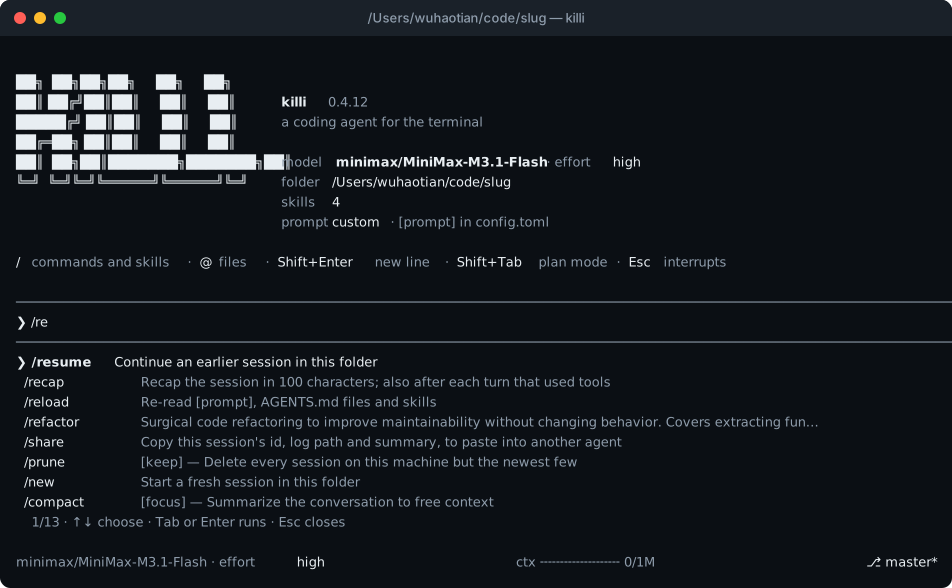
Commands: /model [alias], /effort [level] (thinking effort), /new (or /clear),/resume, /compact [focus], /recap, /undo, /plan, /swarm [task|on|off],/goal [<text>|done|clear] (a session goal: /exit, /new and /resume wait until it is/goal done, or /goal clear when it is truly impossible or no longer wanted), /usage, /session
(copies the session's id, log path and summary for another agent to read), /sessions (the
other killi sessions running on this machine), /prune [keep]
(deletes every session on the machine but the newest few), /reload,/help, /exit, and/<skill-name> [request] for any skill. The menu matches loosely, the way Kimi Code's does:/cr finds code-review.
After a turn that used tools, killi prints a recap of the session in 100 characters or fewer
under the turn's totals; /recap asks for one at any time, and [ui] recap = false turns the
automatic one off. A recap is a side request like /btw: it is never kept in the conversation
and the cached prefix still hits.
killi runs commands and edits files without asking; /undo is the safety net.
Things for later. When the agent notices a blocker, a bug in passing or an improvement
it won't do now, it notes it with its later tool right then, instead of holding it for the
final message, one list per folder in ~/.killi/sessions/<folder>/later.md with open items
only. /later shows the list, /later done 3 crosses one off, and the banner says how many
are open.
Other sessions. Every killi running on the machine is listed in ~/.killi/live. When one starts or stops there, the
agent is told once: changes it didn't make may be theirs, and branch switches, stashes and
resets belong in a worktree. /undo says when it would also undo another session's work. From
the agent's shell, or yours:
killi sessions                 # every session: pid, working or idle, folder, branch, prompt
killi sessions 4321            # what one is doing now: its task list, what it waits on
killi ask 4321 "which files are you changing?"   # its model answers from its conversation; nothing is kept
killi tell 4321 "the base branch is pushed"      # a message for its next step, or its next prompt when idle
A message is marked as not coming from the user, never starts a turn, and a session takes at
most three between two prompts. [agent] peers = false keeps a session to itself.
System prompt, instructions, skills, MCP and hooks
System prompt: its guidance (how the agent works, and the safety rules) sits in
config.tomlunder[prompt] system, to read and edit;/reloadapplies a change.killi initwrites it there, or adds it to a config that has none. While it's there, killi
updates don't change your prompt; delete the table to go back to the built-in text.Instructions:
~/.agents/AGENTS.md, then everyAGENTS.mdfrom the git root down to
the working directory (orCLAUDE.mdwhere there is noAGENTS.md;@filelines are
followed). When the agent works in a subfolder with its ownAGENTS.md, it is pointed to it.Skills: folders with a
SKILL.mdin~/.agents/skillsand the project's.agents/skillsor.claude/skills. Only their names go in the prompt; the agent loads one
when it applies, and/<name>runs one directly. Other folders:[skills] dirs = [...].
One is built in:/update-configtells the agent every file and key of this version's
configuration, so it can say where things are, what a setting does, or make a change.MCP: servers from
~/.killi/mcp.jsonand the project's.mcp.json, in the usual{"mcpServers": {...}}format (stdio or HTTP). The agent reaches them through onemcptool,
and a server starts, and its tools load, the first time it's used. To give a project's
favorite server native tools from the start, add[mcp] eager = ["godot"]to its.killi/config.toml. Stdio servers run in one sharedkilli mcp-serveprocess, so every
killi session on the machine uses the same server instead of starting its own; it exits 15
minutes after the last session lets go. User servers start in your home folder, project
servers in the project root./mcplists the servers and turns one on or off, for this
session and the next ones.Hooks use Claude Code's protocol (JSON on stdin; exit code 2 blocks and tells the model
why):[[hooks.PreToolUse]] matcher = "bash" # a regex over tool names command = "~/bin/no-force-push.sh"Events:
SessionStart,UserPromptSubmit,PreToolUse,PostToolUse,Stop,SubagentStop,SessionEnd(when the session exits, only if a turn ran). APostToolUsehook that prints something (or exits 2) shows its output to
the model, which makes a cheap stand-in for an editor's diagnostics: run the type checker
after every edit.[[hooks.PostToolUse]] matcher = "edit|write" command = "cargo check --quiet 2>&1 | head -30; exit 0"Entire: killi sessions checkpoint to Entire, which mirrors the
repo and links each commit to the session behind it (see the
quickstart).entire agent addhas no killi entry,
but killi speaks Claude Code's hook protocol, so the wiring in/update-config(seven
hooks in~/.killi/config.toml) checkpoints every session on start, prompt, tool use,
stop and exit.Web:
web_searchfinds pages andfetch_urlreads them. Without setup, search reads
Brave's public results page, which can turn automated requests away./web-search-config
asks for the service and what it needs, writes[search]and applies it at once; by hand
(provideris"brave","tavily"or"searxng"):[search] provider = "brave" api_key_env = "BRAVE_API_KEY" # or: api_key = "...""searxng"points at your own instance instead of a key — self-hosted, with the json format
enabled (settings.yml:search → formats: [html, json]) — and takes an optional key:[search] provider = "searxng" url = "http://localhost:8888"fetch_urlalso renders pages that need JavaScript, takes screenshots of them (screenshot,
for checking a local dev server's UI) and fetches raw bodies (raw), all through the Chrome,
Chromium, Edge or Brave in/Applications(orKILLI_CHROME) run headless with a throwaway
profile. A page whose static HTML has no readable text is rendered automatically.
How it works
Providers cache the start of a prompt, so a request that begins exactly like the last one is
cheaper and faster. killi keeps that start identical:
- The system prompt, your
AGENTS.mdfiles and the tool definitions are built once when the
session starts and never change. Plan mode blocks writes when a tool runs instead of removing
tools; MCP servers are reached through one fixed tool; subagents get the same prompt and tools. - Messages are stored exactly as sent, tool-call arguments and reasoning included, and nothing
earlier is ever edited or merged. Notes from killi to the model go at the end. Only
compaction rewrites history, and it keeps your requests word for word. - On MiMo, changing the tool list mid-session dropped a request's cached tokens to zero,
history included. That measurement shaped the rest.
The design, with the measurements behind each choice, is in
docs/decisions.md.
Development
cargo clippy --workspace --all-targets -- -D warnings
cargo test --workspace
python3 scripts/eval.py verify   # every capability task fails as given and passes when solved
Releases are described in RELEASING.md.
License
Reviews (0)
Sign in to leave a review.
Leave a reviewNo results found