caxri
Health Uyari
- License — License: NOASSERTION
- Description — Repository has a description
- Active repo — Last push 0 days ago
- Low visibility — Only 5 GitHub stars
Code Gecti
- Code scan — Scanned 12 files during light audit, no dangerous patterns found
Permissions Gecti
- Permissions — No dangerous permissions requested
Bu listing icin henuz AI raporu yok.
Best ADE for vibe coding
Caxri
English | 简体中文
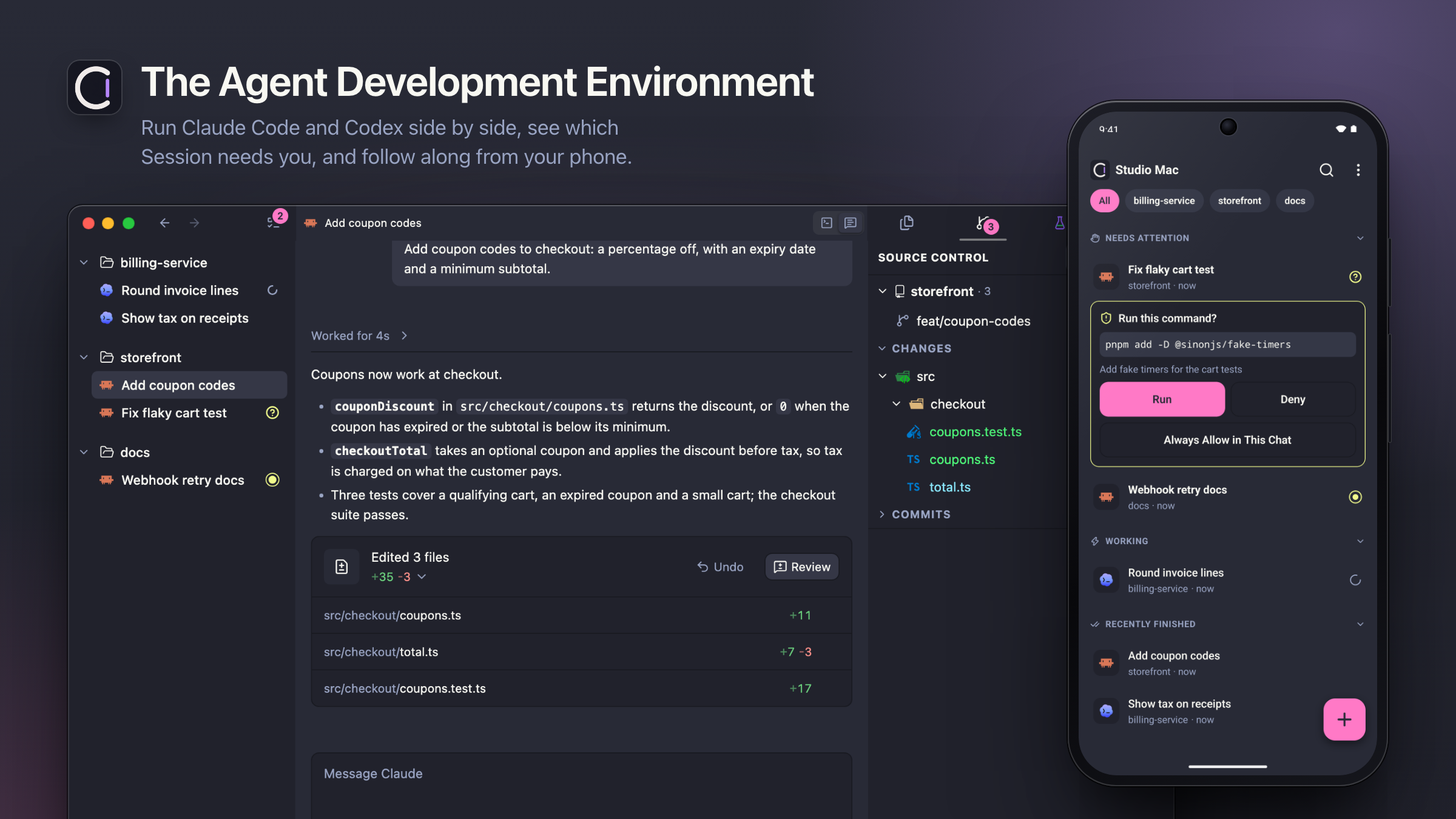
Caxri is an Agent Development Environment (ADE): one desktop app where you build software through
the coding Agents you already use, Claude Code, Codex and Grok Build. Run many Agents side by side,
see at a glance which one needs you, review what it changed, and let Caxri handle the chores that
come with heavy daily Agent use. Agents change quickly, so Caxri ships often and adapts with them.
Works with: Claude Code, Codex and Grok Build. Caxri runs your own installed Agent CLIs and
their existing sign-in; it does not bundle an Agent or a subscription, and it needs no Caxri
account. Every supported Agent is ongoing maintenance, so Caxri covers the ones used daily and
adds others on request; open an issue for the
Agent you want. The interface is available in English and Simplified Chinese.
Caxri is a preview. It ships often and has no compatibility commitment yet, so an update may
require resetting your local data: the profile in ~/Library/Application Support/Caxri (see
Uninstall and reset). Your Project folders are never part of that reset.
Public source and published releases do not change this; the maintainer will announce any
compatibility commitment explicitly.
Highlights
- One workflow for every Agent. Claude Code, Codex and Grok Build share the same Sessions,
conversation view, notifications and usage tracking, so switching Agents does not mean learning
a new tool. - Chat and Terminal, side by side. One Session can hold several Agent conversations and
Terminals at once. Each Agent opens as a readable Chat or as its real terminal interface, and can
switch between the two without losing the conversation. - Made for heavy Agent users. Caxri automates the chores of running Agents all day: it compacts
idle conversations before their prompt cache expires, resumes Agents after a usage limit resets,
parks idle background Agents,
and shows live output speed (tok/s). Usage sits in the status bar: hover it for your plan limits,
click it for a Usage page with tokens and cost per Agent. - Know who needs you. Every Session reports waiting, completed or failed. An Activity view lists
the Sessions waiting on you across every Project, desktop notifications point you to them, and
your paired phone shows the same list. - Worktrees when the Agent needs them. Start a conversation in the Project; no worktree is
required up front. Worktrees stay grouped under their Project, and when an Agent creates or enters
one mid-conversation, the Session's files, editor and Git views switch to it. - Hand work to another Agent. Type
@in a new Session to give its Agent an earlier
conversation, or run/new-sessionand the current Agent writes a brief into a new Session. When
a plan runs out, Caxri offers to continue the task with another Agent. - Review and ship without leaving the app. Leave comments on a diff and send them to the Agent
in one step. The Status panel shows the Session's pull request, checks and linked issues; merge
from Caxri, and the Agent is told when its pull request merges. Agents commit; you decide the
merge.
And more
- Mobile companion. Check Sessions and reply to Agents from your phone over your local network,
Tailscale, or a Relay you deploy, with end-to-end encryption. - Remote machines. Open Projects on a Linux machine or another Mac over SSH; Agents, Terminals
and Git run there as they do locally. The Caxri Server also runs on its own, without the desktop
app. - Archive. Archive a finished Session to clear it from the sidebar and restore it any time; a
Session whose pull request merged can archive itself. - Airplane Mode. Before you go offline, stop every Agent cleanly and pick which ones to resume
when you are back. caxriCLI. Agents can create Sessions, delegate work to other Agents and report back.- Linked work items. Pull requests, Linear issues and LobeHub acceptance reports appear beside
the Session that produced them. - Themes. Light and dark themes that follow macOS, plus imported custom themes.
- Light editor. A file tree, search and editor for checking an Agent's work, without turning
into an IDE.
How Caxri compares
- Running Claude Code or Codex directly in a terminal. Caxri runs those same CLIs with their
own sign-in, so nothing about the Agent changes. It adds everything around them: durable
Sessions, a readable Chat, attention across many Agents, usage automation and review tools. - Parallel-agent workbenches such as Conductor, Superset and Orca. These also run several
Agents in parallel with Git worktrees and diff review. Caxri focuses on one workflow across Claude
Code, Codex and Grok Build, Chat and Terminal both as first-class modes, automation around plan
limits and prompt caches, and showing only what still needs you. It also does not ask you to pick
a worktree before a conversation starts. - AI IDEs such as Cursor. Caxri is not an IDE and does not replace your editor. It is built from
scratch rather than forked from VS Code, though its editor, status bar and Command Palette will
feel familiar to VS Code users. The editor and Source Control view stay light, for checking what
an Agent did. - Run buttons and task launchers. Caxri has no buttons for committing, pushing, building or
running scripts. Describe the routine in a skill and let the Agent run it. The one button Caxri
keeps is merging a pull request, because that decision stays with you.
New here? Read Getting started for the model in five minutes.
Requirements
- An Apple Silicon Mac running macOS 13 (Ventura) or later.
- At least one supported Agent CLI (Claude Code, Codex or Grok Build) installed and signed in. Check
that it works in Terminal first. Shell Sessions work without one. - Optional:
gh,linear,lh, andvc, signed in, for pull request, issue, acceptance, and
deployment status. See Install.
Release builds are currently Apple Silicon only; Intel Macs can build Caxri from source (see
CONTRIBUTING.md). Other desktop platforms are not supported yet. A remote SSH
Host can be Linux or macOS.
Install
Run this in Terminal:
curl -fsSL https://raw.githubusercontent.com/tjx666/caxri/main/install.sh | bash
It needs nothing beyond macOS itself: it downloads the latest release, refuses it unless it matches
the published SHA-256, replaces /Applications/Caxri.app only once the new copy is in place (a
failed install keeps the previous app), and clears macOS's download quarantine on Caxri alone. Run
it again to update; your Projects, Sessions and settings are never touched.
Or paste this into your coding agent (Claude Code, Codex, Grok Build, or similar):
Install Caxri for me by following https://raw.githubusercontent.com/tjx666/caxri/main/docs/install.md
The agent checks your Mac, installs Caxri with the same script, and offers optional setup: thecaxri command and initial settings such as language, default Agent, and font sizes. To install by hand, follow the same page:
docs/install.md.
Caxri is not notarized by Apple yet. If macOS says Apple could not verify Caxri, open
System Settings → Privacy & Security and click Open Anyway, or run this once and open it
again:
xattr -dr com.apple.quarantine /Applications/Caxri.app
If you downloaded the disk image by hand, verify it against its .sha256 file first.
Troubleshooting also covers
older releases that macOS reported as "damaged".
Install on Android
Android phones can install the paired companion from the same
Release: downloadCaxri-Mobile-<version>-android-arm64.apk, open it, and allow installation from the browser or
file manager if prompted. Each APK has a .sha256 companion; use the same release version as Desktop.
See Mobile installation and updates.
First Session
Add a local folder as a Project and create a Session beneath it. In the Session, click + to
start your default Agent, or hover + to pick another Agent, Chat or terminal mode, or a plain
Terminal.
Agents open in Chat by default; you can switch an Agent to its terminal at any time.
Agents start with full access: they can edit files and run commands without asking. Change this in
Settings → Agents. Allow notifications from the helper in macOS System Settings if prompted.
Updating
Caxri checks GitHub for a new release when it launches and every few hours afterwards. You can also
choose Caxri → Check for Updates… at any time. A new version downloads in the background; when it
is ready, choose Restart to Update, or simply quit Caxri and the next launch is the new version.
If Caxri cannot replace itself (for example, it runs from the disk image), the dialog explains how to
install the downloaded disk image by hand. Updating does not delete your profile or Project folders.
See Desktop updates. Contributor release
options are in RELEASING.md.
Command line for app users
Open the Command Palette and run Install 'caxri' Command in PATH, then in a new Terminal:
caxri --help
The full manual is docs/cli.md.
What Caxri changes on your Mac
- Agent hook entries (off by default). Caxri does not touch your Agent configs unless you turn
on lifecycle hooks. Chats never need them. An Agent running in a Terminal uses them to report
when it starts, waits or finishes, so its Session status, unread marks and notifications stay
accurate; Grok Build needs them to run in a Terminal at all. A Terminal Agent without them offers
to turn them on. When on, Caxri adds only its own marked entries to~/.claude/settings.json,~/.codex/hooks.jsonor~/.grok/hooks/caxri.json. Outside Caxri those entries exit
immediately, and they receive lifecycle phases, never prompt or response content. Turn them off
per Agent in Settings → Agents, which removes Caxri's entries; your own hooks stay. - A background job for Claude windows (Claude Pro). Keep 5-hour windows rolling (Settings → Agents → Claude)
is on by default for a Claude Pro account and off for Max. When on, Caxri registers a per-user
launchd job under~/Library/LaunchAgents(names start withcom.caxri.app.claude-windows;
macOS lists it under Login Items) that sends one minimal request to Claude when a window resets.
Turn the setting off to remove it. See docs/claude-windows.md. - The
caxricommand link (only if you installed it). Install 'caxri' Command in PATH in the
command palette creates the symlink/usr/local/bin/caxri. Run Uninstall 'caxri' Command from
PATH before deleting the app, or remove it later withsudo rm /usr/local/bin/caxri. - The notification helper. Caxri ships
alerterinside
the app (Contents/Resources/bin/alerter) and runs it only to show banners. - Your data. The profile (database, settings) lives in
~/Library/Application Support/Caxri,
with logs under itslogsfolder. Use Help → Reveal Logs in Finder to open them. - Two kinds of network requests. Caxri asks GitHub's public release API for new versions, and,
while the Claude windows setting is on, sends the one minimal request to Claude described above.
It has no telemetry, and its diagnostics never include source contents, Terminal output or Agent
transcripts. Your Agent CLIs talk to their own vendors under their own terms.
Uninstall and reset
Quit Caxri, delete /Applications/Caxri.app, then remove ~/Library/Application Support/Caxri
to erase its data. Deleting a Project or Session in Caxri never touches your folders or files.
Before deleting, turn off Agent hooks and Keep 5-hour windows rolling (on by default for Claude Pro) in Settings so Caxri removes its
config entries and background job. If you installed the caxri command, run Uninstall 'caxri'
Command from PATH from the command palette too (or sudo rm /usr/local/bin/caxri afterwards). From a source checkout, bun run uninstall:caxri previews a full
local cleanup (hook entries, background jobs, app and profiles) and archives rather than deletes;
add -- --yes to apply it.
Support and community
- Open an Issue for a bug, feature request or
question. There is no response or resolution SLA. Use Help → Report an Issue in the app. - Pull requests from people and coding agents are welcome; the maintainer decides what to merge.
See CONTRIBUTING.md. - Report vulnerabilities privately; see SECURITY.md.
- See SUPPORT.md for request routing and docs/troubleshooting.md
for common problems.
License
Caxri is source-available under the Caxri Source-Available License 1.0. It is not licensed
under an OSI-approved open source license.
Using Caxri for personal or company work, earning money from Outputs created with it, and keeping
private Modifications closed source are free. Free redistribution is allowed under the License's
notice and source-availability conditions. Selling, commercially distributing, or monetizing access
to Caxri or a Modification requires a separate written commercial license. Contact
[email protected] for commercial terms.
External Contributions require acceptance of the Caxri Individual Contributor License
Agreement before merge. See CONTRIBUTING.md for the contribution flow.
Development usage
Personal Caxri development usage from retained local logs, as of 2026-10-30 07:45:04.661 UTC.
Includes Codex, Claude Code, Grok Build, child agents, identifiable Caxri worktrees and auxiliary directories, and deduplicated Claude session backups.
| Tool | Tokens (input + output) | Known USD cost |
|---|---|---|
| Codex | 33,726,423,546 | $16,295.29 |
| Claude Code | 32,431,216,998 | $15,286.15 |
| Grok Build | 571,136,796 | $147.57 |
| Total | 66,728,777,340 | $31,729.01 |
Codex and Claude costs are standard API list-price equivalents, using the price snapshot checked on 2026-10-16. Grok uses its recorded USD cost. These are not subscription payments or historical invoices.
Token totals include cache reads and writes once; reasoning is already included in output. Long-context rates apply per request; unspecified Claude cache-write TTLs use the 5-minute rate.
Unpriced usage: 857,264 tokens. Grok sessions without usable usage: 21. Deleted logs, other machines, hosted agents and unattributable work are outside this snapshot.
Update with bun run usage:development --write; omit --write to preview, use --json for aggregate JSON, or --as-of <ISO timestamp> for a fixed cutoff. The active Codex accounting session and its identifiable descendants are excluded when CODEX_THREAD_ID is available.
The script reads session files without changing them. Default backup paths use ~; additional Claude project directories can be supplied with --claude-backup <path>. Prices are pinned in the price snapshot; review that snapshot when model prices change.
Pricing sources: OpenAI, Anthropic.
Documentation
Use Caxri
| Document | Contents |
|---|---|
| Getting started | The model in five minutes |
| Troubleshooting | Blocked app, notifications, Agent not found |
| docs/cli.md | The caxri CLI manual |
| GLOSSARY.md | Product language: Projects, Sessions, Attention |
| SUPPORT.md | Community support scope and request routing |
| SECURITY.md | Private vulnerability reporting policy |
| LICENSE | Source-available use and commercial licensing |
Contribute
| Document | Contents |
|---|---|
| CONTRIBUTING.md | Issue and pull request contribution workflow |
| CLA.md | Contributor license agreement |
| AGENTS.md | Contributor standing orders for coding agents |
| DESIGN.md | Authoritative UI and interaction spec |
| docs/README.md | Full index of every living doc, ADR, and historical record |
| RELEASING.md | Release workflow for the self-signed DMG |
| Project architecture | Process model, recovery contracts, dependency baseline |
Yorumlar (0)
Yorum birakmak icin giris yap.
Yorum birakSonuc bulunamadi